LetsExtract vs Seamless.AI: Web Scraper or Contact Database in 2026?
LetsExtract scrapes emails from the open web. Seamless.AI searches a live B2B contact engine. We compare accuracy, pricing models, compliance risk and workflow fit so you can pick the right tool, or skip both.
TL;DR
- LetsExtract is a web-scraping email extractor. It crawls sites, search results and pages you point it at, then pulls out any email addresses and phone numbers it finds. It works best for bulk, low-cost list building from public sources.
- Seamless.AI is a real-time B2B contact search engine with a Chrome extension. It finds named decision-makers by title, company and industry. It suits sales teams that prospect specific people every day.
- Neither tool fits every case. LetsExtract gives you volume but many generic inboxes like info@ and sales@. Seamless.AI gives you named contacts, but its pricing is quote-based and reviewers often complain about annual contracts.
- Whichever you pick, verify every address before you send. Scraped and database emails both go stale.
- If you want named-contact finding with transparent monthly pricing, a domain-first email finder like Tomba ($49/mo Starter) is a middle option.
What is the real difference between LetsExtract and Seamless.AI?#
The simplest way to frame the LetsExtract vs SeamlessAI question is this: one tool harvests and the other searches.
LetsExtract is built around extraction. You give it keywords, URLs or a list of domains. It crawls the pages and collects every email address, phone number and social link that is publicly visible. What you get back depends entirely on what the web exposes: contact pages, footers, directories, PDFs and forum posts.
Seamless.AI starts from a person instead of a page. You search for "VP of Marketing at SaaS companies with 50–200 employees," or you open a LinkedIn profile with its Chrome extension, and it returns a name, title, company, and (when it finds one) a direct email and phone number. Seamless describes this as a real-time search engine instead of a static database. Either way, the unit of output is a named decision-maker.
That difference drives everything else: accuracy profile, pricing model, compliance risk and the kind of campaigns each tool can support.
How do LetsExtract and Seamless.AI compare feature by feature?#
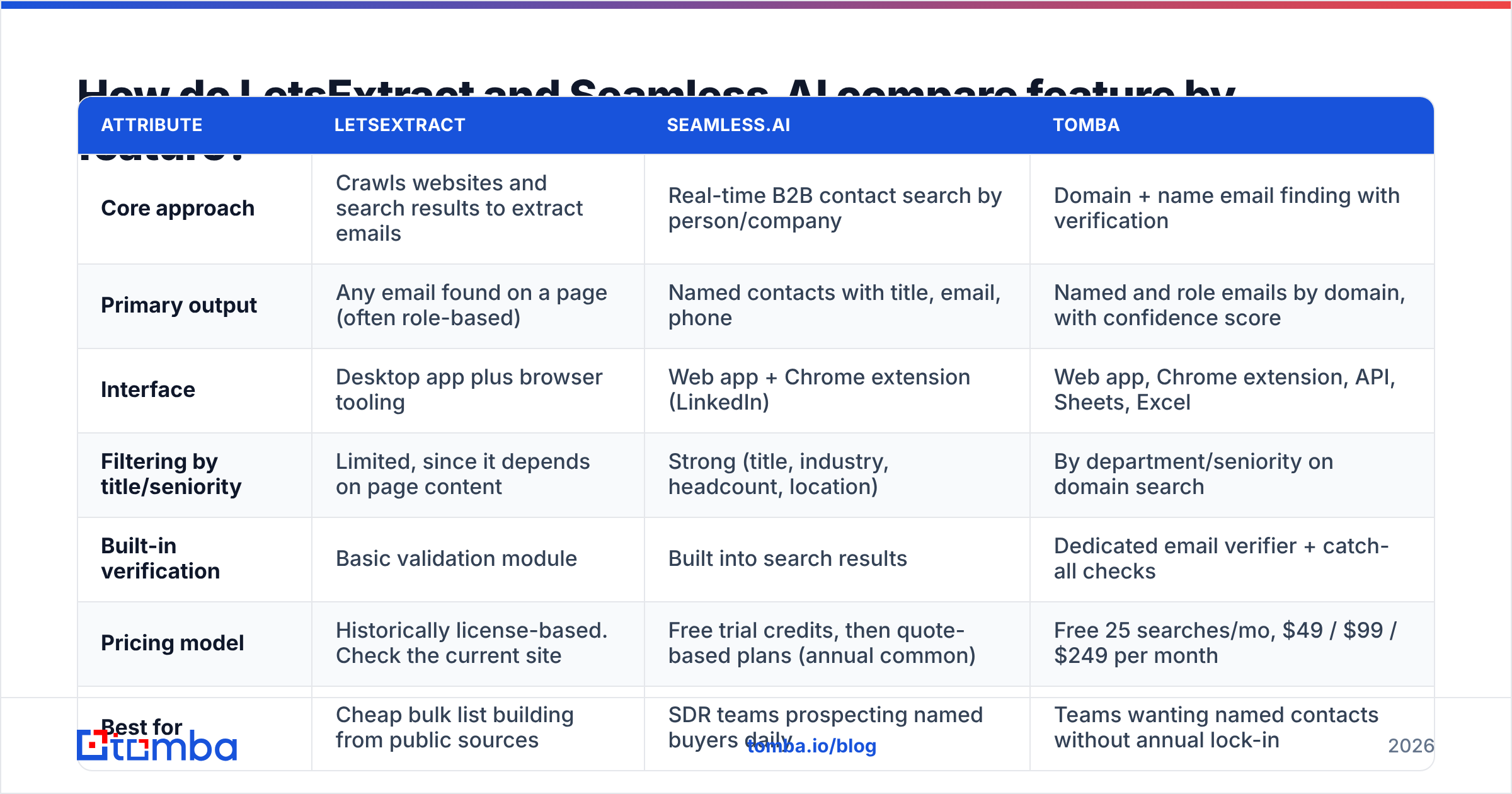
Here's the side-by-side. We add Tomba as a third column because many teams comparing these two end up wanting something in between.
| Attribute | LetsExtract | Seamless.AI | Tomba |
|---|---|---|---|
| Core approach | Crawls websites and search results to extract emails | Real-time B2B contact search by person/company | Domain + name email finding with verification |
| Primary output | Any email found on a page (often role-based) | Named contacts with title, email, phone | Named and role emails by domain, with confidence score |
| Interface | Desktop app plus browser tooling | Web app + Chrome extension (LinkedIn) | Web app, Chrome extension, API, Sheets, Excel |
| Filtering by title/seniority | Limited, since it depends on page content | Strong (title, industry, headcount, location) | By department/seniority on domain search |
| Built-in verification | Basic validation module | Built into search results | Dedicated email verifier + catch-all checks |
| Pricing model | Historically license-based. Check the current site | Free trial credits, then quote-based plans (annual common) | Free 25 searches/mo, $49 / $99 / $249 per month |
| Best for | Cheap bulk list building from public sources | SDR teams prospecting named buyers daily | Teams wanting named contacts without annual lock-in |
| Main drawback | Generic inboxes, compliance questions on scraped data | Opaque pricing, contract complaints in reviews | Smaller people-search filters than a full sales-intel suite |
Pricing on both LetsExtract and Seamless.AI changes often, and Seamless.AI does not publish most paid tiers. Treat the table as a map of the pricing model and confirm current numbers with each vendor before you sign.

Which tool finds more accurate emails?#
Accuracy means different things for these two products, so compare them on the failure mode each one has.
LetsExtract's accuracy problem is relevance, not existence. An email scraped from a live contact page usually exists, because someone published it. But it is often info@, support@ or hello@, which are shared inboxes that rarely reach the buyer. Scraped lists also pick up stale addresses from old PDFs, archived pages and directories that haven't been updated in years. You get high volume and a mixed hit rate.
Seamless.AI's accuracy problem is freshness and guessing. Because it returns a named person's direct address, the value is much higher when it's right. When a contact has changed jobs recently, or the company uses a catch-all mail server that accepts every address, the result can look valid and still bounce or go unread. G2 reviews of Seamless.AI are mixed on this point. Some users report strong accuracy for US mid-market contacts, and others report bounce rates they had to clean up themselves.

The practical takeaway: whichever tool you use, run the output through an email verifier before it reaches your sequencer. On catch-all domains, add a dedicated catch-all check. A 5% bounce rate from an "accurate" tool can still hurt a new sending domain.
How is each tool priced, and what do you actually pay?#
This is where the two tools differ most for buyers.
LetsExtract has historically sold its desktop email extractor as a software license rather than a per-seat SaaS subscription, with add-ons and tiers based on features. That model suits a solo marketer or small agency: you pay once or on a simple cycle, run as many crawls as your machine and proxies can handle, and don't burn credits per contact. The hidden costs are proxies (search engines throttle aggressive crawling), your time spent cleaning the output, and a separate verification tool.
Seamless.AI runs on credits. New users get a limited number of free credits to test. Paid plans (Basic, Pro, Enterprise) are mostly quote-based, and many reviewers on G2 and Capterra mention annual commitments and auto-renewal terms they wish they'd read more carefully. For a team of several SDRs, the effective cost can be meaningful, and it's harder to model before you talk to sales.
A useful way to think about it:
- Cost per raw email: LetsExtract wins easily, because crawling is almost free once you own the software.
- Cost per usable named-buyer email: Seamless.AI usually wins, because you aren't paying (in time) to filter out thousands of role inboxes.
- Cost predictability: LetsExtract is more predictable. Seamless.AI requires a sales conversation and contract review.
- Cost of a bad send: This is the same for both. A burned domain costs far more than any subscription.
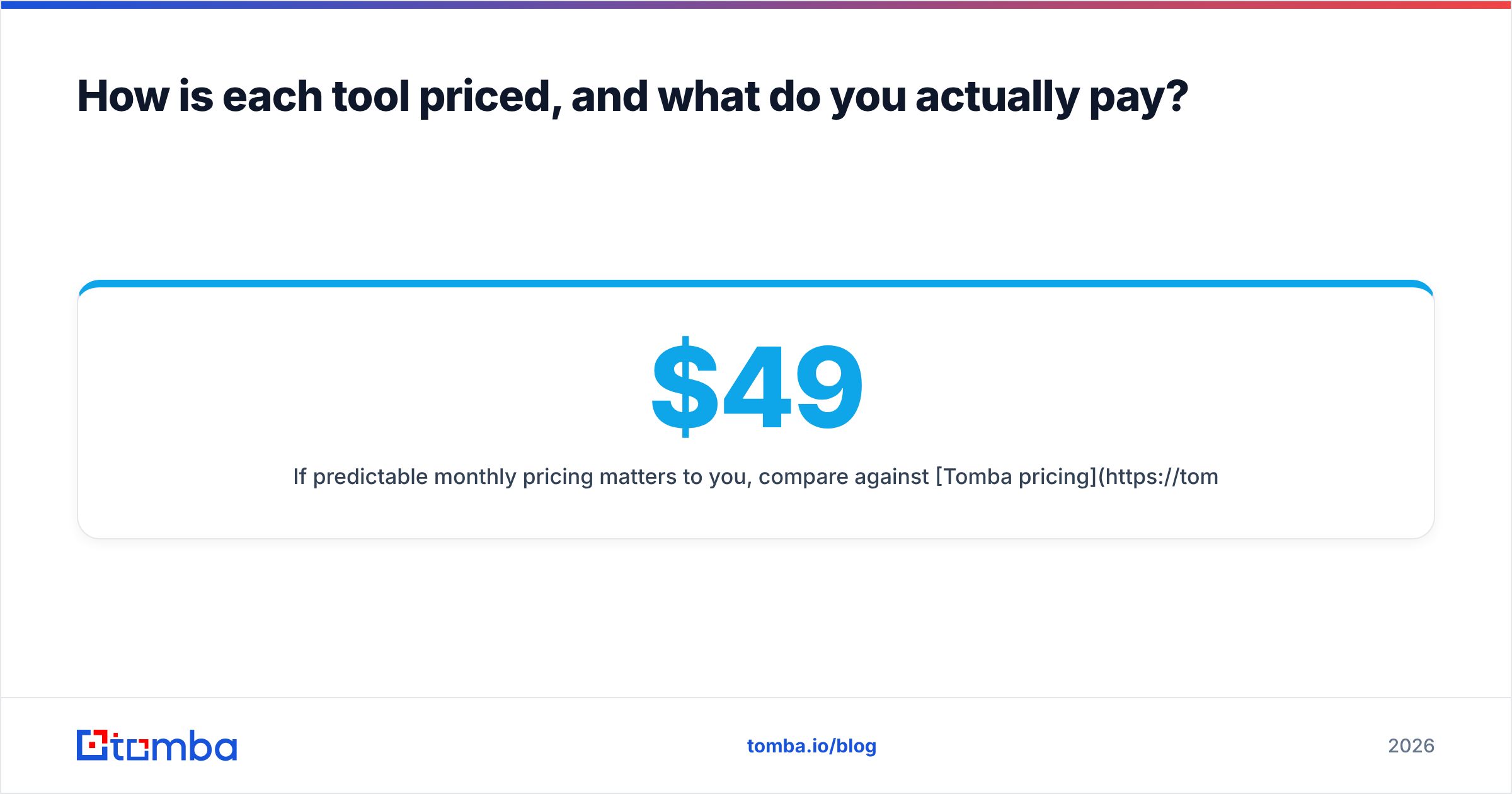
If predictable monthly pricing matters to you, compare against Tomba pricing: 25 free searches a month, then $49 Starter, $99 Growth, $249 Pro, all month-to-month.
Which one fits your prospecting workflow?#
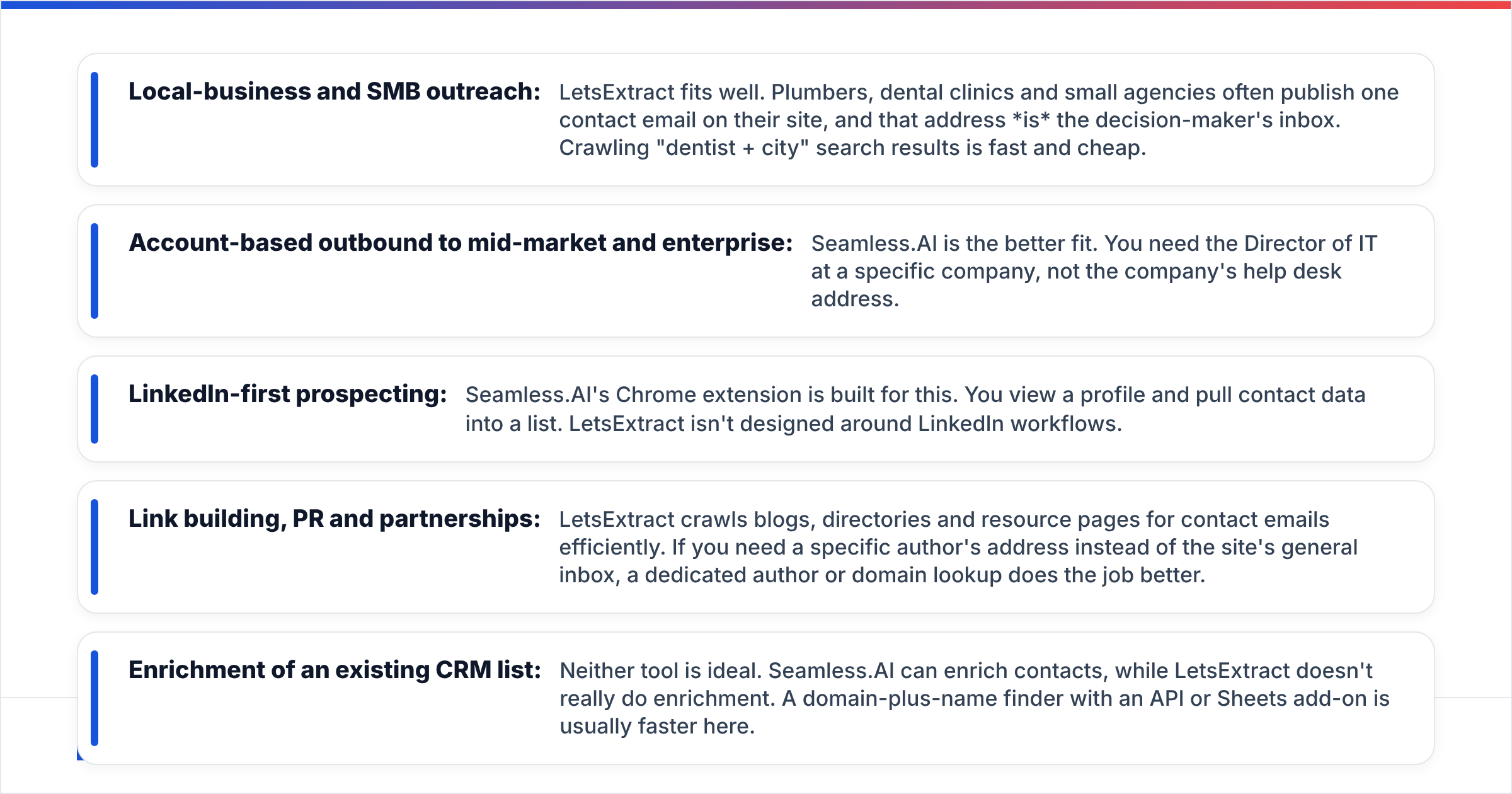
Match the tool to how your pipeline actually works, not to the feature list.
- Local-business and SMB outreach: LetsExtract fits well. Plumbers, dental clinics and small agencies often publish one contact email on their site, and that address is the decision-maker's inbox. Crawling "dentist + city" search results is fast and cheap.
- Account-based outbound to mid-market and enterprise: Seamless.AI is the better fit. You need the Director of IT at a specific company, not the company's help desk address.
- LinkedIn-first prospecting: Seamless.AI's Chrome extension is built for this. You view a profile and pull contact data into a list. LetsExtract isn't designed around LinkedIn workflows.
- Link building, PR and partnerships: LetsExtract crawls blogs, directories and resource pages for contact emails efficiently. If you need a specific author's address instead of the site's general inbox, a dedicated author or domain lookup does the job better.
- Enrichment of an existing CRM list: Neither tool is ideal. Seamless.AI can enrich contacts, while LetsExtract doesn't really do enrichment. A domain-plus-name finder with an API or Sheets add-on is usually faster here.
Is scraping emails with LetsExtract compliant?#
This deserves its own section because it's the most common blind spot in LetsExtract vs Seamless.AI comparisons.
Scraping publicly visible emails is technically easy. Using them lawfully is a separate question. Under GDPR in the EU and UK, a business email that identifies a person (like jane.doe@company.com) is personal data. You need a lawful basis to process it (legitimate interest is typically argued for B2B), you must tell people how you got their data, and you must honour opt-outs. Some countries, such as Germany, are much stricter about unsolicited B2B email than others. In the US, CAN-SPAM is more permissive but still requires a physical address, a working unsubscribe link and honest subject lines.
The tool doesn't make you compliant or non-compliant, but it changes how much work falls on you:
- With LetsExtract, you are the data controller for everything you scrape. You need to record where each address came from and why you're contacting that person.
- With Seamless.AI (or any B2B data vendor), the vendor carries part of the sourcing and privacy-notice work. You still own how you use the data.
Neither situation is illegal by default, but scraped EU contacts sent a mass, untargeted campaign is the scenario regulators care about. If you sell into Europe, factor that in before you pick a tool on price alone.
What do users like and dislike about each tool?#
Summarising patterns from public reviews and our own testing notes:
LetsExtract: pros
- Very low cost per extracted email
- Unlimited-style crawling instead of per-contact credits
- Good for niche, long-tail and local-business lists
- Extracts phones and social links alongside emails
LetsExtract: cons
- High share of role-based and generic inboxes
- No real people-search filters (title, seniority)
- Needs proxies and tuning for large search-engine crawls
- Compliance burden sits entirely with you
Seamless.AI: pros
- Finds named decision-makers with titles and phone numbers
- Strong filters for industry, headcount and location
- LinkedIn Chrome extension fits SDR workflows
- Integrations with major CRMs such as Salesforce and HubSpot
Seamless.AI: cons
- Pricing isn't published for most tiers
- Recurring reviewer complaints about annual contracts and renewals
- Accuracy varies by region and seniority
- Credits get used up on contacts you end up not using
If Seamless.AI's contract model is the dealbreaker, we've covered other options in our Seamless.AI alternative breakdown.
Is there a middle option between a scraper and a sales-intel suite?#
Yes. Many teams end up needing two things. They want the named-contact precision of Seamless.AI. They also want the predictable cost and domain-level coverage of a crawler like LetsExtract.
A domain-first email finder covers that middle ground. You enter a company domain and get every professional email associated with it, with names, positions and a confidence score, plus the source pages where each address was found. You enter a first name, last name and domain, and it returns the most likely address, checked against the mail server. That's how Tomba's email finder works, and it's close to what most people actually want when they install a scraper.
Where a domain-first finder beats each option:
- Versus LetsExtract: you get named employees with titles, not just the contact-page inbox. Source URLs are shown, which helps with GDPR record-keeping, and verification is built into the same workflow.
- Versus Seamless.AI: pricing is public and monthly. There's a free tier to test, and you can run bulk email finder jobs from a CSV without talking to sales.
Where it doesn't beat them, to be fair:
- LetsExtract will still be cheaper for pure volume scraping of local-business sites.
- Seamless.AI's people-search filters (industry + title + headcount across the whole market) go wider than a domain-by-domain workflow when you don't yet know your target accounts.
Which should you choose: LetsExtract or Seamless.AI?#
Here's the short verdict.
Choose LetsExtract if you build high-volume lists of small businesses, local services, publishers or directories. It also fits if the published contact inbox is genuinely the right person to reach and you want the lowest possible cost per email. Budget for proxies and a verification step, and keep a record of your sources.
Choose Seamless.AI if you run a funded SDR team doing account-based outbound into mid-market or enterprise, you need direct emails and phone numbers for specific titles, and you're comfortable negotiating an annual contract. Read the renewal terms before you sign.
Choose neither, and use a domain-first finder, if you already know your target companies, want named contacts with verification built in, and prefer month-to-month pricing you can see on a web page.
A simple test before committing to any of the three: take 100 target accounts you already know well. Run them through each tool's free tier or trial and verify the output. Then count how many named, deliverable, correct-role emails you got per dollar. That one number will settle the LetsExtract vs SeamlessAI decision for your use case better than any review, including this one.
Where does Tomba fit in your stack?#
If this comparison left you wanting Seamless.AI's precision without the contract, and LetsExtract's coverage without the cleanup, try the Tomba Email Finder. Search any company domain or a person's name plus domain, get verified professional emails with source URLs and confidence scores, and export them straight to your CRM or sequencer. You can start on the free plan with 25 searches a month and move to Starter at $49/mo when you're ready to scale. There's no annual lock-in and no proxies to manage.
Related guides#
// get started
Find, verify and enrich your first contacts today
Start on the free plan with 25 searches a month, then scale when your team is ready.
Free plan · No credit card required · GDPR & CCPA
// about the author