LetsExtract vs Tomba (2026): Web Scraper vs Email Finder Compared
LetsExtract scrapes emails from websites and search results. Tomba finds and verifies professional emails by name and domain. We compare how each one works, accuracy, pricing, compliance and workflow fit so you can pick the right tool.
TL;DR
- LetsExtract is mainly a scraping tool. Its desktop app, Email Studio, crawls websites, search results and online sources and pulls out any email address it finds. It works best for high-volume harvesting from public pages.
- Tomba is an email finder and verifier. You give it a person's name and company domain, and it returns a professional address with a confidence score and a verification status.
- If you need a named decision-maker's email that won't bounce, Tomba is the better fit. If you need a big list of every address published on a set of websites, LetsExtract does that job.
- Tomba has a free tier (25 searches/mo) and paid plans from $49/mo. LetsExtract's pricing is split between a desktop licence and online credits, so check the current plans on its site before you buy.
- Many teams do best with both: scrape for coverage, then verify with a dedicated verifier before sending anything.
What is the real difference between LetsExtract and Tomba?#
These two tools solve different problems, and "LetsExtract vs Tomba" searches often mix them up.
LetsExtract is built around extraction. Its best-known product, LetsExtract Email Studio, is Windows desktop software. You give it keywords, a list of URLs or search queries. It visits pages and collects every email address, phone number and social link it can parse. The company also sells browser-based tools and an online email finder, but crawling is still its main strength. What you get back is whatever the web happens to publish: info@, sales@, support@, and now and then a named employee.
Tomba starts from the person, not the page. You type "Jane Doe, acme.com" into the email finder. Tomba then combines its indexed sources, the company's detected email pattern and SMTP-level checks to return jane.doe@acme.com with a confidence score. You can also run a domain search to list known contacts at a company. Every result can go through the built-in verifier.
Put simply, LetsExtract answers "what emails exist on these pages?" Tomba answers "what is this specific person's work email, and is it deliverable?"
How does each tool actually find emails?#
This is how each tool works, step by step. It explains most of the gaps in accuracy and compliance covered later.
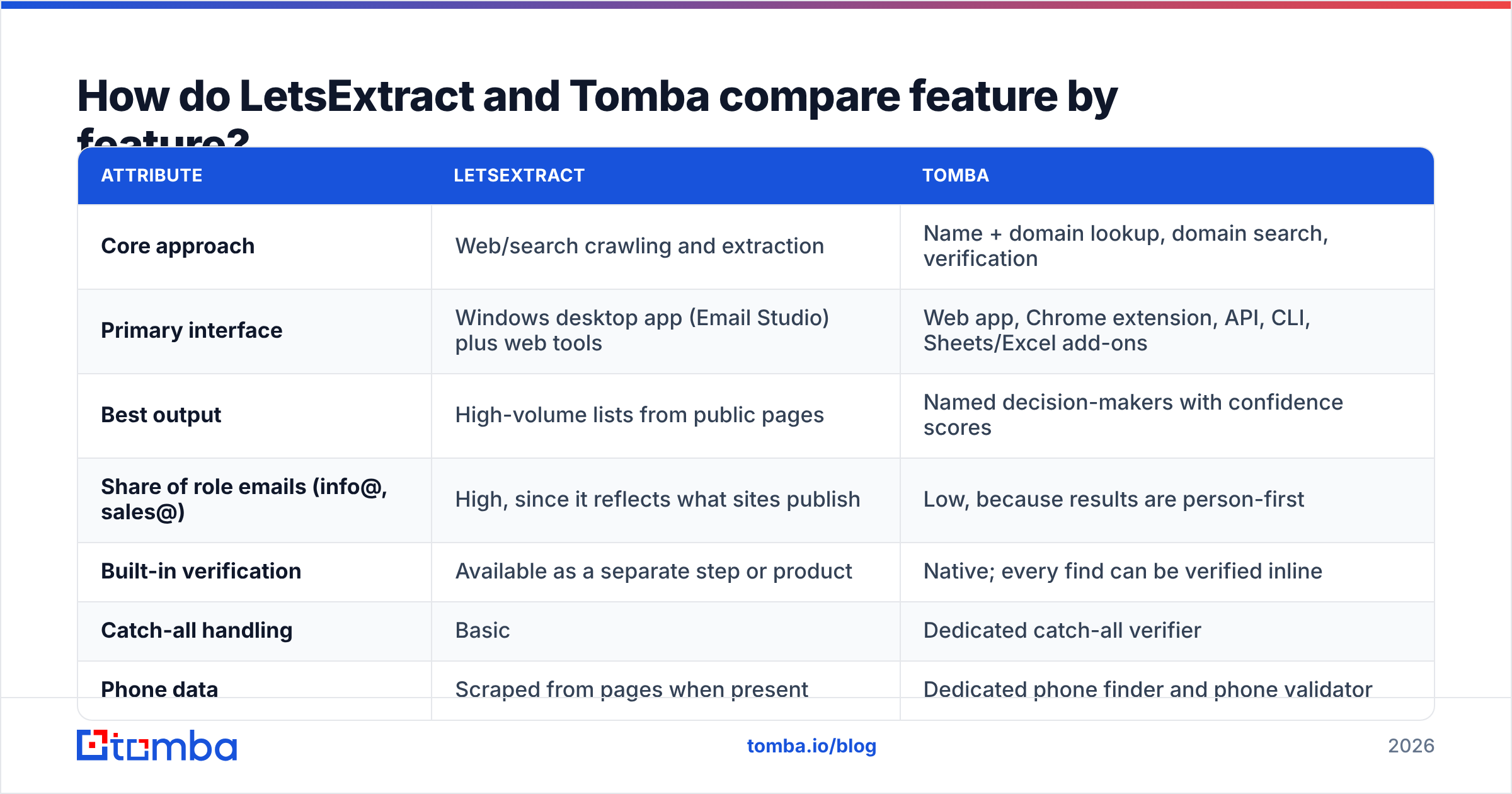
- Source input. LetsExtract takes keywords, URLs, sitemaps or search-engine queries. Tomba takes a name plus a domain, a domain alone, a LinkedIn profile URL, or a CSV of these.
- Discovery method. LetsExtract crawls live pages and matches email-shaped strings with regex-style parsing. Tomba looks addresses up in a pre-indexed B2B dataset and derives each company's email pattern from addresses it has already seen.
- Validation step. LetsExtract has verification features, but the addresses it scrapes arrive unverified, so validating them is a separate step. Tomba attaches a verification status (valid, accept-all, invalid) and a source trail to each result.
- Output shape. LetsExtract exports long lists with a high share of generic role inboxes. Tomba returns fewer records, but each one is tied to a named person, a job title and a company.
- Enrichment. LetsExtract can grab phones and social links it finds on the same pages. Tomba adds a separate data enrichment layer with company size, industry, role and location.
Neither method is wrong. Scraping gives you breadth. Lookup-plus-verification gives you precision. Your choice depends on which of those your campaign needs.

How do LetsExtract and Tomba compare feature by feature?#
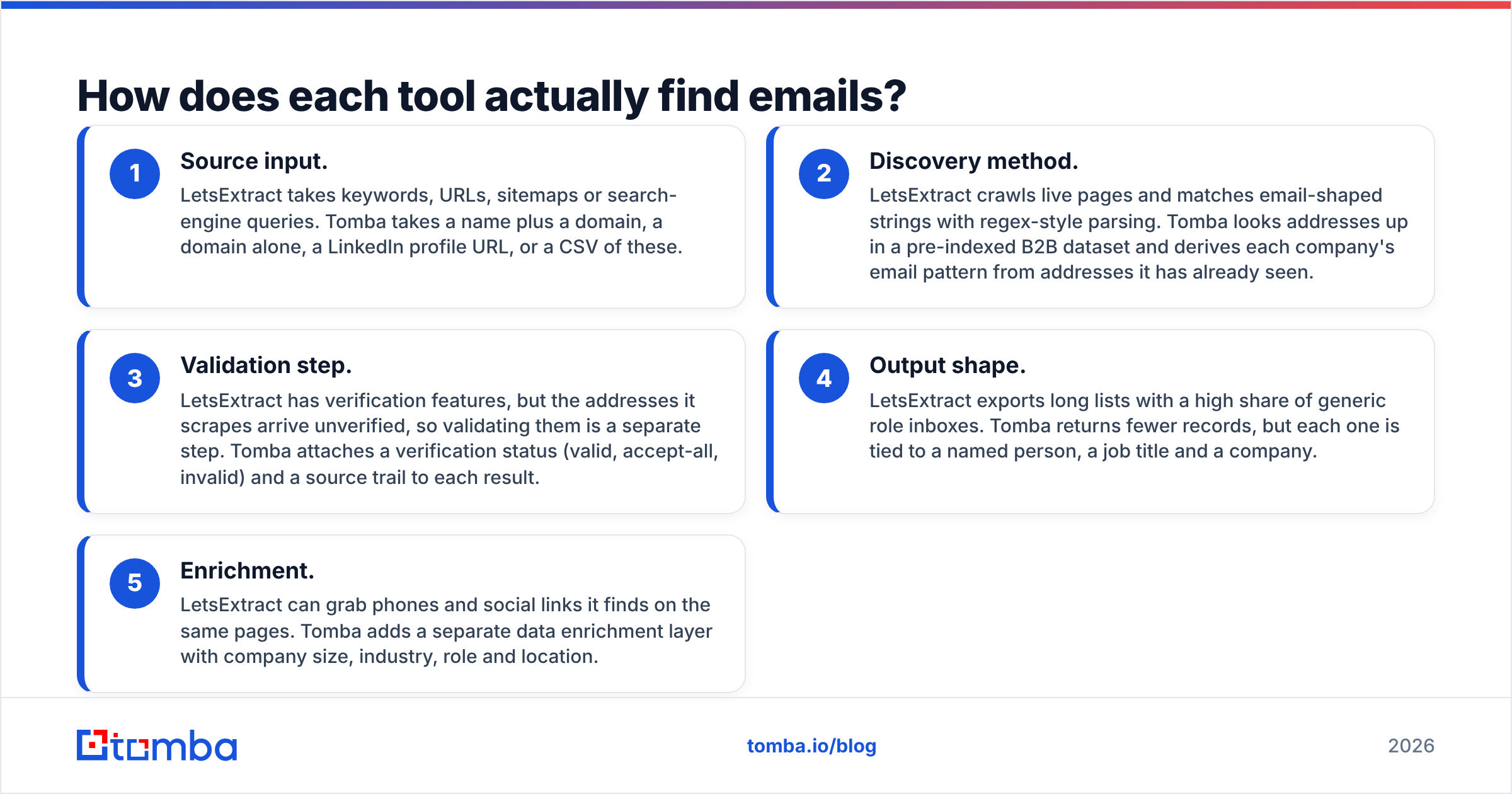
Here's how they compare on the attributes buyers usually ask about. LetsExtract changes its packaging from time to time, so check current details on its site.
| Attribute | LetsExtract | Tomba |
|---|---|---|
| Core approach | Web/search crawling and extraction | Name + domain lookup, domain search, verification |
| Primary interface | Windows desktop app (Email Studio) plus web tools | Web app, Chrome extension, API, CLI, Sheets/Excel add-ons |
| Best output | High-volume lists from public pages | Named decision-makers with confidence scores |
| Share of role emails (info@, sales@) | High, since it reflects what sites publish | Low, because results are person-first |
| Built-in verification | Available as a separate step or product | Native; every find can be verified inline |
| Catch-all handling | Basic | Dedicated catch-all verifier |
| Phone data | Scraped from pages when present | Dedicated phone finder and phone validator |
| CRM integrations | Mostly CSV export | HubSpot, Salesforce, Pipedrive, Zapier, Make, and others |
| API access | Limited / product-dependent | Full REST API plus MCP server |
| Free option | Trial / limited free tools | Free tier: 25 searches/mo |
| Paid entry point | Desktop licence and/or online credit packs | Starter $49/mo |
| Best for | Local-business lists, niche directories, SEO outreach | B2B outbound, account-based prospecting, sales teams |

The main takeaway from the table: LetsExtract is a harvesting engine and Tomba is a prospecting engine. The rest of the differences follow from that.
Which tool is more accurate?#
Accuracy means different things for these two products, so be clear about what you're measuring.
For extraction accuracy, meaning "did it capture every address on the page?", a good crawler like LetsExtract does well. If an email is printed in the HTML, it will usually find it.
For deliverability accuracy, meaning "will this address accept my email, and does it belong to the person I want?", scraped lists lose out for a few reasons:
- Staleness. Contact and team pages often go years without an update. Addresses of people who have left stay online and bounce.
- Role inboxes.
info@andcontact@inboxes may accept mail, but they seldom reach a decision-maker, and many filters treat them as low-engagement. - Obfuscation and traps. Some sites publish decoy addresses on purpose to catch harvesters. Email address harvesting has a long history, and so do the countermeasures against it.
Tomba's accuracy comes from cross-referencing multiple sources and checking the mailbox live. Its data sources page explains where records come from. Each result carries a score, so you can drop anything below your threshold before a sequence starts.

The practical rule: however you collect an address, verify it before you send. If you use LetsExtract, add a verification pass to your workflow. Pushing a raw scrape straight into a sending tool is how domains end up on blocklists.
How much do LetsExtract and Tomba cost?#
The two pricing models are built differently, which makes a direct comparison tricky.
LetsExtract has historically sold Email Studio as a licensed desktop product, with the online finder and verification tools sold separately on credits or subscriptions. A licence can look cheap when you plan to scrape large volumes over a long period. What it doesn't include:
- Proxies, if you crawl search engines at scale and want to avoid rate limits or CAPTCHAs.
- Verification credits for cleaning the scraped output.
- A Windows machine left running for long crawls.
- Time spent deduplicating and filtering role addresses.
Check letsextract.com for current tiers. Packaging has changed over the years, and this post avoids quoting numbers that might be out of date.
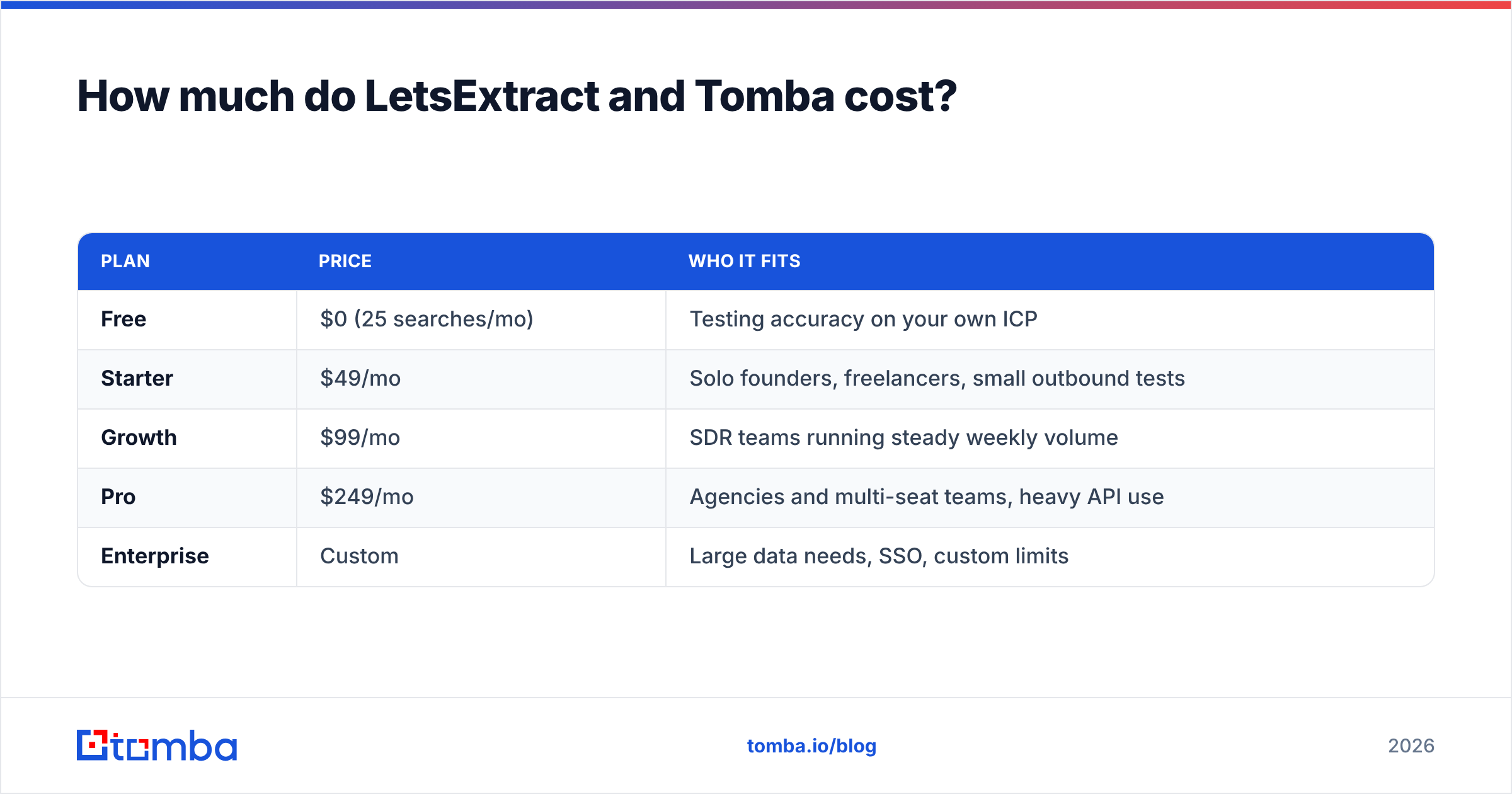
Tomba uses a monthly SaaS model:
| Plan | Price | Who it fits |
|---|---|---|
| Free | $0 (25 searches/mo) | Testing accuracy on your own ICP |
| Starter | $49/mo | Solo founders, freelancers, small outbound tests |
| Growth | $99/mo | SDR teams running steady weekly volume |
| Pro | $249/mo | Agencies and multi-seat teams, heavy API use |
| Enterprise | Custom | Large data needs, SSO, custom limits |
Full limits are on the Tomba pricing page. Verification is part of the workflow, so the credit you spend on a find also tells you whether the address is usable.
Cost per usable lead is the number that matters, not cost per email. Say a scrape of 10,000 addresses gives you 1,500 named, deliverable contacts in your ICP. Your real unit cost is the licence plus proxies plus verification plus labour, divided by 1,500. Say 500 Tomba lookups give you 420 verified decision-makers. That per-lead cost often comes out lower even though the sticker price is higher.
Is LetsExtract or Tomba better for GDPR and compliance?#
Neither tool makes you compliant. How you use them decides that. The collection method does change your risk profile, though.
Mass-scraping personal addresses from websites, especially in the EU, puts more of the burden on you. You need a documented legitimate-interest assessment, a way to handle data-subject requests, and a record of where each address came from. With a raw crawl, that last part is hard to reconstruct. The GDPR doesn't ban B2B outreach, but it does expect you to know your data's lineage.
Tomba surfaces the public sources behind each email and runs a data-removal process. That makes it easier to show where you got an address and to honour opt-outs. Role addresses from LetsExtract (info@company.com) carry less personal-data risk, since they aren't tied to a named individual. That is one legitimate reason to prefer scraping for some use cases.
Whichever tool you pick, get your legal team's view for your own jurisdiction. This section is not legal advice.
When should you choose LetsExtract?#
LetsExtract is a reasonable choice when:
- You're targeting local or small businesses. Plumbers, dentists, restaurants and agencies often list only an
info@address. A crawler captures those well, and a person-first finder may have little to return. - You're doing SEO or link-building outreach. Sending to editorial or webmaster inboxes across hundreds of niche sites fits scraping well.
- You need contacts from niche directories. Industry directories, association member lists and event exhibitor pages are what crawlers are built for.
- You want a one-off bulk harvest. If you'll scrape a lot once and then stop, a desktop licence can be cheaper than a subscription.
In all of these cases, plan a verification step and a role-address filter before anything reaches your sending tool.
When should you choose Tomba?#
Tomba is the better fit when:
- You sell B2B to named roles. "VP of Marketing at 200-person SaaS companies" is a lookup problem, not a crawling problem.
- Deliverability matters more than volume. Bounces damage your sender reputation. Verified, person-level emails keep bounce rates low.
- You work in a CRM or spreadsheet. Tomba works in the browser, in Google Sheets and Excel, via its API, and through native HubSpot, Salesforce and Pipedrive integrations. There's no desktop app to babysit.
- You need to cover a whole account. Domain search lists known employees at a target company, which fits account-based prospecting.
- You automate. The REST API, CLI and MCP server let you enrich leads inside your own pipelines or AI agents.
For a wider view of the market, independent review sites like G2 list user ratings for email finders, including both tools where reviews exist. Check them against your own trial results.
Can you use LetsExtract and Tomba together?#
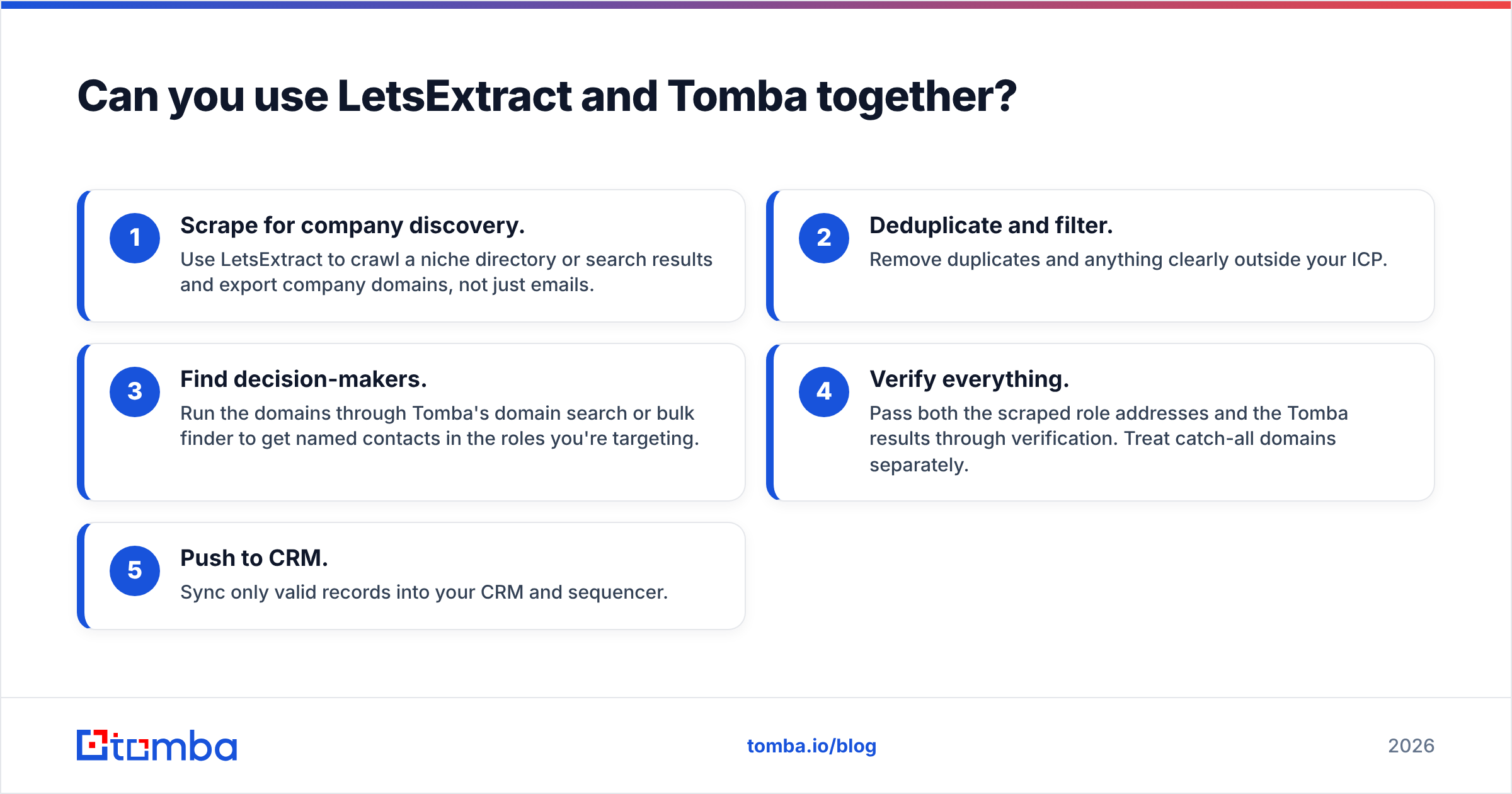
Yes. For some teams, combining them works better than either tool on its own. Here's a practical hybrid workflow:
- Scrape for company discovery. Use LetsExtract to crawl a niche directory or search results and export company domains, not just emails.
- Deduplicate and filter. Remove duplicates and anything clearly outside your ICP.
- Find decision-makers. Run the domains through Tomba's domain search or bulk finder to get named contacts in the roles you're targeting.
- Verify everything. Pass both the scraped role addresses and the Tomba results through verification. Treat catch-all domains separately.
- Push to CRM. Sync only valid records into your CRM and sequencer.
This way, LetsExtract's reach helps you find companies, and Tomba's precision picks the right people inside them.
So, LetsExtract vs Tomba: which should you pick?#
The verdict depends on what a "lead" means to you.
- If a lead is any working inbox on a website, LetsExtract is a capable, affordable harvester, as long as you verify its output.
- If a lead is a specific person with buying authority whose email won't bounce, Tomba is the better tool, and the free tier lets you test that claim on your own targets.
Most B2B sales teams are in the second group. Reply rates depend on reaching the right person, and a clean list protects the domain you'll use for every future campaign.
If that's your situation, start with the Tomba Email Finder. Take ten accounts from your current target list, run the names and domains through the free plan, and compare the verified results with your latest scraped export. Twenty-five free searches a month is enough to see the difference in accuracy, and moving up to Starter at $49/mo when you're ready takes one click.
Related guides#
// get started
Find, verify and enrich your first contacts today
Start on the free plan with 25 searches a month, then scale when your team is ready.
Free plan · No credit card required · GDPR & CCPA
// about the author