Lienion Pricing Reviews Pros and Cons: 2026 Honest Breakdown
Lienion bundles ten business apps under one per-user, per-app license. Here is what it really costs, what reviewers say, and where its basic CRM falls short.
This guide covers Lienion pricing reviews pros and cons in one place. You'll see how the per-app licensing works, what real users say, and which teams should skip it.
- Lienion is a modular work-management suite, not a sales-data tool. It bundles ten apps (social intranet, tasks, projects, timesheets, processes, training, KPIs, testing, CRM) on one platform.
- Pricing is per user, per app, and quote-based. Lienion publishes no price list. Third-party directories list a starting price of about $6, a free version, and a free trial. Volume and long-term discounts are available.
- Reviewers praise the ease of use and the all-in-one scope. The main complaints are a small review base, few third-party integrations, and costs that are hard to predict before you talk to sales.
- Its CRM (Inginion) is deliberately basic. It stores and organizes prospects, but you have to bring the contact data yourself.
- Verdict: Lienion is worth shortlisting if you're a small or mid-sized team replacing 4-6 lightweight tools. It isn't the right pick if you need a sales-first CRM with built-in prospecting data.
What is Lienion?#
Lienion is a suite of business apps that all run on one shared platform. Most tools do one job well. Lienion takes the opposite approach. You switch on only the apps each person needs. Everything shares one user directory, one permission model, and one dashboard.
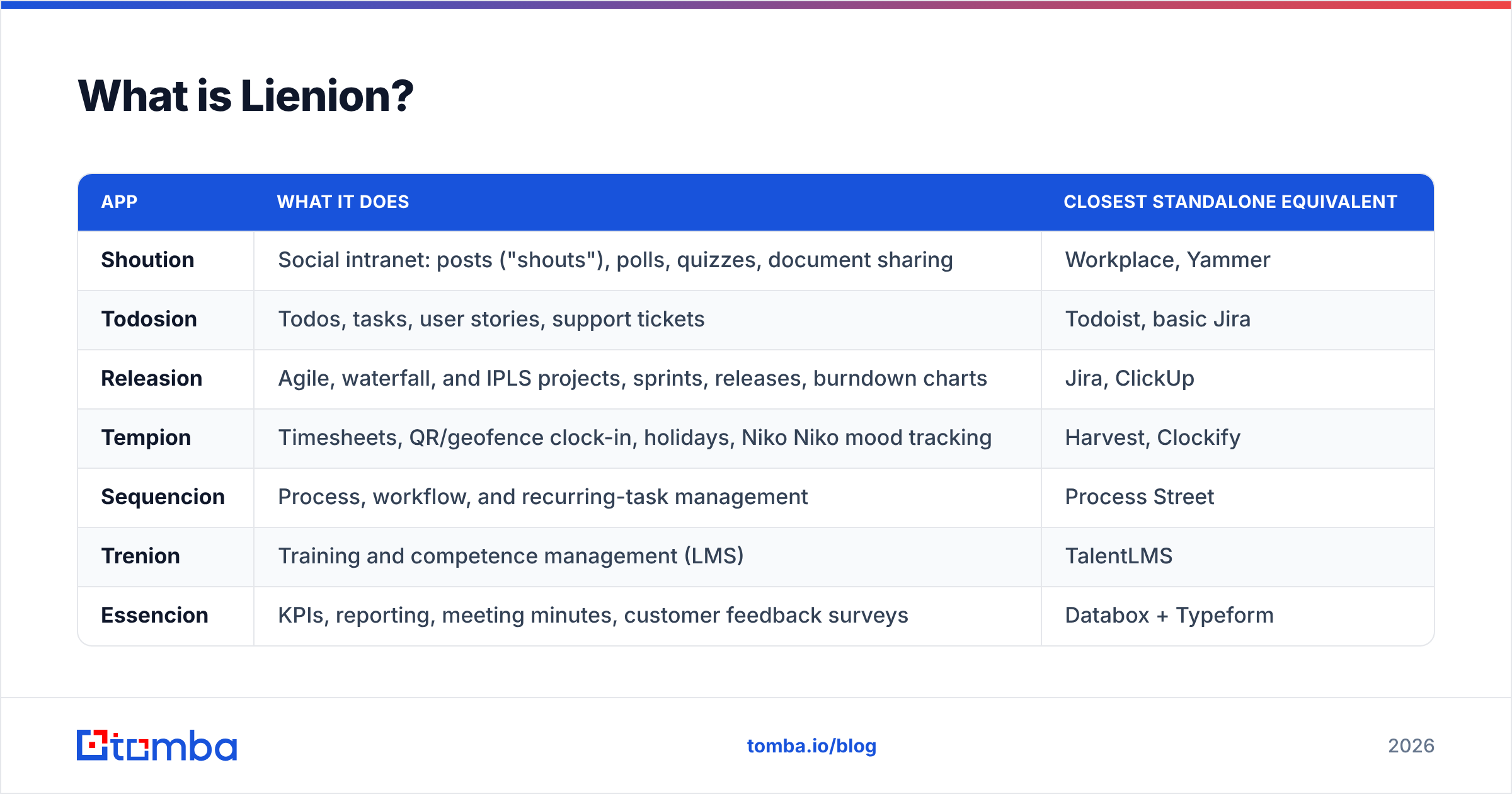
According to the official Lienion site, the suite currently includes:
| App | What it does | Closest standalone equivalent |
|---|---|---|
| Shoution | Social intranet: posts ("shouts"), polls, quizzes, document sharing | Workplace, Yammer |
| Todosion | Todos, tasks, user stories, support tickets | Todoist, basic Jira |
| Releasion | Agile, waterfall, and IPLS projects, sprints, releases, burndown charts | Jira, ClickUp |
| Tempion | Timesheets, QR/geofence clock-in, holidays, Niko Niko mood tracking | Harvest, Clockify |
| Sequencion | Process, workflow, and recurring-task management | Process Street |
| Trenion | Training and competence management (LMS) | TalentLMS |
| Essencion | KPIs, reporting, meeting minutes, customer feedback surveys | Databox + Typeform |
| Testcasion | Test cases, test suites, and test plan execution | TestRail |
| Inginion | Prospects, leads, and customer relationship management | Pipedrive (lite) |
| The Core | Central admin: users, rights, app assignment, dashboard | Admin console |
It's a bit like a Swiss Army knife. No single blade is the best tool on the market. But you carry one thing instead of ten, and every blade fits the same handle. How much that's worth depends on how many blades you'd actually use.
How does Lienion pricing work?#
Lienion charges a license fee per user, per app. The vendor's "Why Lienion" page says the more users you add, the lower the per-seat fee. It also promises "attractive and aggressive long-term pricing plans" with "no hidden costs." What it doesn't do is publish those numbers. There's no public pricing page, so you get a figure by contacting sales.
The public signals come from software directories:
- SoftwareSuggest's Lienion listing shows a starting price of $6, framed as "for 10 users." That works out to roughly $0.60 per user, but the listing doesn't say which app or billing period the figure covers.
- The Lienion profile on Capterra and other directories list both a free version and a free trial.
- Pricing is modular, so two companies with the same headcount can pay very different amounts depending on how many apps they switch on.
Here's a practical way to think about your real cost:
Estimated monthly cost = (users on App A x rate A) + (users on App B x rate B) + ... minus volume or term discounts
Suppose a 25-person team gives everyone Shoution and Tempion, gives five people Releasion, and gives three salespeople Inginion. That team pays for 58 app-seats, not 25 users. Keep that in mind before you compare Lienion with a flat per-user suite.
What does Lienion cost compared with alternatives?#
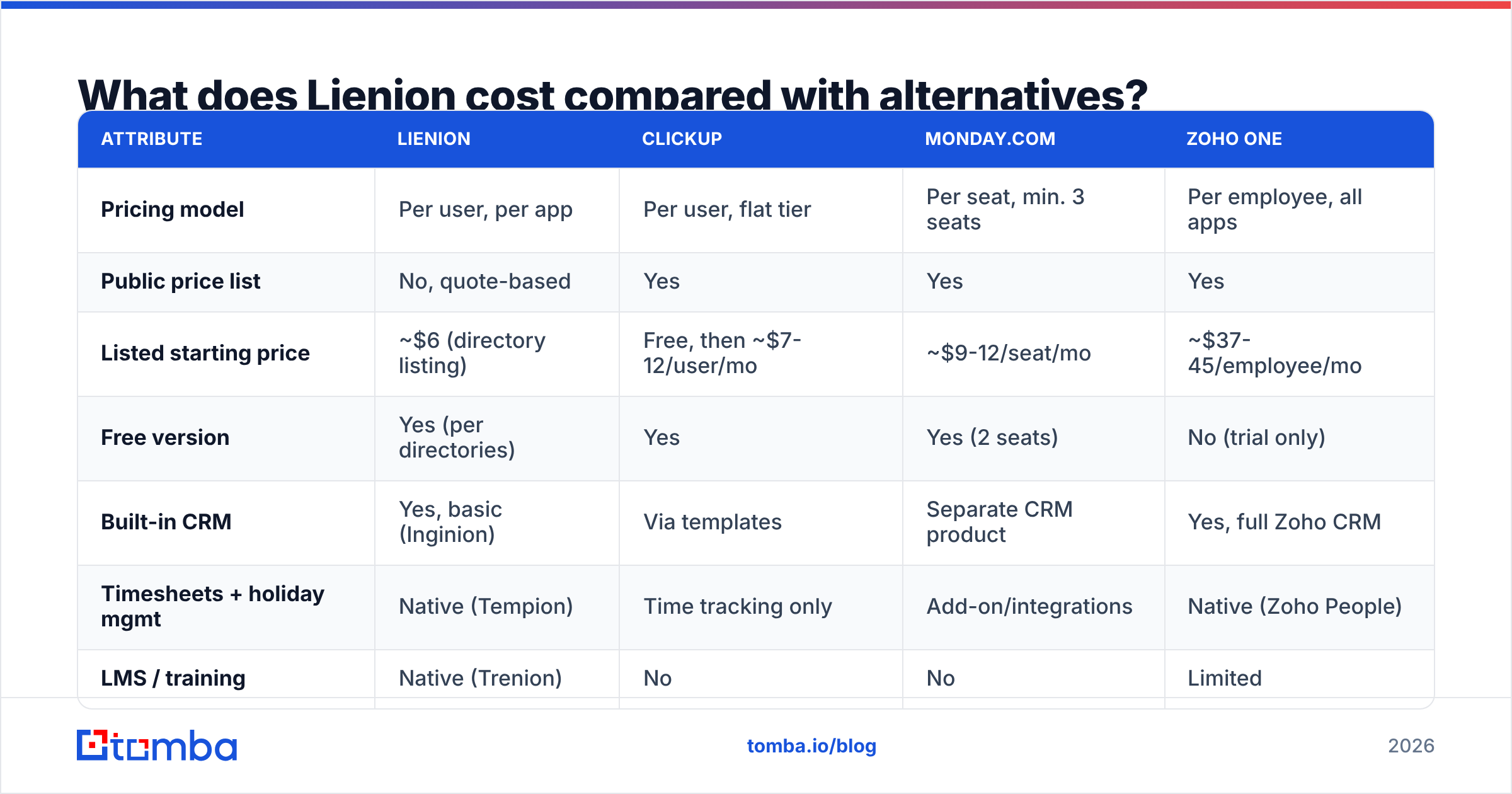
Lienion replaces several tool types at once. So compare it against the stack it would replace. The competitor figures below are typical list prices at the time of writing. Check each vendor before you buy.
| Attribute | Lienion | ClickUp | Monday.com | Zoho One |
|---|---|---|---|---|
| Pricing model | Per user, per app | Per user, flat tier | Per seat, min. 3 seats | Per employee, all apps |
| Public price list | No, quote-based | Yes | Yes | Yes |
| Listed starting price | ~$6 (directory listing) | Free, then ~$7-12/user/mo | ~$9-12/seat/mo | ~$37-45/employee/mo |
| Free version | Yes (per directories) | Yes | Yes (2 seats) | No (trial only) |
| Built-in CRM | Yes, basic (Inginion) | Via templates | Separate CRM product | Yes, full Zoho CRM |
| Timesheets + holiday mgmt | Native (Tempion) | Time tracking only | Add-on/integrations | Native (Zoho People) |
| LMS / training | Native (Trenion) | No | No | Limited |
| Test case management | Native (Testcasion) | No | No | No |
| Integration ecosystem | Small | Large | Large | Large (Zoho-first) |
| Best fit | SMBs consolidating many light tools | Project-heavy teams | Visual workflow teams | Companies going all-in on one vendor |
Two things stand out:
- Lienion's breadth is unusual at its price. You rarely get test case management, an LMS, and Niko Niko mood tracking in the same suite as a CRM and an intranet.
- Predictability is the weak spot. ClickUp, Monday, and Zoho let you calculate your bill in 30 seconds. With Lienion, you need a conversation first.
What do Lienion reviews say?#
Lienion's review footprint is small. The Capterra profile has only a handful of verified reviews, so treat any star average as a rough guide. Still, the reviews that exist agree with each other:
- Ease of use comes up again and again. Reviewers describe the apps as "very easy to use and navigate," which matches the vendor's no-training-needed positioning.
- Having everything in one place is the main reason people buy. One reviewer summed it up as "all the features you need to organize your business process."
- Tempion and Essencion get singled out. Users call the time-tracking and KPI apps especially good for tracking employee work records.
- Releasion and Shoution show up as everyday tools. Teams use them for sprint work and internal communication.
What's missing from the reviews matters too. There are few mentions of deep integrations, API automation, or sales-specific workflows. That fits the product: Lienion is an operations suite with a CRM module, not a revenue platform with an intranet attached.
What are the Lienion pricing reviews pros and cons?#
Pros#
- Buy only what you use. Per-app licensing means your QA team isn't paying for the CRM and your sales team isn't paying for test management.
- One login, one permission model. The Core handles users, teams, hierarchies, and access rights across every app. That's a real admin time-saver compared with managing 6 SaaS tools.
- Unusual native modules. Niko Niko well-being tracking, QR and geofence clock-in, an LMS, and test case management are rare in suites at this price.
- Mobile apps where they matter. Shoution and Tempion have smartphone versions, which suits field and hybrid staff.
- Low entry price and a free version. You can pilot it without procurement headaches.
- Volume discounts. Per-seat cost goes down as you grow, according to the vendor.
Cons#
- No public pricing. You can't model the total cost of ownership without a sales call, and the per-app model makes quick estimates error-prone.
- Small review base. There's less social proof and less community knowledge (tutorials, forums, templates) than ClickUp or Monday have.
- Thin integration ecosystem. If your stack depends on Zapier recipes, native HubSpot or Salesforce sync, or a rich API, check what's available first.
- The CRM is intentionally basic. Inginion "brings back the basics" of customer management. That's great for simplicity, but there are no sequences, no enrichment, and no built-in contact data.
- Breadth over depth. Each app covers the essentials. Power users of Jira, TestRail, or a dedicated LMS may hit feature ceilings.
Is Lienion's CRM good enough for sales teams?#
It depends on what "sales" means at your company.
Inginion lets you store companies with address details, contact persons, industry, region, LinkedIn and Facebook profiles, and data source. You can group accounts into prospect lists and target lists. You can log contact moments and set reminders. Reminders show up in a sales task dashboard or trigger an email. Managers can see each rep's target lists in two clicks. There's also a bulk import for "an external database with prospects."
That last feature tells you a lot about how Inginion is meant to be used. Inginion organizes contact data. It doesn't source it. There's no email finder, no verification, and no enrichment. For an account manager handling 80 existing customers, that's fine. For an SDR who needs 300 new verified contacts a month, the CRM will just sit empty until you feed it.
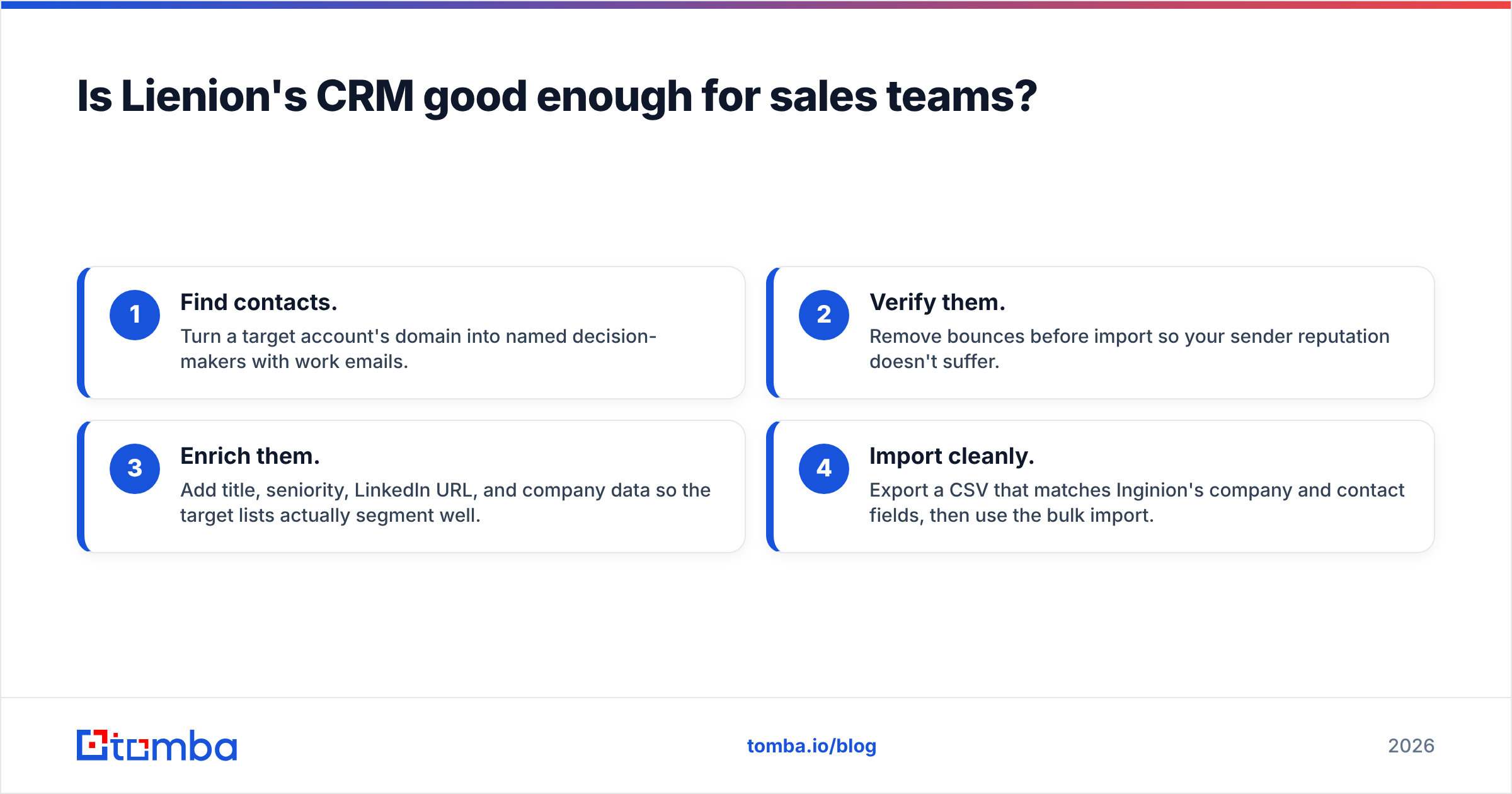
That's the typical gap in any lightweight CRM. You need a separate layer to:
- Find contacts. Turn a target account's domain into named decision-makers with work emails.
- Verify them. Remove bounces before import so your sender reputation doesn't suffer.
- Enrich them. Add title, seniority, LinkedIn URL, and company data so the target lists actually segment well.
- Import cleanly. Export a CSV that matches Inginion's company and contact fields, then use the bulk import.
A dedicated email finder handles steps 1-3 in a single pass. Running the list through an email verifier before import keeps bounce rates low once reps start emailing from Inginion reminders.
Who should buy Lienion, and who should skip it?#
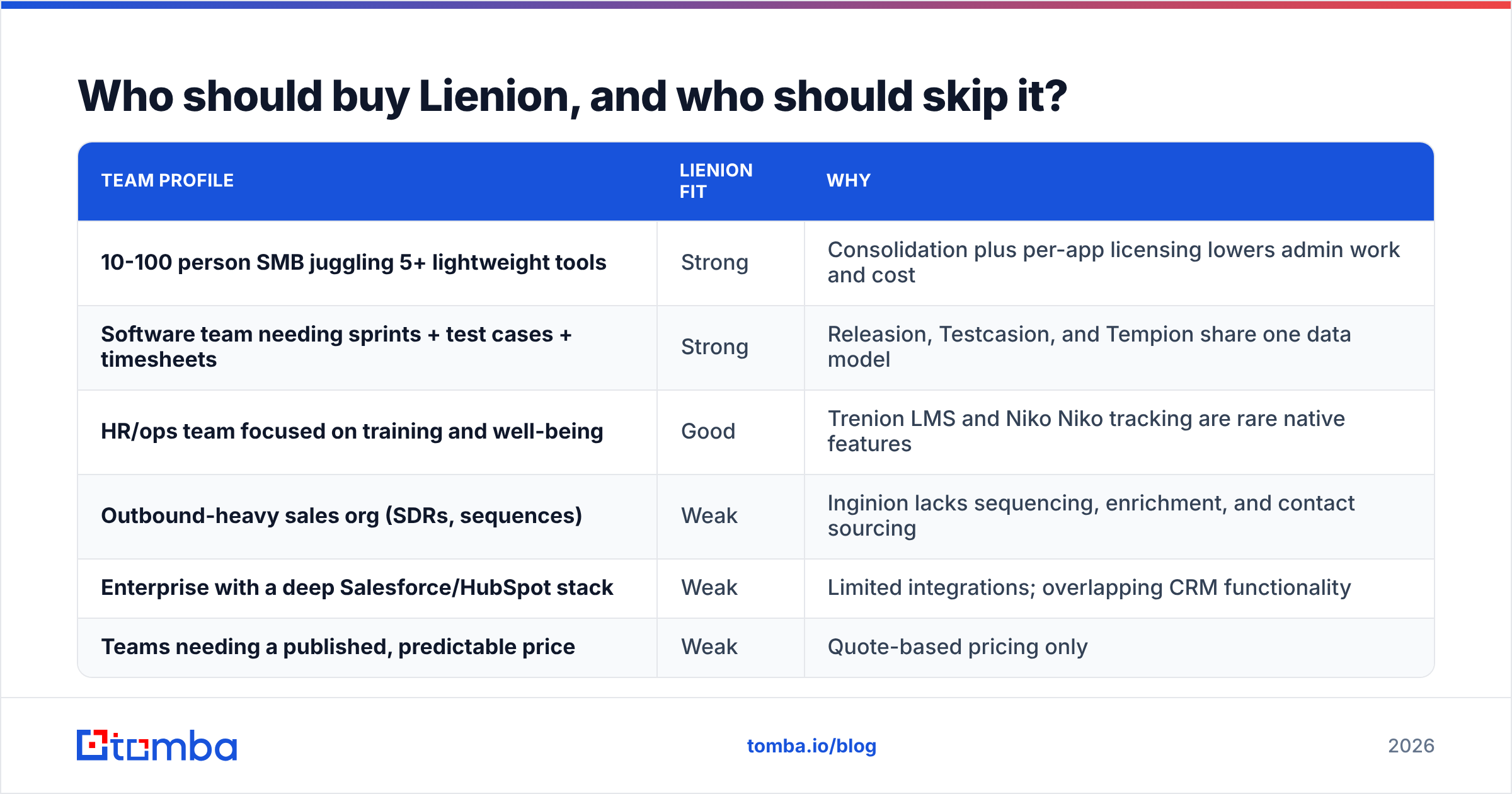
| Team profile | Lienion fit | Why |
|---|---|---|
| 10-100 person SMB juggling 5+ lightweight tools | Strong | Consolidation plus per-app licensing lowers admin work and cost |
| Software team needing sprints + test cases + timesheets | Strong | Releasion, Testcasion, and Tempion share one data model |
| HR/ops team focused on training and well-being | Good | Trenion LMS and Niko Niko tracking are rare native features |
| Outbound-heavy sales org (SDRs, sequences) | Weak | Inginion lacks sequencing, enrichment, and contact sourcing |
| Enterprise with a deep Salesforce/HubSpot stack | Weak | Limited integrations; overlapping CRM functionality |
| Teams needing a published, predictable price | Weak | Quote-based pricing only |
How do you evaluate Lienion before committing?#
Use the free version or trial with a checklist instead of just clicking around:
- Map your seats per app. List every user and the apps they'd actually need. Send that matrix to Lienion sales so the quote reflects reality.
- Ask for the discount curve. Request per-seat prices at your current headcount and at 2x headcount, on both monthly and annual terms.
- Test your integration must-haves. Confirm SSO, data export formats, and whether you can connect your email, calendar, and accounting tools.
- Run a real sales week in Inginion. Import 200-500 real prospects (sourced and verified externally), set reminders, and check whether the target list view holds up at that volume.
- Check data residency and support. If you're a GDPR-sensitive team, ask where data is hosted and what support SLAs apply.
To compare Lienion's review footprint with its alternatives, Capterra's list of Lienion alternatives is a useful cross-check.
Is Lienion worth it in 2026?#
Here's the short version of the Lienion pricing reviews pros and cons.
Yes, for the right team. Maybe you're a small or mid-sized company paying for a patchwork of task, time, training, KPI, and basic CRM tools. Lienion's per-app model can merge them at a low per-seat cost with less admin work. Reviewers consistently back up the ease-of-use claim.
No, if sales pipeline is your main problem. Lienion is an operations platform with a CRM module. Its hidden pricing and small integration ecosystem make it a harder sell for teams that need predictable budgets. The same goes for teams that need deep links to Salesforce or HubSpot.
Most teams that choose Lienion will still need a contact-data source feeding Inginion. That's where the rest of the stack comes in.
How do you fill Lienion's CRM with verified contacts?#
If you go with Lienion, you'll still need a way to put decision-makers into Inginion. Tomba Email Finder turns a company domain or a person's name into a verified professional email, with enrichment fields you can map straight to Inginion's bulk import. You can start on the free tier with 25 searches a month, then move to Starter at $49/mo when your pipeline grows. Compare the Tomba plans, run your first target list, and give your reps a CRM that already has contacts in it.
Related guides#
// get started
Find, verify and enrich your first contacts today
Start on the free plan with 25 searches a month, then scale when your team is ready.
Free plan · No credit card required · GDPR & CCPA
// about the author