ListKit vs MailTester Ninja: Lead Database or Email Verifier?
ListKit sells you verified B2B leads. MailTester Ninja checks lists you already own. We compare pricing, credits, daily limits, and the workflow each one fits, so you pay for the job you actually need done.
TL;DR
- ListKit and MailTester Ninja do different jobs. ListKit is a B2B lead database that gives you prospects with emails it says are already verified. MailTester Ninja is a bulk email verifier with a small finder attached. It checks addresses you already have.
- They charge in different ways. ListKit charges per credit, with 1 credit per email and 5 per phone number, and its best rates need yearly billing. MailTester Ninja sells daily verification caps that start at $6.99/week.
- Pick ListKit if you have no list yet and want targeted leads you can load straight into a sequencer. Pick MailTester Ninja if you already have lists and need to clean a lot of them cheaply.
- Many teams use both: they build a list in one tool and verify it again in the other before sending.
- If you'd like finding, verification, and catch-all checks in one credit pool, a combined tool such as Tomba covers both steps. The tradeoffs are covered below.
What is the real difference between ListKit and MailTester Ninja?#
Most "ListKit vs MailTester Ninja" searches come from people who assume the two tools compete directly. For the most part they don't.
ListKit is a prospecting database. You filter by industry, job title, headcount, location, and technology, and you get a list of people with business emails (plus phone numbers if you pay for them). The pitch is that the emails are verified before you get them, so you can export to Instantly, Smartlead, or your CRM and start sending.
MailTester Ninja is a verification engine. You upload a CSV or call the API, and it tells you whether each address is valid, invalid, risky, or unknown, along with a confidence score. It also has an email finder, but that's a secondary feature. It doesn't give you a searchable database of companies and contacts.
Put simply, ListKit answers "who should I email?" and MailTester Ninja answers "will this email bounce?"
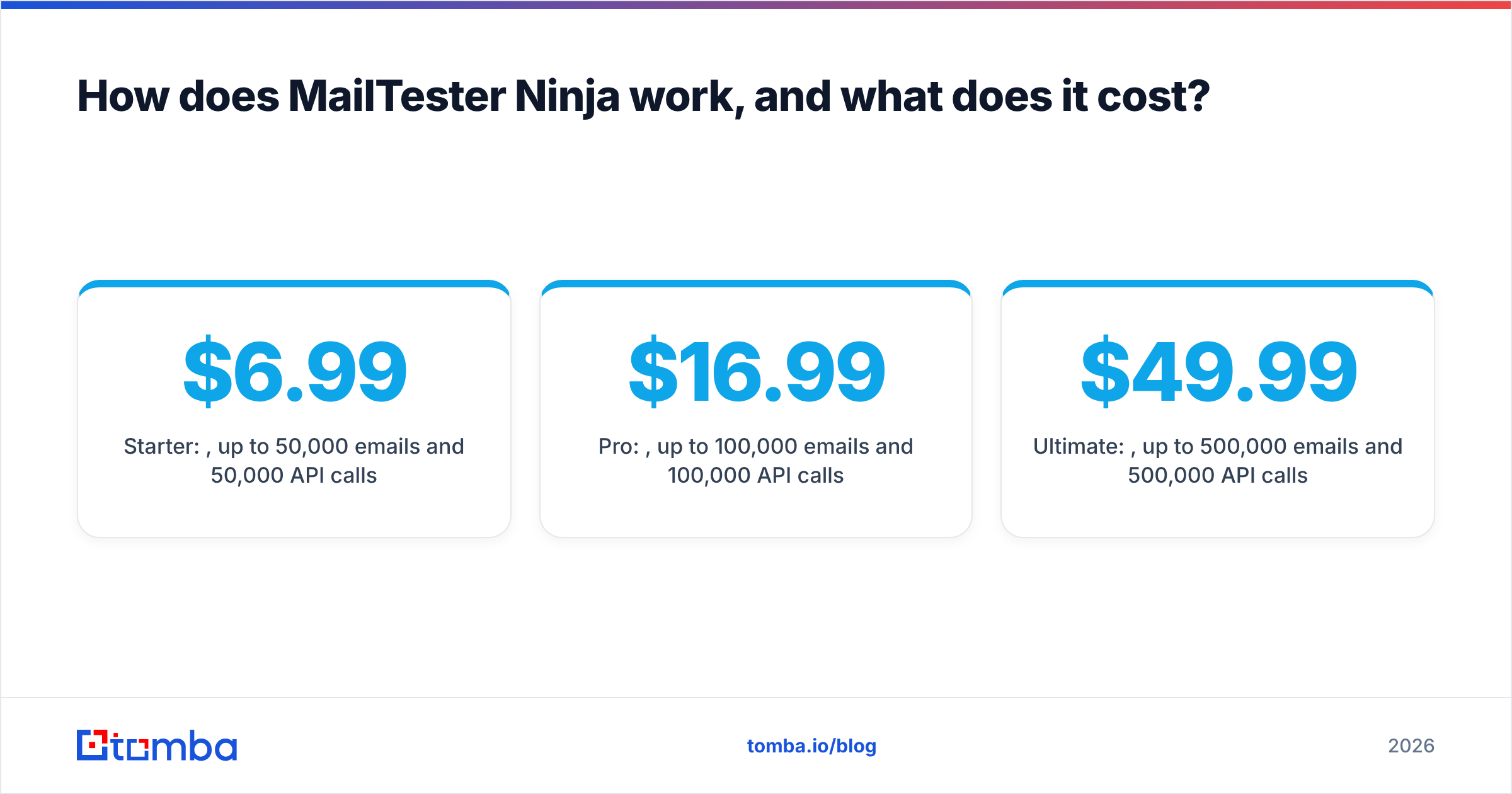
| Job to be done | ListKit | MailTester Ninja | What you need if you have neither |
|---|---|---|---|
| Build a new prospect list from filters | Core product | Not offered | A B2B database or domain search tool |
| Verify a list you scraped or bought | Only lists built inside ListKit | Core product | A bulk email verifier |
| Find one person's email by name + domain | Possible through the database | Email finder feature | An email finder |
| Clean 100k+ addresses per day | Not designed for it | Built for it (plan-dependent caps) | A high-volume verifier |
| Phone numbers | Yes, 5 credits each | No | A phone finder |
| API for automation | Yes | Yes, on paid plans | An email finder/verifier API |
How does ListKit work, and what does it cost?#
ListKit is a filter-and-export database. You define an ideal customer profile, preview matching contacts, and spend credits to reveal and export them. ListKit markets its emails as verified before delivery. It's aimed at cold emailers who don't want to run a separate verification pass on every list.
ListKit pricing at a glance#
These are the plans at the time of writing. Check the ListKit pricing page before you buy, because credit bundles change.
- Free: 100 credits in total to test every feature
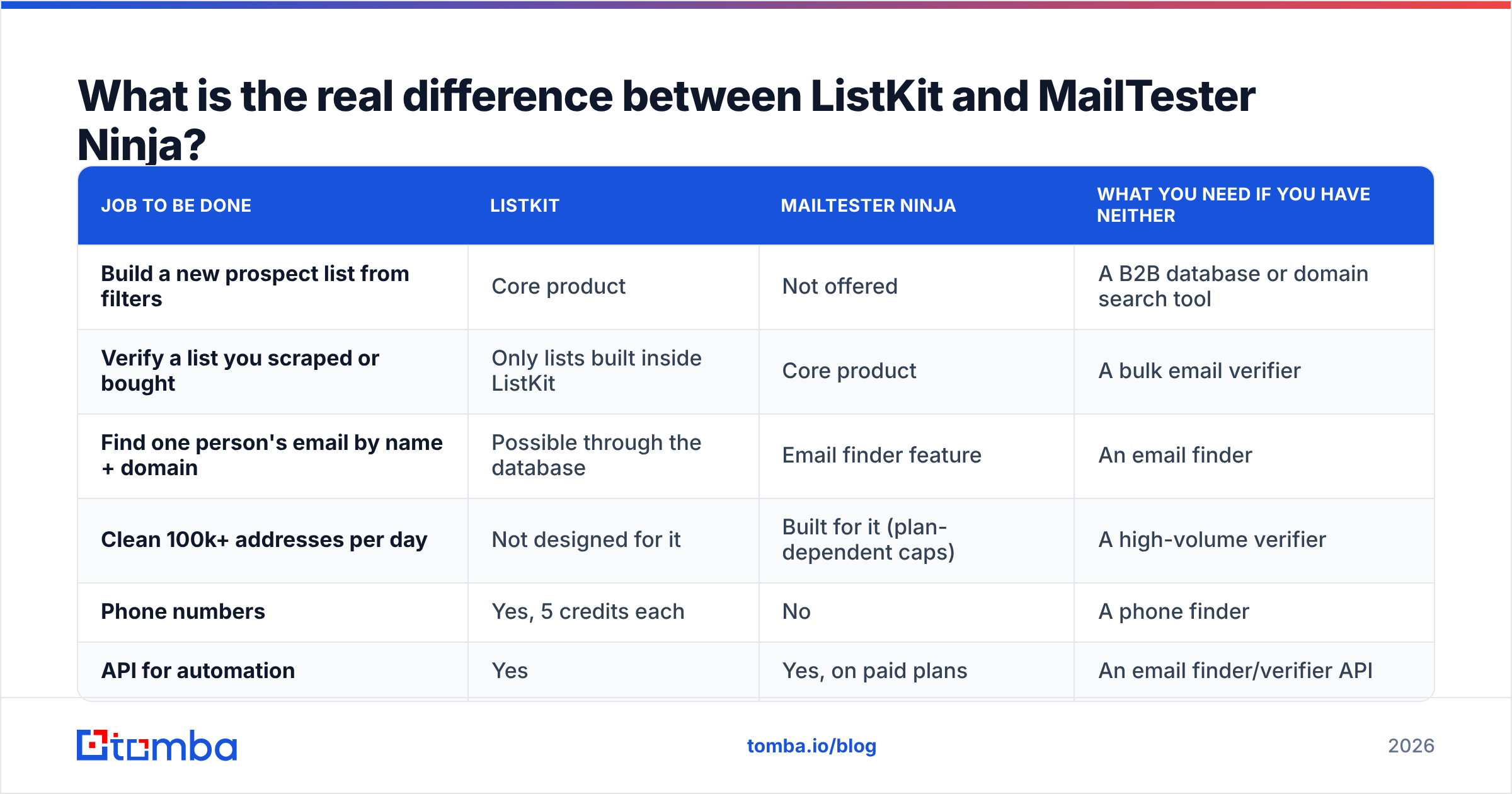
- Professional: about $83/mo billed yearly (around 24,000 credits per year)
- Scale: about $253/mo billed yearly (around 120,000 credits per year), marked as the most popular plan
- Ultimate: about $508/mo billed yearly
All tiers get the same features. You're paying for credit volume, not for access to extra functionality. An email costs 1 credit and a phone number costs 5. Monthly billing is available, but you pay more and get noticeably fewer credits, so ListKit only makes financial sense if you commit to a year.
Where ListKit is strong#
- Speed from ICP to campaign. You can go from "VP Marketing, SaaS, 50–200 employees, US" to a CSV loaded into your sequencer in one sitting.
- Verification is built in. You don't need a separate verification subscription for lists you build inside ListKit, at least on paper.
- Every plan has the same features. You won't find a filter or integration locked behind a higher tier.
Where ListKit is weaker#
- Phone numbers use up credits quickly. At 5 credits each, a list that includes phones can shrink your effective lead count to a fraction of the credit number on the plan.
- Annual commitment. Monthly plans exist, but you get much less for your money.
- It can't clean data from elsewhere. If your list came from a conference, a scraper, or an old CRM export, ListKit won't verify it for you.
How does MailTester Ninja work, and what does it cost?#
MailTester Ninja is a verification tool built for volume. It checks syntax, domain and MX records, and whether the mailbox exists, and it returns a status and confidence score for each address. It has a documented REST API, so you can verify addresses at signup, inside a CRM workflow, or in a scraping pipeline.
MailTester Ninja pricing at a glance#
MailTester Ninja doesn't sell per-email credits. It sells daily throughput caps:
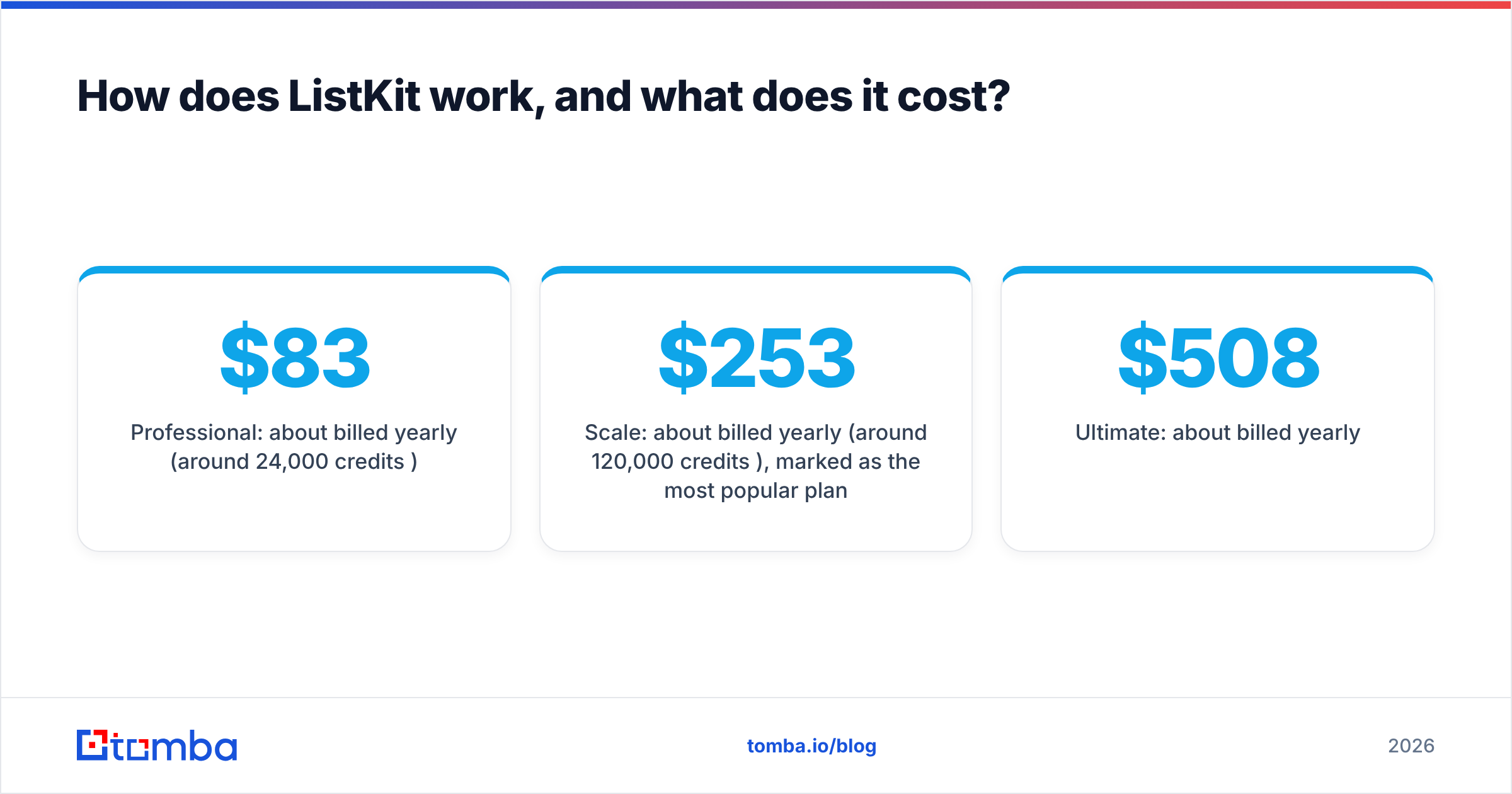
- Starter: $6.99/week, up to 50,000 emails/day and 50,000 API calls/day
- Pro: $16.99/month, up to 100,000 emails/day and 100,000 API calls/day
- Ultimate: $49.99/month, up to 500,000 emails/day and 500,000 API calls/day
You can buy several copies of a plan to raise the cap (two Pro plans give you 200k/day), and you can cancel at any time. For anyone verifying large volumes, this model costs far less per email than credit-based verifiers, where a million checks can cost hundreds of dollars.
Where MailTester Ninja is strong#
- Very low cost per verification at volume. If you clean scraped lists or re-verify a big CRM every quarter, not much else comes close on price.
- Built with the API in mind. The daily API call allowance matches the verification allowance, so automation isn't an afterthought.
- Short commitment. The weekly Starter plan suits one-off list cleaning.
Where MailTester Ninja is weaker#
- It won't find prospects. There are no ICP filters, no company search, and no contact database. The finder is useful for looking up one person, but it isn't a prospecting tool.
- You need to decide how to handle catch-all domains. Every verifier has trouble with domains that accept all mail. Before you send, check how MailTester Ninja labels those results and decide whether "risky" addresses go into your campaign.
- Daily caps can be a nuisance if your volume is uneven. If you verify 2 million emails once a month, a daily cap means spreading the job over several days or buying extra plan copies.

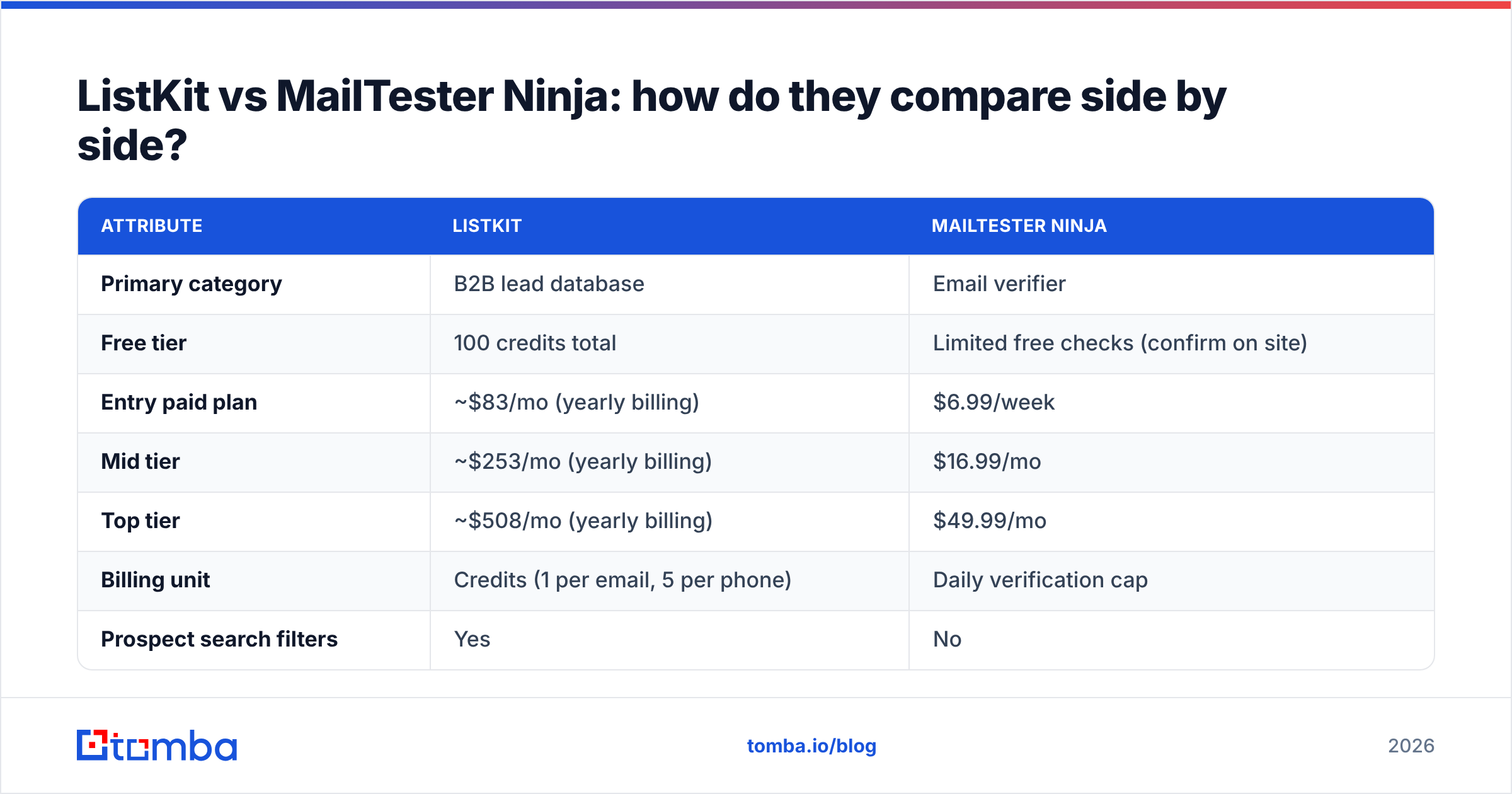
ListKit vs MailTester Ninja: how do they compare side by side?#
Here's the full comparison. Prices are list prices at the time of writing.
| Attribute | ListKit | MailTester Ninja |
|---|---|---|
| Primary category | B2B lead database | Email verifier |
| Free tier | 100 credits total | Limited free checks (confirm on site) |
| Entry paid plan | ~$83/mo (yearly billing) | $6.99/week |
| Mid tier | ~$253/mo (yearly billing) | $16.99/mo |
| Top tier | ~$508/mo (yearly billing) | $49.99/mo |
| Billing unit | Credits (1 per email, 5 per phone) | Daily verification cap |
| Prospect search filters | Yes | No |
| Bulk verification of external lists | No | Yes, core feature |
| Phone numbers | Yes | No |
| Email finder | Via database | Yes, secondary feature |
| API | Yes | Yes, on paid plans |
| Best for | Agencies and SDRs building fresh outbound lists | Teams cleaning large or aging lists cheaply |
If you'd like to see what other users say, G2 has user reviews for both categories. Read reviews from teams your size, because a feature that makes an agency happy can be too much for a solo founder.
Which is cheaper per usable lead?#
The answer depends on whether you already have the leads.
Scenario 1: You have no list. MailTester Ninja can't help much. It has nothing to verify until you get contacts somewhere. With ListKit, 24,000 yearly credits on the Professional plan works out to roughly 2,000 email-only contacts a month. That's about 4 cents per lead with verification included. Add phone numbers and the cost per lead goes up several times.
Scenario 2: You have 300,000 scraped or purchased contacts. ListKit is irrelevant here because it doesn't verify external data. MailTester Ninja's Pro plan at $16.99/mo gets through all 300k in about three days. That costs a fraction of a cent per address.
Scenario 3: You build lists regularly and also re-verify old CRM data. This is where teams end up paying for both tools. That's reasonable, but you then have two dashboards, two billing cycles, and two sets of statuses to reconcile. Suppose ListKit marks an email verified in March and MailTester Ninja marks it "risky" in June. Your team needs a rule for which result wins. Email data decays, and a verification result is only reliable for a few months.
Can you use ListKit and MailTester Ninja together?#
Yes, and it's a common setup among cold email agencies:
- Build the list in ListKit using ICP filters.
- Export to CSV and keep the ListKit verification status as a column.
- Re-verify in MailTester Ninja just before the campaign launches, especially if the list sat unused for more than a few weeks.
- Split the results. Send to valid addresses, put catch-all and risky ones into a smaller, slower campaign, and remove invalid ones.
- Upload to your sequencer and watch bounce rates for the first few hundred sends.
A second verification pass is inexpensive insurance for your sender reputation. Bounce rates above 2–3% get mailbox providers' attention, and one bad list can undo weeks of warmup. HubSpot's guidance on email bounce rates makes the same point: hard bounces hurt deliverability quickly.
The downside is overhead. You maintain two tools, and every list goes through a manual export and import.

When should you choose ListKit?#
Choose ListKit if:
- You don't have a list yet and want to go from ICP to campaign quickly.
- You run cold email at agency scale and want one tool to produce many client lists.
- You mostly need emails, not phones. Email-only exports make the credit math work in your favour.
- You're happy with annual billing and can predict your monthly lead volume.
Don't choose it if your main problem is dirty data you already own. ListKit won't fix that.
When should you choose MailTester Ninja?#
Choose MailTester Ninja if:
- You already have lists, whether scraped, bought, from events, or from an old CRM, and you need to know what's still deliverable.
- You verify at high volume and per-email pricing elsewhere has become expensive.
- You want verification in your stack through an API, for example on signup forms or in enrichment pipelines.
- You prefer short commitments and like being able to buy a week at a time.
Don't choose it as your prospecting engine. Its finder helps with looking up individuals, but it doesn't replace a searchable B2B database.
Is there an option that covers both finding and verifying?#
If you're about to pay for two subscriptions, consider whether one tool that finds and verifies would be simpler. Several email-finder platforms, Tomba among them, combine domain search, a single-contact email finder, and an email verifier under one credit balance, with a dedicated catch-all verifier for the domains where standard SMTP checks can't give a clear answer.
To be fair about the tradeoffs:
- Compared with ListKit: a finder-plus-verifier is organised around domains and names rather than broad ICP filters. If you want to search "every CFO at 200-person fintechs in Texas", a database-first tool like ListKit is the better fit. If you already know which accounts you're targeting and need the right person's email at each one, a finder is quicker and usually more accurate per contact.
- Compared with MailTester Ninja: at extreme volumes, such as millions of verifications a month, MailTester Ninja's daily-cap pricing is very hard to beat. A combined tool suits teams whose verification volume follows their prospecting volume, not teams cleaning very large legacy databases.
- On price: Tomba has a free tier (25 searches/mo), then Starter at $49/mo, Growth at $99/mo, and Pro at $249/mo, with Enterprise priced on request. See Tomba pricing for credit breakdowns per plan.
Which is right depends on where your pipeline breaks down. If the missing piece is who to contact, get a database. If it's which addresses are safe to send to, get a verifier. If it's both, and at moderate volume, a combined tool saves you the export-import step.
What should you check before buying either tool?#
Before you pay for anything, run the same test on every shortlisted tool:
- Take 200 contacts you already know are good, such as current customers or people who replied to you, plus 50 you know have bounced.
- Run them through each tool and compare how many are marked valid, invalid, risky, and catch-all.
- Look for false positives on known bounces. This number predicts your future bounce rate more reliably than any accuracy claim on a vendor's homepage.
- Count catch-all results. If a third of your market is on catch-all domains, whichever tool handles them best wins by default.
- Work out cost per usable address, not cost per credit or per check.
The test takes about an hour and can save you a year-long contract that doesn't suit your data.
The verdict: ListKit or MailTester Ninja?#
ListKit is the better choice for building lists. MailTester Ninja is the better choice for cleaning them. Comparing them head-to-head only makes sense once you've worked out which of those jobs you need done.
- Solo founder or SDR with no list: ListKit, on the Professional tier, email-only.
- Agency or growth team with large, aging, or scraped lists: MailTester Ninja, on the Pro or Ultimate tier.
- Team that prospects by named accounts and wants finding and verification in one place: a combined email finder + verifier.
If you're in that last group, the Tomba Email Finder is worth trying. Search by domain, name, or company, verify each result in the same step, and check catch-all domains without exporting to a second tool. The free plan includes 25 searches a month, which is enough to run the 250-contact test above before you commit.
Related guides#
// get started
Find, verify and enrich your first contacts today
Start on the free plan with 25 searches a month, then scale when your team is ready.
Free plan · No credit card required · GDPR & CCPA
// about the author