Listkit vs Safetymails: Lead Database or Email Verifier in 2026?
Listkit and Safetymails show up in the same searches, but they solve different problems. One builds B2B lead lists and the other cleans them. Here's how they compare on pricing and credits, and which one your outbound stack actually needs.
TL;DR
- Listkit and Safetymails do different jobs. Listkit is a B2B lead database that finds and enriches contacts. Safetymails is an email verification service that cleans lists you already have.
- Listkit fits outbound teams starting from zero. You search by company and persona, then export emails that have been triple-verified. Plans use monthly credits that don't roll over.
- Safetymails fits teams that already have data. Newsletter lists, CRM exports and web-form signups go in, and deliverability-safe lists come out. Credits start around $7.50 per 1,000 checks and don't expire.
- If you only need one, the choice depends on where your data comes from. Buy Listkit if you have no contacts. Buy Safetymails if you have plenty of contacts and they're dirty.
- If you need both finding and verifying, a tool that does both, such as Tomba, often costs less than paying for two subscriptions.
What is the real difference between Listkit and Safetymails?#
"Listkit vs Safetymails" is a common search, but it compares two different kinds of product. A useful comparison: Listkit is a fishing boat and Safetymails is a sorting table. The boat brings in the catch. The table throws out whatever you can't sell. Both are useful, but they aren't substitutes.
Listkit is a prospecting database. You filter companies and people by industry, headcount, job title, technology and intent signals. Listkit then returns contact records with business emails it has already checked through a triple-verification process. The pitch is that you get a list you can send to right away, without jumping between tools.
Safetymails is a Brazil-based email validation platform. It doesn't find anyone. You upload a list, or connect its real-time API to your signup forms. Safetymails tells you which addresses are valid, invalid, risky, disposable or role-based, so you stop sending to them before they hurt your sender reputation.
So the real question isn't which tool is better. It's which problem you have right now: not enough contacts, or contacts you can't trust.
How do Listkit and Safetymails compare feature by feature?#
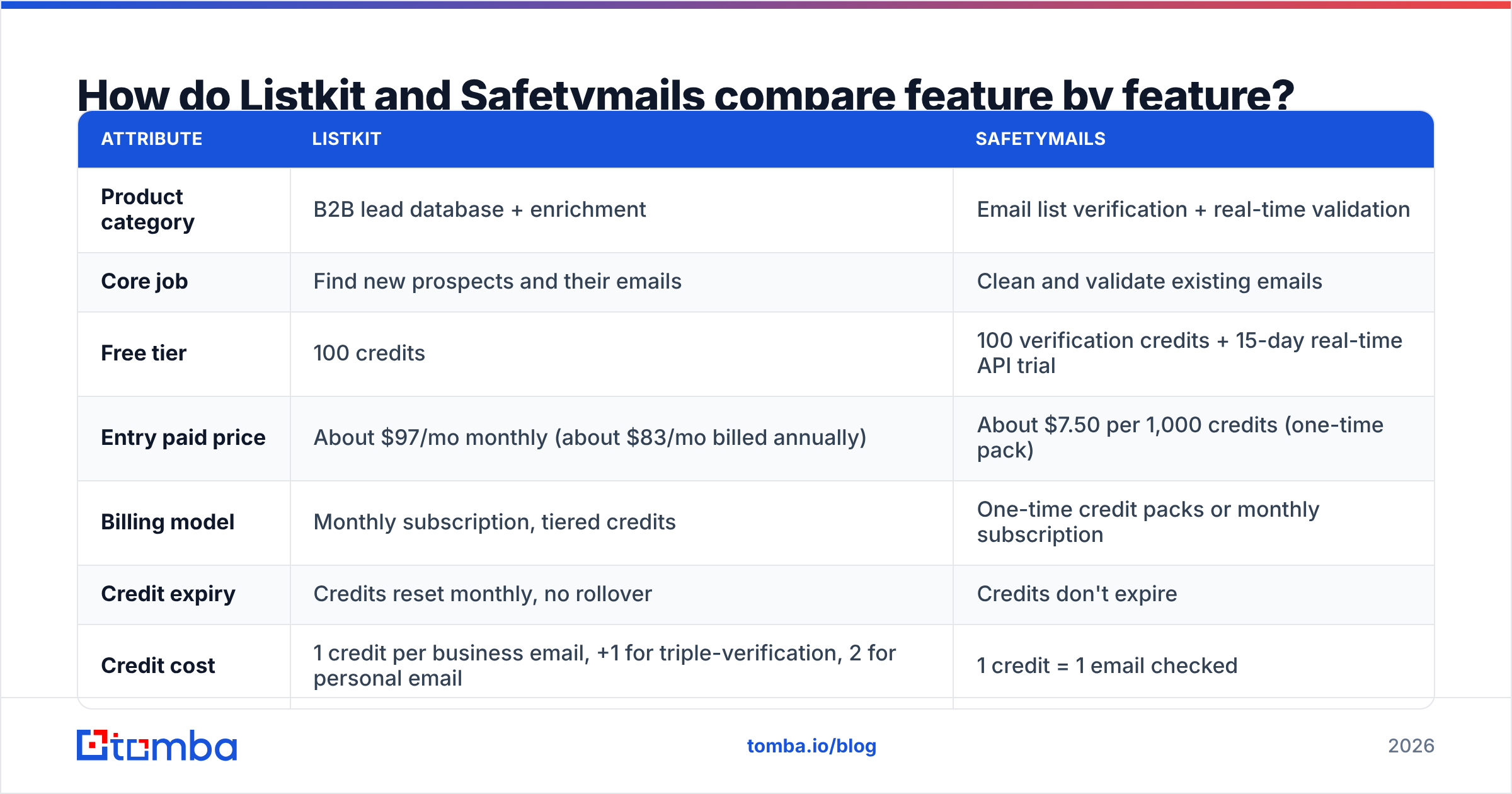
Here's the side-by-side. Pricing reflects public plan pages and third-party breakdowns at the time of writing. Check both vendors' pricing pages before you buy, because credit bundles change often.
| Attribute | Listkit | Safetymails |
|---|---|---|
| Product category | B2B lead database + enrichment | Email list verification + real-time validation |
| Core job | Find new prospects and their emails | Clean and validate existing emails |
| Free tier | 100 credits | 100 verification credits + 15-day real-time API trial |
| Entry paid price | About $97/mo monthly (about $83/mo billed annually) | About $7.50 per 1,000 credits (one-time pack) |
| Billing model | Monthly subscription, tiered credits | One-time credit packs or monthly subscription |
| Credit expiry | Credits reset monthly, no rollover | Credits don't expire |
| Credit cost | 1 credit per business email, +1 for triple-verification, 2 for personal email | 1 credit = 1 email checked |
| Users | Unlimited users on all plans | Account-based |
| Search / filtering | Company, persona, technology, intent filters | None (not a finder) |
| Real-time form validation | No | Yes (API + form integration) |
| Best for | Outbound SDR teams, agencies building lists | Marketers, ecommerce, CRM hygiene, lead-gen forms |
The takeaway: the only overlap is verification. Listkit verifies emails as part of building a list. Safetymails verifies emails as its whole product.
What does Listkit do well?#
Listkit's main strength is speed from an ICP to a send-ready list. A few features stand out.
- Unlimited seats on every plan. Agencies and small SDR teams don't pay per user, which is uncommon among lead databases. Five reps can share one credit pool without a per-seat charge.
- Triple-verified emails. Listkit runs addresses through several verification passes before export. That cuts the bounce risk that normally forces you to buy a separate verifier.
- AI company search and intent data. You can describe a target segment instead of stacking dozens of filters, and add intent signals to rank accounts that look ready to buy.
- Enrichment and CRM sync. You can enrich existing records and push them into your CRM without a CSV round-trip.
Where it's weaker: credits expire every month. If your outbound comes in bursts, such as a big campaign in March and nothing in April, you'll lose credits you paid for. Credits also go faster than the headline number suggests: one business email plus triple-verification is 2 credits, and personal emails cost 2 on their own.
What does Safetymails do well?#
Safetymails is built for data hygiene. It's less exciting than a lead database, but it protects the thing every other part of email depends on: your domain's ability to reach the inbox.
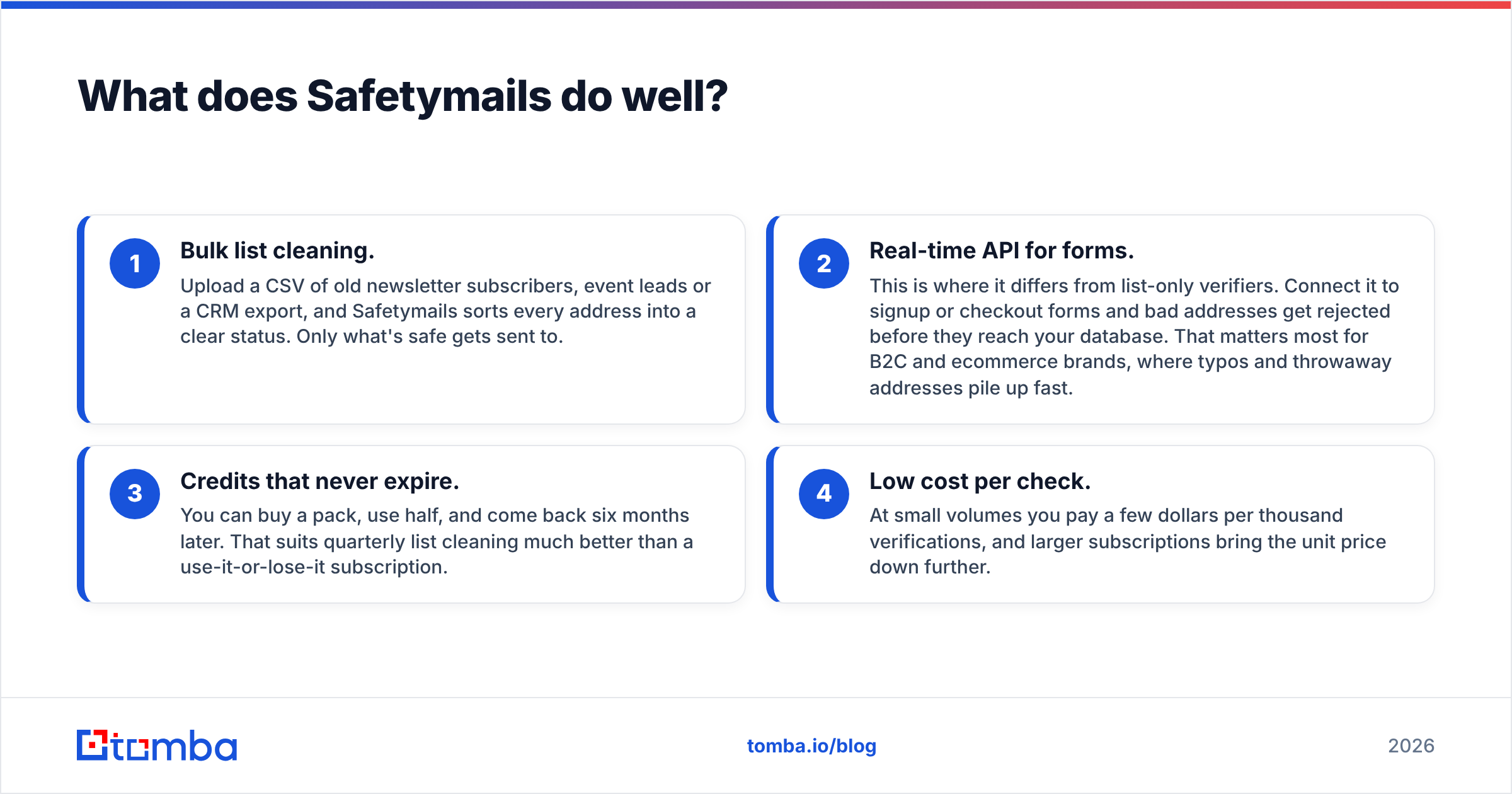
- Bulk list cleaning. Upload a CSV of old newsletter subscribers, event leads or a CRM export, and Safetymails sorts every address into a clear status. Only what's safe gets sent to.
- Real-time API for forms. This is where it differs from list-only verifiers. Connect it to signup or checkout forms and bad addresses get rejected before they reach your database. That matters most for B2C and ecommerce brands, where typos and throwaway addresses pile up fast.
- Credits that never expire. You can buy a pack, use half, and come back six months later. That suits quarterly list cleaning much better than a use-it-or-lose-it subscription.
- Low cost per check. At small volumes you pay a few dollars per thousand verifications, and larger subscriptions bring the unit price down further.
Where it's weaker: it won't create a single new lead. If your pipeline problem is "we don't know who to email," Safetymails can't help. It's also a general-purpose verifier. Its reports focus on validity and risk, not B2B context like job title or company size. Users on G2 mostly praise its ease of use and support, and it's rarely mentioned as a prospecting tool.
Which tool gives you better email accuracy?#
This is where the comparison gets misleading, because the two tools measure accuracy against different inputs.
- Listkit's accuracy is about data freshness: is the person still at that company, and is the address still live? Its triple-verification tackles the second part. No database fully solves the first, because people change jobs all the time.
- Safetymails' accuracy is about classification: when you hand it an address, does it label it correctly as valid, invalid or risky? The quality of your input isn't its concern. It just gives you an honest verdict on it.
The hardest case for both is the catch-all domain. That's a mail server set to accept every address, so a basic check can't tell a real inbox from a made-up one. Many B2B companies, especially those on Microsoft 365 with certain setups, behave this way. Both tools will flag some addresses as "accept-all" or "unknown." What you do with that bucket often decides your bounce rate. Some teams send to catch-alls in small throttled batches. Others run them through a dedicated catch-all verifier before deciding.
Practical rule: verify again right before you send, no matter where the data came from. A list that was 98% valid when exported can decay noticeably within a quarter.
How much will each tool actually cost you?#
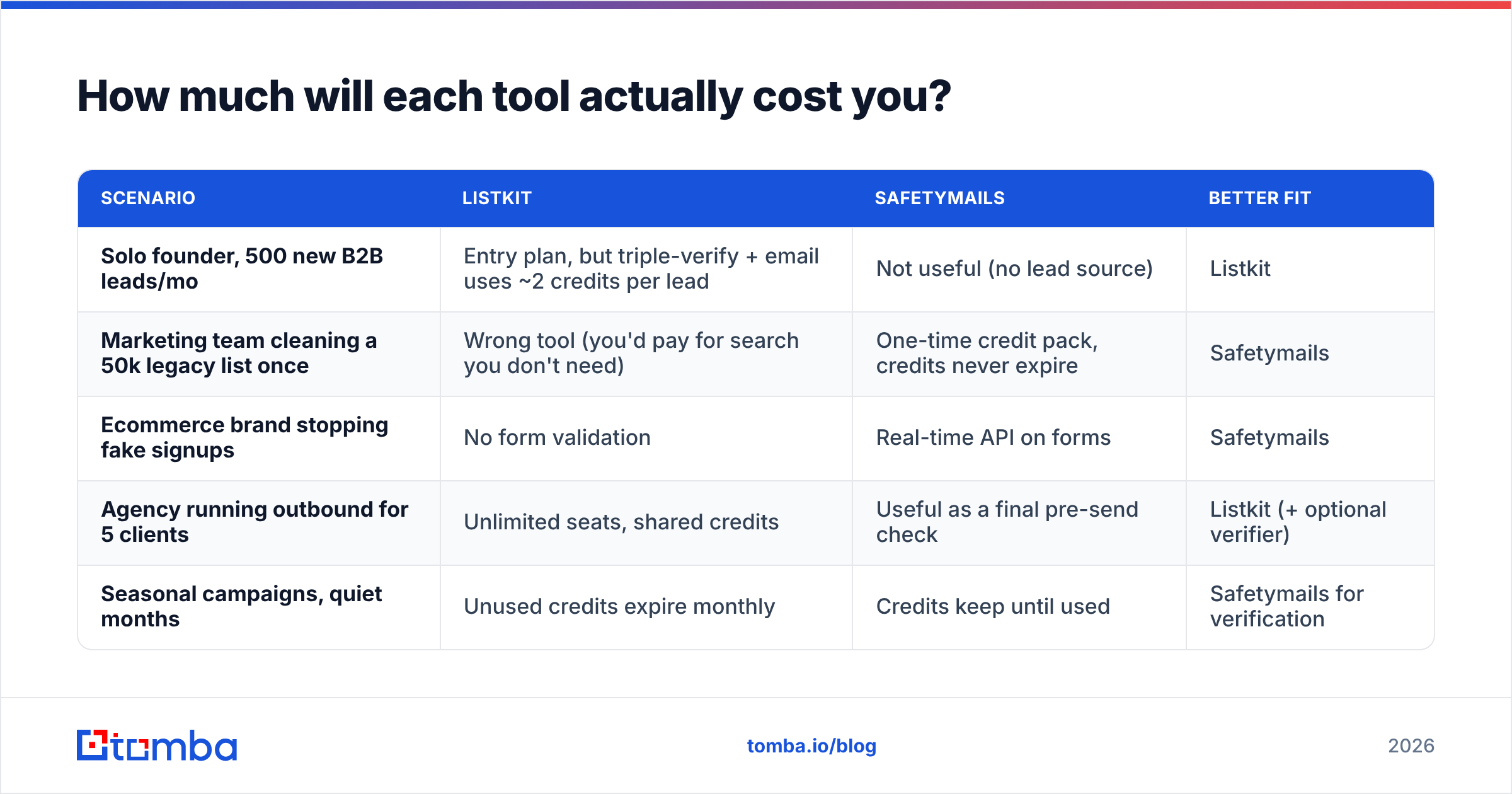
The headline prices aren't comparable, so model your own usage. Here are three common scenarios.
| Scenario | Listkit | Safetymails | Better fit |
|---|---|---|---|
| Solo founder, 500 new B2B leads/mo | Entry plan, but triple-verify + email uses ~2 credits per lead | Not useful (no lead source) | Listkit |
| Marketing team cleaning a 50k legacy list once | Wrong tool (you'd pay for search you don't need) | One-time credit pack, credits never expire | Safetymails |
| Ecommerce brand stopping fake signups | No form validation | Real-time API on forms | Safetymails |
| Agency running outbound for 5 clients | Unlimited seats, shared credits | Useful as a final pre-send check | Listkit (+ optional verifier) |
| Seasonal campaigns, quiet months | Unused credits expire monthly | Credits keep until used | Safetymails for verification |
The hidden cost with Listkit is expiry. The hidden cost with Safetymails is needing a second tool for the leads themselves. Plenty of teams end up with both, often at around $100/mo for a lead database plus a separate verification spend. Before you do that, check whether one platform already covers both jobs.
Do you need both Listkit and Safetymails?#
Sometimes, yes. Here's a typical outbound stack and where each tool would sit:
- Source: a lead database (Listkit) or manual research on LinkedIn and company websites
- Find: an email finder to fill gaps for named contacts the database missed
- Verify: a verifier (Safetymails, or the verifier built into your finder) right before sending
- Send: your sequencer with warmed inboxes and correct SPF, DKIM and DMARC
- Monitor: bounce and email deliverability metrics after each campaign
If Listkit's triple-verification is doing its job, adding Safetymails on top of Listkit exports is mostly redundant. A second check can still catch decay if you sit on exported lists for weeks. Safetymails earns its place when you have other data sources feeding your CRM: inbound forms, webinar registrants, trade-show scans or purchased lists. Listkit's verification only covers what Listkit exports.

What are the pros and cons of each?#
Listkit pros
- Builds send-ready B2B lead lists from scratch
- Unlimited users on every plan
- Verification included, so fewer bounces without a second tool
- Intent data and AI search for ranking accounts
Listkit cons
- Monthly credits expire, which penalises bursty usage
- Stacked credit costs (email + verification) shrink the real lead count
- Can't validate emails that come from outside Listkit, like forms or legacy lists
Safetymails pros
- Cheap per-check pricing, credits that don't expire
- Real-time API stops bad signups at the form
- Simple bulk cleaning for any list, from any source
- Free credits and an API trial to test before you pay
Safetymails cons
- Doesn't find leads or enrich contacts
- General-purpose results without B2B context like title or company
- You still need a separate prospecting tool for outbound
Is there an alternative that finds and verifies in one place?#
If your honest answer to "Listkit vs Safetymails" is "I need a bit of both," a single platform that combines finding and verifying is usually cheaper and easier to run.
Tomba is one option in that category. The core product is an email finder: you search by domain, by name and company, or from LinkedIn through the browser extension. An email verifier and a catch-all verifier sit alongside it. Plans start with a free tier of 25 searches per month, then Starter at $49/mo, Growth at $99/mo and Pro at $249/mo (Tomba pricing). That compares directly with running a lead database and a verifier side by side.
To be fair, Tomba isn't a full intent-data platform like Listkit's top tiers. It also isn't built mainly for real-time form validation on high-volume B2C signups, which is Safetymails' strength. If either of those is your main need, go with the specialist.
So which should you pick?#
- Pick Listkit if your bottleneck is pipeline, you run steady monthly outbound, and you want several reps sharing one account.
- Pick Safetymails if your bottleneck is list quality, your contacts come from forms and older databases, and you want pay-once credits with no expiry.
- Pick a combined finder + verifier if you do targeted B2B outreach to named accounts and don't want to pay for two tools to cover one workflow.
Whatever you choose, keep the rule from earlier: re-verify right before you hit send. Bounce rate is the one metric that can damage every campaign that follows.
If you're prospecting named B2B contacts and want finding and verification together, try the Tomba Email Finder. Enter a domain or a name plus company, get the professional address with its verification status, and export straight to your CRM or sequencer. The free tier gives you 25 searches a month, so you can test it on your own ICP before paying for another subscription.
Related guides#
// get started
Find, verify and enrich your first contacts today
Start on the free plan with 25 searches a month, then scale when your team is ready.
Free plan · No credit card required · GDPR & CCPA
// about the author