ListKit vs Thomson Data: Self-Serve Leads or Custom B2B Lists?
ListKit sells self-serve credits with published prices. Thomson Data builds custom lists and prices each one by quote. Here's how the two compare on cost, freshness, verification and fit, so you can pick the right one before you spend.
TL;DR
- ListKit is a self-serve B2B lead database. You pay for credits on published plans that start at $83/mo (billed yearly), and a free tier gives you 100 credits. It suits cold email teams that build their own lists every week.
- Thomson Data is a traditional list vendor. It builds custom lists (industry, job title, technology users, geography) and prices each one by quote. It suits marketing teams that need one large, segmented list for a campaign, direct mail or CRM enrichment.
- Your workflow matters more than raw database size. If you pull leads every day, a list you buy once goes stale. If you run one campaign a quarter, pay-per-list can cost less than a yearly credit plan.
- Whichever you choose, check every contact again right before you send. B2B contact data decays all the time, and no vendor's accuracy claim covers the gap between the day they deliver and the day you hit "send".
What is the real difference between ListKit and Thomson Data?#
The simplest way to think about it: ListKit is a grocery store and Thomson Data is a caterer. At the grocery store you walk the aisles, choose exactly what you want and pay at the till. The caterer takes your brief, puts the order together and sends you a quote.
ListKit (listkit.io) is built for outbound teams, especially cold email agencies and SDRs. You filter its database by title, industry, headcount, location and similar fields, pull contacts, and spend credits on emails and phone numbers. ListKit markets its emails as "triple-verified", and all plans include the same features. You're paying for volume, not for unlocked features.
Thomson Data (thomsondata.com) works the older data-vendor way. You tell them who you want to reach, for example "US hospital CFOs" or "companies using a specific ERP", and they compile a list, usually alongside services like data appending and cleansing. Its Datarade listing describes B2B email data covering about 70 million records across 100 countries. Pricing is custom for every order.
That one structural difference, self-serve credits against quote-based lists, drives almost everything else in this comparison.
How do ListKit and Thomson Data compare side by side?#
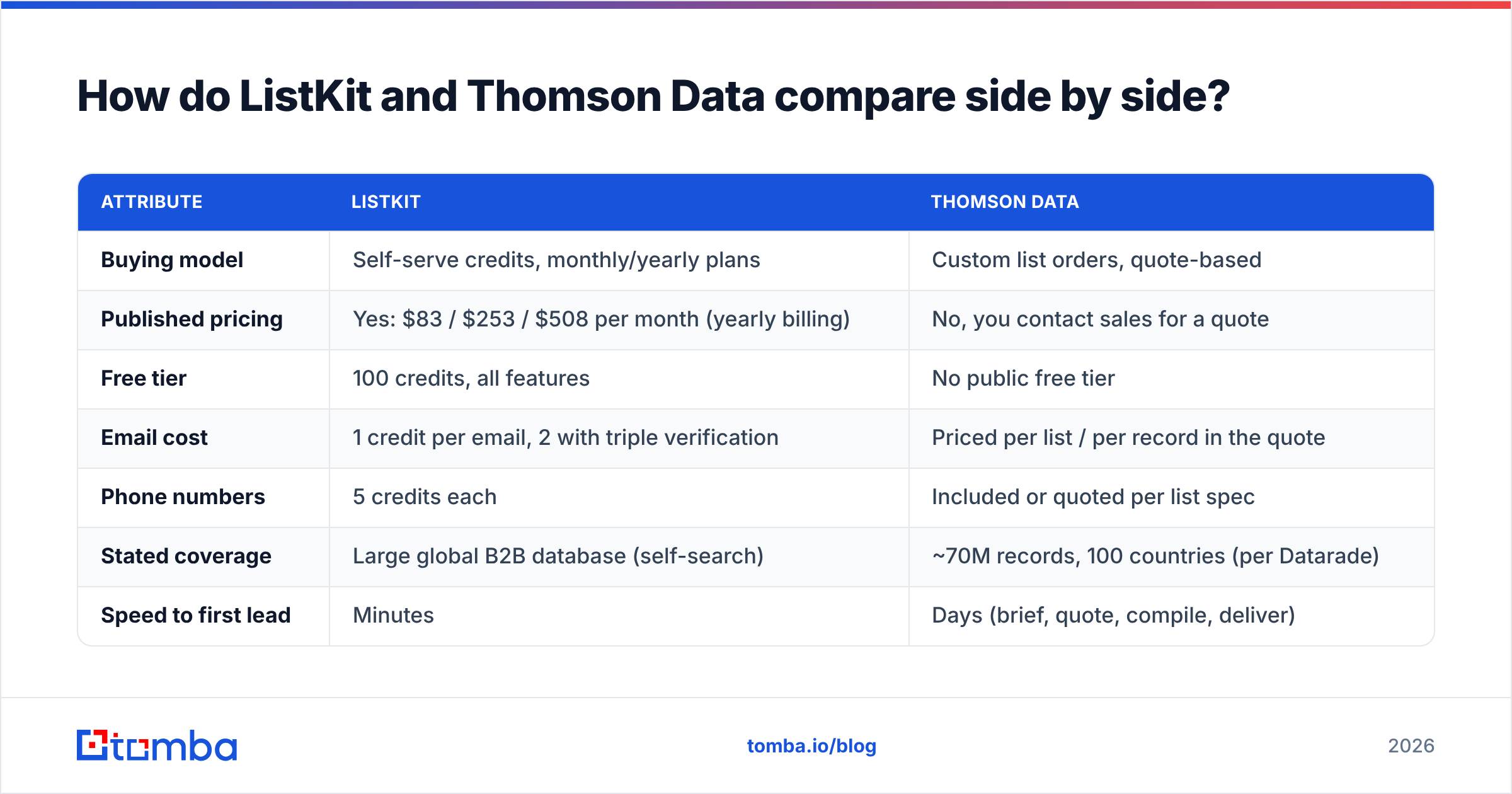
| Attribute | ListKit | Thomson Data |
|---|---|---|
| Buying model | Self-serve credits, monthly/yearly plans | Custom list orders, quote-based |
| Published pricing | Yes: $83 / $253 / $508 per month (yearly billing) | No, you contact sales for a quote |
| Free tier | 100 credits, all features | No public free tier |
| Email cost | 1 credit per email, 2 with triple verification | Priced per list / per record in the quote |
| Phone numbers | 5 credits each | Included or quoted per list spec |
| Stated coverage | Large global B2B database (self-search) | ~70M records, 100 countries (per Datarade) |
| Speed to first lead | Minutes | Days (brief, quote, compile, deliver) |
| Best for | Cold email agencies, SDR teams, weekly list building | Marketing campaigns, niche verticals, CRM append |
| Main risk | Credit burn if you over-pull | List ages from the day it's delivered |
How does ListKit pricing actually work?#
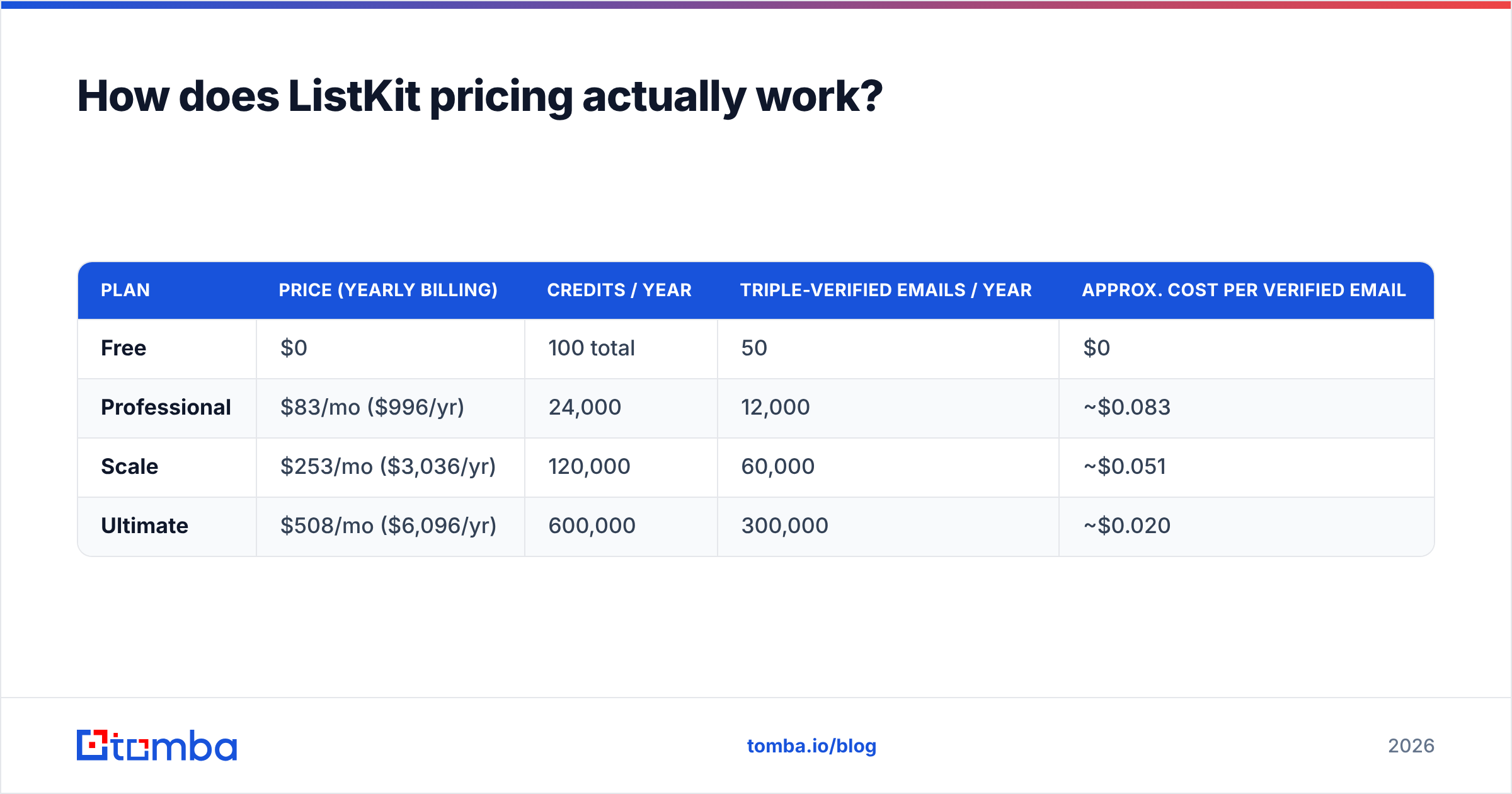
ListKit's credit system is simple once you see the numbers. According to ListKit's own credits documentation, a business email costs 1 credit, triple verification adds 1 more, and a phone number costs 5.
Here's what that works out to on yearly billing:
| Plan | Price (yearly billing) | Credits / year | Triple-verified emails / year | Approx. cost per verified email |
|---|---|---|---|---|
| Free | $0 | 100 total | 50 | $0 |
| Professional | $83/mo ($996/yr) | 24,000 | 12,000 | ~$0.083 |
| Scale | $253/mo ($3,036/yr) | 120,000 | 60,000 | ~$0.051 |
| Ultimate | $508/mo ($6,096/yr) | 600,000 | 300,000 | ~$0.020 |
Some things to know before you commit:
- Phones eat credits fast. One phone number costs as much as five raw emails. If your motion is call-heavy, work out your cost with phones included, not just emails.
- Yearly billing is the headline price. The low per-month figures assume an annual commitment. Monthly billing costs more.
- Bundles are a separate product. ListKit also sells high-volume "bundles" priced per 1,000 emails per day, starting at $597/month. That's aimed at agencies running serious sending volume, not a solo SDR.
- Every plan has the same features. Upgrading only buys you more credits, so there's no reason to pay for a tier you won't use up.
For a team pulling a few thousand verified contacts a month, Professional or Scale is simple to budget for and cheap per contact.
How does Thomson Data pricing work?#
Thomson Data doesn't publish a rate card. You send a brief (industry, titles, geography, company size, sometimes tech stack) and get a quote. That's normal for list vendors. The price depends on how narrow the segment is, how many fields you want per record (email, direct dial, postal address, SIC/NAICS codes) and whether you're renting or buying outright.
For context, industry-wide B2B email list pricing usually runs from roughly $300 to $1,000+ per thousand records, and per-contact prices vary a lot depending on how deep the targeting goes (see Instantly's breakdown of list pricing models). That's a market range, not a Thomson Data quote, so ask for exact numbers for your segment.
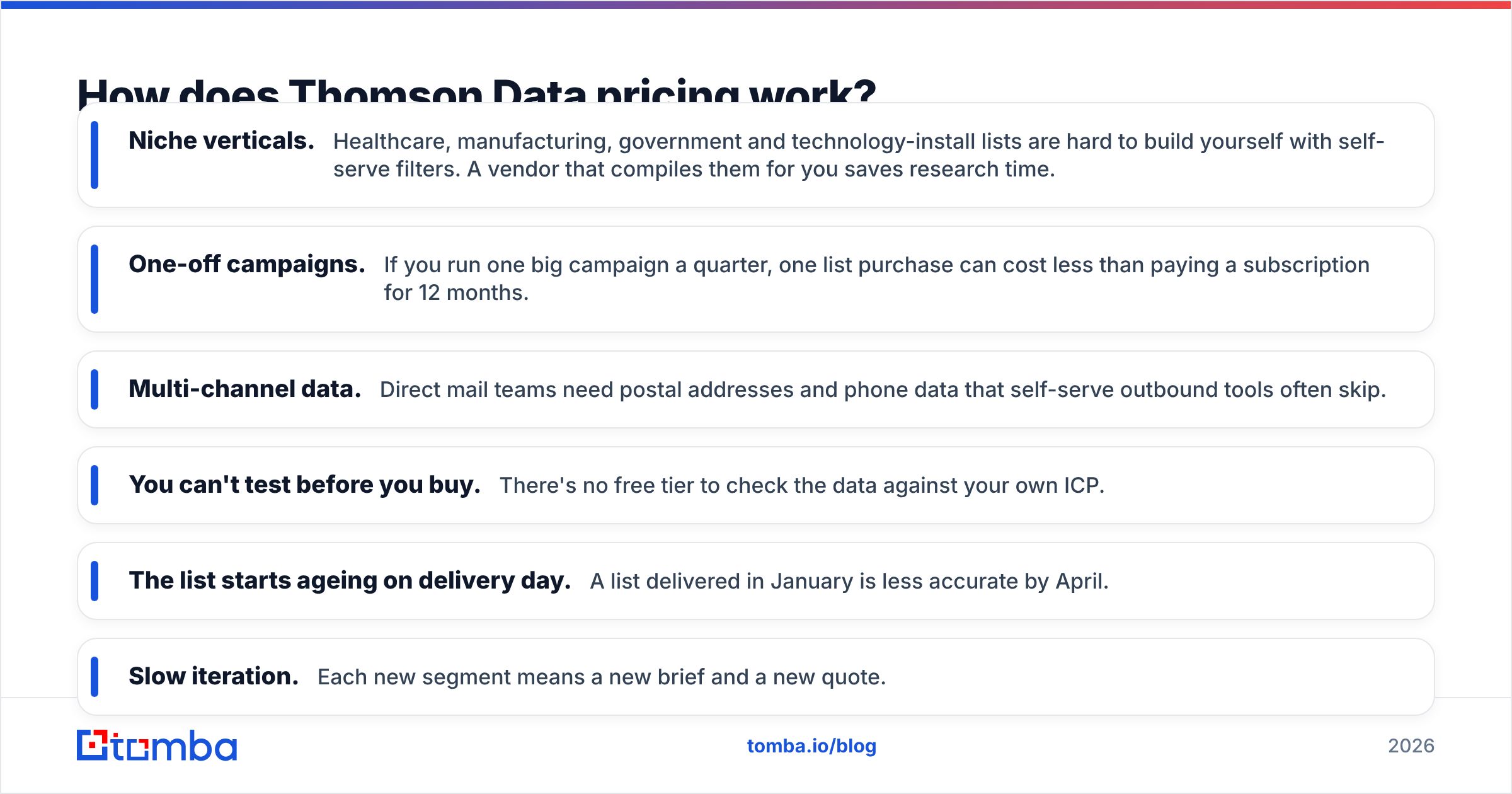
Where the quote model works in your favour:
- Niche verticals. Healthcare, manufacturing, government and technology-install lists are hard to build yourself with self-serve filters. A vendor that compiles them for you saves research time.
- One-off campaigns. If you run one big campaign a quarter, one list purchase can cost less than paying a subscription for 12 months.
- Multi-channel data. Direct mail teams need postal addresses and phone data that self-serve outbound tools often skip.
Where it works against you:
- You can't test before you buy. There's no free tier to check the data against your own ICP.
- The list starts ageing on delivery day. A list delivered in January is less accurate by April.
- Slow iteration. Each new segment means a new brief and a new quote.

Which has better data quality: ListKit or Thomson Data?#
Neither vendor's accuracy claim should be your deciding factor. Your own test should be.
ListKit's argument is verification at the moment you pull. Because you pull contacts on demand and can pay for triple verification per email, the data you export is checked close to the time you'll use it. That fits cold email, where bounce rates directly affect your sender reputation.
Thomson Data's argument is compiled, cleansed records. The vendor reports a 95% deliverable rate and a 90% accuracy rate on its enterprise contact data product (per its Datarade listing). Those are the vendor's own figures, and they describe the data at the moment of delivery. They don't cover the weeks the file sits in your CRM.
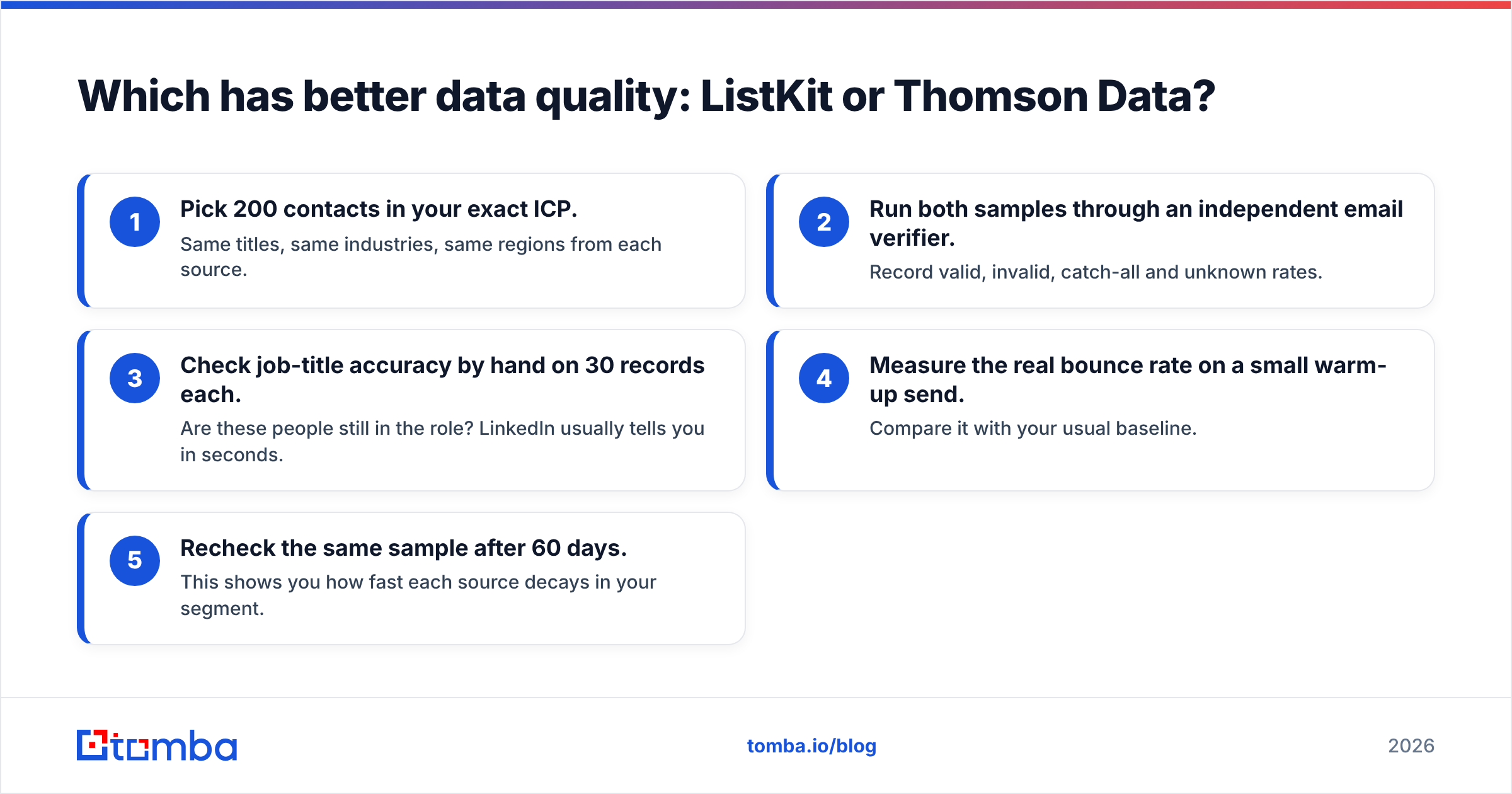
Here's a fair way to test both:
- Pick 200 contacts in your exact ICP. Same titles, same industries, same regions from each source.
- Run both samples through an independent email verifier. Record valid, invalid, catch-all and unknown rates.
- Check job-title accuracy by hand on 30 records each. Are these people still in the role? LinkedIn usually tells you in seconds.
- Measure the real bounce rate on a small warm-up send. Compare it with your usual baseline.
- Recheck the same sample after 60 days. This shows you how fast each source decays in your segment.
For outbound specifically, catch-all domains are where most "verified" lists fall apart. A mailbox that accepts everything looks valid until your message silently disappears. Running catch-all results through a dedicated catch-all verifier before you send closes that gap whichever vendor you use.
Is ListKit better than Thomson Data for cold email?#
For most cold email teams, yes. Three reasons:
- Speed. You can go from ICP idea to a sendable list in one sitting. Cold email rewards fast testing of angles and segments, and waiting days for a quote slows every test down.
- Verification fits the channel. Pull-time verification suits inbox-based outreach, where a 5% bounce rate can hurt a domain.
- Predictable spend. Published credits mean you know your cost per contact before you start.
Thomson Data makes more sense when cold email is only one channel. If you also run direct mail, event invitations, paid audience uploads or CRM enrichment, a vendor that delivers a multi-field, segmented file (with postal addresses and firmographics) can serve more of your go-to-market at once.
Also look at how each fits into your existing tools. ListKit exports feed straight into sending tools. A Thomson Data file usually gets imported into your CRM or marketing automation platform first, which suits marketing ops but adds a step for SDRs.
Which is better for marketing teams and niche industries?#
Thomson Data has the stronger case here. Marketing teams often need:
- Big, clearly segmented audiences for nurture programs rather than hand-picked prospect lists.
- Specialist verticals like healthcare providers, specific technology users or regional manufacturers, where self-serve filters return thin results.
- Append and cleansing services to fix an existing CRM rather than build a new list from scratch.
A quote-based vendor that builds to spec and cleans your existing records is more useful for those jobs than a credit-based search tool. The trade-off is still freshness: plan to re-verify before every major send, not just at delivery.

What are the pros and cons of each?#
ListKit
- Pro, transparent pricing: published plans and a documented credit system.
- Pro, free trial with every feature: 100 credits to test before you pay.
- Pro, pull-time verification: triple verification is available on every email.
- Con, phone data is expensive in credits: 5 credits per number adds up fast.
- Con, best prices need a yearly commitment: monthly billing costs more.
Thomson Data
- Pro, custom segmentation: built to your brief, including hard-to-find verticals.
- Pro, multi-channel fields: useful beyond email, for mail, phone and enrichment.
- Pro, services on top of data: append and cleansing for existing databases.
- Con, no public pricing or free tier: harder to compare costs or test first.
- Con, static delivery: the file doesn't refresh itself once delivered.
Buyers on review sites like G2 raise the same recurring themes about list vendors in general: freshness and bounce rates matter more than headline record counts. Read recent reviews for your specific segment, not just overall star ratings.
How do you choose between ListKit and Thomson Data?#
Use this quick guide:
| If you... | Choose |
|---|---|
| Send cold email every week and need fresh segments | ListKit |
| Run one or two big campaigns per quarter | Thomson Data (quote per list) |
| Target a niche vertical that self-serve filters barely cover | Thomson Data |
| Want to test data quality free before paying | ListKit |
| Need postal addresses and multi-channel fields | Thomson Data |
| Need predictable monthly spend per contact | ListKit |
There's also a third option many teams end up with: skip the big database entirely and look up contacts on demand. If you already know your target accounts (from intent data, a CRM list or a target account plan), you don't need millions of records. You need the right email for the right person at the right company, checked the day you send. An email finder with domain search does exactly that: enter a company domain or a person's name and get a verified address, without buying a list that decays in your CRM.
Should you use a list provider at all?#
It depends on where your targeting comes from. If your ICP is broad ("VP Sales at 50–500 person SaaS companies in North America"), a database like ListKit or a custom list from Thomson Data gets you volume quickly. If your targeting is account-based, meaning a defined list of companies you've already researched, a big list is mostly contacts you'll never email.
Many mature outbound teams combine the two: a database or vendor list for top-of-funnel volume, plus on-demand lookup and verification for priority accounts. Whatever you pick, the rule is the same. Verify close to the send, watch your bounce rates, and don't treat a vendor's accuracy percentage as permanent.
Final verdict: ListKit or Thomson Data?#
ListKit wins for cold email and SDR teams. Published pricing, a free tier, pull-time verification and fast list building suit high-frequency outbound. Thomson Data wins for marketing-led and niche-vertical use cases where you need a custom, multi-field list or cleanup of existing data, and can live with quote-based pricing and slower turnaround.
If neither model fits because you already know which accounts you want and just need the right contacts, try an on-demand approach. Tomba Email Finder finds professional email addresses by domain, name or company, with verification built in, so each contact is fresh when you reach out. Start on the free tier (25 searches a month) to test it against your own ICP, then compare Tomba pricing from $49/mo against your current list spend.
Related guides#
// get started
Find, verify and enrich your first contacts today
Start on the free plan with 25 searches a month, then scale when your team is ready.
Free plan · No credit card required · GDPR & CCPA
// about the author