LoopUp vs Zoom (2026): Which Calling Platform Fits Sales Teams?
LoopUp puts carrier-grade phone numbers inside Microsoft Teams. Zoom sells a full meetings-plus-phone suite. Here is how they compare on cost, coverage, and sales use cases, and which one fits your stack.
TL;DR
- LoopUp and Zoom now solve different problems. LoopUp is a cloud telephony provider that puts PSTN calling inside Microsoft Teams through Direct Routing and Operator Connect. Zoom is an all-in-one platform (Zoom Workplace) covering meetings, chat, and phone.
- If your company runs on Microsoft Teams, LoopUp is usually the cleaner fit. Reps get real phone numbers in the client they already use, and there's no second app to support.
- If you want one vendor for video, phone, and webinars, or you don't use Teams, Zoom is simpler to buy and deploy. Pro starts around $14/user/mo billed annually.
- Neither tool fixes bad contact data. A dialer only helps if the numbers and emails you load into it are real.
- Our pick: LoopUp for Teams-standardized multinationals, Zoom for SMB and mid-market teams that want self-serve pricing and one app.
What is LoopUp, and how has it changed?#
If you last looked at LoopUp around 2018, you probably remember it as a premium remote-meetings company. It sold high-quality audio conferencing to law firms, banks, and professional services firms, with a strong focus on reliability and live operator support.
That isn't really the company anymore. LoopUp now calls itself a cloud telephony provider. In its own words, it "makes the telephone ring inside Microsoft Teams." Its core product connects Microsoft Teams to the public phone network (PSTN) through two Microsoft-supported routes:
- Direct Routing: LoopUp's session border controllers connect your Teams tenant to carrier networks in many countries.
- Operator Connect: LoopUp is provisioned as a certified operator straight from the Teams admin center. There's less configuration on your side.
The company went private again in 2024. It has also been building out adjacent pieces, including the acquisition of SyncRTC (hybrid collaboration software) and a 2025 partnership with Luware for Teams-native contact center workflows.
In practice, LoopUp's pitch to a multinational is to consolidate global telephony under one vendor, keep Teams as the only client, and drop the patchwork of local carriers.
What is Zoom in 2026?#
Zoom is no longer "the video meeting link." It now sells Zoom Workplace, a bundle of meetings, team chat, whiteboard, docs, and the AI Companion assistant. Zoom Phone, Contact Center, Webinars, and Events sit alongside it as add-ons or higher-tier bundles.
For sales teams, the parts that matter are:
- Zoom Meetings for demos and discovery calls
- Zoom Phone for inbound and outbound PSTN calling with numbers in dozens of countries
- Zoom Revenue Accelerator (formerly Zoom IQ for Sales) for conversation intelligence
- CRM integrations with Salesforce and HubSpot for click-to-dial and call logging
The main difference from LoopUp is that Zoom wants to be the client your team lives in. LoopUp is built to make Microsoft's client work better.

How do LoopUp and Zoom compare side by side?#
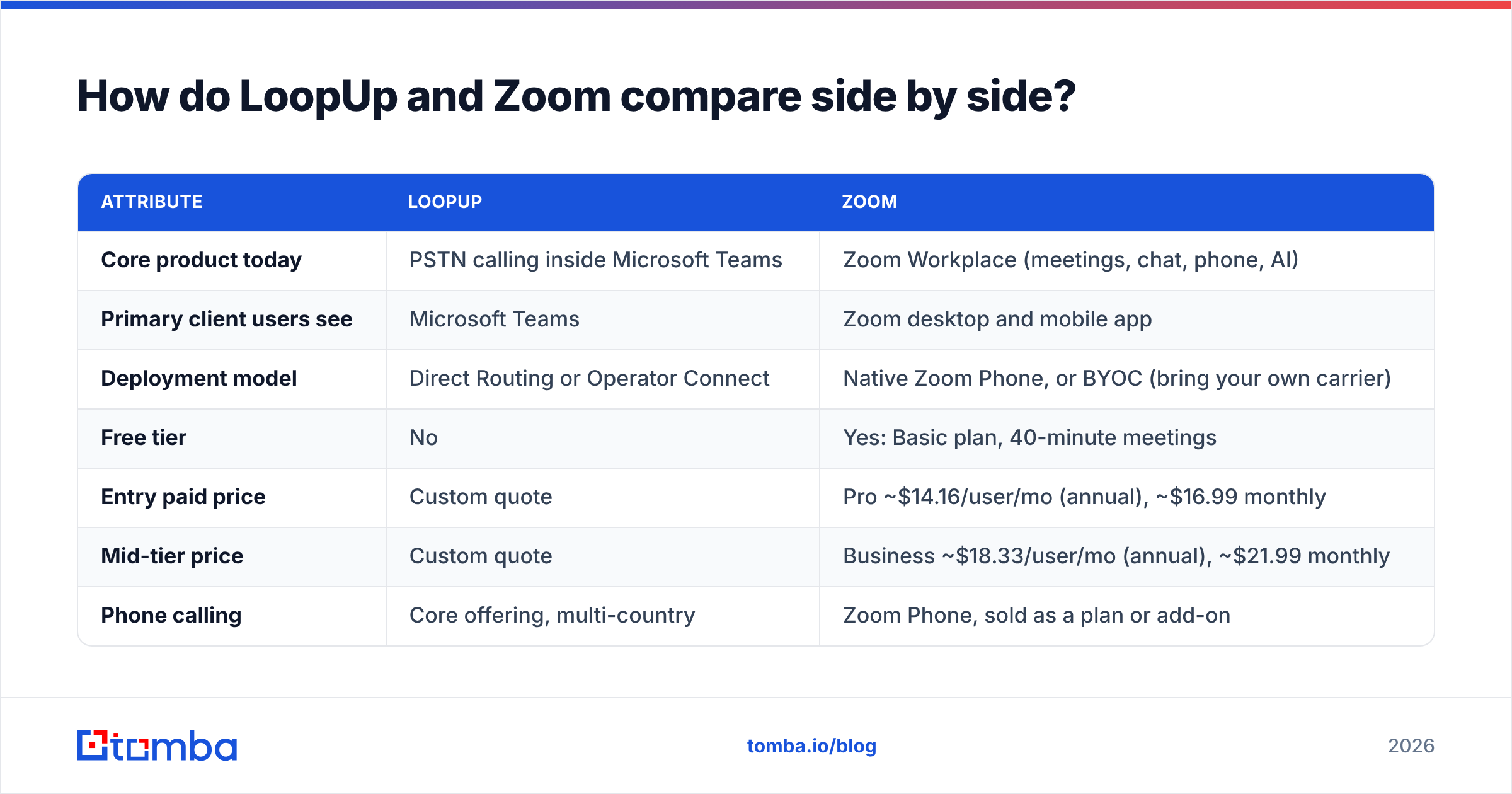
This table covers the attributes that usually decide the purchase. Zoom prices come from its public pricing page. LoopUp doesn't publish list prices and quotes per deployment.
| Attribute | LoopUp | Zoom |
|---|---|---|
| Core product today | PSTN calling inside Microsoft Teams | Zoom Workplace (meetings, chat, phone, AI) |
| Primary client users see | Microsoft Teams | Zoom desktop and mobile app |
| Deployment model | Direct Routing or Operator Connect | Native Zoom Phone, or BYOC (bring your own carrier) |
| Free tier | No | Yes: Basic plan, 40-minute meetings |
| Entry paid price | Custom quote | Pro ~$14.16/user/mo (annual), ~$16.99 monthly |
| Mid-tier price | Custom quote | Business ~$18.33/user/mo (annual), ~$21.99 monthly |
| Phone calling | Core offering, multi-country | Zoom Phone, sold as a plan or add-on |
| Video meetings | Uses Teams meetings | Native, category-defining |
| Contact center | Via partners (e.g., Luware) | Zoom Contact Center (native) |
| Conversation intelligence | Via Teams and Copilot ecosystem | Zoom Revenue Accelerator |
| Best-fit buyer | Multinational enterprise on Microsoft 365 | SMB to enterprise wanting one vendor |
| Buying motion | Sales-led, solution design | Self-serve up to enterprise sales |
Two things in this table are easy to misread:
- "Custom quote" isn't a red flag. Enterprise telephony pricing depends on countries, number porting, minutes, and emergency-calling requirements. Nobody can quote a 20-country Teams rollout from a pricing page. Zoom also moves to custom quotes at the Enterprise tier.
- Zoom's per-seat price and your Zoom Phone cost are two separate numbers. A Pro or Business meetings license doesn't include PSTN calling. Budget for Zoom Phone separately unless you buy a bundle that includes it.
Is LoopUp better than Zoom for Microsoft Teams shops?#
For most Teams-standardized organizations, yes.
If your company already pays for Microsoft 365 and everyone lives in Teams, adding Zoom Phone means your reps run two communication clients. They take calls in one app and chat in another, and presence status drifts between them. IT supports two security reviews, two admin consoles, and two sets of compliance recordings.
LoopUp avoids that. Numbers show up in the Teams dial pad, calls land in Teams, and recording and compliance run through the Microsoft stack you've already approved. Microsoft's Direct Routing documentation explains the architecture if you want to see how the connection works.
Where LoopUp specifically helps:
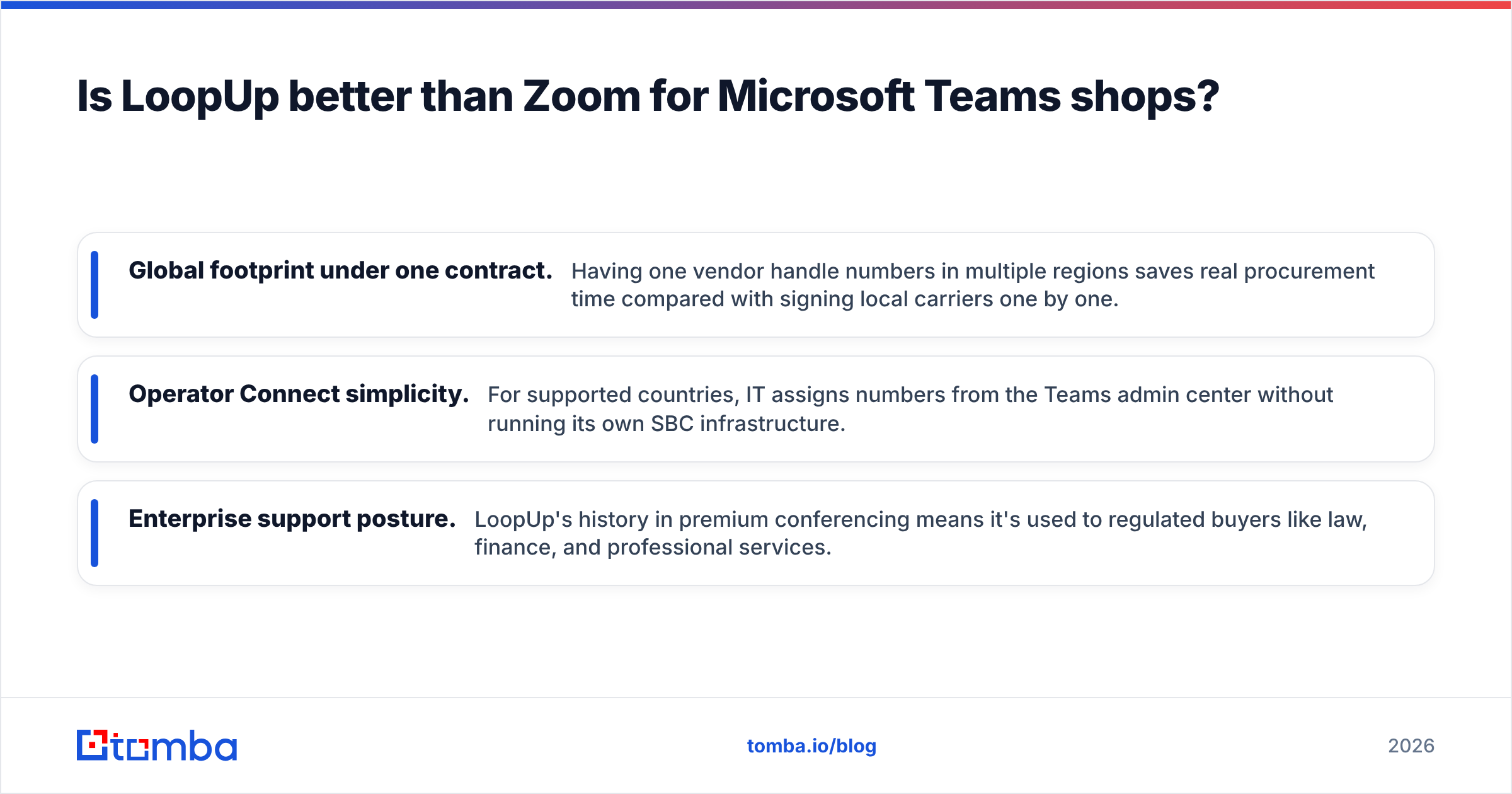
- Global footprint under one contract. Having one vendor handle numbers in multiple regions saves real procurement time compared with signing local carriers one by one.
- Operator Connect simplicity. For supported countries, IT assigns numbers from the Teams admin center without running its own SBC infrastructure.
- Enterprise support posture. LoopUp's history in premium conferencing means it's used to regulated buyers like law, finance, and professional services.
Where it's weaker: there's no native video product outside Teams, there's no self-serve trial, and small teams may find the sales-led process heavy for 10 seats.
Is Zoom better than LoopUp for sales teams?#
For teams that aren't committed to Teams, Zoom is usually the faster and more complete choice.
A 15-person SDR team at a SaaS startup doesn't want a solution-design call about session border controllers. It wants to buy seats, get numbers, connect Salesforce or HubSpot, and start dialing this afternoon. Zoom supports that.
Zoom's advantages for revenue teams:
- One app for the whole call lifecycle. Cold call on Zoom Phone, book the demo, run it on Zoom Meetings, and review the recording in Revenue Accelerator.
- Self-serve onboarding. You can go from zero to live numbers without a procurement cycle.
- Mature CRM connectors. Click-to-dial, automatic call logging, and recording links in the contact record are all standard.
- Webinars and events for pipeline generation, in the same vendor.
The trade-off is that if your company later standardizes on Microsoft 365, you'll end up running both Teams and Zoom, which is exactly the problem LoopUp is built to fix.

How should you choose between LoopUp and Zoom?#
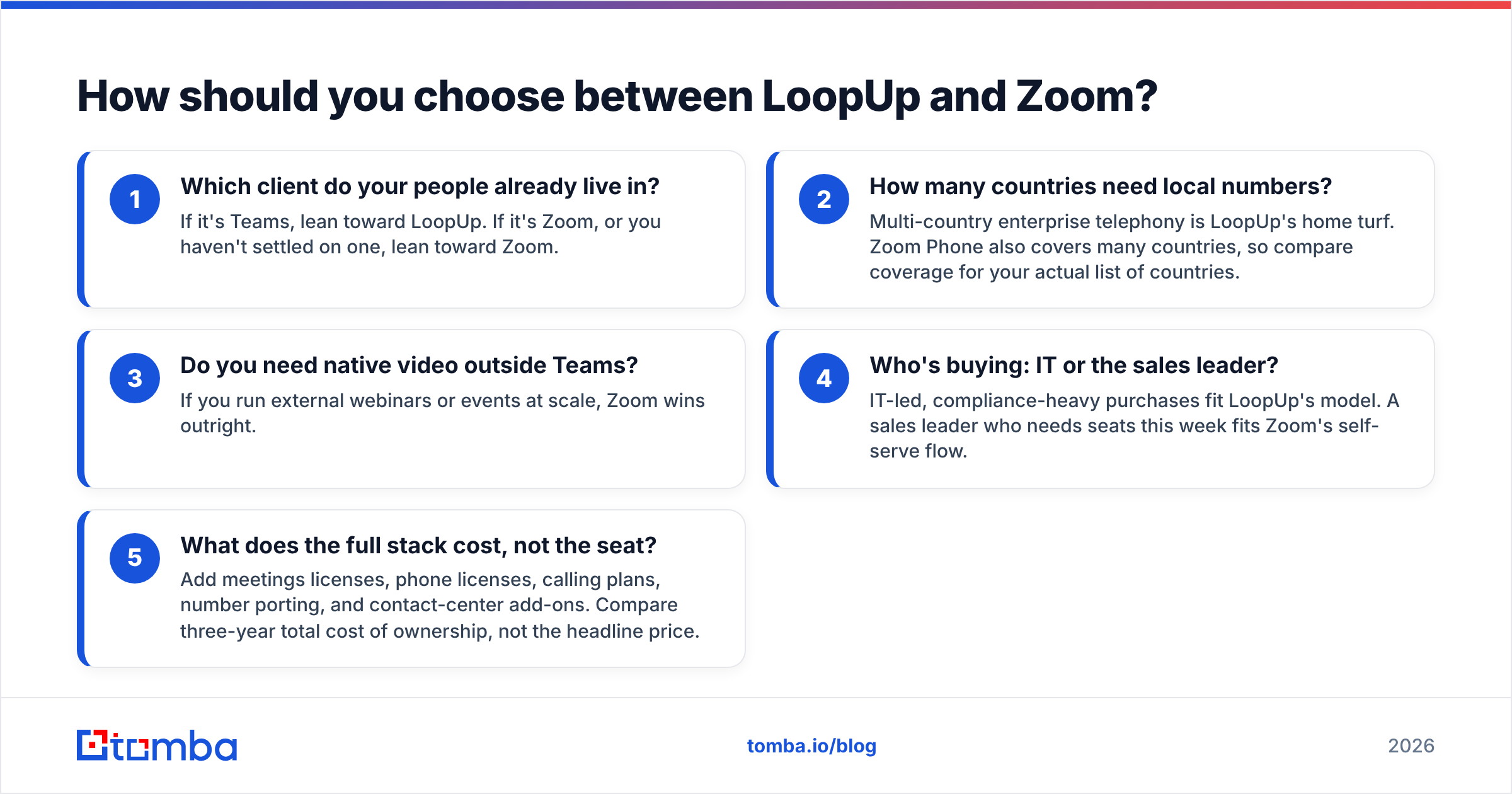
Skip the feature lists and answer these five questions in order:
- Which client do your people already live in? If it's Teams, lean toward LoopUp. If it's Zoom, or you haven't settled on one, lean toward Zoom.
- How many countries need local numbers? Multi-country enterprise telephony is LoopUp's home turf. Zoom Phone also covers many countries, so compare coverage for your actual list of countries.
- Do you need native video outside Teams? If you run external webinars or events at scale, Zoom wins outright.
- Who's buying: IT or the sales leader? IT-led, compliance-heavy purchases fit LoopUp's model. A sales leader who needs seats this week fits Zoom's self-serve flow.
- What does the full stack cost, not the seat? Add meetings licenses, phone licenses, calling plans, number porting, and contact-center add-ons. Compare three-year total cost of ownership, not the headline price.
Review sites such as G2 are useful for checking real admin experiences. Filter reviews by company size and region, since telephony quality varies a lot by geography.
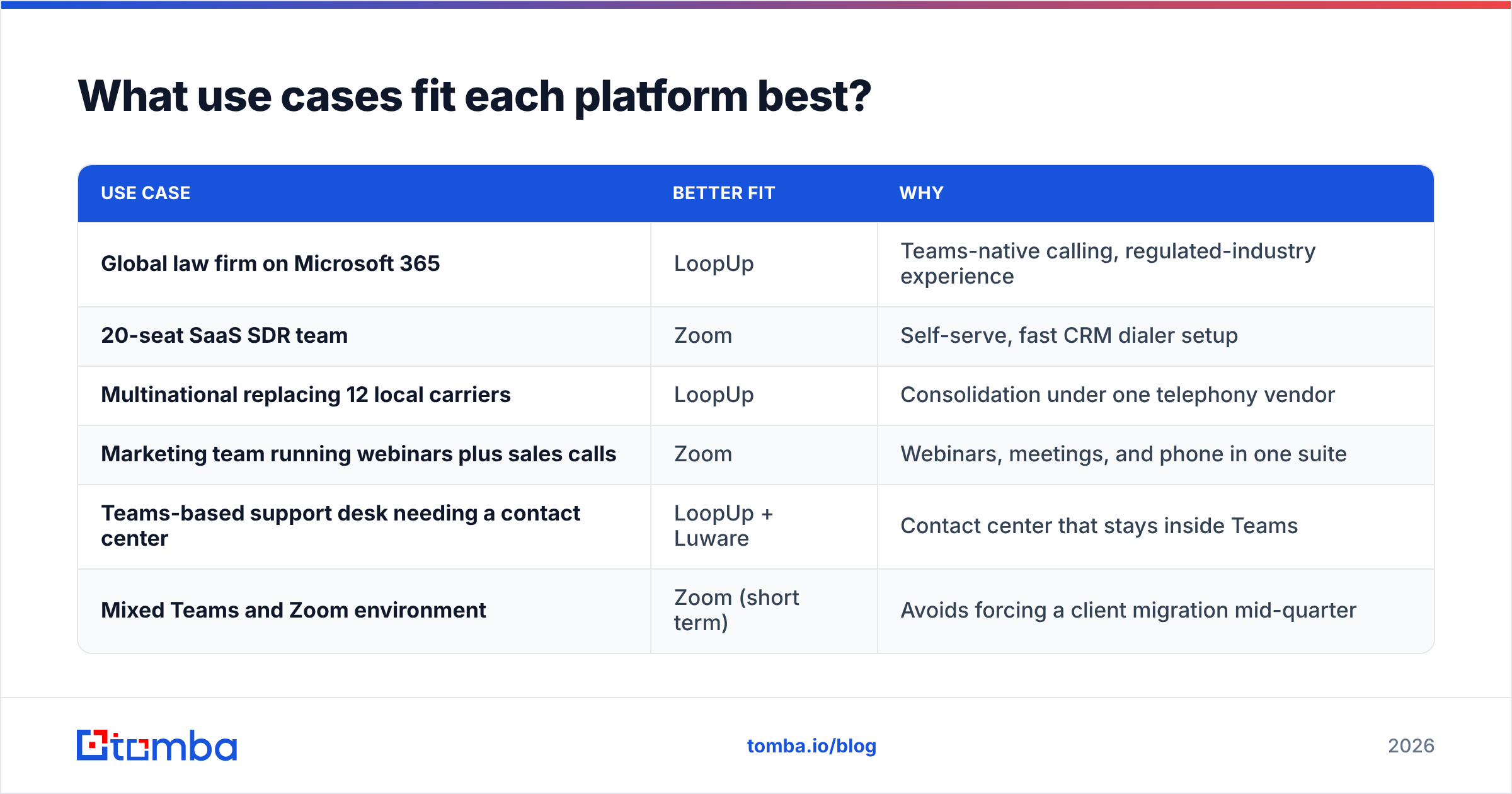
What use cases fit each platform best?#
| Use case | Better fit | Why |
|---|---|---|
| Global law firm on Microsoft 365 | LoopUp | Teams-native calling, regulated-industry experience |
| 20-seat SaaS SDR team | Zoom | Self-serve, fast CRM dialer setup |
| Multinational replacing 12 local carriers | LoopUp | Consolidation under one telephony vendor |
| Marketing team running webinars plus sales calls | Zoom | Webinars, meetings, and phone in one suite |
| Teams-based support desk needing a contact center | LoopUp + Luware | Contact center that stays inside Teams |
| Mixed Teams and Zoom environment | Zoom (short term) | Avoids forcing a client migration mid-quarter |
Does your calling platform actually affect connect rates?#
Less than vendors suggest. The platform affects call quality, caller-ID presentation, local-presence numbers, and how much time reps lose to clunky workflows. Those matter, but they're second-order effects.
The first-order drivers of connect rate are:
- Whether the number is correct. Dialing a switchboard, a disconnected line, or a former employee's direct dial wastes the attempt, regardless of platform.
- Whether the number belongs to the right person. Direct dials and mobiles connect far better than HQ main lines.
- Whether the number is reachable and not flagged. Line-type and validity checks catch dead numbers before your reps burn time on them.
This is why teams that switch from one UCaaS vendor to another often see no change in pipeline. The dialer changed, but the list didn't. Before you blame LoopUp or Zoom for low connect rates, audit your data. A phone finder can source direct numbers for your target accounts, and a phone validator can remove invalid or mistyped lines before they reach a sequence.
Email works the same way. Most outbound motions pair calls with email touches, and bounced emails hurt sender reputation across the whole domain. If your cadence mixes channels, verify addresses with an email verifier before they go into the sequence.
What are the pros and cons of each?#
LoopUp: pros
- Calls land in Microsoft Teams, so there's no second client
- Strong multi-country telephony consolidation
- Operator Connect makes provisioning simpler in supported markets
- Experienced with regulated, enterprise buyers
LoopUp: cons
- No public pricing or self-serve trial
- Only makes sense if you're committed to Teams
- Video and webinar capabilities depend on Microsoft
Zoom: pros
- Free tier and transparent per-seat pricing
- Best-in-class meetings, plus phone, webinars, and contact center in one vendor
- Mature Salesforce and HubSpot integrations
- Fast to deploy for small and mid-sized teams
Zoom: cons
- Phone is a separate line item from meetings licenses
- Adds a second client if your company runs on Teams
- Costs can grow as you add AI, webinar, and contact-center add-ons
So, LoopUp vs Zoom: which should you pick?#
Pick LoopUp if you're a Microsoft 365 organization, especially a multinational, and you want enterprise-grade PSTN calling inside Teams without running a second communications app. It's a narrow product, but it does that one job well.
Pick Zoom if you want one vendor for meetings, phone, and webinars, you value self-serve pricing, or you're a sales-led team that needs dialing live this week rather than next quarter.
Both are credible. The bigger risk is assuming that a new calling platform will fix a pipeline problem that's really a data problem.
Ready to make every dial count?#
Whichever platform you choose, your reps can only connect with people whose contact details are correct. The Tomba Email Finder finds verified professional email addresses by name, domain, or company, so your call-plus-email sequences reach real decision-makers instead of bouncing. You can start on the free tier with 25 searches a month and move to a paid plan from $49/mo when your team scales. See Tomba pricing for plan details.
Related guides#
// get started
Find, verify and enrich your first contacts today
Start on the free plan with 25 searches a month, then scale when your team is ready.
Free plan · No credit card required · GDPR & CCPA
// about the author