Lusha vs QuickEnrich: Pricing, Data Quality and Our Pick for 2026
Lusha has the brand and the CRM integrations. QuickEnrich offers cheaper credits and free mobile numbers. Here is how the two compare on cost per contact, API access and data quality, and which one fits your team.
- Lusha is the safer pick if your reps live in Salesforce or HubSpot and want a polished Chrome extension, intent signals and team governance. You pay for that polish, especially on phone reveals.
- QuickEnrich is the cheaper, API-first option. It advertises thousands of contact credits on a $29/mo entry plan, mobile numbers bundled at no extra credit cost where available, and native hooks into Clay and MCP workflows.
- On cost per contact, QuickEnrich wins easily when you enrich in bulk. Lusha's 5-credit phone reveal is the line item that drives its bills up.
- On coverage and accuracy, neither vendor's own claims settle anything. Run the same 50–100 contacts from your ICP through both before you sign anything annual.
- If you mostly need verified work emails found by name and domain, a dedicated email finder like Tomba ($49/mo Starter, 25 free searches/mo) can cost less than either one.
What are Lusha and QuickEnrich?#
These two tools look alike on a feature checklist, but they're built for different buyers.
Lusha is one of the best-known B2B contact data platforms. It began as a Chrome extension for LinkedIn and grew into a full prospecting suite: a searchable database, list building, CRM enrichment, buying-intent signals, job-change alerts and AI-assisted recommendations. Its buyers are usually sales teams of 5 to 200 reps who want one vendor for contact data plus light prospecting workflow.
QuickEnrich is a younger, leaner B2B email and mobile finder. It says it has a proprietary database of over 130 million contacts, "double-verified" emails stamped with a verification date, and broader coverage from sources beyond LinkedIn. It's clearly aimed at technical outbound operators: people who build waterfalls in Clay, call enrichment from scripts, or plug data providers into AI agents over MCP.
In short, Lusha is a prospecting platform that happens to sell contact data, and QuickEnrich is a contact-data API that also has a UI.
How do Lusha and QuickEnrich compare side by side?#
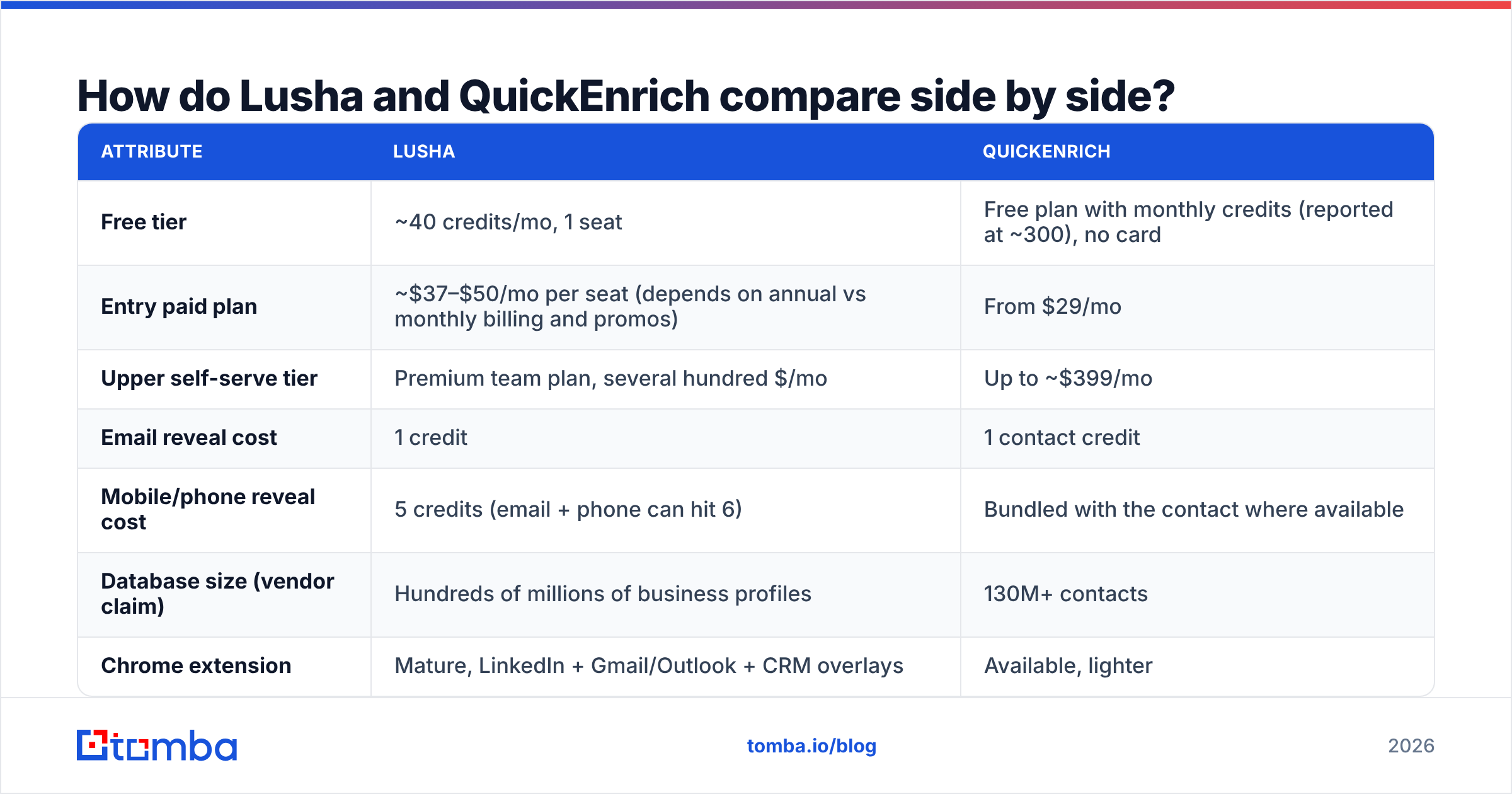
Here's how the two stack up on the things that change your monthly bill and your reply rates. Pricing reflects publicly listed plans at the time of writing. Both vendors run promotions and change credit rules often, so check their pricing pages before you buy.
| Attribute | Lusha | QuickEnrich |
|---|---|---|
| Free tier | ~40 credits/mo, 1 seat | Free plan with monthly credits (reported at ~300), no card |
| Entry paid plan | ~$37–$50/mo per seat (depends on annual vs monthly billing and promos) | From $29/mo |
| Upper self-serve tier | Premium team plan, several hundred $/mo | Up to ~$399/mo |
| Email reveal cost | 1 credit | 1 contact credit |
| Mobile/phone reveal cost | 5 credits (email + phone can hit 6) | Bundled with the contact where available |
| Database size (vendor claim) | Hundreds of millions of business profiles | 130M+ contacts |
| Chrome extension | Mature, LinkedIn + Gmail/Outlook + CRM overlays | Available, lighter |
| API access | Higher tiers; API calls consume credits | API-first, fuller access on higher plans |
| Native CRM integrations | Salesforce, HubSpot, Pipedrive, Outreach, Salesloft and more | CSV import, Clay, API, MCP |
| Intent/signals | Yes (job changes, intent, recommendations) | No meaningful signals layer |
| Credit rollover | Monthly plans roll over up to a cap; annual plans reset | Check current terms |
| Compliance posture | GDPR/CCPA programs, SOC 2, ISO 27001 | Smaller vendor; ask for documentation |
| Best for | CRM-centric sales teams that want governance | Bulk enrichment, Clay waterfalls, API builders |

The row that matters most for most buyers is mobile/phone reveal cost. If your motion is cold calling plus email, Lusha's 5-credit phone reveal turns a plan that looks cheap into an expensive one. If your motion is email-first, the gap is much smaller.
How does each tool actually find and verify a contact?#
Before you compare accuracy claims, it helps to know where the data comes from. Every contact data vendor runs some version of the same pipeline. Quality depends on how seriously each step is taken:
- Source collection: crawling public web pages, professional profiles, company sites, and (in Lusha's case) a large community-contributed data network from users who share their address books. QuickEnrich says it pulls from a wider set of channels than LinkedIn alone.
- Pattern inference: working out a company's email format (
first.last@,flast@) and generating candidate addresses for people the vendor hasn't directly observed. - Verification: SMTP-level checks, MX lookups and catch-all detection to decide whether a mailbox exists. QuickEnrich puts a verification date stamp on each result. Lusha relies on its internal verification plus ongoing refresh cycles.
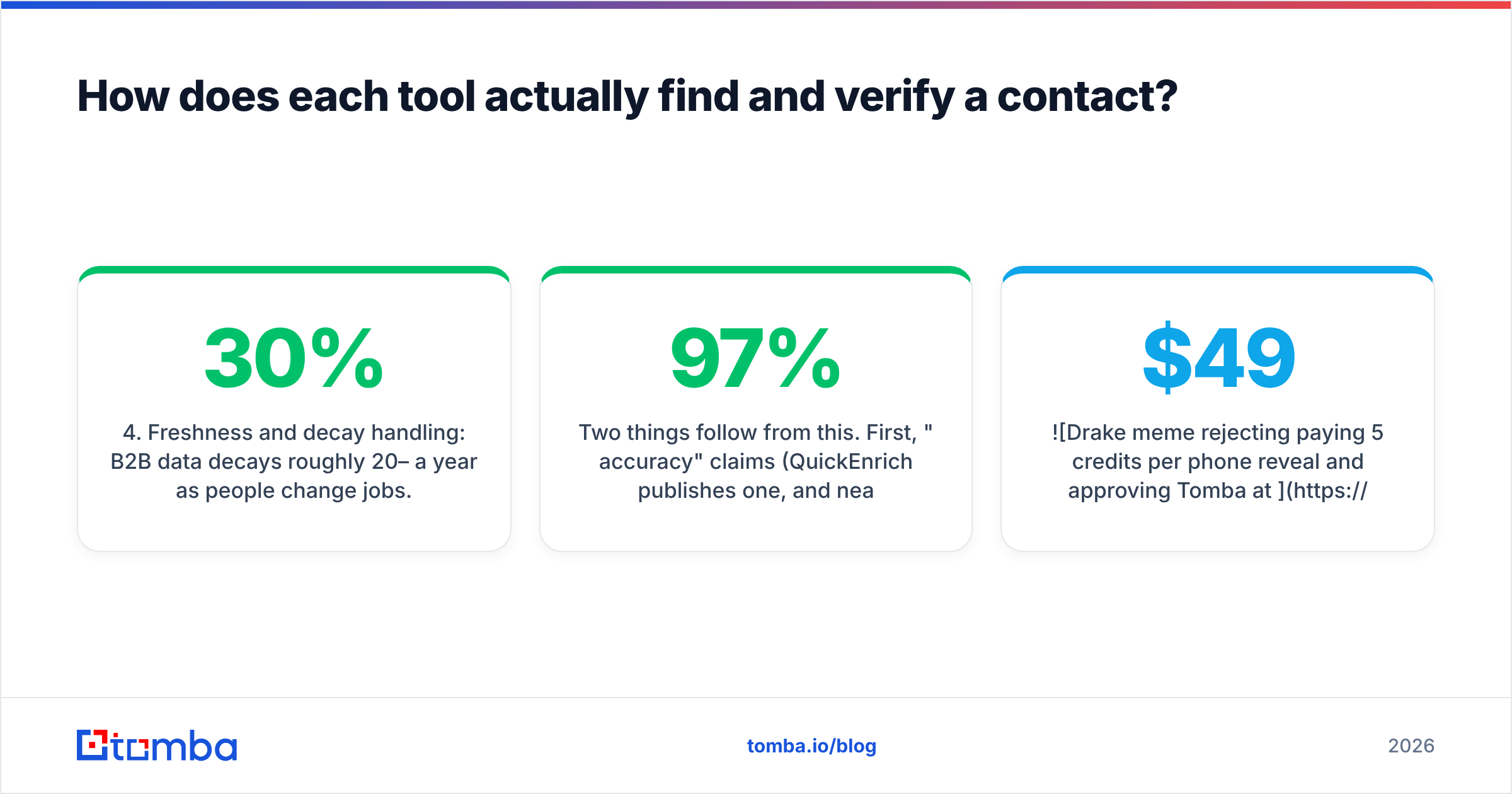
- Freshness and decay handling: B2B data decays roughly 20–30% a year as people change jobs. Lusha's job-change alerts are a direct response to this. Smaller vendors depend on re-verifying at query time.
- Delivery: through an extension, a web app, CRM sync or an API. This step determines your workflow cost, and it's where the two products differ most.
Two things follow from this. First, "97% accuracy" claims (QuickEnrich publishes one, and nearly every vendor in the category does) usually describe verified results only, not how many contacts get a result at all. Second, catch-all domains are where both tools struggle most. If your ICP is mid-market companies running Microsoft 365 or Google Workspace with catch-all settings, expect a bigger share of "risky" or "unknown" results from either vendor.


Is Lusha better than QuickEnrich for sales teams?#
For a traditional sales org, often yes, and the reason is mostly not the data itself.
Where Lusha clearly wins:
- CRM-native workflow. Reps can enrich a lead in Salesforce or HubSpot with one click, push contacts from LinkedIn into a sequence, and keep records updated automatically. That cuts down on manual exporting, and less exporting means fewer duplicate records and fewer data-hygiene problems.
- Admin controls. Seat management, credit allocation per user, usage reporting and SSO on higher tiers. When you have 30 reps, you need someone to see who burned through 2,000 phone credits in a week.
- Signals. Job-change alerts and intent data give reps a reason to reach out, not just a contact to reach. QuickEnrich doesn't try to compete here.
- Track record. Lusha has thousands of reviews on G2, mature security certifications and a procurement-friendly paper trail. That counts if legal and IT have to sign off.
Where Lusha frustrates buyers:
- Credit math. One credit per email is fair. Five per phone number adds up fast. A rep who reveals 20 mobiles a day burns 100 credits a day, which wipes out an entry-level plan in about a week.
- Annual plan resets. On annual billing, unused credits reset at the end of the cycle instead of rolling over. Model your real usage before you commit.
- EMEA and APAC coverage. Like most US-centric providers, Lusha's mobile coverage outside North America varies a lot by country.
If your sales leader's main question is "how do I give 25 reps compliant, CRM-synced contact data with spend controls?", Lusha answers it and QuickEnrich mostly doesn't.
Is QuickEnrich better than Lusha for outbound operators?#
For lean outbound teams, agencies and growth engineers, QuickEnrich is often the better economic choice.
Where QuickEnrich clearly wins:
- Price per enriched contact. An entry plan in the $29/mo range with thousands of contact credits works out to a fraction of a cent to a few cents per contact. Lusha's per-credit cost is far higher, especially once phone reveals are involved.
- Mobiles without the surcharge. QuickEnrich returns mobile numbers alongside emails where it has them, without a separate multiplier. For SDR teams that call and email, this is the biggest single difference between the two.
- API-first design. Public API docs, MCP server support and native Clay compatibility make it easy to slot into a waterfall: try provider A, fall back to B, verify with C. If you're building AI SDR agents or automated list refreshes, this matters more than a pretty extension.
- Low-friction trial. A free plan with no credit card required lets you test on real data in an afternoon.
Where QuickEnrich falls short:
- Thin workflow layer. There are no intent signals, no job-change alerts and no deep native CRM sync. You'll be moving CSVs or writing integrations.
- Smaller vendor risk. Less public review history, fewer published certifications, and less certainty about long-term pricing. Ask for DPA and security documentation before sending it large volumes of EU personal data.
- Coverage claims are self-reported. QuickEnrich publishes comparison pages showing it ahead of competitors. That's normal marketing, but it isn't independent evidence.
How much will each tool really cost you?#
List prices are misleading in this category. The useful number is cost per usable contact: a verified email that doesn't bounce, or a mobile that connects to the right person.
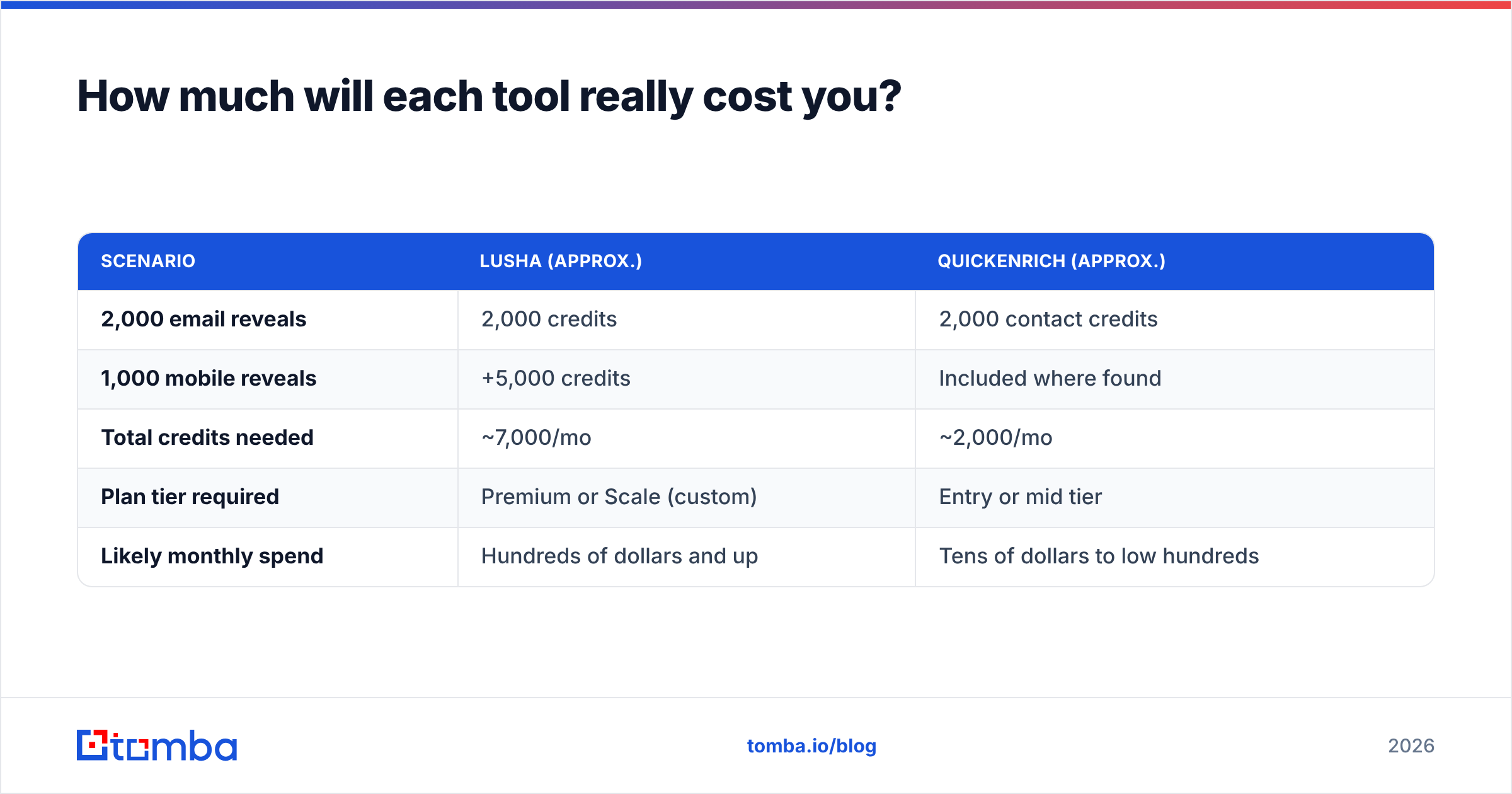
Here's a rough monthly model for an SDR team enriching 2,000 contacts, half of which also need a mobile number:
| Scenario | Lusha (approx.) | QuickEnrich (approx.) |
|---|---|---|
| 2,000 email reveals | 2,000 credits | 2,000 contact credits |
| 1,000 mobile reveals | +5,000 credits | Included where found |
| Total credits needed | ~7,000/mo | ~2,000/mo |
| Plan tier required | Premium or Scale (custom) | Entry or mid tier |
| Likely monthly spend | Hundreds of dollars and up | Tens of dollars to low hundreds |
Treat these as directional, since promotions, seat minimums and annual discounts move both numbers. The pattern still holds: once phones are involved, Lusha costs several times more per contact. Whether that premium is worth it depends on how much you value its CRM workflow, signals and compliance posture.
There's also a third path many teams skip. If 80% of your outreach is email, you may not need a phone-heavy database at all. A focused email finder that searches by name, company or domain, combined with an email verifier to clean the list before sending, often covers the job at a lower and more predictable cost. Compare the Tomba pricing tiers ($49 Starter, $99 Growth, $249 Pro) against your real monthly volume before you commit to a platform you'll only half use.
How should you test Lusha vs QuickEnrich before buying?#
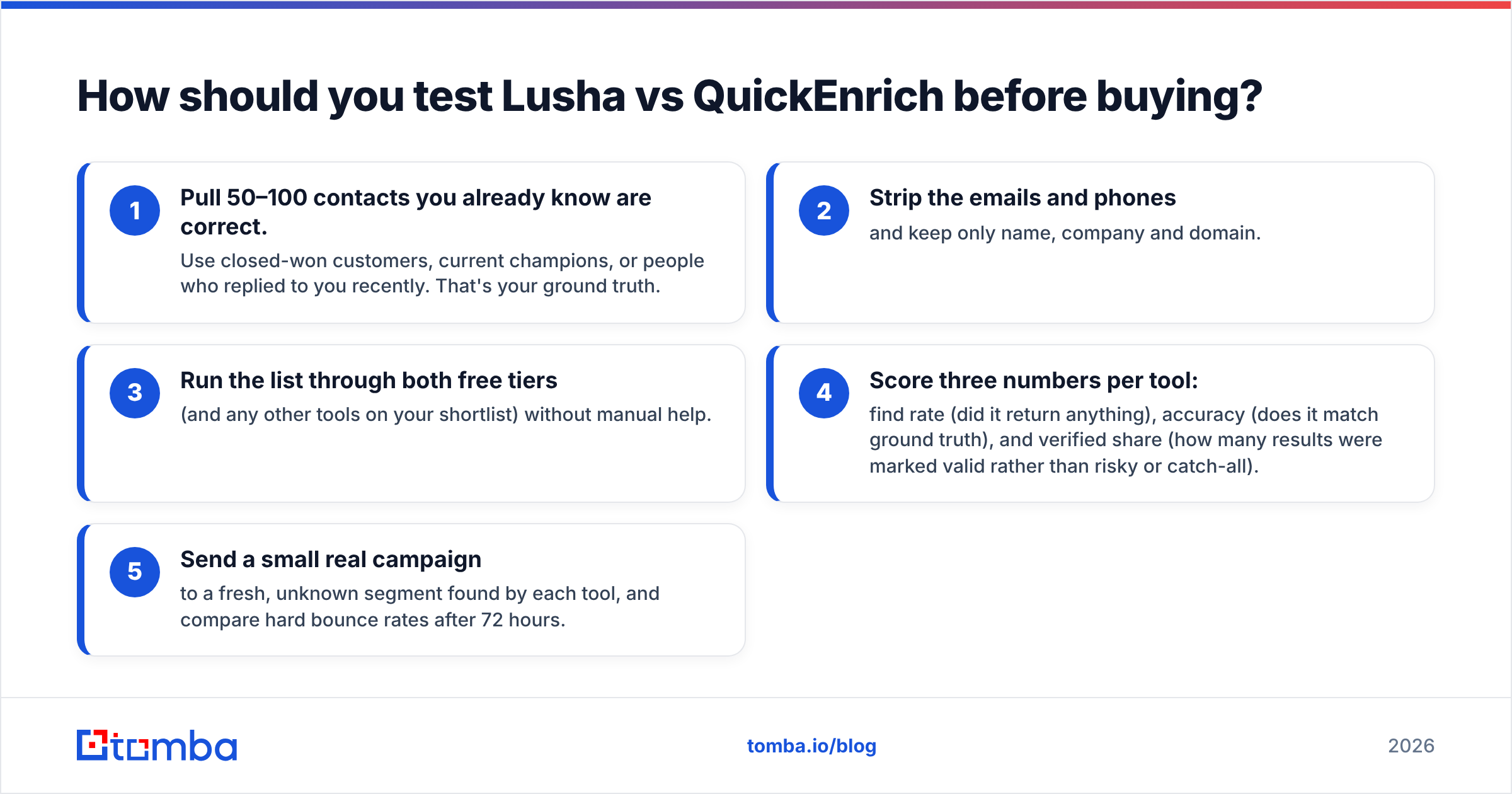
Don't trust either vendor's accuracy page, or ours. Run a controlled bake-off:
- Pull 50–100 contacts you already know are correct. Use closed-won customers, current champions, or people who replied to you recently. That's your ground truth.
- Strip the emails and phones and keep only name, company and domain.
- Run the list through both free tiers (and any other tools on your shortlist) without manual help.
- Score three numbers per tool: find rate (did it return anything), accuracy (does it match ground truth), and verified share (how many results were marked valid rather than risky or catch-all).
- Send a small real campaign to a fresh, unknown segment found by each tool, and compare hard bounce rates after 72 hours.
This takes about an hour and tells you more than any review article, this one included.

Which one should you choose?#
Pick based on your workflow, not on database-size claims.
Choose Lusha if:
- Your reps work inside Salesforce or HubSpot and need one-click enrichment there
- You need admin controls, credit allocation per rep, and security documentation for procurement
- Job-change alerts and intent signals are part of how you prioritize accounts
- Budget per seat is less of a concern than adoption and governance
Choose QuickEnrich if:
- You enrich in bulk through Clay, scripts, or AI agents over MCP
- You need mobile numbers and don't want a 5x multiplier on every phone reveal
- You're a small team or agency where cost per contact decides everything
- You're comfortable doing your own data hygiene and CRM syncing
Consider neither (or both, plus a specialist) if:
- Your outreach is mostly email and you just need accurate, verified work addresses
- You want a predictable monthly cost without phone-credit surprises
- You need to find emails by domain, author or LinkedIn URL inside spreadsheets, a browser extension or your own code via the Tomba API
Many mature outbound teams don't pick just one. They use a cheap, API-friendly source first, fall back to a second provider for misses, and verify everything before sending. Lusha and QuickEnrich can both fill a slot in that kind of stack. They just fill different ones.
What's the bottom line on Lusha vs QuickEnrich?#
Lusha is the more complete sales platform: polished, integrated, well-governed and priced accordingly, especially for phone data. QuickEnrich is the sharper tool for cost-conscious, technical outbound teams that care about cost per contact and API access more than dashboards. Neither one guarantees accuracy on your specific ICP, so test with your own known-good contacts before you sign anything annual.
If your shortlist is really about finding and verifying professional email addresses, and phone data is a nice-to-have rather than core, take a look at the Tomba Email Finder. You can find work emails by name, company or domain, verify them before they hit your sequencer, and use the same data in Google Sheets, a Chrome extension, or the API. Start with 25 free searches a month and run the same 50-row bake-off described above. If Tomba wins on your data, the Starter plan is $49/mo.
Related guides#
// get started
Find, verify and enrich your first contacts today
Start on the free plan with 25 searches a month, then scale when your team is ready.
Free plan · No credit card required · GDPR & CCPA
// about the author