Lusha vs Spherescout (2026): Person Contacts vs Local Lead Data
Lusha and Spherescout both sell contact data, but they're built for different targets. Lusha finds decision-makers at mid-market and enterprise companies. Spherescout bulk-exports local businesses by category and city. Here's how to pick the right one.
- Lusha is a person-level B2B contact finder. You use it to get the direct email and mobile number of a specific decision-maker, usually from LinkedIn or inside your CRM.
- Spherescout is a local-business lead database. You filter more than 100M businesses by category and location, then export the whole list to CSV or pull it through the API.
- Pricing models differ a lot. Lusha charges per reveal: 1 credit for an email and 5 for a phone number. Spherescout sells a monthly allotment of contacts, starting at $49/mo, with no per-field fees.
- The short answer: pick Lusha to reach named buyers at mid-market and enterprise accounts. Pick Spherescout to sell to SMBs such as dentists, restaurants, agencies or contractors, territory by territory.
- Whichever you choose, check every exported email with a verifier before you send. Neither tool removes that step.
What is the real difference between Lusha and Spherescout?#
Lusha and Spherescout both sell "contact data," but they answer different questions.
Lusha answers "How do I reach this person?" You're looking at the VP of Operations at a 400-person logistics company on LinkedIn. You open the Lusha extension, spend a credit or two, and get her work email and maybe her mobile number. Everything in Lusha's model is organised around a named person at a known company.
Spherescout answers "Who are all the businesses of type X in place Y?" Say you sell scheduling software to physiotherapy clinics in Texas, Ontario and Bavaria. You filter by category and geography, preview what's available, and export thousands of rows with emails, phones, websites, addresses and social links. Here the unit is the business, not the buyer persona.
That one difference drives everything else in this comparison: data coverage, pricing, workflow and the kind of team that gets value from each tool. Ask which of those two questions your pipeline depends on before you compare features.
How do Lusha and Spherescout compare feature by feature?#
Here are the attributes that actually change a buying decision, side by side.
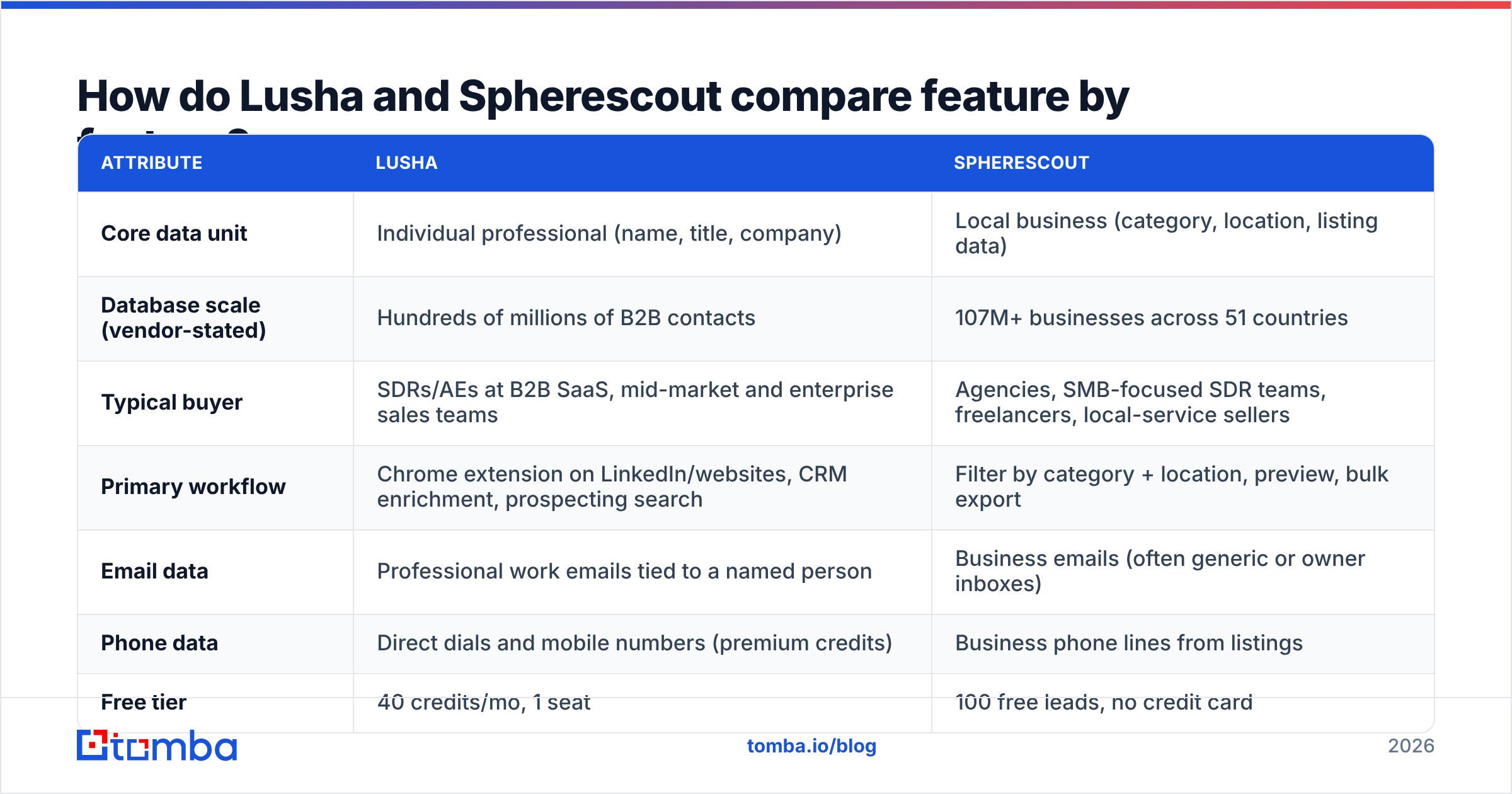
| Attribute | Lusha | Spherescout |
|---|---|---|
| Core data unit | Individual professional (name, title, company) | Local business (category, location, listing data) |
| Database scale (vendor-stated) | Hundreds of millions of B2B contacts | 107M+ businesses across 51 countries |
| Typical buyer | SDRs/AEs at B2B SaaS, mid-market and enterprise sales teams | Agencies, SMB-focused SDR teams, freelancers, local-service sellers |
| Primary workflow | Chrome extension on LinkedIn/websites, CRM enrichment, prospecting search | Filter by category + location, preview, bulk export |
| Email data | Professional work emails tied to a named person | Business emails (often generic or owner inboxes) |
| Phone data | Direct dials and mobile numbers (premium credits) | Business phone lines from listings |
| Free tier | 40 credits/mo, 1 seat | 100 free leads, no credit card |
| Entry paid plan | Starter, about $37–50/mo depending on billing and promos | Starter $49/mo |
| Pricing model | Credits per reveal (email 1, phone 5) | Monthly contact allotment, no per-field fees |
| Export | Limited by credits; CSV and CRM sync | Unlimited searches, CSV export on all plans |
| API | Yes (consumes credits) | REST API plus an agent skill for AI workflows |
| CRM integrations | HubSpot, Salesforce, Pipedrive, Outreach, Salesloft and more | CSV-first, API for custom pipelines |
| Best at | Reaching a specific buyer persona | Mapping an entire local market |
Two things stand out. First, the products barely overlap at the data level. A Lusha lookup on "Joe's Plumbing, Tulsa" will usually come back empty or thin, and a Spherescout search for "Director of RevOps at Series C fintechs" isn't something it's designed to answer. Second, the pricing models reward opposite behaviours. Lusha's model rewards precision: every reveal costs money, so you're careful. Spherescout's model rewards volume: once you're on a plan, a bigger export doesn't cost extra per field.
How does Lusha work, and who is it for?#
Lusha has been around since 2016 and is one of the best-known names in person-level B2B contact data. A typical workflow looks like this:
- Prospect on LinkedIn or a company website. The Chrome extension sits alongside the profile and shows whether Lusha has an email or phone for that person.
- Reveal what you need. An email costs 1 credit. A phone number costs 5. Revealing both can cost up to 6.
- Push to your CRM or sequencer. Native integrations with HubSpot, Salesforce and the major sales engagement platforms mean the contact lands where your reps already work.
- Enrich existing records. Lusha can fill missing fields on accounts and contacts already in your CRM. This is useful when your inbound form only collects a name and work email.
Lusha's strengths are mobile numbers in North America and Western Europe, a smooth extension, and a compliance posture (GDPR and CCPA, ISO-certified security) that procurement teams at bigger companies want to see.
Its weak spots follow from the same model. Phone reveals cost 5x an email, so call-heavy teams burn credits fast. Annual plans don't roll unused credits over. And coverage drops for very small businesses, for regions outside Lusha's core markets, and for roles that aren't active on LinkedIn.
What does Lusha cost in 2026?#
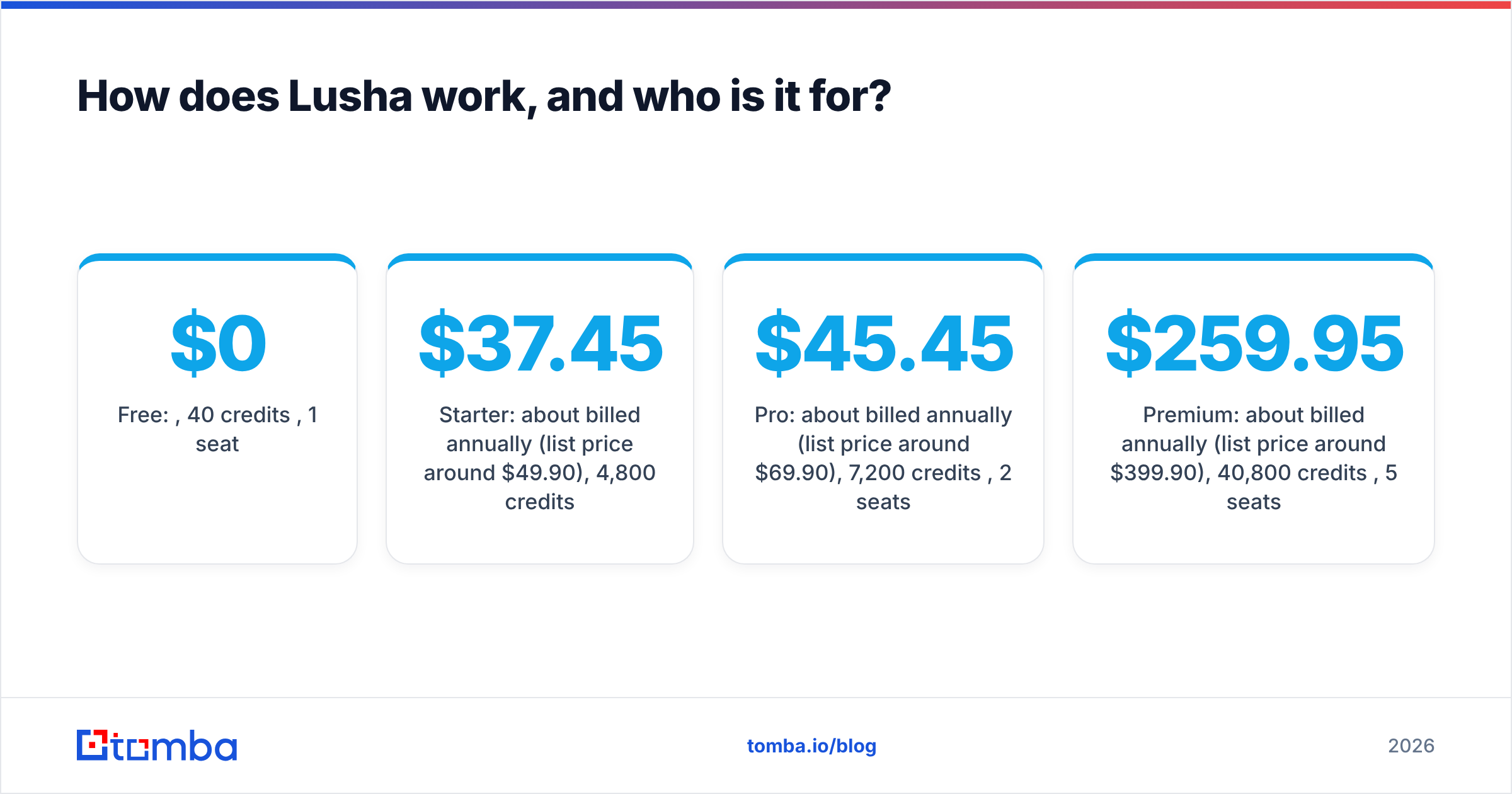
Lusha's 2026 lineup has five tiers. Annual-billing prices are often discounted, so check the live page before you budget.
- Free: $0, 40 credits/month, 1 seat
- Starter: about $37.45/mo billed annually (list price around $49.90), 4,800 credits/year
- Pro: about $45.45/mo billed annually (list price around $69.90), 7,200 credits/year, 2 seats
- Premium: about $259.95/mo billed annually (list price around $399.90), 40,800 credits/year, 5 seats
- Scale: custom
Work out the per-phone cost before you sign. 4,800 Starter credits is 4,800 emails, or only 960 phone numbers. If your playbook leans on cold calling, budget for Pro or Premium.

How does Spherescout work, and who is it for?#
Spherescout takes a very different approach. It's a database of local and small businesses that you query like a map with filters. The vendor-stated coverage is 107M+ businesses across 51 countries and 200M+ business contacts.
The workflow is built for list-building:
- Choose a category and location. For example "veterinary clinics" in "Lyon" or "roofing contractors" in "Florida."
- Narrow with filters. You can require an email, require social profiles, or filter by ratings, which helps you skip dead listings.
- Preview the result set. You see emails, phones and websites before you commit to an export.
- Export. Use CSV in the browser, the REST API, or an agent skill that plugs Spherescout into AI-agent workflows.
Each record bundles email, phone, address, website and social links, and Spherescout doesn't charge per field. That's a real advantage for agencies building client lists, because cost scales with the contact allotment, not with how many columns you want.
The trade-off is depth per person. A Spherescout record describes a business. The email might be the owner's inbox, info@ or contact@, and the phone is usually the main line. That works when the owner is the buyer (most SMBs). It works less well when you need a specific stakeholder at a 2,000-person company.
What does Spherescout cost in 2026?#
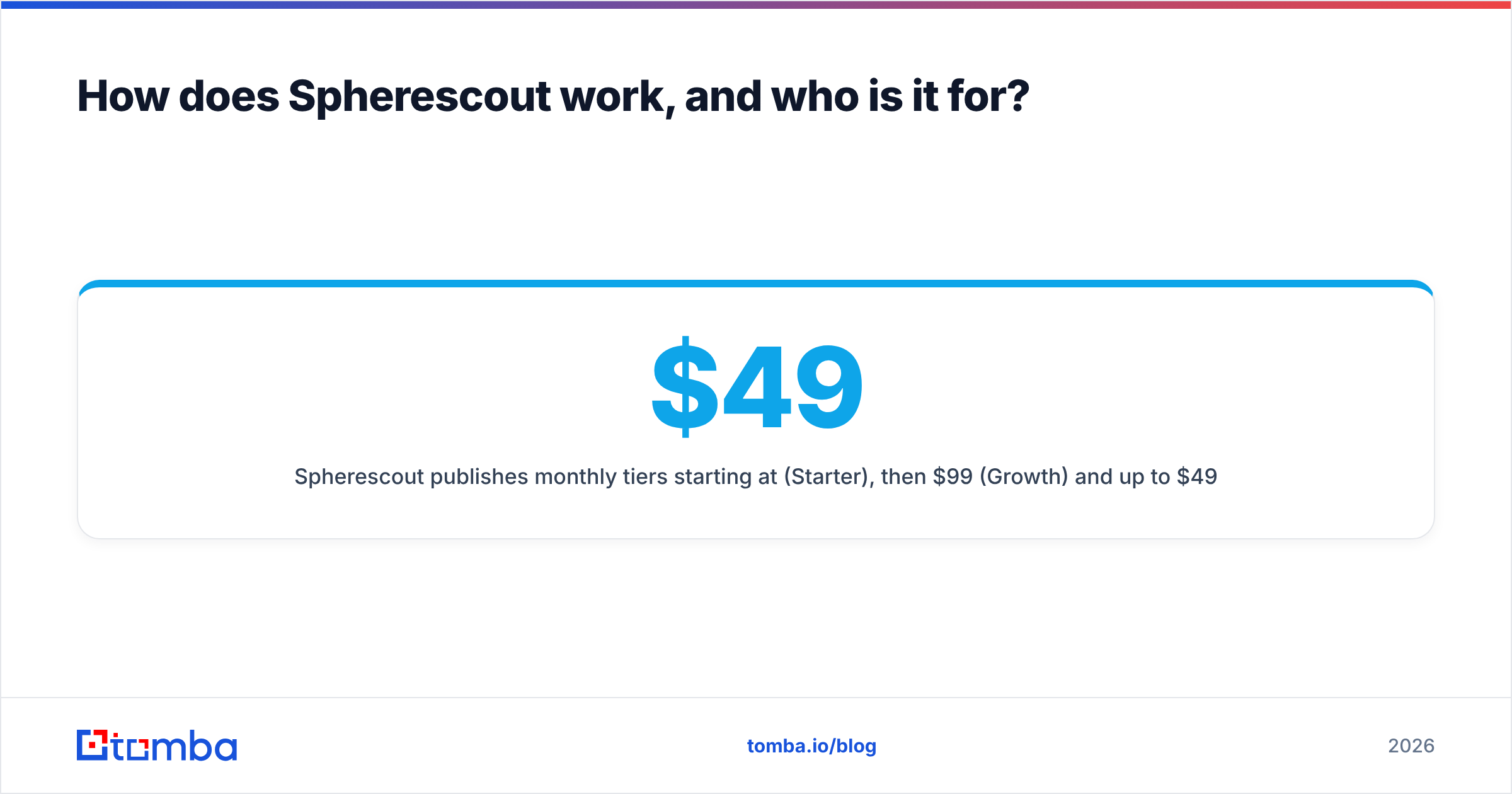
Spherescout publishes monthly tiers starting at $49/mo (Starter), then $99/mo (Growth) and up to $499/mo (Scale). Some versions of the pricing page also list a $199 Pro tier. Contact allotments have shifted over time, roughly 10,000–15,000 contacts on Starter and up to several hundred thousand on Scale, so confirm current numbers on the pricing page. Every plan includes unlimited searches and CSV export, and new accounts get 100 free leads with no credit card.
Per contact, Spherescout is far cheaper than any person-level tool. That's expected, because it's selling a different kind of record. If you compare "cost per contact" across the two tools without adjusting for what a contact is, the comparison will mislead you.
Is Lusha better than Spherescout for B2B outbound?#
It depends on your ideal customer profile. Here's how to decide.
- Your buyer is a named role at a company with 50+ employees. Lusha fits. You need person-level emails and direct dials, and you'll only reach the actual decision-maker with that data.
- Your buyer is the owner of a local or small business. Spherescout fits. The business email and main line usually reach the decision-maker, and you get far more coverage per dollar.
- You're an agency building lists for several clients. Spherescout fits better. Per-plan contact allotments and per-field-free exports suit repeated, category-by-city pulls.
- You live in Salesforce or HubSpot and want enrichment inside the CRM. Lusha fits better because its native integrations are more mature.
- Your motion is phone-first. Look closely at both. Lusha has mobile direct dials but they cost 5 credits each. Spherescout gives you main business lines at no extra cost, which suits SMB calling but won't get you past an enterprise switchboard.
- You're building an AI-agent prospecting workflow. Spherescout's API and agent skill are designed for that. Lusha's API works too but spends credits per call.
Many teams end up using both: Spherescout to map an SMB territory and Lusha to target the handful of larger accounts in that territory. That's a reasonable setup if your market spans both segments.
What do users say about each tool?#
Lusha has a large review footprint on G2. Reviewers consistently praise the extension's ease of use and North American mobile coverage. The recurring complaints are about credits: phone reveals are expensive, annual plans don't roll credits over, and data accuracy varies outside the US and for niche roles.
Spherescout is newer and has a smaller G2 profile, so you have less third-party signal to go on. Most feedback focuses on how fast it builds category-by-location lists and how simple export is. Before you commit to an annual plan, run your own test: use the 100 free leads on a niche you know well and check the results by hand.

How accurate is the data, and how should you verify it?#
Neither vendor can promise a zero bounce rate, and you shouldn't treat any database export as send-ready. The failure modes are different, though:
- Lusha data decays with job changes. People move roles every 2–3 years on average, and a correct email from last year can bounce today. Check freshness on every contact you reveal before sending.
- Spherescout data decays with business churn and generic inboxes. Small businesses close, change domains or stop checking
info@. Bounces matter less than silence here: a valid address that nobody reads.
Whichever tool you use, run exports through an email verifier before they reach your sequencer. Above roughly 2% hard bounces, mailbox providers start downgrading your sender reputation, and recovering takes far longer than verifying the list would have.
If a Spherescout export gives you only a generic inbox for an account you care about, a domain search on the company's website will often turn up named staff emails. That gets you past the info@ problem without paying for a person-level reveal.
Where does Tomba fit next to Lusha and Spherescout?#
Tomba covers a third approach: finding and verifying emails from a domain or a name plus company, with predictable monthly pricing. Here's where it overlaps and where it doesn't:
- Versus Lusha: Tomba focuses on email discovery and verification rather than mobile numbers. It does have a phone finder, but if direct dials are your main need, Lusha's North American mobile coverage is the reference point. If email is your main channel, Tomba's credit math is simpler, with no 5x multiplier hiding in phone reveals.
- Versus Spherescout: Tomba doesn't replace a category-by-city business map. It complements one. Build the list in Spherescout, then use Tomba's domain search to find named people at the accounts worth the effort, and verify everything before sending.
Tomba's plans run from a free tier (25 searches/mo) to Starter at $49/mo, Growth at $99/mo and Pro at $249/mo, with Enterprise on request. Full breakdown on Tomba pricing.
Lusha vs Spherescout: what's the final verdict?#
These tools aren't really direct competitors. They target different layers of B2B data.
- Choose Lusha if you sell to defined personas at established companies, run your process inside a CRM, and are willing to pay per reveal for direct dials.
- Choose Spherescout if you sell to small and local businesses, build large territory lists, or run an agency, and you want flat monthly pricing with no per-field charges.
- Choose neither on its own if you skip verification. Every list needs an email check before it hits your sending domain.
Test each tool against your actual ICP before you commit. Pull 50 Lusha reveals on your top accounts and 100 free Spherescout leads in your best vertical, verify both batches, and compare the cost per valid, reachable decision-maker. That number tells you more than either vendor's database size.
If what you actually need is a named, verified email at every account on your list, whether it came from Spherescout, Lusha or a spreadsheet, try the Tomba Email Finder. Enter a domain or a name plus company, get the professional address with a confidence score, and verify it in the same workflow. Start on the free tier, then move to Starter at $49/mo when you're ready to scale.
Related guides#
// get started
Find, verify and enrich your first contacts today
Start on the free plan with 25 searches a month, then scale when your team is ready.
Free plan · No credit card required · GDPR & CCPA
Get the Tomba newsletter
Product and data updates
// about the author