Mailcheck vs Salesbot (2026): Email Verifier or AI SDR — Which Fits?
Mailcheck cleans your list and SalesBot works it. They do different jobs, so the useful question is which gap in your outbound stack costs you more right now. Here's the breakdown, with pricing.
TL;DR
- Mailcheck and SalesBot aren't competitors in the usual sense. Mailcheck (mailcheck.co) is a low-cost email verification tool. SalesBot (sales-bot.io) is an AI SDR that qualifies prospects and books meetings.
- Mailcheck is cheap and narrow. Published plans run from a free tier (10 checks/month) to about $90/month for 20,000 verifications.
- SalesBot is broader and costs more. It's listed at around €149/month, and you're paying for a bot that runs conversations rather than for data hygiene.
- Neither one fully solves the data problem. Mailcheck verifies emails you already have. An AI SDR is only as good as the contacts you load into it. Most teams still need an email finder upstream.
- Our pick: if you have a list but a bounce problem, start with Mailcheck. If your list is clean and you lack the people to work it, try SalesBot. If you have neither, sort out the data first.
What is the real difference between Mailcheck and Salesbot?#
People search "Mailcheck vs Salesbot" because both show up in lists of cheap outbound tools. They sit at opposite ends of the pipeline, though.
Mailcheck is an email verification service. You give it addresses, and it tells you which ones are valid, invalid, disposable, or risky. Third-party listings describe a real-time API for checking addresses at the point of capture, plus bulk list cleaning. Its job is defensive: it keeps bad addresses out of your sends so your bounce rate stays low and your domain reputation holds up.
SalesBot sells itself as "the AI SDR that books your meetings." According to its official site, it identifies B2B decision-makers, starts conversations, qualifies interest, and hands booked meetings to your team. Its job is offensive. It replaces or adds to the manual work of an early-stage SDR.
So you're not choosing between two versions of the same thing. You're deciding which bottleneck to fix first: data quality or prospecting capacity.
One naming note before going further. "SalesBot" (sales-bot.io) is a different product from SalesRobot (salesrobot.co), a LinkedIn automation tool with per-seat pricing. Review sites mix them up all the time, so check the domain before you trust a pricing quote.
How do Mailcheck and Salesbot compare side by side?#
Here's how they line up on the attributes that matter when you're building an outbound stack. Prices are taken from public listings at the time of writing. Check them on each vendor's site before you buy, because small tools change plans often.
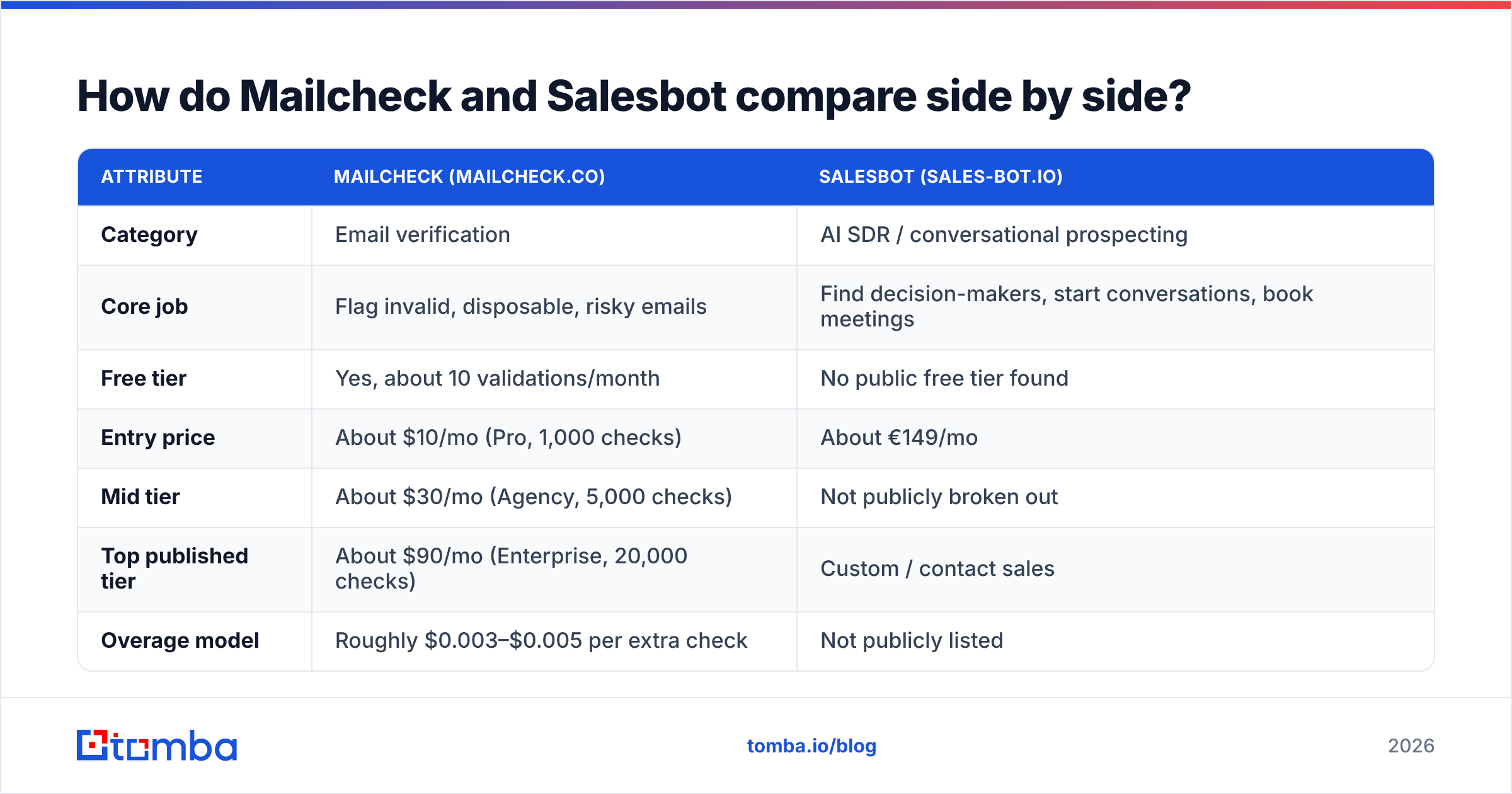
| Attribute | Mailcheck (mailcheck.co) | SalesBot (sales-bot.io) |
|---|---|---|
| Category | Email verification | AI SDR / conversational prospecting |
| Core job | Flag invalid, disposable, risky emails | Find decision-makers, start conversations, book meetings |
| Free tier | Yes, about 10 validations/month | No public free tier found |
| Entry price | About $10/mo (Pro, 1,000 checks) | About €149/mo |
| Mid tier | About $30/mo (Agency, 5,000 checks) | Not publicly broken out |
| Top published tier | About $90/mo (Enterprise, 20,000 checks) | Custom / contact sales |
| Overage model | Roughly $0.003–$0.005 per extra check | Not publicly listed |
| API access | Yes, real-time verification API | Not documented publicly |
| Finds new emails? | No, it verifies existing ones | Partly: it identifies prospects, but data sourcing isn't documented |
| Best for | Cleaning lists before cold sends | Small teams without SDR headcount |
| Main risk | Doesn't help you grow the list | Output quality depends on targeting and data |
The pattern is clear. Mailcheck is a utility you pay for by volume. SalesBot is a workflow you pay for monthly whether or not it produces meetings that month.
What does Mailcheck do well, and where does it fall short?#
Think of Mailcheck as a bouncer at the door of your email list. It doesn't bring anyone new in. It just stops the obvious troublemakers from getting through.
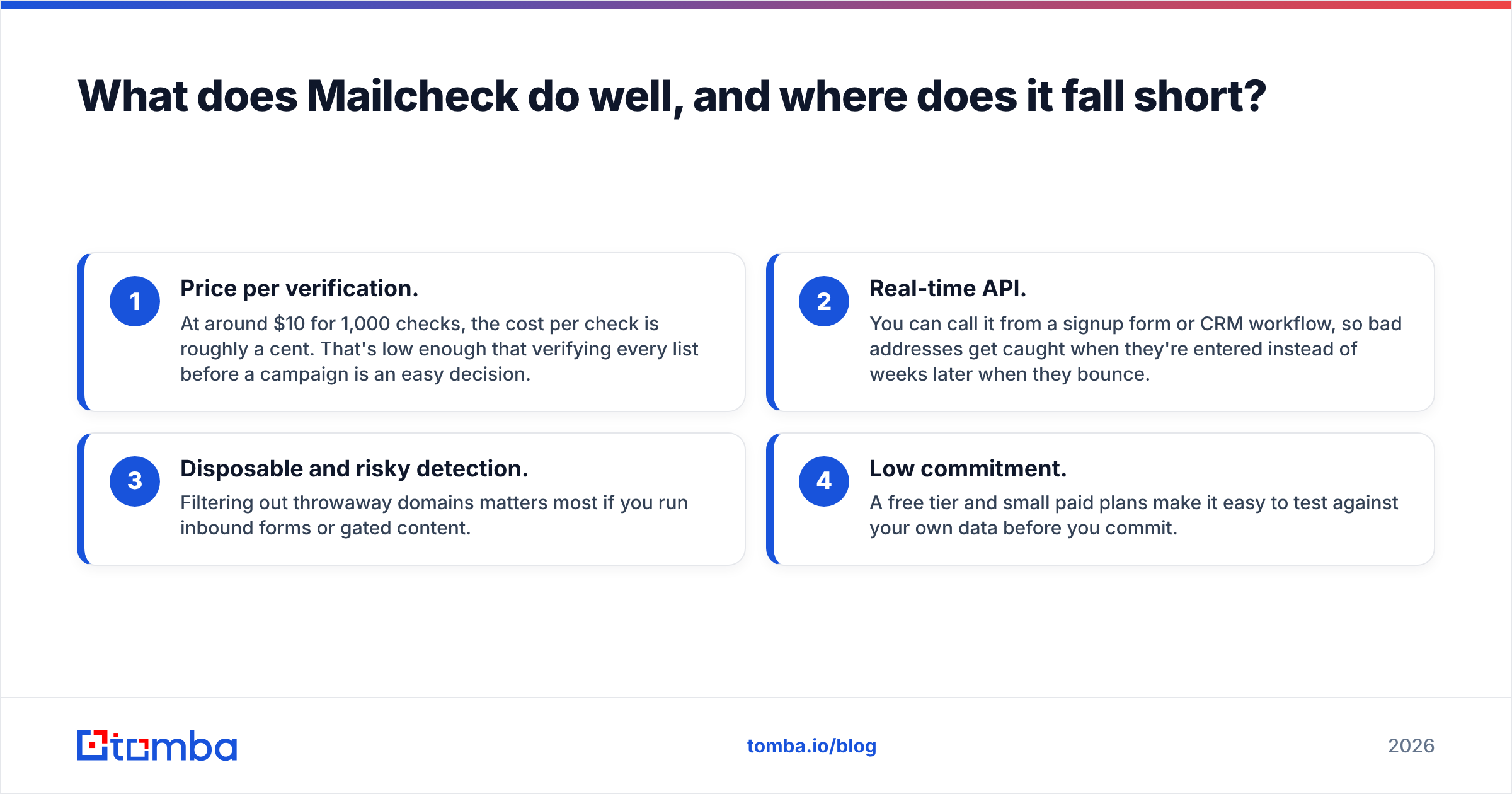
Where it's strong:
- Price per verification. At around $10 for 1,000 checks, the cost per check is roughly a cent. That's low enough that verifying every list before a campaign is an easy decision.
- Real-time API. You can call it from a signup form or CRM workflow, so bad addresses get caught when they're entered instead of weeks later when they bounce.
- Disposable and risky detection. Filtering out throwaway domains matters most if you run inbound forms or gated content.
- Low commitment. A free tier and small paid plans make it easy to test against your own data before you commit.
Where it falls short:
- It can't find anyone. If your problem is "I don't have the CFO's email at 400 target accounts," a verifier does nothing for you.
- Catch-all domains are a gray zone. Many corporate domains accept mail for any address at the SMTP level, so most verifiers can only label them "accept-all" or "risky." If a big share of your targets are enterprise companies, check how a tool handles this before you commit. A dedicated catch-all verifier exists for exactly this reason.
- Thin public footprint. We found few independent reviews and only limited public documentation. That doesn't mean the product is weak. It means you should run your own test (more on that below) instead of relying on others' benchmarks.
Bounces aren't just a vanity metric. Mailbox providers treat a high rate of hard bounce messages as a sign of poor list hygiene, and a burned sending domain takes weeks to recover. That's why a cheap verifier earns its place even in a small stack.
What does Salesbot do well, and where does it fall short?#
SalesBot is closer to a junior hire than a utility. You describe your ideal customer, and it works through prospecting and first-touch conversations so your closers only see people who have shown interest.
Where it's strong:
- Covers the SDR job end to end. Finding prospects, opening conversations, qualifying, and handing off are the four tasks that eat an SDR's week. SalesBot claims to cover all four.
- Predictable cost compared with headcount. About €149/month is a small fraction of an SDR's fully loaded salary. Even a handful of qualified meetings a month can make the numbers work.
- Meetings as the output. You measure it on booked calls, not on emails sent. That's the metric leadership cares about.
- Fast to try. For founders and small teams with no outbound function, it's a way to test whether outbound works for your ICP without hiring first.
Where it falls short:
- Data quality limits everything. Every AI SDR depends on its contact data. If the emails it reaches out to bounce, or the "decision-makers" it finds are out of date, the bot burns your domain and your brand at machine speed. SalesBot doesn't publicly document where its contact data comes from, so ask on the demo call.
- No independent reviews yet. We couldn't find meaningful third-party reviews on sites like G2 at the time of writing. Treat any vendor case study as a starting point, not proof.
- Less control over messaging. AI-written outreach can drift off-brand. Plan to review conversation logs weekly, at least during the first month.
- Pricing transparency. Beyond the entry price, tiers and usage limits aren't clearly published, so cost at scale is unclear until you talk to sales.
Which one should you choose for your situation?#
The useful question is where your outbound actually breaks. Use this as a decision guide:
- You have lists, but bounce rates are above 3–5%. Choose Mailcheck. Verify everything before it's sent, and fix the leak before you increase volume.
- Your lists are clean and verified, but nobody has time to work them. Choose SalesBot. Capacity is your bottleneck, and an AI SDR addresses it directly.
- You have no lists at all. Neither tool is enough on its own. You need an email finder or B2B database first, then verification, then outreach.
- You're running both inbound forms and outbound. Use Mailcheck's API on your forms and a separate stack for outbound prospecting.
- You're an agency managing several client domains. Mailcheck's Agency tier is built for per-client list hygiene. Evaluate SalesBot per client, since its results depend heavily on each ICP.
- You're about to scale an AI SDR to thousands of contacts. Run verification first, no matter which bot you use. Automation multiplies whatever is in your data, including the errors.
For most teams the honest answer is "both, in sequence": find, verify, then engage. The two tools don't overlap, and running them together is cheaper than most single all-in-one platforms.
How do Mailcheck and Salesbot fit into a full outbound stack?#
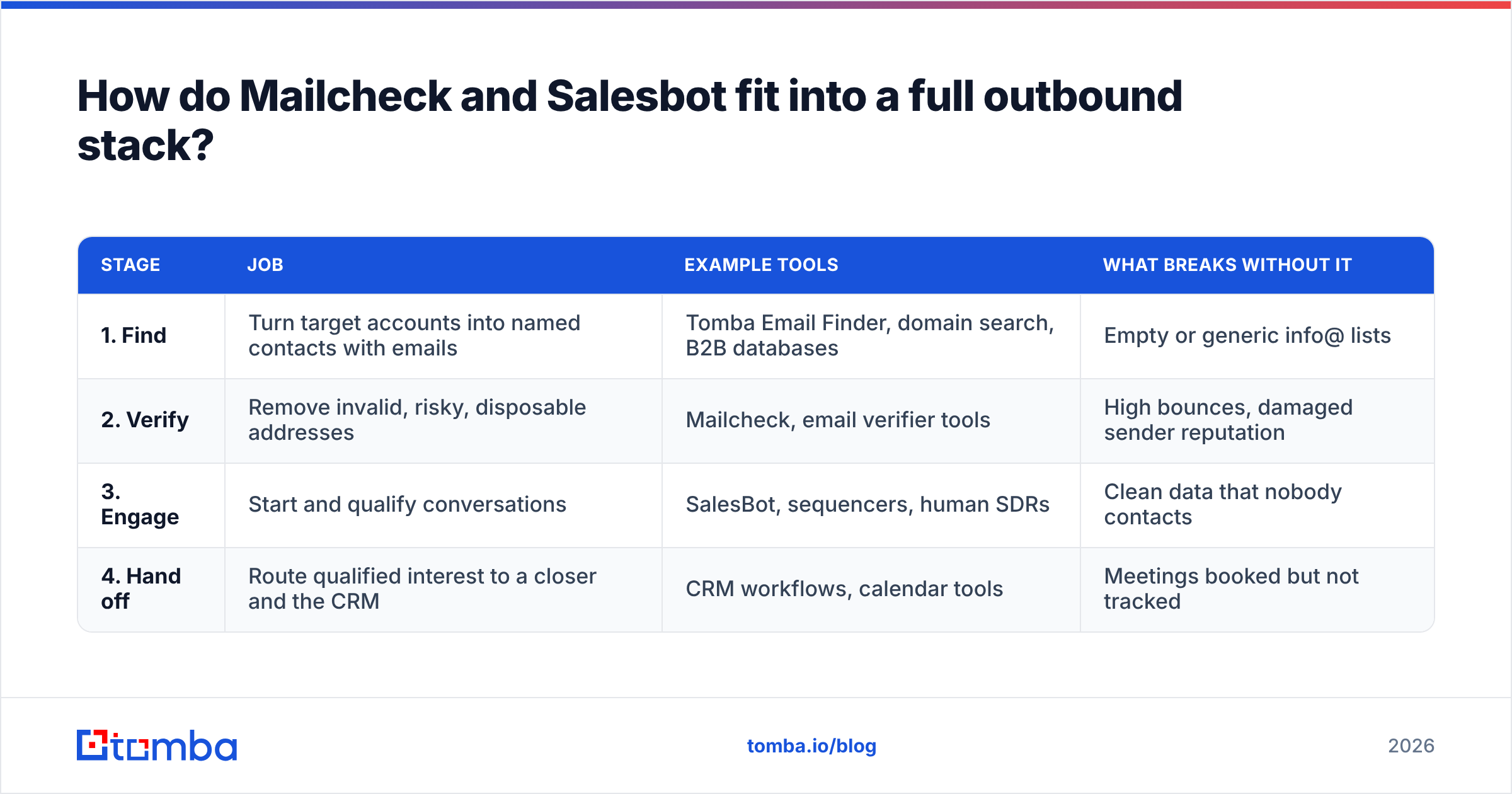
Think of outbound as a three-stage assembly line. If one stage is broken, upgrading the others won't fix it.
| Stage | Job | Example tools | What breaks without it |
|---|---|---|---|
| 1. Find | Turn target accounts into named contacts with emails | Tomba Email Finder, domain search, B2B databases | Empty or generic info@ lists |
| 2. Verify | Remove invalid, risky, disposable addresses | Mailcheck, email verifier tools | High bounces, damaged sender reputation |
| 3. Engage | Start and qualify conversations | SalesBot, sequencers, human SDRs | Clean data that nobody contacts |
| 4. Hand off | Route qualified interest to a closer and the CRM | CRM workflows, calendar tools | Meetings booked but not tracked |
Mailcheck covers stage 2. SalesBot covers stage 3 and part of stage 4, and may touch stage 1 depending on how it sources prospects. Stage 1 is the gap that often gets overlooked, and it's the one that decides whether stages 2 and 3 have anything to work with.
If you're feeding an AI SDR, track your CRM data the way HubSpot and similar platforms recommend: log each contact's source, verification status, and verification date, so you can trace any bounce spike back to the batch it came from.

How should you test Mailcheck or Salesbot before committing?#
Don't trust anyone's benchmarks, including ours, without testing against your own ICP. Here's a two-week test that works for either tool.
Testing Mailcheck:
- Take 300 addresses from a recent campaign where you already know the outcome (delivered vs bounced).
- Run them through Mailcheck's free tier and lowest paid plan.
- Compare its "invalid" flags against your actual hard bounces. You care about two numbers: how many real bounces it caught, and how many good addresses it wrongly flagged.
- Keep "catch-all" and "unknown" results in a separate bucket. That bucket shows you how much of your market sits on accept-all domains.
Testing SalesBot:
- Give it a narrow ICP, such as one industry, one role, and one region, instead of your whole market.
- Before launch, ask exactly where its contact data comes from and whether it verifies emails before sending.
- Track booked meetings, show rate, and meeting quality as rated by your closer, not just reply rate.
- Read the conversation logs. If the bot misrepresents your product even once, fix the prompt or brief before you scale.
Cost math to run: divide each tool's monthly cost by the outcome you care about. For Mailcheck that's cost per bounce prevented. For SalesBot it's cost per qualified meeting. A €149 bot that books three real meetings a month is a bargain. One that books zero is an expensive experiment.
Is there a better alternative to both?#
That depends on which gap you're filling. If the core problem is that you don't have reliable contact data, the most useful upgrade is a tool that finds and verifies contacts in one step.
That's the space Tomba works in. You can search by domain, name, or company, and found addresses come with a verification status, so stage 1 and stage 2 happen together. Tomba pricing starts with a free tier of 25 searches a month, then Starter at $49/month, Growth at $99/month, and Pro at $249/month, with custom Enterprise plans.
This doesn't replace an AI SDR. If you want a bot running conversations, you still need SalesBot or something like it. And if you only need to clean an existing list cheaply, Mailcheck's per-check pricing is hard to beat. But if you're about to point an AI SDR at a market, the contacts you give it matter more than which bot you pick.
Frequently asked questions#
Is Mailcheck the same as MailerCheck?#
No. Mailcheck (mailcheck.co) is an independent verification tool with monthly plans. MailerCheck is a separate product from MailerLite that uses pay-as-you-go credits. The similar names cause a lot of confusion in reviews and pricing pages.
Is SalesBot the same as SalesRobot?#
No. SalesBot (sales-bot.io) is positioned as an AI SDR that books meetings. SalesRobot (salesrobot.co) is a LinkedIn and email automation tool priced per LinkedIn account. Check the domain before comparing prices.
Can Mailcheck find email addresses?#
No. Mailcheck verifies addresses you already have. To find new contacts you need an email finder or a B2B contact database.
Do I need an email verifier if I use an AI SDR?#
Yes, unless the AI SDR verifies every address before sending and tells you how. Automated outreach sends at volume, so bad data damages your sender reputation faster than manual outreach would.
Which is cheaper, Mailcheck or Salesbot?#
Mailcheck, by a wide margin. It starts free and published paid plans top out around $90/month. SalesBot starts at about €149/month. They solve different problems, though, so price alone shouldn't decide it.
What's the bottom line on Mailcheck vs Salesbot?#
Pick Mailcheck if your lists are bouncing and you want cheap, API-friendly cleanup. Pick SalesBot if your data is solid and you lack the people to work it. Don't pick either to solve a problem it wasn't built for. A verifier won't book meetings, and an AI SDR won't fix bad data.
If your real gap is the contacts themselves, start one step earlier. Tomba Email Finder finds professional email addresses by domain, name, or company and verifies them in the same step, so whatever comes next, whether that's Mailcheck, SalesBot, or your own SDRs, starts from a list that holds up. Try it on the free tier with 25 searches and see how much of your target account list you can fill before spending anything on outreach.
Related guides#
// start free
See who Tomba finds at any company
Type a company's domain to see its people, their roles and verified work emails, each with the pages it was found on. Free account, no card.
Free plan · No credit card required · GDPR & CCPA
// about the author