MailCleanup vs UpLead (2026): Verifier or Lead Database?
MailCleanup cleans the list you already have. UpLead sells you new contacts. Compare pricing, cost per contact and accuracy to decide which one your team needs, or whether you need either.
TL;DR
- MailCleanup and UpLead solve different problems. MailCleanup cleans a list you already have. UpLead sells you new contacts with verification built in.
- MailCleanup is pay-as-you-go: G2 lists credits from $5 for 1,000 emails up to $500 for 1,000,000, with no subscription.
- UpLead is a subscription B2B database: Essentials runs about $99/mo for 170 credits, Plus about $199/mo for 400 credits, and Professional is custom-quoted.
- Per address, the gap is large. Verifying an email on MailCleanup costs roughly half a cent. Buying a contact on UpLead Essentials costs roughly $0.58.
- If you need to find emails and also verify them without paying database prices, an email finder that includes verification, such as Tomba, sits between the two.
What is the real difference between MailCleanup and UpLead?#
People search "MailCleanup vs UpLead" expecting two versions of the same tool. They aren't. Before you compare prices, figure out which job you're hiring for.
MailCleanup is an email verification service. You upload a CSV of addresses you already collected from sign-ups, old CRM exports, event lists or scraped leads. It checks each one for syntax errors, dead domains, missing mailboxes, disposable addresses and risky patterns, then returns a cleaned list. It doesn't give you new people to contact.
UpLead is a B2B contact database. You filter by industry, company size, job title, location or technology, and it returns contacts with emails and often direct-dial or mobile numbers. Each email is checked in real time when you reveal it, so verification is part of the product, but you're paying mainly for the data.
Comparing them directly is a bit like comparing a car wash with a car dealership. Both involve cars. Only one sells you a car.
So the useful question isn't which tool is better. It's which problem costs you more right now: a dirty list or an empty one.
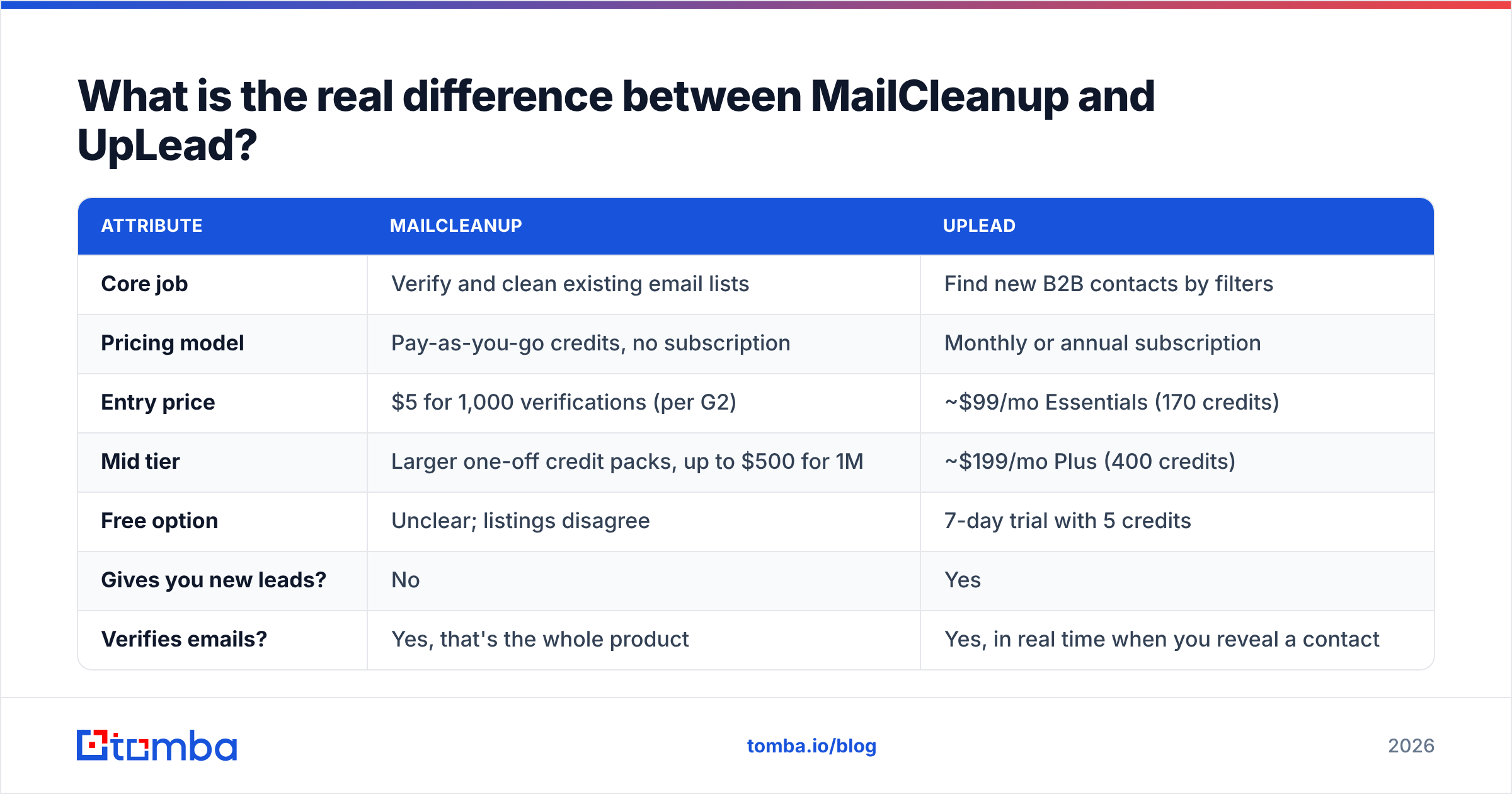
| Attribute | MailCleanup | UpLead |
|---|---|---|
| Core job | Verify and clean existing email lists | Find new B2B contacts by filters |
| Pricing model | Pay-as-you-go credits, no subscription | Monthly or annual subscription |
| Entry price | $5 for 1,000 verifications (per G2) | ~$99/mo Essentials (170 credits) |
| Mid tier | Larger one-off credit packs, up to $500 for 1M | ~$199/mo Plus (400 credits) |
| Free option | Unclear; listings disagree | 7-day trial with 5 credits |
| Gives you new leads? | No | Yes |
| Verifies emails? | Yes, that's the whole product | Yes, in real time when you reveal a contact |
| Phone numbers | No | Yes, on contact records |
| Best for | Marketers and SDRs with lists already on hand | Teams that need to build prospect lists from scratch |
What does MailCleanup actually do well?#
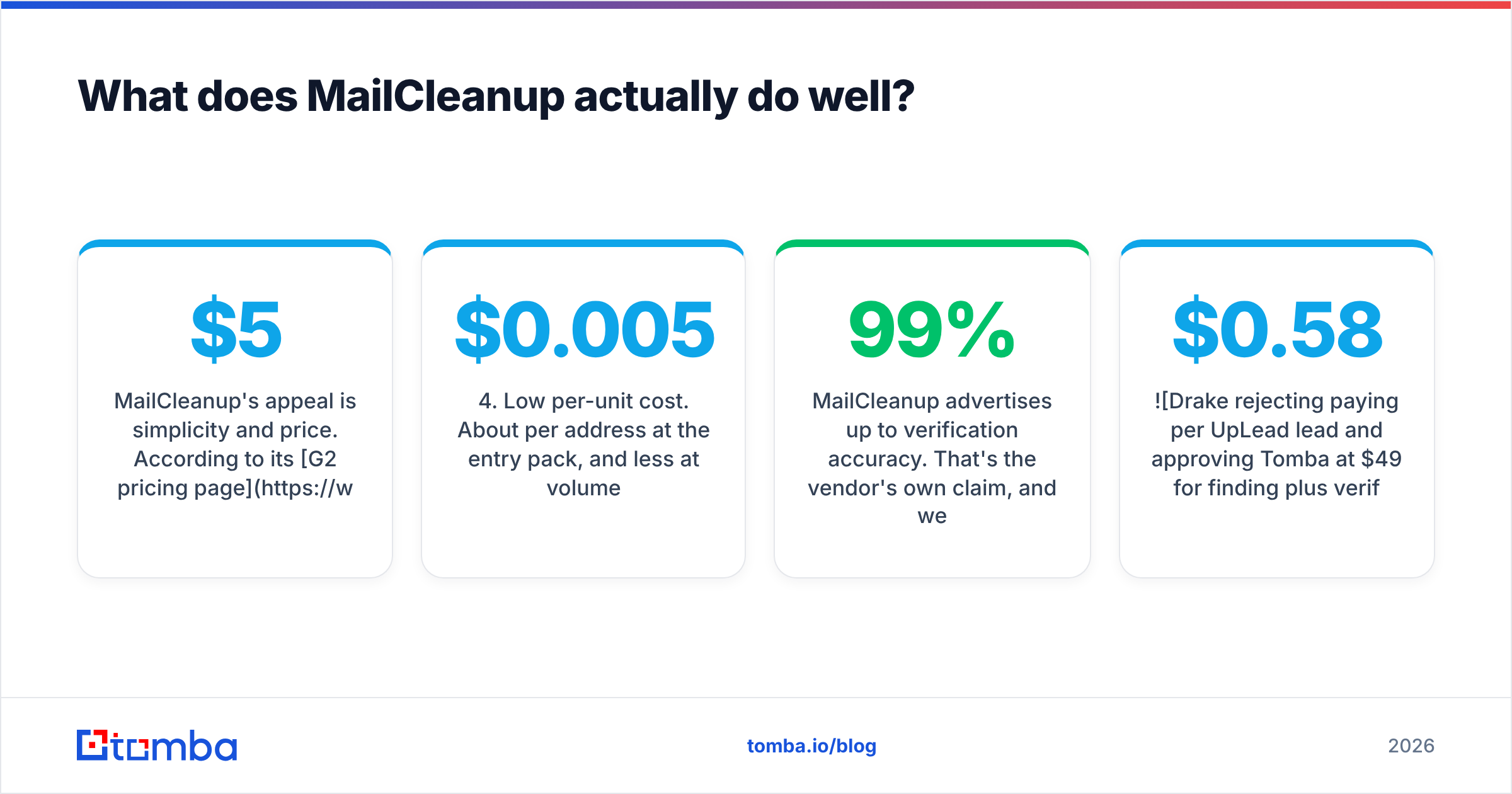
MailCleanup's appeal is simplicity and price. According to its G2 pricing page, credits start at $5 for 1,000 emails and scale to $500 for 1,000,000. There's no monthly plan, no auto-renewal and no seat fee. You buy credits when you need them and use them when you're ready.
That model suits teams that clean lists in batches, for example before a quarterly newsletter push, after a trade show, or when moving to a new sending platform. You don't pay for months when you aren't verifying anything.
Here's what you get in practice:
- Bulk CSV verification. Upload a list, wait, download results tagged as valid, invalid, risky or unknown.
- Bounce prevention. Removing hard-bounce addresses before sending protects your sender reputation and keeps bounce rates under the thresholds mailbox providers watch.
- Disposable and role-based detection. Addresses like
info@or temporary inboxes get flagged so you can decide whether to keep them. - Low per-unit cost. About $0.005 per address at the entry pack, and less at volume.
MailCleanup advertises up to 99% verification accuracy. That's the vendor's own claim, and we found no independent benchmark confirming it. Its review footprint is also small. Capterra shows only a handful of reviews, mostly praising affordability and the absence of subscriptions. A small sample isn't a red flag, but it means you should run your own test before committing a large list.
Where MailCleanup falls short#
- It can't fill your pipeline. If your CRM is thin, cleaning it just leaves you with a shorter thin list.
- Catch-all domains stay uncertain. Like most SMTP-based verifiers, a domain that accepts every address will come back "accept-all" or "unknown." You'll need a dedicated catch-all verifier or a policy on whether to send to them.
- No enrichment. You get a validity status, not job titles, company data or phone numbers.
What does UpLead actually do well?#
UpLead is built for prospecting. You open the search, set filters such as "VP Marketing, SaaS, 50-200 employees, United States, uses HubSpot," and get a list of matching people with contact details. When you spend a credit to reveal a contact, UpLead verifies the email in real time, so you aren't paying for addresses that were dead last quarter.
The main strengths:
- Prospect discovery. Firmographic, technographic and title filters let you build a targeted account list without scraping anything yourself.
- Verification included. Real-time checks at the moment of export mean fewer bounces on the leads you buy.
- Phone data. Contact records often include direct dials or mobiles, which matters if your team cold calls.
- CRM and browser workflows. UpLead connects to the major CRMs and has a Chrome extension for pulling contacts while you browse.
- Enrichment on higher tiers. Plus adds data enrichment, technographic filtering and duplicate detection, according to third-party pricing breakdowns.
Where UpLead falls short#
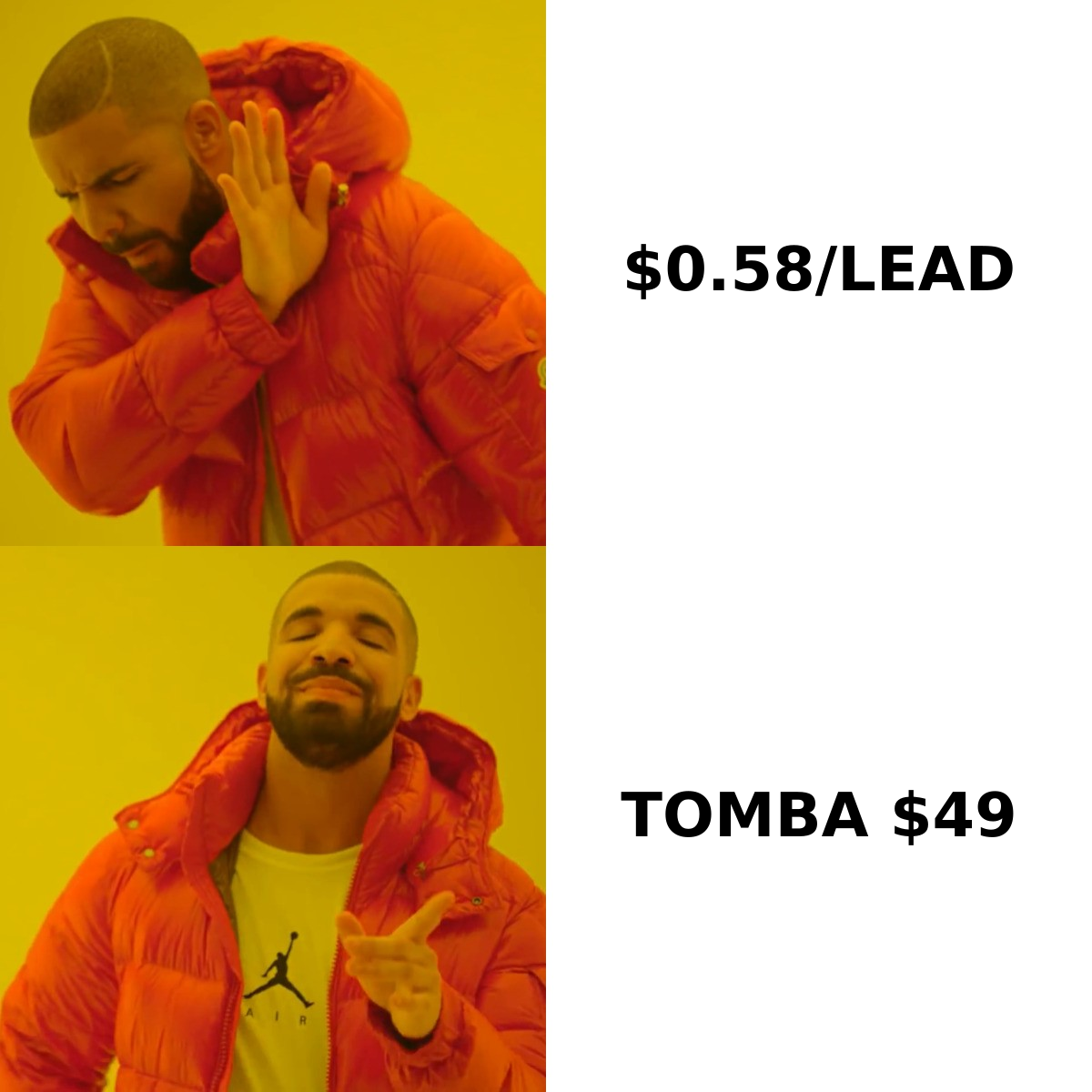
- Cost per contact. At $99 for 170 credits, Essentials works out to roughly $0.58 per contact on monthly billing. Annual billing on Plus brings that down to about $0.37, which is better but still around 75 times the per-address cost of MailCleanup verification.
- Credit pressure. 170 credits a month disappears quickly for an SDR building fresh sequences every week. Top-up credits reportedly cost $0.50-$0.60 each, so heavy users usually end up upgrading.
- Trial is narrow. Five credits over seven days is enough to see the interface, not enough to judge data quality in your niche.
- Not built for cleaning old lists. UpLead verifies the contacts it sells you. If you have 40,000 legacy addresses, sending them through a database tool isn't the efficient way to clean them.
Is MailCleanup cheaper than UpLead?#
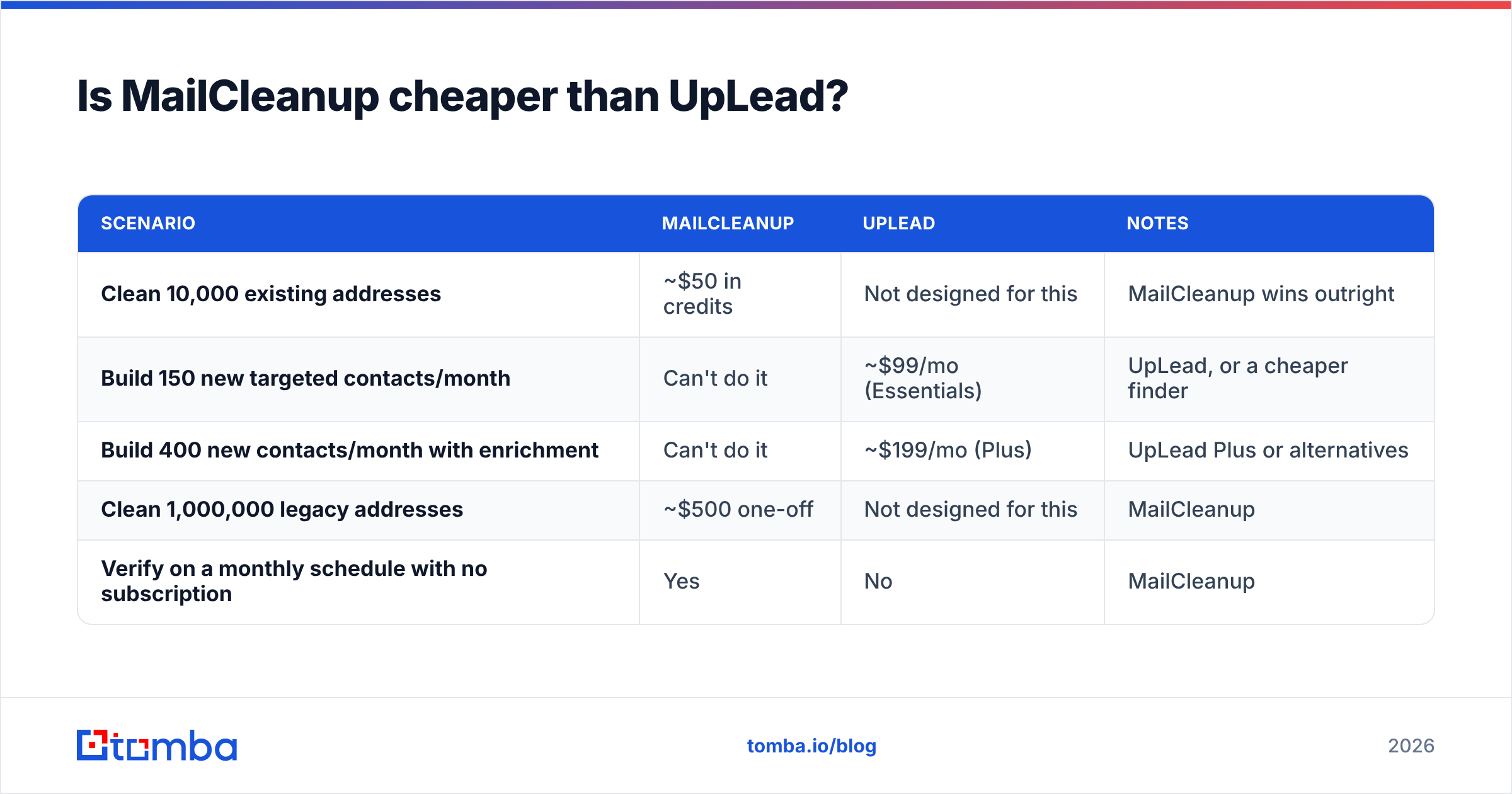
Per address, yes, by a wide margin. But that comparison is misleading if you need new leads, because MailCleanup won't produce any.
Here's how the costs compare across a few common scenarios:
| Scenario | MailCleanup | UpLead | Notes |
|---|---|---|---|
| Clean 10,000 existing addresses | ~$50 in credits | Not designed for this | MailCleanup wins outright |
| Build 150 new targeted contacts/month | Can't do it | ~$99/mo (Essentials) | UpLead, or a cheaper finder |
| Build 400 new contacts/month with enrichment | Can't do it | ~$199/mo (Plus) | UpLead Plus or alternatives |
| Clean 1,000,000 legacy addresses | ~$500 one-off | Not designed for this | MailCleanup |
| Verify on a monthly schedule with no subscription | Yes | No | MailCleanup |
The math changes once you add both needs together. Plenty of teams pay for UpLead to source contacts and a separate verifier to clean their inherited CRM data. That's two vendors, two billing cycles and two exports to reconcile.
Which is more accurate: MailCleanup or UpLead?#
They measure different kinds of accuracy, so a straight comparison doesn't hold up.
- MailCleanup's accuracy means: when it says an address is valid, does it accept mail? The vendor claims up to 99%.
- UpLead's accuracy covers two things: is the email deliverable (verified in real time at export), and is the person still in that role at that company? UpLead has long marketed a 95% data accuracy guarantee and credits back bounced emails, but check the current terms on its site before you rely on that.
The second kind is harder. An email can pass SMTP verification and still belong to someone who left the company six months ago, with the inbox kept open for forwarding. Verifiers can't catch that. Databases only catch it if their refresh cycle is fast enough.
Whichever tool you pick, test it the same way: take 200 addresses where you already know the outcome, from recent bounces and recent replies, run them through, and count how many it gets right. That tells you more than any vendor's headline number.
Who should choose MailCleanup?#
Pick MailCleanup if most of these apply:
- You already have the list. Newsletter subscribers, event attendees, inbound leads or a CRM export.
- Your volume is irregular. You clean in bursts and don't want to pay for idle months.
- Budget is tight. A few dollars per thousand addresses is hard to beat.
- You don't need enrichment. A valid/invalid status is all you're after.
It's a strong fit for marketing teams protecting email deliverability on newsletter sends, and for agencies cleaning client lists before a campaign launches.
Who should choose UpLead?#
Pick UpLead if most of these apply:
- Your pipeline is empty. You need net-new accounts and contacts every month.
- You sell into well-defined segments. Filters by size, industry and tech stack save hours of research.
- You call as well as email. Phone data on contact records matters to you.
- You can absorb $99-$199 a month and the per-contact cost still fits your deal size.
It's a good fit for outbound teams with a clear ICP and an average deal value high enough that $0.40-$0.60 per contact is a rounding error.
Is there a middle option between a verifier and a database?#
Yes. Many teams don't need a full filterable database. They already know the companies they want to reach, from a target account list, a conference exhibitor page, or a list of competitors' customers. What they're missing is the right person's email at those companies, plus confidence that it won't bounce.
That's what an email finder does. You give it a domain or a name plus company, and it returns the likely address with a confidence score and verification status. Tomba's email finder works this way, with an email verifier alongside it for cleaning lists you already have. So one tool covers both the MailCleanup job and the most common UpLead job.
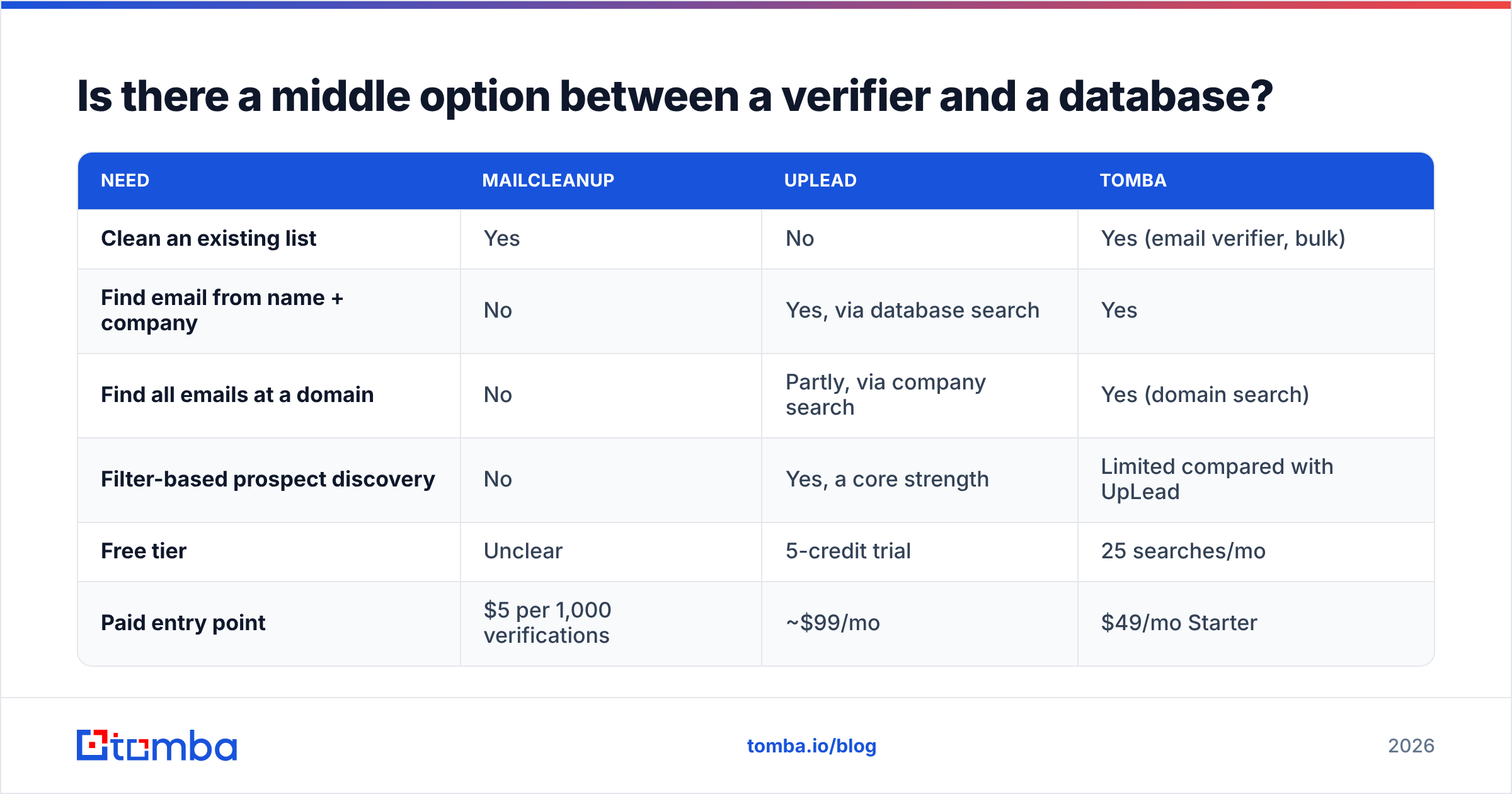
Here's how the three approaches line up:
| Need | MailCleanup | UpLead | Tomba |
|---|---|---|---|
| Clean an existing list | Yes | No | Yes (email verifier, bulk) |
| Find email from name + company | No | Yes, via database search | Yes |
| Find all emails at a domain | No | Partly, via company search | Yes (domain search) |
| Filter-based prospect discovery | No | Yes, a core strength | Limited compared with UpLead |
| Free tier | Unclear | 5-credit trial | 25 searches/mo |
| Paid entry point | $5 per 1,000 verifications | ~$99/mo | $49/mo Starter |
To be fair to UpLead: if you need to discover companies by firmographics and technographics, a dedicated database is the better tool, and Tomba doesn't replace that. If you mostly need verified emails for accounts you've already chosen, a finder with built-in verification is cheaper and simpler. See the Tomba pricing page for credit counts per tier. Plans run from Starter at $49/mo to Growth at $99/mo and Pro at $249/mo.
How do you decide in five minutes?#
Answer these four questions in order:
- Do you have a list already? If it's yes, and the problem is bounces, start with a verifier (MailCleanup or similar). Stop here.
- Do you know which companies you want to reach? If yes, an email finder will get you verified contacts for less than a database.
- Do you need to discover companies you haven't identified yet? If yes, a database like UpLead earns its subscription.
- Do you need both finding and cleaning every month? Then add up the cost of two tools against one finder that also verifies, and pick the cheaper stack that still meets your accuracy bar.
Whatever you choose, run the 200-address test before committing budget. Your own data is the only benchmark that matters.
Final verdict: MailCleanup or UpLead?#
Choose MailCleanup if you have lists and a bounce problem. It's cheap, there's no subscription, and it does one job.
Choose UpLead if you have no list and need targeted net-new contacts with phone numbers, and your deal size justifies roughly $0.37-$0.58 per contact.
Choose neither on its own if your real need is "verified emails for companies I've already picked, plus a way to clean what I've got." In that case one finder-plus-verifier usually beats paying for both.
If that last case sounds like you, try the Tomba Email Finder. Enter a domain or a name and company, get the verified professional address back, and run your existing lists through the built-in verifier in the same account. The free tier gives you 25 searches a month to test it against your own target accounts before you spend anything. If the results hold up, Starter at $49/mo costs less than half of UpLead Essentials.
Related guides#
// start free
See who Tomba finds at any company
Type a company's domain to see its people, their roles and verified work emails, each with the pages it was found on. Free account, no card.
Free plan · No credit card required · GDPR & CCPA
// about the author