What Is a Sales Hub? Building Your B2B Sales Stack in 2026
A sales hub centralizes prospecting, outreach, and pipeline in one place. Here's what a 2026 sales hub really needs — and how to build one without overpaying.
TL;DR
- A sales hub is the single workspace where your team prospects, contacts, tracks deals, and reports — instead of stitching ten disconnected tabs together.
- "Sales Hub" is also a HubSpot product name, so this guide separates the concept (a unified sales stack) from the brand and shows where each fits.
- The four pillars of any sales hub: a CRM of record, a data/prospecting layer, an outreach engine, and reporting. Most teams overbuy on one and starve the others.
- You do not need a $500/seat suite to get a working hub. A lean stack — CRM + a focused email finder + a sequencer — covers 80% of the value.
- Use the comparison table and the build framework below to decide between an all-in-one platform and a best-of-breed assembly.
What is a sales hub?#
A sales hub is the central system your reps live in all day — the place where a lead's contact data, every email and call, and the deal's pipeline stage all sit in one record. Think of it like an airport control tower: planes (leads) are landing, taxiing, and taking off constantly, and the tower is the one screen that shows every aircraft and what it's doing right now. Without the tower, each pilot is guessing.
Technically, a sales hub is the combination of a CRM, a contact-data source, an outreach tool, and analytics, glued together so a rep never has to re-key the same prospect into four apps. The term gets confusing because HubSpot Sales Hub is a specific commercial product. So you'll hear "sales hub" used two ways:
- The generic concept — your unified sales workspace, whatever tools compose it.
- The brand — HubSpot's paid CRM-plus-selling tier.
This post covers both. If you came here to evaluate HubSpot's product specifically, the comparison table has you covered. If you're trying to build a hub from parts, the framework section is for you.
What are the four pillars of a sales hub?#
Every functional sales hub — branded or assembled — rests on four pillars. When a hub feels broken, it's almost always because one pillar is missing or bolted on as an afterthought.
1. The CRM of record. This is the source of truth for accounts, contacts, and deals. It holds pipeline stages, owns the deal history, and feeds your forecast. If two systems disagree about a deal's stage, the CRM wins.
2. The data and prospecting layer. A CRM is only as useful as the contacts inside it. This pillar finds and enriches those contacts — company domain search, verified work emails, direct dials, and firmographics. Skimp here and reps spend their selling hours hunting for email addresses on LinkedIn.
3. The outreach engine. Sequencers, email sending, call dialers, and task automation. This is where the actual contacting happens — multi-step cadences, follow-ups, and reply tracking.
4. Reporting and revenue intelligence. Pipeline health, conversion rates between stages, win rate, and activity metrics. Without this pillar you're flying blind on what's actually working.
The mistake most teams make: they buy a heavyweight platform for pillar 1 and 3, then treat pillar 2 (data) as free. It isn't. Bad contact data is the single biggest silent tax on outbound — every bounced email hurts your sender reputation and quietly kills deliverability.
Is HubSpot Sales Hub worth it?#
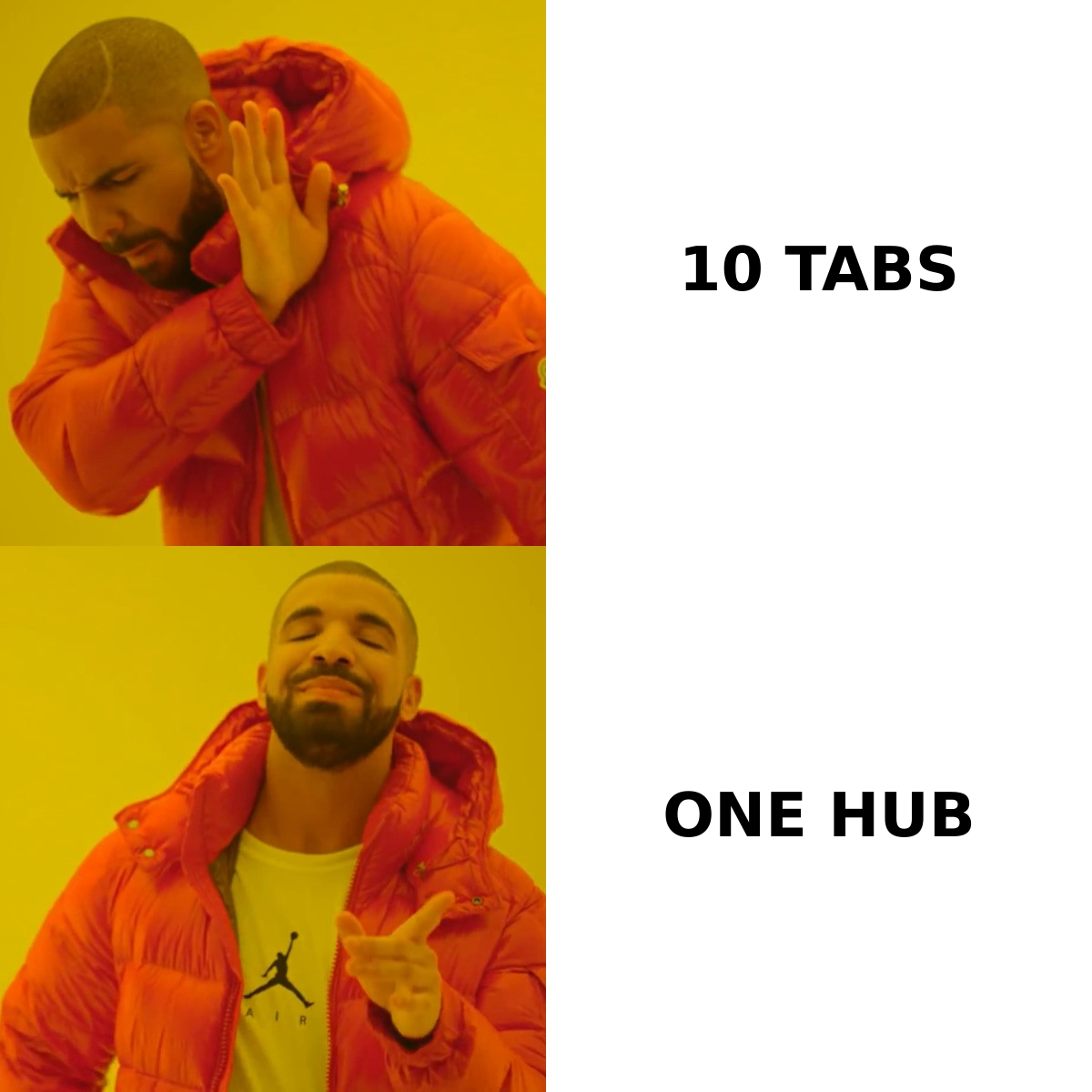
HubSpot Sales Hub is worth it when you want CRM, sequences, and reporting under one login and you're willing to pay per seat for that convenience. It's a genuinely strong all-in-one. But it is not a strong prospecting-data tool — HubSpot doesn't ship a high-accuracy email finder, so you still need a data layer feeding it.
Here's the honest breakdown of the trade-off between an all-in-one suite and a best-of-breed assembly:
| Factor | All-in-One (e.g. HubSpot Sales Hub) | Best-of-Breed Stack |
|---|---|---|
| Setup speed | Fast — one signup, native modules | Slower — integrate 3-4 tools |
| Contact-data quality | Weak; add-on or third-party needed | Strong; pick a dedicated finder |
| Per-seat cost | $90–$150/seat/mo (Pro tiers) | Often lower; pay per tool, not per seat |
| Customization | Limited to vendor's roadmap | High; swap any layer independently |
| Reporting depth | Excellent, built-in | Varies; may need a BI layer |
| Lock-in risk | High — data + workflows entangled | Low — components are replaceable |
| Best for | SMBs wanting one bill, fast | Teams optimizing cost + data accuracy |
The decision rarely comes down to features alone. It comes down to where your bottleneck is. If your reps already have great data but waste time switching tools, an all-in-one earns its price. If your reps have tools but burn hours on bad emails and bounced sends, no suite fixes that — you need a better data pillar regardless of which CRM you run.
For a deeper look at the all-in-one category specifically, see how teams evaluate an Apollo alternative when the bundled data doesn't hold up.
How do you build a sales hub from scratch?#
Build it pillar by pillar, cheapest-bottleneck-first — don't start by buying the most expensive suite. Here's the sequence that works for most B2B teams under 50 reps.
Step 1: Pick the CRM of record#
Start with whatever CRM your deals already live in. Pipedrive and HubSpot are common for SMBs; Salesforce for upmarket. Don't switch CRMs just to get a hub — the CRM is the anchor, and migrating it is the most painful move you can make. Whatever you choose, confirm it has open integrations (most do): check the Pipedrive integration, HubSpot integration, or Salesforce integration before committing.
Step 2: Add the data layer#
This is where most hubs are won or lost. Plug in a dedicated tool that turns a name + company into a verified email and phone number, then writes it straight to the CRM. A focused finder with high accuracy — and a real email verifier behind it — prevents the bounce cascade that wrecks deliverability. You want this layer to support bulk runs too, so you can enrich a whole list at once with a bulk email finder.
Step 3: Wire the outreach engine#
Connect a sequencer for multi-step cadences. The non-negotiable here is that it pulls verified contacts from your data layer and logs every touch back to the CRM. If you're running cold campaigns, pair this with warmup and deliverability hygiene — a clean list from step 2 is worthless if your domain isn't warmed.
Step 4: Layer in reporting#
Most CRMs cover this natively. Track stage-to-stage conversion and response rate first; vanity activity counts later. Reporting tells you which earlier pillar to reinforce next quarter.
The beauty of building this way: each pillar is swappable. If a vendor jacks up prices or degrades data quality, you replace one layer without rebuilding the whole hub. That optionality is the entire argument against all-in-one lock-in.
What does a sales hub cost in 2026?#
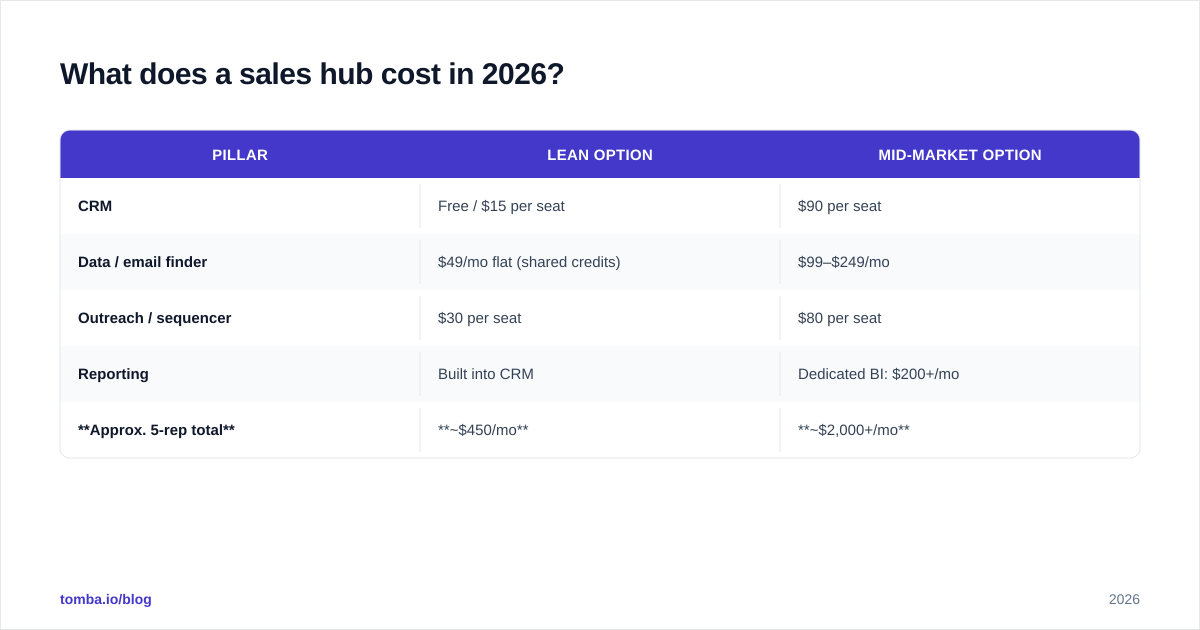
A working sales hub runs anywhere from under $100/month for a solo founder to several thousand for a mid-market team — the spread depends almost entirely on seat count and how much you pay for the data pillar. Here's a realistic breakdown for a 5-rep team.
| Pillar | Lean Option | Mid-Market Option |
|---|---|---|
| CRM | Free / $15 per seat | $90 per seat |
| Data / email finder | $49/mo flat (shared credits) | $99–$249/mo |
| Outreach / sequencer | $30 per seat | $80 per seat |
| Reporting | Built into CRM | Dedicated BI: $200+/mo |
| Approx. 5-rep total | ~$450/mo | ~$2,000+/mo |
The data pillar is where smart teams save without sacrificing results. Tomba's pricing starts with a Free tier at 25 searches/month, then Starter at $49/mo, Growth at $99/mo, and Pro at $249/mo — credits are account-wide, not per-seat, so a 5-rep team shares one bill instead of paying five times. Compared with per-seat data add-ons inside an all-in-one suite, that structure alone can cut your data spend by half.
Whatever you choose, the rule holds: don't pay enterprise prices for a pillar that isn't your bottleneck. A startup with a free CRM and a $49 finder closes the same deals as one paying $150/seat — if the data is clean.
All-in-one vs. best-of-breed: which sales hub wins?#
Best-of-breed wins on cost and data accuracy; all-in-one wins on speed and simplicity. There's no universal answer — there's a right answer for your stage.
- Choose all-in-one if: you're a small team that values one login and one invoice over squeezing every dollar, and you're fine with average contact data (or you'll bolt on a finder anyway).
- Choose best-of-breed if: outbound volume is high, data accuracy directly drives revenue, and you want the freedom to swap any layer as you scale.
A pragmatic middle path that many 2026 teams land on: keep an affordable CRM as the anchor, then run a dedicated, accurate data layer on top. You get the simplicity of a known CRM with the data quality an all-in-one can't match. The category leaders — you can validate this on independent review sites like G2 and Capterra — consistently score lower on data accuracy than purpose-built finders, even when their CRM and reporting are excellent.
One more honest note: tooling is a multiplier, not a strategy. According to research summarized by firms like Gartner, the biggest gains come from process and data quality, not from adding another app. A sales hub's job is to remove friction so reps sell — if it adds steps, it's not a hub, it's overhead. HubSpot's own sales resources make the same point: consolidation only helps when it cuts manual work.
How do you keep a sales hub healthy?#
Treat the data layer like a garden, not a statue — it decays. Roughly 25–30% of B2B contact data goes stale every year as people change jobs. A hub you set up perfectly in January is meaningfully wrong by December if nothing re-verifies it.
Three maintenance habits that keep a hub trustworthy:
- Re-verify before big sends. Run your list through verification before any large campaign. This protects email deliverability and keeps your domain off blocklists.
- Enrich on entry. Auto-enrich every new contact as it hits the CRM via data enrichment, so reps never start with a half-empty record.
- Audit one pillar per quarter. Rotate: CRM hygiene, data accuracy, sequence performance, reporting fidelity. Fix the weakest one, then move on.
Do those three things and the hub compounds in value instead of quietly rotting. Skip them and you're back to ten tabs and guesswork within a year.
Build the data layer your sales hub is missing#
Most teams already own a CRM and a sequencer — what's actually holding their hub back is the data pillar. If reps are losing selling hours hunting for emails, bouncing sends, and re-keying contacts, that's the gap to close first. Tomba Email Finder turns a name and company into a verified, deliverable email and writes it straight into your stack, with a built-in verifier so the bounce cascade never starts. Start free with 25 searches, scale to Starter at $49/mo when you're ready, and connect it to the CRM and tools you already run via Tomba's integrations. Build the hub around clean data — find your first verified emails free and feel the difference on your next campaign.
// get started
Find, verify and enrich your first contacts today
Start on the free plan with 25 searches a month, then scale when your team is ready.
Free plan · No credit card required · GDPR & CCPA
// about the author