Lead Routing in 2026: How to Route Leads to the Right Rep
Lead routing decides which rep gets which lead — and slow or random assignment quietly kills your win rate. Here's how routing models, rules, and tooling work in 2026.
TL;DR
- Lead routing is the system that decides which rep or team receives each inbound or sourced lead — and how fast.
- The biggest lever isn't the model you pick; it's speed-to-lead. Contacting a lead within five minutes beats a 30-minute delay by an order of magnitude.
- Round-robin is the easy default, but account-based and score-weighted routing convert better once you have clean firmographic data.
- Routing breaks when data is missing. Enrich every lead with company, title, and contact data before the rules fire.
- Most teams over-engineer routing logic and under-invest in the data feeding it. Fix the inputs first.
What is lead routing?#
Lead routing is the automated process of assigning each incoming lead to the right salesperson, team, or queue based on rules you define. Think of it like a restaurant host seating guests: the host doesn't just shove everyone at the nearest table — they match party size, reservation, and section to the right server so nobody waits and no server gets slammed. Routing does the same for leads.
Technically, a routing engine sits between your lead capture points (forms, chat, demo requests, imported lists) and your CRM ownership field. When a lead arrives, the engine evaluates conditions — territory, company size, product interest, lead score — and writes an owner, then often kicks off an SLA timer and a notification.
Get it right and reps work the leads they're best suited to close. Get it wrong and your best inbound demo request sits unassigned in a queue while a competitor calls first.
Why does lead routing matter so much in 2026?#
Because speed and fit decide deals before the first call. The classic Lead Response Management research — still widely cited by HubSpot and others — found that contacting a web lead within five minutes makes you far more likely to qualify it than waiting even 30 minutes. Routing is what makes that five-minute window physically possible.
There are three compounding reasons routing is more important now than it was a few years ago:
- Buying committees are bigger. A single deal can involve six to ten stakeholders. Routing the right contact to the right rep — and keeping the whole account with one owner — prevents the chaos of three reps emailing the same company.
- Inbound volume is spikier. AI-driven content, webinars, and product-led signups create bursts. Manual assignment can't keep up, so leads rot.
- Data is the bottleneck, not the rules. Most forms capture an email and maybe a name. Without enrichment, your routing rules have nothing to evaluate.
That third point is where teams lose the most. You can build a beautiful territory map, but if the lead record only says jane@acme.com, the engine can't tell whether Acme is a 12-person startup or a 12,000-person enterprise. You need data enrichment to fill in company size, industry, title, and location before the rules run.

What are the main lead routing models?#
There are four models most B2B teams use, often in combination. Pick based on how mature your data and territory structure are.
Round-robin#
Leads are distributed evenly across a pool of reps, one after another. Simple, fair, and fast to set up. The weakness: it's blind to fit. A round-robin engine will happily hand an enterprise logo to a rep who only closes SMB.
Territory or rule-based#
Leads route by geography, industry, language, or product line. This matches your go-to-market structure and is the workhorse for most mid-market teams. It requires accurate location and firmographic data on every lead — another reason enrichment is non-negotiable.
Account-based routing#
Every lead is matched to an account, and the account's existing owner gets the lead — regardless of who filled out the form. This is essential for ABM and any team selling into named accounts. It prevents the "three reps, one company" problem and keeps account history intact.
Score-weighted routing#
Leads above a certain lead score go to senior reps or a fast-track queue; lower scores go to nurture or SDR pools. This protects your best reps' time for your best opportunities.
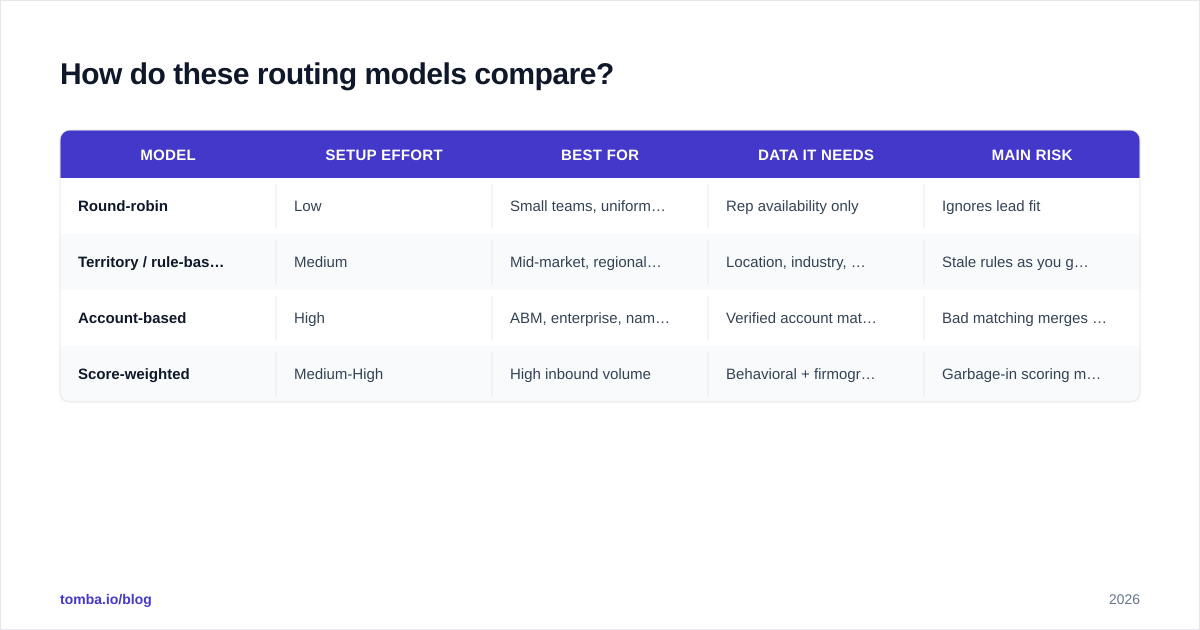
How do these routing models compare?#
| Model | Setup effort | Best for | Data it needs | Main risk |
|---|---|---|---|---|
| Round-robin | Low | Small teams, uniform ICP | Rep availability only | Ignores lead fit |
| Territory / rule-based | Medium | Mid-market, regional teams | Location, industry, company size | Stale rules as you grow |
| Account-based | High | ABM, enterprise, named accounts | Verified account match | Bad matching merges wrong accounts |
| Score-weighted | Medium-High | High inbound volume | Behavioral + firmographic score | Garbage-in scoring misroutes |
Most teams start with round-robin, layer territory rules as they hire, then add account-based logic once they adopt ABM. There's no prize for jumping straight to the most complex model — complexity you can't feed with clean data just hides misrouting.
What does a good routing workflow actually look like?#
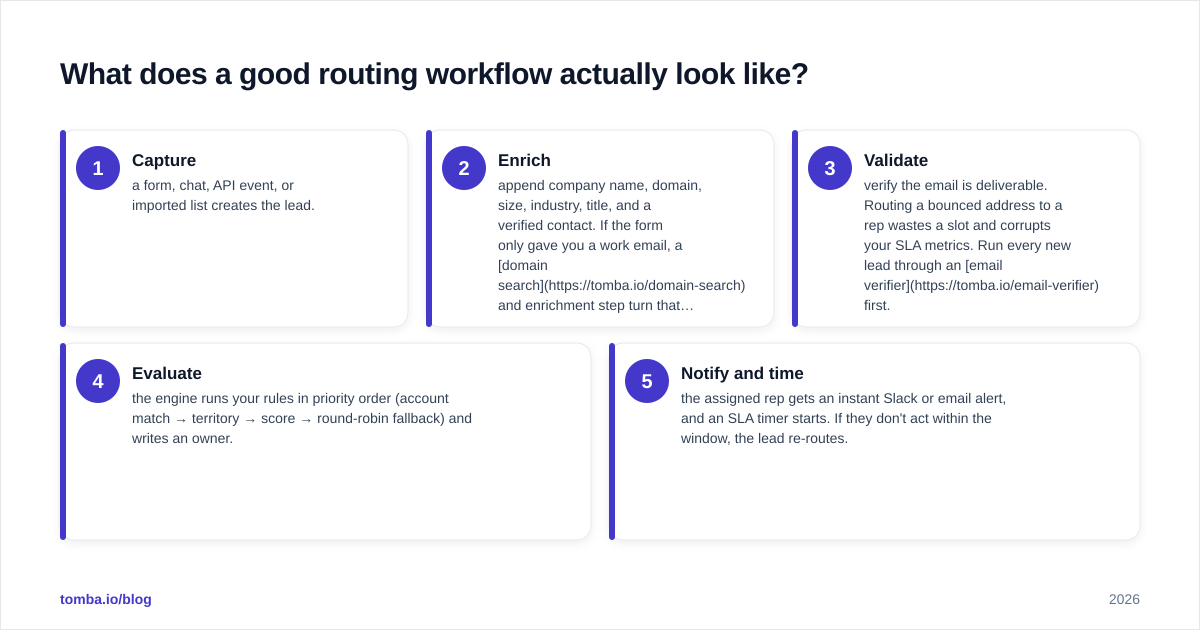
A reliable 2026 routing workflow has five stages, and four of them happen before a rep ever sees the lead.
- Capture — a form, chat, API event, or imported list creates the lead.
- Enrich — append company name, domain, size, industry, title, and a verified contact. If the form only gave you a work email, a domain search and enrichment step turn that thin record into something your rules can read.
- Validate — verify the email is deliverable. Routing a bounced address to a rep wastes a slot and corrupts your SLA metrics. Run every new lead through an email verifier first.
- Evaluate — the engine runs your rules in priority order (account match → territory → score → round-robin fallback) and writes an owner.
- Notify and time — the assigned rep gets an instant Slack or email alert, and an SLA timer starts. If they don't act within the window, the lead re-routes.
The order matters. Enrichment and validation come before evaluation, because the rules are only as smart as the fields they read. This is the step most teams skip, and it's why their "broken routing" is usually a data problem wearing a routing costume.

How do you stop leads from falling through the cracks?#
Set SLAs and fallbacks, and instrument everything.
- SLA timers: define a max time-to-first-touch (commonly 5–15 minutes for hot inbound). If a rep doesn't respond, the lead auto-reassigns.
- Fallback owners: never leave a routing path that can end in "no owner." Always have a catch-all queue.
- Capacity caps: stop assigning to reps who are out of office or at their daily limit. Round-robin without capacity awareness floods your top performer and starves the rest.
- Audit logging: log every routing decision. When a rep asks "why did I get this lead?", you need an answer in seconds.
- Dedupe before assign: if a lead already exists, route to the existing owner instead of creating a duplicate. Clean your imports with a tool like remove duplicates before they ever hit the engine.
According to Gartner, revenue teams that align process and data tooling see materially better pipeline conversion than those bolting on point solutions. Routing is exactly that alignment point — process logic riding on top of data quality.
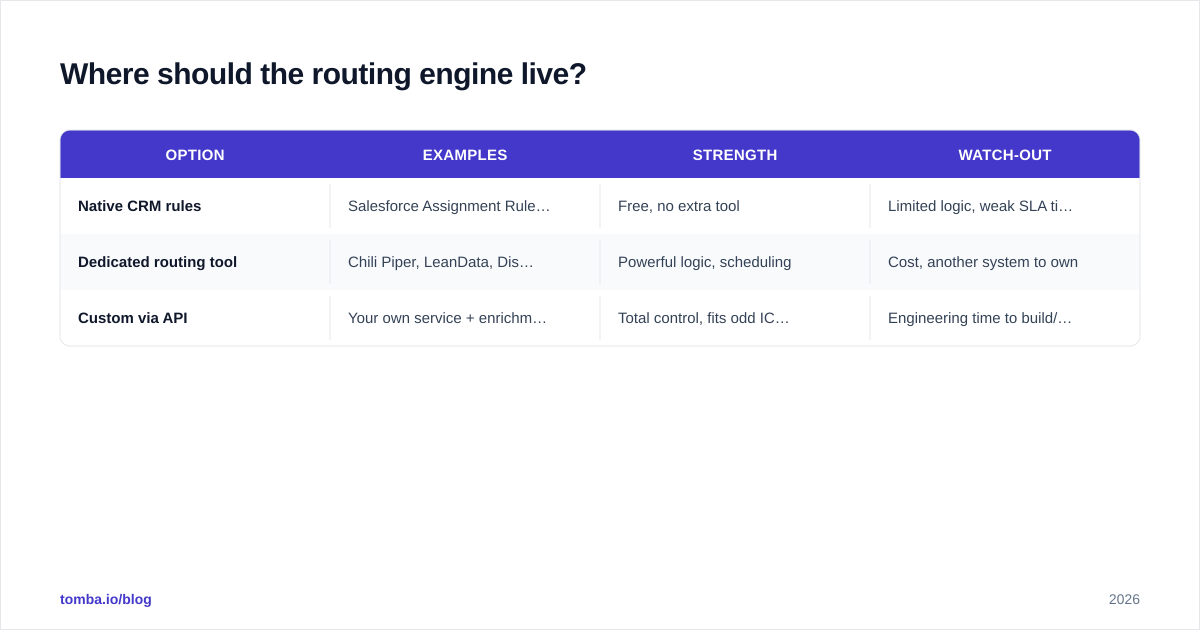
Where should the routing engine live?#
You have three realistic options in 2026.
| Option | Examples | Strength | Watch-out |
|---|---|---|---|
| Native CRM rules | Salesforce Assignment Rules, HubSpot workflows | Free, no extra tool | Limited logic, weak SLA timers |
| Dedicated routing tool | Chili Piper, LeanData, Distribution Engine | Powerful logic, scheduling | Cost, another system to own |
| Custom via API | Your own service + enrichment API | Total control, fits odd ICPs | Engineering time to build/maintain |
For most teams, native rules in HubSpot or Salesforce handle 80% of cases. Reach for a dedicated tool when you need meeting scheduling on the form, complex account matching, or strict SLA enforcement. Go custom only when your ICP or compliance needs break the off-the-shelf options — and even then, you'll feed it with an enrichment and verification API rather than rebuilding data from scratch.
How does data quality make or break routing?#
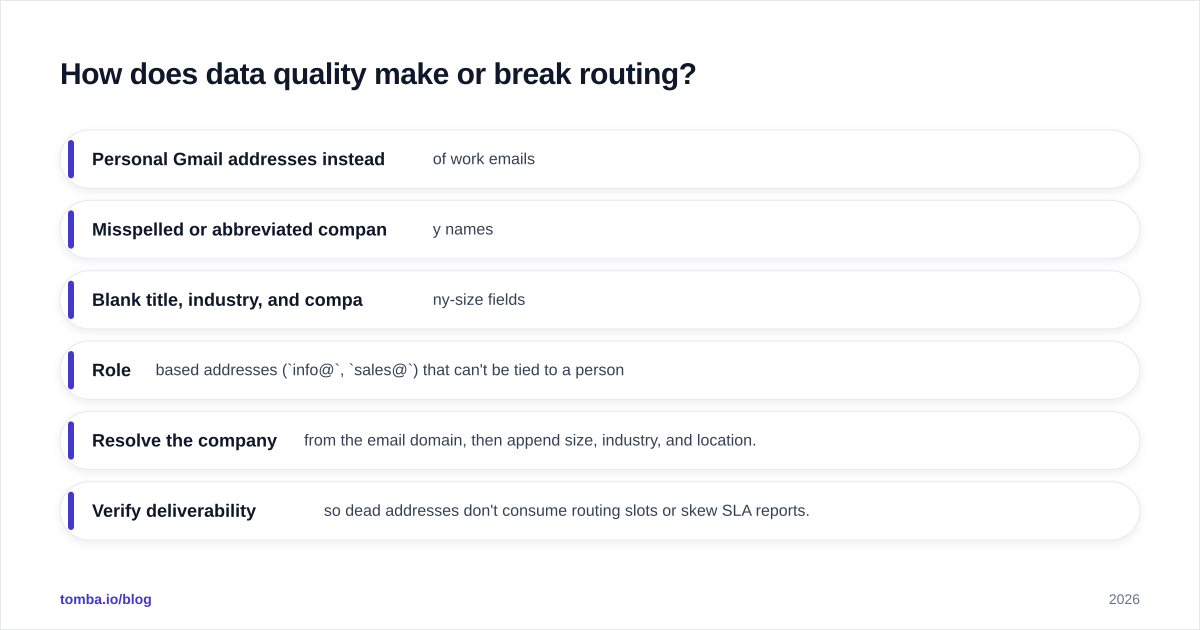
Routing is downstream of data. Every model above assumes the lead record contains the fields the rules evaluate. In practice, raw form fills are sparse and messy:
- Personal Gmail addresses instead of work emails
- Misspelled or abbreviated company names
- Blank title, industry, and company-size fields
- Role-based addresses (
info@,sales@) that can't be tied to a person
Feed those into a territory or account-based engine and it misroutes silently — the rep just gets a worse lead and never knows why. The fix is to enrich and verify at the point of capture:
- Resolve the company from the email domain, then append size, industry, and location.
- Verify deliverability so dead addresses don't consume routing slots or skew SLA reports.
- Match to an existing account to keep account-based ownership intact.
- Flag catch-all domains so you don't treat an unverifiable address as confirmed — a catch-all verifier handles this.
Once the record is complete, even simple rules route accurately. This is why "improve our routing" is, nine times out of ten, really "improve the data our routing reads."
What are the most common lead routing mistakes?#
- Routing before enriching. The number-one error. Rules can't evaluate fields that don't exist.
- No SLA or fallback. Leads land in an unwatched queue and decay.
- Over-complex rule trees. Twenty nested conditions nobody can debug. Start simple, add logic only when data supports it.
- Ignoring capacity. Flooding your top rep while juniors sit idle.
- Never auditing outcomes. If you don't track conversion by routing path, you can't tell which rules work.
- Skipping verification. Bounced and role-based addresses inflate your lead counts and waste rep time.
Avoid these and you'll outperform teams running far fancier routing logic on dirty data.
Frequently asked questions#
Is round-robin good enough? For a small team with a single, uniform ICP, yes. Once reps specialize by segment or territory, layer in rule-based or account-based logic.
How fast should routing happen? Instantly. The assignment and notification should fire within seconds of capture so a rep can make first contact inside the five-minute window.
Do I need a dedicated routing tool? Not at first. Native CRM rules cover most cases. Add a specialized tool when you need scheduling, complex account matching, or hard SLA enforcement.
What's the single highest-impact improvement? Enrich and verify every lead before the rules run. Clean inputs make even basic routing accurate.
Route every lead on data you can trust#
Routing logic is only as good as the lead record it reads. Before you redesign a single rule, make sure every lead arrives complete: the right company, a real person, and a verified, deliverable address. Tomba's Email Finder — alongside its domain search, verification, and enrichment tools — fills in the firmographic and contact data your routing engine needs, so territory, account, and score-based rules fire on facts instead of guesses. Start on the free tier (25 searches/month) and scale through Tomba pricing from Starter at $49/mo as your inbound volume grows. Fix the data, and the routing takes care of itself.
// get started
Find, verify and enrich your first contacts today
Start on the free plan with 25 searches a month, then scale when your team is ready.
Free plan · No credit card required · GDPR & CCPA
// about the author