SPF, DKIM & DMARC: Email Authentication Guide (2026)
SPF, DKIM, and DMARC are the three records that decide whether your cold email lands in the inbox or the spam folder. Here's how to set up all three correctly in 2026.
SPF, DKIM & DMARC: The 2026 Email Authentication Guide
If your cold emails are landing in spam even though your copy is fine, the problem is almost never the copy. It's that mailbox providers can't prove you are who you say you are. SPF, DKIM, and DMARC are the three DNS records that supply that proof — and getting all three right is the single highest-leverage deliverability move you can make.
TL;DR#
- SPF, DKIM, and DMARC are complementary, not interchangeable. SPF authorizes sending IPs, DKIM cryptographically signs the message, and DMARC tells receivers what to do when the first two fail.
- DMARC requires at least one of SPF or DKIM to pass and align with your visible
Fromdomain. Passing SPF alone is no longer enough at Google and Yahoo. - As of 2024, Google and Yahoo require DMARC for anyone sending to their users in volume. In 2026 that expectation is universal — no DMARC, no inbox.
- Start DMARC at
p=none, read the aggregate reports for two to four weeks, then move toquarantineand finallyreject. - Authentication gets you eligible for the inbox; it doesn't guarantee it. You still need clean lists, warmup, and sender reputation.
What are SPF, DKIM, and DMARC?#
Think of sending an email like mailing a sealed letter through a postal service that's terrified of fraud. SPF is the approved list of post offices allowed to drop your mail. DKIM is a tamper-proof wax seal that proves the letter wasn't opened in transit. DMARC is the standing instruction you leave the receiving clerk: "If the post office isn't on my list and the seal is broken, here's what to do with it."
Technically, all three are published as DNS TXT records on your sending domain, and receiving mail servers check them the instant your message arrives.
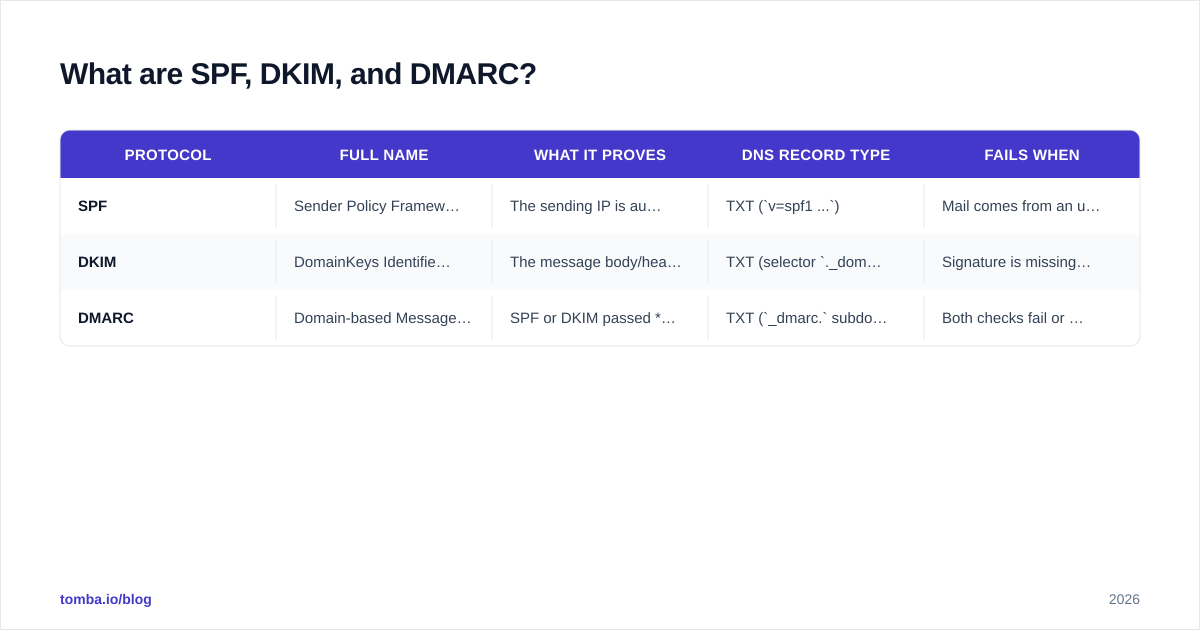
| Protocol | Full name | What it proves | DNS record type | Fails when |
|---|---|---|---|---|
| SPF | Sender Policy Framework | The sending IP is authorized to send for the domain | TXT (v=spf1 ...) |
Mail comes from an unlisted IP |
| DKIM | DomainKeys Identified Mail | The message body/headers weren't altered and came from the domain | TXT (selector ._domainkey) |
Signature is missing or doesn't validate |
| DMARC | Domain-based Message Authentication, Reporting & Conformance | SPF or DKIM passed and aligns with the From domain | TXT (_dmarc. subdomain) |
Both checks fail or are misaligned |
The key insight most guides bury: DMARC doesn't replace SPF and DKIM — it sits on top of them. It checks "alignment," meaning the domain SPF/DKIM validated must match the domain your recipient actually sees in the From field. You can pass raw SPF and still fail DMARC if the domains don't line up.
If you want a deeper reference on any single term, Tomba's email deliverability glossary breaks down the surrounding vocabulary.
How does SPF actually work?#
SPF answers one question: is this IP address allowed to send mail for this domain?
You publish a TXT record listing every service that sends on your behalf — your mail server, your ESP, your CRM, your invoicing tool. When a receiving server gets your message, it looks up the MAIL FROM (envelope) domain, fetches that domain's SPF record, and checks whether the connecting IP is included.
A typical record looks like this:
v=spf1 include:_spf.google.com include:sendgrid.net ~allinclude:pulls in the authorized IP ranges of a third-party sender.~allis a "soft fail" (suspicious but accept);-allis a "hard fail" (reject). Use-allonce you're confident your record is complete.
The two SPF traps that break it:
- The 10-DNS-lookup limit. SPF allows a maximum of 10 nested DNS lookups. Stack too many
include:statements and the whole record returnspermerror— silently failing authentication. SaaS-heavy stacks hit this constantly. Flatten the record or use an SPF-flattening service. - Forwarding breaks SPF. When mail is forwarded, the connecting IP changes, so SPF fails at the new hop. This is exactly why DKIM and DMARC exist — DKIM survives forwarding.
You can confirm your record resolves correctly with a SPF checker before you ever hit send. For the formal definition, the SPF record entry is a quick reference.
How does DKIM add cryptographic proof?#
DKIM solves SPF's biggest weakness: it proves the message itself wasn't tampered with, and it survives forwarding.
Here's the mechanism. Your sending server holds a private key. When it sends a message, it hashes selected headers plus the body and signs that hash with the private key, attaching the result as a DKIM-Signature header. You publish the matching public key as a DNS TXT record at a "selector" subdomain, e.g. s1._domainkey.yourdomain.com.
The receiving server reads the signature, fetches your public key from DNS, and verifies the signature mathematically. If even one character of the signed content changed in transit, the signature fails.
v=DKIM1; k=rsa; p=MIGfMA0GCSqGSIb3DQEBAQUAA4GNADCBi...Two practical notes for 2026:
- Use 2048-bit RSA keys. 1024-bit keys are now considered weak; most ESPs default to 2048-bit. If your provider still issues 1024-bit, request a rotation.
- Rotate selectors periodically. Multiple selectors let you rotate keys without downtime — sign with the new selector while the old one still validates in-flight mail.
Because DKIM authenticates the content and domain rather than the connection, it's the check that holds up when your message is forwarded, mailing-listed, or relayed. That durability is why DMARC alignment leans on DKIM so heavily.
What does DMARC do that SPF and DKIM can't?#
DMARC turns two pass/fail signals into an enforceable policy — and it gives you visibility you otherwise never get.
Without DMARC, a receiver that sees a failed SPF check has no instruction from you about what to do. Maybe it junks the mail, maybe it delivers it anyway. Worse, a spammer can spoof your exact From address, and as long as their domain's SPF passes, nothing flags it. DMARC closes that gap with two mechanisms:
- Alignment + policy. DMARC requires that the domain validated by SPF or DKIM aligns with the
From:header the recipient sees. Then it enforces your chosen policy:none(monitor),quarantine(spam folder), orreject(bounce). - Aggregate reporting. With a
rua=tag, receivers email you daily XML reports listing every IP sending mail as your domain — legitimate or not. This is how you discover the shadow-IT tool nobody told you about, and how you catch spoofers.
A starter record:
v=DMARC1; p=none; rua=mailto:dmarc@yourdomain.com; fo=1; adkim=s; aspf=sadkim=s and aspf=s set strict alignment; relax to r (relaxed) if subdomains send on your behalf.
The rollout sequence that won't nuke your own mail#
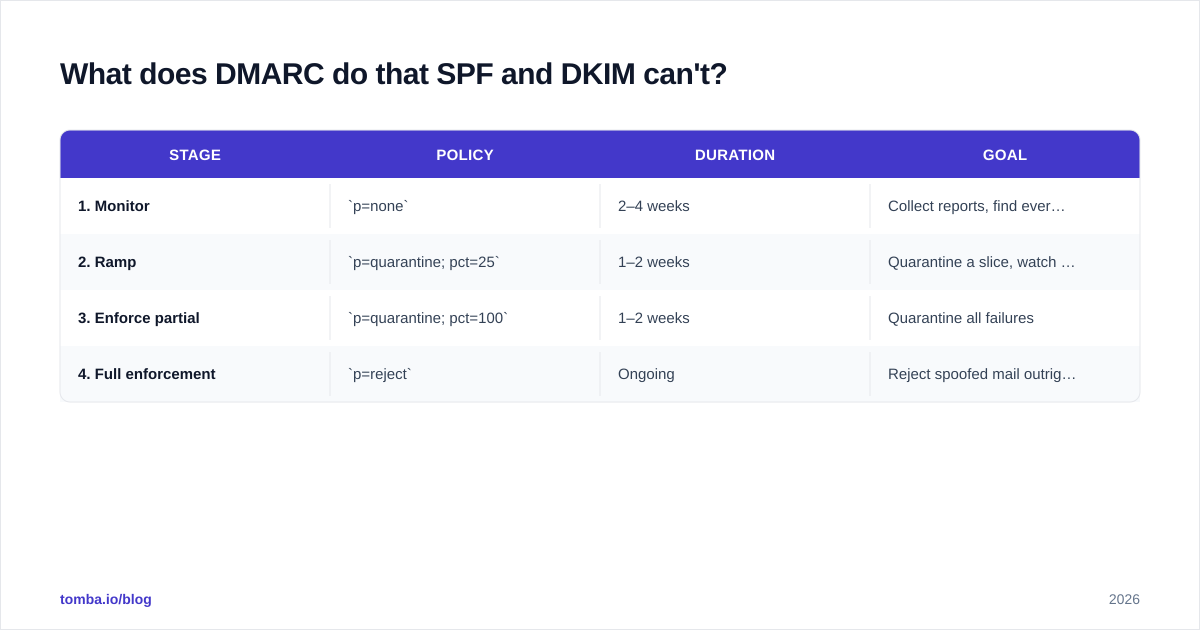
Jumping straight to p=reject is how teams accidentally block their own invoices and newsletters. Follow the staged path:
| Stage | Policy | Duration | Goal |
|---|---|---|---|
| 1. Monitor | p=none |
2–4 weeks | Collect reports, find every legitimate sender |
| 2. Ramp | p=quarantine; pct=25 |
1–2 weeks | Quarantine a slice, watch for false positives |
| 3. Enforce partial | p=quarantine; pct=100 |
1–2 weeks | Quarantine all failures |
| 4. Full enforcement | p=reject |
Ongoing | Reject spoofed mail outright |
The official standard and a vendor-neutral explainer live at dmarc.org, and Google's own requirements are documented in the Google Postmaster sender guidelines. Both are worth bookmarking.
Do you really need all three in 2026?#
Yes — and this stopped being optional in 2024.
In February 2024, Google and Yahoo began enforcing rules for "bulk senders" (5,000+ messages/day to their users): valid SPF and DKIM, a DMARC record at minimum p=none, alignment, one-click unsubscribe, and spam complaint rates under 0.3%. Microsoft followed with similar requirements. By 2026, mailbox providers treat missing authentication as a near-automatic spam signal regardless of volume — the "bulk" threshold has effectively become "everyone."
Here's the part teams miss: authentication makes you eligible for the inbox; it doesn't win the inbox. A perfectly authenticated email to a dead, scraped list still tanks your sender reputation. The two work as a pair:
- Authentication (SPF/DKIM/DMARC) = "you are provably you."
- Reputation (engagement, complaints, list hygiene) = "people want your mail."
You need both. Which is why cleaning your list with an email verifier before a send matters as much as your DNS records — bouncing into invalid addresses wrecks the reputation that authentication was supposed to protect.
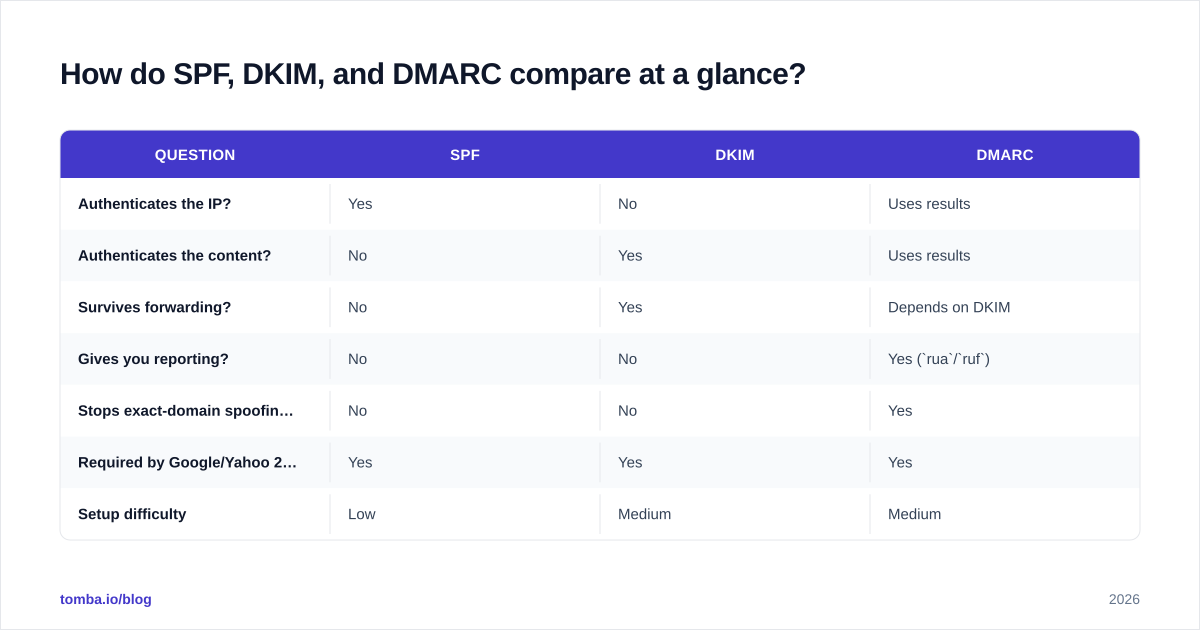
How do SPF, DKIM, and DMARC compare at a glance?#
| Question | SPF | DKIM | DMARC |
|---|---|---|---|
| Authenticates the IP? | Yes | No | Uses results |
| Authenticates the content? | No | Yes | Uses results |
| Survives forwarding? | No | Yes | Depends on DKIM |
| Gives you reporting? | No | No | Yes (rua/ruf) |
| Stops exact-domain spoofing? | No | No | Yes |
| Required by Google/Yahoo 2024+? | Yes | Yes | Yes |
| Setup difficulty | Low | Medium | Medium |
The pattern is clear: each protocol covers the previous one's blind spot. SPF can't survive forwarding, so DKIM exists. DKIM and SPF can't enforce a policy or report, so DMARC exists. Skip one and you leave a documented gap that providers will penalize.
What are the most common authentication mistakes?#
Most "we set it up and it still fails" cases come down to a short list:
- Multiple SPF records. A domain may have exactly one SPF TXT record. Two records = automatic
permerror. Merge them into a singlev=spf1line. - Exceeding 10 DNS lookups. Covered above — the silent killer for SaaS-heavy stacks.
- DKIM signing a different domain than the
From. Common when an ESP signs with its own domain by default. Configure a custom signing domain so DKIM aligns. - DMARC at
p=rejecton day one. You'll block legitimate senders you didn't know existed. Always monitor first. - Forgetting subdomains. DMARC's
sp=tag governs subdomain policy. Spoofers lovemail.yourdomain.com— setsp=rejectonce you're confident. - Never reading the reports. A
ruaaddress that nobody monitors is wasted. Use a DMARC report parser; the raw XML is unreadable by hand. - Sending to bad data. Authentication won't save you from a list full of spam traps. Pair clean DNS with a clean list.
If you maintain multiple sending domains, audit each one — a single misconfigured subdomain can drag down the reputation of your primary domain. Wikipedia's DMARC overview is a solid, neutral primer if you need to brief a non-technical stakeholder.
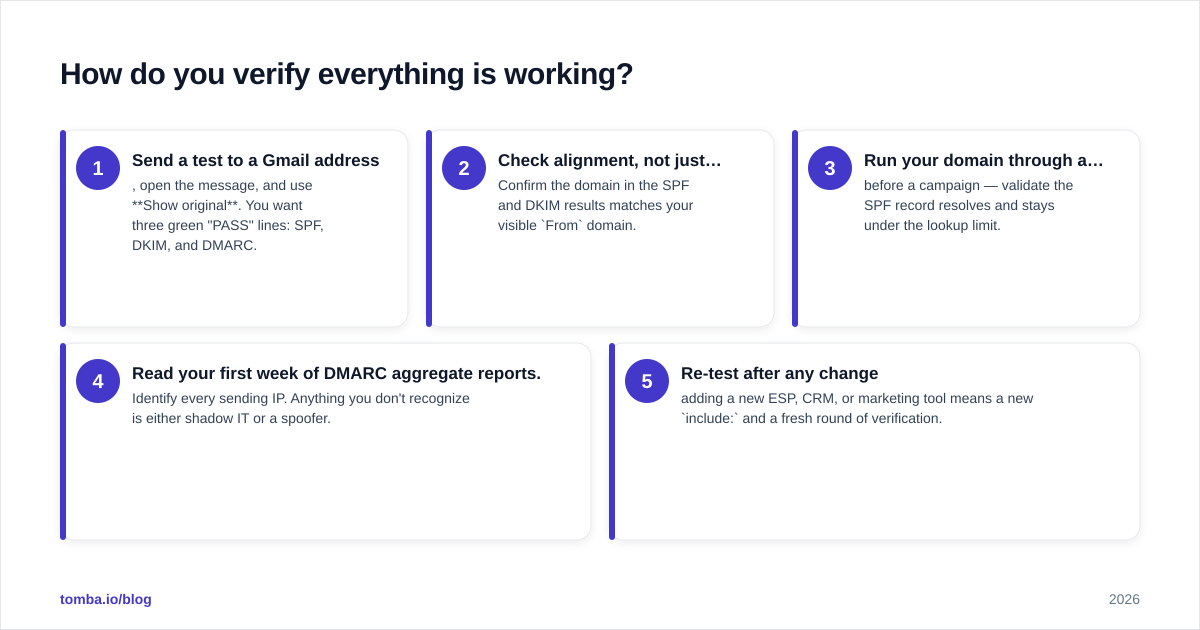
How do you verify everything is working?#
Don't trust "it looks right." Verify with evidence:
- Send a test to a Gmail address, open the message, and use Show original. You want three green "PASS" lines: SPF, DKIM, and DMARC.
- Check alignment, not just pass/fail. Confirm the domain in the SPF and DKIM results matches your visible
Fromdomain. - Run your domain through a checker before a campaign — validate the SPF record resolves and stays under the lookup limit.
- Read your first week of DMARC aggregate reports. Identify every sending IP. Anything you don't recognize is either shadow IT or a spoofer.
- Re-test after any change — adding a new ESP, CRM, or marketing tool means a new
include:and a fresh round of verification.
Treat this as a recurring audit, not a one-time setup. Every new tool you connect to your domain is a new sender that needs to be authorized.
Where does this fit in your outbound stack?#
Authentication is the foundation; list quality is the structure you build on it. The cleanest DNS configuration in the world can't compensate for emailing addresses that don't exist or never engage. That's the half of deliverability that lives outside your DNS zone — and it's where your prospecting data quality directly drives your sender reputation.
Before you load a single contact into a sequence, make sure the addresses are real and reachable. Tomba's Email Finder sources verified professional emails by name, domain, or company, so your authenticated, warmed-up domain sends to inboxes that actually open — protecting the reputation your SPF, DKIM, and DMARC records work so hard to establish. Pair it with verification, get your three records green, and you've covered both halves of deliverability. See Tomba pricing to start on the free tier with 25 searches a month.
// get started
Find, verify and enrich your first contacts today
Start on the free plan with 25 searches a month, then scale when your team is ready.
Free plan · No credit card required · GDPR & CCPA
// about the author