BIMI Email Authentication in 2026: A Complete Setup Guide
Your brand logo in every inbox sounds great—until you hit the DMARC and VMC requirements. Here's how BIMI really works in 2026, and whether it's worth the cost.
BIMI email authentication is the standard that finally puts your verified brand logo next to your emails in the inbox. You earn it first with strict authentication. Have you ever seen a small company logo in the sender slot of a Gmail or Apple Mail message and wondered how to get one? This is the guide.
TL;DR#
- BIMI (Brand Indicators for Message Identification) displays your trademarked logo as the sender avatar in supporting inboxes, but it is a reward layered on top of email authentication, not a setting you flip on.
- You must reach DMARC enforcement (
p=quarantineorp=reject) before any BIMI logo will render—no shortcuts. - Most major mailbox providers (Gmail, Apple Mail, Yahoo, Fastmail) require a Verified Mark Certificate (VMC) or, more recently, a Common Mark Certificate (CMC) that proves you own the logo.
- A VMC costs roughly $1,000–$1,500 per year; the logo must be an SVG Tiny PS file and, for a VMC, usually a registered trademark.
- BIMI improves brand recognition and can lift engagement, but it only pays off if your underlying SPF, DKIM, DMARC, and list hygiene are already solid.
What is BIMI email authentication and why does it matter in 2026?#
BIMI email authentication is an email specification that lets mailbox providers show a brand-controlled logo beside authenticated messages. Think of it like the verified checkmark on social media: anyone can type a company name in the "from" field, but only a brand that has proven control of its domain and its logo gets the visual badge.
The strategic point in 2026 is trust. Inboxes are crowded and phishing is relentless. Recipients scan sender avatars faster than subject lines, so a consistent, verified logo is a recognition shortcut. Brands that deploy BIMI report higher open rates in early studies. More important, the logo gives a clear signal that separates them from spoofers using lookalike domains.
But here's the part most "turn on BIMI today" articles skip: BIMI is the visible tip of an authentication iceberg. The logo only appears once your domain passes email deliverability fundamentals. If your DMARC policy is still in monitoring mode, BIMI does nothing. So treat BIMI as a forcing function: it pushes you to fix authentication you should have fixed anyway.
How does BIMI actually work?#
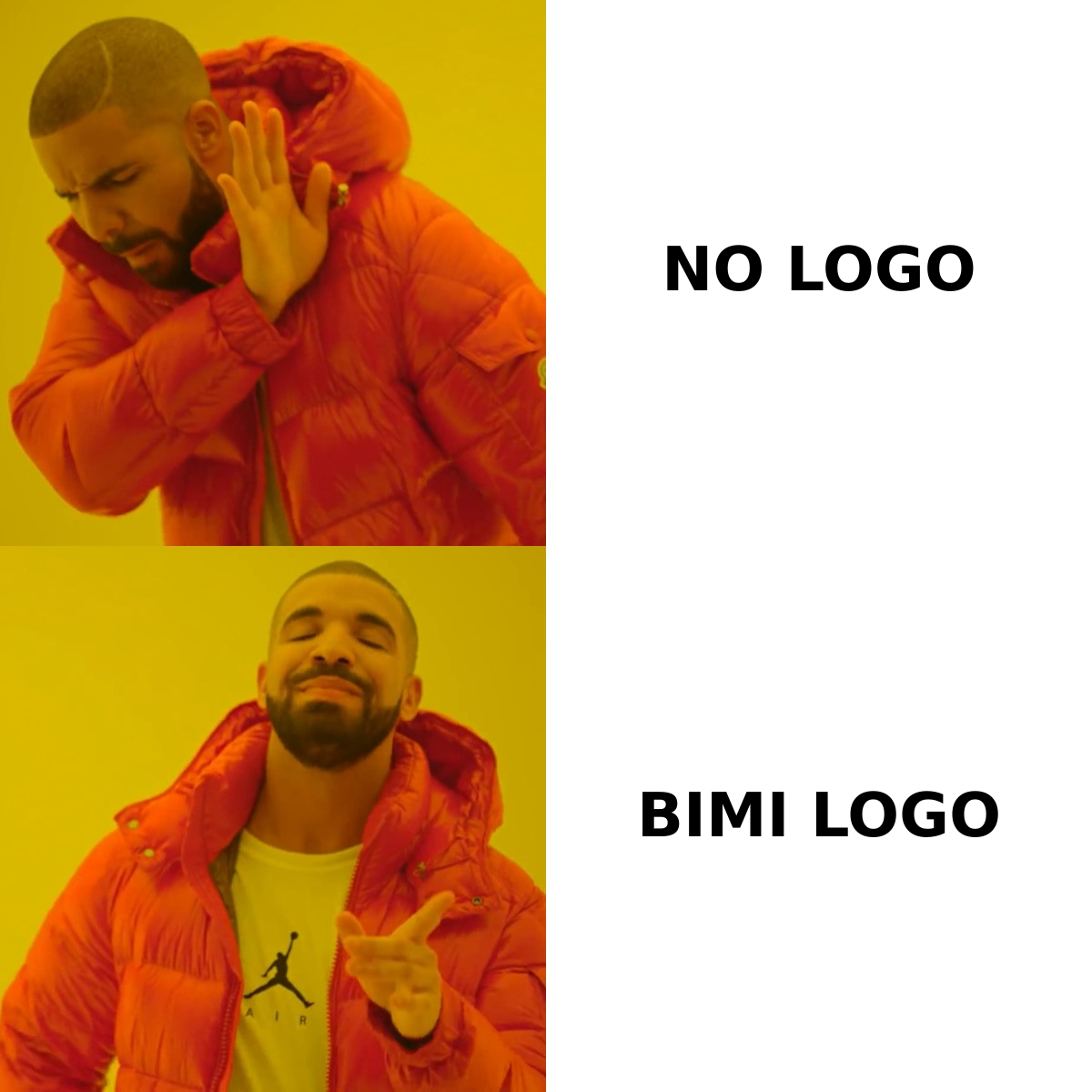
BIMI ties three things together: your domain's authentication, a DNS record that points to your logo, and (for most providers) a certificate that proves the logo is really yours.
When you send an email, the receiving mailbox provider runs its normal checks:
- SPF and DKIM confirm the message came from an authorized server and wasn't tampered with. You can sanity-check your SPF setup with a free SPF checker before you go further.
- DMARC ties SPF and DKIM to the visible "from" domain and tells receivers what to do with failures. BIMI requires this to be at enforcement.
- BIMI lookup — if the message passes DMARC, the provider queries a
default._bimi.yourdomain.comTXT record. That record points to your logo's SVG file and, optionally, to a certificate. - Certificate validation — the provider checks your VMC or CMC to confirm you control the logo, then renders it.
If any link in that chain breaks, the logo silently fails to appear. There's no error message to the sender—the email just shows the default avatar. That's why methodical setup matters more than speed.
A quick analogy: BIMI is like getting a verified storefront sign in a shopping mall. The mall (the mailbox provider) won't hang your branded sign until you've shown a business license (DMARC enforcement), proof you own the logo (the certificate), and a sign cut to the exact spec (SVG Tiny PS). Skip a document and the sign stays in the back room.
What do you need before BIMI will display?#
Here's the non-negotiable checklist. Work top to bottom—each step depends on the one above it.
- SPF published and passing for your sending domain.
- DKIM signing every message with a key of 1024 bits or stronger.
- DMARC at enforcement. A
p=nonepolicy is not enough. You needp=quarantineorp=reject, and many providers want a meaningful percentage (pct=100). - A clean SVG Tiny PS logo. Square aspect ratio, solid background, no scripts or external references. Standard SVGs are rejected.
- A VMC or CMC issued by an authorized certificate authority (currently DigiCert or Entrust).
- A published BIMI DNS record pointing to both the logo and the certificate.
Reaching DMARC enforcement is where most teams stall. Moving from p=none to p=reject without preparation can block legitimate mail from forgotten senders—your CRM, your invoicing tool, your support desk. Roll it out gradually and read your DMARC aggregate reports. Tighten the policy only once every legitimate source authenticates cleanly. Strong sender reputation and a verified recipient list make this far less risky, because you're not fighting spam complaints at the same time.
VMC vs CMC: which certificate do you need?#
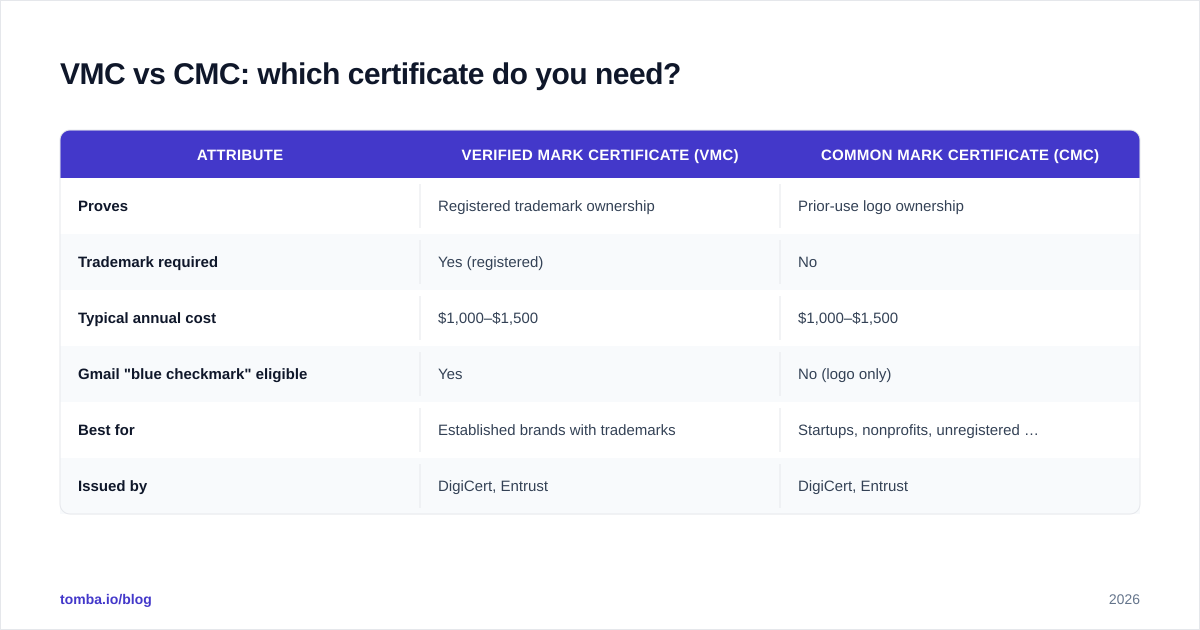
Until recently, BIMI effectively required a Verified Mark Certificate, which in turn required a registered trademark. That locked out small businesses and brands in regions where trademark registration is slow or expensive. In 2023–2024 the ecosystem added the Common Mark Certificate (CMC), which validates a logo that is in prior use but not necessarily trademark-registered. CMC support is now rolling out across providers.
| Attribute | Verified Mark Certificate (VMC) | Common Mark Certificate (CMC) |
|---|---|---|
| Proves | Registered trademark ownership | Prior-use logo ownership |
| Trademark required | Yes (registered) | No |
| Typical annual cost | $1,000–$1,500 | $1,000–$1,500 |
| Gmail "blue checkmark" eligible | Yes | No (logo only) |
| Best for | Established brands with trademarks | Startups, nonprofits, unregistered marks |
| Issued by | DigiCert, Entrust | DigiCert, Entrust |
The practical takeaway: if you own a registered trademark, get a VMC—it unlocks the strongest trust signals, including Gmail's verified checkmark. If you don't, a CMC still gets your logo into supporting inboxes for a similar price. Either way, budget for an annual renewal and a few weeks of validation paperwork.
Which email providers support BIMI?#
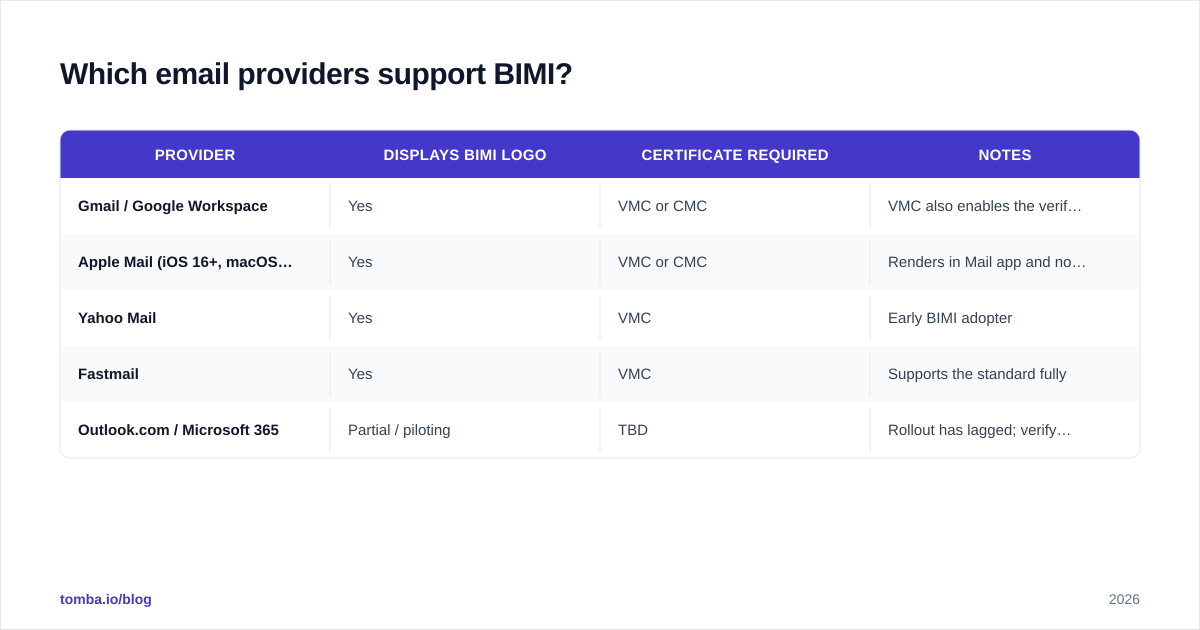
Support is uneven, and the certificate requirement varies by provider. This is the part to check before you spend a dollar, because if your audience lives in an unsupported client, the ROI changes.
| Provider | Displays BIMI logo | Certificate required | Notes |
|---|---|---|---|
| Gmail / Google Workspace | Yes | VMC or CMC | VMC also enables the verified blue checkmark |
| Apple Mail (iOS 16+, macOS Ventura+) | Yes | VMC or CMC | Renders in Mail app and notifications |
| Yahoo Mail | Yes | VMC | Early BIMI adopter |
| Fastmail | Yes | VMC | Supports the standard fully |
| Outlook.com / Microsoft 365 | Partial / piloting | TBD | Rollout has lagged; verify current status |
Because Microsoft's consumer and enterprise rollout has trailed the others, don't assume universal coverage. Pull a breakdown of where your subscribers actually open mail, then weigh the certificate cost against the share of your list that will ever see the logo. If 70% of your opens are in Gmail and Apple Mail, the math is easy. If they're in unsupported clients, wait.
How do you set up BIMI step by step?#
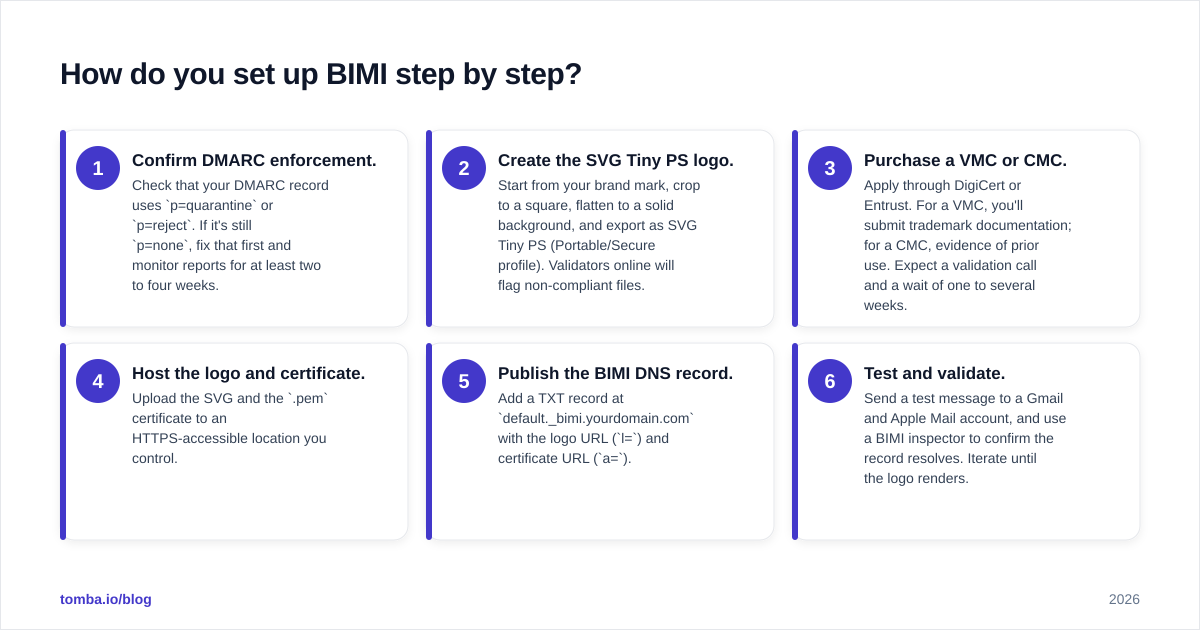
Once the prerequisites are in place, the deployment itself is straightforward. Here's the sequence.
- Confirm DMARC enforcement. Check that your DMARC record uses
p=quarantineorp=reject. If it's stillp=none, fix that first and monitor reports for at least two to four weeks. - Create the SVG Tiny PS logo. Start from your brand mark, crop to a square, flatten to a solid background, and export as SVG Tiny PS (Portable/Secure profile). Validators online will flag non-compliant files.
- Purchase a VMC or CMC. Apply through DigiCert or Entrust. For a VMC, you'll submit trademark documentation; for a CMC, evidence of prior use. Expect a validation call and a wait of one to several weeks.
- Host the logo and certificate. Upload the SVG and the
.pemcertificate to an HTTPS-accessible location you control. - Publish the BIMI DNS record. Add a TXT record at
default._bimi.yourdomain.comwith the logo URL (l=) and certificate URL (a=). - Test and validate. Send a test message to a Gmail and Apple Mail account, and use a BIMI inspector to confirm the record resolves. Iterate until the logo renders.
Keep a calendar reminder for certificate renewal. An expired VMC makes the logo disappear with no warning, and re-issuance isn't instant.
Is BIMI worth the cost?#
For most established senders, yes—but only as the capstone on a healthy program, never as a first step.
The case for BIMI is real: a verified logo lifts recognition, reinforces trust at the exact moment a recipient decides whether to open or delete, and signals to providers that you've done the authentication work spoofers won't. Brands that have deployed it report measurable engagement gains, and the verified checkmark in Gmail is a differentiator competitors can't fake.
The case against rushing it is just as real. BIMI costs four figures a year and demands DMARC enforcement, which can be disruptive if your sending sources aren't fully mapped. And the logo does nothing to fix a bad list, weak content, or a damaged reputation. If your mail is landing in spam, BIMI won't rescue it—the message has to pass authentication and reach the inbox before any logo renders.
The honest sequence is: fix authentication, clean your list, monitor your reputation, then add BIMI email authentication as the visible proof of a program that's already working. A logo on top of a deliverability mess is lipstick on a problem.
What are the most common BIMI mistakes?#
- Stopping at
p=none. Monitoring mode satisfies DMARC reporting but not BIMI. Enforcement is mandatory. - Using a standard SVG. Only SVG Tiny PS is accepted. A normal vector export will be rejected silently.
- Skipping the certificate. A few providers once allowed "self-asserted" BIMI without a cert, but the major inboxes require a VMC or CMC. Without one, no logo in Gmail or Apple Mail.
- Letting the certificate lapse. Renewals aren't automatic, and an expired cert removes the logo.
- Ignoring list quality. Sending to stale or invalid addresses tanks the reputation BIMI depends on. Run addresses through an email verifier and check your domain against a blacklist checker before you scale sends.
For deeper background on the standard itself, the BIMI Group, Google's BIMI documentation, and the DMARC overview on Wikipedia are the authoritative references to keep bookmarked.
Where should you start?#
Start with the foundation, not the logo. BIMI email authentication rewards senders who already authenticate cleanly and mail only verified, engaged recipients. So the highest-leverage work happens before you ever buy a certificate.
That foundation begins with knowing exactly who you're emailing. Build your outreach on accurate, deliverable contact data with the Tomba Email Finder. Find professional email addresses by domain, name, or company. Then keep your lists clean. Healthy lists keep your DMARC enforcement and sender reputation strong, so that verified logo actually shows up. Get the data right first, and BIMI becomes the easy last step instead of an expensive band-aid.
// get started
Find, verify and enrich your first contacts today
Start on the free plan with 25 searches a month, then scale when your team is ready.
Free plan · No credit card required · GDPR & CCPA
// about the author