Dedicated IP Management in 2026: A Deliverability Guide
Should you move to a dedicated sending IP, and how do you manage one without torching your reputation? A practical 2026 playbook on warmup, volume, and monitoring.

TL;DR
- A dedicated IP gives you full control over your sending reputation, but it also means you own every mistake — there is no shared pool to dilute a bad day.
- Dedicated IPs only pay off above roughly 100,000–150,000 emails per month per IP. Below that, you cannot generate enough consistent volume to keep the reputation "warm," and a shared IP is usually safer.
- Warmup is non-negotiable: ramp volume gradually over 4–8 weeks, starting with your most engaged recipients, before you send at full scale.
- Dedicated IP management is an ongoing discipline — monitor bl. acklists, Postmaster reputation, bounce and complaint rates weekly, not just at launch.
- Clean data is the foundation. Even a perfectly warmed IP gets wrecked by sending to invalid addresses, so verification sits upstream of every other tactic here.
Dedicated IP management is the practice of running one or more sending IP addresses that belong exclusively to your domain, and deliberately controlling the volume, consistency, and recipient quality that flows through them so mailbox providers learn to trust you. Done well, it gives large senders predictable inbox placement. Done badly, it gives you a single point of failure that can silently route your campaigns to spam.
This guide walks through when a dedicated IP actually makes sense, how to warm one up, the volume math that keeps reputation healthy, and the monitoring routine that separates senders who land in the inbox from senders who wonder where their open rates went.
What is a dedicated IP and how does it differ from a shared IP?#
A dedicated IP is a sending IP address used by only one sender. A shared IP is a pool of addresses used by many senders at once, managed by your email service provider (ESP).
Think of it like your driving record versus a rental-car insurance pool. On a shared IP, everyone's behavior is averaged together — a reckless sender in the pool can raise everyone's "premiums" (lower everyone's reputation), but a single bad campaign of yours is diluted by everyone else's good behavior. On a dedicated IP, the record is entirely yours. Clean sending earns you a pristine reputation that no one else can damage; sloppy sending has no one else to hide behind.
That trade-off is the entire decision. You are choosing between control and protection.
Mailbox providers like Gmail and Outlook build reputation primarily at the domain level today, but IP reputation still matters — especially for high-volume senders and for the first impression a new IP makes. Reputation is the running score providers assign based on how recipients react to your mail: opens, replies, "not spam" clicks on the good side; deletes-without-reading, spam complaints, and hard bounces on the bad side. A dedicated IP means that score is 100% a reflection of your list and your content.
Should you use a dedicated IP? The volume question#
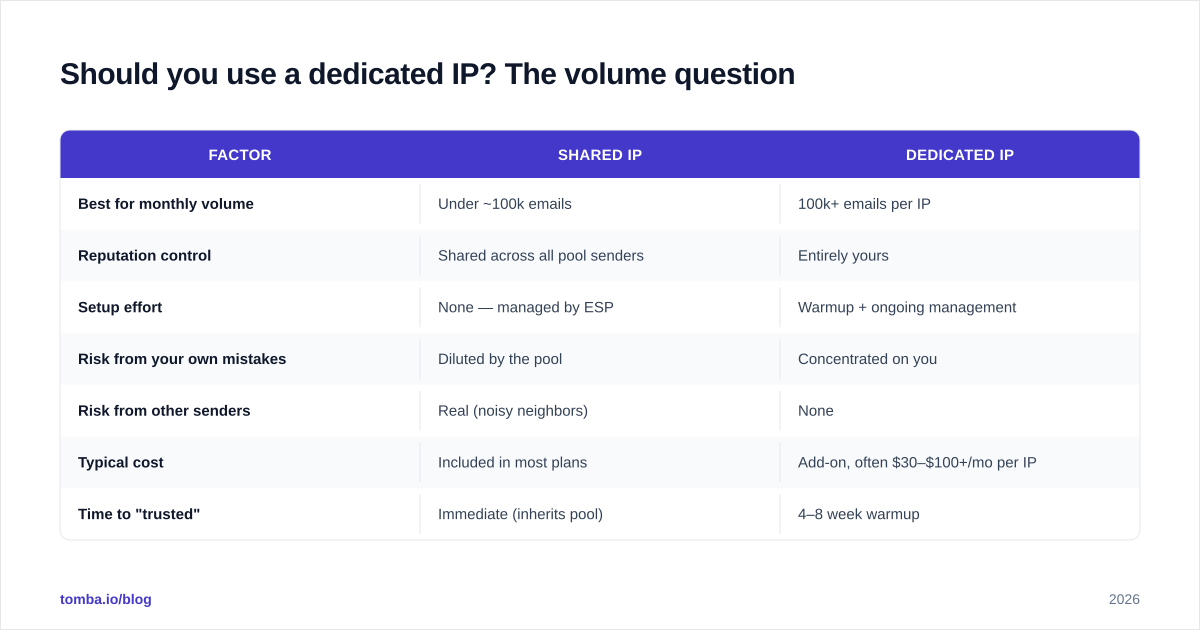
The short answer: use a dedicated IP only if you can send consistently high volume to engaged recipients. For most senders, the threshold is around 100,000+ emails per month, per IP.
Here is why volume is the deciding factor. Mailbox providers trust IPs that behave predictably. An IP that sends 50,000 emails on Monday and then nothing for two weeks looks suspicious — that pattern resembles a compromised server or a spammer burning an address. To stay "warm," a dedicated IP needs a steady, recurring stream of mail. If you cannot supply that, the IP goes cold, and your next big send starts from a position of distrust.
The table below frames the decision concretely.
| Factor | Shared IP | Dedicated IP |
|---|---|---|
| Best for monthly volume | Under ~100k emails | 100k+ emails per IP |
| Reputation control | Shared across all pool senders | Entirely yours |
| Setup effort | None — managed by ESP | Warmup + ongoing management |
| Risk from your own mistakes | Diluted by the pool | Concentrated on you |
| Risk from other senders | Real (noisy neighbors) | None |
| Typical cost | Included in most plans | Add-on, often $30–$100+/mo per IP |
| Time to "trusted" | Immediate (inherits pool) | 4–8 week warmup |
If you are a startup sending 20,000 transactional emails a month, a dedicated IP is usually the wrong move — you will struggle to keep it warm, and a reputable shared pool will outperform it. If you are an enterprise pushing millions of messages with a clean, engaged list, a dedicated IP gives you the isolation and predictability you need.
There is also a middle path worth naming: multiple dedicated IPs in a rotation for very large senders, or a hybrid setup where transactional mail (high engagement, time-sensitive) runs on a dedicated IP while marketing blasts stay on a managed shared pool. Segment by mail type and engagement, not just by total volume.
How do you warm up a dedicated IP?#
Warming up means gradually increasing send volume on a new IP over several weeks so mailbox providers can build trust incrementally instead of being hit with a sudden flood.
A brand-new dedicated IP has no reputation at all — it is a blank slate, which providers treat with suspicion, not neutrality. Send 500,000 emails on day one from a cold IP and you will be throttled, deferred, or blocked outright. The fix is a disciplined ramp.
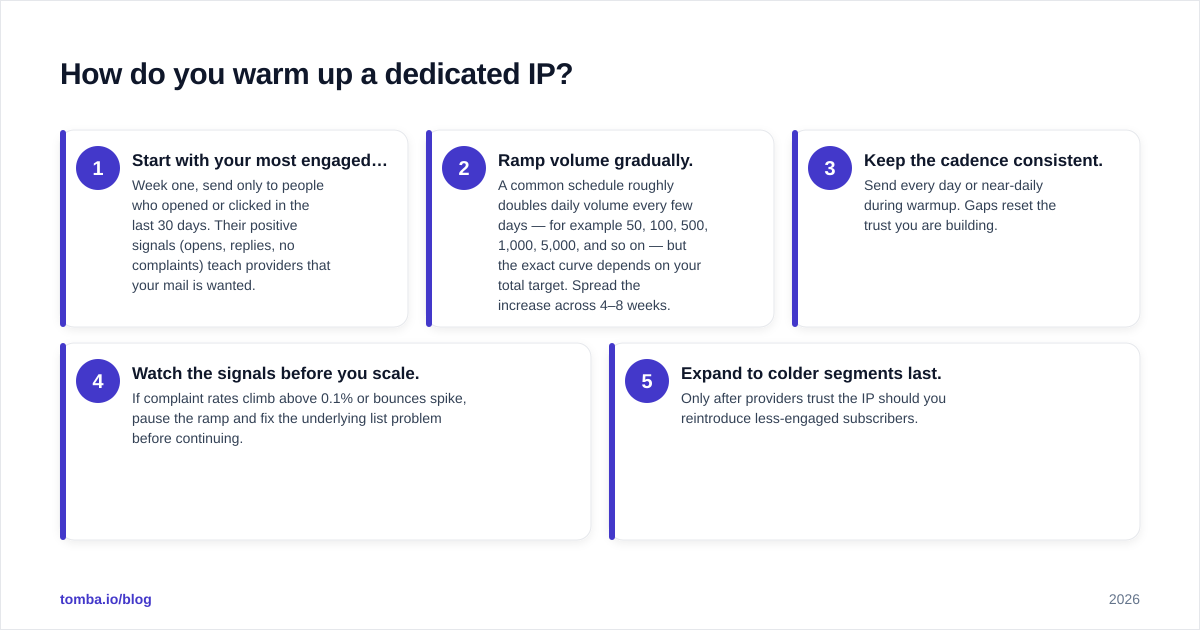
A workable warmup framework:
- Start with your most engaged recipients. Week one, send only to people who opened or clicked in the last 30 days. Their positive signals (opens, replies, no complaints) teach providers that your mail is wanted.
- Ramp volume gradually. A common schedule roughly doubles daily volume every few days — for example 50, 100, 500, 1,000, 5,000, and so on — but the exact curve depends on your total target. Spread the increase across 4–8 weeks.
- Keep the cadence consistent. Send every day or near-daily during warmup. Gaps reset the trust you are building.
- Watch the signals before you scale. If complaint rates climb above 0.1% or bounces spike, pause the ramp and fix the underlying list problem before continuing.
- Expand to colder segments last. Only after providers trust the IP should you reintroduce less-engaged subscribers.
You can model the curve before you start with an email warmup calculator, which translates a monthly target into a realistic daily ramp. The principle to internalize: warmup is about engagement signals, not just raw numbers. Volume to people who delete your mail teaches providers the wrong lesson, no matter how gradual the ramp.
For the underlying mechanics of how providers score senders, the email deliverability and sender reputation glossary entries are worth a read before you start.
What authentication do you need before sending?#
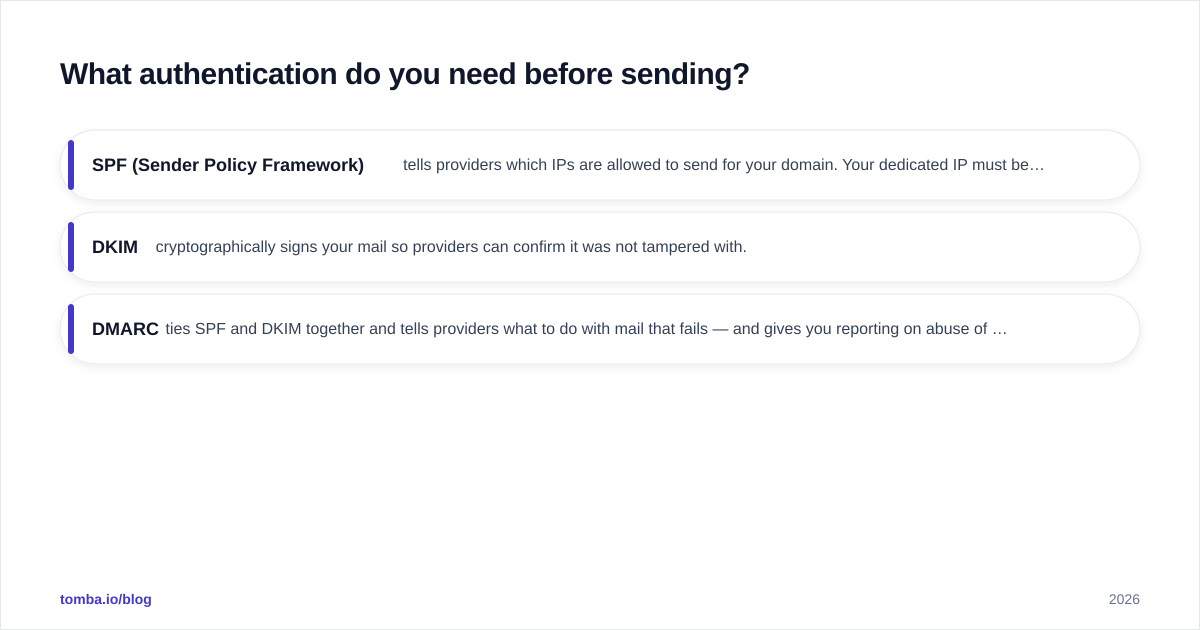
Before a single warmup email goes out, your domain must have SPF, DKIM, and DMARC correctly configured. These are non-negotiable in 2026 — Gmail and Yahoo now require them for bulk senders, and missing records will cap your deliverability no matter how clean your IP is.
- SPF (Sender Policy Framework) tells providers which IPs are allowed to send for your domain. Your dedicated IP must be included in the record. Verify it with an SPF record lookup or a dedicated SPF checker before launch.
- DKIM cryptographically signs your mail so providers can confirm it was not tampered with.
- DMARC ties SPF and DKIM together and tells providers what to do with mail that fails — and gives you reporting on abuse of your domain.
Google publishes its current requirements in the official Postmaster sender guidelines, and it is the authoritative source to check before any large sending change. Skipping authentication is the single most common reason a well-warmed IP still underperforms.
How do you manage a dedicated IP over time?#
Managing a dedicated IP is a weekly discipline, not a launch-day task. The four metrics to watch are reputation, bounces, complaints, and blacklist status.
Sender reputation. Use Google Postmaster Tools to monitor your IP and domain reputation directly from the largest mailbox provider. Postmaster grades reputation as Bad/Low/Medium/High — anything below High deserves investigation. Check your standing with an email reputation checker for a broader view across providers.
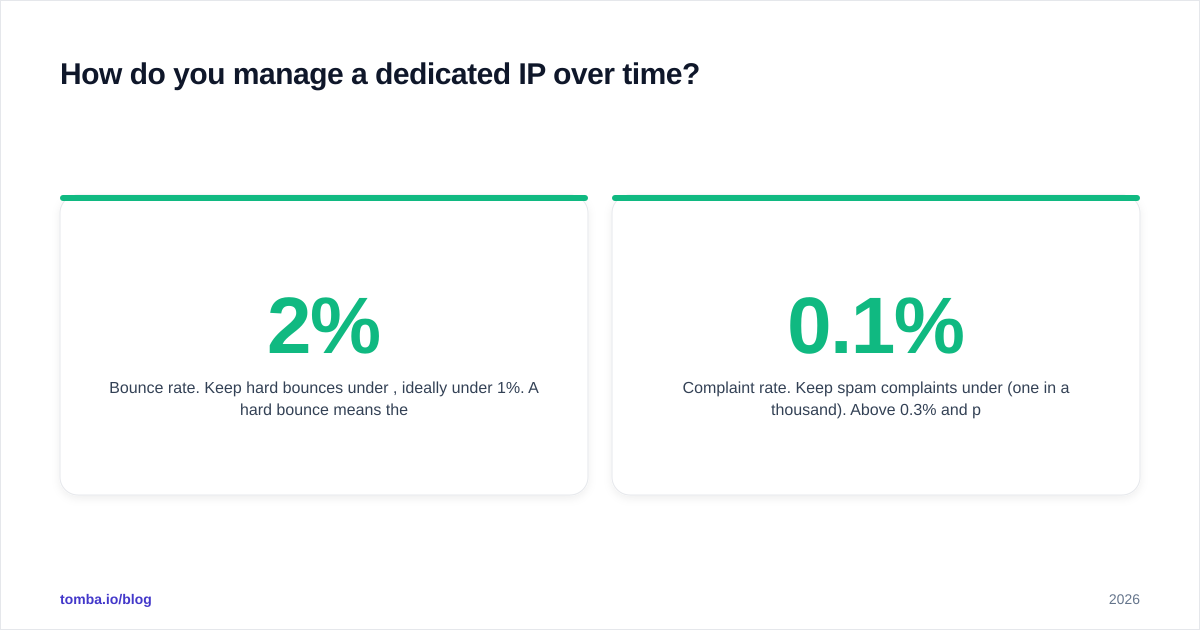
Bounce rate. Keep hard bounces under 2%, ideally under 1%. A hard bounce means the address does not exist, and a pile of them signals to providers that you are not maintaining your list. This is the failure mode that quietly destroys otherwise-healthy IPs.
Complaint rate. Keep spam complaints under 0.1% (one in a thousand). Above 0.3% and providers will start routing you to spam aggressively. Make unsubscribing easy — a visible unsubscribe link reduces complaints because annoyed recipients have a better option than the spam button.
Blacklist status. Check major blocklists weekly with a blacklist checker. Landing on a list like Spamhaus can tank delivery overnight, and the sooner you catch it, the faster you can request delisting after fixing the cause.

The single biggest lever across all four metrics is list quality. Most reputation damage traces back to sending mail to addresses that should never have received it — spam traps, invalid mailboxes, and recycled addresses. Which brings us to the foundation everything else rests on.
Why does data quality decide dedicated IP success?#
Because a dedicated IP concentrates all reputation consequences on you, the quality of the addresses you send to becomes the highest-leverage factor in the entire system. Clean data upstream prevents nearly every downstream reputation problem.
Consider the chain of cause and effect. Invalid addresses cause hard bounces. Hard bounces lower reputation. Spam traps — old or fabricated addresses that exist only to catch careless senders — can get you blacklisted instantly. Disengaged recipients generate complaints and deletes. Every one of these is a data problem before it is a reputation problem.
That is why verification belongs at the top of the funnel. Before any address enters your warmup or your regular sends, it should be validated. An email verifier checks whether a mailbox actually exists and flags risky addresses before they ever touch your dedicated IP. For domains that accept all incoming mail regardless of whether the mailbox exists, a catch-all verifier gives you a more nuanced read than a simple valid/invalid check.
The discipline compounds. A list that is verified, segmented by engagement, and continuously pruned of bounces keeps your bounce rate low, your complaint rate low, and your reputation high — which is the entire point of owning a dedicated IP in the first place. Skip verification, and you have simply bought yourself a faster, more concentrated way to ruin your sending reputation.
For acquisition, the same principle applies before addresses even reach your list: build your prospect data from accurate sources rather than scraped or guessed addresses. A reliable email finder returns addresses with confidence scores, so you start with deliverable contacts instead of cleaning up a mess later.
What are the common dedicated IP mistakes to avoid?#
The failure patterns are predictable, which means they are avoidable.
- Going dedicated too early. If you cannot sustain ~100k/month per IP, you will fight to keep it warm. Stay on a quality shared pool until your volume justifies the switch.
- Skipping or rushing warmup. Blasting a cold IP at full volume is the fastest way to get throttled. The ramp is not optional.
- Inconsistent sending. Long gaps between sends let the IP go cold. Maintain a steady cadence.
- Ignoring authentication. Missing SPF, DKIM, or DMARC caps your ceiling regardless of IP health.
- Sending to unverified lists. This is the root cause behind most reputation collapses. Verify before you send, every time.
- Set-and-forget monitoring. Reputation drifts. Weekly checks catch problems while they are still cheap to fix.
Each of these is cheaper to prevent than to recover from. Recovering a damaged dedicated IP can take weeks of careful re-warming, during which your deliverability stays depressed.
Dedicated IP management: the bottom line#
A dedicated IP is a powerful tool for senders with the volume and the discipline to manage it — and a liability for everyone else. The decision hinges on consistent volume; the execution hinges on warmup, authentication, and relentless attention to list quality. Get those right and you earn predictable inbox placement that no noisy neighbor can disrupt. Get them wrong and you have built a single, concentrated point of failure.
Whether you run a shared or dedicated IP, every email you send is only as good as the address it is going to. Start your sending list with deliverable, verified contacts using the Tomba Email Finder — find professional email addresses by domain, name, or company, complete with confidence scores, so your dedicated IP only ever carries mail that lands. Pair it with Tomba's verifier to keep bounces low and your hard-won reputation intact. See Tomba pricing to find the plan that matches your sending volume.
// get started
Find, verify and enrich your first contacts today
Start on the free plan with 25 searches a month, then scale when your team is ready.
Free plan · No credit card required · GDPR & CCPA
// about the author