Email Sending Limits and Throttling: 2026 Deliverability Guide
Send too fast and mailbox providers throttle or block you. Here's how email sending limits and throttling actually work in 2026 — and the ramp schedule that keeps you in the inbox.
Email Sending Limits and Throttling: The 2026 Deliverability Guide
Sending limits and throttling are the speed bumps mailbox providers use to decide whether you're a trusted sender or a spammer in a hurry. Get the pacing wrong and your carefully built list never sees the inbox. Get it right and you can scale outbound without torching your domain.
TL;DR#
- Sending limits are hard caps (per hour, per day) set by your email provider; throttling is the dynamic slowdown mailbox providers like Gmail and Outlook apply when your reputation looks shaky.
- New domains and inboxes need a warmup ramp — start at 20–40 emails/day and roughly double each week over 4–8 weeks.
- Throttling shows up as
421and4.7.xdeferral codes, rising bounce rates, and slow SMTP responses. These are signals to slow down, not push harder. - Spreading volume across multiple inboxes and authenticated domains beats hammering one inbox at its ceiling.
- Clean lists are the cheapest deliverability win: verify emails before you send so bounces don't trigger throttling in the first place.
What's the difference between sending limits and throttling?#
Sending limits are fixed; throttling is reactive. Think of a sending limit as the posted speed limit on a highway, and throttling as a traffic cop who pulls you over when you're driving erratically even though you're technically under the limit.
A sending limit is the maximum number of messages your sending platform allows in a window. Google Workspace caps you at 2,000 external recipients per day per user. A standard @gmail.com account is capped around 500. Microsoft 365 limits you to 10,000 recipients per day and 30 messages per minute. These are your provider's rules, and they don't move.
Throttling is what the receiving server does. Gmail, Yahoo, and Outlook each run their own reputation systems. When they decide your sending pattern looks risky — too much volume too fast, too many bounces, too many spam complaints — they temporarily defer your mail with a soft bounce instead of accepting it. Your provider says you can send; the recipient's server says "not so fast."
Both matter. You can be well under your provider's daily limit and still get throttled into oblivion by Gmail because your domain is two weeks old and you just tried to send 800 cold emails in an afternoon.

Why do mailbox providers throttle senders?#
Mailbox providers throttle to protect their users from spam and to test whether you're a legitimate sender. Their core question is simple: does this domain behave like a real business or like a spam cannon?
The signals they weigh include:
- Volume velocity — a domain that sent 5 emails yesterday and 5,000 today looks compromised.
- Engagement — opens, replies, and "not spam" actions raise reputation; deletes-without-reading and spam complaints sink it.
- Bounce rate — a high share of invalid recipients screams "purchased list."
- Authentication — missing or failing SPF record, DKIM, and DMARC alignment.
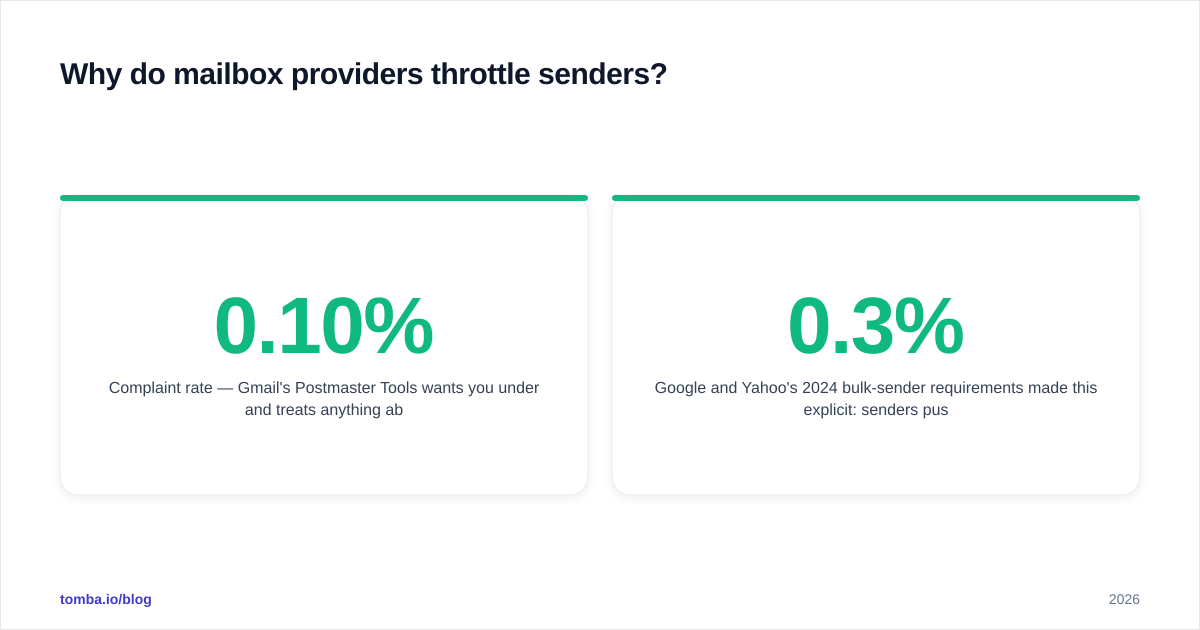
- Complaint rate — Gmail's Postmaster Tools wants you under 0.10% and treats anything above 0.30% as a red flag.
Google and Yahoo's 2024 bulk-sender requirements made this explicit: senders pushing 5,000+ messages a day to Gmail must authenticate with SPF, DKIM, and DMARC, keep spam complaints below 0.3%, and offer one-click unsubscribe. Those rules are fully enforced in 2026, and throttling is the first lever providers pull when you drift out of bounds. You can read the current requirements straight from Google's Postmaster guidelines.
How do email sending limits work across providers?#
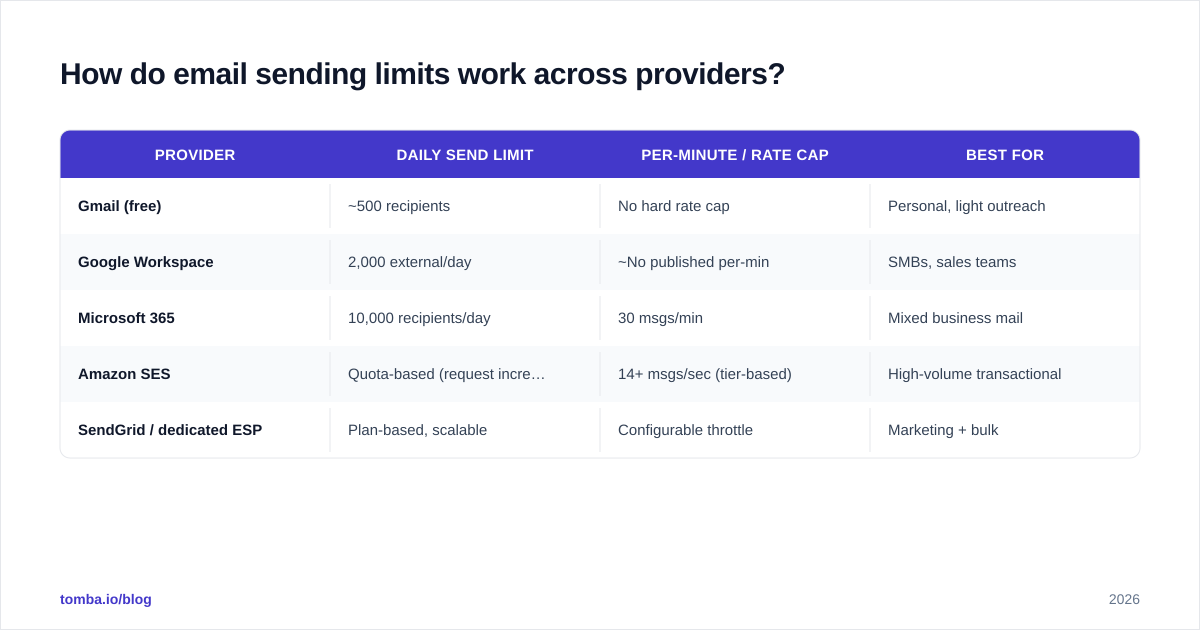
Every platform publishes a ceiling, but the practical limit — the volume you can send without throttling — is almost always lower for a fresh setup. Here's how the common senders stack up.
| Provider | Daily send limit | Per-minute / rate cap | Best for |
|---|---|---|---|
| Gmail (free) | ~500 recipients | No hard rate cap | Personal, light outreach |
| Google Workspace | 2,000 external/day | ~No published per-min | SMBs, sales teams |
| Microsoft 365 | 10,000 recipients/day | 30 msgs/min | Mixed business mail |
| Amazon SES | Quota-based (request increases) | 14+ msgs/sec (tier-based) | High-volume transactional |
| SendGrid / dedicated ESP | Plan-based, scalable | Configurable throttle | Marketing + bulk |
Two rules of thumb survive across all of them. First, published limits are not warmup limits — a brand-new Workspace inbox should not send 2,000 emails on day one even though it's "allowed." Second, per-minute pacing matters as much as the daily total. Dumping 500 messages in 90 seconds looks far more like a bot than spreading the same 500 across eight hours.
What is a safe email warmup ramp schedule?#
A warmup ramp gradually increases volume so mailbox providers build trust in your domain before you scale. The principle is the same as breaking in a new credit card: small, consistent, on-time activity earns you a higher limit.
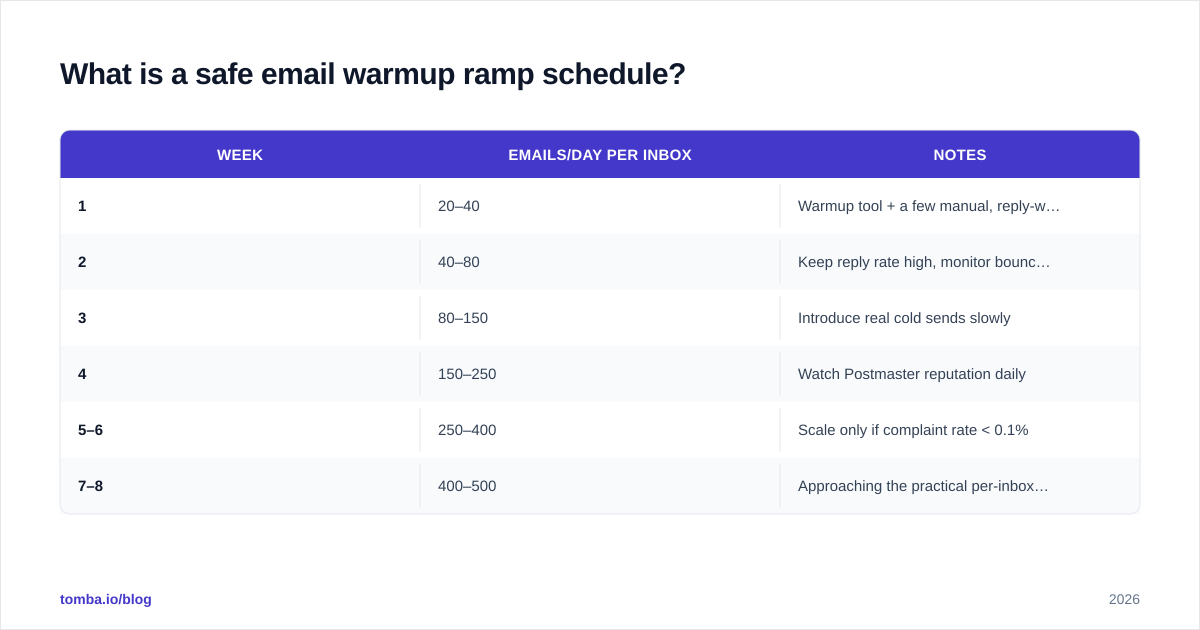
Here's a conservative 8-week ramp for a new inbox on an authenticated domain:
| Week | Emails/day per inbox | Notes |
|---|---|---|
| 1 | 20–40 | Warmup tool + a few manual, reply-worthy sends |
| 2 | 40–80 | Keep reply rate high, monitor bounces |
| 3 | 80–150 | Introduce real cold sends slowly |
| 4 | 150–250 | Watch Postmaster reputation daily |
| 5–6 | 250–400 | Scale only if complaint rate < 0.1% |
| 7–8 | 400–500 | Approaching the practical per-inbox ceiling |
Notice the ceiling: roughly 400–500 cold emails per inbox per day, even after a full ramp. That's not a coincidence. Beyond that, deliverability degrades fast regardless of how long you've warmed up. The answer to scaling isn't pushing one inbox harder — it's adding more inboxes and domains, each on its own ramp.
If you want to model your own curve, a warmup calculator will turn a target volume into a week-by-week schedule and tell you how many inboxes you actually need.

How do you know you're being throttled?#
Throttling announces itself through SMTP response codes and reputation metrics — you just have to read them. The clearest tell is a wave of 4xx deferrals, which mean "try again later," versus 5xx hard rejections, which mean "go away."
Watch for these signatures:
421 4.7.0/ "too many messages" — Gmail or Outlook is rate-limiting your IP or domain right now.452 4.2.2— recipient mailbox full or temporarily over quota; benign in small numbers, suspicious in bulk.4.7.28rate limit — Google explicitly telling you to slow down.- Rising deferral-then-delivery latency — mail eventually lands but hours late.
- Postmaster reputation dropping from High to Medium/Low — the leading indicator before deferrals even start.
A spike in deferrals is a request to back off, not a glitch to retry around. Aggressive retry loops on throttled mail make your reputation worse, because the receiving server sees the same risky pattern hammering its gateway. Slow the queue, fix the underlying cause, and let reputation recover.
How do you avoid throttling when scaling cold email?#
Avoiding throttling is mostly about looking trustworthy before you scale, then scaling in a way that never spikes. Five practices cover the vast majority of cases.
1. Authenticate everything. SPF, DKIM, and DMARC are table stakes in 2026 — without them, Gmail and Yahoo may not even accept your bulk mail. Check your setup with a free SPF checker before your first campaign.
2. Verify your list before sending. Invalid recipients are the single fastest way to trigger throttling, because a high bounce rate is the strongest "spammer" signal there is. Run every list through an email verifier and route ambiguous catch-all domains through a dedicated catch-all verifier so you only send to addresses likely to accept.
3. Distribute volume. Instead of one inbox at 1,000/day, run five inboxes at 200/day across two or three authenticated domains. Each stays comfortably under the practical ceiling, and one inbox getting flagged doesn't sink the whole operation.
4. Pace within the hour. Spread sends across your working window with randomized intervals. Bursts look automated; drips look human.
5. Protect engagement. Tight targeting and relevant copy keep replies high and complaints low, which is what actually raises your reputation. Sourcing accurate, role-matched contacts with a precise email finder does more for deliverability than any sending trick, because you're emailing people who might actually care.
For teams running outbound at scale, pairing a clean data layer with disciplined pacing is the whole game. You can compare plan limits and bulk allowances on the Tomba pricing page to size your verification and enrichment volume to your sending volume.
What about dedicated IPs and shared pools?#
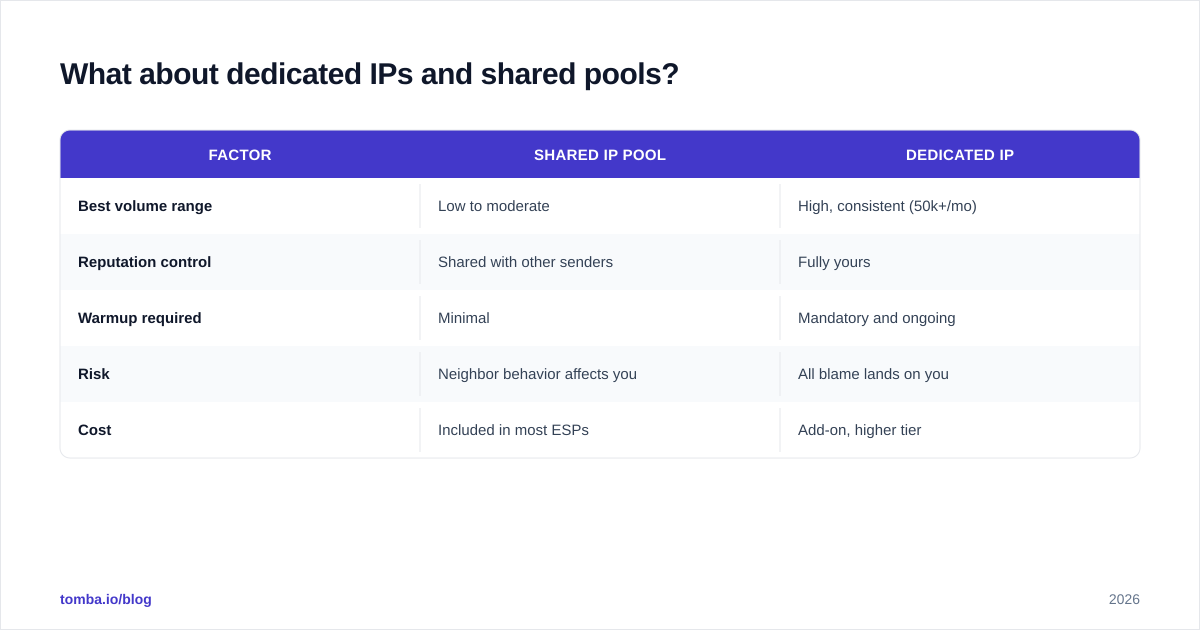
The IP question comes down to volume. A dedicated IP only helps if you can keep it warm. Reputation lives on the IP as well as the domain, and a dedicated IP with low, sporadic volume looks worse than a well-managed shared pool, because providers have no consistent pattern to trust.
| Factor | Shared IP pool | Dedicated IP |
|---|---|---|
| Best volume range | Low to moderate | High, consistent (50k+/mo) |
| Reputation control | Shared with other senders | Fully yours |
| Warmup required | Minimal | Mandatory and ongoing |
| Risk | Neighbor behavior affects you | All blame lands on you |
| Cost | Included in most ESPs | Add-on, higher tier |
For most cold-outreach and SMB sending in 2026, a reputable shared pool plus authenticated domains and a real warmup ramp outperforms a half-idle dedicated IP. Reach for a dedicated IP only when you're sending consistent five- or six-figure monthly volume and have the discipline to keep it warm every single day.
How does list quality interact with sending limits?#
List quality is the multiplier on every limit you have. A pristine list lets you sit near your ceiling safely; a dirty list throttles you long before you reach it.
Here's the mechanism. Mailbox providers convert your bounce and complaint rates into reputation, and reputation determines how much they'll accept from you. Send to 1,000 addresses where 150 bounce, and you've just told Gmail you're working from a scraped list — so it throttles you down to a trickle. Send to 1,000 verified, well-targeted addresses with a 1% bounce rate, and your reputation climbs, raising the volume providers will accept tomorrow.
This is why verification and enrichment aren't separate from deliverability — they are deliverability infrastructure. Enriching contacts with current, accurate data through data enrichment and validating them with bulk verify before a campaign does more to protect your sending limits than any throttle setting. Industry analysts at G2 consistently rank list hygiene among the top deliverability factors for exactly this reason.
The order of operations matters: find, verify, then send — never send, then clean up. By the time you're cleaning up after a campaign, the throttle has already hit and your reputation is already paying for it.
Frequently asked questions#
How many cold emails can I send per day safely? After a full warmup, plan for roughly 400–500 per inbox per day as a practical ceiling. To go higher, add more inboxes and domains rather than pushing a single inbox past that range.
How long does email warmup take? Four to eight weeks for a new domain and inbox. There's no shortcut — providers need to see consistent, engaged sending over time before they'll trust higher volume.
Is throttling the same as being blocked?
No. Throttling is a temporary 4xx deferral ("try later"); a block is a 5xx rejection ("refused"). Persistent throttling that you ignore, though, often escalates into outright blocks.
Do sending limits reset daily? Provider limits typically reset on a rolling 24-hour window, not at midnight. Throttling, by contrast, lifts when your reputation recovers — which can take hours or days depending on how hard you pushed.
The bottom line#
Sending limits tell you how fast you're allowed to go; throttling tells you how fast you're actually trusted to go. The senders who win in 2026 respect both — they ramp patiently, distribute volume, authenticate everything, and treat list hygiene as the foundation rather than an afterthought.
Start at the source. Before you worry about pacing, make sure every address on your list is real, current, and worth sending to. Use the Tomba Email Finder to source accurate, role-matched contacts by domain, name, or company — then verify them before your first send. Clean inputs are the cheapest, most durable deliverability upgrade you can make, and they keep your sending limits working for you instead of against you.
// get started
Find, verify and enrich your first contacts today
Start on the free plan with 25 searches a month, then scale when your team is ready.
Free plan · No credit card required · GDPR & CCPA
// about the author