Spam vs Inbox Placement in 2026: A Deliverability Guide
Your email can be delivered and still never get read. Learn the difference between delivery and inbox placement, why messages land in spam, and how to fix it in 2026.
Spam vs Inbox Placement: The 2026 Deliverability Guide
You can send 10,000 emails, get a 99% delivery rate, and still talk to almost nobody. That gap — between "delivered" and "actually seen" — is where most cold email and B2B campaigns quietly die. Mailbox providers accepted your message, then routed it straight to spam or the Promotions tab. The report says success. Your pipeline says otherwise.
This guide explains what inbox placement really is, why it differs from delivery, and the concrete steps that move messages from the spam folder back to the primary inbox in 2026.
TL;DR#
- Delivery rate measures whether a server accepted your email. Inbox placement measures whether a human can find it. They are not the same metric.
- Most "delivered" mail that disappears is sitting in spam or the Promotions tab — your ESP often reports both as delivered.
- The three biggest placement killers in 2026 are broken authentication (SPF/DKIM/DMARC), poor sender reputation, and dirty lists full of invalid or spam-trap addresses.
- Cleaning your list with an email verifier before sending is the single highest-leverage fix — bounces and traps wreck reputation fast.
- Inbox placement is a system: authentication + reputation + list hygiene + content + engagement. Fix one and ignore the rest, and you stay in spam.
What is inbox placement, and how is it different from delivery?#
Inbox placement is the percentage of your sent emails that land in the primary inbox — not spam, not Promotions, not a vanished void. Delivery rate only tells you a receiving server accepted the message and didn't bounce it.
Think of it like mailing a physical letter. Delivery means the postal service carried your envelope to the building and didn't return it. Placement means it reached the recipient's desk instead of the shredder in the mailroom. The post office "delivered" it either way. Only one outcome gets you a reply.
This distinction matters because nearly every email service provider reports delivery, and almost none report true placement by default. A 98% delivery rate can hide a 40% spam-folder rate. You feel productive while your reply rate craters.
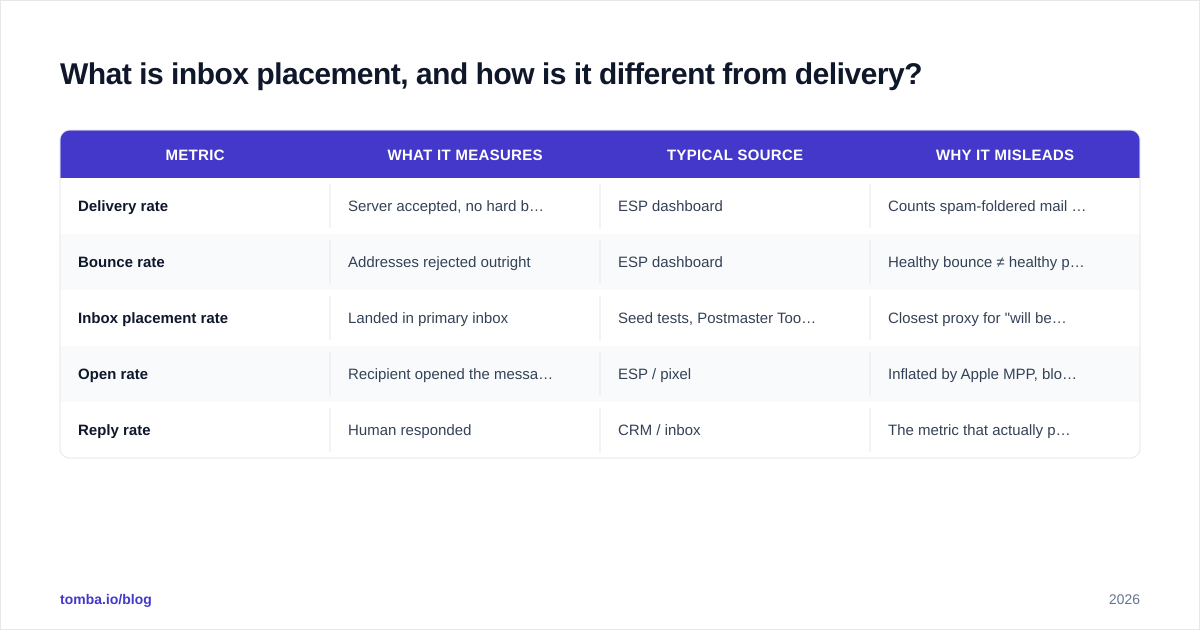
| Metric | What it measures | Typical source | Why it misleads |
|---|---|---|---|
| Delivery rate | Server accepted, no hard bounce | ESP dashboard | Counts spam-foldered mail as "delivered" |
| Bounce rate | Addresses rejected outright | ESP dashboard | Healthy bounce ≠ healthy placement |
| Inbox placement rate | Landed in primary inbox | Seed tests, Postmaster Tools | Closest proxy for "will be seen" |
| Open rate | Recipient opened the message | ESP / pixel | Inflated by Apple MPP, blocked by spam |
| Reply rate | Human responded | CRM / inbox | The metric that actually pays |
The lesson: stop celebrating delivery rate. If your ESP shows 97% delivered but replies are flat, you have a placement problem, not a volume problem.
Why do my emails land in spam instead of the inbox?#
Mailbox providers route mail to spam when your sender signals look untrustworthy. Gmail, Outlook, and Yahoo each run filtering models that score every inbound message in milliseconds. A handful of factors dominate that score.
1. Authentication is missing or broken#
In 2024 Google and Yahoo made email authentication mandatory for bulk senders, and the bar has only risen since. If your domain lacks a valid SPF record, DKIM signature, and a DMARC policy, large providers may reject or junk your mail outright. Run your domain through an SPF checker before you send a single campaign — a missing or malformed record is the most common reason new domains never reach the inbox.
2. Sender reputation is low#
Every sending domain and IP carries a sender reputation score that providers build from your history: how often recipients mark you as spam, how many messages bounce, how engaged your audience is. New domains start with no reputation, which is why a cold domain blasting 500 emails on day one looks exactly like a spammer.
3. Your list is dirty#
Sending to invalid addresses generates hard bounces. Hitting spam traps — addresses planted specifically to catch senders who don't clean their lists — can blacklist you in a single send. Both signal that you're not managing your list, and providers respond by tightening placement.
4. Content and formatting raise flags#
Spammy subject lines, link-heavy bodies, large images with little text, link shorteners, and mismatched "from" names all add to your spam score. No single one buries you, but they stack.
5. Engagement is poor#
If nobody opens, replies, or moves your mail out of spam, providers learn that your messages aren't wanted — and placement degrades further. Engagement is both a cause and a symptom, which is why the spiral is hard to escape once it starts.
How do I check my real inbox placement rate?#
You measure placement with seed tests and provider feedback tools, not with your ESP's delivery number. Three practical methods:
- Seed list testing. Send your campaign to a set of seed addresses across Gmail, Outlook, Yahoo, and corporate domains, then record where each copy landed. Tools like GlassHouse, Mailtrap, or built-in ESP inbox-placement tests automate this.
- Google Postmaster Tools. If you send meaningful volume to Gmail, Google Postmaster Tools shows your domain reputation, spam rate, and authentication results straight from the source. Keep your user-reported spam rate under 0.3%; above 0.5% and Gmail starts punishing you hard.
- Blacklist monitoring. Check whether your sending IP or domain appears on major blocklists. A free blacklist checker tells you in seconds; a single listing can tank placement across every provider at once.
Run these checks weekly, not once. Placement drifts as your reputation and list change.
What is the framework for fixing inbox placement?#
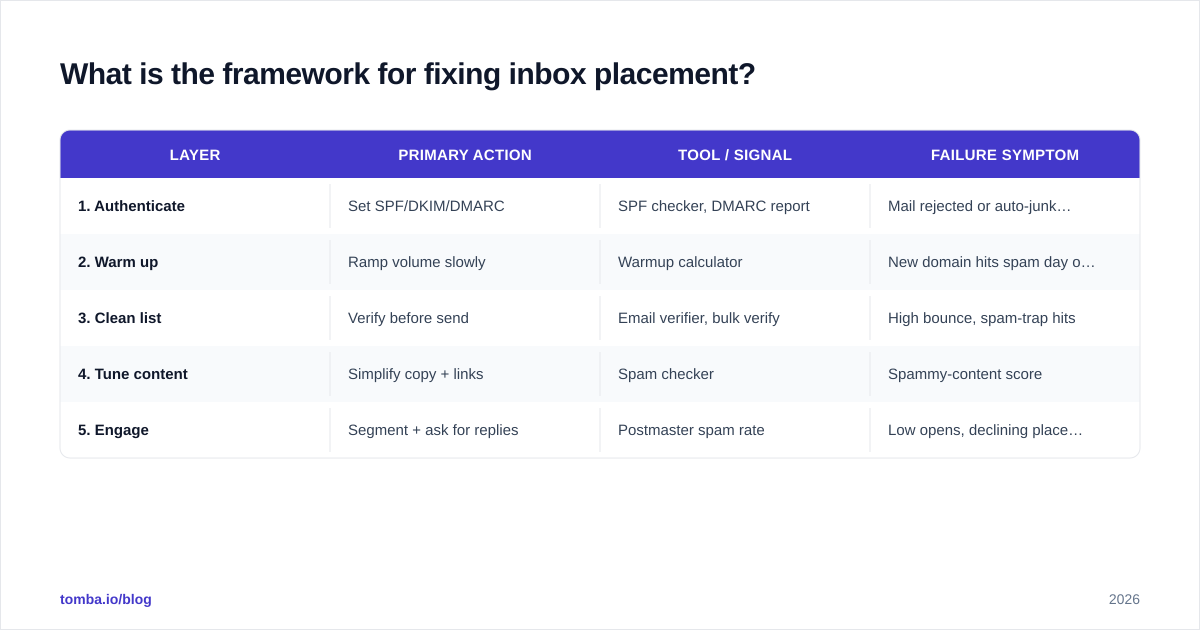
Treat placement as a five-layer system and fix the layers in order — foundation first. Skipping ahead to clever copy while your authentication is broken is like painting a house with no roof.
Layer 1 — Authenticate. Publish SPF, DKIM, and DMARC for every sending domain. Verify them before launch. This is non-negotiable in 2026.
Layer 2 — Warm up. New domains and IPs need a gradual volume ramp. Start with 10–20 emails a day to engaged recipients and build over 4–8 weeks. A warmup calculator maps the ramp so you don't spike volume and trip filters.
Layer 3 — Clean the list. Verify every address before you send. Remove invalids, role accounts, and catch-alls you can't confirm. This is where list quality lives or dies.
Layer 4 — Tune content. Plain, conversational text. One clear call to action. Minimal links, no shorteners, a real reply-to address. Match the "from" name to a real person.
Layer 5 — Drive engagement. Target people likely to open and reply. Segment tightly. Ask recipients early in a sequence to reply, which teaches providers your mail is wanted.
| Layer | Primary action | Tool / signal | Failure symptom |
|---|---|---|---|
| 1. Authenticate | Set SPF/DKIM/DMARC | SPF checker, DMARC report | Mail rejected or auto-junked |
| 2. Warm up | Ramp volume slowly | Warmup calculator | New domain hits spam day one |
| 3. Clean list | Verify before send | Email verifier, bulk verify | High bounce, spam-trap hits |
| 4. Tune content | Simplify copy + links | Spam checker | Spammy-content score |
| 5. Engage | Segment + ask for replies | Postmaster spam rate | Low opens, declining placement |
Why does list hygiene matter most for placement?#
Because a dirty list damages every other layer at once. You can authenticate perfectly, warm up patiently, and write clean copy — then a 12% bounce rate and two spam-trap hits erase all of it in a week.
Here's the mechanism. When you email invalid addresses, you generate hard bounces. Providers read a high bounce rate as a sign you bought or scraped a list without checking it. Hit a spam trap and you can land on a blocklist outright. Both crush the reputation you spent weeks building.
The fix is upstream: never send to an address you haven't verified. Before a campaign, run the whole list through verification to flag invalids, risky catch-alls, and disposable domains. For large lists, bulk verify in one pass instead of discovering dead addresses through bounces. And when you're sourcing new contacts, start with accurate data — finding verified email addresses at the collection stage means fewer bounces at the send stage.
This is also why "spray and pray" — buy a giant list, blast it, hope something sticks — is the fastest route to the spam folder in 2026. Volume without hygiene is a reputation grenade.

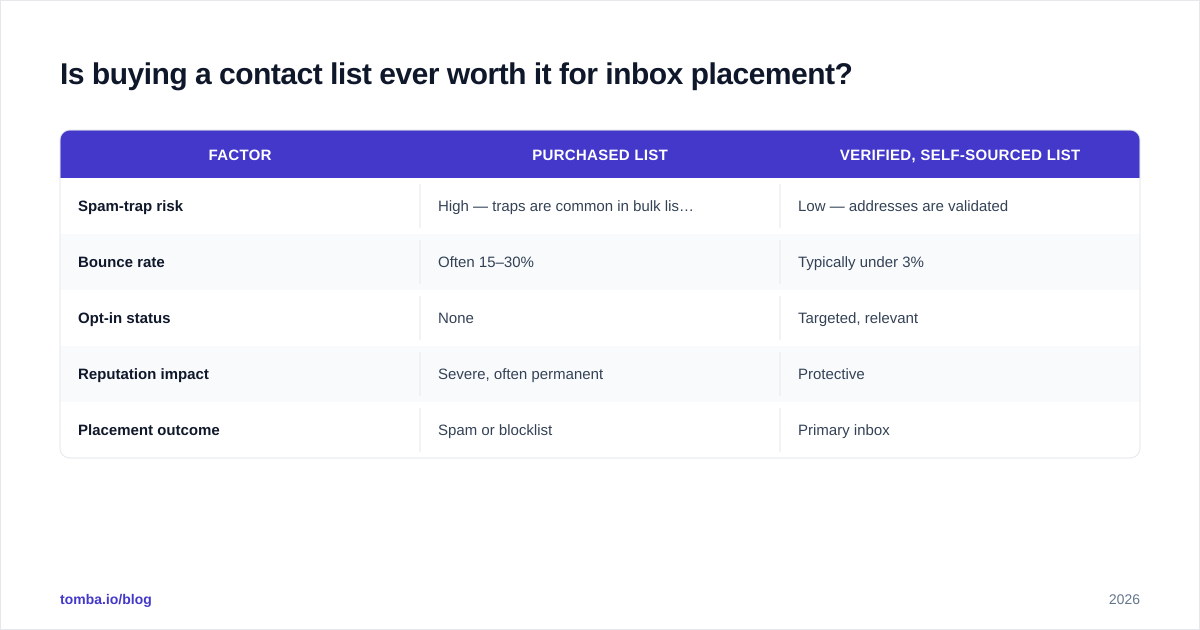
Is buying a contact list ever worth it for inbox placement?#
Almost never — purchased lists are the leading cause of catastrophic placement failure. Bought lists are stale, riddled with spam traps, and never opted in. One send can blacklist your domain.
Compare the two sourcing approaches:
| Factor | Purchased list | Verified, self-sourced list |
|---|---|---|
| Spam-trap risk | High — traps are common in bulk lists | Low — addresses are validated |
| Bounce rate | Often 15–30% | Typically under 3% |
| Opt-in status | None | Targeted, relevant |
| Reputation impact | Severe, often permanent | Protective |
| Placement outcome | Spam or blocklist | Primary inbox |
If you need new contacts, build the list deliberately: find accurate, verified emails for the specific roles you're targeting, then verify again right before sending. It's slower than buying a CSV, and it's the difference between landing in the inbox and torching a domain you can't easily replace.
How long does it take to recover inbox placement?#
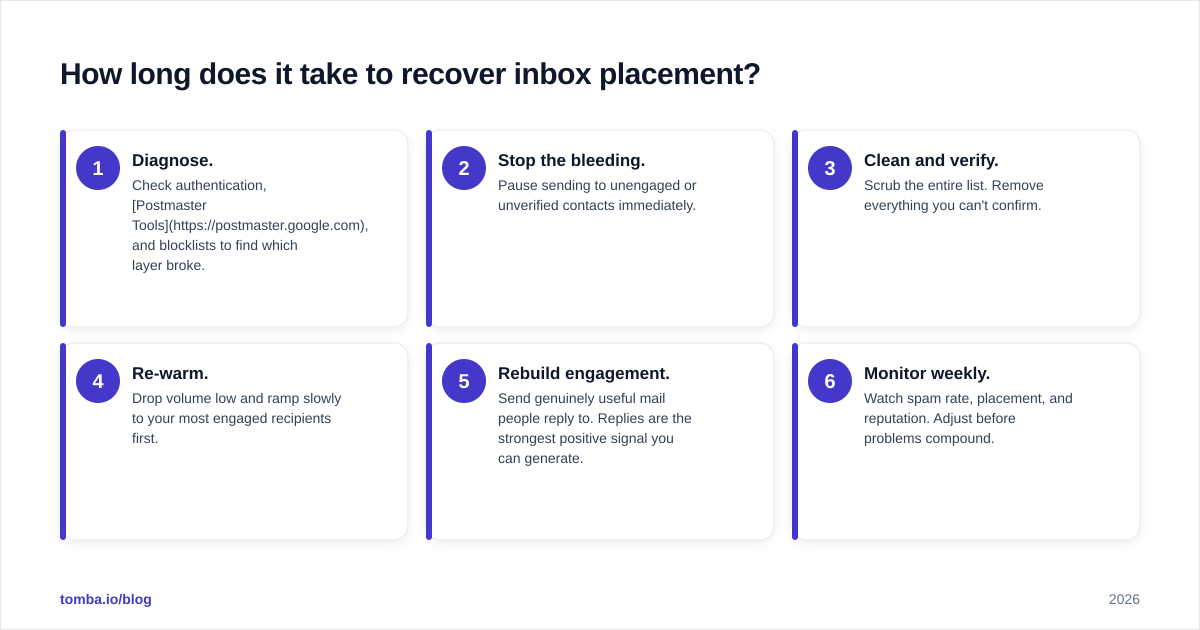
Recovery typically takes 4–8 weeks of disciplined sending — there is no instant fix. Reputation is built on history, so providers need time to see new, better behavior before they trust you again.
A realistic recovery sequence:
- Diagnose. Check authentication, Postmaster Tools, and blocklists to find which layer broke.
- Stop the bleeding. Pause sending to unengaged or unverified contacts immediately.
- Clean and verify. Scrub the entire list. Remove everything you can't confirm.
- Re-warm. Drop volume low and ramp slowly to your most engaged recipients first.
- Rebuild engagement. Send genuinely useful mail people reply to. Replies are the strongest positive signal you can generate.
- Monitor weekly. Watch spam rate, placement, and reputation. Adjust before problems compound.
If your domain is badly burned, sometimes the pragmatic move is a fresh sending domain (a subdomain or alternate) warmed from scratch — but only after fixing the behaviors that burned the first one. A new domain with the same dirty list lands right back in spam.
What's the simplest way to protect placement going forward?#
Verify before you send, every time, and never let volume outrun reputation. Inbox placement isn't a one-time configuration; it's an ongoing discipline. The senders who consistently reach the primary inbox treat list hygiene as routine maintenance, not a cleanup they do after deliverability already tanked.
The compounding logic is simple: clean lists protect reputation, strong reputation earns placement, good placement drives engagement, and engagement reinforces reputation. Break the cycle at the list-quality stage and the whole flywheel reverses.
Reach the inbox with verified data from Tomba#
Inbox placement starts before you hit send — with data you can trust. Use the Tomba Email Finder to source professional, verified email addresses by domain, name, or company, so your list begins clean instead of needing rescue later. Pair it with bulk verification to strip out invalids and spam traps before they bounce, and you protect the sender reputation that every campaign depends on.
The Free plan includes 25 searches a month to test the data quality yourself, and paid plans start at $49/mo on the Starter tier — see full Tomba pricing for verification volume and team options. Stop optimizing for "delivered." Start landing in the inbox.
// get started
Find, verify and enrich your first contacts today
Start on the free plan with 25 searches a month, then scale when your team is ready.
Free plan · No credit card required · GDPR & CCPA
// about the author