Email Finder API in 2026: Compare, Integrate, and Scale
A practical 2026 guide to the email finder API: how it works, what accuracy and pricing to expect, and how to choose a provider that scales without burning your sender reputation.
Building lead generation on top of copy-pasted spreadsheets is like delivering packages by memorizing every street yourself. An email finder API is the GPS: you hand it a name and a domain, it hands back a verified address and a confidence score, and your app never has to "know the streets" at all.
This guide is for the engineer or growth lead deciding which email finder API to wire into a product, CRM, or outbound engine in 2026 — what these APIs actually do, what accuracy and pricing to expect, and how to integrate one without torching your deliverability.
TL;DR#
- An email finder API turns a name + company domain into a verified business email programmatically, returning a confidence score and source signals instead of a raw guess.
- The three numbers that matter when comparing providers: match rate, verification accuracy, and price per successful lookup — not price per credit.
- Always pair finding with verification. Sending to unverified addresses is the fastest way to wreck sender reputation.
- Bulk endpoints, rate limits, and webhook support decide whether the API survives production scale.
- Tomba's email finder API covers finder, verifier, domain search, and enrichment behind one key, starting on a free tier and scaling to enterprise.
What is an email finder API?#
An email finder API is a programmatic service that returns a person's professional email address when you send it identifying inputs — typically a full name plus a company domain, or a domain on its own. Instead of a human searching LinkedIn and guessing first.last@company.com, your code makes an HTTPS request and gets a structured JSON response back.
A good response is more than a string. It includes a confidence score (how sure the service is the address is real and deliverable), the sources where the pattern was observed, and often the detected company email pattern ({first}@, {first}.{last}@, {f}{last}@). That metadata is what lets you make automated send/no-send decisions downstream.
Under the hood, providers blend several techniques: crawling public web pages and published sources, learning per-domain email patterns, cross-referencing historical datasets, and running real-time SMTP checks to confirm a mailbox accepts mail. The quality of that blend is the entire product. Two APIs with identical pricing can differ by 30+ points on match rate depending on data freshness and verification depth.
If you want the concepts behind the product before the API, the email finder and domain search pages walk through the same logic in the UI.
How does an email finder API actually work?#
Most providers expose a small, predictable set of endpoints. Learn these and you've learned 90% of every vendor on the market:
- Email Finder — input: full name + domain. Output: best email + confidence + sources.
- Domain Search — input: a domain. Output: all discoverable addresses + the dominant pattern.
- Email Verifier — input: an email. Output: deliverability status (valid, invalid, risky, accept-all).
- Enrichment — input: an email or domain. Output: role, seniority, company size, socials, location.
A typical finder request looks like this:
GET https://api.tomba.io/v1/email-finder/{domain}?first_name=Ada&last_name=Lovelace
Authorization: Bearer <api_key>
And a response carries the decision-making metadata you need:
{
  "email": "ada.lovelace@example.com",
  "score": 96,
  "verification": { "status": "valid" },
  "pattern": "{first}.{last}",
  "sources": [ { "uri": "https://example.com/team", "last_seen": "2026-05-01" } ]
}
The score and verification.status are what you branch on. A score of 96 with valid goes straight into a sequence; a 55 with accept-all gets held for manual review or a catch-all check. For domains that accept every address, route the result through a catch-all verifier before you trust it.
What accuracy should you expect from an email finder API in 2026?#
Accuracy is two distinct metrics that vendors love to blur into one marketing number. Keep them separate:
- Match rate — of the contacts you query, what percentage return any address. A high match rate on bad data is useless.
- Verification accuracy — of the addresses returned, what percentage are actually deliverable. This is the number that protects your domain.
The honest way to compare providers is to take a known sample of 500–1,000 contacts you can ground-truth, run them through each API, and measure both. Vendor-published benchmarks are a starting point, not gospel — they're run on the data that flatters each vendor.

A few realities about 2026-era accuracy:
- Catch-all domains are the silent killer. Roughly a third of B2B domains accept any address at the SMTP layer, so a naive verifier reports them all "valid." Providers that distinguish catch-all from genuinely valid save you from bounces that look fine until they aren't.
- Freshness beats database size. A 200M-record database that's two years stale loses to a smaller, continuously refreshed one. Ask where the data sources come from and how often they refresh.
- A confidence score is only useful if it's calibrated. Test whether a "90" actually bounces less than a "70" on your own data before you trust the threshold.
How do the top email finder APIs compare?#
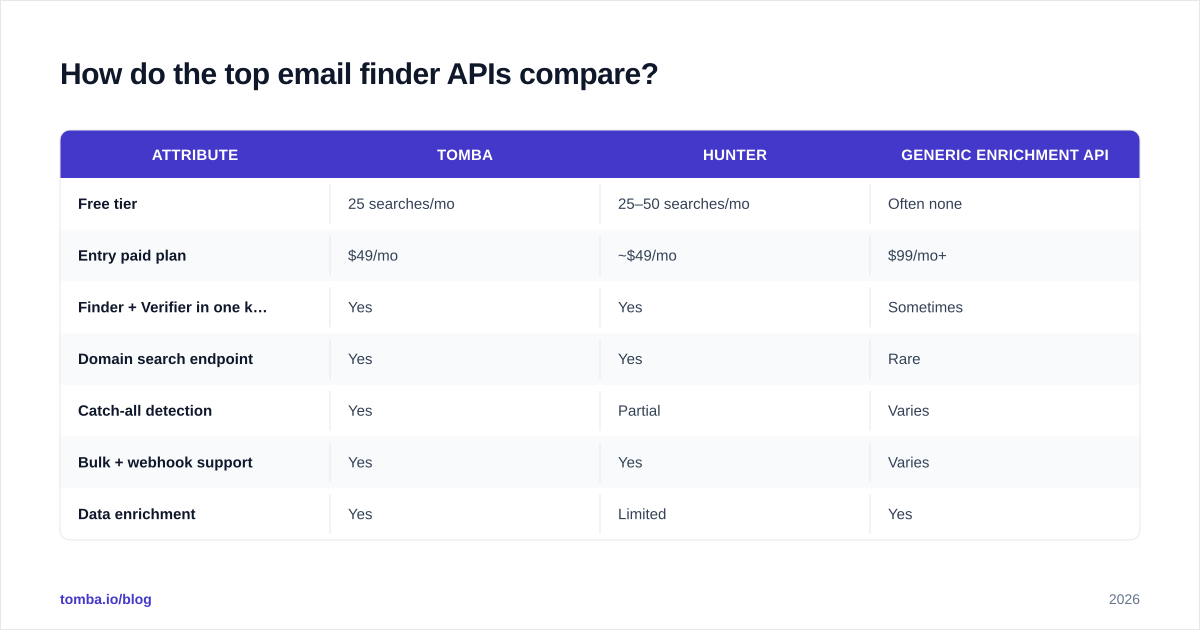
Here's a side-by-side of the attributes that actually drive an integration decision. Pricing reflects published entry tiers as of 2026; always confirm on the vendor's live pricing page.
| Attribute | Tomba | Hunter | Generic enrichment API |
|---|---|---|---|
| Free tier | 25 searches/mo | 25–50 searches/mo | Often none |
| Entry paid plan | $49/mo | ~$49/mo | $99/mo+ |
| Finder + Verifier in one key | Yes | Yes | Sometimes |
| Domain search endpoint | Yes | Yes | Rare |
| Catch-all detection | Yes | Partial | Varies |
| Bulk + webhook support | Yes | Yes | Varies |
| Data enrichment | Yes | Limited | Yes |
| Native CRM integrations | HubSpot, Salesforce, Pipedrive | Several | Varies |
The pattern: dedicated email-finder platforms win on match rate, catch-all handling, and price-per-successful-lookup, while broad enrichment APIs win on firmographic depth but charge more and match less reliably on email specifically. If email is the job, buy the tool built for email.
For deeper one-to-one breakdowns, Tomba maintains head-to-head pages like the Apollo alternative and RocketReach alternative comparisons. Independent reviews on G2 are also worth a skim before you commit a budget.
How do you choose the right email finder API?#
Work through five questions in order. The first that disqualifies a vendor saves you the rest of the evaluation.
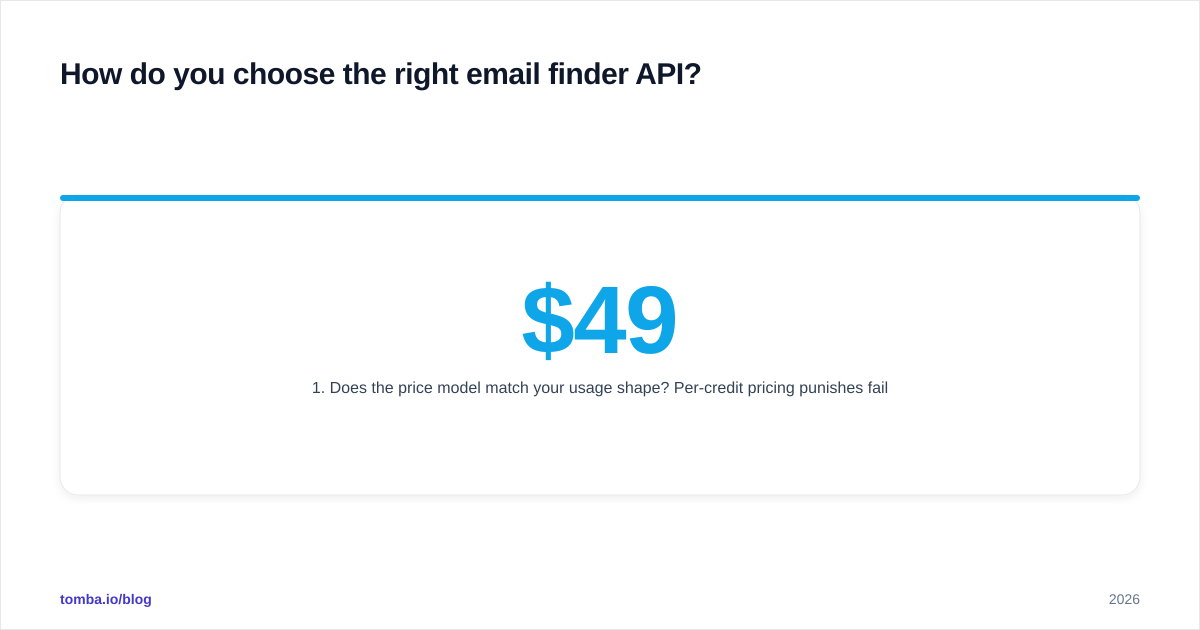
1. Does the price model match your usage shape? Per-credit pricing punishes failed lookups. Per-successful-result pricing aligns the vendor's incentive with yours. Map your monthly volume against published Tomba pricing tiers — Free (25), Starter $49, Growth $99, Pro $249 — and model the effective cost per good email, not the sticker credit price.
2. Is verification built in? If you have to bolt on a separate email verifier, that's a second integration, a second bill, and a latency hop. One key for find-and-verify is strictly better.
3. Will it survive your scale? Check the rate limits, the bulk email finder endpoint, and whether long jobs return via webhook instead of forcing you to poll. A finder that's perfect at 100 lookups/day and rate-limited at 10,000/day is a rewrite waiting to happen.
4. Does it fit your stack? A clean REST API is table stakes. Bonus points for an official SDK, a Chrome extension for manual spot-checks, Google Sheets for non-engineers, and native integrations into the CRM you already run.
5. Is the data sourced defensibly? In 2026, "where did this email come from" is a compliance question, not just a quality one. Prefer vendors transparent about data sources and GDPR posture.

How do you integrate an email finder API without hurting deliverability?#
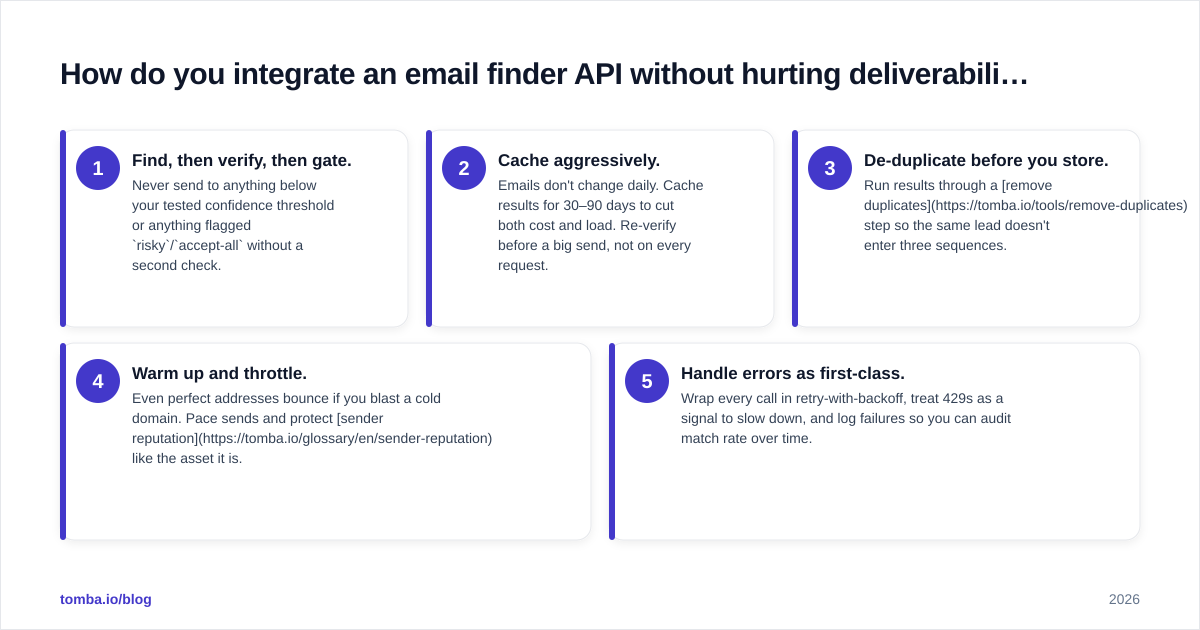
Finding an address is the easy half. Sending to it responsibly is where teams quietly destroy their own email deliverability. Follow this sequence:
- Find, then verify, then gate. Never send to anything below your tested confidence threshold or anything flagged
risky/accept-allwithout a second check. - Cache aggressively. Emails don't change daily. Cache results for 30–90 days to cut both cost and load. Re-verify before a big send, not on every request.
- De-duplicate before you store. Run results through a remove duplicates step so the same lead doesn't enter three sequences.
- Warm up and throttle. Even perfect addresses bounce if you blast a cold domain. Pace sends and protect sender reputation like the asset it is.
- Handle errors as first-class. Wrap every call in retry-with-backoff, treat 429s as a signal to slow down, and log failures so you can audit match rate over time.
A defensive integration in pseudocode:
async function findAndVerify(name, domain) {
  const found = await api.finder({ name, domain })
  if (!found || found.score < 80) return null      // gate on confidence
  if (found.verification.status !== "valid") return null
  return { ...found, verifiedAt: timestamp }        // never mutate the source
}
That score < 80 gate is the single highest-leverage line in your whole pipeline. It's the difference between a 1% bounce rate and a 12% one.
When should you build versus buy an email finder?#
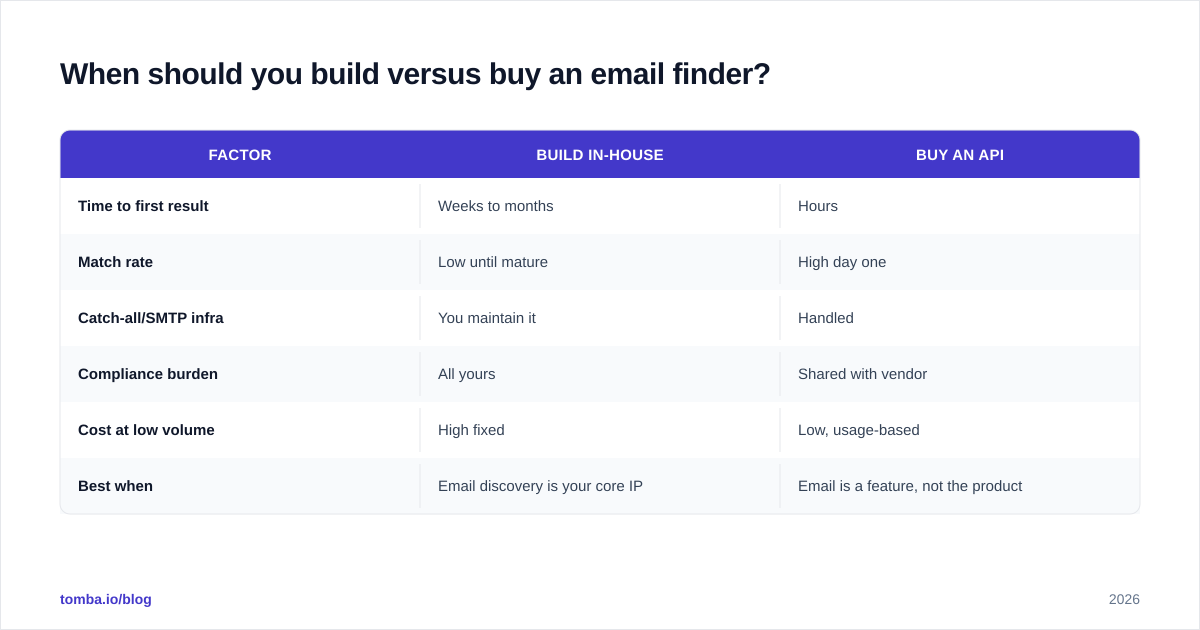
Build only if email discovery is your product. For everyone else, buy. Maintaining your own crawler, pattern engine, SMTP verification fleet, and IP reputation is a full team's job that produces lower match rates than a vendor who does it all day.
| Factor | Build in-house | Buy an API |
|---|---|---|
| Time to first result | Weeks to months | Hours |
| Match rate | Low until mature | High day one |
| Catch-all/SMTP infra | You maintain it | Handled |
| Compliance burden | All yours | Shared with vendor |
| Cost at low volume | High fixed | Low, usage-based |
| Best when | Email discovery is your core IP | Email is a feature, not the product |
The buy case wins for ~95% of teams. The build case only pencils out when your differentiation is the data.
Frequently asked questions#
Is using an email finder API legal? Using publicly available business contact data for legitimate B2B outreach is broadly accepted, but obligations under GDPR, CAN-SPAM, and similar laws still apply — honor opt-outs, identify yourself, and prefer vendors transparent about sourcing. This isn't legal advice; consult counsel for your jurisdiction.
What's a good match rate? For solid B2B domains, 60–80% is realistic; anything claiming 95%+ across all data is usually measuring on a flattering sample.
Do I still need a separate verifier? Only if your finder doesn't verify inline. Tomba returns verification with the find, and exposes a standalone email verification endpoint for lists you sourced elsewhere.
Can non-engineers use it? Yes — the same data is available through Google Sheets, a Chrome extension, and bulk uploads, so sales ops isn't blocked on the dev team.
Get started with the Tomba Email Finder API#
If you want one key that finds, verifies, searches domains, and enriches — without stitching three vendors together — start with the Tomba Email Finder and its email finder API. The free tier gives you 25 searches a month to benchmark accuracy against your own data before you pay a cent, and plans scale from Starter at $49/mo up to enterprise as your volume grows. Build the GPS into your stack once, and stop memorizing streets.
// get started
Find, verify and enrich your first contacts today
Start on the free plan with 25 searches a month, then scale when your team is ready.
Free plan · No credit card required · GDPR & CCPA
// about the author