Role-Specific Email Finders: Reach the Right Buyer in 2026
Generic email lists waste reps' time. Role-specific email finders pull the exact decision-maker by job title — here's how they work and which to use in 2026.
TL;DR
- Role-specific email finders return the email of a person by job title and department (e.g. "VP of Marketing at Acme") instead of dumping every address on a domain.
- They cut wasted sends, raise reply rates, and protect sender reputation because you contact buyers, not catch-all aliases.
- Accuracy depends on data freshness, title normalization, and a verification step that confirms the mailbox before you hit send.
- Tomba's domain search and email finder both support role and seniority filters on the Free, Starter ($49/mo), Growth ($99/mo), and Pro ($249/mo) tiers.
- Pair finding with an email verifier — a great find that bounces still burns your domain.
What is a role-specific email finder?#
A role-specific email finder is a lookup tool that returns a verified business email for a role — "Head of Procurement," "Director of Engineering," "CFO" — at a target company, rather than every address it can scrape from that domain.
Think of it like calling a company switchboard and asking for "whoever runs paid acquisition" instead of reading the entire staff phone directory aloud. The first gets you a conversation. The second gets you a headache and a hang-up.
The distinction matters because most prospecting failures aren't deliverability problems — they're targeting problems. You can have perfect email deliverability and still get zero replies if your message lands with an intern who can't sign a contract. Role-specific finders solve the upstream problem: getting to the human who can actually say yes.
How is it different from a regular email finder?#
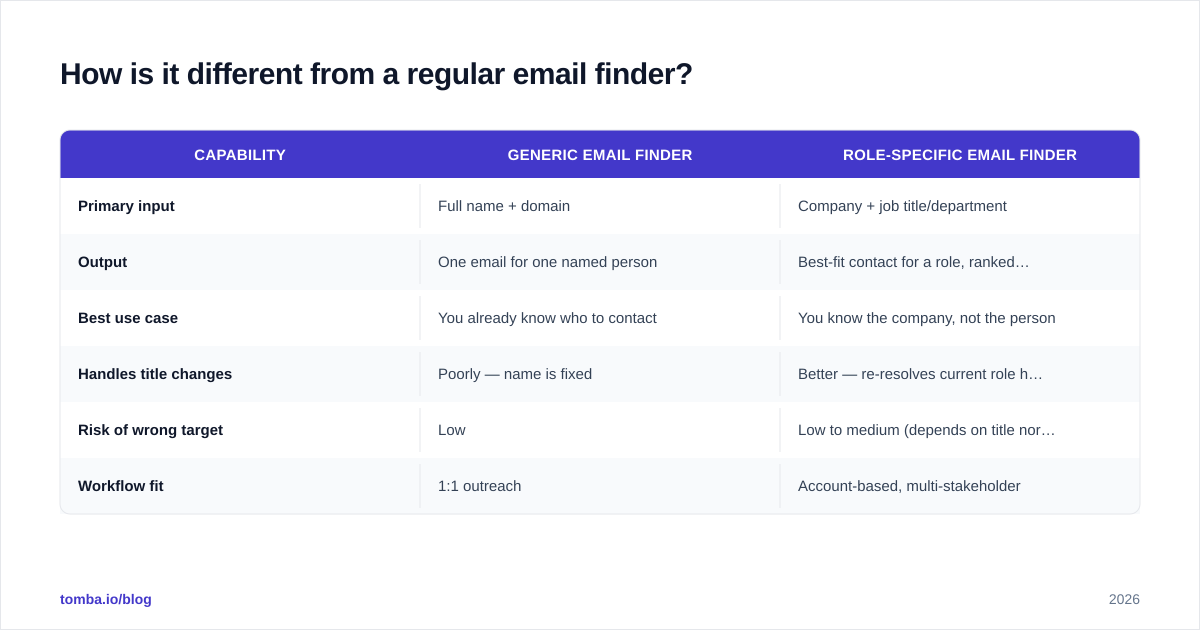
A standard email finder takes a name plus a domain and guesses the address pattern. A role-specific finder works the other direction: you give it a company and a role, and it resolves the person first, then the email.
| Capability | Generic email finder | Role-specific email finder |
|---|---|---|
| Primary input | Full name + domain | Company + job title/department |
| Output | One email for one named person | Best-fit contact for a role, ranked by seniority |
| Best use case | You already know who to contact | You know the company, not the person |
| Handles title changes | Poorly — name is fixed | Better — re-resolves current role holder |
| Risk of wrong target | Low | Low to medium (depends on title normalization) |
| Workflow fit | 1:1 outreach | Account-based, multi-stakeholder |
The role-specific approach shines in account-based motions where you're working a named account list and need to reach three or four personas — economic buyer, champion, and a technical evaluator — inside the same company.

Why does targeting by role beat buying a bulk list?#
Conclusion first: a smaller list of right-role contacts almost always outperforms a bigger list of random ones — on reply rate, on deliverability, and on rep morale.
Here's the mechanism. Bulk lists are stuffed with generic aliases (info@, sales@, contact@), former employees, and people three layers away from the buying decision. When you mail those, three bad things happen at once:
- Bounces climb. Stale and generic addresses bounce, and bounce rate is the single fastest way to wreck a sending domain.
- Spam complaints rise. Mailing the wrong person reads as spam to them, because to them, it is.
- Replies crater. Even the deliverable messages reach people with no authority or interest.
Role-specific finding flips all three. You contact fewer people, but they're the right people, so your response rate goes up while your complaint and bounce rates fall. Google and Microsoft's filters reward that pattern with better inbox placement over time.
A practical rule: if you can't name the role you're emailing before you build the list, you're not prospecting — you're gambling.
How do role-specific email finders actually work?#
Four steps run under the hood, and understanding them tells you where accuracy comes from — and where it breaks.
1. Title normalization. "VP Sales," "Vice President of Sales," "Head of Revenue," and "CRO" may all describe one role. Good tools map these synonyms to a canonical title so a search for one surfaces the others. Weak tools miss the synonyms and tell you "no contact found" when the person is sitting right there under a different label.
2. Person resolution. The tool matches your role query against its B2B database and public sources to identify the current holder. Freshness is everything here — people change jobs constantly, and a finder that hasn't refreshed in a year will hand you someone who left months ago.
3. Email construction and lookup. Once the person is known, the tool finds or constructs the address using the company's known email pattern (first.last@, flast@, etc.) confirmed across multiple records.
4. Verification. The candidate address is checked at the SMTP layer before it's returned to you, so you know whether the mailbox accepts mail. This is the step amateurs skip and regret.

Accuracy is the product of all four steps, not any single one. A tool with a huge database but no verification will return plausible-looking addresses that bounce. A tool with great verification but stale data will verify the wrong person's email perfectly.
Which role-specific email finders should you consider in 2026?#
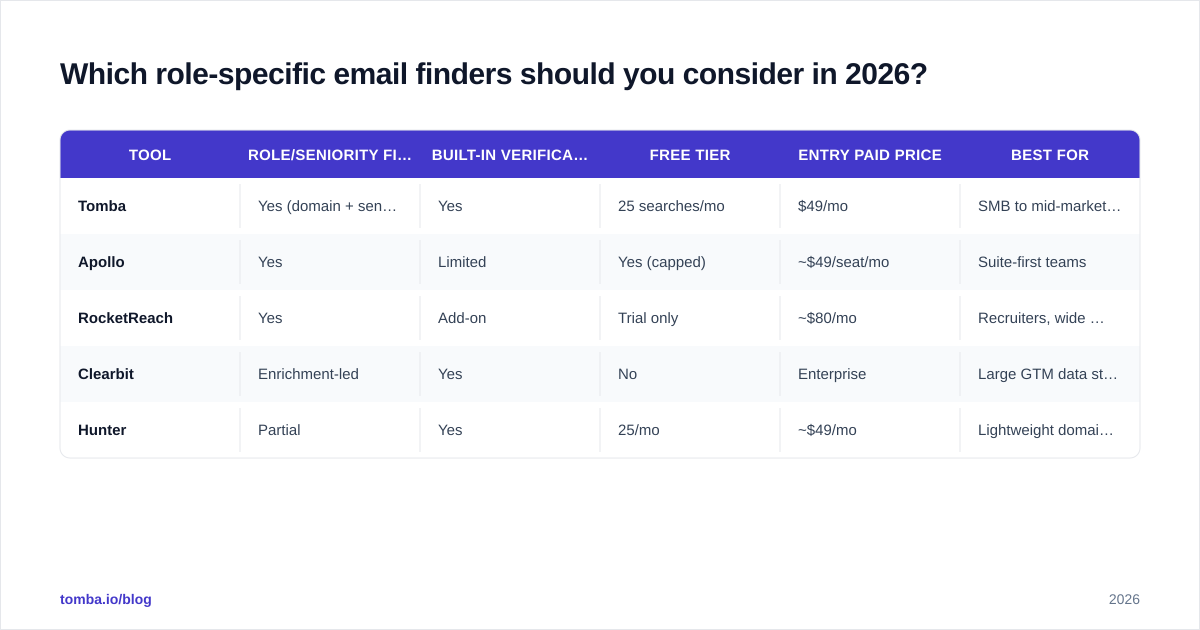
The market splits into pure finders, enrichment platforms, and all-in-one sales suites. Here's an honest comparison across the dimensions that matter for role-targeting.
| Tool | Role/seniority filters | Built-in verification | Free tier | Entry paid price | Best for |
|---|---|---|---|---|---|
| Tomba | Yes (domain + seniority) | Yes | 25 searches/mo | $49/mo | SMB to mid-market, API users |
| Apollo | Yes | Limited | Yes (capped) | ~$49/seat/mo | Suite-first teams |
| RocketReach | Yes | Add-on | Trial only | ~$80/mo | Recruiters, wide coverage |
| Clearbit | Enrichment-led | Yes | No | Enterprise | Large GTM data stacks |
| Hunter | Partial | Yes | 25/mo | ~$49/mo | Lightweight domain lookups |
A few notes so this stays honest. Apollo and similar suites bundle finding with sequencing, which is convenient if you want one login, but you pay for the whole stack even if you only need the finder. RocketReach leans on breadth and is popular with recruiters. Clearbit (now part of HubSpot's data layer) is enrichment-first and priced for enterprise. For a focused, verification-backed finder with an API and transparent Tomba pricing, Tomba is a strong default for teams that don't want to buy a whole suite to find five CFOs.
If you're cost-comparing against a specific incumbent, Tomba publishes direct breakdowns like its Apollo alternative and RocketReach alternative pages.
For deeper vendor research, third-party review sites like G2 and Capterra carry verified user reviews on coverage and accuracy that are worth a skim before you commit budget.

How do you build a role-specific list step by step?#
Here's a repeatable workflow you can run today, whether you have ten target accounts or a thousand.
Step 1 — Define the buying committee. Write down the 2–4 roles that touch the decision. For a marketing SaaS sale that might be: VP Marketing (economic buyer), Marketing Ops (champion), and CFO (approver on larger deals).
Step 2 — Pull the role holders per account. Run a domain search for each target company and filter by department and seniority. This returns the named people in those roles plus their email patterns.
Step 3 — Verify before you load. Push the results through an email verifier so catch-all and risky addresses are flagged. For domains that accept everything, a dedicated catch-all verifier tells you whether the specific mailbox is real.
Step 4 — Enrich for personalization. Add firmographic and role context with data enrichment so your first line references something true about that person, not a mail-merge token.
Step 5 — Scale with bulk or API. For large lists, the bulk email finder processes accounts in batches; for product or workflow integration, the email finder API does the same programmatically.
Step 6 — Sync to your stack. Push clean, role-tagged contacts into your CRM via the HubSpot, Salesforce, or Pipedrive integrations so reps work from one source of truth.
The whole point is that each step trims junk before it reaches a sending tool. Garbage filtered early never costs you a bounce later.
Does verification really matter for role-based finding?#
Yes — and it matters more for role-based lists than for named-person lists, for a non-obvious reason.
When you search by role, you're more likely to land on shared or functional mailboxes (procurement@, recruiting@) and on people in transition. Both categories are exactly where catch-all domains and soft bounces hide. A domain configured as catch-all will accept any address you throw at it during a basic check, so a naive "valid" result means nothing. You need a verification layer that probes the actual mailbox.
Skipping this is how good prospectors quietly poison their domains: the finder says "valid," the address is really a catch-all black hole, the message vanishes, and after a few hundred of those the mailbox provider starts deprioritizing everything you send. Run a catch-all verification pass and you sidestep the whole trap. According to mailbox providers like Google Postmaster, consistent low bounce and complaint rates are core inputs to sender reputation — which is precisely what clean, role-verified lists protect.
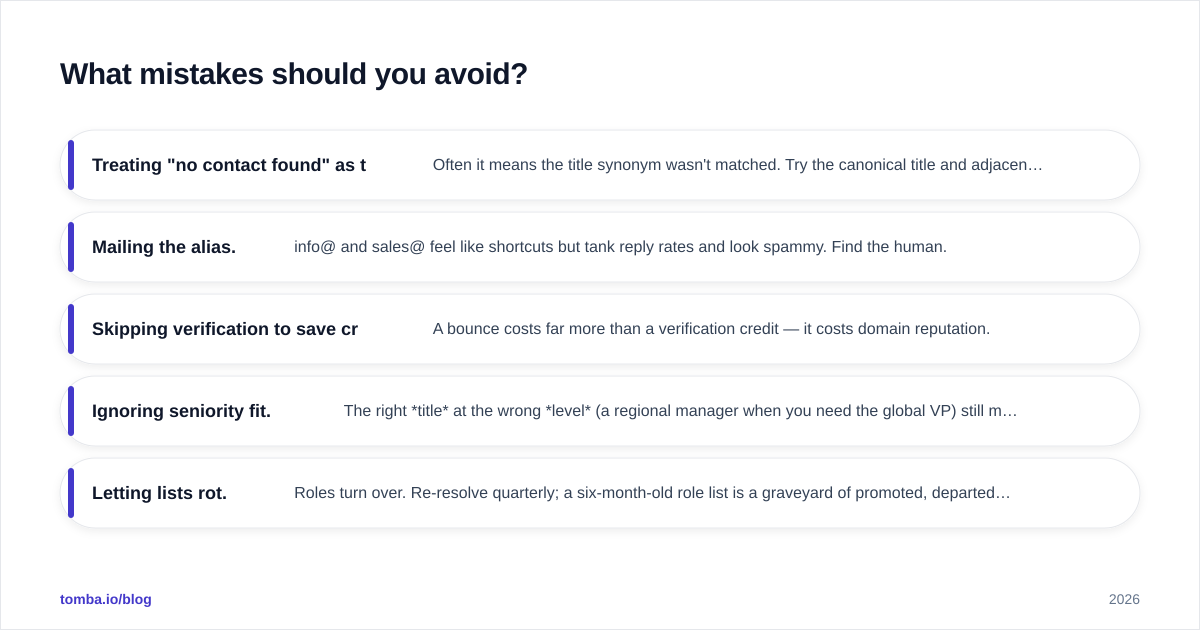
What mistakes should you avoid?#
- Treating "no contact found" as truth. Often it means the title synonym wasn't matched. Try the canonical title and adjacent ones (e.g. "Head of People" for "CHRO").
- Mailing the alias. info@ and sales@ feel like shortcuts but tank reply rates and look spammy. Find the human.
- Skipping verification to save credits. A bounce costs far more than a verification credit — it costs domain reputation.
- Ignoring seniority fit. The right title at the wrong level (a regional manager when you need the global VP) still misses. Filter on seniority, not just department.
- Letting lists rot. Roles turn over. Re-resolve quarterly; a six-month-old role list is a graveyard of promoted, departed, and reorganized contacts.
How does role-specific finding fit into an account-based motion?#
It's the connective tissue between your target account list and your sequences. ABM tells you which companies matter; role-specific finding tells you which humans inside them to reach and in what order. Without it, you have a beautiful account list and no way to act on it.
The mature pattern looks like this: marketing defines the ICP and account tiers, RevOps builds role templates for each tier's buying committee, and reps run role-specific searches to populate those templates per account. Everyone works from defined roles, so revenue operations can actually measure which personas convert — instead of guessing why a generic blast underperformed.
The bottom line#
Role-specific email finders move you from "I have a domain" to "I have the buyer." That shift is where reply rates live. The tooling is mature, the verification step is non-negotiable, and the workflow above scales from a handful of accounts to thousands without changing shape.
Start with the Tomba Email Finder: filter by role and seniority, let built-in verification confirm the mailbox, and push clean contacts straight into your CRM. The Free tier gives you 25 searches a month to test the targeting on your own account list — enough to prove that ten right-role emails beat a thousand random ones before you ever upgrade. Find the buyer, not the inbox.
// get started
Find, verify and enrich your first contacts today
Start on the free plan with 25 searches a month, then scale when your team is ready.
Free plan · No credit card required · GDPR & CCPA
// about the author