Sales Hub & Sales Automation Tools: 2026 Vendor Platform Guide
A neutral, buyer-side guide to picking sales automation tools in 2026 — what a sales hub actually does, how vendors differ, and the data layer that makes any platform work.
Sales Hub & Sales Automation Tools: The 2026 Vendor Platform Guide
Picking sales automation tools in 2026 is less about finding the "best" platform and more about finding the platform that fits the work your team already does. The market is crowded, the demos all look the same, and every vendor calls itself a "sales hub." This guide cuts through that.
TL;DR#
- A sales hub is the system of record (usually your CRM); sales automation tools are the layers that move data and actions through it — sequencing, enrichment, dialing, and reporting.
- The four vendor categories that matter: all-in-one platforms, engagement/sequencing tools, data & enrichment providers, and point automation tools. Most teams run a blend.
- Pricing ranges from free tiers to $150+/user/month. The hidden cost is almost always data — bad contact data quietly breaks every automation downstream.
- Choose by workflow, not feature count. A tool with 200 features you won't use loses to a tool that nails the three you run daily.
- No platform works without accurate contact data. An email finder and email verifier feed clean records into whatever hub you choose.
What is a sales hub, and how is it different from sales automation tools?#
A sales hub is your home base. Think of it like the kitchen in a restaurant: it's where every order is tracked, every ticket lives, and every cook knows the status of every dish. In sales terms, that's your CRM — HubSpot Sales Hub, Salesforce, Pipedrive, or similar. It holds contacts, deals, pipeline stages, and history.
Sales automation tools are the appliances around that kitchen. They don't replace the hub; they make it faster. A sequencer sends the follow-ups. An enrichment tool fills in missing phone numbers and titles. A dialer logs calls automatically. A reporting layer turns activity into forecasts.
The confusion in 2026 is that nearly every vendor now markets itself as a "hub" or "platform" regardless of what it actually does. A sequencing tool with a contacts table calls itself a CRM. A CRM with a basic email step calls itself an engagement platform. The label tells you almost nothing — the underlying job does.
The practical test: the hub is the thing you'd be most afraid to lose. If your contact records, deal history, and pipeline disappeared, that's your hub. Everything that pushes data into it or pulls actions out of it is automation tooling.
What are the main categories of sales automation vendors in 2026?#
There are four buckets. Knowing which bucket a vendor lives in tells you more than any feature list.
1. All-in-one platforms. These try to be the hub and the automation layer — CRM, sequencing, dialing, and reporting in one login. HubSpot, Apollo, and Salesforce (with its add-ons) sit here. The pitch is "one tool, one bill, one data model." The trade-off is depth: the bundled dialer or enrichment is rarely best-in-class.
2. Engagement / sequencing tools. Outreach, Salesloft, Reply.io, and Instantly focus on the cadence — multi-step email and call sequences, A/B testing, and reply detection. They sit on top of your CRM rather than replacing it.
3. Data & enrichment providers. This is the layer that finds and cleans contact records: emails, phone numbers, titles, company firmographics. Tomba, Clearbit, ZoomInfo, and RocketReach live here. Without this layer, the other three categories automate against bad data.
4. Point automation tools. Single-job specialists — a LinkedIn finder, a meeting scheduler, a bulk email finder, or a proposal generator. Cheap, focused, and easy to swap.
Most real-world stacks blend categories: an all-in-one hub for records, a dedicated engagement tool for cadences, and a data provider feeding both. The mistake is buying two all-in-one platforms and paying twice for overlapping CRMs.
)
How do the leading sales automation platforms compare?#
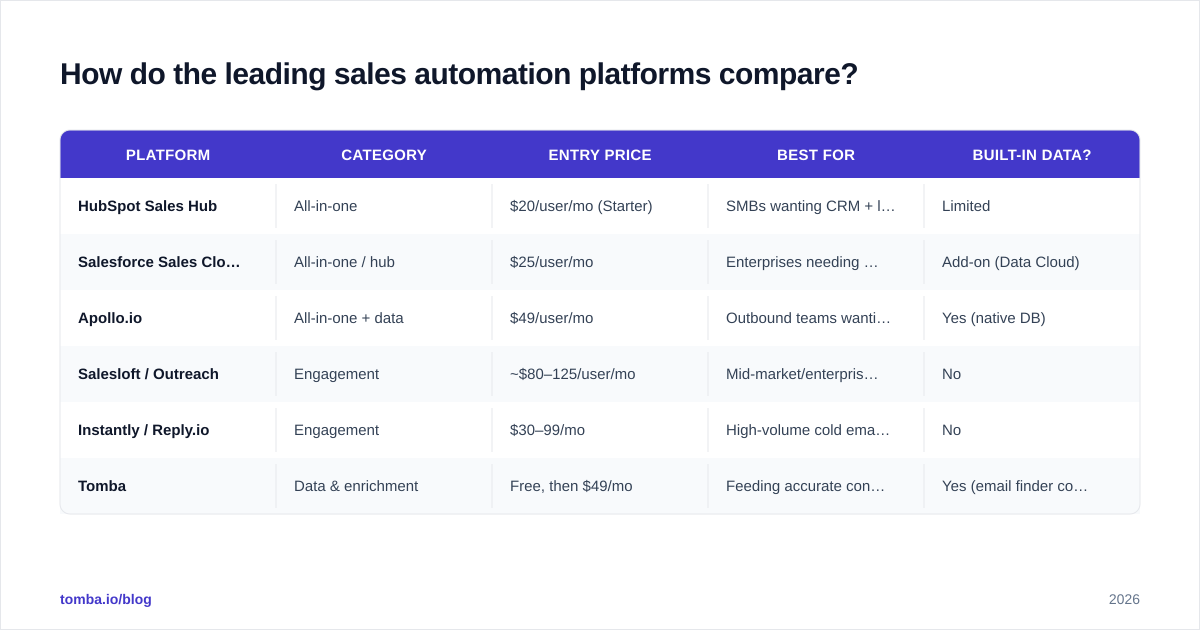
Here's a buyer-side comparison across the categories. Prices are entry-level published rates as of 2026 and shift often — always confirm on the vendor's own pricing page.
| Platform | Category | Entry price | Best for | Built-in data? |
|---|---|---|---|---|
| HubSpot Sales Hub | All-in-one | $20/user/mo (Starter) | SMBs wanting CRM + light automation | Limited |
| Salesforce Sales Cloud | All-in-one / hub | $25/user/mo | Enterprises needing deep customization | Add-on (Data Cloud) |
| Apollo.io | All-in-one + data | $49/user/mo | Outbound teams wanting data + sequencing | Yes (native DB) |
| Salesloft / Outreach | Engagement | ~$80–125/user/mo | Mid-market/enterprise cadence at scale | No |
| Instantly / Reply.io | Engagement | $30–99/mo | High-volume cold email senders | No |
| Tomba | Data & enrichment | Free, then $49/mo | Feeding accurate contacts into any hub | Yes (email finder core) |
A few takeaways from the table. First, the all-in-one tools are cheapest per seat but charge for usage tiers, add-ons, and data credits that stack up fast. Second, engagement tools assume you already have contacts — they don't find them. Third, the data layer is the one category that every other tool depends on, which is why it's worth getting right first.
If you're evaluating a specific incumbent, Tomba publishes direct breakdowns like the Apollo alternative and RocketReach alternative comparisons that map feature-for-feature against the data layer.
Why does contact data quality matter more than the platform?#
Because automation multiplies whatever you feed it — including garbage. Picture a conveyor belt in a factory: if the parts going in are defective, automating the belt just produces broken products faster. A sequencer firing 5,000 emails at unverified addresses doesn't generate 5,000 conversations; it generates bounces, spam complaints, and a damaged sender reputation.
The numbers back this up. B2B contact data decays at roughly 22–30% per year as people change jobs, companies rebrand, and inboxes get retired. That means nearly a third of any list you bought 12 months ago is now wrong. According to HubSpot's research on data decay, database degradation is one of the top silent killers of email performance.
This is where the email verifier step earns its keep. Before any sequence runs, contacts should be checked for validity, catch-all status, and deliverability risk. Clean data protects your sender reputation, which protects your email deliverability, which is the entire point of running automation in the first place.
The order of operations matters: find, verify, enrich, then automate. Teams that skip the first two steps and jump straight to sequencing are the ones complaining their expensive platform "doesn't work."
How should you choose a sales automation platform?#
Use a workflow-first framework instead of a feature checklist. Score vendors against the work your reps actually do every day.
Step 1 — Map your daily workflow. Write down the literal sequence: find prospect → verify contact → log in CRM → send cadence → book meeting → update pipeline. Every step is a potential tool boundary.
Step 2 — Identify your hub. Decide which system is the non-negotiable source of truth. If you already live in Salesforce or HubSpot, that's your hub and your automation tools must integrate cleanly with it — check the Salesforce integration and HubSpot integration docs before committing.
Step 3 — Find the gaps. Where does your current process break? Usually it's data (missing emails/phones) or follow-up (no systematic cadence). Buy for the gap, not the brochure.
Step 4 — Test with real data. Run a free trial against 100 of your actual target accounts, not the vendor's demo data. Measure match rate, bounce rate, and how many steps it removes from your day.
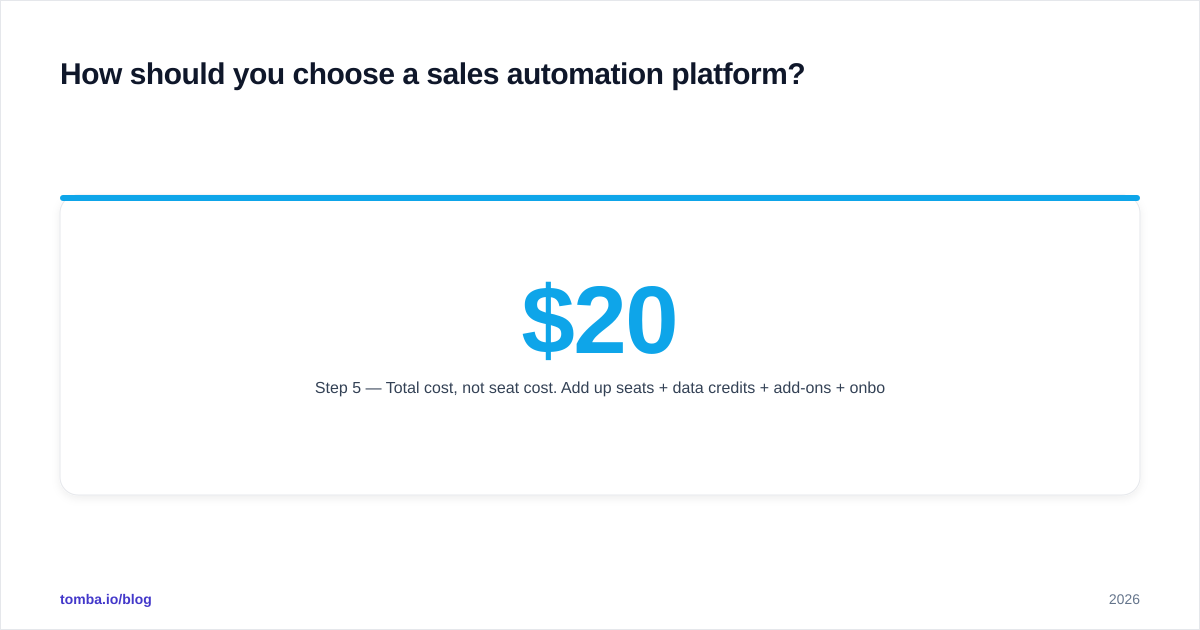
Step 5 — Total cost, not seat cost. Add up seats + data credits + add-ons + onboarding. The $20/user tool with $0.50 per enrichment credit can cost more than the $49 flat tool at scale.
)
The discipline here is resisting shiny-object syndrome. A new platform with a slick demo is tempting, but switching costs — data migration, retraining, integration rebuilds — are brutal. Change tools when a workflow is genuinely broken, not when a competitor ships a flashy feature.
What does a complete 2026 sales stack actually look like?#
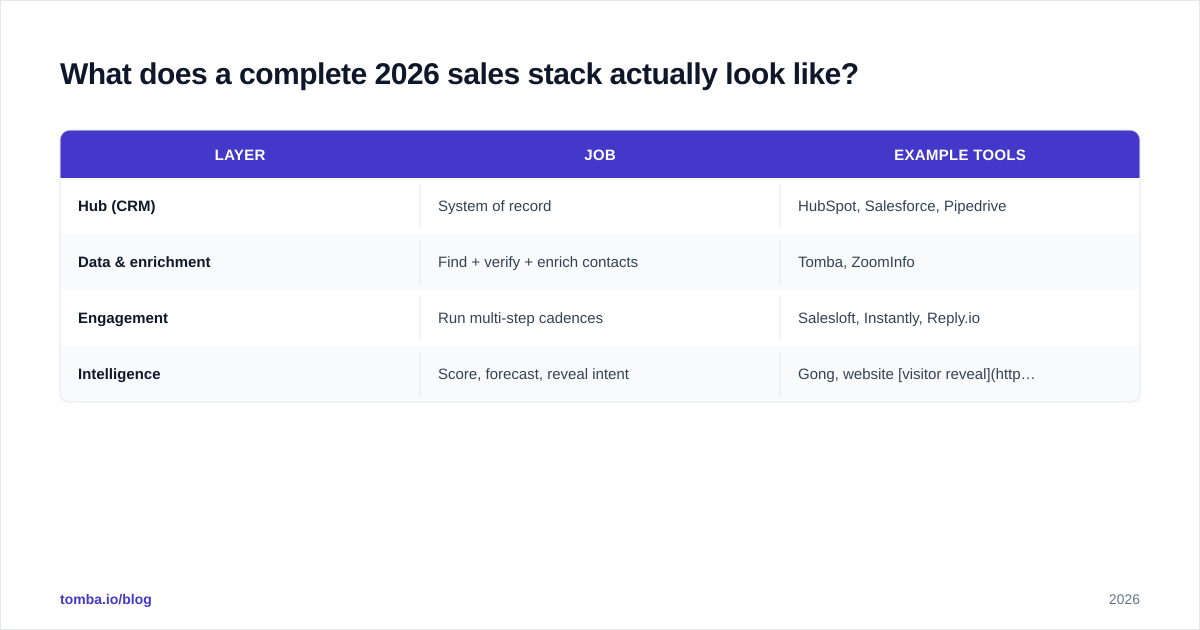
A lean, effective stack usually has four layers, and most of them are cheaper than buying one bloated all-in-one platform:
| Layer | Job | Example tools |
|---|---|---|
| Hub (CRM) | System of record | HubSpot, Salesforce, Pipedrive |
| Data & enrichment | Find + verify + enrich contacts | Tomba,ZoomInfo |
| Engagement | Run multi-step cadences | Salesloft, Instantly, Reply.io |
| Intelligence | Score, forecast, reveal intent | Gong, website visitor reveal |
The connective tissue is integration. A stack only works if data flows between layers without manual copy-paste. That's why tools like Zapier and native Pipedrive connectors matter more than any single feature — they're the plumbing that lets your data layer feed your hub and your hub feed your sequencer.
For teams that prefer working in spreadsheets or build custom workflows, an email finder API or the Google Sheets add-on lets you bolt accurate data onto whatever process you already run, no rip-and-replace required.
One more honest note: you don't need every layer on day one. A two-person startup can run a free CRM, a free email checker, and a single sequencing tool and outperform a 50-person team drowning in nine overlapping platforms. Tool sprawl is a real tax — every extra login is another place data goes stale and another integration that can silently break.
How do you avoid the most common platform-buying mistakes?#
Three traps catch most buyers:
Buying for features you'll never use. Vendors compete on feature count because it photographs well in a comparison grid. But a feature you don't use is negative value — it's complexity you pay for and train around. Score tools on the three workflows you run daily, and ignore the rest.
Ignoring the data layer until it's too late. Teams buy a $100/seat engagement platform, then discover half their contacts bounce. The fix isn't a better sequencer — it's clean data at the source. Get your email finder and verification in place before you scale outreach.
Underestimating switching costs. Migrating CRMs or rebuilding sequences eats weeks of productivity. Before switching, ask whether a point tool could fix the actual gap for a fraction of the disruption. Often a single domain search or enrichment integration solves the problem the "new platform" was supposed to.
For deeper vendor-by-vendor breakdowns, independent review sites like G2 carry verified buyer reviews that cut through vendor marketing — worth reading alongside any guide, including this one.
The bottom line#
The best sales automation tools in 2026 aren't the ones with the longest feature lists — they're the ones that fit your existing workflow and sit on top of accurate data. Pick a hub you trust, layer engagement and intelligence around it, and treat your data provider as the foundation everything else stands on.
That foundation is where most stacks quietly fail. If your reps are chasing bounced emails or guessing at contact info, no amount of automation will save the numbers. Start by fixing the data: the Tomba Email Finder finds verified professional emails by name, company, or domain, and feeds clean contacts straight into the hub and sequencer you already use. Try it on the free tier (25 searches/month), then scale on the Starter plan at $49/mo once you see the bounce rate drop. Get the data layer right, and every other tool in your stack starts earning its price.
// get started
Find, verify and enrich your first contacts today
Start on the free plan with 25 searches a month, then scale when your team is ready.
Free plan · No credit card required · GDPR & CCPA
// about the author