Sales Hub Sales Management Enablement: 2026 Playbook
A practical 2026 guide to running sales management enablement on a Sales Hub: the framework, the metrics, the tooling, and how to fill the data gaps that hubs leave open.
TL;DR
- "Sales hub sales management enablement" means using a central CRM hub (HubSpot Sales Hub, Salesforce Sales Cloud, Pipedrive) as the operating system for how you coach reps, forecast, and enforce process — not just store contacts.
- A hub only enables managers when three layers are working: a clean data layer, a visible process layer, and a coaching cadence layer. Most teams nail the first and ignore the other two.
- The biggest silent failure is dirty contact data. Bounced emails and missing phone numbers make every dashboard lie, so enrichment and verification belong inside the enablement stack, not beside it.
- Use the comparison table below to pick the right hub tier for your team size before you buy seats you won't use.
- Pair your hub with a dedicated data tool like the Tomba Email Finder so pipeline metrics reflect reachable buyers, not guesses.
What does "sales hub sales management enablement" actually mean?#
It means running your sales management through one central hub instead of a pile of disconnected tools. A "Sales Hub" is the CRM-plus-engagement platform your reps live in — HubSpot Sales Hub, Salesforce Sales Cloud, or Pipedrive are the common ones. "Sales management enablement" is the discipline of giving managers the data, process, and coaching tools to make reps better. Put them together and you get a single place where pipeline, activity, forecasting, and coaching all reference the same source of truth.
The distinction matters because most teams buy a hub and use 20% of it. They log deals and call it a day. Enablement is what happens when a manager can open the same hub, see why a deal stalled, watch the rep's last three calls, and run a coaching session off real signal instead of a gut feeling. That second use case is where revenue actually moves.

If you want the textbook definition of the surrounding discipline, HubSpot's own sales enablement resource and Salesforce's sales cloud overview are reasonable neutral starting points. But definitions are cheap. The framework below is what you operate.
What is the three-layer enablement framework?#
A Sales Hub enables managers only when three layers are healthy at the same time. Skip one and the whole thing degrades into an expensive contact database.
Layer 1 — Data. Every record (contact, company, deal) has to be accurate and complete. This is the foundation, and it is the layer teams most often skip because it's unglamorous. If 18% of your contact emails bounce, every conversion-rate report above it is wrong by roughly 18%. Garbage in, confident-looking dashboards out.
Layer 2 — Process. The stages, exit criteria, required fields, and automation that force a deal to move predictably. This is where the hub earns its keep: required fields, deal-stage probability, and sequence enforcement turn "trust me, it's closing" into observable steps.
Layer 3 — Coaching cadence. The weekly ritual where managers use layers 1 and 2 to make reps better — call reviews, pipeline reviews, and 1:1s anchored to the same hub data the rep sees. Without this layer, you have analytics nobody acts on.
Notice the order. You cannot coach (Layer 3) off a process (Layer 2) built on bad data (Layer 1). Fix bottom-up, always.
How do you build the data layer so the hub doesn't lie?#
Start with reachability, because a contact you can't reach is not a lead — it's a row. The fastest way to corrupt a Sales Hub is to import lists nobody verified. Within a quarter, managers stop trusting the dashboards, and once trust is gone, enablement is dead.
Three habits keep Layer 1 honest:
- Verify before import. Run every list through an email verifier so bounces never enter the hub. A bounce that never lands can't skew a report.
- Enrich on creation. When a rep adds a company, auto-fill the missing decision-maker emails and phone numbers via data enrichment so the record is workable on day one.
- Fill gaps at the source. When reps work a target account and the contact is missing, let them pull it directly with an email finder or domain search instead of guessing a
first.last@pattern.
This is the part of the stack hubs themselves handle poorly. HubSpot and Salesforce store data beautifully; they are not in the business of finding and verifying fresh B2B contact details at scale. That gap is exactly where a dedicated data tool sits inside the enablement stack — not beside it.

Which Sales Hub fits your team? (comparison)#
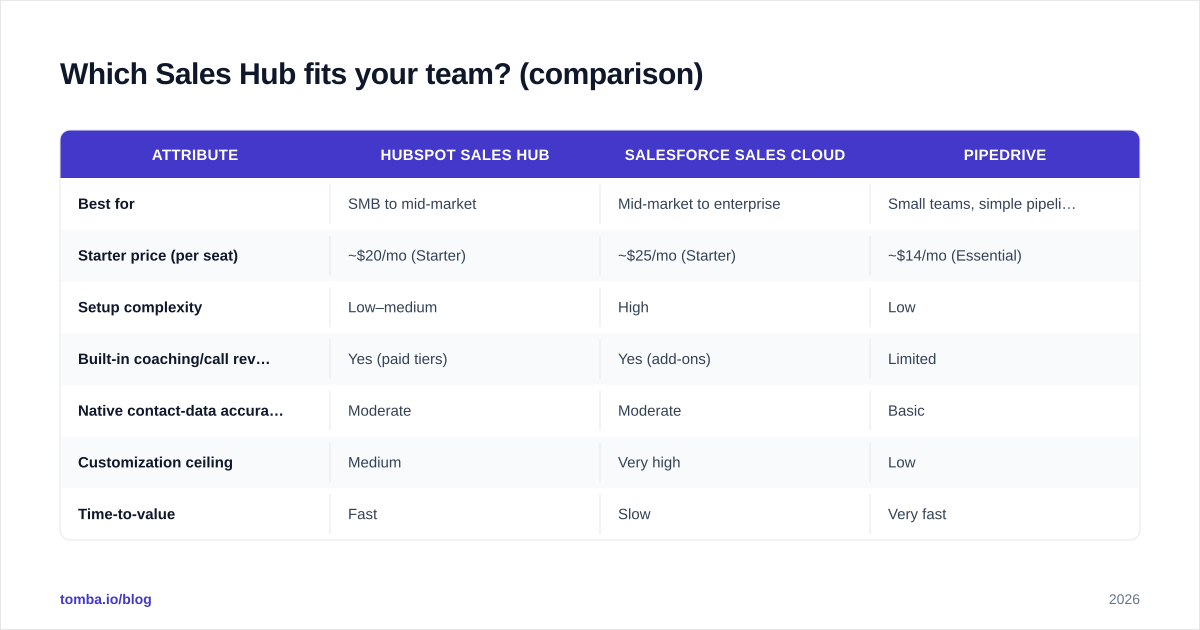
There is no universally "best" hub — there's a best fit for your team size, motion, and budget. The table below compares the three most common hubs on the attributes that actually affect enablement, plus where a data layer like Tomba slots in.
| Attribute | HubSpot Sales Hub | Salesforce Sales Cloud | Pipedrive |
|---|---|---|---|
| Best for | SMB to mid-market | Mid-market to enterprise | Small teams, simple pipelines |
| Starter price (per seat) | ~$20/mo (Starter) | ~$25/mo (Starter) | ~$14/mo (Essential) |
| Setup complexity | Low–medium | High | Low |
| Built-in coaching/call review | Yes (paid tiers) | Yes (add-ons) | Limited |
| Native contact-data accuracy | Moderate | Moderate | Basic |
| Customization ceiling | Medium | Very high | Low |
| Time-to-value | Fast | Slow | Very fast |
A few honest takeaways. If you're under ~15 reps and want to be live this week, Pipedrive or HubSpot Starter wins. If you have a RevOps team and complex territories, Salesforce's customization ceiling is worth the setup pain. But across all three, native contact-data accuracy is "moderate to basic" — which is why none of them removes the need for a verification and enrichment layer. Check current pricing on each vendor's own page before you commit; tiers shift often. You can compare data-layer options against full platforms on the Apollo alternative breakdown if you're weighing all-in-one suites.
What metrics should the hub surface for managers?#
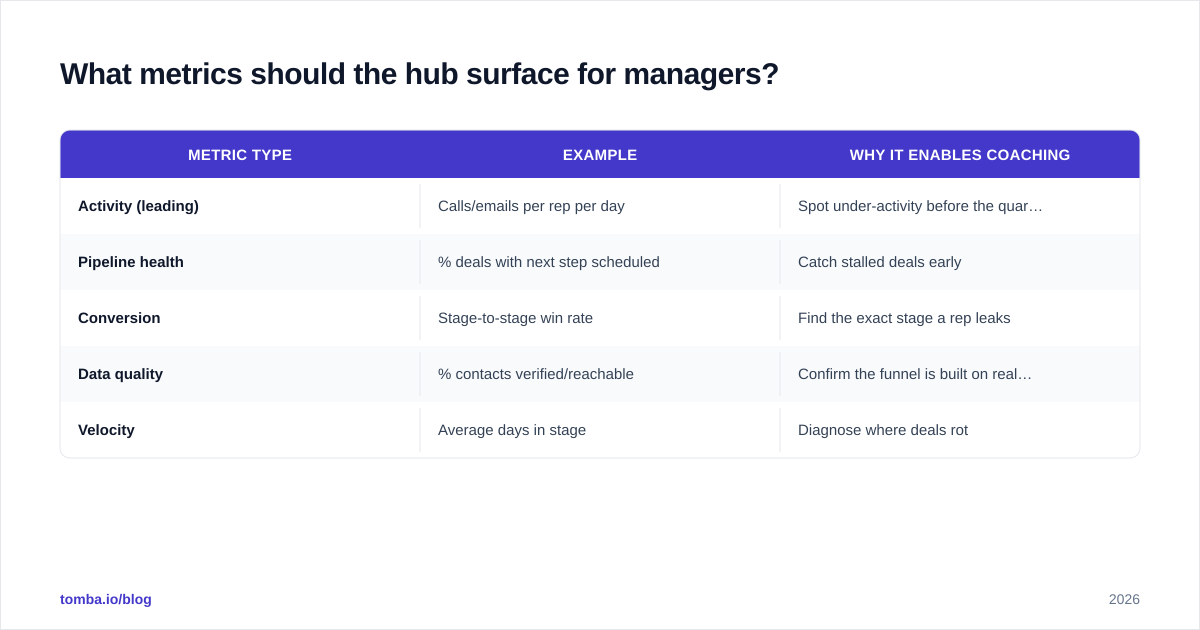
Surface leading indicators, not just lagging ones. A closed-won number tells you what already happened; enablement is about changing what happens next. Configure the hub to report on the inputs managers can actually coach.
| Metric type | Example | Why it enables coaching |
|---|---|---|
| Activity (leading) | Calls/emails per rep per day | Spot under-activity before the quarter is lost |
| Pipeline health | % deals with next step scheduled | Catch stalled deals early |
| Conversion | Stage-to-stage win rate | Find the exact stage a rep leaks |
| Data quality | % contacts verified/reachable | Confirm the funnel is built on real buyers |
| Velocity | Average days in stage | Diagnose where deals rot |
The data-quality row is the one most managers never add — and it's the one that validates every other row. If only 70% of your contacts are reachable, your stage-to-stage conversion is being computed on a polluted denominator. Track reachability as a first-class metric. For definitions of the downstream numbers, the glossary entries on win rate and response rate are useful shared references for the whole team.
How do you run the coaching cadence on a Sales Hub?#
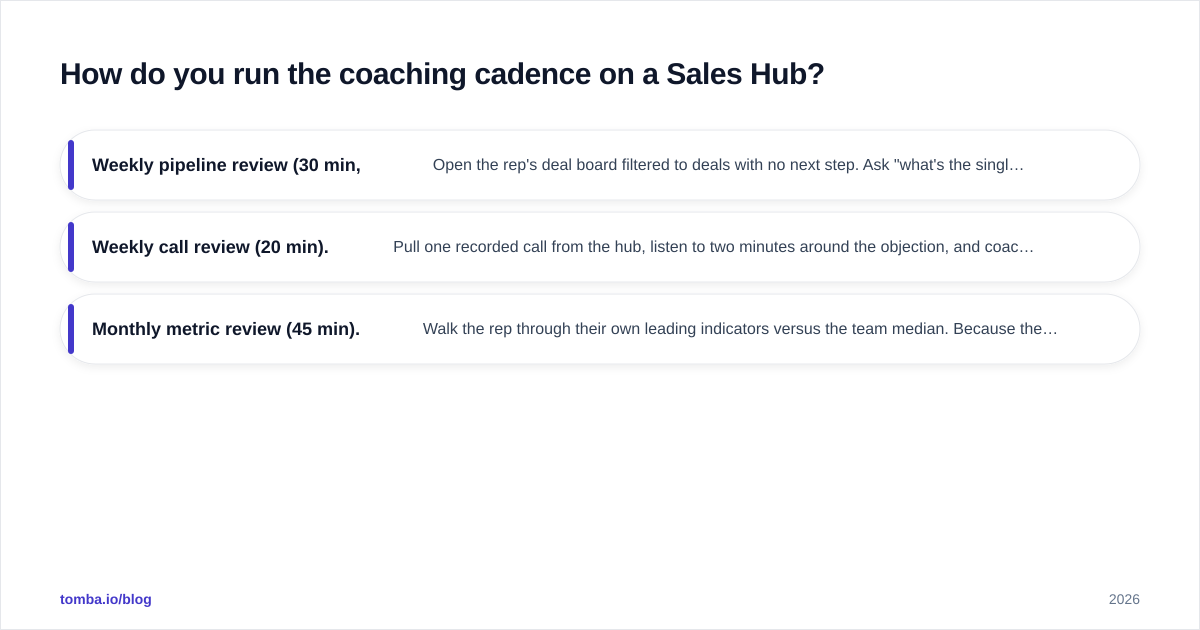
Anchor every coaching session to a hub view the rep already sees, so coaching feels like help rather than surveillance. The cadence that works for most mid-market teams:
- Weekly pipeline review (30 min, per rep). Open the rep's deal board filtered to deals with no next step. Ask "what's the single blocker?" on each. The hub makes the gaps visible so you're not relying on the rep's memory.
- Weekly call review (20 min). Pull one recorded call from the hub, listen to two minutes around the objection, and coach that moment. Specific beats general.
- Monthly metric review (45 min). Walk the rep through their own leading indicators versus the team median. Because the data layer is clean, the numbers are defensible and the conversation stays about behavior, not about whether the report is broken.
The cadence only works if Layers 1 and 2 hold. When a rep can deflect with "that contact was a bad number anyway," you've lost the session — and they're often right, because the data layer was never enforced. That's the recurring theme of this whole playbook: enablement is downstream of data.
For teams scaling outbound, connect the hub to your data workflow directly. Tomba's HubSpot integration and Salesforce integration push verified contacts straight into the hub, so reps stop copy-pasting and managers stop coaching off stale records.
What are the common failure modes — and the fixes?#
Most Sales Hub enablement projects fail in predictable ways. Name them so you can avoid them.
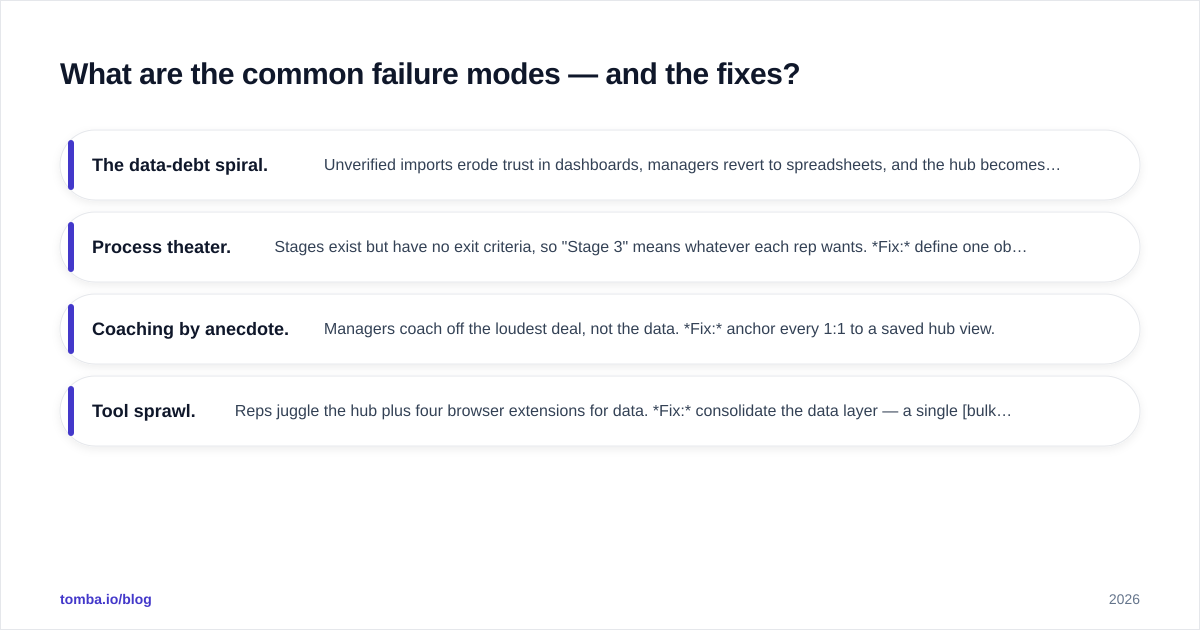
- The data-debt spiral. Unverified imports erode trust in dashboards, managers revert to spreadsheets, and the hub becomes shelfware. Fix: gate every import behind verification; make reachability a tracked metric.
- Process theater. Stages exist but have no exit criteria, so "Stage 3" means whatever each rep wants. Fix: define one observable exit criterion per stage and make it a required field.
- Coaching by anecdote. Managers coach off the loudest deal, not the data. Fix: anchor every 1:1 to a saved hub view.
- Tool sprawl. Reps juggle the hub plus four browser extensions for data. Fix: consolidate the data layer — a single bulk email finder or Chrome extension replaces the grab-bag.
The thread connecting all four is discipline at the data and process layers. Tools don't create discipline, but the wrong tools make discipline impossible — and the right ones make it nearly automatic. G2's sales enablement category is a decent place to sanity-check that you're not missing a category of tool your peers have standardized on.
How does the data layer pay for itself?#
It pays for itself by making every other investment in the hub actually work. You've already paid for seats, for the engagement features, for the coaching tooling. If a fifth of your contacts are unreachable, you're getting four-fifths of the value from all of it. Fixing the data layer is the highest-leverage, lowest-cost move in the entire stack — and it's the one teams defer the longest.
Run the math on your own funnel: take your unreachable-contact rate, multiply it by your pipeline value, and that's the revenue your clean-looking dashboards are quietly hiding. For most teams the number is uncomfortable enough to justify a verification workflow the same afternoon.
Closing: make your hub tell the truth#
Your Sales Hub is only as good as the data underneath it — and the coaching you build on top. Get the data layer right and the process and coaching layers finally have something solid to stand on. Get it wrong and you're managing a very expensive spreadsheet with nicer charts.
Start at the foundation. Feed your hub verified, enriched, reachable contacts with the Tomba Email Finder — find professional emails by domain, name, or company, verify them before they ever hit your CRM, and give your managers dashboards they can actually trust. The free tier (25 searches/month) is enough to clean a pilot list; see Tomba pricing when you're ready to scale across the team. Fix Layer 1, and the rest of your enablement program stops fighting its own data.
Ready to find emails that actually work?
Join 150,000+ professionals who stopped guessing and started sending. Free credits on signup — no credit card required.
Get the Tomba newsletter
Practical outbound tactics and product updates — once every two weeks.
About the author