AI Cold Email Automation in 2026: The Complete Playbook
AI cold email automation promises hands-off pipeline, but most setups quietly burn domains. Here's the data, personalization, and deliverability stack that actually books meetings in 2026.

TL;DR
- AI cold email automation is not "press a button, get meetings." It's a pipeline: clean data in, AI-assisted personalization in the middle, disciplined sending and deliverability at the end.
- The biggest failure point isn't the copy — it's bad data and reckless sending volume that torch your sender reputation in week two.
- AI is excellent at scaling research and first-draft personalization. It's terrible at judgment, list hygiene, and knowing when to stop.
- A realistic stack costs $150–$400/month across data, sending, and warmup tools — far cheaper than one SDR, but only if your inputs are accurate.
- Start with verified contact data (the input everything else depends on), then layer automation on top. Reverse that order and you scale garbage faster.
What is AI cold email automation, really?#
AI cold email automation is the use of machine learning and large language models to handle the repetitive parts of cold outreach: researching prospects, drafting personalized openers, sequencing follow-ups, and timing sends — at a volume no human could match by hand.
Think of it like a modern kitchen. The AI is a very fast prep cook: it chops, measures, and plates hundreds of orders. But it doesn't decide the menu, it doesn't taste the food, and it will happily serve a spoiled ingredient if you hand it one. You're still the chef. The automation only multiplies the quality — or the mess — of what you feed it.
In practice, a full automated cold email system has four moving parts:
- Data layer — finding and verifying who to email
- Personalization layer — AI research and copy generation per prospect
- Sending layer — sequencing, throttling, inbox rotation
- Deliverability layer — warmup, authentication, reputation monitoring
Most people obsess over layer two (the AI copy) and ignore the other three. That's exactly backwards, and it's why so many "AI SDR" experiments collapse after a month.
Why do most AI cold email setups fail?#
They fail because automation scales whatever you give it — and what most teams give it is unverified data and impatient volume.
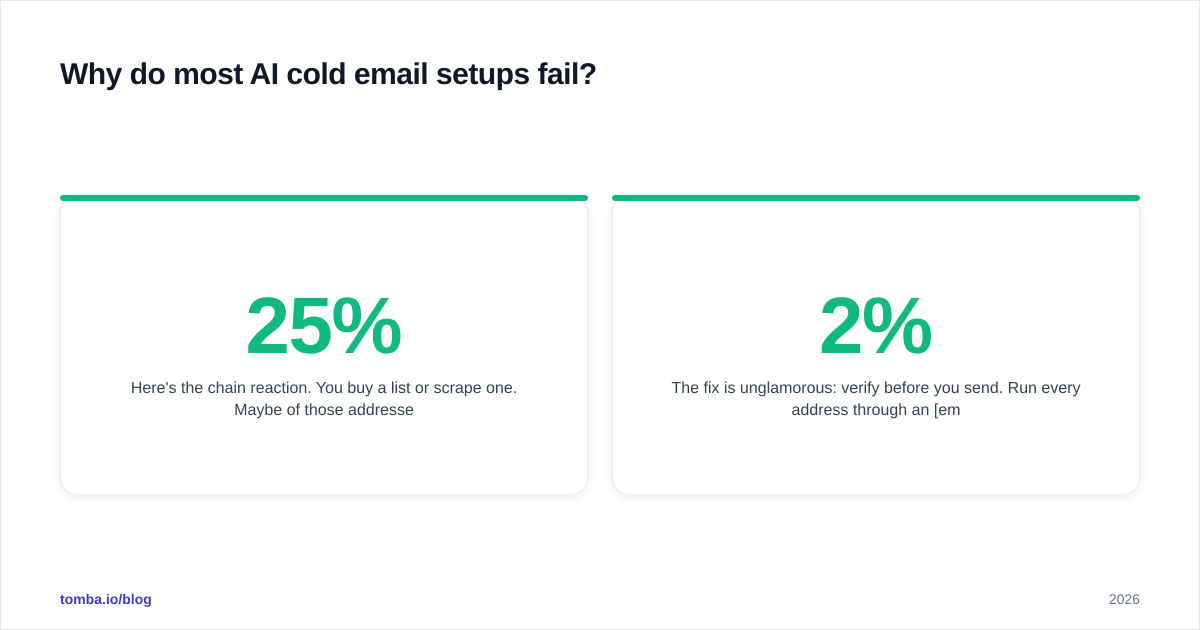
Here's the chain reaction. You buy a list or scrape one. Maybe 25% of those addresses are dead, role-based, or catch-all guesses. You load them into an AI sender, set it to 200 emails a day from a fresh domain, and let it rip. The bounces spike, mailbox providers flag your domain as a spam source, and now even your good prospects never see the message. The AI did its job perfectly. The inputs were the problem.
The fix is unglamorous: verify before you send. Run every address through an email verifier and segment out the catch-all and risky ones. A 2% bounce rate is the line most providers tolerate; above 5% you're in reputation trouble. Verification is the single highest-leverage step in the entire pipeline, and it's the one AI hype skips.
How does AI personalization actually work?#
AI personalization works by pulling structured signals about a prospect — their role, company, recent activity, tech stack — and generating a relevant opening line or angle for each one.
The good version looks like this: the system enriches each contact with firmographic data, feeds those signals to a model, and produces a first line that references something true and specific ("Saw you're hiring three backend roles — usually means the data pipeline is straining"). A human skims, approves, and sends.
The bad version is mail-merge with a thin AI coat: "Hi {{firstName}}, I loved your work at {{company}}!" — generated for 5,000 people who can all smell the template. Personalization at scale only works when the underlying data is rich and accurate, which loops right back to your data layer. You can enrich contacts in bulk with a tool like Tomba's data enrichment so the AI has real signals to work with instead of guessing.
A practical rule: AI should draft, a human should gate. Let the model produce variants, but keep a person (or a strict scoring rule) between generation and send until your reply data proves the system can run unattended. The teams getting 5%+ reply rates in 2026 aren't fully hands-off — they've automated the 90% that's mechanical and kept judgment in the loop.
What does a realistic AI cold email automation stack look like?#
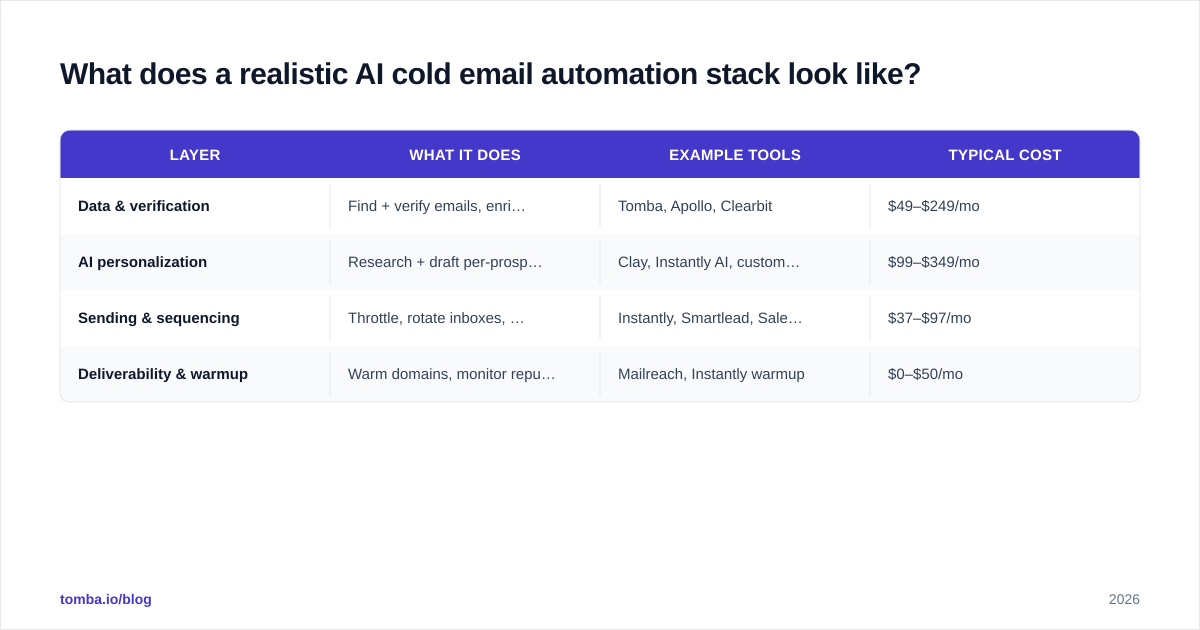
A working stack splits across the four layers, and no single tool does all four well. Here's how the common categories compare on what matters for cold outreach.
| Layer | What it does | Example tools | Typical cost |
|---|---|---|---|
| Data & verification | Find + verify emails, enrich contacts | Tomba, Apollo, Clearbit | $49–$249/mo |
| AI personalization | Research + draft per-prospect copy | Clay, Instantly AI, custom GPT | $99–$349/mo |
| Sending & sequencing | Throttle, rotate inboxes, follow-ups | Instantly, Smartlead, Saleshandy | $37–$97/mo |
| Deliverability & warmup | Warm domains, monitor reputation | Mailreach, Instantly warmup | $0–$50/mo |
Notice the data layer anchors everything and is where accuracy compounds. A few practical notes on choosing:
- Don't over-buy the all-in-one. A platform that claims to do data, AI, and sending usually does one of them well and the other two adequately. Best-of-breed for the data layer pays off because it's your input quality.
- Sending tools are increasingly commoditized. Smartlead, Instantly, and Saleshandy are close enough that you should pick on inbox-rotation and warmup features, not AI gimmicks.
- Warmup is non-negotiable on new domains. Budget two to four weeks before your first real campaign.
For a deeper side-by-side on the data layer specifically, our breakdowns of the best Apollo alternative options and dedicated email-finding tools cover accuracy and pricing trade-offs in detail.
How do you keep automated cold email out of spam?#
You stay out of spam by treating deliverability as a system, not a setting — authentication, warmup, volume discipline, and list hygiene working together.
The fundamentals, in priority order:
- Authenticate every sending domain. Set up SPF, DKIM, and DMARC before you send a single email. Google and Yahoo's 2024 bulk-sender rules made this mandatory, not optional. You can sanity-check records with a free SPF checker and confirm what a valid SPF record should contain.
- Use separate domains for cold outreach. Never send cold email from your primary brand domain. Buy lookalike domains, warm them, and isolate the risk.
- Warm up gradually. Start at 10–20 sends a day per inbox and ramp over weeks. Automated warmup tools simulate real conversations to build sender reputation.
- Cap volume per inbox. Rotate across many inboxes at 30–50 sends each rather than blasting 300 from one. This is the core reason inbox-rotation features exist.
- Verify relentlessly. Every bounce is a vote against your domain. Keep bounce rates under 2%.
Google's own Postmaster Tools will show you your domain reputation and spam rate directly — if you're automating cold email and not watching that dashboard, you're flying blind. Treat anything above a 0.3% reported spam rate as a five-alarm fire and pause sending immediately.

Should AI write your cold emails end-to-end?#
No — not yet, and probably not for high-value segments ever. AI should draft and assist; a human or a hard rule should approve.
Here's the honest trade-off. Fully autonomous AI sending maximizes volume and minimizes labor, but it also maximizes the blast radius when the model hallucinates a detail, misreads a prospect's company, or writes something tone-deaf at scale. Semi-automated sending — AI drafts, human approves in a batch queue — costs you a few minutes per hundred prospects and catches the embarrassing 5% before it ships.
| Approach | Reply rate (typical) | Risk | Labor |
|---|---|---|---|
| Pure mail-merge templates | 1–2% | Low | Low |
| AI drafts + human approves | 4–7% | Low | Medium |
| Fully autonomous AI sending | 2–5% | High | Very low |
| Manual 1:1 research | 8–12% | Low | Very high |
The sweet spot for most teams in 2026 is row two: AI does the research and first draft, a human spends ten minutes approving a batch, and you capture most of the quality of manual outreach at a fraction of the time. Reserve fully manual 1:1 for your top 50 dream accounts, and let automation handle the long tail.
One more underrated point: AI is far better at the follow-up than the first touch. Follow-ups are where most replies actually come from, and they're lower-risk to automate because the prospect already has context. Let the machine own your sequence's second-through-fifth touches and put your human effort into the opener and the offer.

What's the right workflow to launch a campaign?#
The right workflow front-loads data quality and back-loads automation, so you scale only what's already proven clean.
A step-by-step launch sequence that holds up:
- Define the segment narrowly. "VP Eng at Series B fintechs, 50–200 employees" beats "tech companies." Tight segments make AI personalization actually land.
- Build the list with verified data. Use domain search to pull contacts by company, then verify every address. Don't skip this to save an hour.
- Enrich for signals. Layer in role, tech stack, and recent triggers so the AI has something true to reference.
- Generate copy in batches. Let AI draft openers and a 4-touch sequence. Review for accuracy and tone.
- Warm and authenticate. Confirm SPF/DKIM/DMARC and that inboxes are warmed before launch.
- Send small, then scale. Launch to 50 contacts, watch bounce and reply rates for 48 hours, then ramp only if the numbers hold.
- Monitor and prune. Kill underperforming variants, remove bouncers, and feed reply data back into your targeting.
This is the part the "AI does everything" pitch glosses over: the loop. Cold email automation is a system you tune weekly, not a machine you set and forget. The teams winning in 2026 run tight feedback loops where last week's reply data sharpens next week's targeting.
If you want to see how the data layer plugs into your existing CRM and sequencer, our integrations connect finding and verification directly into HubSpot, Pipedrive, and your sending tool — so the verified-data step doesn't become a manual CSV chore.
How much does AI cold email automation cost?#
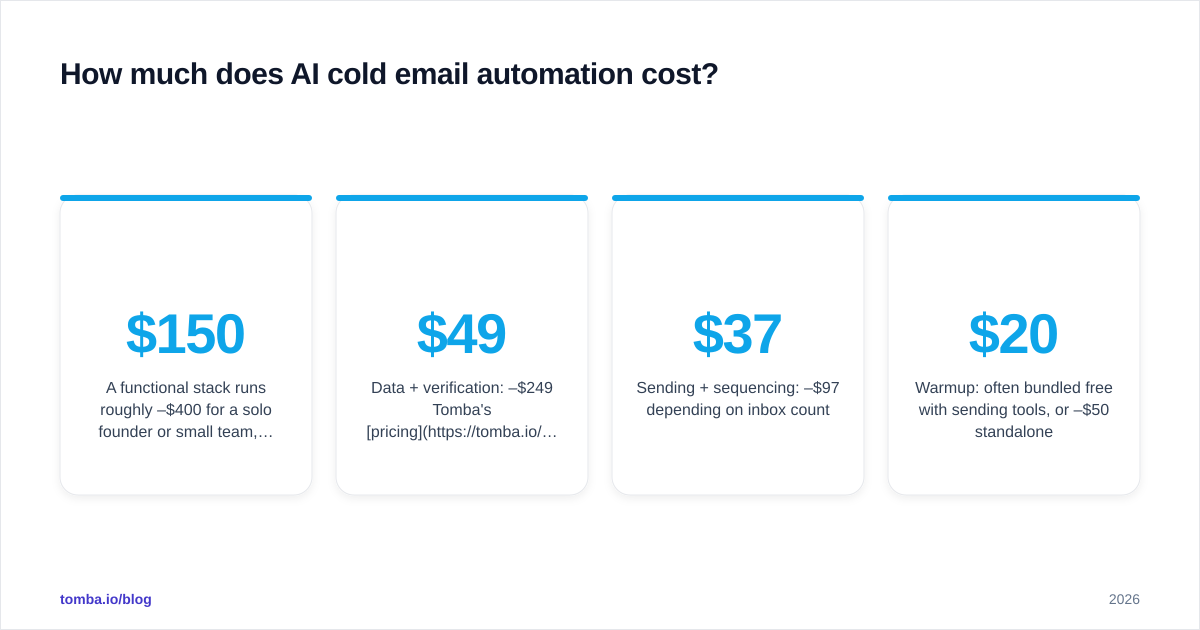
A functional stack runs roughly $150–$400/month for a solo founder or small team, scaling with sending volume and data needs.
Rough budget breakdown:
- Data + verification: $49–$249/mo. Tomba's pricing starts with a free tier (25 searches/mo), Starter at $49/mo, Growth at $99/mo, and Pro at $249/mo — sized to how many contacts you find and verify.
- Sending + sequencing: $37–$97/mo depending on inbox count.
- Warmup: often bundled free with sending tools, or $20–$50/mo standalone.
- Domains + inboxes: ~$10–$40/mo for several lookalike domains and mailboxes.
Compare that to a single SDR at $60,000+ fully loaded, and the math is obvious — automation wins on cost. But the comparison is only fair if your automated system actually books meetings, and that depends entirely on data accuracy and deliverability discipline. A cheap stack feeding on bad data is more expensive than no stack at all, because it also burns domains you have to replace.
The bottom line#
AI cold email automation in 2026 is real, effective, and dramatically cheaper than headcount — but only when you build it in the right order. Verified data first, AI personalization second, disciplined sending and deliverability wrapped around both. Skip the data layer and you've just built a faster way to land in spam.
Every layer above depends on one thing: knowing the contact is real and reachable. That's the input the whole machine runs on. Tomba's Email Finder finds professional email addresses by name, domain, or company and verifies them before they ever hit your sequence — so your automation scales accuracy instead of multiplying bounces. Start free with 25 searches a month, plug it into your stack, and let the AI handle the volume on top of a foundation that actually delivers.
// get started
Find, verify and enrich your first contacts today
Start on the free plan with 25 searches a month, then scale when your team is ready.
Free plan · No credit card required · GDPR & CCPA
// about the author