AI Email Assistant 2026: Best Tools, Features & Real ROI
An AI email assistant drafts, replies, and prioritizes your inbox so you sell more in less time. Here's how the tools compare, what they actually automate, and where they fall short in 2026.
TL;DR
- An ai email assistant is software that reads, drafts, replies to, and prioritizes email using large language models — it acts on your inbox, not just inside a compose window.
- The best tools save reps 5–10 hours a week on writing and triage, but they only pay off when the data feeding them (contacts, context, CRM history) is clean.
- There are three categories: inbox copilots (Gmail/Outlook add-ons), sales-sequence assistants, and full autonomous agents. Most teams need the first two, not the third.
- AI writes the message; it does not find the person. You still need an email finder and verified addresses upstream, or the assistant just automates bounces.
- Use the comparison table and the buyer framework below to pick by job-to-be-done, not by hype.
What is an AI email assistant?#
An AI email assistant is a tool that uses a language model to handle the parts of email that used to eat your morning: reading long threads, drafting replies, writing first-touch outreach, summarizing what a prospect said three weeks ago, and flagging which messages actually need you.
Think of it like a sharp executive assistant who has read every email you've ever sent. They know your tone, they know the deal history, and they can hand you a ready-to-send draft while you're still pouring coffee. Technically, it's a layer that connects an LLM (GPT, Claude, Gemini) to your mailbox and CRM, then runs prompts against incoming and outgoing mail.
The category exploded because email is still where B2B deals live. Reps spend roughly 21% of their day writing emails, according to HubSpot research, and most of that writing is repetitive. An assistant collapses that time without making every message sound like a robot — at least when it's set up well.
How does an AI email assistant actually work?#
Four steps run under the hood, whether the tool is a $10 Gmail plugin or an enterprise agent:
- Ingest — it pulls the thread, your past emails, and (if connected) CRM fields like deal stage and last contact.
- Understand — the model classifies intent: is this a buying signal, an objection, an out-of-office, a scheduling request?
- Generate — it drafts a response in your voice, or composes net-new outreach from a contact record.
- Act — depending on permissions, it either suggests a draft, sends after approval, or (for autonomous agents) sends on its own and logs the activity.
The quality of step 3 depends entirely on the quality of step 1. An assistant with no context writes generic filler. An assistant wired into your CRM and a clean contact database writes like someone who did their homework. This is why an AI email assistant is a downstream tool — it amplifies whatever data you feed it.
What can an AI email assistant do (and not do)?#
Here's the honest split. AI is excellent at language tasks and weak at truth and data tasks.
It does well:
- Drafting replies that match your tone
- Summarizing long threads into three bullets
- Turning a rough idea into a polished cold email
- Writing follow-ups that reference the prior message
- Prioritizing your inbox by likely revenue impact
- Catching grammar, spam-trigger words, and weak subject lines
It struggles with:
- Knowing whether an email address is real (that's verification, not generation)
- Finding a contact's address in the first place
- Inventing facts it doesn't have — it will hallucinate a "recent funding round" if you let it
- Judging nuance in a high-stakes negotiation
- Staying compliant without guardrails (GDPR, CAN-SPAM)
If you ask an assistant to "email the VP of Engineering at Acme," it can write a beautiful message — to an address that may not exist. You still need a verified email. Pair the writing layer with a real email verifier so your polished copy lands in an inbox instead of a bounce log.
What are the best AI email assistant tools in 2026?#
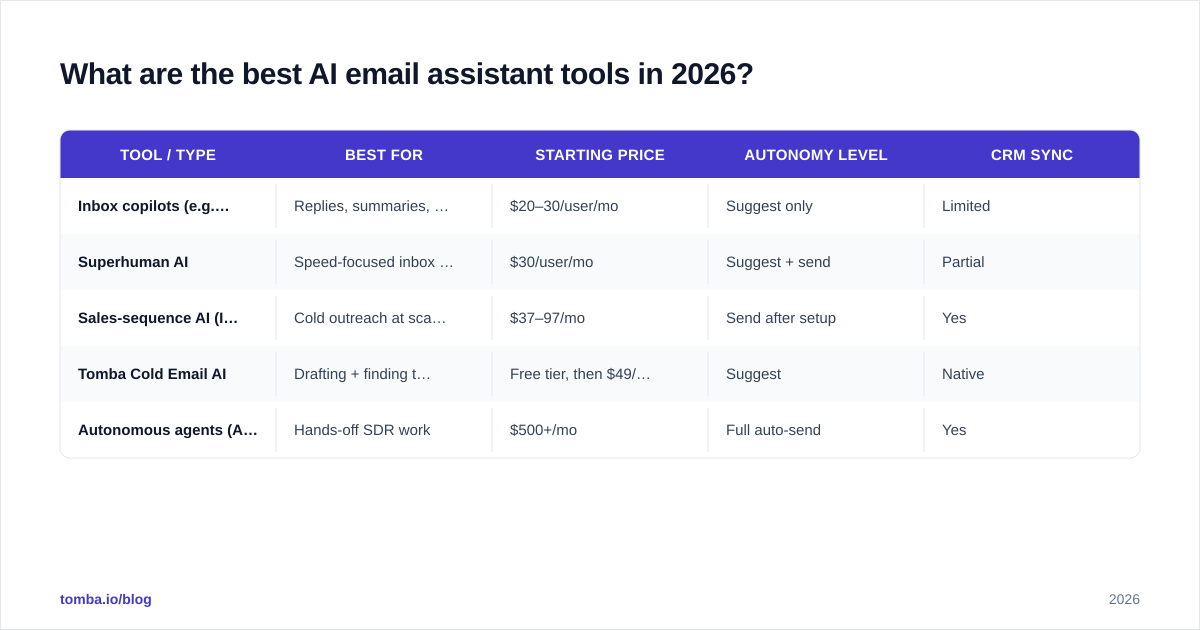
The market splits into three jobs. Pick by what you're trying to automate.
| Tool / Type | Best for | Starting price | Autonomy level | CRM sync |
|---|---|---|---|---|
| Inbox copilots (e.g. Gmail/Outlook Copilot) | Replies, summaries, tone | $20–30/user/mo | Suggest only | Limited |
| Superhuman AI | Speed-focused inbox triage | $30/user/mo | Suggest + send | Partial |
| Sales-sequence AI (Instantly, Saleshandy) | Cold outreach at scale | $37–97/mo | Send after setup | Yes |
| Tomba Cold Email AI | Drafting + finding the contact | Free tier, then $49/mo | Suggest | Native |
| Autonomous agents (Artisan, 11x) | Hands-off SDR work | $500+/mo | Full auto-send | Yes |
A few notes the vendor pages won't tell you:
- Inbox copilots are the safest starting point. Low cost, low risk, immediate time savings on replies.
- Sequence assistants are where revenue teams live, but they assume you already have verified contacts loaded. See Instantly alternatives and Saleshandy alternatives if you're comparing.
- Autonomous agents demo beautifully and scare prospects in practice. Full auto-send with no human in the loop is the fastest way to torch a domain reputation. Most teams that buy them dial autonomy back within a quarter.
You can compare verified user reviews on G2 before committing — the gap between marketing claims and the review section is often the whole story.
Is an AI email assistant worth it for sales teams?#
Yes — if you measure the right thing. The ROI is not "emails sent." It's hours returned and reply rate.
Run this quick math. A rep who spends two hours a day on email, with an assistant cutting that by 40%, gets back about four hours a week. Across a five-person team, that's a full work-week of selling time recovered every week. At even a modest fully-loaded cost per rep, the tool pays for itself in days, not months.
But the trap is automation theater: sending more mediocre emails faster. Volume without quality tanks your email deliverability and your sender reputation. The teams that win use AI to send fewer, better emails to verified contacts — not to 10x the noise.
That's the core principle: an AI email assistant multiplies your inputs. Multiply clean, targeted, verified data and you get more meetings. Multiply garbage and you get more spam complaints.
How do you choose an AI email assistant? (A buyer's framework)#
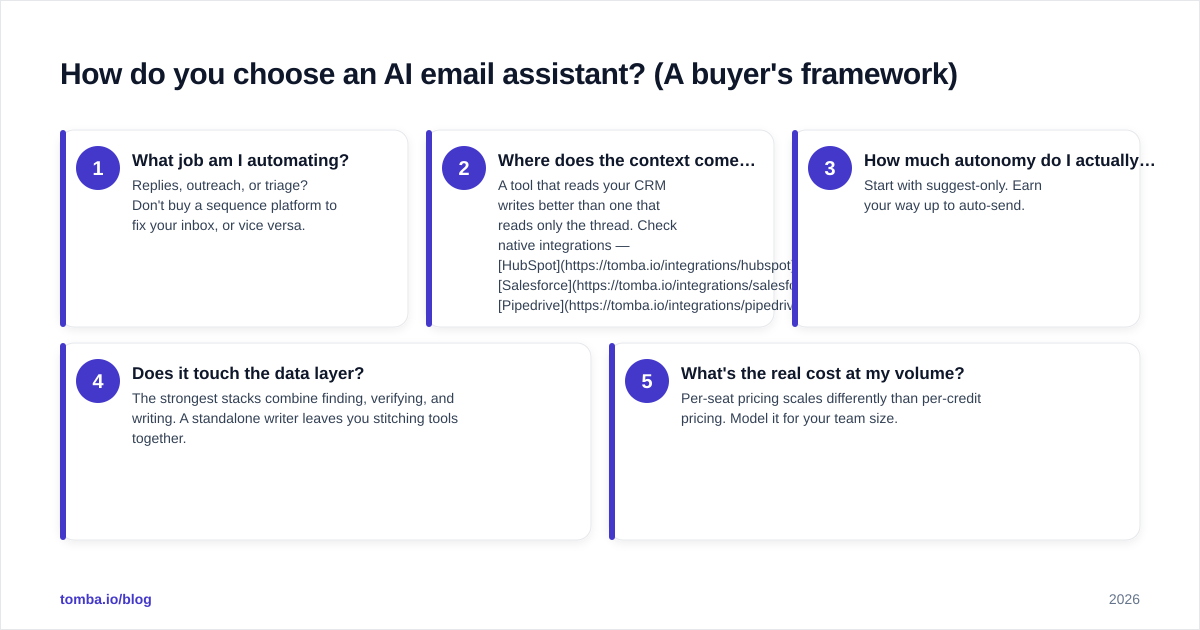
Use this five-question filter before you buy anything.
- What job am I automating? Replies, outreach, or triage? Don't buy a sequence platform to fix your inbox, or vice versa.
- Where does the context come from? A tool that reads your CRM writes better than one that reads only the thread. Check native integrations — HubSpot, Salesforce, Pipedrive.
- How much autonomy do I actually want? Start with suggest-only. Earn your way up to auto-send.
- Does it touch the data layer? The strongest stacks combine finding, verifying, and writing. A standalone writer leaves you stitching tools together.
- What's the real cost at my volume? Per-seat pricing scales differently than per-credit pricing. Model it for your team size.
If a vendor can't answer #2 and #4 clearly, the assistant will write confident, well-formatted emails to people who will never see them.
How does AI email writing fit with finding contacts?#
This is the part most "best AI email assistant" lists skip. Writing is the last mile. Before the assistant drafts a word, three things have to be true:
- The contact exists and is the right person.
- You have their verified, deliverable email address.
- You have enough context to personalize honestly.
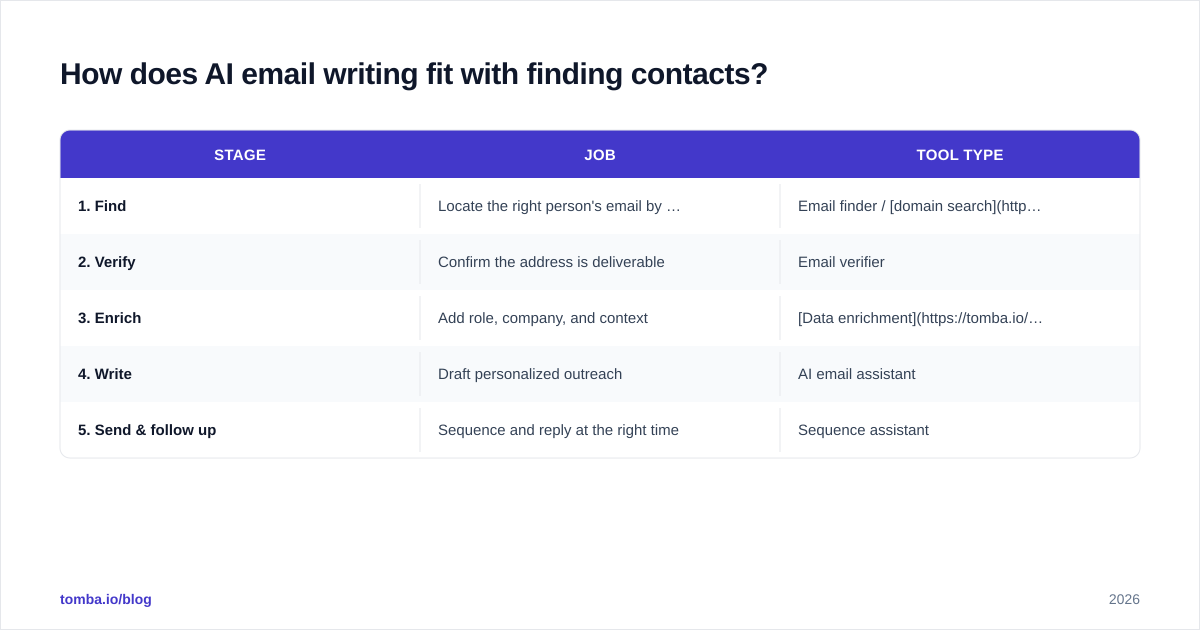
That's the data layer, and it's where the writing assistant gets its raw material. A typical clean workflow looks like this:
| Stage | Job | Tool type |
|---|---|---|
| 1. Find | Locate the right person's email by name or domain | Email finder / domain search |
| 2. Verify | Confirm the address is deliverable | Email verifier |
| 3. Enrich | Add role, company, and context | Data enrichment |
| 4. Write | Draft personalized outreach | AI email assistant |
| 5. Send & follow up | Sequence and reply at the right time | Sequence assistant |
Skip stages 1–3 and your AI assistant is writing fiction. This is why Tomba bundles the find-and-verify layer with an AI cold email writer — the writing is only as good as the address it's pointed at. You can even draft replies with the free AI email response generator to feel out the workflow before committing.
What about deliverability and spam risk?#
AI makes it trivially easy to send more email. That's exactly the danger. Mailbox providers in 2026 are aggressive about pattern detection — sudden volume spikes, repetitive templated language, and high bounce rates all get you throttled or boxed.
Protect yourself with three habits:
- Verify before you send. Every bounce damages reputation. A bounce rate above 2–3% is a red flag to Gmail and Outlook.
- Vary your copy. AI can generate genuine variation; use that to avoid sending 500 identical messages.
- Warm up new domains. If you're scaling outreach, run a warmup calculator and ramp gradually instead of blasting day one.
An assistant that writes beautifully but ignores deliverability is a liability. The best setups treat the verifier and the writer as one system, not two.
AI email assistant vs. templates vs. autonomous agents#
People conflate these three. They're not the same.
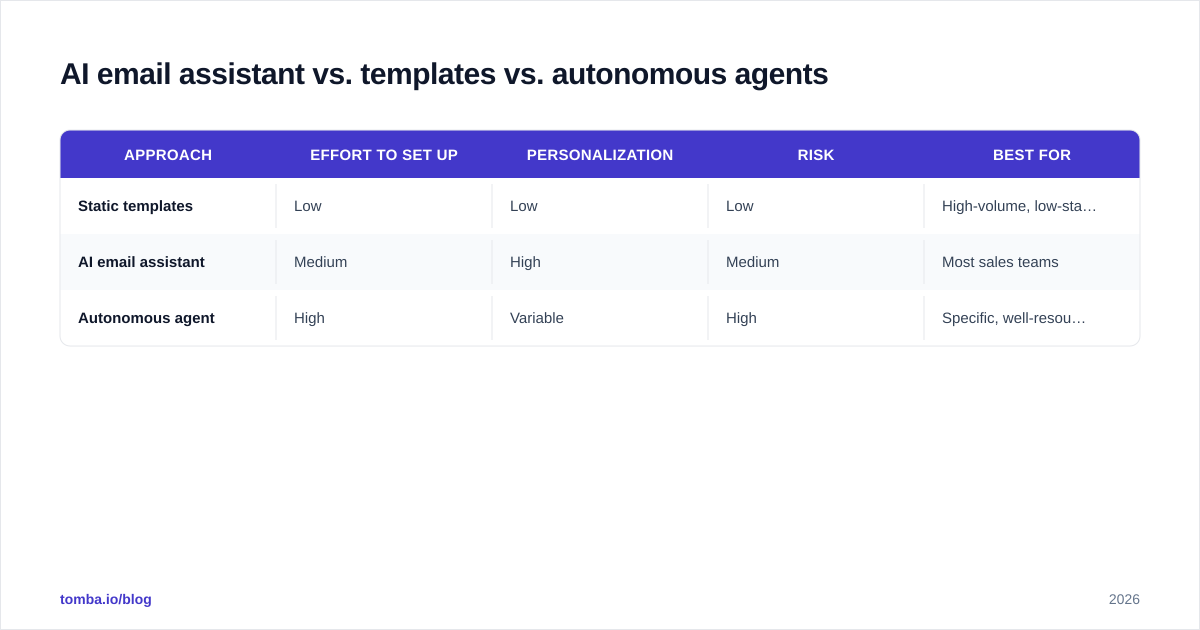
| Approach | Effort to set up | Personalization | Risk | Best for |
|---|---|---|---|---|
| Static templates | Low | Low | Low | High-volume, low-stakes |
| AI email assistant | Medium | High | Medium | Most sales teams |
| Autonomous agent | High | Variable | High | Specific, well-resourced teams |
Templates don't adapt. Autonomous agents adapt too much, too fast, with no one watching. The AI email assistant — suggest-first, human-approved — is the sweet spot for the vast majority of revenue teams in 2026. It keeps a human accountable for what goes out while removing the drudgery of writing it.
Common mistakes to avoid#
- Buying autonomy you don't need. Auto-send on day one is how domains get blacklisted. Use the blacklist checker if you suspect damage.
- Feeding it unverified lists. AI personalization on a bad address is wasted compute.
- Letting it hallucinate. Always review claims about funding, headcount, or recent news before sending.
- Measuring volume instead of replies. More sent ≠ more pipeline.
- Ignoring tone drift. Re-train the assistant on your real sent mail every quarter so it keeps sounding like you.
Frequently asked questions#
Is an AI email assistant safe to use with customer data? It can be, if the vendor is SOC 2 compliant and you control what data it accesses. Read the data-handling terms and limit CRM scopes to what the assistant needs.
Will recipients know an AI wrote the email? Not if it's drafting in your voice from real context. They notice generic, contextless mail — which is exactly what AI produces when you skip the data layer.
Can it replace an SDR? No. It replaces the typing, not the judgment. The reps who thrive use it as leverage, handling more accounts at higher quality.
Do I still need an email finder if I have an AI assistant? Yes. The assistant writes; it doesn't locate or verify addresses. Those are separate, upstream jobs.
The bottom line#
An AI email assistant is one of the highest-ROI tools a sales team can adopt in 2026 — but only when it sits on top of clean, verified contact data. The writing layer amplifies whatever you feed it. Point it at the right people with deliverable addresses and you'll book more meetings in less time. Point it at a stale list and you'll just automate your bounces faster.
Start at the data layer. Use the Tomba Email Finder to locate and verify the right contacts by name, company, or domain, then let your AI assistant write the message that lands. Tomba's free tier gives you 25 searches a month to test the workflow, and paid plans start at $49/mo — see full Tomba pricing to match a plan to your team's volume. Find the person first. Let AI handle the words.
Ready to find emails that actually work?
Join 150,000+ professionals who stopped guessing and started sending. Free credits on signup — no credit card required.
Get the Tomba newsletter
Practical outbound tactics and product updates — once every two weeks.
About the author