How to Automate Outreach in 2026: Tools, Steps & ROI
Learn how to automate outreach in 2026 without sounding like a robot — the exact stack, sequence logic, and guardrails that keep reply rates high.
You want more pipeline without hiring three more SDRs. Automation is the obvious lever — but done badly it torches your domain, spams the wrong people, and trains prospects to ignore you. Done well, it compounds: every reusable step you build keeps finding, enriching, and contacting buyers while you sleep.
This guide shows you exactly how to automate outreach in 2026 — the stack, the sequence logic, the deliverability math, and the guardrails that separate a working machine from a spam cannon.
TL;DR#
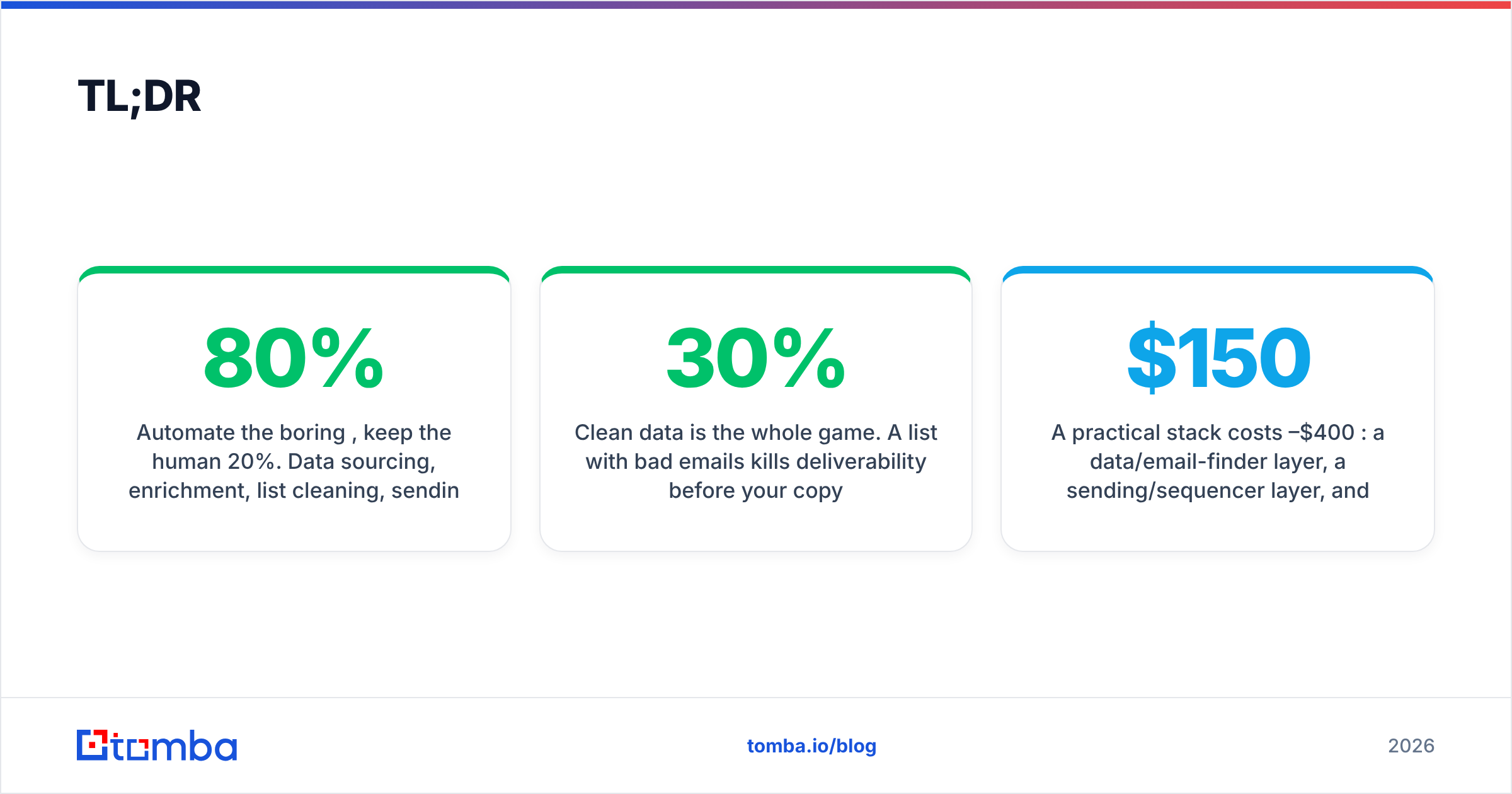
- Automate the boring 80%, keep the human 20%. Data sourcing, enrichment, list cleaning, sending, and follow-up timing should be automated; research hooks and reply handling stay human.
- Clean data is the whole game. A list with 30% bad emails kills deliverability before your copy ever matters — verify before you send.
- A practical stack costs $150–$400/mo: a data/email-finder layer, a sending/sequencer layer, and a CRM. You do not need a $1,500/mo all-in-one to start.
- Volume without warmup = blacklist. Spread sends across multiple inboxes, warm them, and cap daily volume per mailbox.
- Measure reply rate and meetings booked, not emails sent. Automation that 10x's send volume but halves reply rate is a net loss.
What does it actually mean to automate outreach?#
Automating outreach means turning a repeatable, manual sales motion into a system that runs with minimal human touch. Think of it like a dishwasher: you still scrape the plates (write good copy, pick good accounts), but the machine handles the tedious scrubbing (finding emails, sending, following up, logging activity).
A fully manual rep spends roughly 60% of the day on tasks that don't require judgment: copying names off LinkedIn, guessing email formats, pasting into a CRM, remembering to follow up on day 3 and day 7. Every one of those is a candidate for automation.
Here are the five layers of an outreach motion and what each one looks like manual versus automated:
- Sourcing — Manual: scrolling LinkedIn and company pages. Automated: pulling target accounts from a B2B database or scraping a filtered list.
- Contact discovery — Manual: guessing
first.last@company.com. Automated: an email finder that returns verified addresses by name and domain. - Enrichment — Manual: copying job titles and company size by hand. Automated: data enrichment that appends role, seniority, and firmographics in bulk.
- Sending & sequencing — Manual: writing each email and setting calendar reminders. Automated: a sequencer that personalizes tokens and fires follow-ups on a schedule.
- Logging & routing — Manual: pasting replies into a spreadsheet. Automated: a CRM sync that updates stages and notifies the owner.
Which parts should you automate — and which should you never?#
The mistake most teams make is automating the wrong layer. They automate the thinking (generic AI-written emails to everyone) and keep doing the grunt work by hand. Flip it.
Automate aggressively:
- List building and deduplication
- Email finding and verification
- Firmographic and technographic enrichment
- Send scheduling, time-zone-aware delivery, and follow-up cadence
- Activity logging and CRM stage updates
- Bounce handling and suppression-list management
Keep human (or human-supervised):
- The first-line personalization hook (the reason this person should care)
- Replies and objection handling
- Account selection and ICP judgment calls
- Anything that touches a hot, late-stage deal
The rule of thumb: automate work that has one correct output and no judgment. Keep humans on work where a wrong call costs you the relationship.
What does an automated outreach stack look like in 2026?#
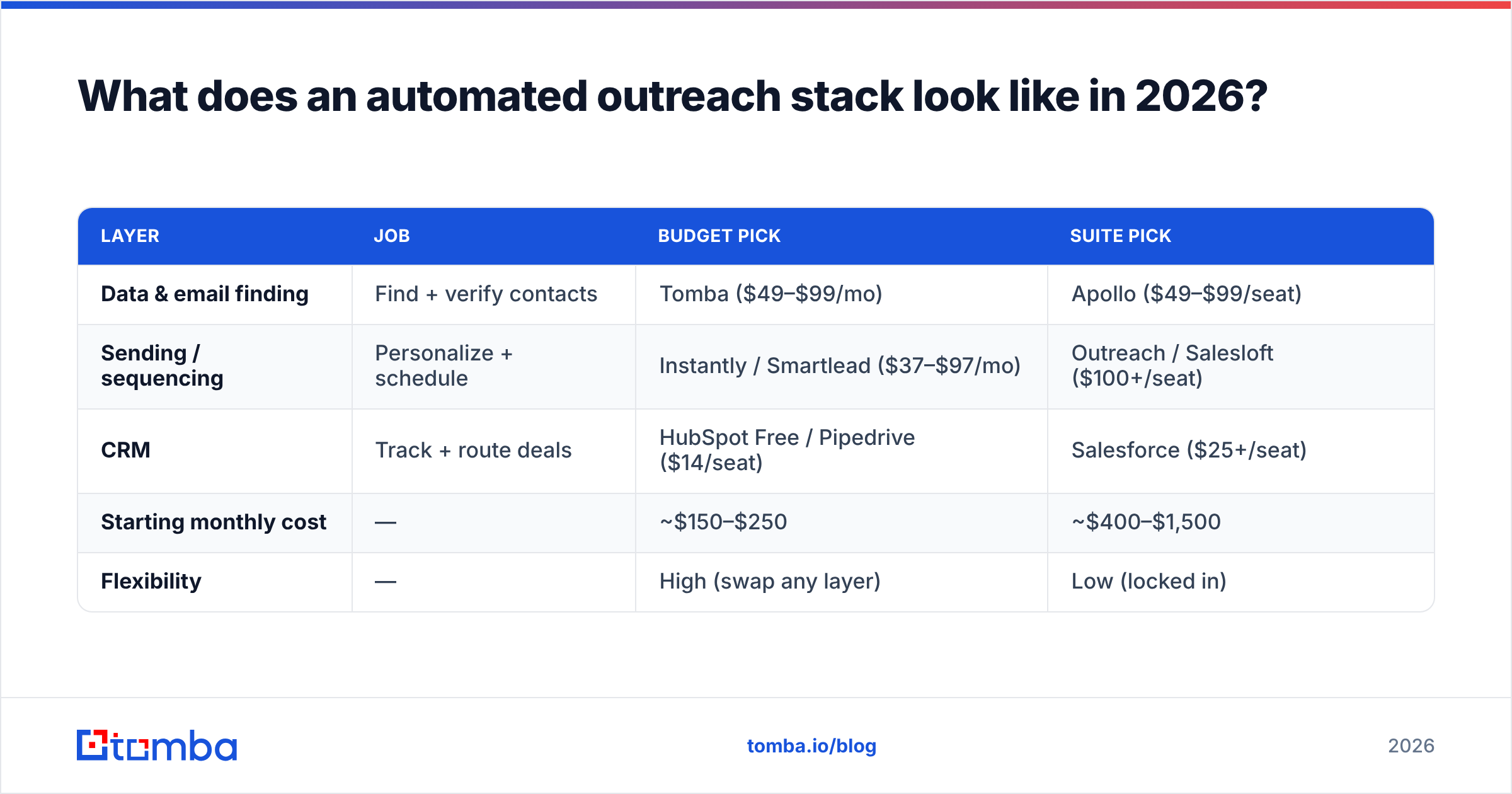
You need three functional layers. You can buy them separately (cheaper, more control) or as a suite (pricier, less flexible). Here's how the common approaches compare.
| Layer | Job | Budget pick | Suite pick |
|---|---|---|---|
| Data & email finding | Find + verify contacts | Tomba ($49–$99/mo) | Apollo ($49–$99/seat) |
| Sending / sequencing | Personalize + schedule | Instantly / Smartlead ($37–$97/mo) | Outreach / Salesloft ($100+/seat) |
| CRM | Track + route deals | HubSpot Free / Pipedrive ($14/seat) | Salesforce ($25+/seat) |
| Starting monthly cost | — | ~$150–$250 | ~$400–$1,500 |
| Flexibility | — | High (swap any layer) | Low (locked in) |
A lean modular stack — a dedicated finder/verifier feeding a sequencer feeding a CRM — outperforms a do-everything suite on data quality, because specialist tools invest more in their core. You can connect the pieces through native integrations, [
Zapier](https://tomba.io/integrations/zapier), or Make.com without writing code.
For teams that want everything in one bill, suites like Apollo and Outreach are convenient — but you trade data accuracy and per-seat cost for that convenience. Compare the trade-offs honestly before you commit; an Apollo alternative that splits data and sending often wins on cost-per-meeting.
How do you build the automated sequence step by step?#
Here's the concrete build, assuming a modular stack. Each step maps to a tool action you can schedule or trigger.
Step 1 — Define the trigger list. Pull accounts that match your ICP from a database or scrape. Export to a CSV with at least company domain and contact name.
Step 2 — Find and verify emails. Run the list through a bulk email finder to get addresses, then through an email verifier to drop invalid and risky ones. This single step protects your sender reputation more than any copy trick.
Step 3 — Enrich. Append title, seniority, company size, and tech stack so you can segment and personalize at scale. Route enriched rows back into your CRM via the HubSpot or Salesforce integration.
Step 4 — Segment. Split the list by persona and pain point. A VP of Eng and a Head of RevOps should never get the same email.
Step 5 — Load into the sequencer. Map personalization tokens, set a 4–5 touch cadence over 12–16 days, and connect multiple sending inboxes so no single mailbox carries the full volume.
Step 6 — Set guardrails. Cap daily sends per inbox (40–50 is sane), enable warmup, and add reply detection that pauses the sequence the moment someone responds.
Step 7 — Route replies to a human. Every positive reply hands off to a rep. Automation got the conversation started; a person closes it.
How do you keep automation from wrecking deliverability?#
Volume is the trap. The instinct after automating is to crank send volume — and that's exactly what gets you blacklisted. Email deliverability is a reputation game, and automated bulk sending is the fastest way to lose reputation if you skip the basics.
Five non-negotiable guardrails:
- Verify every address before sending. Bounces above 2–3% signal spammers to mailbox providers. Run lists through verification and use a catch-all verifier for risky domains.
- Warm up new inboxes. A fresh mailbox blasting 200 emails on day one is a red flag. Ramp over 2–4 weeks.
- Spread volume across inboxes and domains. Use secondary sending domains (not your primary) so a reputation hit never touches your main brand mail.
- Authenticate. Set up SPF, DKIM, and DMARC correctly — check with an SPF checker before you scale.
- Cap and monitor. Watch bounce rate, spam complaints, and sender reputation. If any spikes, pause and diagnose.
Authentication and warmup standards are well documented by providers like Google Postmaster Tools — read the source, don't guess. A clean, verified list run through a warmed inbox at modest volume beats a giant unverified blast every single time.
How much time and money does automating outreach actually save?#
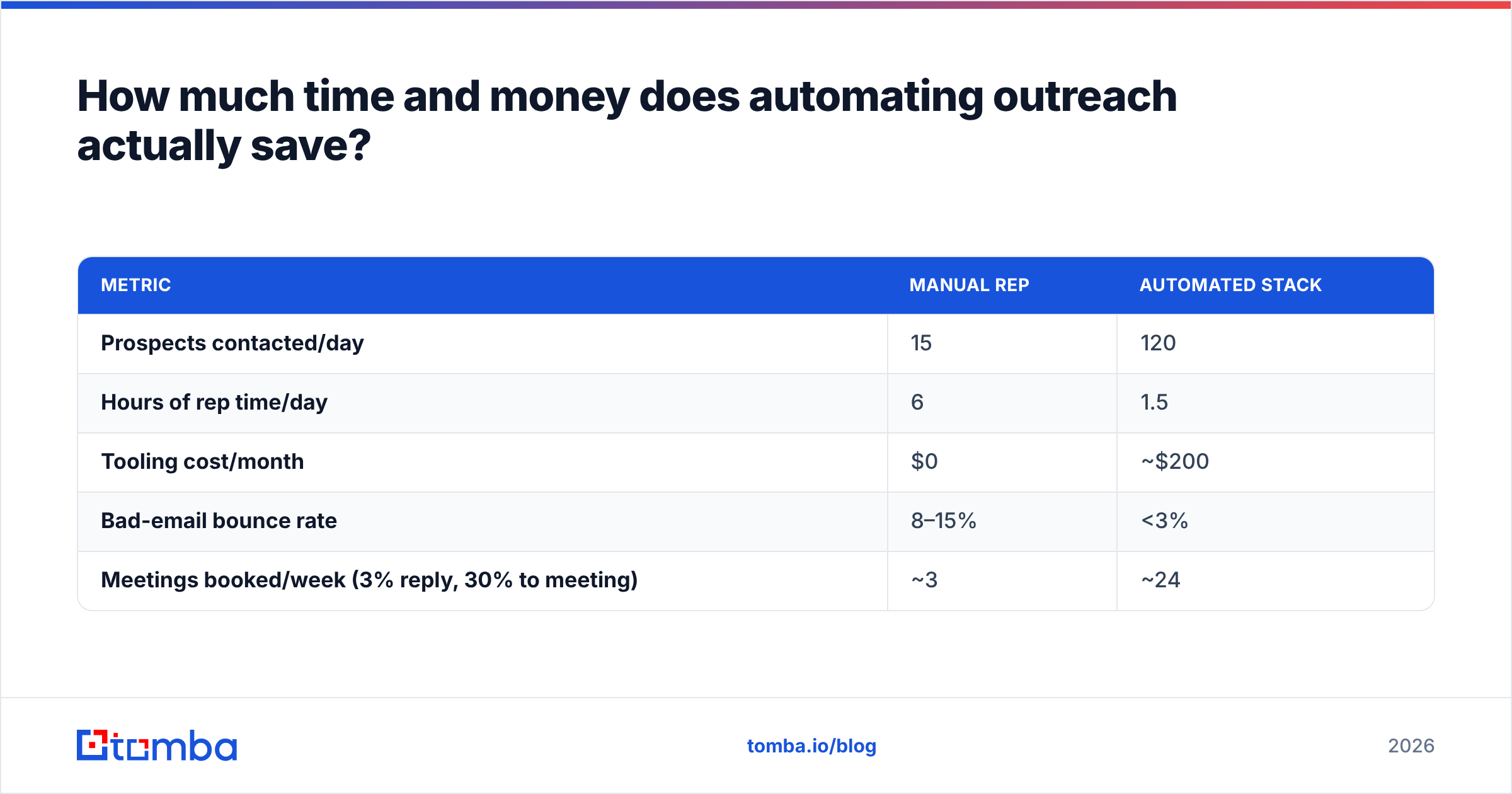
Let's do the math instead of hand-waving. Assume a rep doing 100% manual outreach can personally research, find, write, send, and follow up with about 15 quality prospects per day.
| Metric | Manual rep | Automated stack |
|---|---|---|
| Prospects contacted/day | 15 | 120 |
| Hours of rep time/day | 6 | 1.5 |
| Tooling cost/month | $0 | ~$200 |
| Bad-email bounce rate | 8–15% | <3% |
| Meetings booked/week (3% reply, 30% to meeting) | ~3 | ~24 |
The automated column isn't magic — it's the same rep, freed from grunt work, supervising a machine that handles sourcing, finding, verifying, and sending. The rep's 1.5 hours now go to writing better hooks and working replies, which is where human time creates value.
The cost side is modest. Even Tomba's Growth plan at $99/mo plus a sequencer and a free CRM tier lands you under $250/month — recovered by a single booked meeting in most B2B funnels. Full Tomba pricing starts with a free tier (25 searches) so you can validate the workflow before paying.
What are the most common automation mistakes to avoid?#
Automation amplifies whatever you feed it — including your mistakes. Watch for these:
- Spraying generic AI copy. If the email could go to anyone, it converts like spam. Automate the delivery, not the thinking. Tools like a cold email AI help you draft faster, but a human should still own the hook.
- Skipping verification to save credits. False economy — bounces cost you far more in reputation than verification costs in dollars.
- One inbox, max volume. The classic blacklist recipe. Distribute.
- No reply detection. Nothing burns trust like a "just following up" email sent the day after someone already replied "yes, let's talk."
- Measuring sends, not outcomes. Track response rate and meetings booked. Send volume is a vanity metric.
- Ignoring suppression lists. Automatically suppress unsubscribes, bounces, and current customers — every time, no exceptions.
How do you measure whether your automation is working?#
Track four numbers weekly and let them drive your changes:
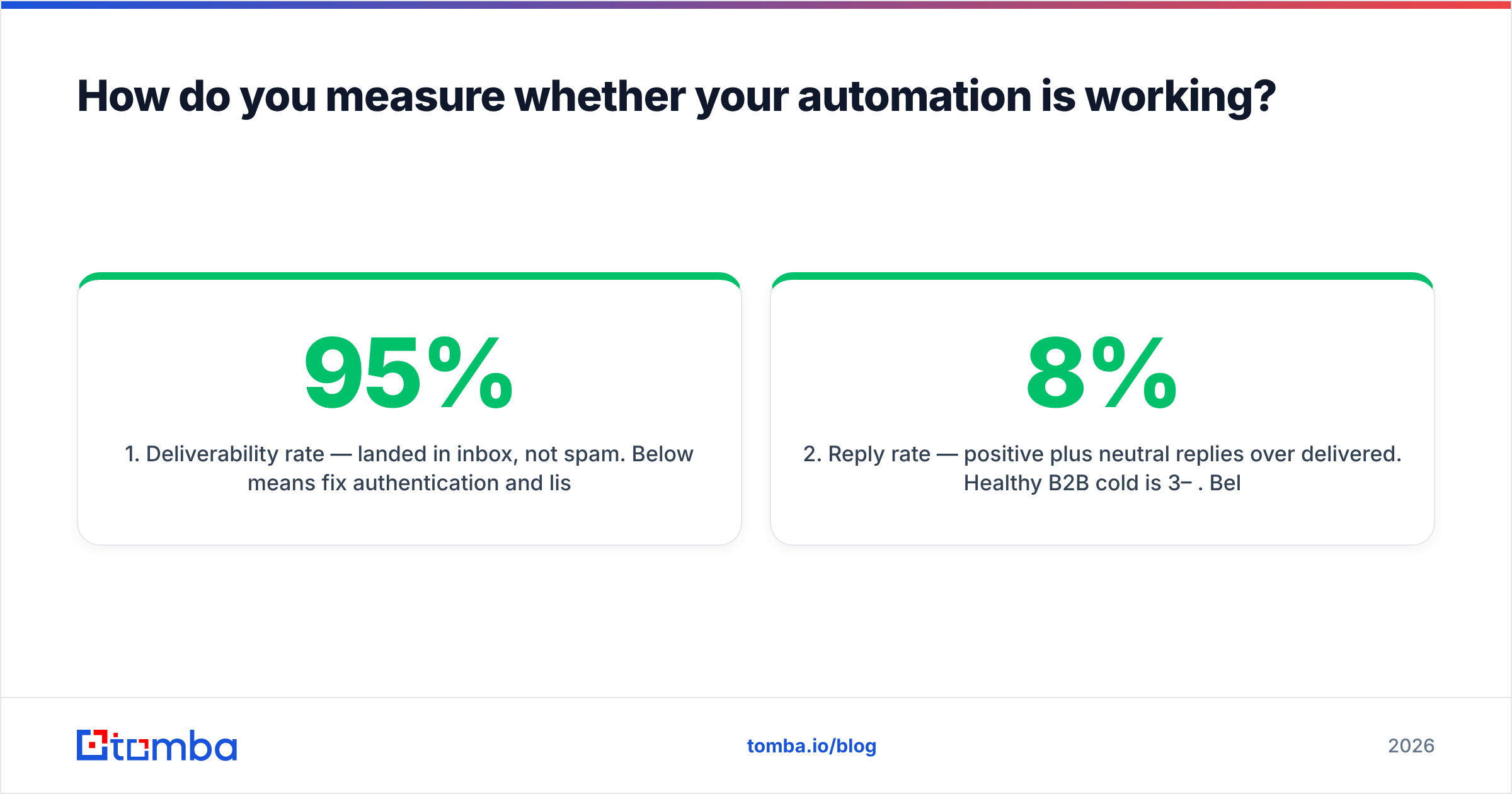
- Deliverability rate — landed in inbox, not spam. Below 95% means fix authentication and list hygiene first.
- Reply rate — positive plus neutral replies over delivered. Healthy B2B cold is 3–8%. Below 2%, your targeting or copy is off, not your automation.
- Meetings booked — the only number that maps to revenue. Optimize backward from here.
- Cost per meeting — total tooling plus rep time divided by meetings. This tells you if the stack is paying for itself.
If reply rate drops as you scale volume, you've automated too aggressively — pull back, re-verify, and improve segmentation before pushing volume again. Compare your numbers against industry benchmarks on review sites like G2 so you know whether you're winning or fooling yourself.
Where should you start?#
Start with the layer that breaks everything downstream if it's wrong: your data. You can have the best sequencer and the sharpest copy in the world, but if a third of your emails bounce, you'll be blacklisted before the copy ever gets read.
Build the foundation first — find verified contacts, enrich them, and only then layer on sending and sequencing. The Tomba Email Finder gives you verified, accurate B2B emails by name, domain, or company, with bulk processing, a Tomba API for fully automated pipelines, and native syncs into the tools you already use. Start on the free tier, validate your workflow on a small list, and scale only once your bounce rate is under control. That's how you automate outreach in 2026 without paying for it in reputation.
// get started
Find, verify and enrich your first contacts today
Start on the free plan with 25 searches a month, then scale when your team is ready.
Free plan · No credit card required · GDPR & CCPA
// about the author