Automated Email Follow Up Campaigns for Lead Generation (2026)
A single cold email rarely converts. Learn how automated email follow-up campaigns turn one-touch outreach into a multi-step system that books real meetings.
TL;DR
- A single cold email almost never closes a deal. The majority of positive replies come from follow-ups two through five, so the campaign — not the first send — is what generates leads.
- An automated email follow-up campaign is a pre-built sequence of timed, conditional messages that fire automatically until a lead replies, books, or opts out.
- The three levers that decide whether your sequence works: list accuracy, timing/spacing, and message variation — not clever subject lines alone.
- Tooling splits into two jobs: sourcing verified contacts (so you don't burn your domain on bounces) and sending sequences (the automation engine). You need both.
- Below: a step-by-step sequence blueprint, a tool comparison table, the metrics that actually matter, and the deliverability rules that keep your campaign out of spam.
What is an automated email follow-up campaign?#
An automated email follow-up campaign is a sequence of emails that send themselves on a schedule and stop the moment a lead takes action. Think of it like a thermostat instead of a light switch. A one-off cold email is the switch — you flip it once and walk away. A follow-up campaign is the thermostat: it keeps adjusting, sending message two on day three, message three on day seven, and shutting off the instant the "temperature" (a reply or a booked call) is reached.
The core idea is simple. Most buyers don't respond to the first touch because they're busy, the timing is wrong, or your email landed under fifty others. Follow-ups solve a scheduling problem, not a persuasion problem. According to outreach data summarized by tools like HubSpot, a large share of replies arrive after the initial message — which means stopping at one email leaves most of your pipeline on the table.
Automation removes the part humans are bad at: remembering to follow up, on time, across hundreds of prospects, without sounding robotic. The system tracks who opened, who replied, and who went cold, then routes each contact down the right path.
Why do single cold emails fail at lead generation?#
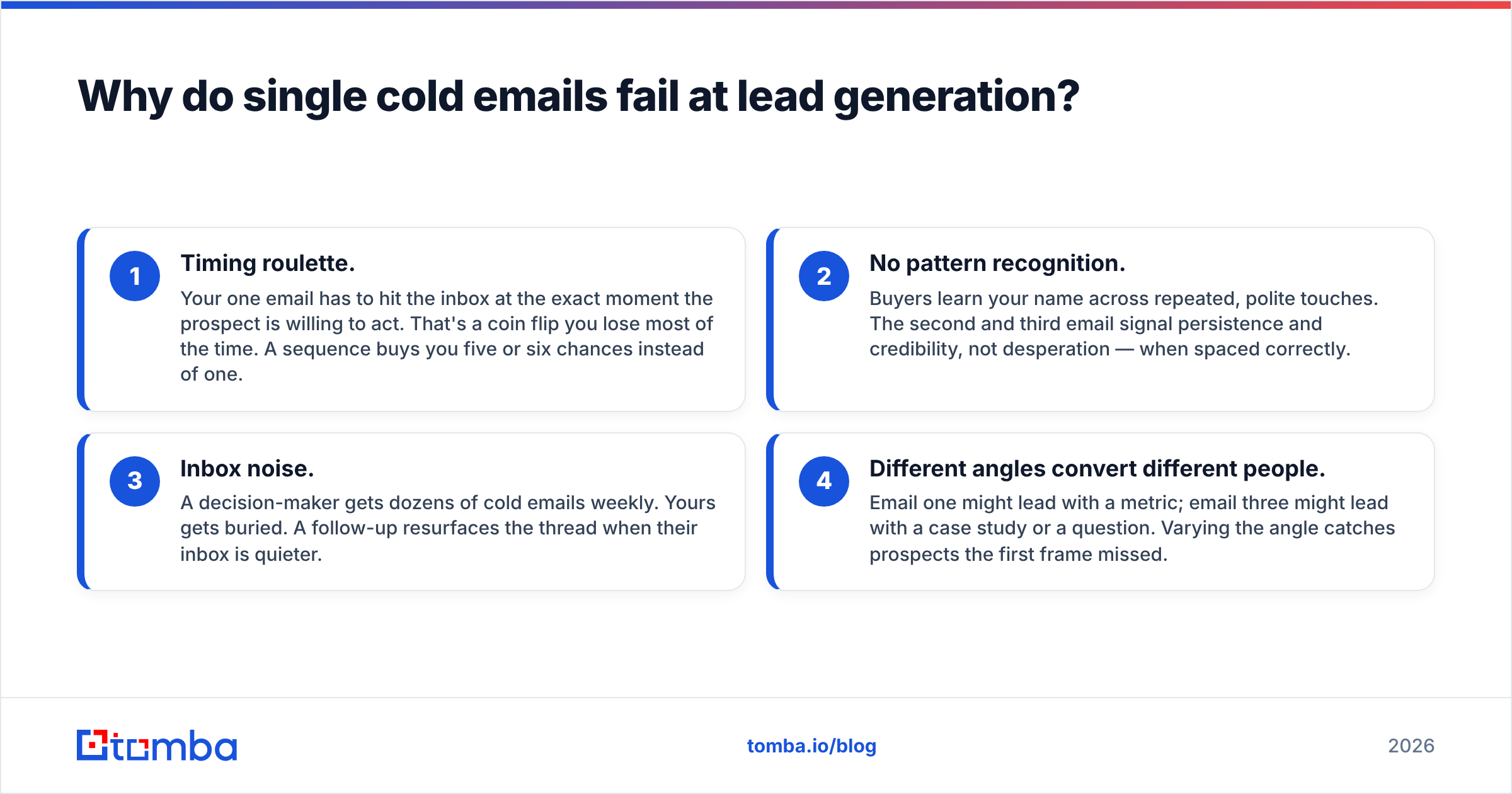
Single sends fail for reasons that have nothing to do with your offer:
- Timing roulette. Your one email has to hit the inbox at the exact moment the prospect is willing to act. That's a coin flip you lose most of the time. A sequence buys you five or six chances instead of one.
- No pattern recognition. Buyers learn your name across repeated, polite touches. The second and third email signal persistence and credibility, not desperation — when spaced correctly.
- Inbox noise. A decision-maker gets dozens of cold emails weekly. Yours gets buried. A follow-up resurfaces the thread when their inbox is quieter.
- Different angles convert different people. Email one might lead with a metric; email three might lead with a case study or a question. Varying the angle catches prospects the first frame missed.
The catch: follow-ups only help if they reach a real human. Sending five messages to a guessed or stale address doesn't multiply your chances — it multiplies your bounces and wrecks your sender reputation. That's why list quality is the foundation everything else sits on.
How do you structure a follow-up sequence that converts?#
A reliable B2B sequence runs four to six emails over two to three weeks. Here's a blueprint you can adapt:
- Email 1 — The hook (Day 1). Short, specific, one clear value statement tied to the prospect's role or company. No "just checking in." Ask one easy question.
- Email 2 — The reframe (Day 3). Reply in the same thread. Add a new angle: a relevant stat, a customer result, or a problem they likely face. Keep it under 90 words.
- Email 3 — The proof (Day 7). Lead with social proof — a named case study, a number, a recognizable logo. This is where many positive replies land.
- Email 4 — The pattern interrupt (Day 11). Change format. A one-line question ("Is this a priority for Q3, or should I close the loop?") often outperforms a polished paragraph.
- Email 5 — The breakup (Day 16). Signal you're stopping. "I'll assume the timing's off and stop here — happy to reconnect later." Breakup emails reliably reactivate dormant threads.
Rules that hold the whole thing together:
- Keep early emails on the same thread so context carries.
- Stop on reply, bounce, or unsubscribe automatically — never let the sequence keep firing after someone responds.
- Cap volume per inbox (40–50 cold sends/day per mailbox) to protect deliverability.
- Personalize the first line, not the whole email — that's where reply-rate gains concentrate.
For deeper subject-line and body testing, pair your sequence with a subject line generator and a spam checker before you launch.
What tools do you need to run automated email follow-up campaigns?#
You're really assembling two layers: a data layer that finds and verifies who to contact, and a sending layer that runs the sequences. Confusing the two is the most common reason campaigns underperform — a great sending tool firing at bad data still bounces.
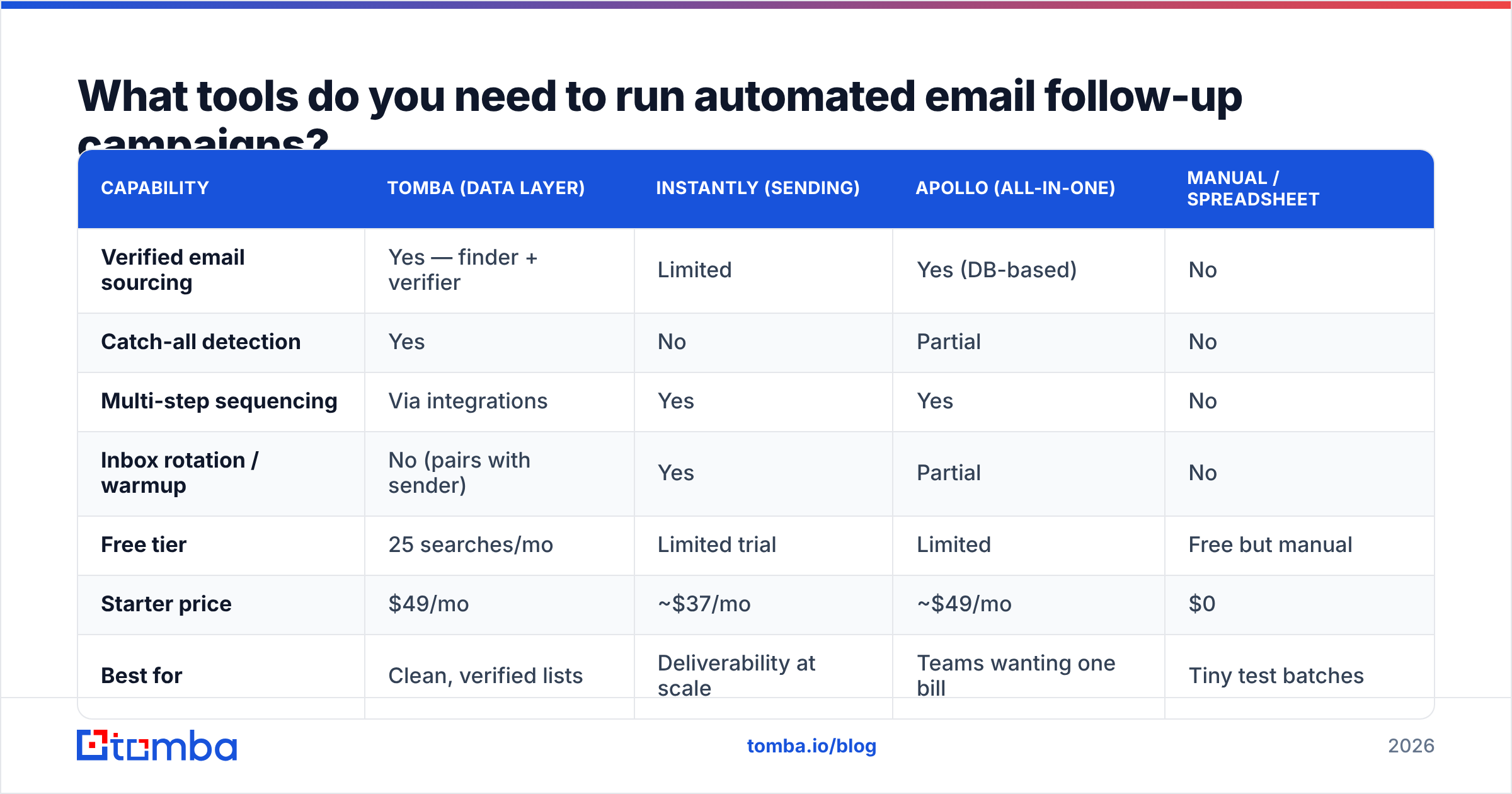
Here's how the main categories compare:
| Capability | Tomba (data layer) | Instantly (sending) | Apollo (all-in-one) | Manual / spreadsheet |
|---|---|---|---|---|
| Verified email sourcing | Yes — finder + verifier | Limited | Yes (DB-based) | No |
| Catch-all detection | Yes | No | Partial | No |
| Multi-step sequencing | Via integrations | Yes | Yes | No |
| Inbox rotation / warmup | No (pairs with sender) | Yes | Partial | No |
| Free tier | 25 searches/mo | Limited trial | Limited | Free but manual |
| Starter price | $49/mo | ~$37/mo | ~$49/mo | $0 |
| Best for | Clean, verified lists | Deliverability at scale | Teams wanting one bill | Tiny test batches |
The honest read: no single tool wins every column. Most high-performing teams pair a dedicated data layer for accuracy with a dedicated sending tool for warmup and rotation. If you'd rather consolidate, an all-in-one like Apollo trades some data freshness for convenience — see how the trade-offs stack up in this Apollo alternative breakdown.
Whatever sending engine you choose, feed it verified emails first. A 2% bounce rate is the rough line most providers treat as a warning sign; cross it repeatedly and your messages start skipping the inbox entirely.

How do you keep follow-up campaigns out of spam?#
Deliverability is where most automated campaigns quietly die. You can write perfect copy and still land in spam if the technical foundation is missing. Lock down these in order:
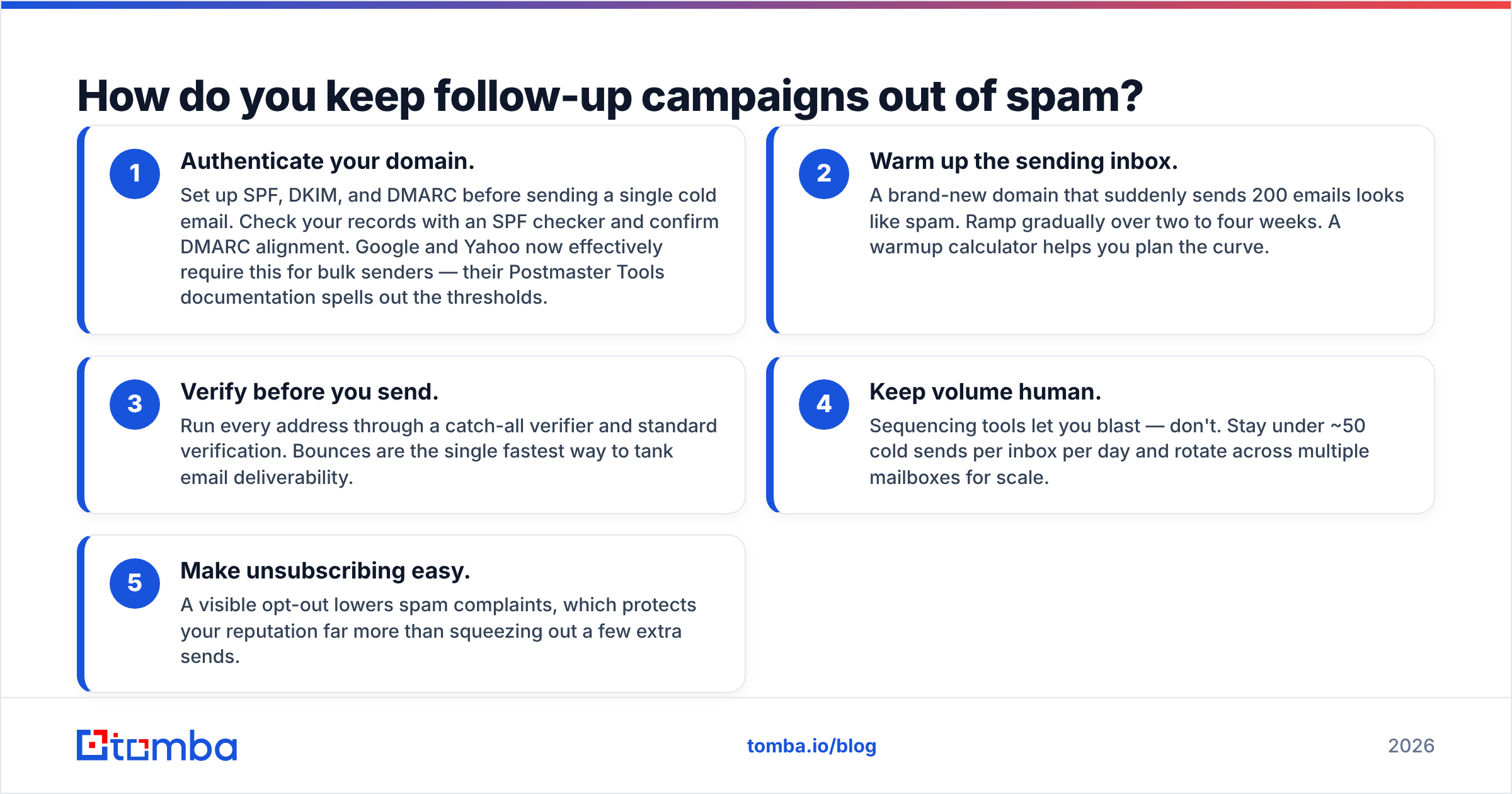
- Authenticate your domain. Set up SPF, DKIM, and DMARC before sending a single cold email. Check your records with an SPF checker and confirm DMARC alignment. Google and Yahoo now effectively require this for bulk senders — their Postmaster Tools documentation spells out the thresholds.
- Warm up the sending inbox. A brand-new domain that suddenly sends 200 emails looks like spam. Ramp gradually over two to four weeks. A warmup calculator helps you plan the curve.
- Verify before you send. Run every address through a catch-all verifier and standard verification. Bounces are the single fastest way to tank email deliverability.
- Keep volume human. Sequencing tools let you blast — don't. Stay under ~50 cold sends per inbox per day and rotate across multiple mailboxes for scale.
- Make unsubscribing easy. A visible opt-out lowers spam complaints, which protects your reputation far more than squeezing out a few extra sends.
Treat deliverability as a system you maintain, not a setting you flip once. Monitor your bounce and complaint rates weekly; if either climbs, pause and diagnose before resuming.
Which metrics tell you the campaign is working?#
Open rate is the vanity metric everyone watches and the one that lies most — especially since privacy features inflate it. Track these instead:
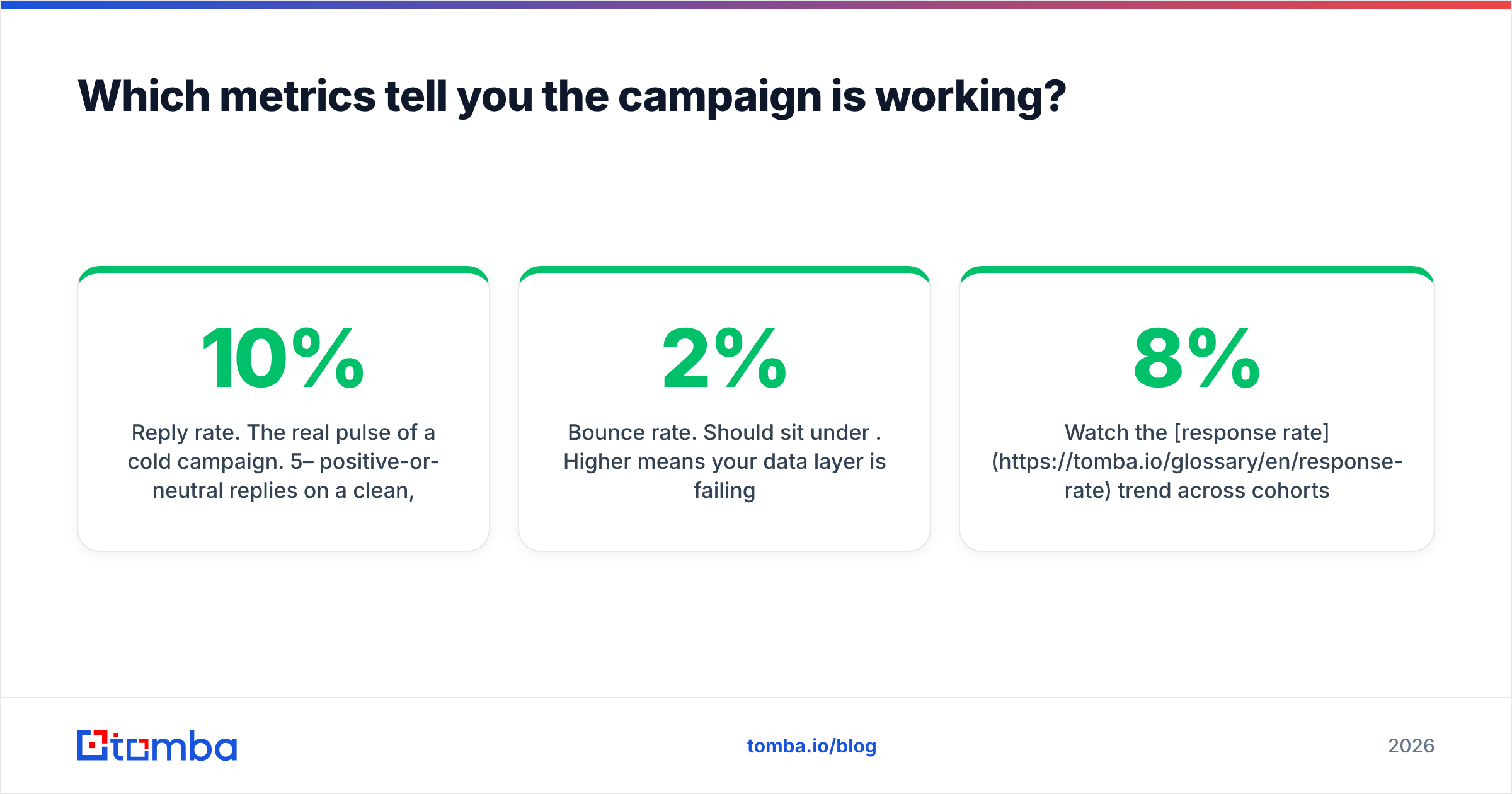
- Reply rate. The real pulse of a cold campaign. 5–10% positive-or-neutral replies on a clean, well-targeted list is a healthy benchmark. Below 2% usually points to bad targeting or a weak offer.
- Positive reply rate. Strip out "not interested" and "unsubscribe." This is the number that predicts pipeline.
- Meetings booked per 100 contacts. The only metric your revenue team cares about. Everything upstream is a means to this.
- Bounce rate. Should sit under 2%. Higher means your data layer is failing.
- Sequence step performance. Which email drives the most replies? Often it's email three or four — proof that follow-ups, not the opener, carry the campaign.
Watch the response rate trend across cohorts, not just one batch. A sequence that converts at 8% this month and 3% next month usually signals list decay — your contacts are going stale and need re-enrichment. For broader benchmarks, vendor-neutral review sites like G2 are useful for sanity-checking what "good" looks like across your category.
How often should you refresh your lead data?#
B2B contact data decays roughly 20–30% per year as people change jobs, companies rebrand, and inboxes get deactivated. A list that converted last quarter may be quietly bouncing this quarter. Build a refresh cadence:
- Re-verify any list older than 90 days before relaunching a sequence against it.
- Re-enrich job-change movers — a prospect who switched companies is often a warmer lead at the new role.
- Deduplicate before every send to avoid emailing the same person from two campaigns.
This is where a strong data layer pays for itself. Pulling fresh, verified contacts on demand beats buying a static list that's already decaying the day you download it. Tools that combine a domain search with bulk verification let you rebuild a clean target list in minutes rather than maintaining a spreadsheet that rots.
Build the data layer your follow-ups depend on#
Automated email follow-up campaigns reward two things above all: persistence and accuracy. The persistence comes from your sequencing tool. The accuracy comes from the contacts you feed it — and that's the part most teams get wrong, sending polished five-step sequences into addresses that were never going to deliver.
Start with the foundation. Use the Tomba Email Finder to source professional email addresses by domain, name, or company, then verify them before they ever hit your sequencer. Clean data means lower bounces, a protected sender reputation, and follow-ups that actually reach a human on email two, three, and four — where the replies live. The free tier gives you 25 searches a month to test it; paid plans start at $49/mo, with full Tomba pricing scaling as your outbound does. Get the list right first, and let automation do the patient, perfectly-timed following up that turns cold contacts into booked meetings.
// get started
Find, verify and enrich your first contacts today
Start on the free plan with 25 searches a month, then scale when your team is ready.
Free plan · No credit card required · GDPR & CCPA
// about the author