B2B Email Finder 2026: Find Verified Work Emails Fast
A B2B email finder turns a name and company into a verified work address. Here is how the tools actually compare on accuracy, price, and bounce rate in 2026.
placeholder
A B2B email finder is the difference between a prospect list that lands in the inbox and one that torches your sender reputation. If you do outbound, you have felt this: you build a list of 500 perfect-fit accounts, then watch 18% of your first send bounce because the addresses were guessed, scraped, or three jobs out of date.
This guide breaks down what a B2B email finder actually does, how the leading tools compare on the only metrics that matter (accuracy, price, and bounce rate), and how to pick one without overpaying for data you can get cheaper.
TL;DR#
- A B2B email finder converts a name + company (or a domain) into a verified professional email address, then checks it against an SMTP server before you send.
- The metric that matters is not "database size" — it's accuracy and bounce rate. A 95%+ deliverability guarantee beats a billion-record claim.
- Pricing ranges from free tiers (25–50 lookups/mo) to enterprise seats. Most teams overpay by buying a full sales-engagement suite when they only need finding + verification.
- Tomba starts at $49/mo (Starter) with a free tier of 25 searches, and bundles finder, verifier, and domain search in one credit pool.
- Always verify before you send. An unverified "found" email is just a guess with extra steps.
What is a B2B email finder?#
A B2B email finder is a tool that takes what you already know about a prospect — usually a full name and a company domain — and returns their verified work email address. Think of it like a reverse phone book for business email: you know who you want to reach and where they work, and the finder fills in the missing contact detail.
Under the hood, most finders do three things:
- Pattern detection — They figure out the company's email format (for example,
first.last@company.comvsflast@company.com) by analyzing known addresses on that domain. - Candidate generation — They apply that pattern to your prospect's name to produce likely addresses.
- Verification — They run an SMTP handshake (and check MX records, catch-all status, and historical data) to confirm the mailbox actually exists before handing it back.
That third step is what separates a real email finder from a glorified email permutator. Anyone can guess john.smith@acme.com. The value is in knowing whether John will actually receive your message.

Why does email accuracy matter more than database size?#
Vendors love to brag about record counts — "275 million contacts!" — but that number tells you almost nothing about whether the email you pull today will bounce tomorrow. People change jobs every 2–4 years, companies get acquired, and email formats shift. A massive but stale database produces a high bounce rate, and a high bounce rate is the fastest way to wreck your sender reputation.
Here is the chain reaction you are trying to avoid: bad data → high bounces → mailbox providers flag you → your email deliverability drops → even your good emails land in spam. One bad list can poison a sending domain for weeks.

This is why the leading tools publish a deliverability or accuracy guarantee instead of just a record count. When you evaluate a finder, ask two questions:
- What is the verified bounce rate? Look for tools that guarantee 95%+ deliverable results.
- Is verification included, or billed separately? Some tools charge you to find an email and again to verify it. That doubles your real cost per usable contact.
If you want to keep a hard list clean, run it through a dedicated email verifier before import — even emails from a good finder benefit from a final pass, especially on catch-all domains.
How do the top B2B email finders compare in 2026?#
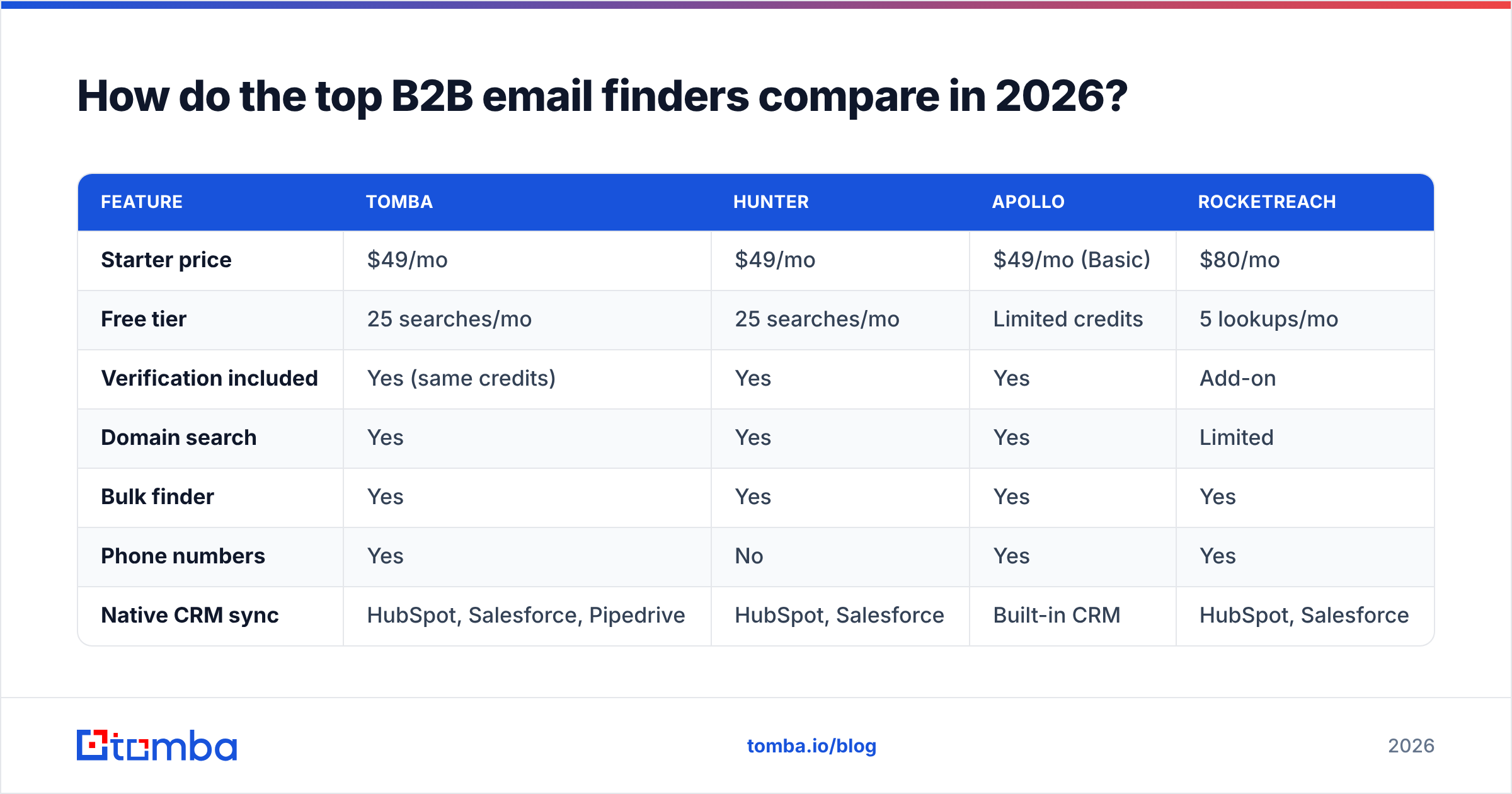
Most teams choose between a handful of tools: Tomba, Hunter, Apollo, and RocketReach cover the bulk of the market, with each leaning toward a different buyer. Here is how they stack up on the attributes that actually drive a buying decision.
| Feature | Tomba | Hunter | Apollo | RocketReach |
|---|---|---|---|---|
| Starter price | $49/mo | $49/mo | $49/mo (Basic) | $80/mo |
| Free tier | 25 searches/mo | 25 searches/mo | Limited credits | 5 lookups/mo |
| Verification included | Yes (same credits) | Yes | Yes | Add-on |
| Domain search | Yes | Yes | Yes | Limited |
| Bulk finder | Yes | Yes | Yes | Yes |
| Phone numbers | Yes | No | Yes | Yes |
| Native CRM sync | HubSpot, Salesforce, Pipedrive | HubSpot, Salesforce | Built-in CRM | HubSpot, Salesforce |
| Best for | Finder + verify accuracy at low cost | Simple domain lookups | All-in-one sales engagement | Recruiter / contact depth |
A few honest takeaways from the table:
- Apollo is a full sales-engagement platform — sequences, dialer, CRM — so you pay for breadth. If you only need clean emails, you are subsidizing features you won't touch. (See the Apollo alternative breakdown.)
- RocketReach shines on contact depth for recruiting but bills verification separately and has a thin free tier.
- Hunter is clean and simple for domain-level lookups, but lighter on phone data and enrichment.
- Tomba keeps finder, verifier, domain search, and phone finder in a single credit pool, which is why it tends to win on cost-per-verified-contact rather than headline price.

What features should a B2B email finder have?#
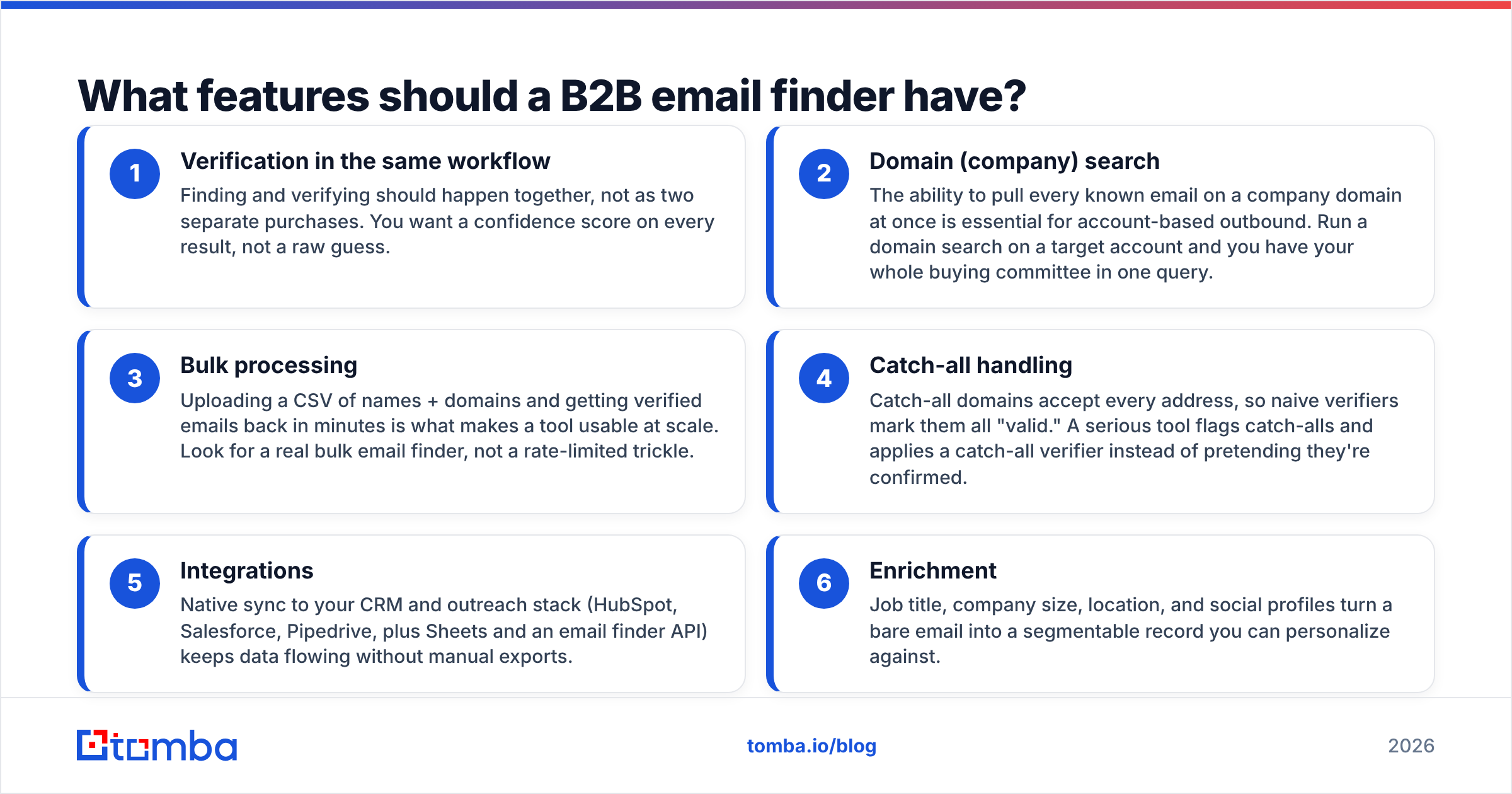
Beyond raw accuracy, the features below separate a tool you'll keep from one you'll churn out of in a month. Use this as a checklist when you trial any finder:
- Verification in the same workflow — Finding and verifying should happen together, not as two separate purchases. You want a confidence score on every result, not a raw guess.
- Domain (company) search — The ability to pull every known email on a company domain at once is essential for account-based outbound. Run a domain search on a target account and you have your whole buying committee in one query.
- Bulk processing — Uploading a CSV of names + domains and getting verified emails back in minutes is what makes a tool usable at scale. Look for a real bulk email finder, not a rate-limited trickle.
- Catch-all handling — Catch-all domains accept every address, so naive verifiers mark them all "valid." A serious tool flags catch-alls and applies a catch-all verifier instead of pretending they're confirmed.
- Integrations — Native sync to your CRM and outreach stack (HubSpot, Salesforce, Pipedrive, plus Sheets and an email finder API) keeps data flowing without manual exports.
- Enrichment — Job title, company size, location, and social profiles turn a bare email into a segmentable record you can personalize against.
If your workflow lives in a spreadsheet, a Google Sheets add-on or Chrome extension can matter more than any dashboard feature — pulling emails where you already work beats context-switching to a web app for every lookup.
How much should a B2B email finder cost?#
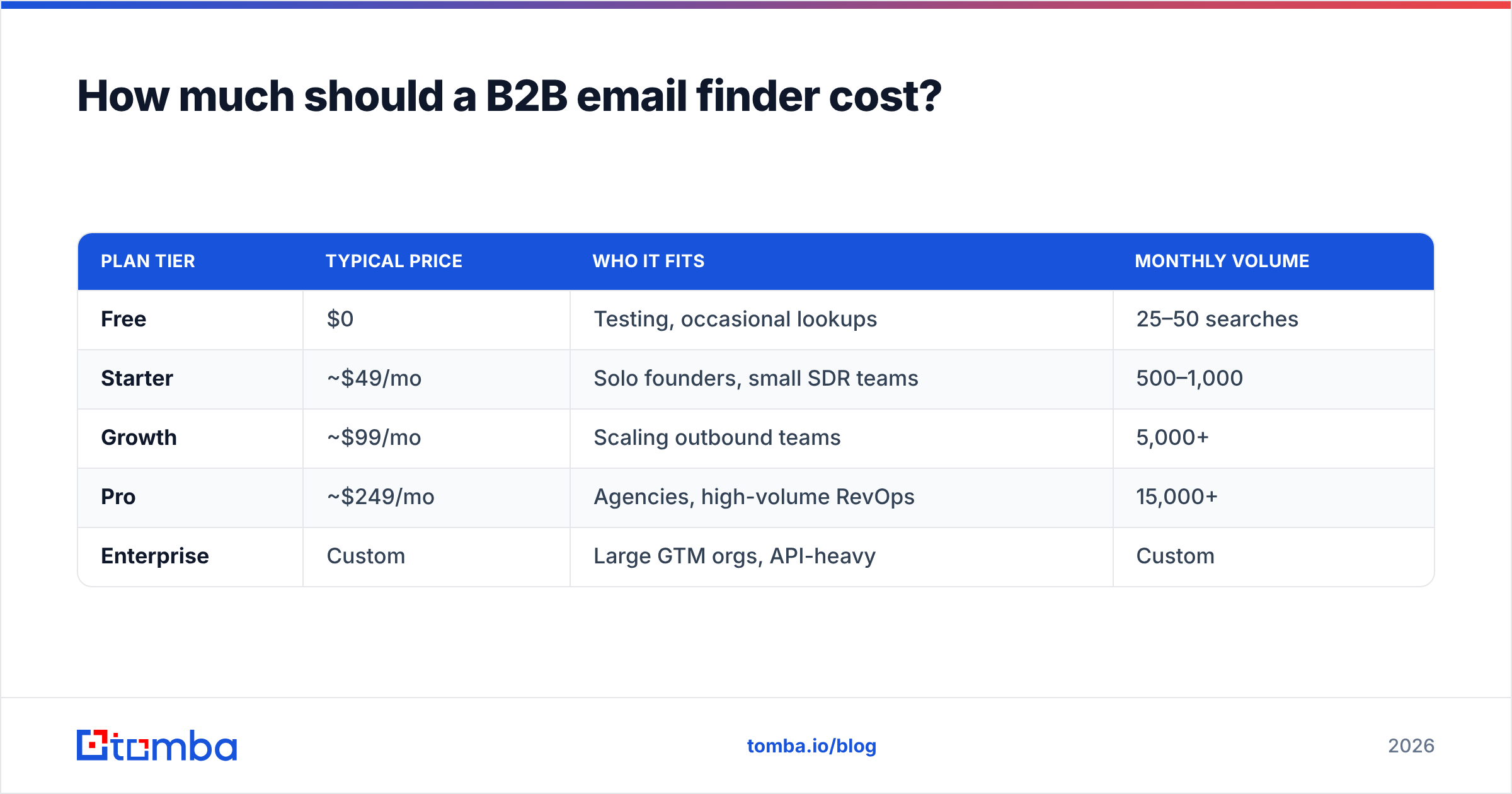
Conclusion first: budget by cost per verified contact, not by sticker price. A $49/mo plan that delivers 1,000 verified emails is cheaper per result than a "$0" free tier capped at 25 lookups, and far cheaper than a $99/mo suite where you waste half the credits on features you don't use.
Here is a realistic pricing ladder for 2026:
| Plan tier | Typical price | Who it fits | Monthly volume |
|---|---|---|---|
| Free | $0 | Testing, occasional lookups | 25–50 searches |
| Starter | ~$49/mo | Solo founders, small SDR teams | 500–1,000 |
| Growth | ~$99/mo | Scaling outbound teams | 5,000+ |
| Pro | ~$249/mo | Agencies, high-volume RevOps | 15,000+ |
| Enterprise | Custom | Large GTM orgs, API-heavy | Custom |
Tomba's pricing follows this exact shape — Free (25 searches/mo), Starter at $49/mo, Growth at $99/mo, Pro at $249/mo, and custom Enterprise — with verification drawing from the same credits rather than a separate line item. That single-pool model is the part that quietly lowers real cost: you are not paying twice to find and then confirm the same address.
Watch for these pricing traps when you compare vendors:
- Verification charged separately. If finding costs one credit and verifying costs another, your effective price doubles.
- Credits that expire monthly. Some plans reset unused credits, so seasonal teams lose what they paid for.
- "Unlimited" with rate caps. Unlimited plans often throttle hard, making bulk jobs crawl.
How do you use a B2B email finder effectively?#
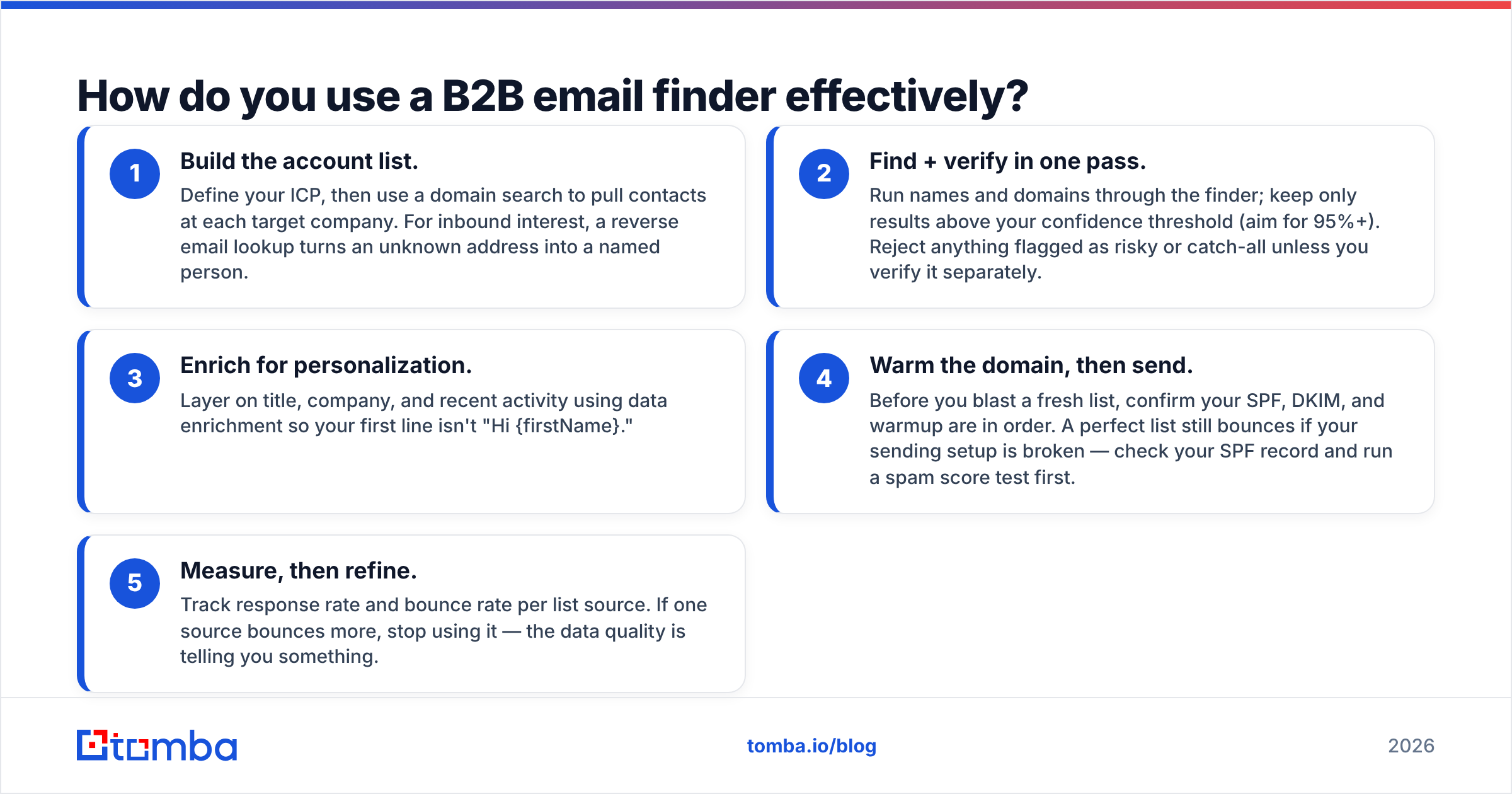
Finding the email is step one. Getting a reply is the actual goal, and the tool only helps with the first half. A clean workflow looks like this:
- Build the account list. Define your ICP, then use a domain search to pull contacts at each target company. For inbound interest, a reverse email lookup turns an unknown address into a named person.
- Find + verify in one pass. Run names and domains through the finder; keep only results above your confidence threshold (aim for 95%+). Reject anything flagged as risky or catch-all unless you verify it separately.
- Enrich for personalization. Layer on title, company, and recent activity using data enrichment so your first line isn't "Hi {firstName}."
- Warm the domain, then send. Before you blast a fresh list, confirm your SPF, DKIM, and warmup are in order. A perfect list still bounces if your sending setup is broken — check your SPF record and run a spam score test first.
- Measure, then refine. Track response rate and bounce rate per list source. If one source bounces more, stop using it — the data quality is telling you something.
The biggest mistake teams make is treating the finder as the whole funnel. It isn't. It's the data layer. Pair it with a real cadence and clean copy, and the verified emails do their job. For broader context on where finding sits in a modern motion, the HubSpot research on B2B buying behavior and G2's grid for lead intelligence are useful neutral references when you're building the business case internally.
Is a free B2B email finder good enough?#
For light, occasional use — a founder reaching out to 10 prospects a week — a free tier is genuinely fine. Tomba, Hunter, and Apollo all offer free plans in the 25–50 lookup range, and that covers a surprising amount of early-stage prospecting. You can also lean on free utilities like an email checker or email extractor to validate one-off addresses without spending a credit.
Free stops being enough the moment you scale. Once you're sending hundreds of cold emails a week, the lookup caps force you into a paid plan, and at that point the question shifts from "free vs paid" to "which paid plan gives the lowest cost per verified contact." That's where the single-credit-pool tools pull ahead.
The honest answer: start free to test accuracy on your market (data quality varies wildly by region and industry), then upgrade to whichever tool kept its bounce rate lowest on your real list.
The bottom line#
A B2B email finder is only as good as the verified, deliverable emails it produces — not the size of its database or the length of its feature list. Score tools on accuracy, total cost per verified contact, and whether verification is bundled or billed twice. Start on a free tier, test against your own target market, and scale into the plan that keeps your bounce rate under control.
If you want finder, verifier, domain search, and phone lookup in one credit pool — with a free tier to test and Starter at $49/mo — try the Tomba Email Finder. Run your hardest list through it, check the bounce rate, and let the data decide. That's the only benchmark that pays you back.
// get started
Find, verify and enrich your first contacts today
Start on the free plan with 25 searches a month, then scale when your team is ready.
Free plan · No credit card required · GDPR & CCPA
// about the author