Best Email Extractor Tool in 2026: Top 9 Compared
Email extractors are not all built the same. Here's how the best email extractor tools in 2026 stack up on accuracy, compliance, bulk speed, and price.
Picking the best email extractor tool is less about which one scrapes the most addresses and more about which one hands you addresses that actually land, without dragging you into a compliance mess. Most "extractors" are glorified regex scripts. A few are real data engines. This guide separates the two.
TL;DR — which email extractor should you use?#
- For verified B2B emails at scale: an extractor backed by a live finder + verifier (like Tomba) beats a raw scraper every time — extracted-but-unverified lists routinely bounce 20-40%.
- For one-off page or text grabs: a free browser-based email extractor or file extractor is enough.
- Accuracy is the whole game: a tool that pulls 10,000 addresses with a 35% bounce rate is worse than one that pulls 3,000 clean ones.
- Compliance matters: scraping personal inboxes off random sites is a fast way to torch your sender reputation and break GDPR.
- Price is secondary: the cheapest extractor costs the most when half its output is dead.
What is an email extractor tool, and how does it differ from an email finder?#
An email extractor pulls email addresses out of an existing source — a web page, a block of pasted text, a PDF, a CSV, or a domain. Think of it like a metal detector sweeping a beach: it surfaces whatever addresses are already lying in the sand of a document or site.
An email finder is different. It takes a name and a company domain and constructs or looks up the most likely address, then checks it against a mail server. That's closer to hiring a private investigator than sweeping a beach.
The line blurs because the best modern tools do both. You extract addresses from a domain, then immediately verify and enrich them. The technical term for the harvesting half is web scraping — and the legality and quality of that scraping is exactly where cheap tools fall apart.
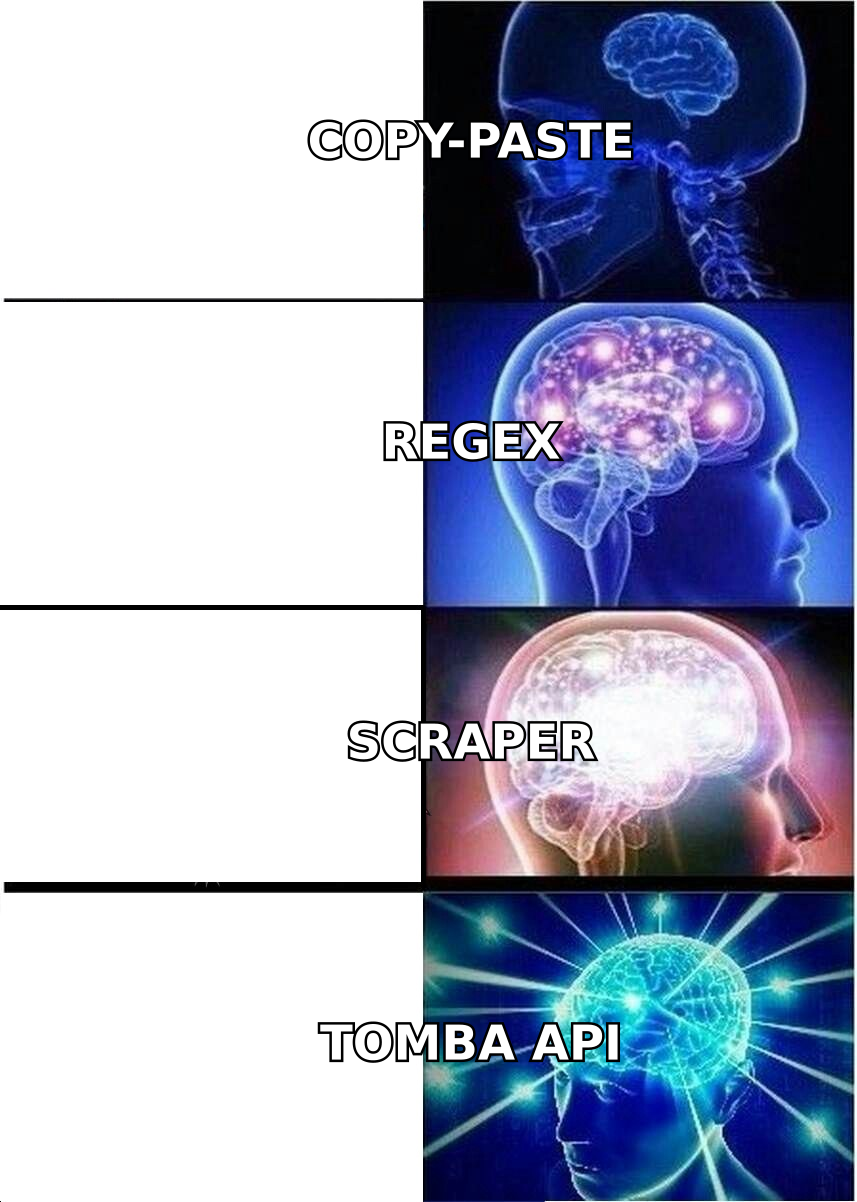
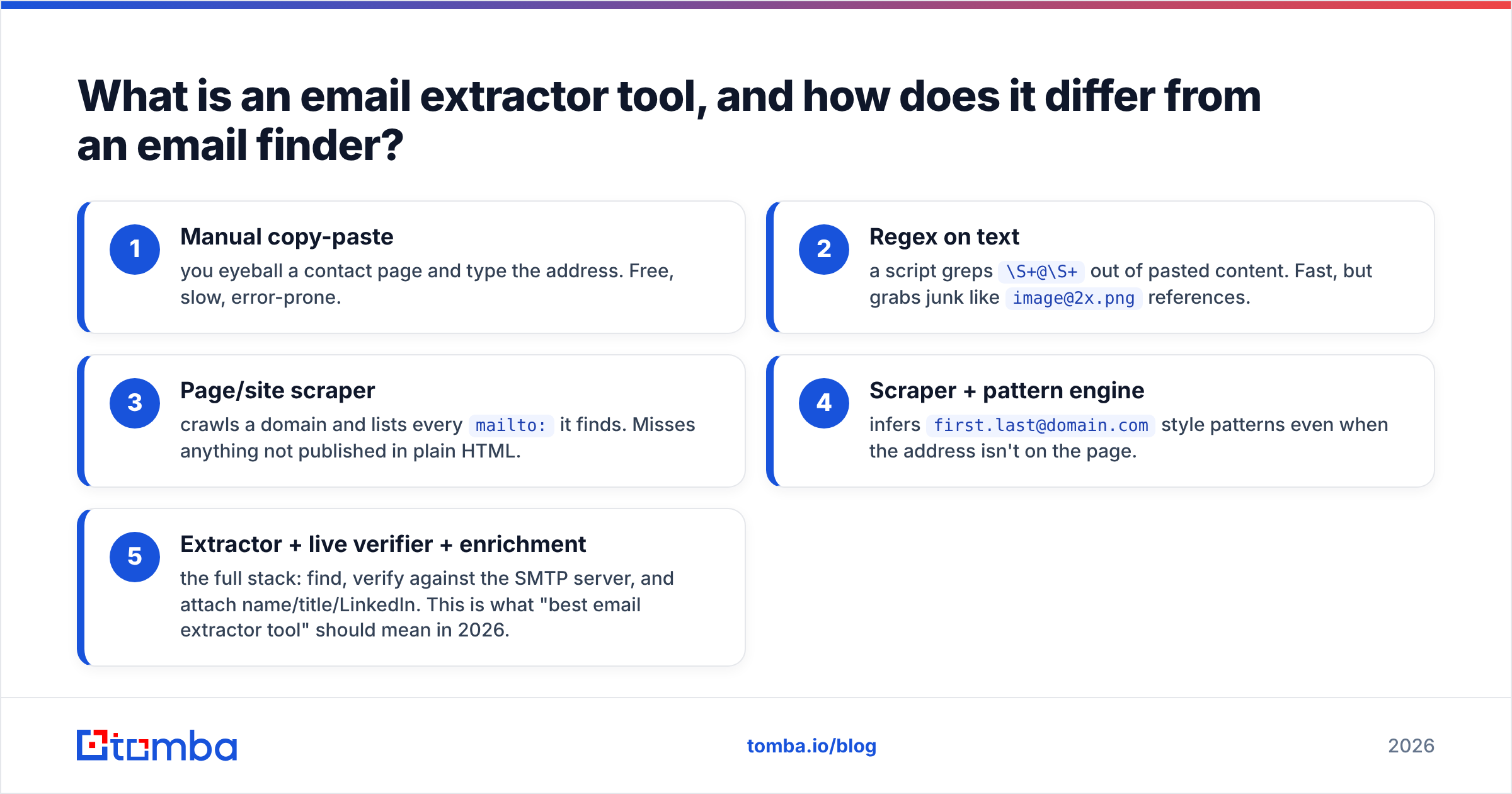
Here's the mental model in five tiers, weakest to strongest:
- Manual copy-paste — you eyeball a contact page and type the address. Free, slow, error-prone.
- Regex on text — a script greps
\S+@\S+out of pasted content. Fast, but grabs junk likeimage@2x.pngreferences. - Page/site scraper — crawls a domain and lists every
mailto:it finds. Misses anything not published in plain HTML. - Scraper + pattern engine — infers
first.last@domain.comstyle patterns even when the address isn't on the page. - Extractor + live verifier + enrichment — the full stack: find, verify against the SMTP server, and attach name/title/LinkedIn. This is what "best email extractor tool" should mean in 2026.
Which is the best email extractor tool in 2026?#
The honest answer depends on your job-to-be-done, but accuracy and verification are the two attributes that consistently separate the winners. A tool that extracts and verifies in one pass saves you from importing a list, exporting it to a separate verifier, and re-importing — the workflow tax most teams underestimate.

When you benchmark extraction tools, look past the raw count on the results screen. The number that matters is deliverable addresses — extracted, verified, and not catch-all guesses. A 70% catch-all rate with no catch-all verifier means most of your list is a coin flip.
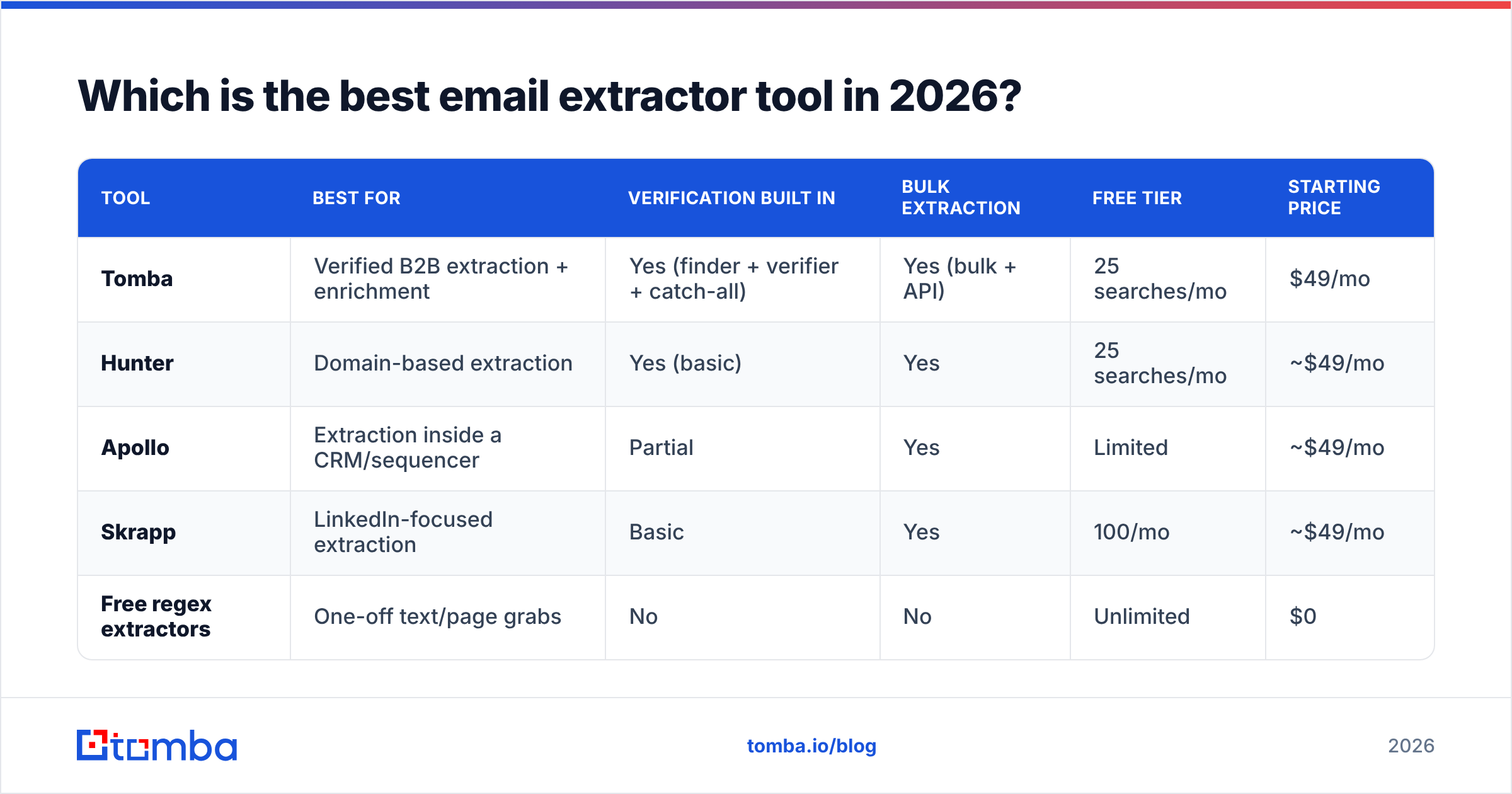
How the top email extractor tools compare#
| Tool | Best for | Verification built in | Bulk extraction | Free tier | Starting price |
|---|---|---|---|---|---|
| Tomba | Verified B2B extraction + enrichment | Yes (finder + verifier + catch-all) | Yes (bulk + API) | 25 searches/mo | $49/mo |
| Hunter | Domain-based extraction | Yes (basic) | Yes | 25 searches/mo | ~$49/mo |
| Apollo | Extraction inside a CRM/sequencer | Partial | Yes | Limited | ~$49/mo |
| Skrapp | LinkedIn-focused extraction | Basic | Yes | 100/mo | ~$49/mo |
| Free regex extractors | One-off text/page grabs | No | No | Unlimited | $0 |
Prices shift, so confirm current tiers on each vendor's own page and cross-check reviews on G2 before you commit annually. The structural point holds regardless of the exact numbers: tools that bundle verification deliver lists you can send to today, while bare extractors hand you a cleanup project.
What makes Tomba stand out for extraction#
Tomba sits in tier five. You can extract by domain with domain search, pull addresses from a name + company with the email finder, and every result is scored and verified before it lands in your export. For high-volume work, the bulk tools and Tomba API let you run thousands of extractions in one job, and the data is enriched with names, roles, and sources so you know why an address was returned.
That sourcing transparency matters for compliance: Tomba publishes where its data comes from, which is the difference between defensible B2B prospecting and blind scraping.
Is a free email extractor good enough?#
Yes — for the right job. No — as your prospecting engine.
A free, browser-based email extractor is genuinely the best tool when you need to pull addresses out of a page you're already looking at, or paste a wall of text and grab the emails inside it. Same with a file extractor when a colleague hands you a messy PDF or spreadsheet. These tasks don't need verification or a paid plan, and reaching for an enterprise tool would be overkill.
Where free extractors fail is volume and trust:
- No verification. They return whatever matches the pattern. You won't know which addresses bounce until you send — and by then your domain reputation is already taking hits.
- No de-duplication or enrichment. You get raw strings, not contacts. You'll still need a verifier and a way to remove duplicates.
- No catch-all handling. Catch-all domains accept every address at the SMTP layer, so a naive extractor reports them all as valid. Without a real catch-all check, your list is padded with guesses.
- No compliance trail. If you can't show where an address came from, you can't defend the contact under GDPR.
The rule of thumb: free for grabbing, paid for prospecting.
How do I judge an email extractor tool's accuracy?#
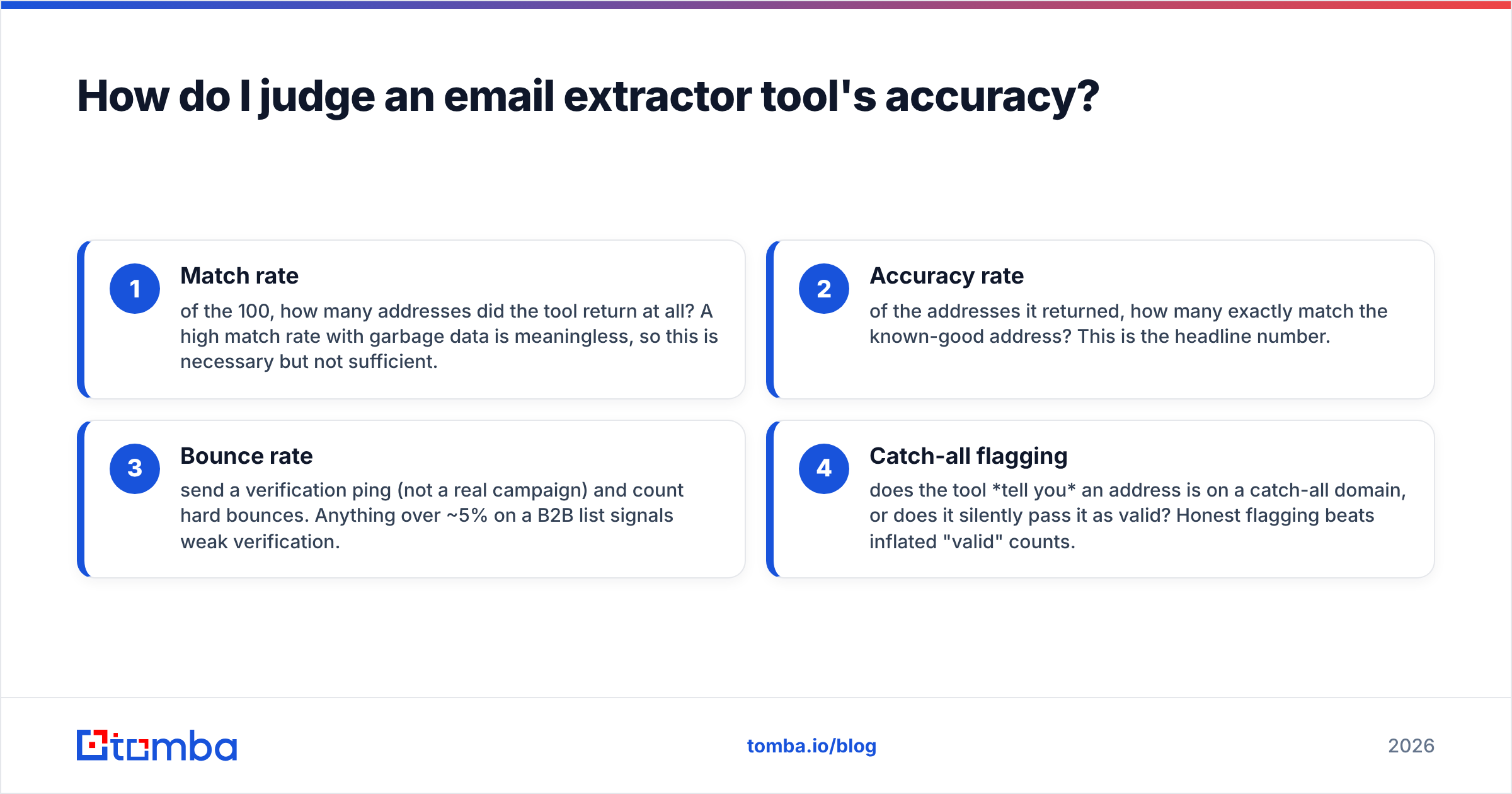
Run a controlled test, not a vibe check. Take 100 contacts you can independently confirm — your own customers, your team, partners whose addresses you already know — and run them through each candidate. Then measure four things.
- Match rate — of the 100, how many addresses did the tool return at all? A high match rate with garbage data is meaningless, so this is necessary but not sufficient.
- Accuracy rate — of the addresses it returned, how many exactly match the known-good address? This is the headline number.
- Bounce rate — send a verification ping (not a real campaign) and count hard bounces. Anything over ~5% on a B2B list signals weak verification.
- Catch-all flagging — does the tool tell you an address is on a catch-all domain, or does it silently pass it as valid? Honest flagging beats inflated "valid" counts.

The tools that win this test are almost always the ones that pair extraction with a live SMTP verifier and a catch-all verifier. Extraction alone is a 1990s technology; verification is what makes a list usable in 2026.

Is scraping emails with an extractor legal?#
It depends on what you extract and how you use it — and "everyone does it" is not a legal defense.
Pulling published, role-based business addresses (think sales@, press@, or a named decision-maker's work email) for legitimate B2B outreach is broadly defensible in most jurisdictions, especially when you can document the source. Harvesting personal Gmail and Yahoo inboxes off forums and social profiles to blast cold offers is where you get into trouble under GDPR, CAN-SPAM, and similar regimes.
Practical guardrails:
- Stick to business contacts and a legitimate-interest basis. B2B outreach relevant to someone's job is easier to justify than scraping consumer inboxes.
- Keep the source. Tools that record where each address was found give you an audit trail. Tomba's data sourcing is built for exactly this.
- Honor opt-outs and suppression. Maintain a do-not-contact list and respect it across every extraction job.
- Warm up and authenticate your domain. Even legal sends bounce or hit spam without SPF, DKIM, and a healthy sender reputation.
A good email extractor tool makes compliance easier, not harder, by giving you verified, sourced, business-grade data instead of a scraped mystery pile.
What features should the best email extractor tool have?#
Use this as your buying checklist. The best tools check every box; budget tools check two or three.
- Multi-source extraction. Domain, name + company, page, pasted text, and file — not just one input type.
- Built-in verification. A live SMTP email verifier so extracted addresses are checked before export.
- Catch-all detection. Explicit flagging of catch-all domains instead of silent false positives.
- Bulk + API. The ability to run thousands of lookups in one job and to wire extraction into your own stack via an API.
- Enrichment. Names, job titles, company data, and LinkedIn attached to each address so you can personalize.
- Integrations. Native connections to your CRM and outreach tools — HubSpot, Salesforce, Pipedrive, Sheets — so you skip the CSV shuffle. (HubSpot's own sales tools overview is a useful reference point for what "connected" should feel like.)
- Transparent pricing. Clear credit costs, no surprise overage walls. Check Tomba pricing for a concrete example of tiered, predictable costs.
If a tool extracts but can't verify, it's a half-product. If it verifies but can't extract in bulk, it won't scale with you. The best email extractor tool does both without making you stitch three vendors together.
How much should an email extractor cost?#
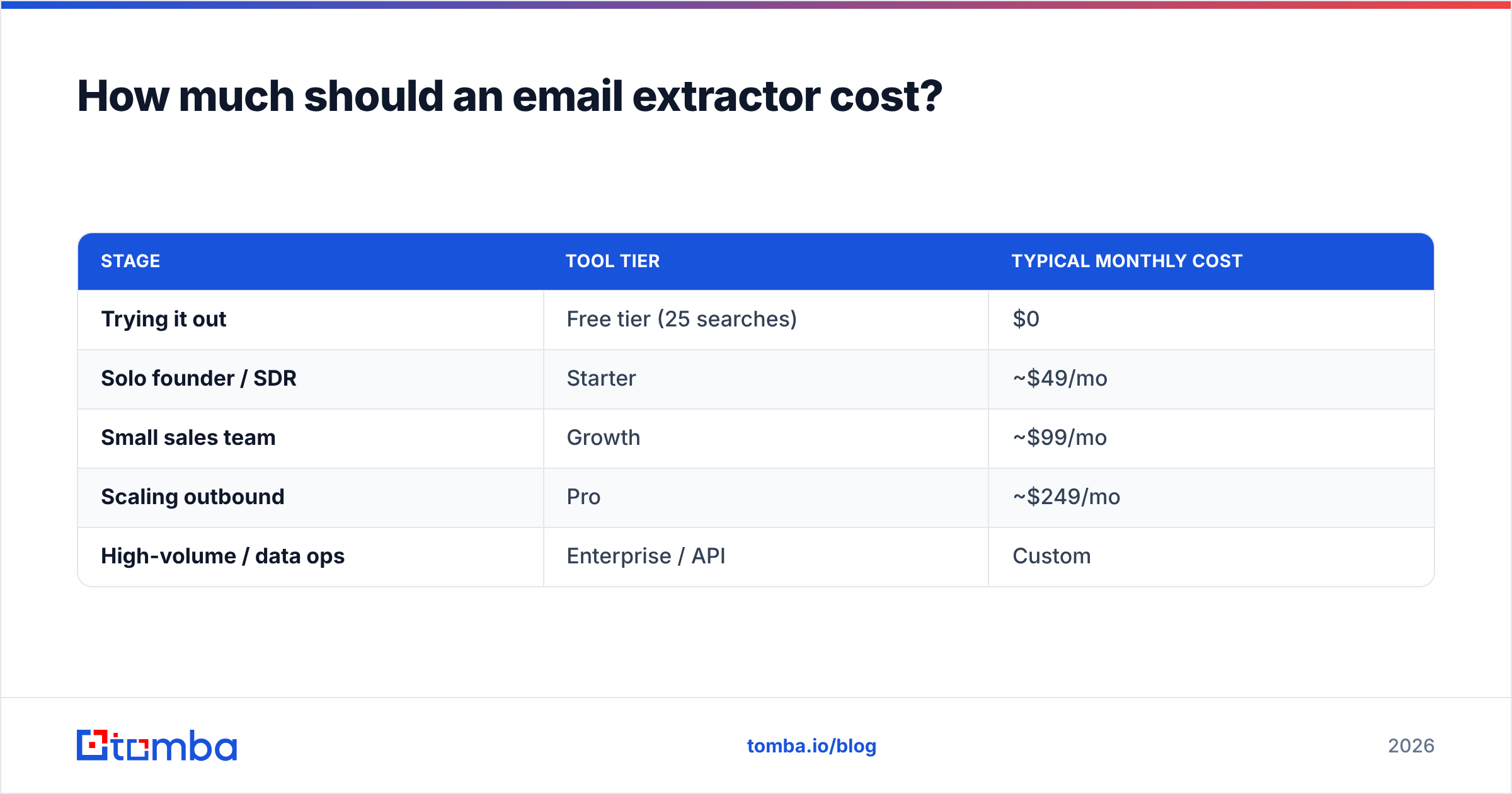
Budget by cost-per-deliverable-contact, not cost-per-extraction. A $0 tool that produces a 35% bounce rate has a brutal effective cost once you account for blown sender reputation and wasted rep hours.
For most teams, the math works out like this:
| Stage | Tool tier | Typical monthly cost |
|---|---|---|
| Trying it out | Free tier (25 searches) | $0 |
| Solo founder / SDR | Starter | ~$49/mo |
| Small sales team | Growth | ~$99/mo |
| Scaling outbound | Pro | ~$249/mo |
| High-volume / data ops | Enterprise / API | Custom |
Tomba follows this curve exactly: a free tier with 25 searches per month, Starter at $49/mo, Growth at $99/mo, Pro at $249/mo, and custom Enterprise pricing — all documented on the pricing page. Start free, validate accuracy on your own known-good list, then upgrade once the deliverability numbers prove out.
Frequently asked questions#
Can I extract emails from LinkedIn? You can find work emails associated with LinkedIn profiles using a dedicated LinkedIn finder, but respect LinkedIn's terms and focus on business contact data for legitimate outreach.
What's the difference between extraction and verification? Extraction finds addresses; verification confirms they're real and deliverable. You need both — extraction without verification is how lists bounce.
Do I still need a separate verifier? Not if your extractor includes one. Standalone email verification is for cleaning lists you got elsewhere; an integrated tool verifies as it extracts.
How do I extract emails in bulk? Use a bulk email finder or the API to process thousands of domains or contacts in a single job, then export the verified results.
The bottom line#
The best email extractor tool in 2026 isn't the one that pulls the most addresses — it's the one that pulls the most deliverable ones, tells you where each came from, and verifies before you ever hit send. Raw scrapers and free regex tools have a place for quick one-off grabs, but they don't scale into a prospecting engine, and they quietly cost you in bounces and reputation.
If you want extraction, verification, and enrichment in one workflow, start with the Tomba Email Finder. Run your own 100-contact accuracy test on the free tier, watch the bounce rate, and upgrade only when the numbers earn it. Clean data in, replies out — that's the whole point of choosing the right extractor.
// get started
Find, verify and enrich your first contacts today
Start on the free plan with 25 searches a month, then scale when your team is ready.
Free plan · No credit card required · GDPR & CCPA
// about the author