Best Way To Send Bulk Email Without Getting Blacklisted (2026)
Blacklists kill more cold campaigns than bad copy ever will. Here is the exact 2026 playbook to send bulk email at scale and keep your domain clean.
Getting blacklisted is the silent killer of bulk email. You do everything else right — great offer, tight copy, a clean spreadsheet of prospects — and then one morning your open rates crater, replies stop, and a quick check shows your sending domain sitting on Spamhaus. The campaign isn't underperforming; it's invisible.
The good news: blacklisting is almost always preventable. It's the predictable result of a handful of mistakes, and once you understand the mechanics, sending bulk email safely becomes a checklist rather than a gamble.
TL;DR#
- Blacklists react to behavior, not volume. You can send tens of thousands of emails a day if your authentication, list quality, and engagement signals are clean.
- Authentication is non-negotiable in 2026. SPF, DKIM, and DMARC are the entry ticket — Google and Yahoo now reject bulk senders without them.
- Dirty lists cause most blacklistings. Verify every address before you send; spam traps and hard bounces are what get you flagged.
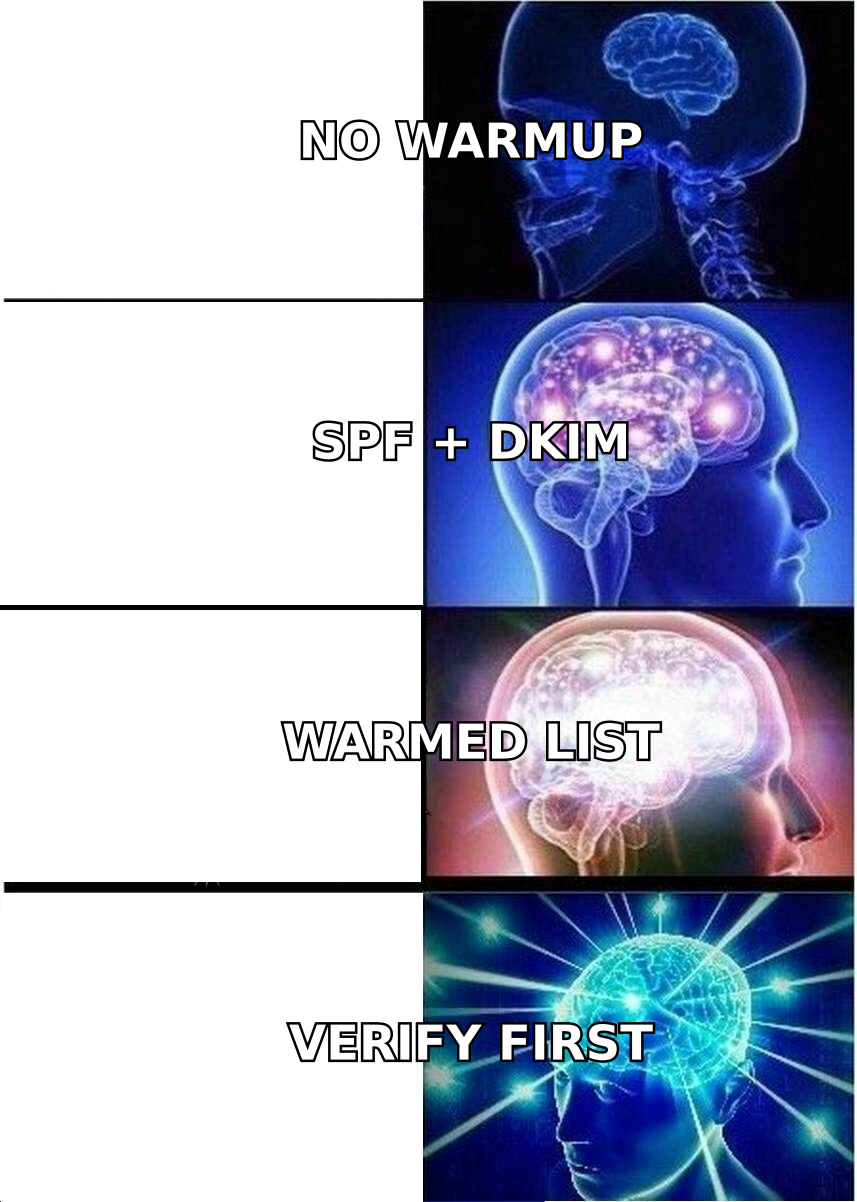
- Warm up new domains and ramp volume slowly. Cold domains blasting 5,000 emails on day one is the fastest route to a block.
- Monitor reputation continuously with Google Postmaster Tools, blacklist checkers, and bounce tracking so you catch problems before they compound.
What actually gets you blacklisted?#
Blacklists are run by organizations like Spamhaus, Barracuda, and SpamCop that maintain real-time databases of IPs and domains exhibiting spammy behavior. Mailbox providers (Gmail, Outlook, Yahoo) consult these lists, plus their own internal reputation scores, to decide whether your mail hits the inbox, the spam folder, or a hard rejection.
Think of your sending reputation like a credit score. One late payment won't ruin you, but a pattern of bad behavior tanks the number, and rebuilding takes far longer than the damage took to inflict. The triggers that move the needle down are consistent:
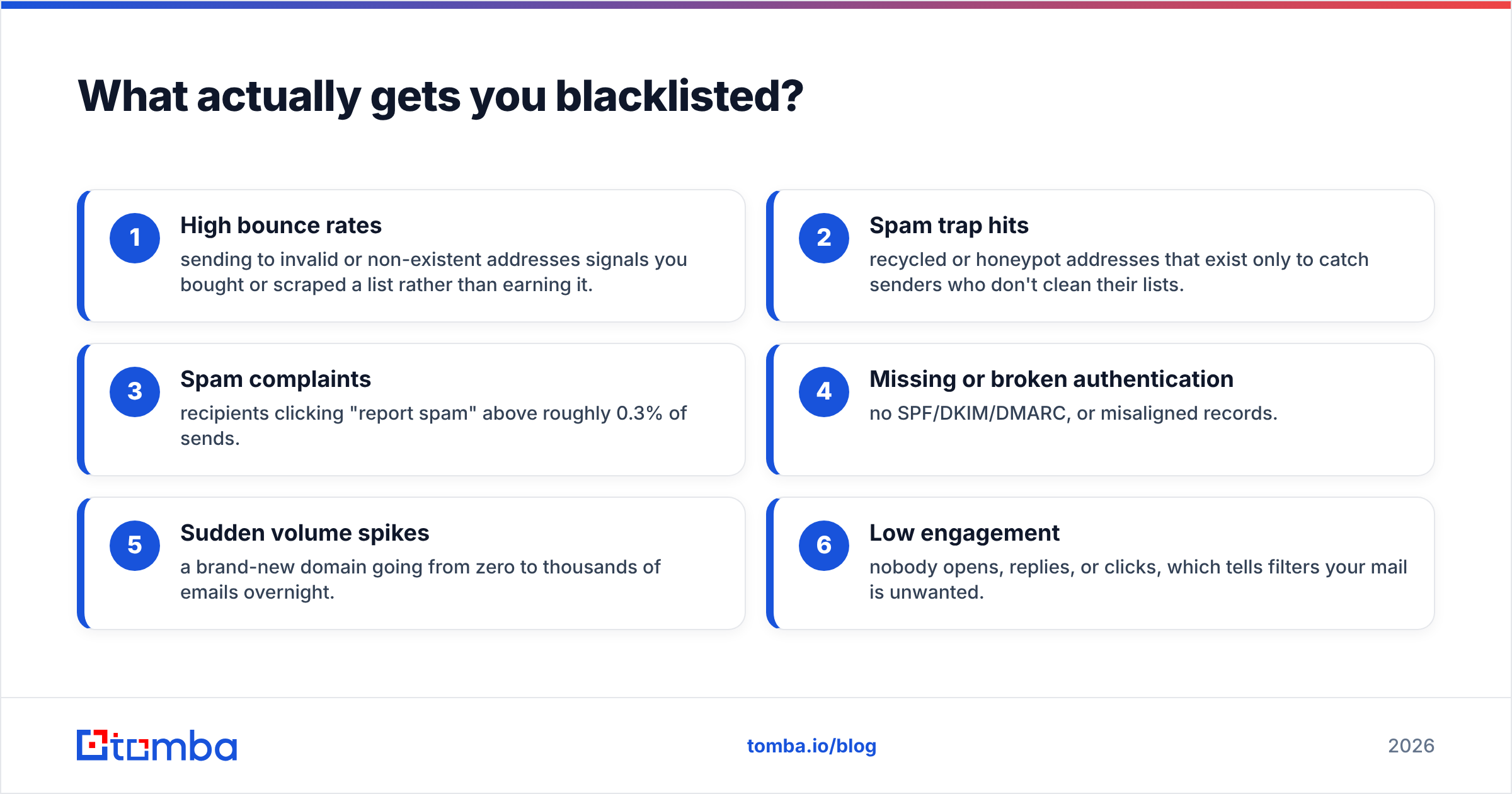
- High bounce rates — sending to invalid or non-existent addresses signals you bought or scraped a list rather than earning it.
- Spam trap hits — recycled or honeypot addresses that exist only to catch senders who don't clean their lists.
- Spam complaints — recipients clicking "report spam" above roughly 0.3% of sends.
- Missing or broken authentication — no SPF/DKIM/DMARC, or misaligned records.
- Sudden volume spikes — a brand-new domain going from zero to thousands of emails overnight.
- Low engagement — nobody opens, replies, or clicks, which tells filters your mail is unwanted.
Notice what's not on that list: raw volume by itself. A well-authenticated domain with an engaged audience can send large batches daily. The providers care about how recipients react, not how many you sent.
How do you set up authentication correctly?#
Authentication proves you are who you say you are. Without it, even legitimate mail looks forgeable, and as of 2024 Google and Yahoo began outright rejecting bulk senders who skip it. In 2026 it's simply the cost of entry.
There are three records to configure on your sending domain's DNS:
- SPF (Sender Policy Framework) — lists which servers are allowed to send mail for your domain. You can verify yours with an SPF checker before you launch.
- DKIM (DomainKeys Identified Mail) — adds a cryptographic signature so receivers can confirm the message wasn't altered in transit.
- DMARC — tells receivers what to do when SPF or DKIM fail, and gives you reporting on who's sending as your domain.
A simple analogy: SPF is the guest list at the door, DKIM is the tamper-proof seal on the envelope, and DMARC is the instruction card telling the receptionist what to do with anything that doesn't match. Skip any one and the whole chain weakens.
If you want the underlying concept in depth, Google's sender guidelines spell out exactly what bulk senders must implement, and the glossary entry on email deliverability covers how these records feed your overall reputation.
Why does list hygiene matter more than anything else?#
Conclusion first: a dirty list is the single biggest cause of blacklisting, and it's also the most fixable. Every invalid address you mail is a bounce, and bounces are the loudest "this sender doesn't maintain their list" signal you can broadcast.
Spam traps make this worse. Providers seed recycled addresses (old accounts that were abandoned and reactivated as traps) into the wild. If yours is an old list you never cleaned, odds are good a few traps are hiding in it. Hitting even one can trigger a listing.
The fix is to verify before you send. An email verifier checks each address against MX records, mailbox existence, and known-trap patterns, then drops the risky ones. Run your whole file through a bulk verify pass and you'll typically remove 10–25% of an aging list before a single message goes out.
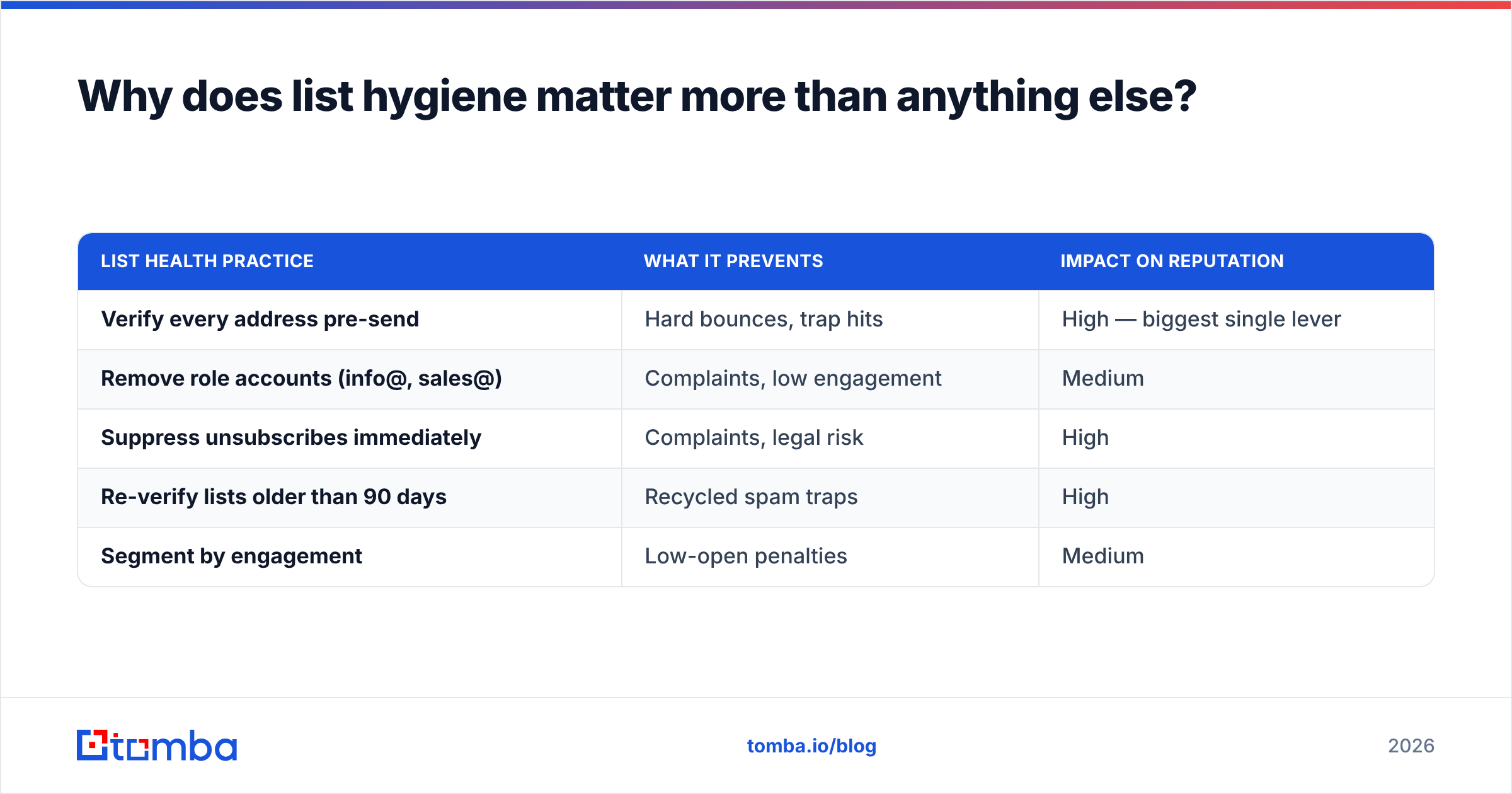
| List health practice | What it prevents | Impact on reputation |
|---|---|---|
| Verify every address pre-send | Hard bounces, trap hits | High — biggest single lever |
| Remove role accounts (info@, sales@) | Complaints, low engagement | Medium |
| Suppress unsubscribes immediately | Complaints, legal risk | High |
| Re-verify lists older than 90 days | Recycled spam traps | High |
| Segment by engagement | Low-open penalties | Medium |
Catch-all domains deserve special mention. They accept mail to any address, which makes verification ambiguous — a "valid" result might still bounce. A dedicated catch-all verifier scores these riskier domains so you can decide whether to mail them or hold back.
How do you warm up a new domain and IP?#
You don't introduce yourself to a new neighborhood by throwing a 500-person party on night one. Domains work the same way. A fresh sending domain has zero reputation, and providers treat unknown senders with suspicion until they've established a track record.
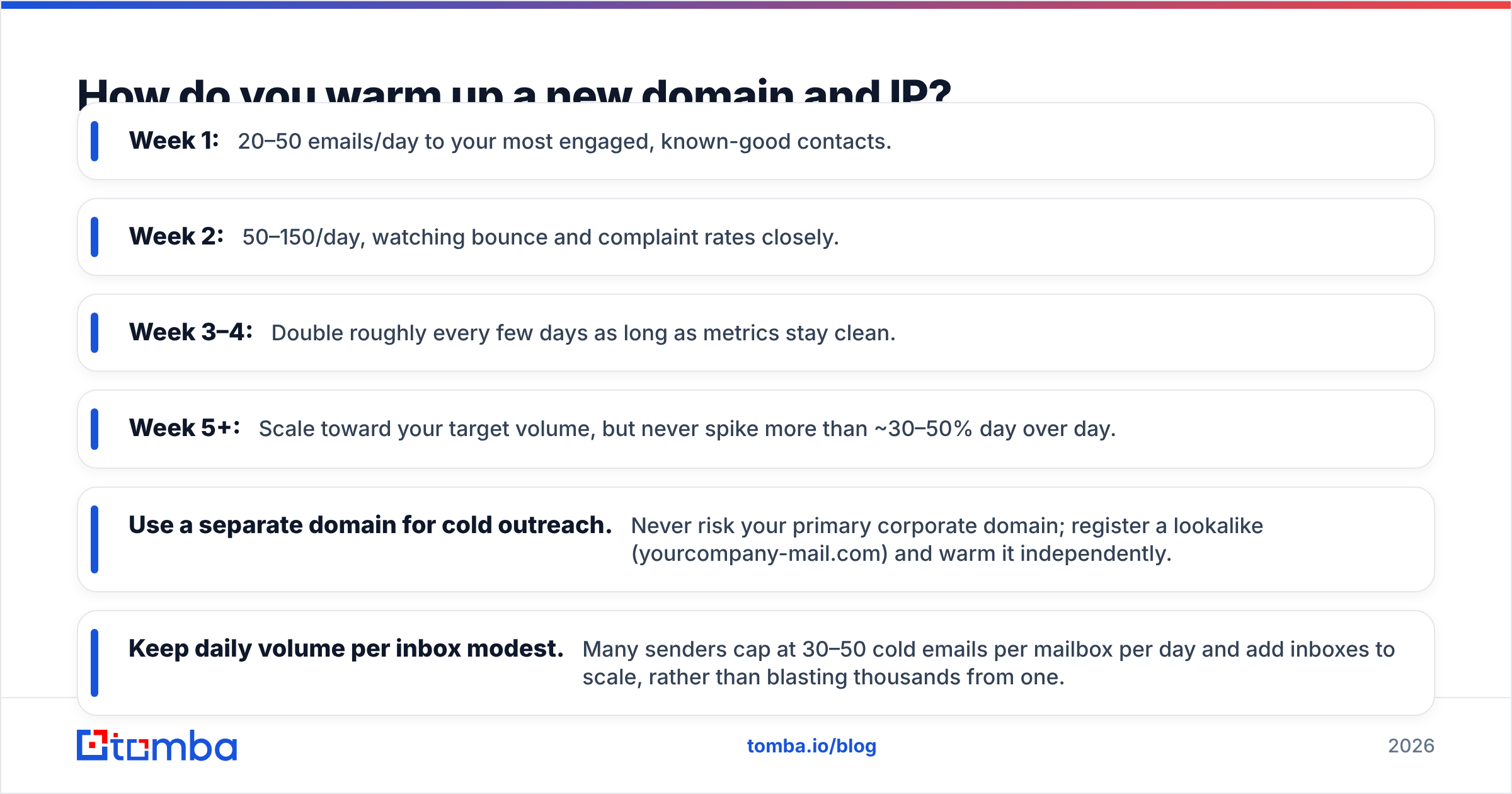
Warmup means ramping volume gradually while generating positive engagement signals. A practical schedule for a new domain looks like this:
- Week 1: 20–50 emails/day to your most engaged, known-good contacts.
- Week 2: 50–150/day, watching bounce and complaint rates closely.
- Week 3–4: Double roughly every few days as long as metrics stay clean.
- Week 5+: Scale toward your target volume, but never spike more than ~30–50% day over day.
Pair the ramp with content that earns replies. Early engagement — opens, replies, and "not spam" actions — is what builds the reputation that lets you scale. If you want the math on a specific ramp, an email warmup calculator will model the curve for your target volume.
A few non-negotiables during warmup and beyond:
- Use a separate domain for cold outreach. Never risk your primary corporate domain; register a lookalike (yourcompany-mail.com) and warm it independently.
- Keep daily volume per inbox modest. Many senders cap at 30–50 cold emails per mailbox per day and add inboxes to scale, rather than blasting thousands from one.
- Maintain a healthy text-to-link ratio. One or two links max in a cold email; image-heavy, link-stuffed messages look like spam.
Which sending setup keeps you safest at scale?#
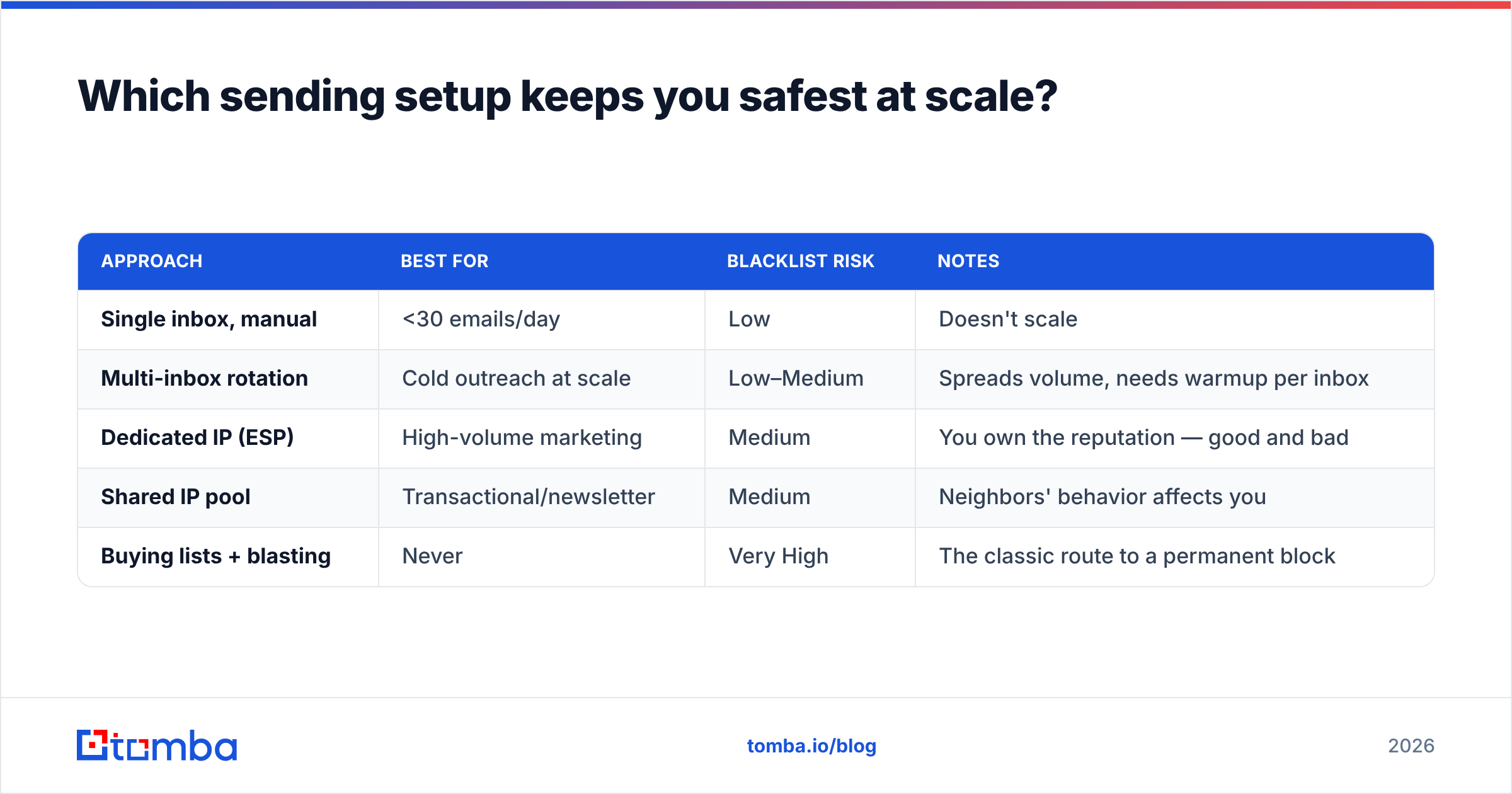
The way you send matters as much as what you send. Here's how the common approaches compare for bulk B2B email in 2026:
| Approach | Best for | Blacklist risk | Notes |
|---|---|---|---|
| Single inbox, manual | <30 emails/day | Low | Doesn't scale |
| Multi-inbox rotation | Cold outreach at scale | Low–Medium | Spreads volume, needs warmup per inbox |
| Dedicated IP (ESP) | High-volume marketing | Medium | You own the reputation — good and bad |
| Shared IP pool | Transactional/newsletter | Medium | Neighbors' behavior affects you |
| Buying lists + blasting | Never | Very High | The classic route to a permanent block |
The pattern is clear: distributed, warmed, verified sending wins. Concentrated, cold, unverified blasting loses. The tooling exists to do the first; the temptation is always to shortcut to the second.

How do you monitor reputation before it's too late?#
The senders who never get blacklisted aren't lucky — they watch their numbers obsessively and act on the first warning sign. By the time your replies dry up, the damage is already weeks old.
Build a monitoring routine around these signals:
- Google Postmaster Tools — free, and the closest thing to seeing your reputation through Gmail's eyes. It surfaces spam rate, domain reputation, and authentication pass rates. Set it up for any domain doing real volume.
- Blacklist checks — scan your domain and IP against major lists weekly with a blacklist checker. Catching a listing early means you can request delisting before it spreads.
- Bounce and complaint thresholds — keep hard bounces under ~2% and complaints under 0.1%. Cross either and pause to investigate, don't push through.
- Sender reputation tools — track your sender reputation score over time so you can correlate dips with specific campaigns.
For independent reviews of monitoring and verification vendors before you commit, G2's deliverability category is a useful neutral reference.
What's the safe bulk-sending checklist?#
Pull it all together and the "best way" to send bulk email without getting blacklisted is really a sequence you run every single campaign:
- Verify the entire list — drop invalids, traps, and risky catch-alls before send.
- Confirm SPF, DKIM, and DMARC all pass on the sending domain.
- Use a dedicated outreach domain, warmed and separate from your primary.
- Cap per-inbox daily volume and rotate across inboxes to scale.
- Personalize and keep links minimal so content reads human, not bulk.
- Honor unsubscribes instantly and suppress them permanently.
- Monitor Postmaster, blacklists, bounces, and complaints after every batch.
- Re-verify lists every 90 days — addresses decay and traps appear.
Do these consistently and blacklisting stops being a threat you fear and becomes a problem you've engineered out. The senders who land in spam folders almost always skipped steps 1, 2, or 4.
Where does an email finder fit into all this?#
You might wonder why an email-finder platform is writing about deliverability. The answer is that the two are inseparable: the cleanest send in the world fails if the addresses are wrong, and the safest list is one that was sourced accurately in the first place rather than scraped and guessed.
That's the connection between sourcing and sending. When you build your list with verified, accurate data — using a real email finder and verification layer instead of permutating guesses — you start every campaign with a low bounce rate baked in. Garbage in, blacklist out; quality in, inbox out.
If you're assembling B2B lists at scale, Tomba's Email Finder finds professional addresses by domain, name, or company and feeds straight into verification, so the contacts you load are real before they ever touch your sending domain. Pair it with the built-in verifier and catch-all checks, and you remove the largest cause of blacklisting at the source. Start free with 25 searches a month, and scale on Tomba pricing from $49/mo Starter to Growth at $99/mo as your volume grows. The best way to never get blacklisted is to never mail a bad address — and that starts before you hit send.
// get started
Find, verify and enrich your first contacts today
Start on the free plan with 25 searches a month, then scale when your team is ready.
Free plan · No credit card required · GDPR & CCPA
// about the author