Blacklist Checker 2026: How to Find and Fix IP & Domain Blocks
A blacklist checker tells you if your IP or domain is on an email blocklist before your campaigns die in spam. Here is how they work and how to fix a listing fast.
TL;DR
- A blacklist checker queries dozens of real-time blocklists (RBLs/DNSBLs) at once and tells you whether your sending IP or domain has been flagged as a spam source.
- Getting listed on Spamhaus, Barracuda, or SORBS can drop your inbox placement to near zero — even with perfect copy and authentication.
- Most listings come from one of four causes: poor list hygiene, missing authentication, sudden volume spikes, or sending to spam traps.
- Checking is free and takes seconds; delisting takes hours to days and requires fixing the root cause first.
- The durable fix is prevention: verify contacts before you send, warm up new IPs, and keep bounce rates under 2%.
What is a blacklist checker?#
A blacklist checker is a diagnostic tool that asks the major email blocklists one simple question: "Is this IP address or domain a known spam source?" Think of it like running your name through every rental-history database before a landlord does — you want to know what shows up before someone else makes a decision based on it.
Technically, these blocklists are DNSBLs (DNS-based blocklists, also called RBLs — real-time blackhole lists). They are databases of IPs and domains that mailbox providers like Gmail, Outlook, and Yahoo consult when deciding whether to accept, junk, or reject your message. A blacklist checker performs a DNS lookup against each list and reports which ones flag you.
The reason this matters: you can write a flawless cold email, authenticate it perfectly, and still land in spam if your sending IP sits on Spamhaus ZEN. Blocklists operate upstream of content filtering. They are the bouncer at the door, not the critic inside.

If you run cold outreach or send marketing at scale, checking your blacklist status should be a weekly habit, not a panic response after open rates crater. The cost of monitoring is zero. The cost of ignoring it is every campaign you send while flagged.
Why does email blacklisting actually happen?#
Blocklists do not flag senders at random. Each listing traces back to a behavior their spam traps and feedback loops detected. Understanding the cause matters because delisting without fixing the cause just gets you re-listed.
Here are the most common triggers, ranked by how often they bite legitimate senders:
- Spam trap hits — A spam trap is an email address that exists only to catch senders with bad list hygiene. Pristine traps were never real; recycled traps are old abandoned addresses repurposed by providers. Hit one and you signal you are emailing people who never opted in or who left long ago.
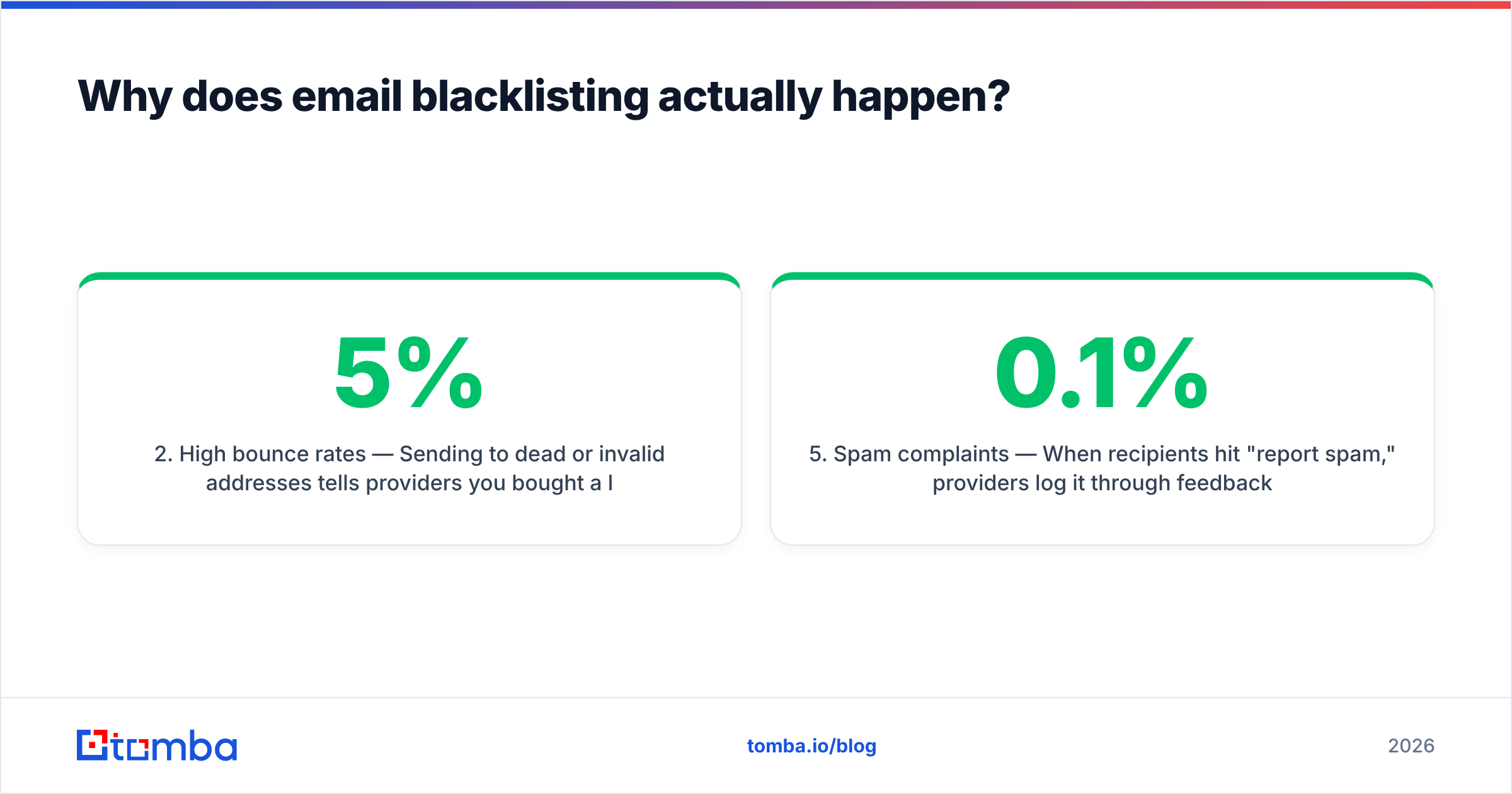
- High bounce rates — Sending to dead or invalid addresses tells providers you bought a list or never cleaned it. A bounce rate above 3-5% is a red flag; above 10% you are asking to be listed.
- Sudden volume spikes — A brand-new IP that sends 50 emails on Monday and 50,000 on Tuesday looks exactly like a compromised account. Ramp gradually.
- Missing or broken authentication — No SPF record, no DKIM, no DMARC, and providers have no way to verify you are who you claim. Spoofable domains get listed fast.
- Spam complaints — When recipients hit "report spam," providers log it through feedback loops. A complaint rate over 0.1% (one in a thousand) erodes your sender reputation quickly.
The throughline: blocklists punish senders who treat email as a numbers game instead of a permission game. The fix for almost every cause above starts before you press send — with clean, verified data.
What are the blacklists that actually matter?#
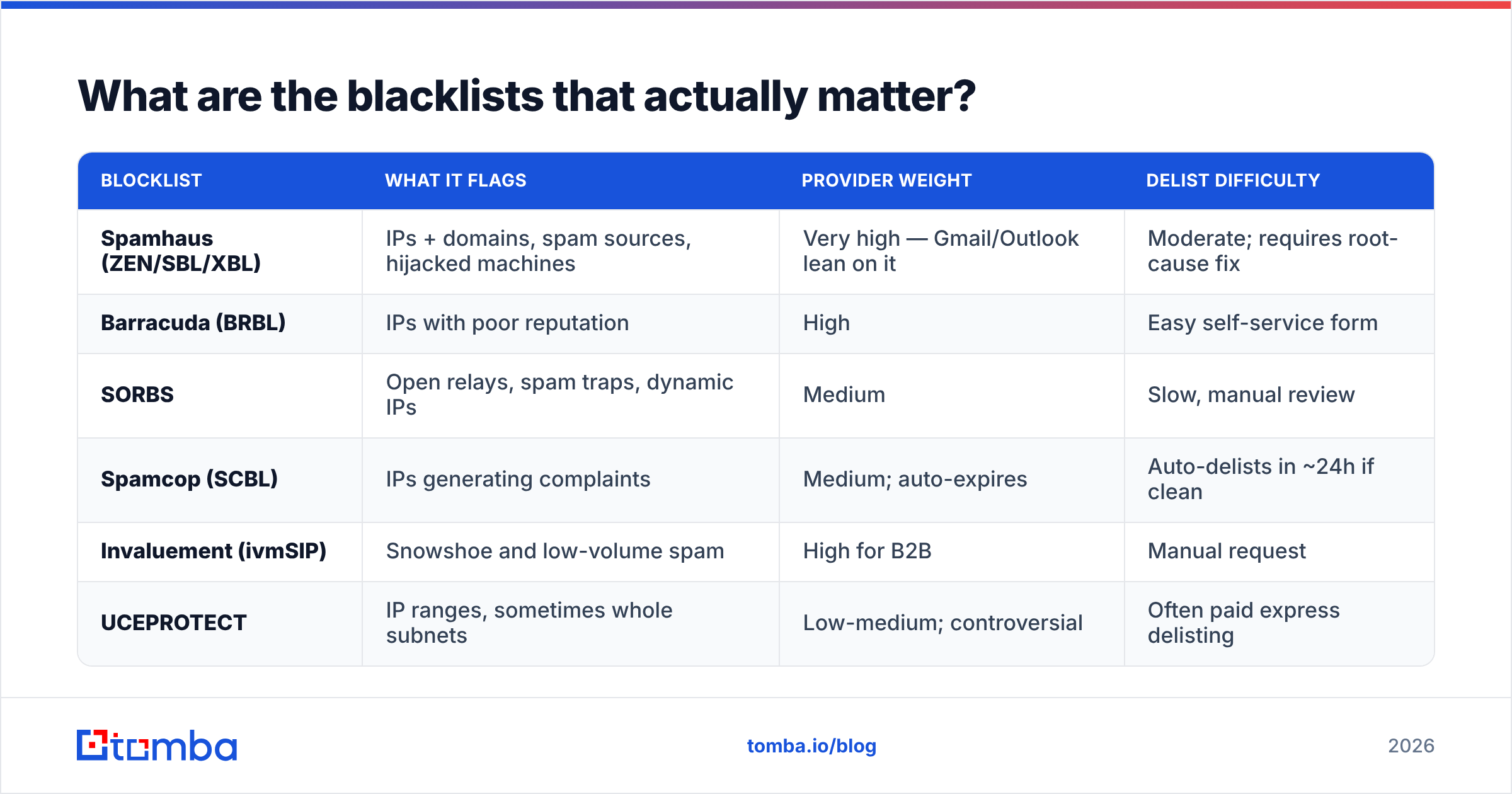
There are over a hundred public blocklists, but mailbox providers weight a handful far more heavily than the rest. Wasting energy on an obscure list nobody queries is a classic rookie mistake. Focus here:
| Blocklist | What it flags | Provider weight | Delist difficulty |
|---|---|---|---|
| Spamhaus (ZEN/SBL/XBL) | IPs + domains, spam sources, hijacked machines | Very high — Gmail/Outlook lean on it | Moderate; requires root-cause fix |
| Barracuda (BRBL) | IPs with poor reputation | High | Easy self-service form |
| SORBS | Open relays, spam traps, dynamic IPs | Medium | Slow, manual review |
| Spamcop (SCBL) | IPs generating complaints | Medium; auto-expires | Auto-delists in ~24h if clean |
| Invaluement (ivmSIP) | Snowshoe and low-volume spam | High for B2B | Manual request |
| UCEPROTECT | IP ranges, sometimes whole subnets | Low-medium; controversial | Often paid express delisting |
A few practical notes. Spamhaus is the one you cannot ignore — if you are listed there, treat it as a five-alarm fire. Spamcop auto-expires listings, so if you fix the cause it often clears itself within a day. And UCEPROTECT is widely viewed as aggressive (it sometimes lists entire IP ranges over a single bad neighbor), so providers discount it; do not pay for express delisting there unless a specific recipient demands it.
For the authoritative source on how listings work, Spamhaus publishes its own policy documentation, and Google's Postmaster Tools guidelines spell out exactly what Gmail expects from bulk senders.
How do you use a blacklist checker step by step?#
Running a check is the easy part. Acting on the result is where most people stall. Here is the workflow:
1. Find your sending IP. If you send through a provider (Google Workspace, a sending platform, an ESP), your "from" IP is theirs, not your office IP. Check the message headers of a sent email, or ask your provider. For self-hosted sending, it is your mail server's public IP.
2. Run both an IP check and a domain check. Domains get blocklisted too (via Spamhaus DBL), and the two are independent. A clean IP with a dirty domain still lands in spam.
3. Read which lists flag you. A single hit on an obscure list with auto-expiry is noise. A hit on Spamhaus or Barracuda is signal. Prioritize accordingly.
4. Diagnose the root cause using the list of triggers above. Pull your bounce rate, complaint rate, and recent volume from your sending platform before you request anything.
5. Fix the cause, then request delisting. Every major list has a removal form. But if you delist before fixing list hygiene or authentication, you will be back within a week and re-listing makes you look worse.
6. Re-check after 48-72 hours and set a recurring reminder to monitor weekly.
The single highest-leverage step is buried in #4: most listings come from sending to addresses you never verified. Cleaning your list with an email verifier before a campaign removes the dead addresses and spam traps that cause the listing in the first place.
Blacklist checker vs. email verifier vs. warmup — what does what?#
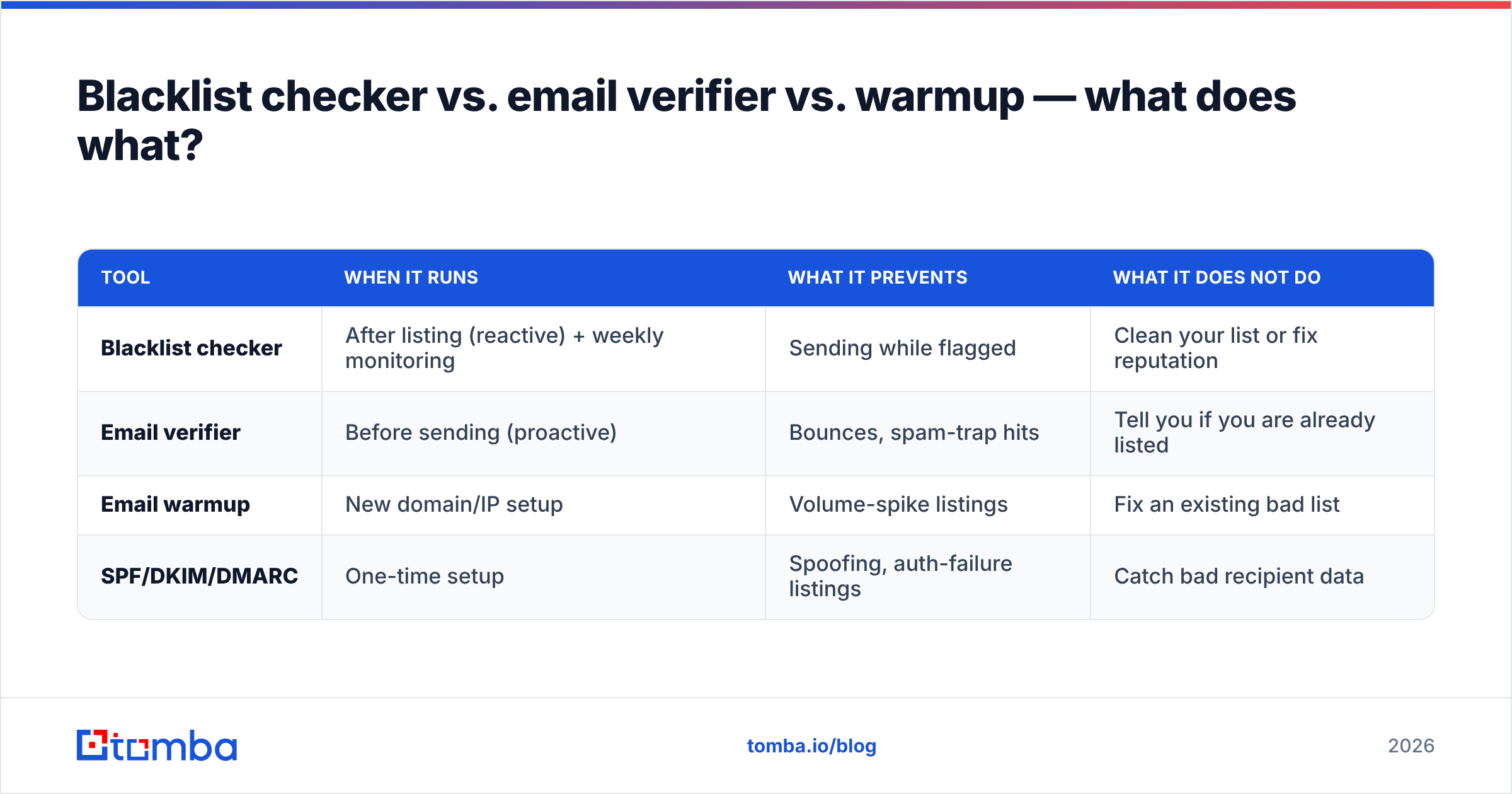
People conflate these three tools constantly, then wonder why one alone does not fix their deliverability. They solve different problems at different points in the lifecycle.
| Tool | When it runs | What it prevents | What it does NOT do |
|---|---|---|---|
| Blacklist checker | After listing (reactive) + weekly monitoring | Sending while flagged | Clean your list or fix reputation |
| Email verifier | Before sending (proactive) | Bounces, spam-trap hits | Tell you if you are already listed |
| Email warmup | New domain/IP setup | Volume-spike listings | Fix an existing bad list |
| SPF/DKIM/DMARC | One-time setup | Spoofing, auth-failure listings | Catch bad recipient data |
The honest takeaway: a blacklist checker is a smoke detector, not a sprinkler system. It tells you the house is on fire. To stop the fire from starting, you need verified data going in and proper authentication on your domain. That is why teams serious about email deliverability layer all four — they verify every address, authenticate the domain, warm new IPs slowly, and monitor blocklists as a safety net.
If you send cold outreach specifically, the order of operations is: authenticate first, verify your list with an email verifier, warm up the domain, then send — and keep a blacklist checker running in the background.
How do you get delisted from a blacklist?#
Delisting is provider-specific, but the pattern is consistent. Fix first, request second, wait third.
Spamhaus: Use the Spamhaus Blocklist Removal Center, enter your IP or domain, and follow the listing reason. Spamhaus will not remove you if the underlying problem persists — they review. Expect a few hours to a couple of days.
Barracuda: Self-service removal form at their reputation portal. Usually fast once submitted, often within hours, because Barracuda leans on automated reputation scoring.
SORBS: Submit a delisting request through their support system. This is the slowest of the majors and may require a back-and-forth explaining your remediation.
Spamcop: Often no action needed — listings auto-expire roughly 24 hours after the last reported spam, so stop the cause and wait.
Two things that will get your request rejected or re-listed: requesting removal while your bounce rate is still high, and removing then immediately resuming the exact sending pattern that got you listed. Providers track repeat offenders, and each re-listing makes the next delisting harder.
While you wait, pause sending from the affected IP or domain. Continuing to send from a flagged source deepens the reputation hole and signals you are ignoring the problem.
How do you prevent blacklisting in the first place?#
Prevention is cheaper than every cure above combined. Five habits keep you off blocklists:
- Verify before you send. Every address, every time. Invalid addresses cause bounces; bounces cause listings. A bulk email verifier can clean a list of thousands in minutes and flag risky catch-all domains before they hurt you.
- Authenticate fully. Publish SPF, DKIM, and DMARC. Use a SPF checker to confirm your record is valid and not over the 10-lookup limit.
- Warm up new IPs and domains. Ramp volume gradually over 4-8 weeks. An email warmup calculator gives you a sane daily schedule instead of guessing.
- Keep complaint rates low. Make unsubscribing trivial, segment so you only email people who want to hear from you, and honor opt-outs immediately.
- Monitor proactively. Run a blacklist checker weekly and watch Google Postmaster Tools for reputation dips. Catching a downward trend early beats reacting to a full listing.
The recurring theme across this entire post is data quality. Spam traps, bounces, and complaints — the three biggest listing causes — all stem from emailing people you should not be emailing. Source accurate contacts and verify them, and the blocklists mostly leave you alone. For the deliverability fundamentals behind these habits, HubSpot's deliverability guide and Validity's sender certification standards are solid neutral references.
How do free and paid blacklist checkers compare?#
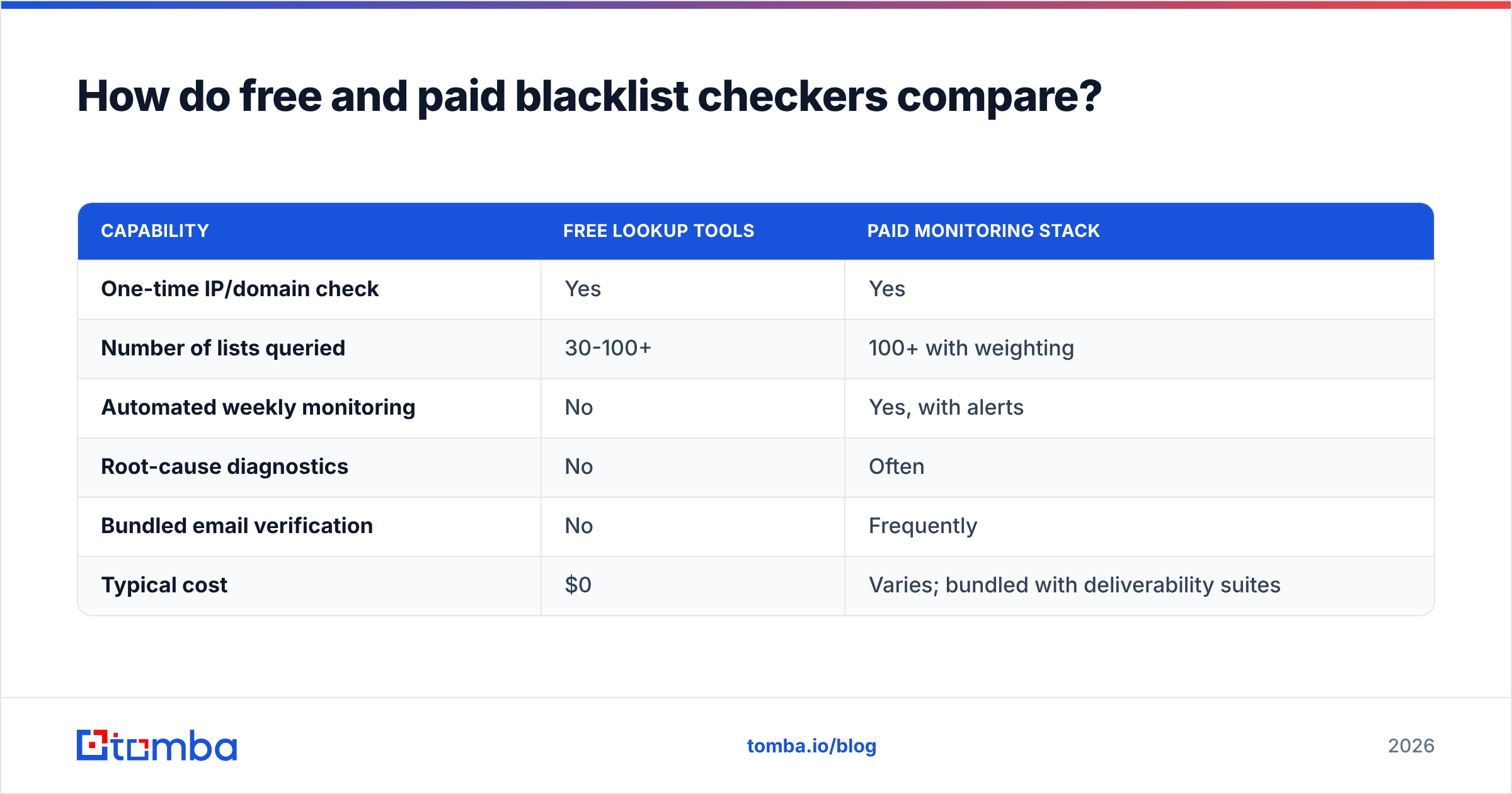
You do not need to pay just to look up a status — that should always be free. What you pay for is monitoring, alerting, and the surrounding hygiene stack that prevents listings.
| Capability | Free lookup tools | Paid monitoring stack |
|---|---|---|
| One-time IP/domain check | Yes | Yes |
| Number of lists queried | 30-100+ | 100+ with weighting |
| Automated weekly monitoring | No | Yes, with alerts |
| Root-cause diagnostics | No | Often |
| Bundled email verification | No | Frequently |
| Typical cost | $0 | Varies; bundled with deliverability suites |
For most senders, the right move is a free checker for spot-checks plus a verification and data layer that prevents the listing — rather than paying for a standalone monitoring tool that only tells you after the damage is done. You can run a quick free check with Tomba's blacklist checker and pair it with an email reputation checker to see the fuller picture.
Frequently asked questions#
How often should I check my blacklist status? Weekly for active senders, and immediately if you notice a sudden drop in open or reply rates. Cold outreach teams should check before launching any large campaign.
Does one blacklist hit ruin my deliverability? It depends on the list. A Spamhaus or Barracuda listing can tank inbox placement immediately. An obscure or auto-expiring list (like Spamcop) often has little practical impact. Always weight by how much providers actually use the list.
Can I get blacklisted with a shared IP? Yes — if you send through a shared IP pool, a bad neighbor's behavior can affect you. This is one reason to choose reputable sending infrastructure and, at scale, consider a dedicated IP you warm up yourself.
How long does delisting take? Anywhere from automatic (Spamcop, ~24h) to several days (SORBS). Spamhaus and Barracuda usually clear within hours to a day once the root cause is fixed.
The bottom line#
A blacklist checker is essential, but it is the last line of defense, not the first. By the time you are listed, the damage to your reputation has already started. The senders who never think about blocklists are the ones who got the inputs right: they verify every contact, authenticate their domain, warm their IPs, and only email people who want to hear from them.
That starts with accurate data. Tomba's Email Finder sources verified professional email addresses by name, domain, or company — so the contacts entering your pipeline are real, deliverable, and far less likely to land you on a blocklist. Pair it with Tomba's free blacklist checker and email verifier, check the Tomba pricing plans (free tier included, paid plans from $49/mo), and build outreach on a foundation that keeps you in the inbox instead of on a list.
// get started
Find, verify and enrich your first contacts today
Start on the free plan with 25 searches a month, then scale when your team is ready.
Free plan · No credit card required · GDPR & CCPA
// about the author