Email Blacklist Removal: The Complete 2026 Delisting Guide
Stuck on Spamhaus, Barracuda, or an internal Gmail block? Here's exactly how blacklist removal works in 2026 — and how to stay off for good.
TL;DR
- Blacklist removal is a two-part job: file the delisting request and fix the behavior that got you listed — skip the second part and you'll be back within days.
- Identify the exact list first (Spamhaus, Barracuda, SORBS, UCEProtect, or a private filter like Google/Microsoft) because each has its own process and timeline.
- Most public DNSBLs auto-delist in 24–72 hours once spam traps stop firing; manual requests speed it up only if the root cause is gone.
- The top three root causes are dirty lists, missing authentication (SPF/DKIM/DMARC), and sudden volume spikes — all preventable.
- Clean your data with an email verifier before you send, and you remove the single biggest trigger for re-listing.
What is an email blacklist?#
An email blacklist (or DNSBL/RBL — DNS-based blocklist) is a published database of IP addresses and domains that have been flagged for sending spam. Think of it like a credit blacklist for senders: when your IP or domain lands on one, receiving mail servers query the list before accepting your message and bounce or junk it if you're flagged.
There are two broad types, and the difference decides your whole removal strategy:
- Public blacklists — Spamhaus, Barracuda, SORBS, UCEProtect, SpamCop. These publish lookup records anyone can query and usually offer a self-service delisting form.
- Private/internal filters — Google, Microsoft (Outlook/Office 365), Yahoo, and most corporate spam filters. These never tell you you're blocked; you just see a spike in bounces or a deliverability collapse to one provider.
A single bad campaign can get you on both at once. That's why blacklist removal is rarely a one-click action — it's a short investigation followed by a fix.
How do I know if I'm actually blacklisted?#
Before you start firing off removal requests, confirm the listing. Symptoms that point to a blacklist rather than a content problem:
- A sudden, sharp drop in delivery to one specific provider (classic internal filter).
- Bounce messages containing phrases like
5.7.1 blocked using Spamhaus,rejected due to reputation, or a URL to a blocklist removal page. - Open rates cratering while your send volume and copy stayed the same.
Run a multi-list lookup. Free tools like MXToolbox Blacklist Check and the Spamhaus IP/domain lookup query dozens of DNSBLs at once. You can also use Tomba's blacklist checker to scan your sending IP and domain in one pass. Always check both your IP and your sending domain — they get listed independently.
Read the bounce. It almost always names the list and links to the exact removal page. That single line saves you an hour of guessing.
What's the difference between the major blacklists?#
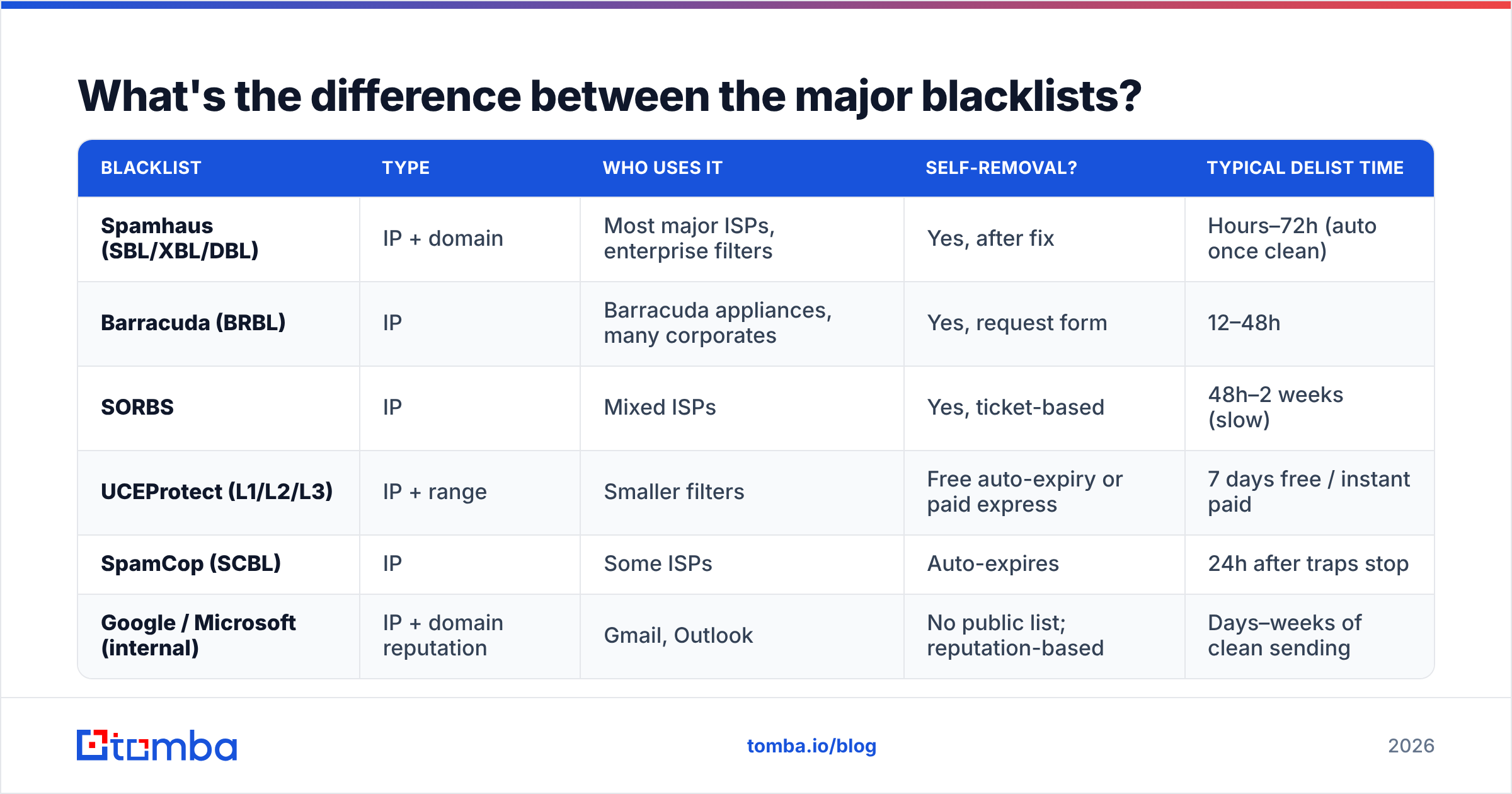
Each list has its own threshold, removal process, and how long delisting takes. Treat them differently.
| Blacklist | Type | Who uses it | Self-removal? | Typical delist time |
|---|---|---|---|---|
| Spamhaus (SBL/XBL/DBL) | IP + domain | Most major ISPs, enterprise filters | Yes, after fix | Hours–72h (auto once clean) |
| Barracuda (BRBL) | IP | Barracuda appliances, many corporates | Yes, request form | 12–48h |
| SORBS | IP | Mixed ISPs | Yes, ticket-based | 48h–2 weeks (slow) |
| UCEProtect (L1/L2/L3) | IP + range | Smaller filters | Free auto-expiry or paid express | 7 days free / instant paid |
| SpamCop (SCBL) | IP | Some ISPs | Auto-expires | 24h after traps stop |
| Google / Microsoft (internal) | IP + domain reputation | Gmail, Outlook | No public list; reputation-based | Days–weeks of clean sending |
Two practical takeaways. First, the public lists with self-service forms (Spamhaus, Barracuda) are the fast ones — fix the cause, submit, done. Second, the internal filters at Google and Microsoft are the hard ones: there's no form, only patient rebuilding of sender reputation. Enroll in Google Postmaster Tools and Microsoft SNDS to see the reputation data they won't put in a bounce.
How do I actually remove myself from a blacklist?#
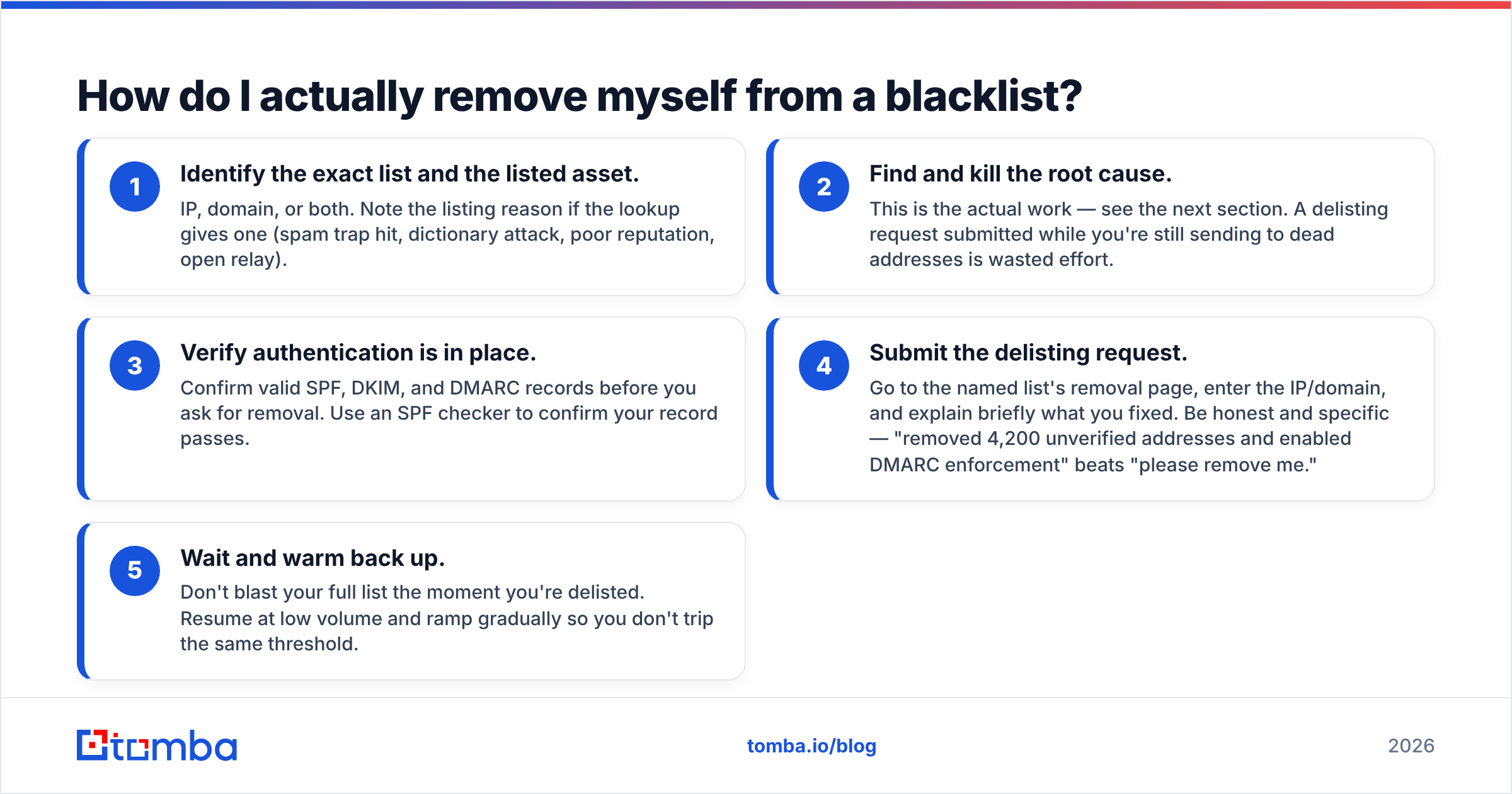
Here's the repeatable process. Follow it in order — skipping the diagnosis step is why most people get re-listed.
- Identify the exact list and the listed asset. IP, domain, or both. Note the listing reason if the lookup gives one (spam trap hit, dictionary attack, poor reputation, open relay).
- Find and kill the root cause. This is the actual work — see the next section. A delisting request submitted while you're still sending to dead addresses is wasted effort.
- Verify authentication is in place. Confirm valid SPF, DKIM, and DMARC records before you ask for removal. Use an SPF checker to confirm your record passes.
- Submit the delisting request. Go to the named list's removal page, enter the IP/domain, and explain briefly what you fixed. Be honest and specific — "removed 4,200 unverified addresses and enabled DMARC enforcement" beats "please remove me."
- Wait and warm back up. Don't blast your full list the moment you're delisted. Resume at low volume and ramp gradually so you don't trip the same threshold.
For internal filters (Gmail/Outlook), steps 1 and 4 don't apply — you skip straight to fixing the cause, then send small, highly engaged batches until reputation recovers.
What causes blacklisting in the first place?#
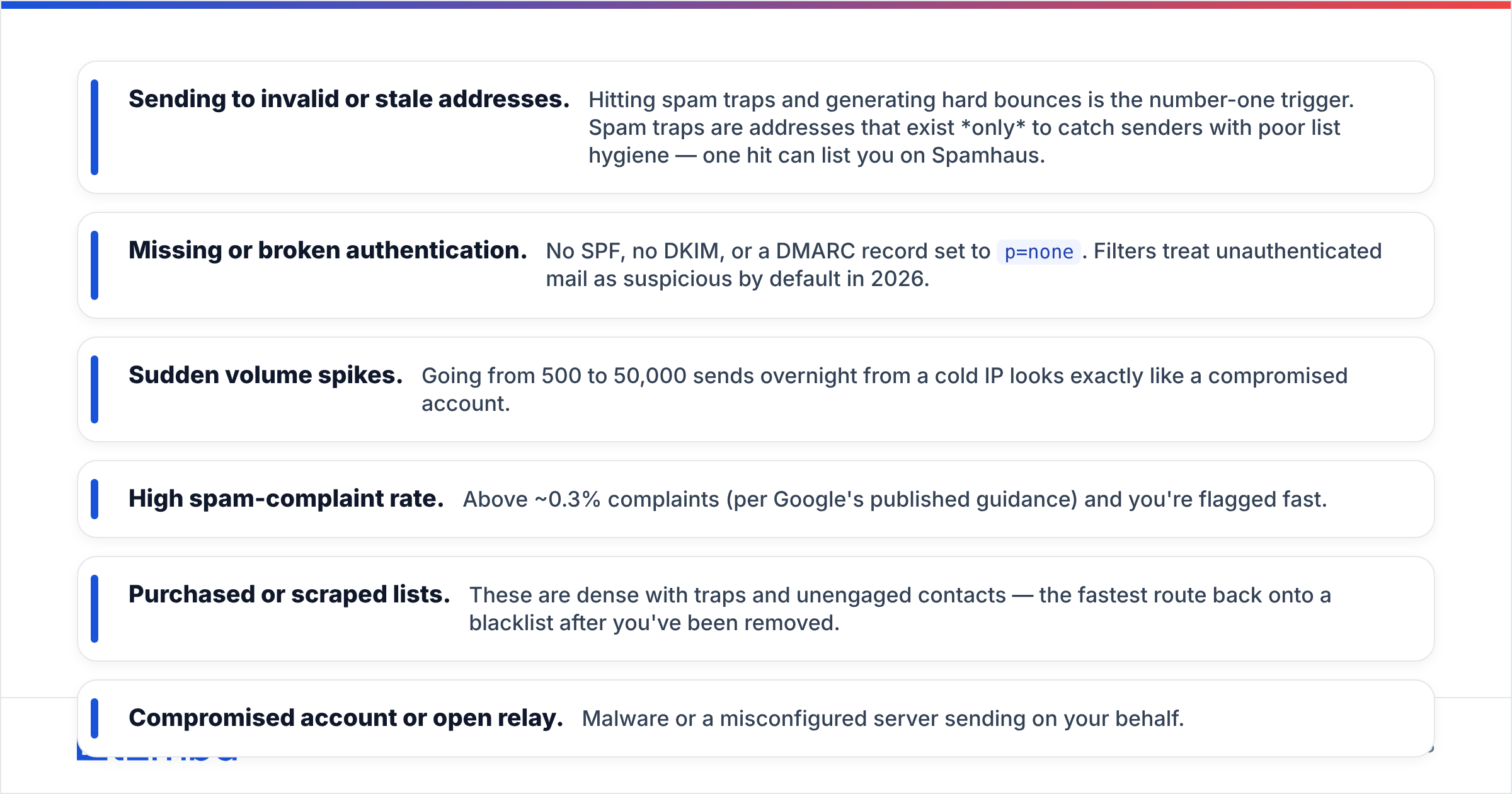
You can't prevent re-listing without knowing what trips the wire. These are the offenders, in rough order of how often they're the culprit:
- Sending to invalid or stale addresses. Hitting spam traps and generating hard bounces is the number-one trigger. Spam traps are addresses that exist only to catch senders with poor list hygiene — one hit can list you on Spamhaus.
- Missing or broken authentication. No SPF, no DKIM, or a DMARC record set to
p=none. Filters treat unauthenticated mail as suspicious by default in 2026. - Sudden volume spikes. Going from 500 to 50,000 sends overnight from a cold IP looks exactly like a compromised account.
- High spam-complaint rate. Above ~0.3% complaints (per Google's published guidance) and you're flagged fast.
- Purchased or scraped lists. These are dense with traps and unengaged contacts — the fastest route back onto a blacklist after you've been removed.
- Compromised account or open relay. Malware or a misconfigured server sending on your behalf.

Notice the pattern: most of these come back to list quality and authentication. Fix those two and you eliminate the majority of listing risk.
How do I prevent getting re-listed?#
Removal is temporary if you don't change behavior. Build these into your sending workflow:
- Verify every address before you send. Real-time and bulk verification catches invalid mailboxes, spam traps, and risky domains before they hurt you. This is the single highest-leverage prevention step.
- Authenticate fully. SPF, DKIM, and DMARC with at least
p=quarantine. Monitor your DMARC reports for spoofing. - Warm up new IPs and domains. Ramp volume over 2–4 weeks. A free email warmup calculator helps you plan the schedule.
- Segment and sunset. Stop mailing contacts who haven't engaged in 90–180 days. Dead weight drags reputation down.
- Watch your metrics. Keep complaints under 0.3% and hard bounces under 2%. Set up Postmaster Tools so you see trouble before a list does.
- Handle catch-all domains carefully. They're ambiguous and risky; use a catch-all verifier to grade them instead of guessing.
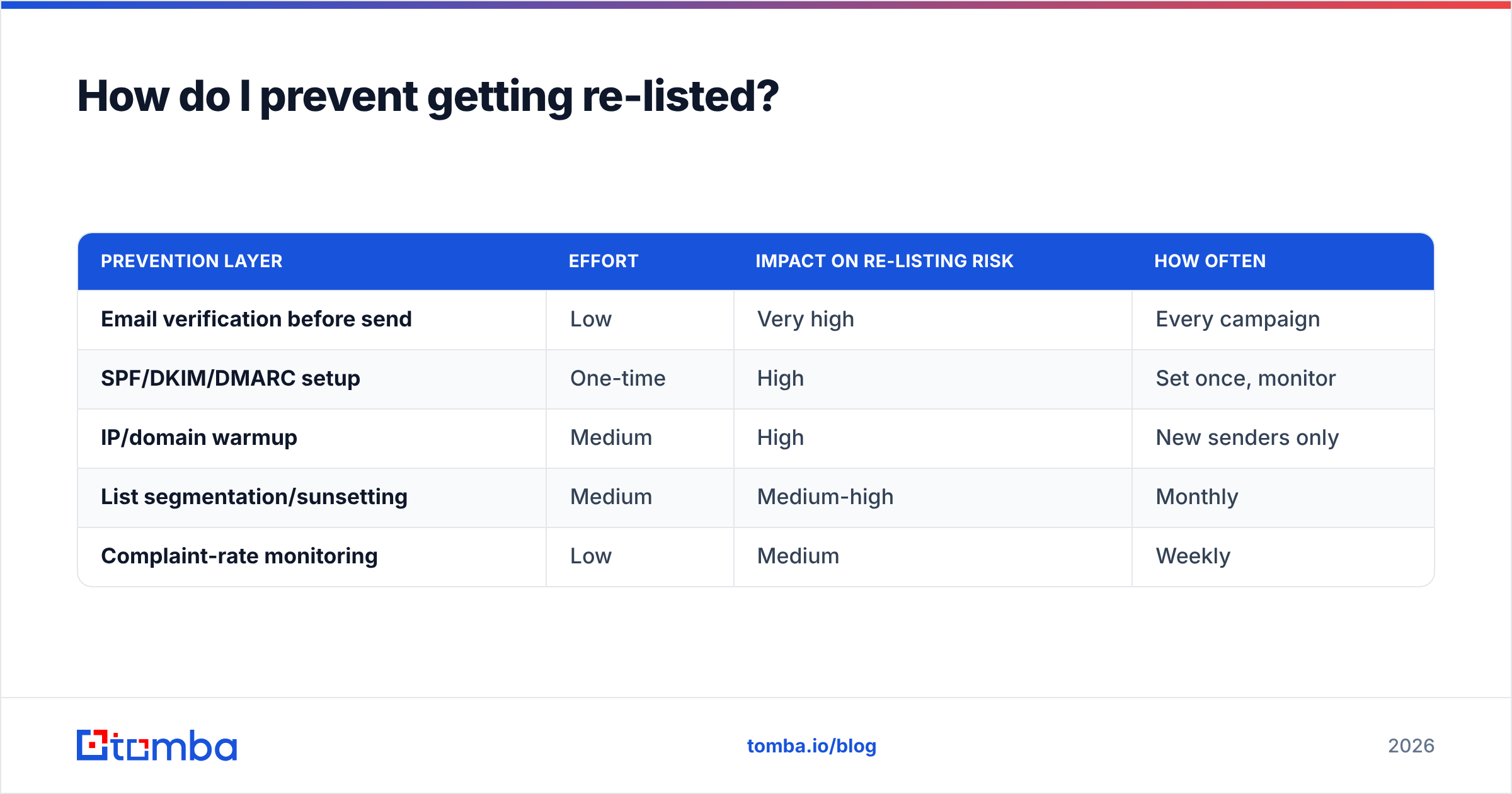
Here's how the prevention layers compare in effort versus impact:
| Prevention layer | Effort | Impact on re-listing risk | How often |
|---|---|---|---|
| Email verification before send | Low | Very high | Every campaign |
| SPF/DKIM/DMARC setup | One-time | High | Set once, monitor |
| IP/domain warmup | Medium | High | New senders only |
| List segmentation/sunsetting | Medium | Medium-high | Monthly |
| Complaint-rate monitoring | Low | Medium | Weekly |
Should I just buy a new IP or domain instead?#
Short answer: no — not as your first move. Switching IPs or domains to escape a blacklist is a band-aid that often makes things worse.
A brand-new IP has no reputation, so you start from zero and have to warm it up anyway. Worse, if you migrate without fixing your list hygiene or authentication, you'll list the new asset within days and now you've burned two. Filters also increasingly correlate domains, IPs, and even payment fingerprints, so "domain hopping" gets detected.
Buy a fresh IP/domain only when: the existing one carries a long, irreparable bad-reputation history; you've already fixed your sending practices; and you commit to a proper warmup. Otherwise, delist the asset you have and repair it — it's cheaper and faster.
When is professional help worth it?#
For a single public-list listing with an obvious cause, you can handle blacklist removal yourself in an afternoon. Consider outside help when:
- You're stuck on a Google or Microsoft internal filter with no public form and weeks of degraded delivery.
- You're listed across many DNSBLs simultaneously, suggesting a compromised server or relay.
- You send high volume where downtime costs real revenue and you can't afford trial-and-error.
Even then, the root-cause fixes — verification, authentication, segmentation — are the same. Tooling does the heavy lifting; consultants mostly enforce discipline you can build in-house.
Putting it all together#
Blacklist removal isn't a single button — it's diagnose, fix, request, prevent. Identify the exact list, kill the root cause (almost always dirty data or broken authentication), submit an honest delisting request to the right page, then ramp back up slowly. The senders who never get listed again are the ones who treat list hygiene as routine, not as cleanup after a disaster.
The cheapest insurance against re-listing is sending only to addresses you've confirmed are real. Run your prospect and customer lists through the Tomba Email Finder and its built-in verification before your next campaign — you'll find valid, deliverable contacts, drop the invalid ones that trip spam traps, and keep your sending reputation clean. Plans start free with 25 searches a month, and paid tiers begin at $49/mo; see full Tomba pricing to match a plan to your volume. Clean data in, no blacklists out.
// get started
Find, verify and enrich your first contacts today
Start on the free plan with 25 searches a month, then scale when your team is ready.
Free plan · No credit card required · GDPR & CCPA
// about the author