Bulk Emailing in 2026: The Complete Guide to Mass Email
Sending thousands of emails without torching your domain is a system, not a button. Here's how bulk emailing actually works in 2026.
Bulk emailing is the practice of sending the same (or lightly personalized) message to a large list of recipients at once. Done well, it's how newsletters, product announcements, and cold outreach reach thousands of inboxes. Done badly, it's how you get your domain blacklisted in an afternoon. The gap between those two outcomes is almost entirely process — not the size of your send button.
TL;DR#
- Bulk emailing is a system, not a feature. List hygiene, authentication, warmup, and segmentation matter more than the tool you press send in.
- Verify before you send. A dirty list with 15% invalid addresses will tank your sender reputation faster than any subject line can save it.
- Authenticate your domain with SPF, DKIM, and DMARC — in 2026 the major mailbox providers reject or junk unauthenticated bulk mail by default.
- Marketing blasts and cold outreach are different sports. Use an ESP for opted-in lists; use a dedicated cold-email platform with rotating inboxes for prospecting.
- Warm up new domains and inboxes over 3–6 weeks before sending volume, or expect the spam folder.
What is bulk emailing?#
Bulk emailing means delivering one message to many recipients in a single coordinated campaign. Think of it like a printing press versus a typewriter: instead of composing each letter by hand, you set the type once and run thousands of copies. The catch is that email providers can tell the difference between a press run people asked for and one they didn't — and they treat the two very differently.
There are three broad flavors, and conflating them is the most common reason campaigns fail:
- Transactional bulk email — receipts, password resets, shipping alerts. Triggered by user action, almost always delivered, rarely the problem.
- Marketing bulk email — newsletters, promotions, announcements sent to people who opted in. Governed by consent law and engagement metrics.
- Cold bulk email — outreach to prospects who haven't opted in. Legal in B2B contexts under most jurisdictions if done correctly, but the riskiest for deliverability.
Each type lives on different infrastructure. A receipt and a cold pitch should never leave from the same domain.

Why does bulk emailing wreck deliverability so easily?#
Because mailbox providers score you, not your message. Every time you hit send, Gmail and Outlook record what happens next: did people open it, reply, delete it unread, or mark it as spam? That history becomes your sender reputation, and a low reputation means even your good mail lands in junk.
The fastest ways to destroy reputation during a bulk send:
- Sending to invalid addresses. Hard bounces above ~2% signal a purchased or stale list. Providers notice.
- Spam-trap hits. Old lists contain recycled addresses that exist only to catch spammers. One hit can blacklist a domain.
- Low engagement. If nobody opens or replies, providers assume nobody wanted the mail.
- No authentication. Unsigned mail looks like spoofing.
- Volume spikes. Going from 50 to 5,000 sends overnight on a cold domain is a textbook spam pattern.
This is why list verification isn't optional. Running your list through an email verifier before a campaign removes the invalid and risky addresses that would otherwise count against you. It's the single highest-leverage step in the entire process, and it's cheap relative to the cost of a burned domain.
How do you prepare a list for bulk emailing?#
Treat list prep as a pipeline with four gates. Skip one and the rest lose value.
- Source legitimately. Build from opt-ins, your CRM, or compliant B2B discovery — not scraped dumps of unknown provenance. If you're prospecting, a bulk email finder that returns verified addresses from real data sources beats a marketplace list of dubious origin.
- Verify every address. Check syntax, domain MX records, mailbox existence, and catch-all status. Remove hard invalids; flag catch-alls and risky addresses for a separate, slower segment.
- Deduplicate and normalize. Strip duplicates, fix casing, and remove role accounts (info@, sales@) that rarely engage and often complain.
- Segment by intent. A 50,000-row list is not one audience. Split by industry, behavior, or stage so your message and send volume match each group.
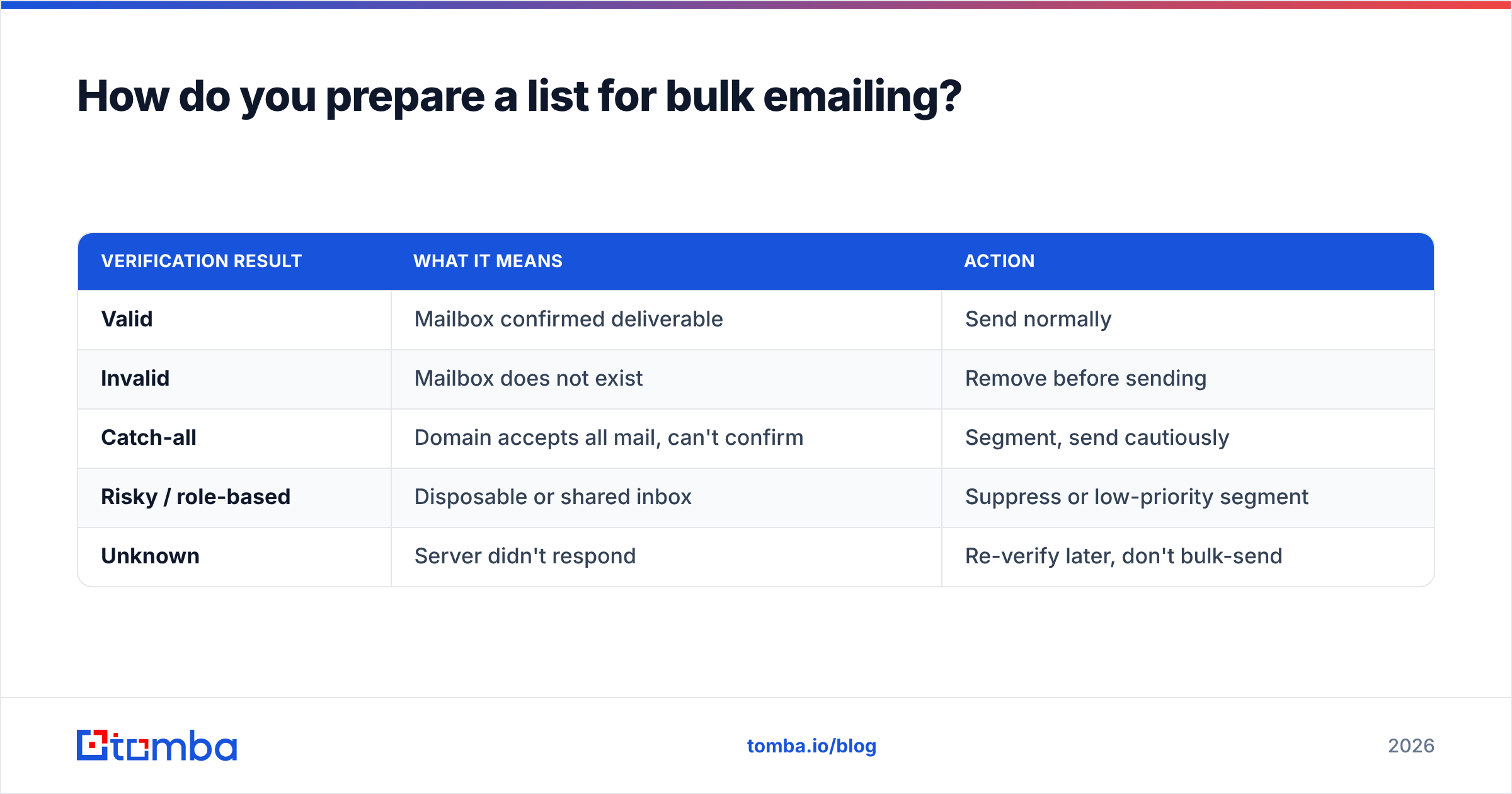
Here's how the verification states typically break down and what to do with each:
| Verification result | What it means | Action |
|---|---|---|
| Valid | Mailbox confirmed deliverable | Send normally |
| Invalid | Mailbox does not exist | Remove before sending |
| Catch-all | Domain accepts all mail, can't confirm | Segment, send cautiously |
| Risky / role-based | Disposable or shared inbox | Suppress or low-priority segment |
| Unknown | Server didn't respond | Re-verify later, don't bulk-send |
A list that's 95%+ valid after this process behaves completely differently from a raw one. Your bounce rate drops, your engagement rate climbs because real people receive the mail, and providers reward the pattern.
Marketing platform vs cold-email tool: which do you need?#
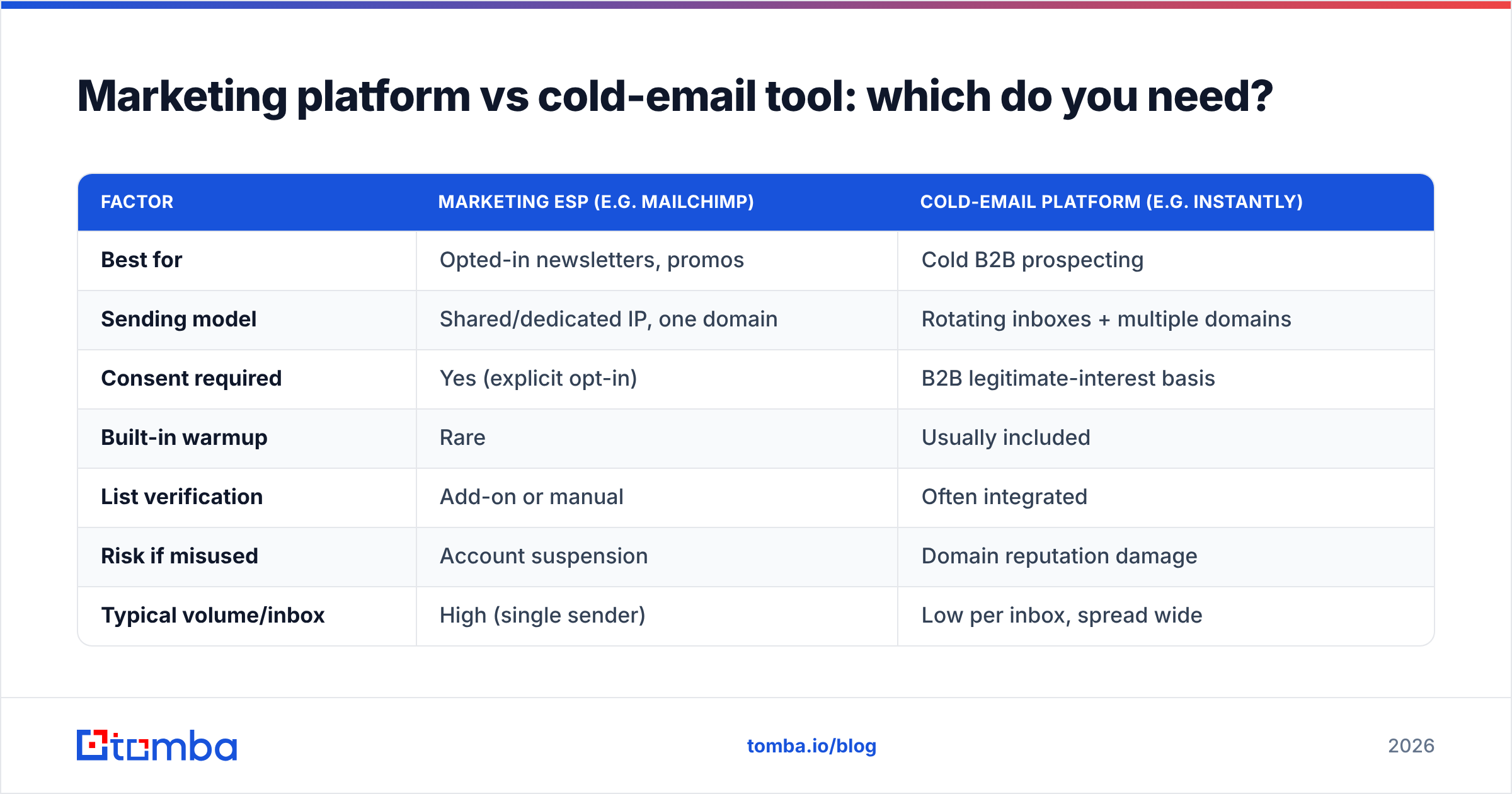
Short answer: it depends on consent. If your recipients opted in, use a traditional email service provider (ESP). If they didn't, a marketing ESP will suspend your account the moment complaints arrive — you need infrastructure built for cold outreach instead.
| Factor | Marketing ESP (e.g. Mailchimp) | Cold-email platform (e.g. Instantly) |
|---|---|---|
| Best for | Opted-in newsletters, promos | Cold B2B prospecting |
| Sending model | Shared/dedicated IP, one domain | Rotating inboxes + multiple domains |
| Consent required | Yes (explicit opt-in) | B2B legitimate-interest basis |
| Built-in warmup | Rare | Usually included |
| List verification | Add-on or manual | Often integrated |
| Risk if misused | Account suspension | Domain reputation damage |
| Typical volume/inbox | High (single sender) | Low per inbox, spread wide |
The mistake that costs people the most: running cold outreach through a marketing ESP like Mailchimp because it's familiar. Those platforms are tuned for permission-based mail and will flag you fast. Conversely, blasting an opted-in newsletter through cold-email infrastructure with rotating throwaway domains looks suspicious to recipients who recognize your brand.
If you want a deeper teardown of dedicated sending tools, the Instantly alternative comparison breaks down where each platform fits.
How do you authenticate a domain for bulk sending?#
Authentication proves you are who your "From" address claims. Without it, in 2026, bulk mail to Gmail and Outlook is rejected or junked by default. Three records do the work:
- SPF (Sender Policy Framework): lists which servers may send mail for your domain. Publish it as a DNS TXT record.
- DKIM (DomainKeys Identified Mail): cryptographically signs each message so the recipient can confirm it wasn't altered.
- DMARC (Domain-based Message Authentication): tells providers what to do when SPF or DKIM fails, and where to send reports.
Set all three before your first bulk send. You can confirm your SPF record resolves correctly with a free SPF checker, then monitor delivery health through Google Postmaster Tools, which shows your domain reputation, spam rate, and authentication pass rate straight from Gmail's perspective. Treat a spam-complaint rate above 0.3% as a five-alarm fire — Gmail's published bulk-sender guidelines draw the line there.

What is email warmup and do you really need it?#
Yes, if your domain or inbox is new. Warmup is the gradual ramp of sending volume that teaches mailbox providers your domain is a real, trusted sender rather than a spam cannon that appeared overnight.
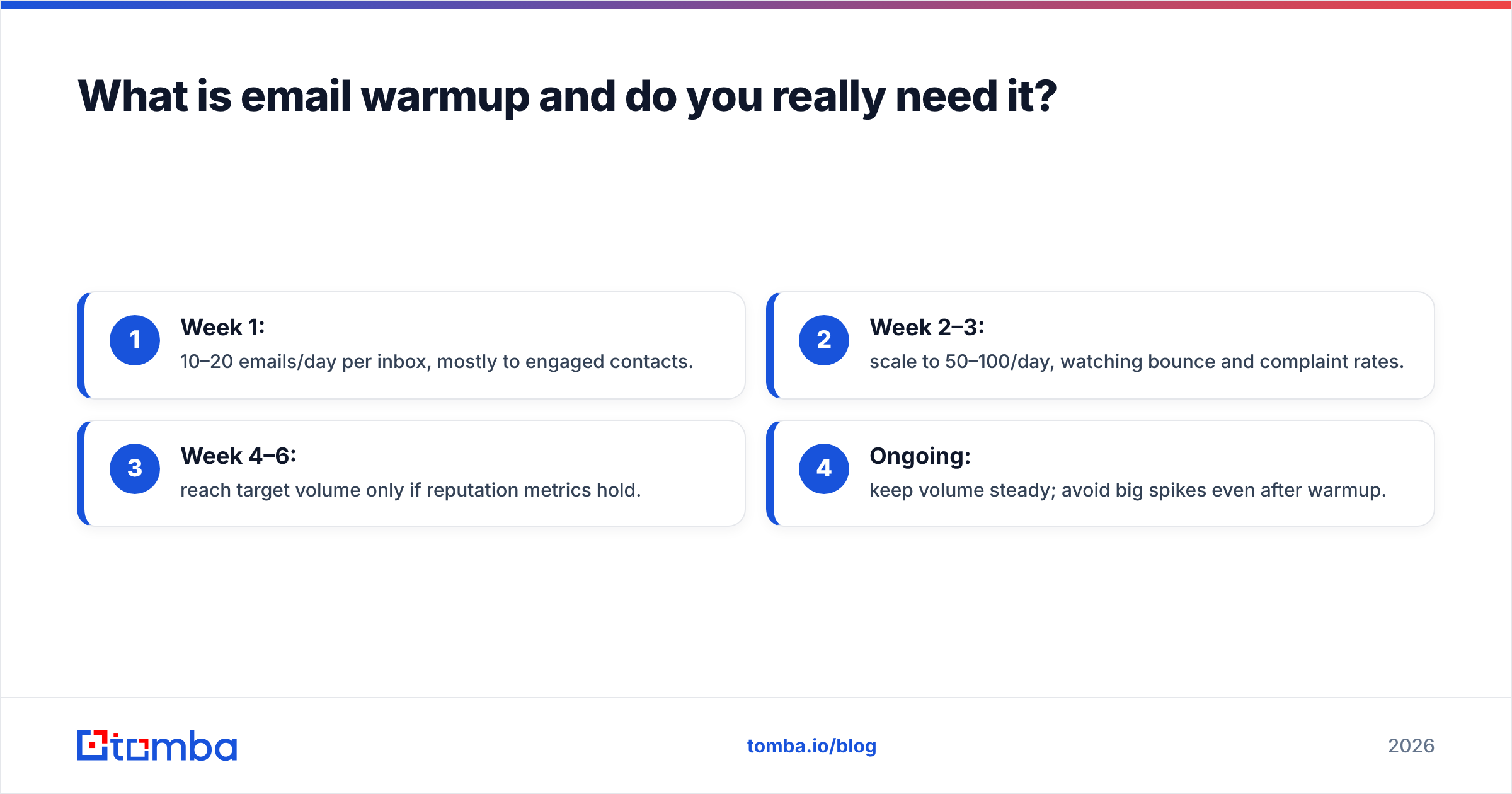
The analogy: you don't sprint a marathon on day one. You build mileage. A cold domain that suddenly sends 3,000 messages looks exactly like a compromised account, so providers throttle or junk it. Warmup avoids that by starting small — 10 to 20 sends a day — and increasing roughly 30–50% weekly while engagement (opens, replies) stays healthy.
A realistic ramp:
- Week 1: 10–20 emails/day per inbox, mostly to engaged contacts.
- Week 2–3: scale to 50–100/day, watching bounce and complaint rates.
- Week 4–6: reach target volume only if reputation metrics hold.
- Ongoing: keep volume steady; avoid big spikes even after warmup.
You can model your own ramp with an email warmup calculator before committing to a schedule. If you're running cold outreach across multiple inboxes, spread the volume — ten inboxes sending 40 each is far safer than one inbox sending 400.
What are the rules and laws for bulk emailing?#
Consent and transparency, enforced differently by region. You don't need to be a lawyer, but ignoring these gets campaigns blocked and companies fined.
- CAN-SPAM (US): requires a real physical address, a working unsubscribe link honored within 10 days, accurate headers, and no deceptive subject lines. Applies to commercial mail.
- GDPR (EU): demands a lawful basis to process personal data. B2B cold email often relies on "legitimate interest," but you must still offer opt-out and respect requests.
- CASL (Canada): among the strictest — generally requires express or implied consent before sending.
Across all of them, two rules never change: make unsubscribing easy, and stop emailing people who ask you to. A clean suppression list is both a legal safeguard and a deliverability asset, because people who can't unsubscribe hit the spam button instead — and that's the metric that hurts you most.
How do you measure whether bulk emailing is working?#
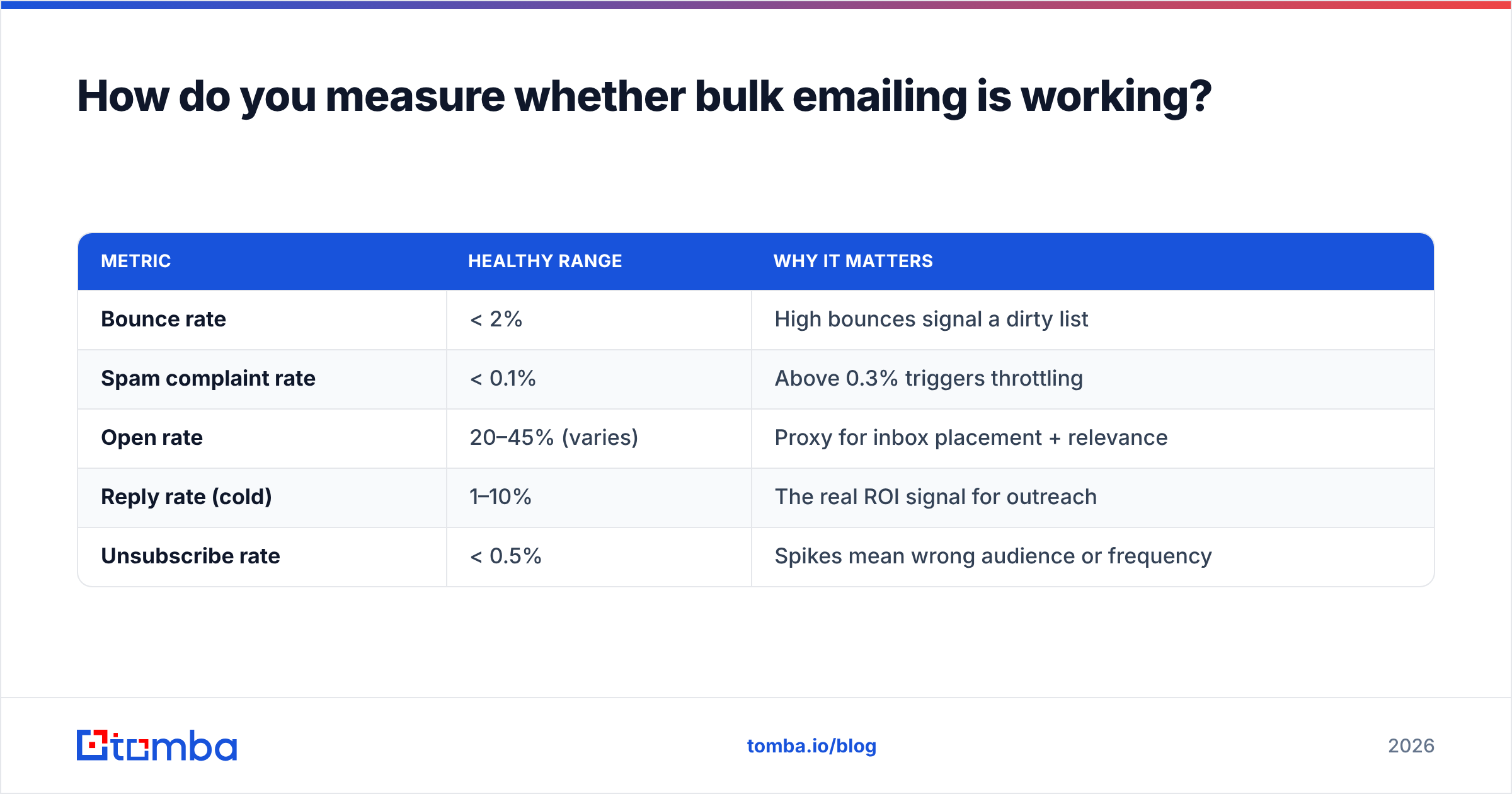
Watch reputation metrics and engagement metrics together — one without the other lies to you. A campaign can show a great open rate while quietly burning your domain through bounces.
| Metric | Healthy range | Why it matters |
|---|---|---|
| Bounce rate | < 2% | High bounces signal a dirty list |
| Spam complaint rate | < 0.1% | Above 0.3% triggers throttling |
| Open rate | 20–45% (varies) | Proxy for inbox placement + relevance |
| Reply rate (cold) | 1–10% | The real ROI signal for outreach |
| Unsubscribe rate | < 0.5% | Spikes mean wrong audience or frequency |
Before you scale a winning campaign, confirm the message itself isn't tripping filters. A quick pass through a spam checker catches trigger words, broken links, and image-heavy templates that depress placement. And review trends over time, not single sends — one good campaign doesn't prove a healthy domain, and one bad one doesn't doom it, but the slope tells the truth.
What does a safe bulk emailing workflow look like end to end?#
Put the pieces together and the sequence is always the same, whether you're sending 500 or 50,000:
- Build and source the list from compliant channels.
- Verify every address; remove invalids, segment catch-alls.
- Authenticate the domain with SPF, DKIM, and DMARC.
- Warm up new domains and inboxes over several weeks.
- Segment by intent and personalize at least the opening line.
- Send in batches, ramping volume rather than spiking.
- Monitor bounces, complaints, and replies daily.
- Suppress and clean continuously based on what you learn.
Skip steps 2 through 4 and the rest is wasted effort — you'll be optimizing copy while your domain quietly slides into junk. Vendor docs like HubSpot's email deliverability guide and the public review aggregator G2 are useful for vetting specific platforms once your process is sound.
For the strategy side of consistently landing in the primary inbox, our breakdown of email deliverability goes deeper on the technical levers.
The bottom line#
Bulk emailing rewards discipline and punishes shortcuts. The senders who reach inboxes at scale aren't the ones with the cleverest subject lines — they're the ones who verify their lists, authenticate their domains, warm up patiently, and watch their metrics like a hawk. The tooling is the easy part; the system around it is what separates a campaign that converts from one that gets you blacklisted.
Start where the leverage is highest: your list. Garbage addresses are the root cause of most deliverability disasters, and they're entirely preventable. Use the Tomba Email Finder to source verified, professional addresses from real data sources before you ever load a campaign — so the only people getting your bulk email are the ones who can actually receive it. Pair it with verification on the way in, and you've solved the hardest part of bulk emailing before you press send. Check Tomba pricing — the free tier covers 25 searches a month to test it on your own list.
// get started
Find, verify and enrich your first contacts today
Start on the free plan with 25 searches a month, then scale when your team is ready.
Free plan · No credit card required · GDPR & CCPA
// about the author