How to Check a Valid Email Address in 2026 (Free + API)
Learn how to check a valid email address fast - syntax, MX, SMTP, and catch-all checks - plus when to use free tools vs a verification API at scale.
TL;DR
- To check a valid email address you need four layers: syntax, domain/MX records, SMTP mailbox response, and a catch-all assessment. Any single check on its own is misleading.
- Free, single-address checkers are fine for a one-off lookup. For lists, an API or bulk verifier is the only sane option.
- A "valid" syntax does not mean a deliverable inbox. Most bounces come from addresses that pass regex but fail at the mailbox level.
- Catch-all domains accept everything at the SMTP layer, so they need probability scoring, not a yes/no.
- Verifying before you send protects your sender reputation and keeps your bounce rate under the 2-3% threshold mailbox providers punish.
What does it mean to check a valid email address?#
Checking a valid email address means confirming that a mailbox can actually receive mail - not just that the string looks like an email. Those are two very different claims, and conflating them is the single most common reason cold campaigns torch their domain reputation.
Think of it like checking whether a house can receive mail. Anyone can write "123 Main St" in the right format (syntax). You can confirm Main St exists on the map (the domain has MX records). But only by knocking on the door do you learn whether anyone lives there to accept the letter (the SMTP mailbox check). Real verification does all three, then makes a judgment call on the houses that "accept all mail no matter what" (catch-all domains).
So when a tool says an address is valid, ask which layer it actually tested. A regex pass is nearly worthless on its own. A full-stack check is what keeps your email deliverability intact.

What are the layers of email validation?#
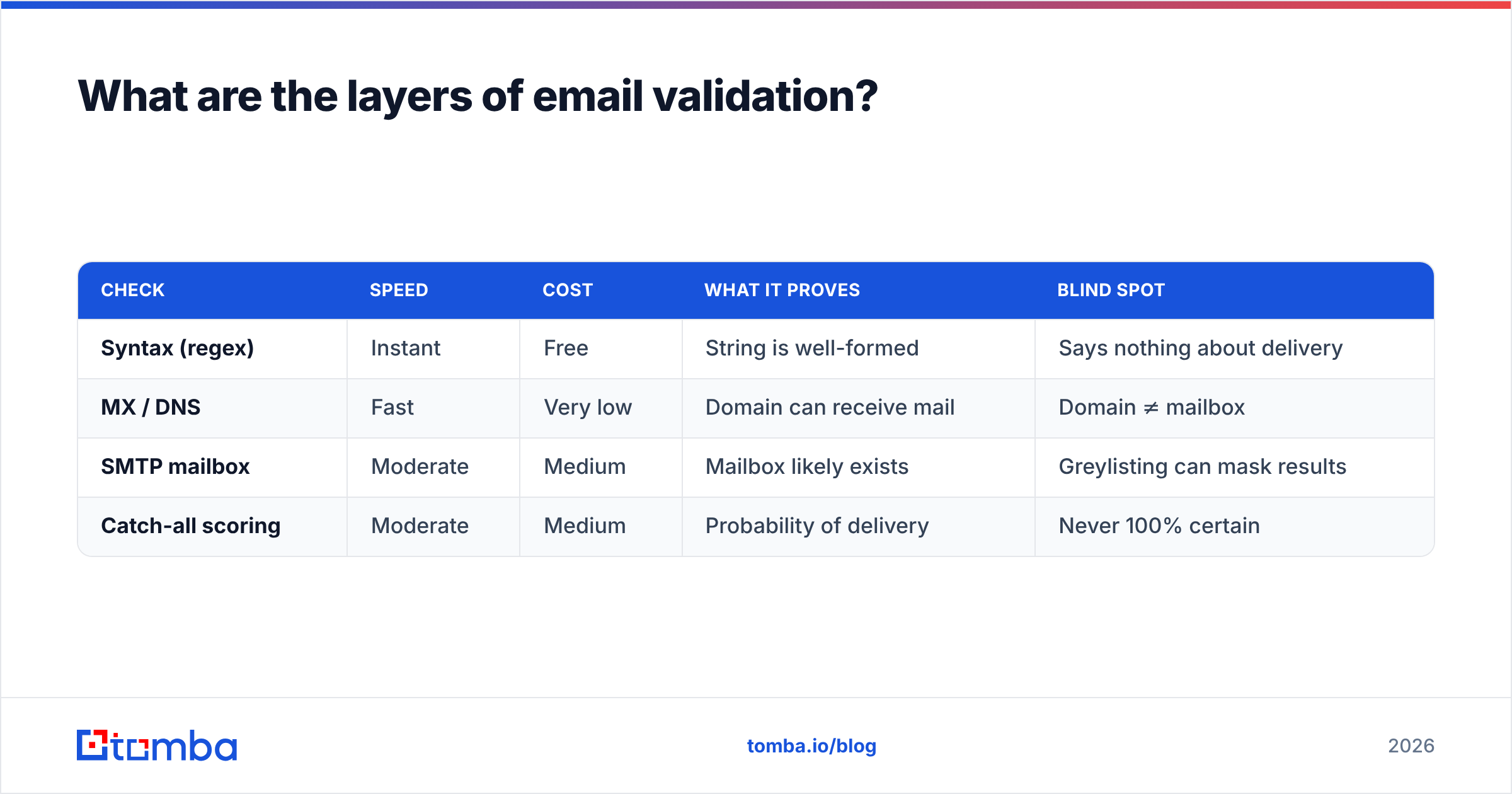
There are four checks, and they run in order from cheapest to most expensive. A good verifier short-circuits as soon as an address fails.
- Syntax check - Does the string follow RFC 5322 rules? Valid local part, single
@, valid domain label. This catches typos likejohn@gmailorjane.doe@@company.com. It is instant and free, but it only filters out the obviously broken. - Domain and MX record check - Does the domain exist, and does it publish Mail Exchange (MX) records that say "send mail here"? No MX record means no mailbox can exist on that domain. This is a DNS lookup, still fast and cheap.
- SMTP mailbox check - The verifier opens a conversation with the receiving mail server and asks, in effect, "do you have a mailbox for this user?" without sending an actual message. The server's response (250 OK vs 550 no such user) is the strongest signal you can get short of sending.
- Catch-all and risk scoring - Some domains answer "yes" to every address to avoid leaking which mailboxes exist. These are catch-all domains. Here a binary answer is impossible, so a good tool returns a confidence score based on patterns, history, and other signals.
Here is how the layers compare on cost, speed, and what each one actually proves.
| Check | Speed | Cost | What it proves | Blind spot |
|---|---|---|---|---|
| Syntax (regex) | Instant | Free | String is well-formed | Says nothing about delivery |
| MX / DNS | Fast | Very low | Domain can receive mail | Domain ≠ mailbox |
| SMTP mailbox | Moderate | Medium | Mailbox likely exists | Greylisting can mask results |
| Catch-all scoring | Moderate | Medium | Probability of delivery | Never 100% certain |
The takeaway: a tool that only does layer 1 is a syntax linter, not an email verifier. When you evaluate an email verifier, confirm it runs all four.
How do you check a single email address for free?#
For a one-off check, use a free, browser-based checker - no account, no API key needed. You paste one address, it runs syntax, MX, and an SMTP probe, and returns a verdict in a few seconds.
This is the right tool when:
- You got one lead from a conference badge and want to confirm it before replying.
- A form submission looks suspicious and you want a quick sanity check.
- You are testing whether a guessed pattern (like
first.last@) resolves before you build on it.
Tomba offers a free email checker that handles exactly this case. You can also generate likely patterns with an email permutator and check the candidates one by one.
The limit is obvious: free single-address tools do not scale. If you have a CSV with 5,000 rows, pasting them one at a time is not a plan. That is where bulk verification and APIs come in - and where the economics flip.
Free tools vs. a verification API: which should you use?#
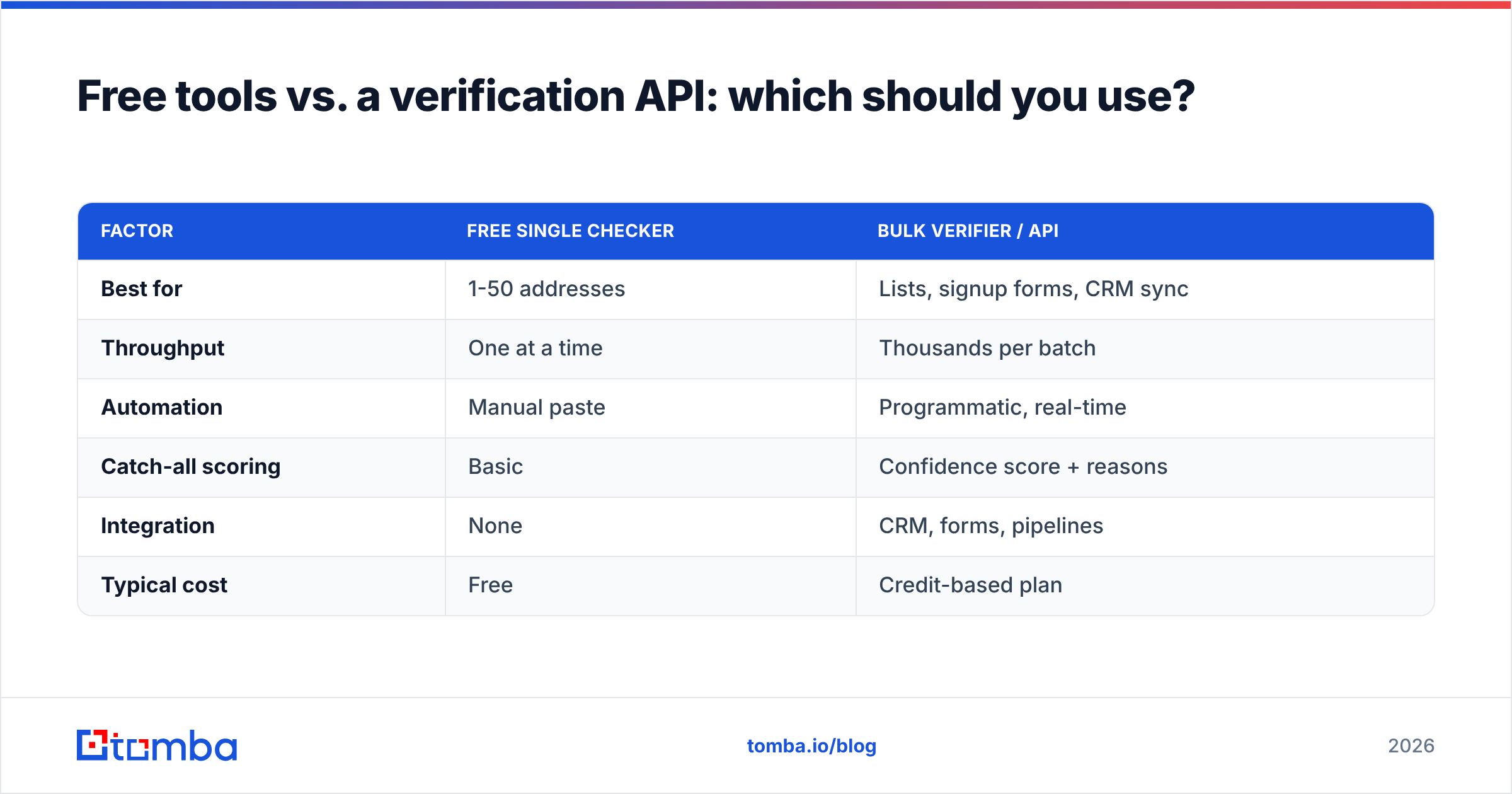
Use a free checker for occasional single lookups; use an API or bulk verifier the moment you have a list. The decision is about volume, automation, and where the verification needs to live (a spreadsheet vs. your signup flow).
| Factor | Free single checker | Bulk verifier / API |
|---|---|---|
| Best for | 1-50 addresses | Lists, signup forms, CRM sync |
| Throughput | One at a time | Thousands per batch |
| Automation | Manual paste | Programmatic, real-time |
| Catch-all scoring | Basic | Confidence score + reasons |
| Integration | None | CRM, forms, pipelines |
| Typical cost | Free | Credit-based plan |
If you are deciding where your volume lands, the Tomba pricing tiers map cleanly to these tiers: a Free plan for 25 searches a month to try it, Starter at $49/mo for steady solo use, Growth at $99/mo for active outbound teams, and Pro at $249/mo when you are verifying at real scale. The point is matching the tool to the volume, not over-buying.
For an engineering team, the email verification API is the cleanest fit: drop a real-time check into your signup form so bad addresses never enter the database in the first place. Prevention beats cleanup every time.
How do you verify a list of emails in bulk?#
To verify a list, upload it to a bulk verifier, let it run all four checks per row, then segment by result before you import anything into your sending tool. Never feed a raw, unverified list straight into a cold email platform.
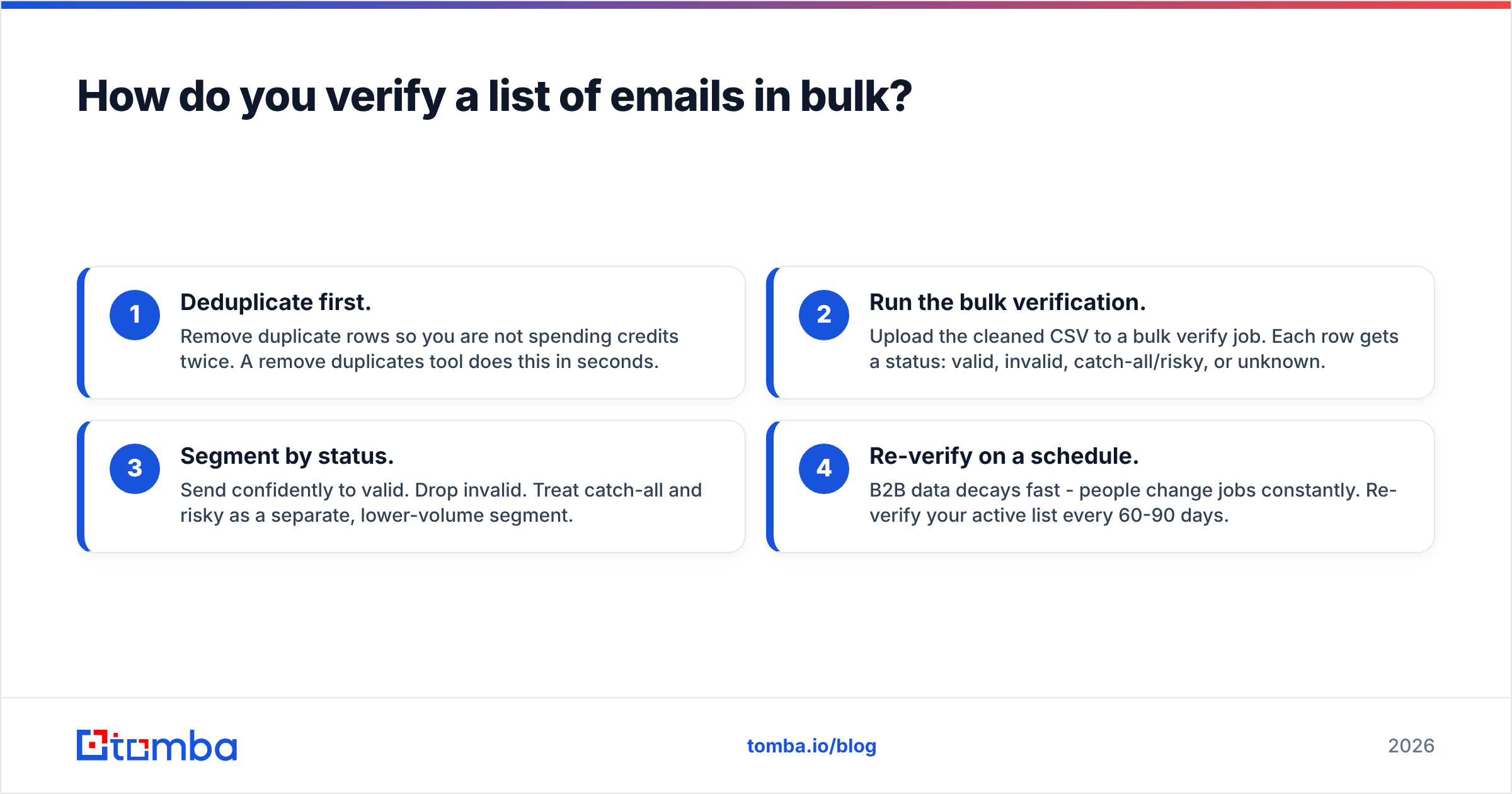
A sensible bulk workflow looks like this:
- Deduplicate first. Remove duplicate rows so you are not spending credits twice. A remove duplicates tool does this in seconds.
- Run the bulk verification. Upload the cleaned CSV to a bulk verify job. Each row gets a status: valid, invalid, catch-all/risky, or unknown.
- Segment by status. Send confidently to valid. Drop invalid. Treat catch-all and risky as a separate, lower-volume segment.
- Re-verify on a schedule. B2B data decays fast - people change jobs constantly. Re-verify your active list every 60-90 days.
According to HubSpot, marketing databases degrade by roughly 22-30% per year as contacts move roles, so a list you verified six months ago is already partly stale. Treat verification as maintenance, not a one-time event.

What is a catch-all email and why is it tricky?#
A catch-all domain is configured to accept mail for every possible address, so the SMTP check returns "OK" even for mailboxes that do not exist. That makes a clean yes/no impossible - the server refuses to tell you the truth.
Imagine a mailroom that signs for every package addressed to the building, regardless of whether the named recipient works there. The delivery confirmation tells you nothing about whether the person exists. That is a catch-all.
Because of this, you cannot treat catch-all results as either valid or invalid. The right move is probability scoring: a good catch-all verifier weighs the email's pattern against known formats for that domain, historical engagement, and other signals to return a confidence percentage. You then decide your own risk tolerance - some teams send to high-confidence catch-alls, others skip them entirely. What you should never do is dump unscored catch-alls into a large send and hope.
How does verification protect your sender reputation?#
Verification keeps your bounce rate low, and your bounce rate is one of the first things mailbox providers use to judge whether you are a spammer. High bounces signal that you are mailing a stale or scraped list - exactly the behavior filters are built to punish.
Mailbox providers like Gmail and Outlook track your sender reputation the way a bank tracks a credit score. Each hard bounce is a missed payment. Cross roughly a 2-3% bounce rate and you start landing in spam folders - not just for the bad addresses, but for your good contacts too. Google's own sender guidelines explicitly tell bulk senders to keep error rates low and validate their lists.
So verification is not a nice-to-have hygiene step. It is the difference between a campaign that reaches inboxes and one that quietly dies in the spam folder while your domain reputation erodes. Pair it with proper authentication - check your records with an SPF checker - and you have covered the two biggest deliverability levers.
What is the difference between finding and verifying an email?#
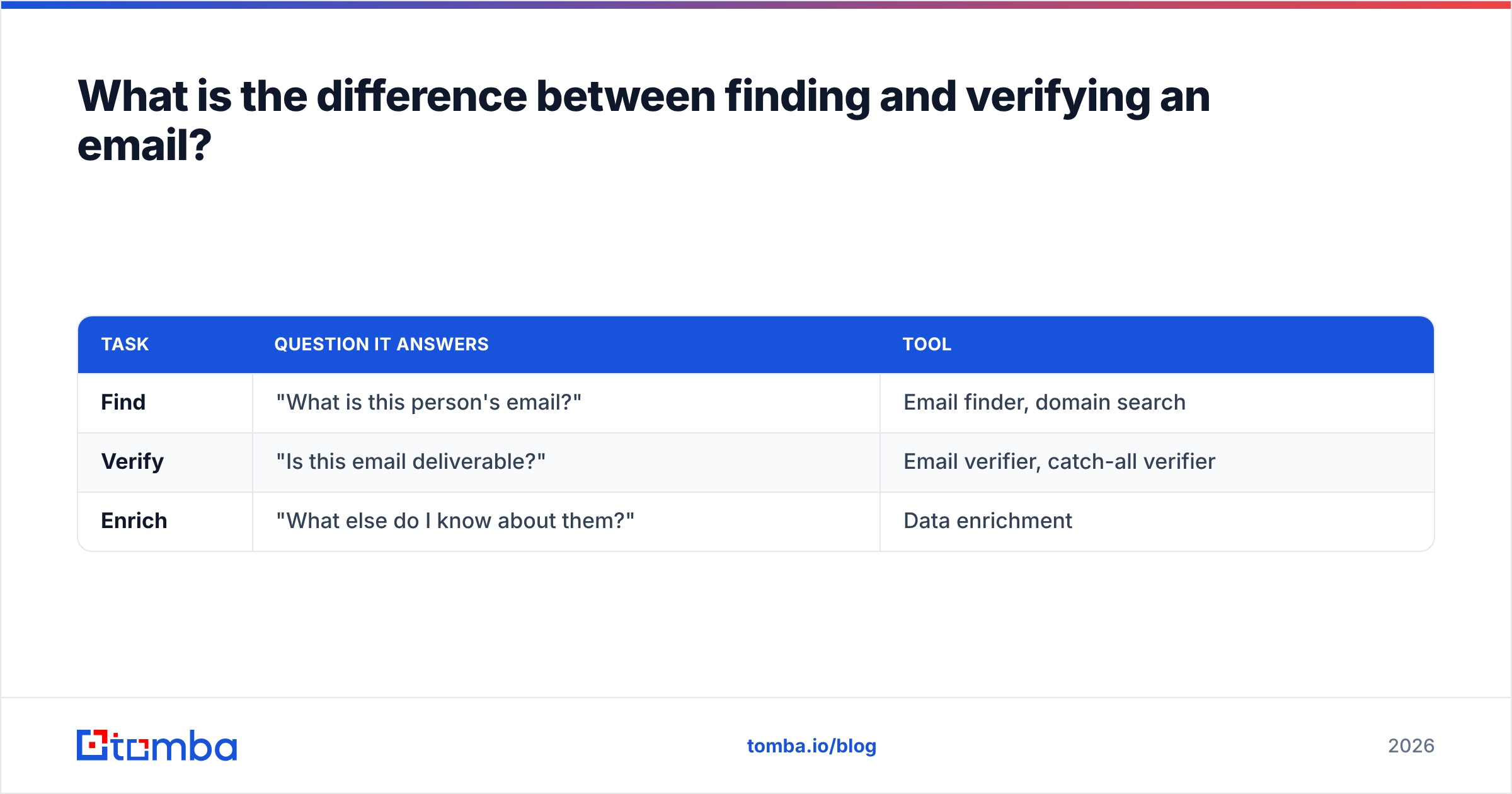
Finding an email gives you a candidate address; verifying it confirms that candidate is real and reachable. They are sequential steps, and skipping the second one is how good prospect lists turn into bounce magnets.
- Finding - You have a name and a company, and you need the address. An email finder or domain search returns the most likely address based on known company patterns and data sources.
- Verifying - You have an address (found, exported, or uploaded) and need to confirm it before sending.
The best workflow does both in one pass: find the address, verify it immediately, and only keep the ones that clear all four checks. Many teams run data enrichment on top to add phone numbers and firmographics, but verification always comes before the first send.
| Task | Question it answers | Tool |
|---|---|---|
| Find | "What is this person's email?" | Email finder, domain search |
| Verify | "Is this email deliverable?" | Email verifier, catch-all verifier |
| Enrich | "What else do I know about them?" | Data enrichment |
Common mistakes when checking email validity#
Even teams that verify make these errors. Avoid them and your bounce rate stays where it should.
- Trusting syntax alone.
ceo@bigcompany.comis perfect syntax and may not exist. Always go past regex. - Verifying once and never again. Data decays. A list verified in January is partly wrong by summer.
- Treating catch-alls as valid. They are unknowns, not confirmations. Score them, segment them.
- Verifying after import. Bad addresses should never reach your sending tool or CRM. Verify before, ideally at the point of capture with an API.
- Ignoring the unknowns. "Unknown" (often from greylisting) is not "valid." Re-check later rather than sending blind.
How do you check a valid email address at scale?#
Start with the free free email checker for one-off lookups, move to a bulk verify job for lists, and wire the Tomba API into your forms and CRM once verification needs to be automatic. The Tomba Email Finder ties the whole loop together - it finds the address, verifies it across syntax, MX, SMTP, and catch-all scoring, and hands you only the addresses worth sending to. Start free with 25 searches a month, and upgrade only when your volume earns it. Verify before you send, protect your reputation, and let your good emails land where they belong.
// get started
Find, verify and enrich your first contacts today
Start on the free plan with 25 searches a month, then scale when your team is ready.
Free plan · No credit card required · GDPR & CCPA
// about the author