Clodura.ai vs SphereScout (2026): Which Sales Tool Wins?
Clodura.ai and SphereScout both promise B2B contact data and prospecting automation—but they win on different fronts. Here's an honest, side-by-side breakdown to help you pick.
Choosing between Clodura.ai and SphereScout comes down to one question: do you want an all-in-one prospecting suite, or a lighter, search-first contact tool? Both pull B2B contact data, both promise time saved on manual research, and both sit in the crowded sales-intelligence market. But they optimize for different buyers.
This is a neutral, hands-on comparison—no vendor spin. We'll look at data coverage, accuracy, pricing, workflow fit, and the gaps each tool leaves open (including where a dedicated finder like Tomba does the job better and cheaper).
TL;DR: Clodura.ai vs SphereScout at a glance#
- Clodura.ai is a full GTM platform: a large contact database, buyer-intent signals, org charts, sequences, and a built-in dialer. Best for teams that want prospecting, enrichment, and outreach under one roof.
- SphereScout is a leaner, search-first prospecting tool focused on finding and exporting verified contacts fast. Best for small teams and solo SDRs who don't need a full sequencing suite.
- Data accuracy is the deciding factor for both—and neither guarantees clean emails at scale. Always run a second-pass verification before you send.
- Pricing: Clodura.ai trends higher with tiered seats and credit caps; SphereScout is cheaper but narrower. If you only need emails, a specialist finder costs far less.
- Our take: Pick Clodura.ai for a bundled workflow, SphereScout for speed and simplicity—but pair either with an accurate email verifier to protect deliverability.
What is Clodura.ai?#
Clodura.ai is a sales-intelligence and prospecting platform that markets itself as an all-in-one GTM engine. Its pitch is breadth: a database of hundreds of millions of B2B contacts, buyer-intent data, technographic filters, org-chart mapping, email sequencing, and a phone dialer—all inside one dashboard.
The appeal is obvious. Instead of stitching a finder, a verifier, an enrichment tool, and a sequencer together, a rep logs into a single app and moves from list-building to first touch without leaving the tab. For a team standardizing its stack, that consolidation reduces context-switching and per-seat sprawl.
The trade-off is also predictable. All-in-one platforms spread engineering effort across many features, so no single module is usually best-in-class. Users on G2 frequently note that database accuracy is strong in some verticals and thin in others, and that credits deplete fast when you run large exports. The dialer and sequencer are convenient but rarely replace a dedicated outreach platform for high-volume teams.
What is SphereScout?#
SphereScout is a search-first B2B prospecting tool. Its focus is narrower and more transactional: search by company, role, or industry, surface matching contacts, verify the essentials, and export. It leans toward the "find and go" workflow rather than the "manage the whole funnel" model that Clodura.ai chases.
That focus is a feature, not a limitation, for the right buyer. Solo founders, agency prospectors, and small SDR pods often don't want a sequencing suite or an intent-data module they'll never open. They want accurate contacts, a clean CSV, and a price that doesn't assume a ten-seat team.
Where SphereScout tends to lose ground is depth. You won't find the same org-chart mapping, intent signals, or native dialer. And like most search-first tools, its verification is a checkpoint, not a guarantee—catch-all domains and role-based addresses still slip through, which is why a separate verification pass matters.
Clodura.ai vs SphereScout: the core comparison#
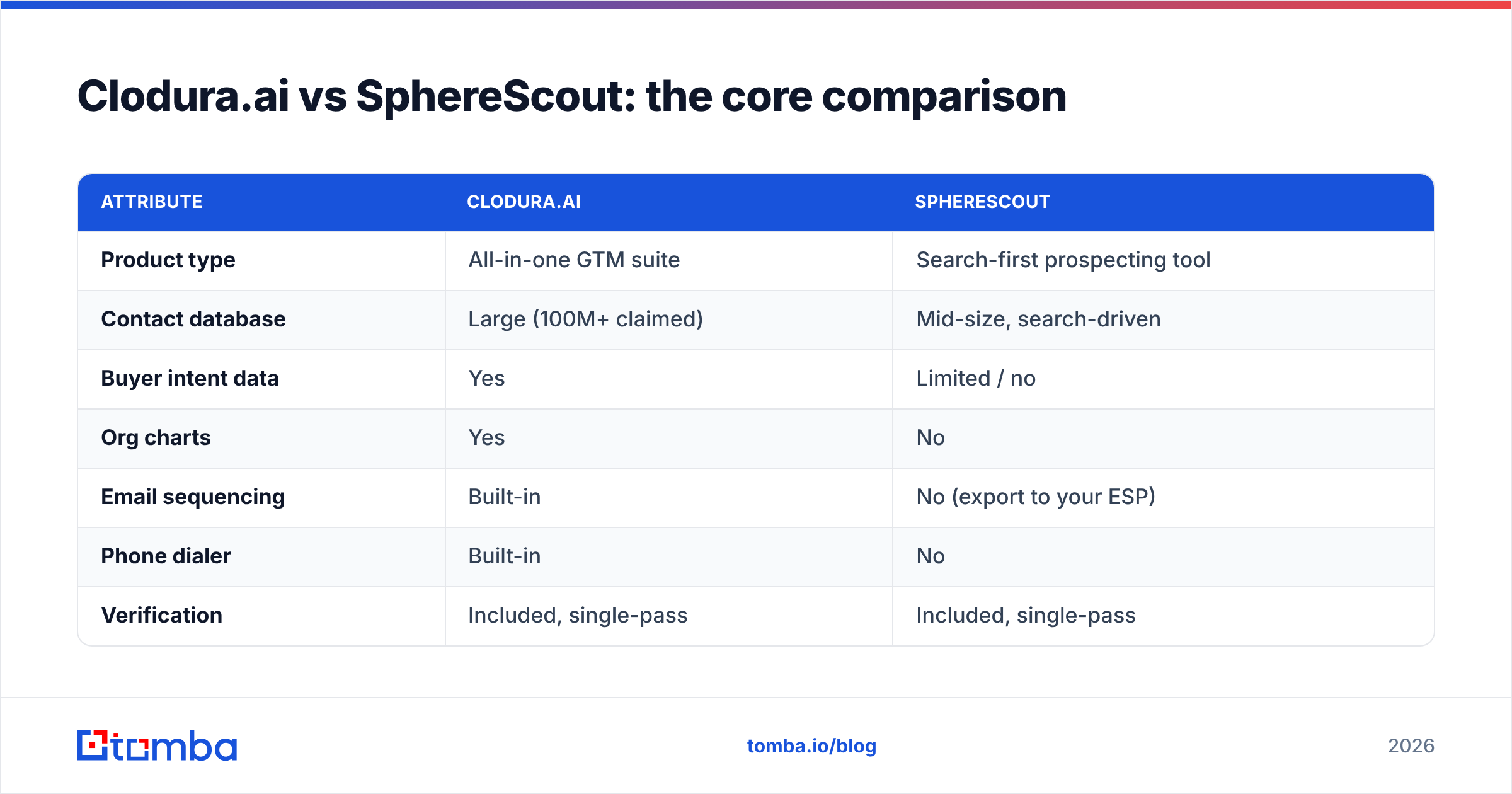
Here's the head-to-head on the attributes that actually change your buying decision.
| Attribute | Clodura.ai | SphereScout |
|---|---|---|
| Product type | All-in-one GTM suite | Search-first prospecting tool |
| Contact database | Large (100M+ claimed) | Mid-size, search-driven |
| Buyer intent data | Yes | Limited / no |
| Org charts | Yes | No |
| Email sequencing | Built-in | No (export to your ESP) |
| Phone dialer | Built-in | No |
| Verification | Included, single-pass | Included, single-pass |
| Best for | Teams wanting one stack | Solo reps & small teams |
| Pricing trend | Higher, seat + credit tiers | Lower, simpler tiers |
| Learning curve | Steeper (many modules) | Shallow |
The pattern is clear: Clodura.ai wins on breadth and workflow consolidation, SphereScout wins on price and simplicity. Neither wins decisively on the one thing that matters most for cold outreach—verified, deliverable email accuracy at scale.
Which tool has more accurate data?#
Neither tool should be trusted blind—accuracy is the recurring complaint across both categories, and it's structural, not a knock on either brand.
Every large database ages. Roughly 25–30% of B2B contact data decays each year as people change jobs, companies rebrand, and mailboxes get deprecated. A platform advertising "100M+ contacts" is advertising volume, not freshness. The number that protects your sender reputation is the percentage of those contacts whose emails are still valid today.
Clodura.ai's larger database gives you more raw matches, but wider coverage often means more stale or unverified rows. SphereScout's tighter, search-driven approach can feel more current on the specific searches it handles well, but its ceiling is lower. In both cases, single-pass verification—the kind bundled into most all-in-one tools—misses catch-all domains, role accounts (info@, sales@), and recently churned addresses.
That's why experienced teams treat any database export as a starting list, then run it through a dedicated verifier before loading it into a sequencer. Bouncing a 5% invalid list can quietly wreck your domain's email deliverability, and no amount of clever copy recovers a mailbox that lands in spam.

How do Clodura.ai and SphereScout price out?#
Pricing is where the two diverge most, and where a specialist tool changes the math entirely.
Clodura.ai uses tiered plans built around seats and monthly credit caps, with intent data and advanced modules gated to higher tiers. That's fair for a suite, but it means you pay for sequencing, dialing, and intent even if you only wanted contacts this month. Credits also burn faster than teams expect once bulk exports start.
SphereScout is generally cheaper and simpler, with fewer tiers and a lighter credit model—appropriate for its narrower scope. But you'll still need a separate sequencer and a real verifier to run outbound properly, so the "cheaper" sticker price isn't the full cost of your stack.
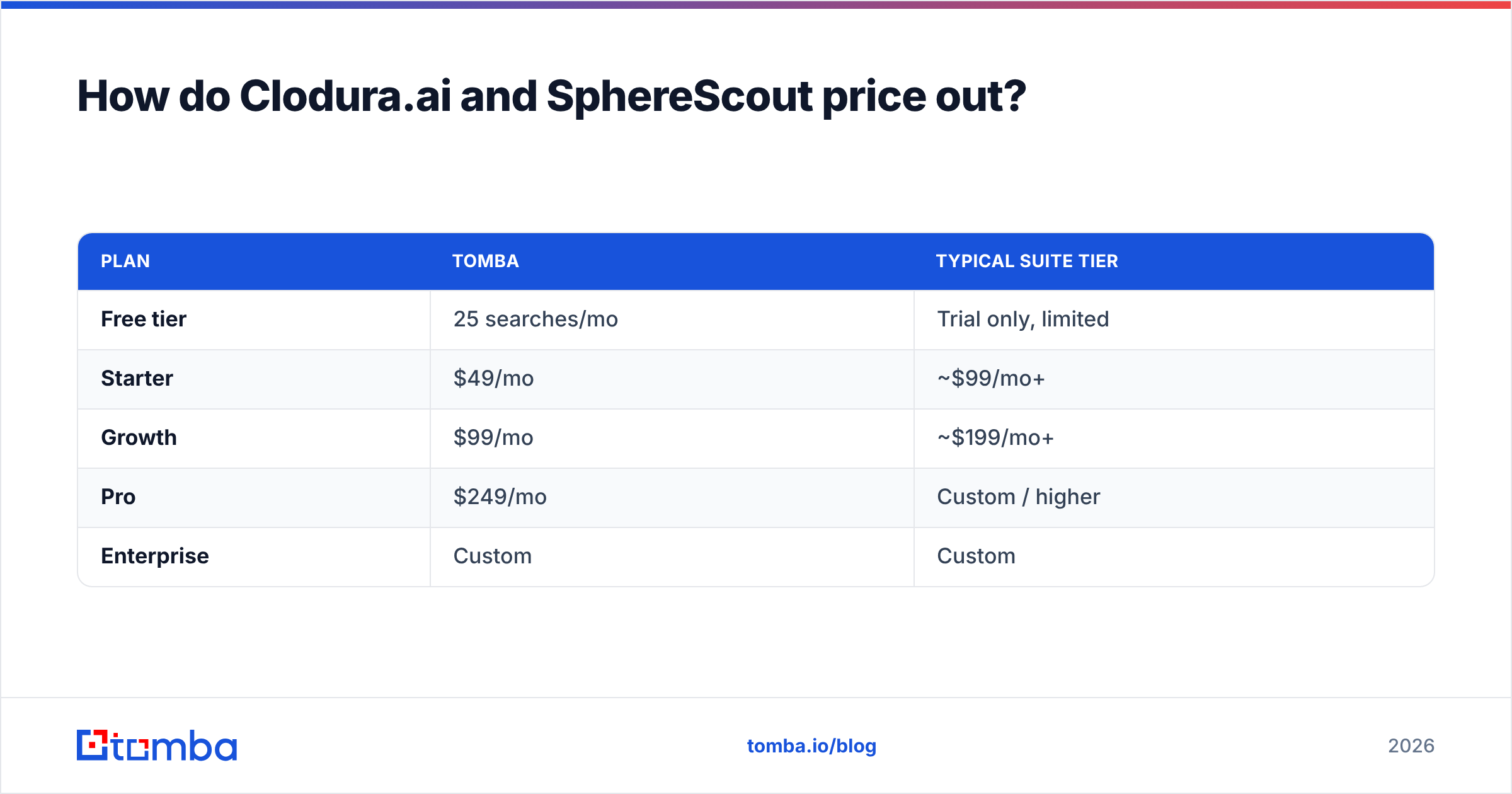
For comparison, a focused finder-and-verifier keeps costs flat and predictable:
| Plan | Tomba | Typical suite tier |
|---|---|---|
| Free tier | 25 searches/mo | Trial only, limited |
| Starter | $49/mo | ~$99/mo+ |
| Growth | $99/mo | ~$199/mo+ |
| Pro | $249/mo | Custom / higher |
| Enterprise | Custom | Custom |
If your real need is "find and verify emails accurately," you don't have to buy an entire GTM suite to get there. See full Tomba pricing for the credit breakdown.
When should you choose Clodura.ai?#
Choose Clodura.ai when consolidation is the point.
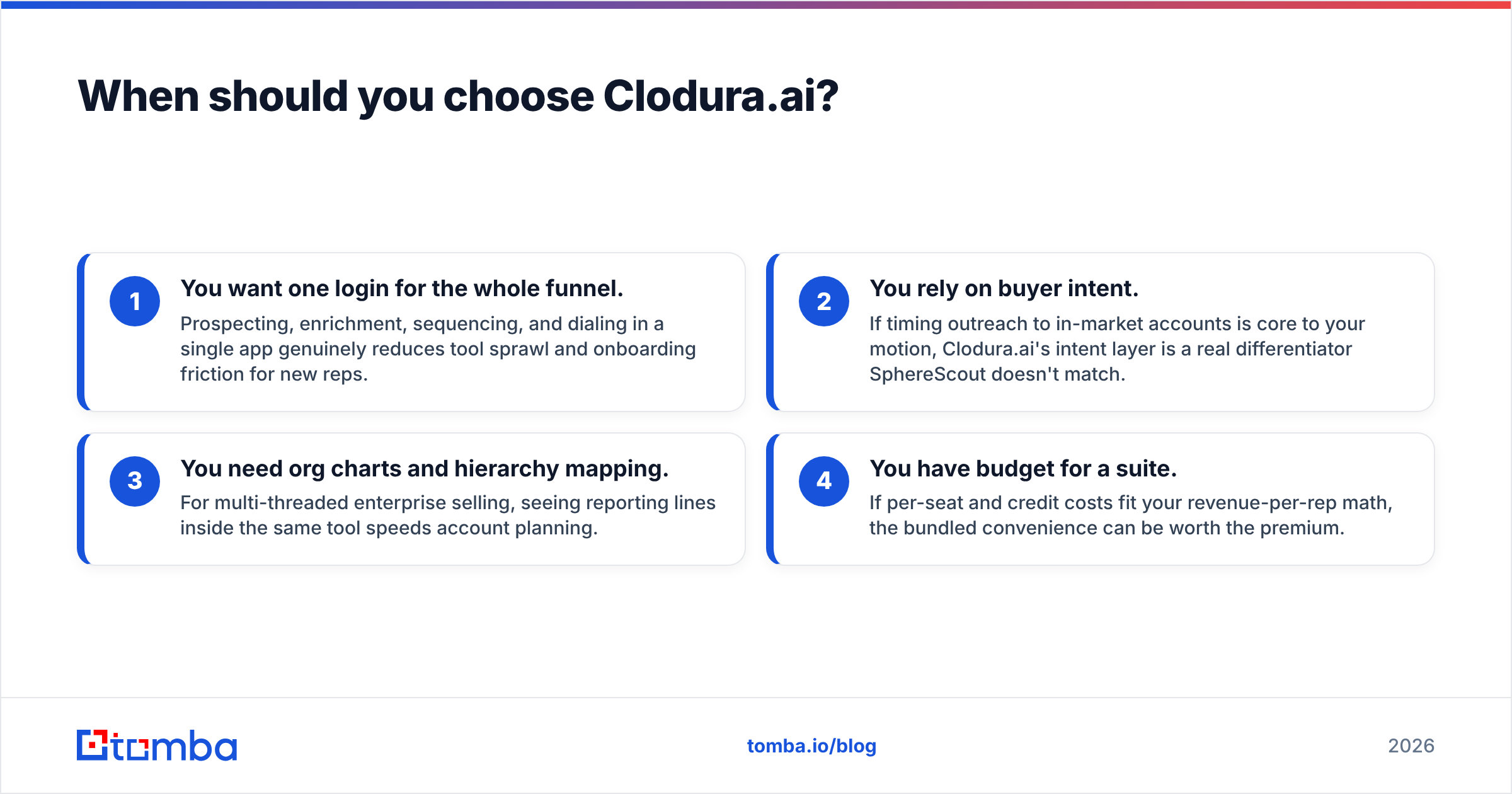
- You want one login for the whole funnel. Prospecting, enrichment, sequencing, and dialing in a single app genuinely reduces tool sprawl and onboarding friction for new reps.
- You rely on buyer intent. If timing outreach to in-market accounts is core to your motion, Clodura.ai's intent layer is a real differentiator SphereScout doesn't match.
- You need org charts and hierarchy mapping. For multi-threaded enterprise selling, seeing reporting lines inside the same tool speeds account planning.
- You have budget for a suite. If per-seat and credit costs fit your revenue-per-rep math, the bundled convenience can be worth the premium.
Just plan to verify exports separately—the bundled single-pass check isn't enough for high-volume cold email.
When should you choose SphereScout?#
Choose SphereScout when speed and simplicity beat breadth.
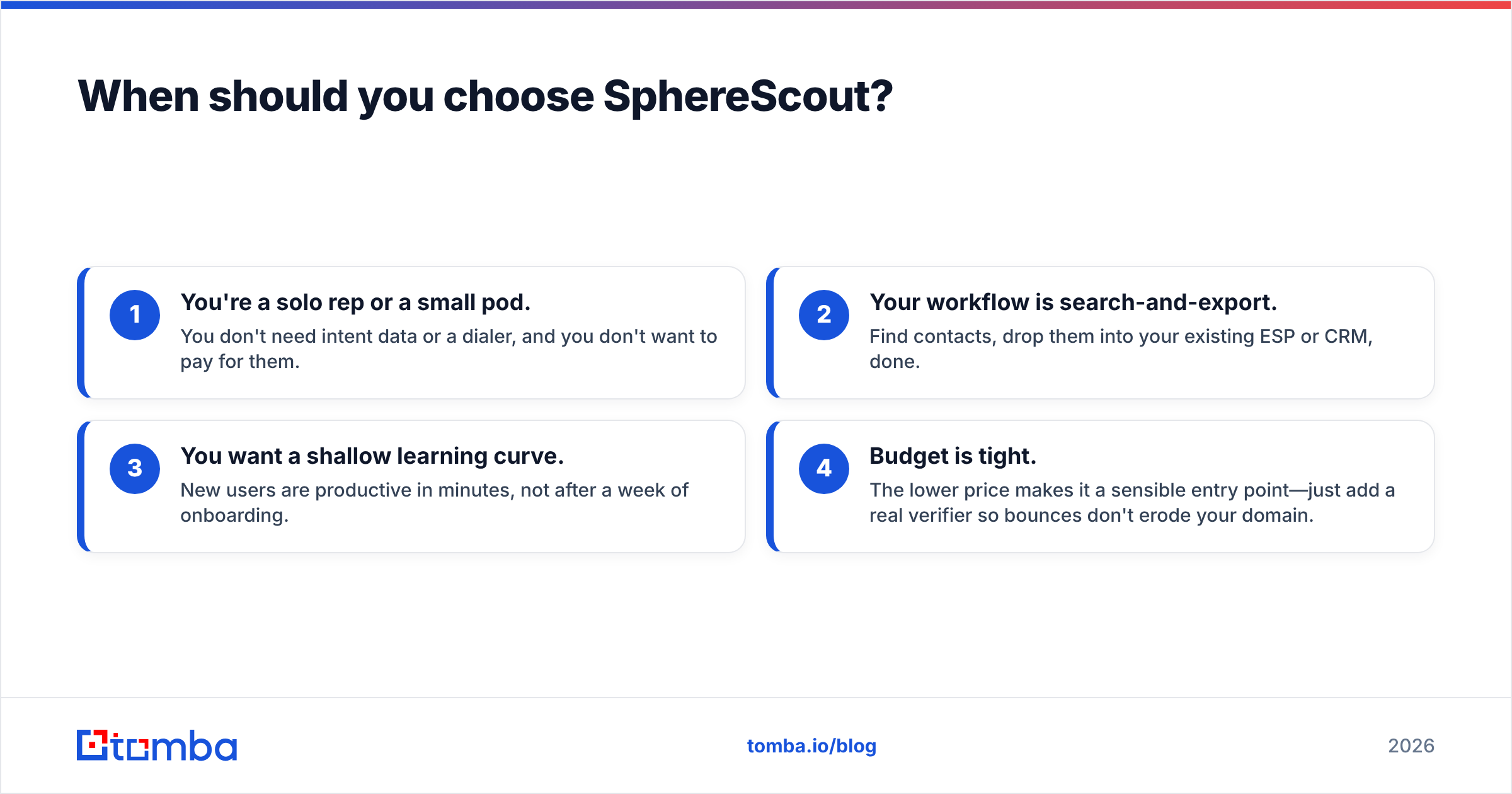
- You're a solo rep or a small pod. You don't need intent data or a dialer, and you don't want to pay for them.
- Your workflow is search-and-export. Find contacts, drop them into your existing ESP or CRM, done.
- You want a shallow learning curve. New users are productive in minutes, not after a week of onboarding.
- Budget is tight. The lower price makes it a sensible entry point—just add a real verifier so bounces don't erode your domain.
Where does a dedicated email finder fit?#
Both tools leave the same gap: accurate, deliverable email at a price that scales—and that's exactly where a specialist earns its place.
A focused tool like the Tomba Email Finder exists to do one job extremely well: turn a name and a domain into a verified professional email, with the sources shown so you can trust the result. Paired with a verifier, it becomes the accuracy layer that all-in-one suites and search tools both under-deliver on.
Common ways teams use a finder alongside Clodura.ai or SphereScout:
- Second-pass verification. Export from your database, then verify every address before it hits a sequence—protecting sender reputation and reply rates.
- Bulk list building. Upload a list of names and domains and get verified emails back in one pass with a bulk email finder.
- Domain-level prospecting. Use domain search to pull every known email at a target company, complete with role and confidence score.
- API-driven enrichment. Wire the Tomba API into your own CRM or workflow so records enrich automatically instead of through manual exports.
This isn't an either/or. Many teams keep Clodura.ai or SphereScout for discovery and intent, then route the actual email work through a dedicated finder for accuracy and cost control.
Clodura.ai vs SphereScout: the verdict#
If you want a single, bundled GTM stack and have the budget, Clodura.ai is the stronger pick. Its database size, intent data, org charts, and native outreach make it a legitimate one-tool workflow for teams that value consolidation over best-in-class depth.
If you're a solo rep or small team who just needs contacts fast and cheap, SphereScout is the better fit. It does less, but what it does is quick, simple, and affordable.
But be honest about the shared weakness. Both are databases first, and databases decay. Whichever you choose, the outbound results you actually care about—open rates, replies, deliverability—depend on the quality of the emails you send to, not the size of the list you started with. Verify before you send, every time.
Check independent reviews on Capterra and the vendor's own claims side by side, run a free trial of each, and test them on your verticals—coverage varies wildly by industry and region, and no comparison table beats a live test on your own ICP.
Ready to fix the accuracy gap?#
Whether you land on Clodura.ai, SphereScout, or a lighter stack, your outreach lives or dies on email accuracy. Start free with the Tomba Email Finder—25 searches a month, no card required—and get verified, source-backed professional emails you can actually send to. Find the contact, confirm it's deliverable, and keep your domain reputation clean while you scale outbound. It's the accuracy layer both of these tools quietly assume you'll add anyway.
Related guides#
// get started
Find, verify and enrich your first contacts today
Start on the free plan with 25 searches a month, then scale when your team is ready.
Free plan · No credit card required · GDPR & CCPA
// about the author