Cockpit AI Pricing, Reviews, Pros and Cons: Honest 2026 Guide
Is Cockpit AI worth the spend in 2026? We break down the real pricing tiers, user reviews, the honest pros and cons, and a leaner alternative for teams that mostly need accurate contact data.
Cockpit AI markets itself as an AI copilot for revenue teams. It bundles conversation intelligence, deal signals, and automated follow-ups in one dashboard, and the demo looks slick. But budget owners ask a simpler question. What does it cost, is it any good, and where does it fall short? This Cockpit AI pricing reviews pros and cons guide answers all three without the sales gloss.
TL;DR: Cockpit AI Pricing Reviews Pros and Cons#
- Pricing is quote-based. Cockpit AI publishes tiers by name (Team, Business, Enterprise) but gates real numbers behind a sales call. Expect a per-seat model that lands in the mid-hundreds per user per year once you add integrations and minimum seat counts.
- Reviews skew positive on AI features, negative on onboarding. Users praise call summaries and deal-risk scoring; the most common complaints are a steep setup, slow support, and annual contracts with limited exit ramps.
- Best fit: mid-market and enterprise sales orgs that already run a CRM and want AI layered on top of live pipeline.
- Weak fit: SMBs, solo founders, and lean outbound teams who mostly need accurate contact data, not a full revenue-intelligence suite.
- Cheaper alternative: if your real bottleneck is finding and verifying prospect emails, a focused tool like Tomba Email Finder starts at a flat $49/mo with public, predictable pricing.
What is Cockpit AI?#
Cockpit AI is an AI-driven revenue-intelligence platform aimed at sales and RevOps teams. Think of it as a co-pilot that sits on top of your CRM and communication stack: it records and transcribes calls, scores deals for risk, drafts follow-up emails, and surfaces "signals" — a prospect went quiet, a competitor got mentioned, a champion left the account.
In plain terms, it is a dashboard that watches your pipeline the way a flight cockpit watches an aircraft: dozens of gauges in one place so a manager can spot trouble before the deal stalls. That analogy is also where the friction starts. A cockpit only helps if you already have a plane. Cockpit AI assumes you have live pipeline, a working CRM, and enough deal volume for its models to learn from.
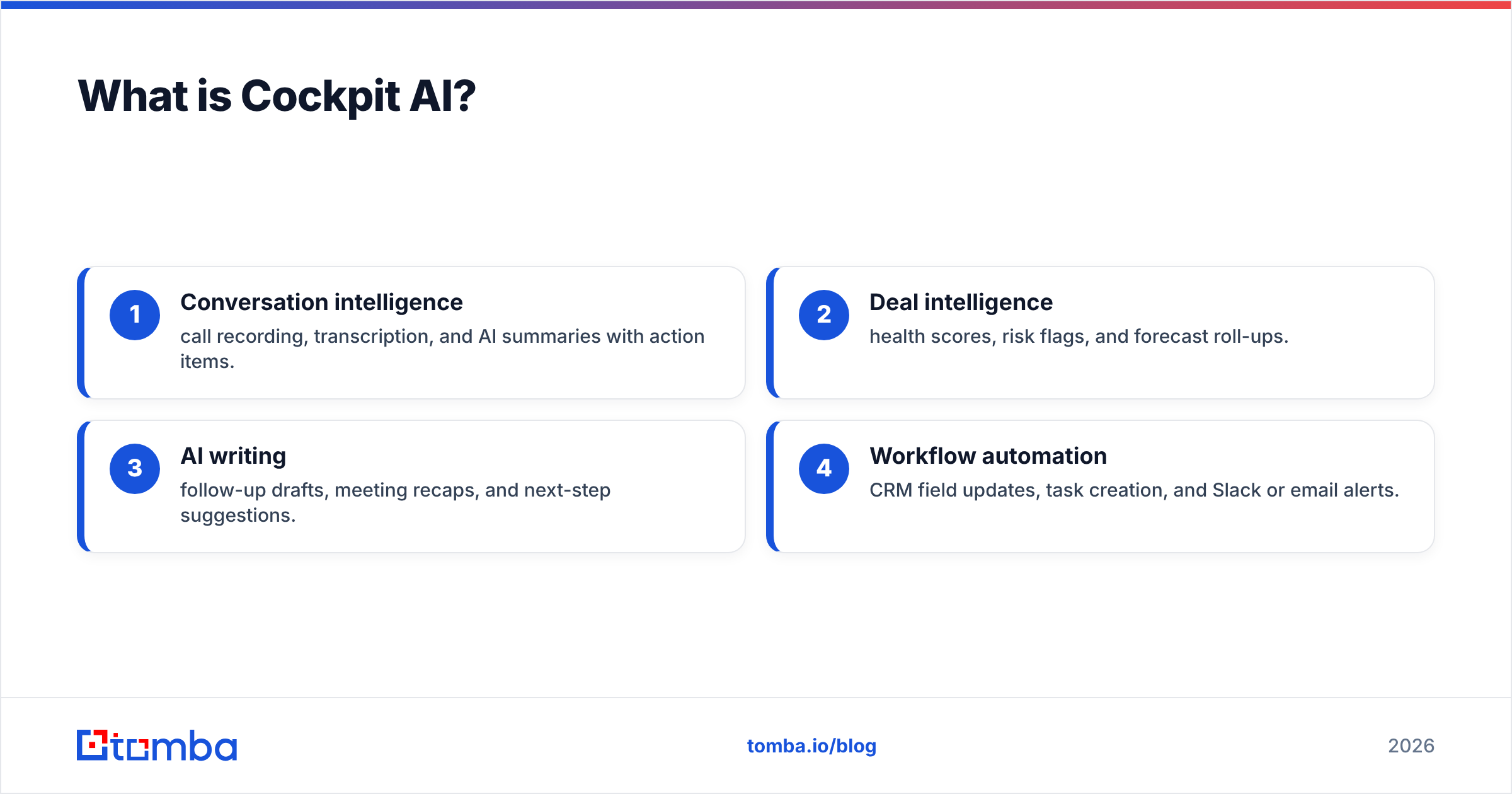
The platform typically bundles four things:
- Conversation intelligence — call recording, transcription, and AI summaries with action items.
- Deal intelligence — health scores, risk flags, and forecast roll-ups.
- AI writing — follow-up drafts, meeting recaps, and next-step suggestions.
- Workflow automation — CRM field updates, task creation, and Slack or email alerts.
That is a genuinely useful stack for a scaling sales team. It is also a lot to buy — and pay for — if the only gap in your process is getting reliable contact data into the top of the funnel.
How much does Cockpit AI cost in 2026?#
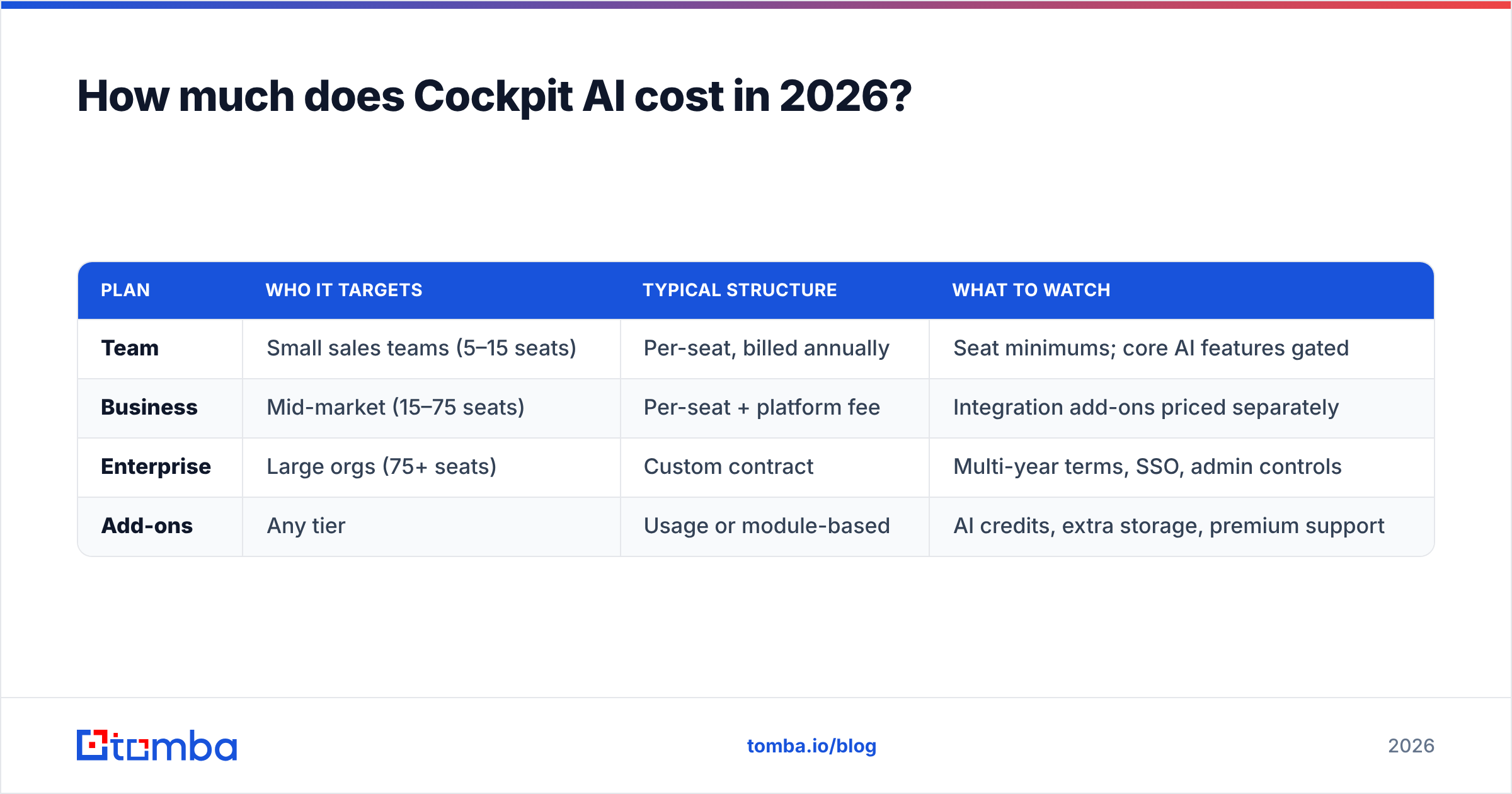
Cockpit AI uses quote-based, per-seat pricing. There is no public price card with a "buy now" button, which is standard for revenue-intelligence tools that sell to sales leadership rather than individual reps. Based on how comparable AI sales platforms price (Gong, Salesloft, and similar conversation-intelligence vendors), here is a realistic picture of what you should expect to negotiate.
| Plan | Who it targets | Typical structure | What to watch |
|---|---|---|---|
| Team | Small sales teams (5–15 seats) | Per-seat, billed annually | Seat minimums; core AI features gated |
| Business | Mid-market (15–75 seats) | Per-seat + platform fee | Integration add-ons priced separately |
| Enterprise | Large orgs (75+ seats) | Custom contract | Multi-year terms, SSO, admin controls |
| Add-ons | Any tier | Usage or module-based | AI credits, extra storage, premium support |
A few honest caveats:
- Seat minimums are common. Many revenue-intelligence tools won't sell below a floor (often 5–10 seats), so the "starting price" a rep quotes you is rarely the price you pay.
- The platform fee is the hidden line item. On top of per-seat, expect an annual platform or onboarding fee. This is the number that surprises buyers most.
- Annual billing is the norm. Month-to-month is either unavailable or carries a premium. Budget for a 12-month commitment.
If you want an apples-to-apples reference for how transparent pricing can look in this category, compare it against a vendor that publishes everything — like the public Tomba pricing page, where the Free, Starter ($49/mo), Growth ($99/mo), and Pro ($249/mo) tiers are listed with exact credit counts. That contrast is the single biggest complaint buyers raise about quote-only tools.
What do Cockpit AI reviews say?#
Aggregated feedback across review sites like G2 and Capterra tends to cluster around a few consistent themes. Treat any single glowing review with caution — the signal is in the patterns.
What reviewers consistently like:
- Call summaries save real time. Reps report cutting post-call admin from 15 minutes to under two. This is the feature people renew for.
- Deal-risk scoring catches slippage early. Managers like seeing which deals went quiet without manually reading every thread.
- CRM hygiene improves. Automated field updates mean forecasts are built on fresher data.
What reviewers consistently criticize:
- Onboarding is heavy. Multiple reviews mention weeks of setup, admin configuration, and rep training before value shows up.
- Support can be slow. Once you're past the sales cycle, response times reportedly drop — a familiar pattern in annual-contract SaaS.
- AI accuracy varies by accent and audio quality. Transcription and summary quality degrades on noisy calls or non-native English, which frustrates global teams.
- Contracts are sticky. Annual terms with limited off-ramps mean a bad fit is expensive to unwind.
The fair takeaway: Cockpit AI reviews are good, not spotless. The product does what it says for teams with the volume to justify it. The disappointment stories almost all come from buyers who were too small, too early, or who expected the AI to replace a process they hadn't built yet.
What are the pros and cons of Cockpit AI?#
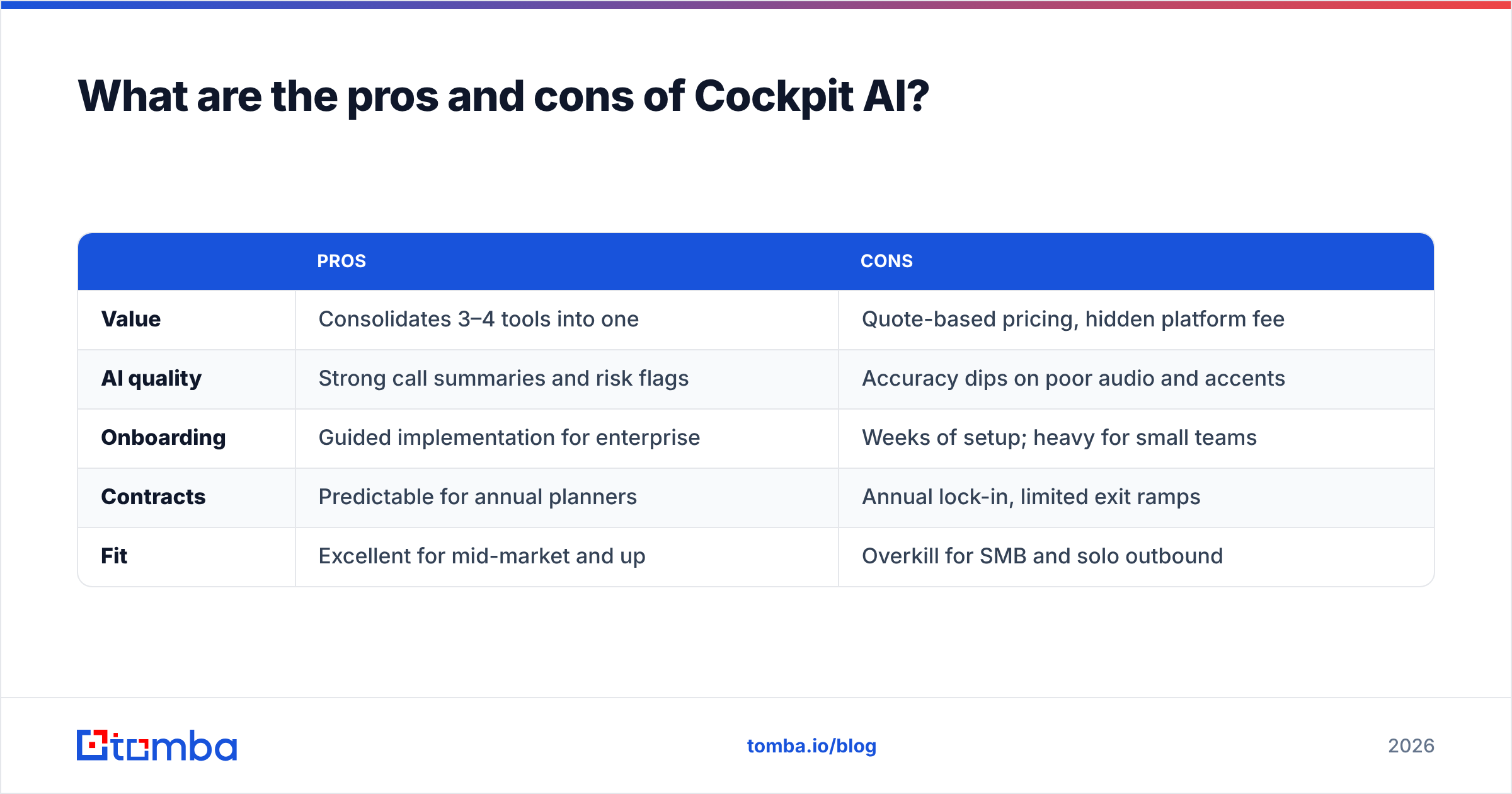
Here is the balanced scorecard, stripped of marketing language.
| Pros | Cons | |
|---|---|---|
| Value | Consolidates 3–4 tools into one | Quote-based pricing, hidden platform fee |
| AI quality | Strong call summaries and risk flags | Accuracy dips on poor audio and accents |
| Onboarding | Guided implementation for enterprise | Weeks of setup; heavy for small teams |
| Contracts | Predictable for annual planners | Annual lock-in, limited exit ramps |
| Fit | Excellent for mid-market and up | Overkill for SMB and solo outbound |
Pros in one line: if you're a sales org with real pipeline and a manager who lives in forecasts, Cockpit AI can pay for itself in saved rep hours and cleaner data.
Cons in one line: if you're small, early, or your actual gap is finding people to sell to, you'll pay enterprise prices for features you won't touch.

Is Cockpit AI worth it, or is there a cheaper alternative?#
It's worth it only if conversation and deal intelligence is your bottleneck. If your reps are already talking to enough qualified prospects and the problem is coaching, forecasting, and follow-up discipline, Cockpit AI is a defensible spend.
But a large share of teams that shop for an "AI sales tool" don't actually have a conversation problem — they have a top-of-funnel data problem. They can't get accurate, verified contact information fast enough to keep the pipeline full. Buying a $30k/year revenue-intelligence suite to fix a data problem is like buying a flight simulator because your car won't start.
If that sounds like you, the smarter first move is a focused, transparently priced contact-data stack:
- Find the emails with a dedicated email finder that works by name, company, or domain.
- Verify before you send with an email verifier so bounces don't wreck your sender reputation.
- Enrich the record with data enrichment to fill in firmographics and phone numbers your CRM is missing.
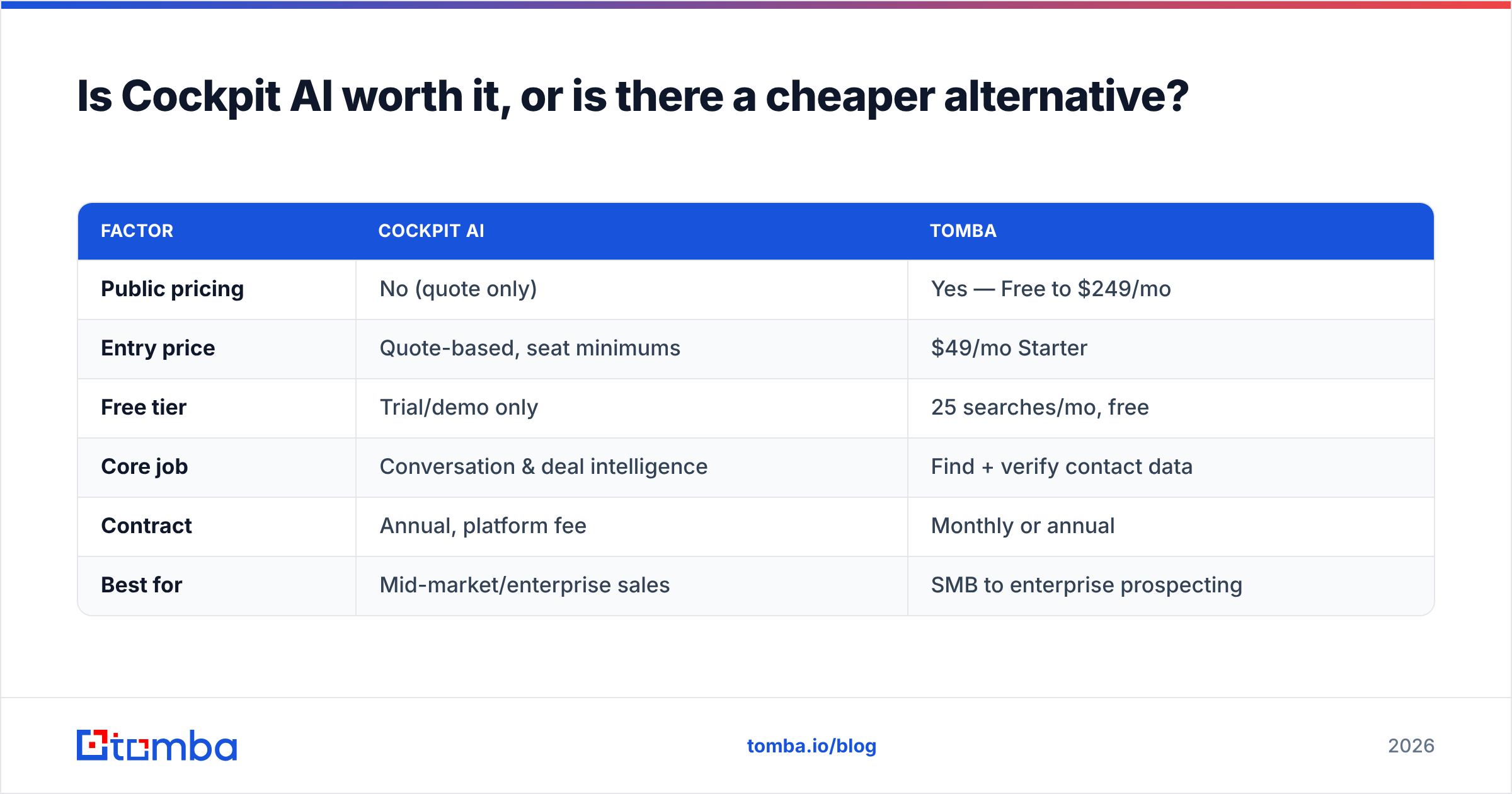
Here's how the two approaches compare on the numbers that actually go on a purchase order.
| Factor | Cockpit AI | Tomba |
|---|---|---|
| Public pricing | No (quote only) | Yes — Free to $249/mo |
| Entry price | Quote-based, seat minimums | $49/mo Starter |
| Free tier | Trial/demo only | 25 searches/mo, free |
| Core job | Conversation & deal intelligence | Find + verify contact data |
| Contract | Annual, platform fee | Monthly or annual |
| Best for | Mid-market/enterprise sales | SMB to enterprise prospecting |
These are not direct competitors — they solve different problems. The point is sequencing. Most teams get further, faster, by fixing data quality first with a tool that costs $49/mo and shows its price up front, then adding a heavier intelligence layer like Cockpit AI once volume justifies it. For broader context on how the revenue-intelligence category is priced and positioned, analyst coverage from Gartner on revenue-enablement platforms is a useful neutral reference.
How should you evaluate Cockpit AI before buying?#
Run this five-point checklist before you sign anything. It will save you from the most common buyer's remorse in this category.
- Get the platform fee in writing. Ask specifically for per-seat plus any onboarding or platform fee, and confirm seat minimums. The quoted "starting price" is almost never the invoice.
- Pressure-test the contract length. Push for month-to-month or a short pilot. If the answer is a hard "annual only," negotiate a performance out-clause.
- Test AI accuracy on your calls. During the trial, feed it your worst audio — a noisy conference room, a non-native speaker — not the vendor's clean demo call.
- Confirm the CRM integration depth. "Integrates with Salesforce" can mean anything from bidirectional sync to a nightly CSV. Verify field-level write-back.
- Right-size the buy. If fewer than half your reps will use the AI weekly, you're overbuying. Fix the underlying gap first.
If step 5 reveals that your real gap is data — not conversations — start smaller. A bulk email finder or a domain search will show ROI in a week, with none of the annual commitment.
The bottom line on Cockpit AI pricing reviews pros and cons#
Here is the Cockpit AI pricing reviews pros and cons verdict in one paragraph. It is a capable revenue-intelligence platform with real fans among mid-market and enterprise sales teams. Its pricing is quote-based and heavier than it first appears. Its reviews are strong on AI features and weak on onboarding and support. Its pros and cons come down to one question: do you have a conversation problem, or a data problem?
If it's conversations, deals, and forecasting — book the demo, but negotiate the platform fee and contract hard. If it's filling the top of the funnel with accurate, verified contacts, you don't need an enterprise suite to start. You need reliable data at a price you can read off a page.
That's exactly where Tomba fits. Start free with 25 searches a month, then scale to a flat $49/mo when you're ready — no sales call, no platform fee, no annual lock-in. Try the Tomba Email Finder today and fix the top of your funnel before you spend enterprise money on the middle of it.
Related guides#
// get started
Find, verify and enrich your first contacts today
Start on the free plan with 25 searches a month, then scale when your team is ready.
Free plan · No credit card required · GDPR & CCPA
// about the author