Cold Emailing Potential Clients: A Practical 2026 Guide
Most cold emails fail before they're read — bad list, wrong inbox, wrong first line. Here's the 2026 playbook: what to send, how to verify, and the benchmarks that tell you when to stop.
TL;DR
- Cold emailing potential clients still works in 2026, but the win condition moved: it's list quality and inbox placement first, copy second. A brilliant email to a dead address is worth exactly zero.
- Keep bounce rate under 2%. Above 3%, Google and Microsoft start throttling you regardless of how good your offer is.
- 30–80 sends per inbox per day is the current safe ceiling. Volume comes from more inboxes, not more sends per inbox.
- The highest-leverage change most teams can make is a 4-step pre-send workflow: find → verify → segment → personalize the first line. Everything else is optimization noise.
- Expect 1–5% reply rates on a good list, 0.2–1% on a scraped one. If you're below 1%, the problem is almost never the CTA.
What does cold emailing potential clients actually mean in 2026?#
Cold emailing potential clients means sending an unsolicited, business-relevant message to someone who fits your customer profile and has never spoken to you. It is not spam in the legal sense — CAN-SPAM permits unsolicited commercial email in the US as long as you identify yourself, provide a physical address, and honor opt-outs. GDPR is stricter in the EU: you need a legitimate-interest basis and a clean audit trail for where the data came from.
What has changed is not the law. It's the filters.
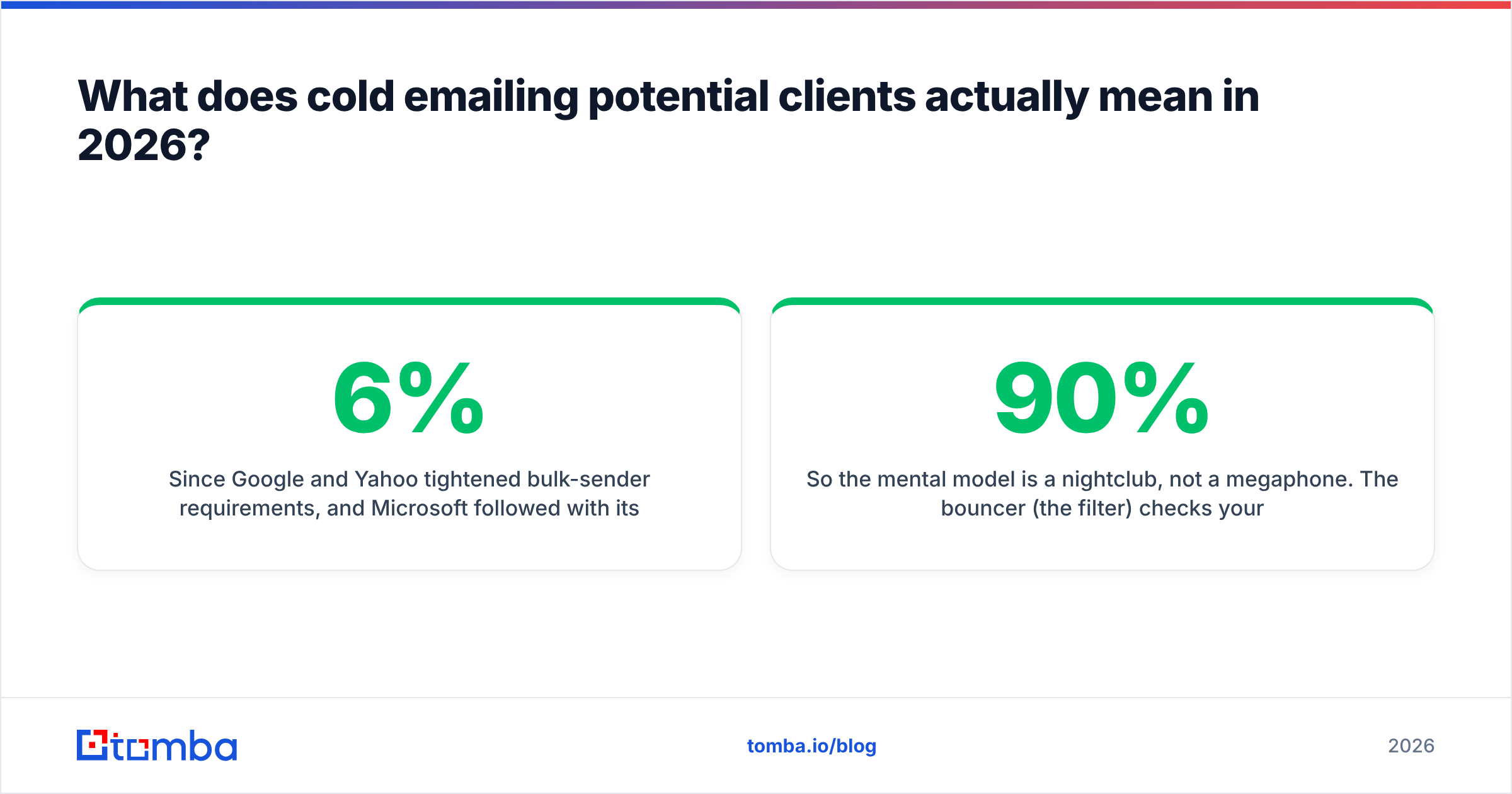
Since Google and Yahoo tightened bulk-sender requirements, and Microsoft followed with its own tenant-level throttling, the mailbox providers now treat sender reputation as the primary signal and content as a secondary one. In practice that means a mediocre email from a clean, warmed domain lands in the primary inbox, while a beautifully written email from a domain with a 6% bounce rate lands in spam or nowhere at all.
So the mental model is a nightclub, not a megaphone. The bouncer (the filter) checks your ID before anyone inside hears what you have to say. Most teams spend 90% of their energy rehearsing the speech and 10% on the ID.
Why do most cold email campaigns fail before the first reply?#
Here's the failure cascade, in the order it actually happens:
- Bad data at the source. You pulled 5,000 contacts from a scraper or a stale export. 18% of them left the company. 9% never existed — they were pattern-guessed and never validated.
- Bounces spike. Every hard bounce is a vote against your domain. Cross 3% and throttling begins; cross 5% and you're effectively invisible.
- Engagement collapses. Lower placement means fewer opens, fewer replies, more "this is spam" votes from the ones who do see it.
- Reputation compounds downward. Now even your good sends underperform. Teams respond by sending more, which accelerates the decline.
- The domain burns. Six to ten weeks in, the team blames the copy and rewrites the templates. The copy was never the problem.
Step one is where the whole thing is decided. This is why an email verifier pass before every send is not a nice-to-have; it's the load-bearing wall.
What are realistic benchmarks for cold emailing potential clients?#
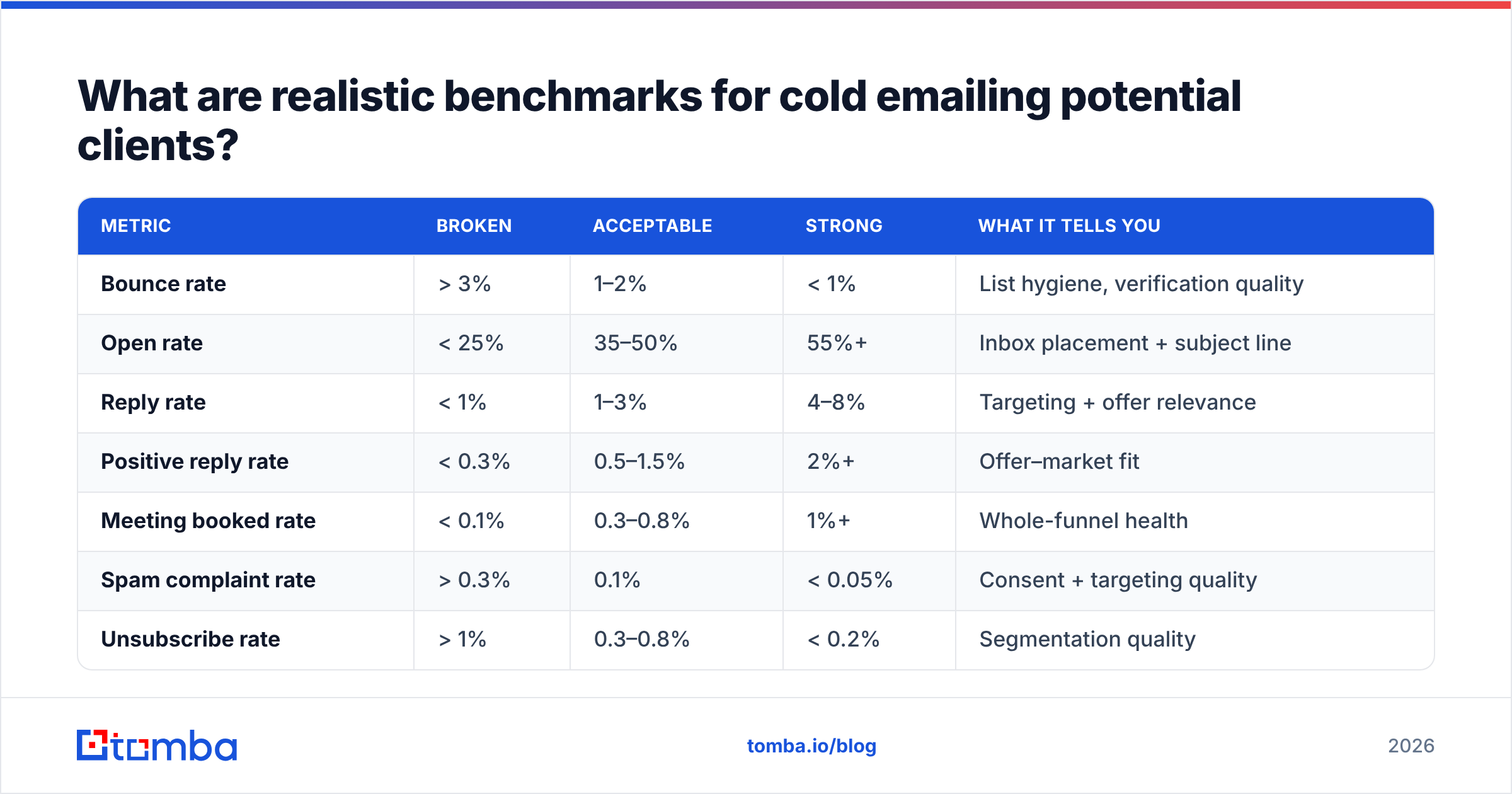
Benchmarks vary by industry, deal size, and seniority of the target. These are the ranges that hold up across most B2B outbound programs in 2026. Use them as a triage tool: find the first row where you're below range and fix that before touching anything else.
| Metric | Broken | Acceptable | Strong | What it tells you |
|---|---|---|---|---|
| Bounce rate | > 3% | 1–2% | < 1% | List hygiene, verification quality |
| Open rate | < 25% | 35–50% | 55%+ | Inbox placement + subject line |
| Reply rate | < 1% | 1–3% | 4–8% | Targeting + offer relevance |
| Positive reply rate | < 0.3% | 0.5–1.5% | 2%+ | Offer–market fit |
| Meeting booked rate | < 0.1% | 0.3–0.8% | 1%+ | Whole-funnel health |
| Spam complaint rate | > 0.3% | 0.1% | < 0.05% | Consent + targeting quality |
| Unsubscribe rate | > 1% | 0.3–0.8% | < 0.2% | Segmentation quality |
Read that table top to bottom, not bottom to top. A team obsessing over its 0.4% meeting rate while sitting at a 4% bounce rate is polishing a car with a seized engine.
One caveat on open rate: Apple Mail Privacy Protection and similar features inflate it substantially. Treat open rate as directional only. Reply rate is the honest number, and it is the only one worth optimizing against.
How do you build a list worth emailing?#
The four steps below are the entire pre-send workflow. Do them in this order — skipping ahead is where most programs break.
Define the trigger, not the title. "VP of Engineering" is a title. "VP of Engineering at a Series B company that posted three backend roles in the last 30 days" is a trigger. Triggers give you a first line that could only have been written for that one person. Titles give you mail merge.
Find the addresses at the source. Use an email finder that resolves against real, sourced data rather than pattern-guessing. Pattern guessing (
first.last@company.com) has a superficially high hit rate and a catastrophic bounce rate, because it produces syntactically valid addresses that don't exist. If you're working company-by-company, a domain search gives you every discoverable address on a domain plus the dominant format, which is more useful than a single guessed address.Verify every single address, every single time. Not once at import — before each send. B2B data decays at roughly 25–30% per year, which means a six-month-old list has already lost more than a tenth of its validity. Catch-all domains need their own treatment: a generic verifier returns "unknown," and teams either send blind (bounces) or discard (waste). A dedicated catch-all verifier resolves a meaningful share of those into a confident verdict.
Segment before you personalize. Ten segments of 100 with a tailored angle each will outperform one blast of 1,000 by a factor of three to five. This is not a copy insight — it's an arithmetic one. Relevance is a multiplier applied to every downstream metric.
Which tools do what, and where do the costs land?#
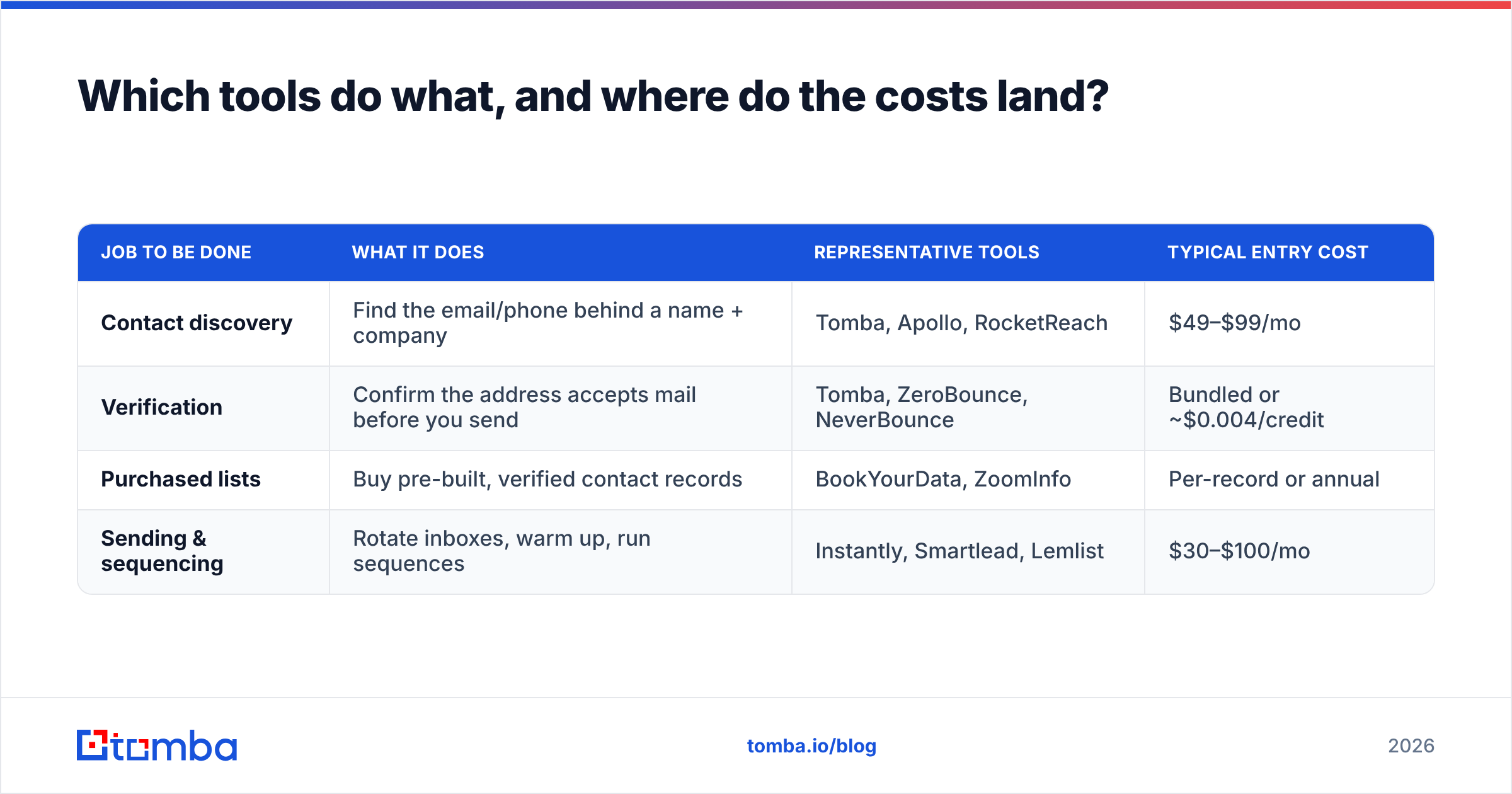
There are four distinct jobs in an outbound stack, and vendors blur the lines between them constantly. Knowing which job you're buying for saves a lot of money.
| Job to be done | What it does | Representative tools | Typical entry cost |
|---|---|---|---|
| Contact discovery | Find the email/phone behind a name + company | Tomba, Apollo, RocketReach | $49–$99/mo |
| Verification | Confirm the address accepts mail before you send | Tomba, ZeroBounce, NeverBounce | Bundled or ~$0.004/credit |
| Purchased lists | Buy pre-built, verified contact records | BookYourData, ZoomInfo | Per-record or annual |
| Sending & sequencing | Rotate inboxes, warm up, run sequences | Instantly, Smartlead, Lemlist | $30–$100/mo |
A few honest notes on the trade-offs:
- Discovery + verification in one tool is the cheapest path for most teams under 5,000 sends/month, because you're not paying twice for the same contact. Tomba pricing starts at a free tier with 25 searches/month, then $49/mo (Starter), $99/mo (Growth), and $249/mo (Pro), with credits shared across the finder, verifier, and enrichment.
- Purchased lists solve a real problem: speed. BookYourData is a solid option when you need a targeted, pre-verified list today and don't want to build the discovery pipeline yourself. The trade-off is that you own a snapshot, not a live source — re-verify before every send regardless of what the seller guarantees.
- All-in-one platforms bundle discovery, sending, and a CRM. Convenient, but you inherit their data quality across the entire funnel. If their finder is weak, no amount of good sequencing recovers it. Check independent reviews on G2 before committing to an annual contract.
- Sending platforms are not data platforms. Their inbox rotation and warmup are genuinely valuable. Their built-in "find email" feature usually isn't. Feed them a clean list from a dedicated source.
For teams that live in a spreadsheet, the Google Sheets add-on and the bulk email finder cover the find-and-verify step without anyone touching an API. For engineering-led teams, the Tomba API does the same thing inside your enrichment job.
How should you structure the email itself?#
Four sentences. That's the whole format. Anything longer gets skimmed, and skimming kills reply rate.
Line 1 — the observation. Something specific and verifiably about them. Not "I saw your company is growing." Something like: "You've had three backend roles open since May — guessing the migration is behind schedule."
Line 2 — the bridge. Connect the observation to a problem you solve, in their language, without a product name. "Teams usually hit this when the data layer can't keep up with the hiring plan."
Line 3 — the proof. One number, one comparable company, no case-study link. "We got [comparable company] from a 6-week backlog to 4 days."
Line 4 — the ask. Low-commitment, single option, no calendar link on the first touch. "Worth 10 minutes?"
Then stop. No signature block with four social icons. No PS. No "Just circling back" as a follow-up subject line.
The follow-up sequence should add information, not pressure. Three touches over ten days is a sensible default: the original, one with a different angle on the same problem, one that closes the loop gracefully ("assuming this isn't a priority — I'll stop here"). That last one reliably outperforms every "bumping this to the top of your inbox" variant ever written. HubSpot's sales email research has consistently found that brevity and specificity beat cadence volume, and nothing since has contradicted it.
What about deliverability — do you really need warmup and SPF?#
Yes, and this part is not optional in 2026.
- Dedicated sending domains. Never send cold email from your primary domain. Buy lookalikes (
get-yourcompany.com,yourcompany-hq.com), point them at the same brand, and burn them instead of your main one if something goes wrong. - SPF, DKIM, and DMARC on every sending domain. Bulk-sender requirements make DMARC effectively mandatory. Run an SPF checker on each domain before it sends a single message.
- Warmup for 3–4 weeks minimum. Ramp from 5 sends/day to your target. A new domain that starts at 100/day on day one is a spam trap in the filter's eyes, regardless of content.
- 30–80 sends per inbox per day, hard cap. Need 1,000/day? That's 15–20 inboxes across 4–6 domains, rotating. There is no shortcut here, and the vendors selling one are selling you a burned domain.
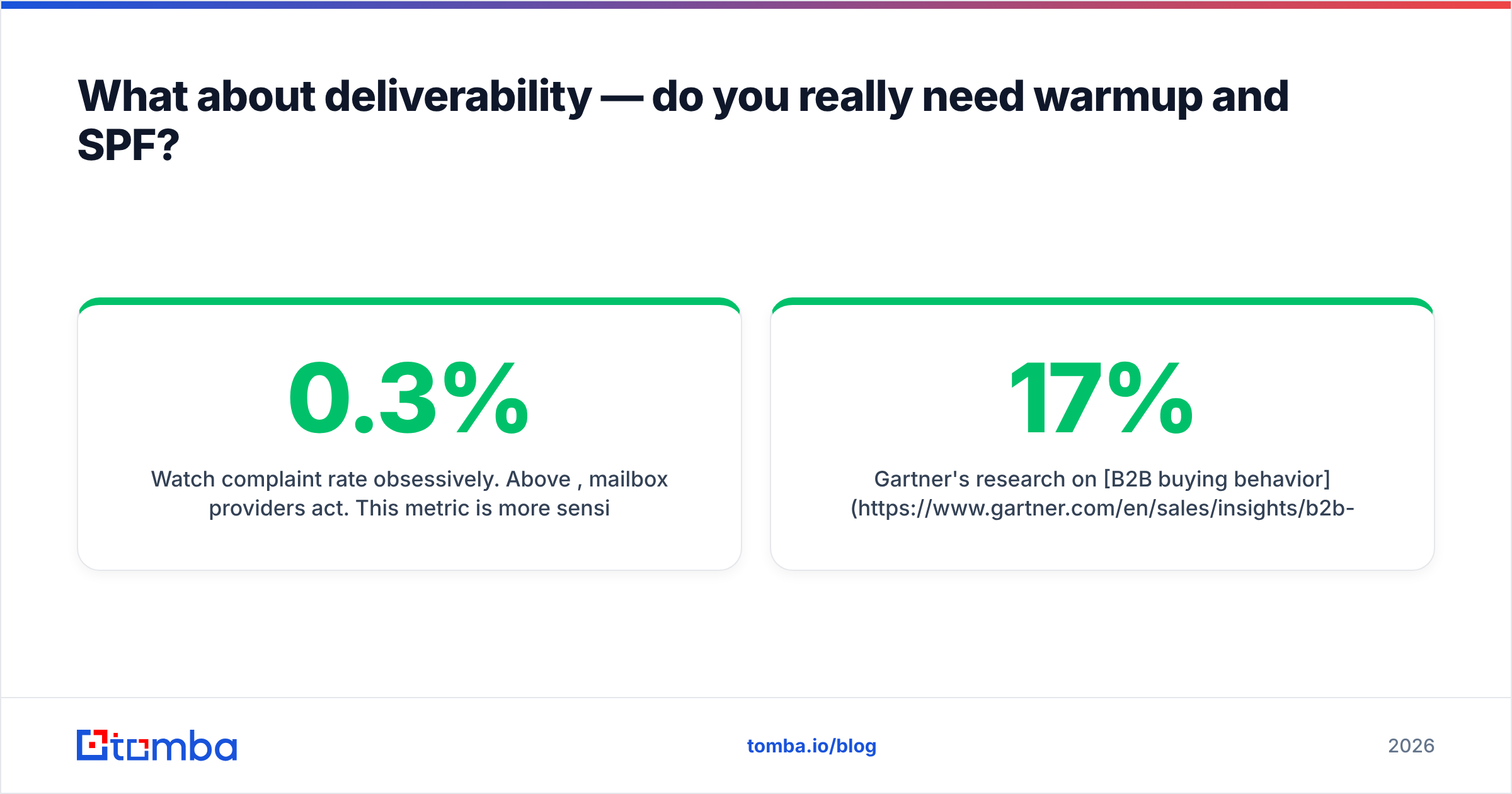
- Watch complaint rate obsessively. Above 0.3%, mailbox providers act. This metric is more sensitive than bounce rate and less forgiving.
Gartner's research on B2B buying behavior is a useful sanity check on the whole enterprise: buyers spend roughly 17% of the purchase journey with sales reps at all, split across every vendor they consider. Cold email's realistic job is to earn a place in that 17%, not to close. Write it accordingly.
When is cold email the wrong channel?#
Three situations where you should stop and pick something else:
- Your ICP doesn't read email. Trades, hospitality, field services, most local businesses — phone and in-person still dominate. A phone finder plus a call script beats any email sequence here.
- Your deal size is under $500 ACV. The math doesn't work. At a 0.5% meeting rate and a 20% close rate, you need 1,000 emails per customer. Use paid acquisition or self-serve.
- You're targeting fewer than 50 accounts. That's not outbound, that's account-based selling. Every touch should be hand-built, multichannel, and researched. Automation adds nothing and costs credibility.
The bottom line#
Cold emailing potential clients in 2026 rewards discipline over creativity. The teams that win aren't the ones with the cleverest subject lines — they're the ones whose bounce rate is under 1%, whose domains are warmed, whose lists are re-verified before every send, and whose first line proves they did ten seconds of homework.
Start where the leverage is. Find the right addresses, confirm they're real, then write four honest sentences.
Ready to build a list that actually lands? The Tomba Email Finder resolves professional email addresses by domain, name, or company against sourced data — not pattern guesses — and every result runs through verification before it reaches your CSV. The free tier gives you 25 searches a month to test the difference against whatever you're using now. If the bounce rate drops, you'll see it in your reply rate within one campaign.
Related guides#
// get started
Find, verify and enrich your first contacts today
Start on the free plan with 25 searches a month, then scale when your team is ready.
Free plan · No credit card required · GDPR & CCPA
// about the author