Coldlytics vs ContactOut: Honest 2026 Comparison for B2B
One tool hands you a human-researched list. The other lets you pull contacts from LinkedIn yourself. We compare Coldlytics and ContactOut on data model, speed, cost per usable contact, and who should actually buy each.
TL;DR
- Coldlytics is a done-for-you research service: you brief a target list, humans (plus automation) build it, and you get a spreadsheet back in a day or two. ContactOut is a self-serve lookup tool: you browse LinkedIn, click the extension, and pull emails and phone numbers in real time.
- They are not really the same product. Coldlytics sells finished lists; ContactOut sells access to a contact database. Choosing between them is really choosing between outsourcing research and doing it yourself.
- ContactOut wins on speed-per-contact and personal-email coverage. Coldlytics wins on list quality for weird, hard-to-filter niches that no database has tagged correctly.
- Both get expensive at volume. If your workflow is "I already know the companies, I just need verified work emails," a straight email finder with an API is cheaper than either.
- Verify everything before you send. Neither tool eliminates bounces, and a 6% bounce rate will do more damage to your domain than a slightly smaller list ever will.
What are Coldlytics and ContactOut, actually?#
Start with the business model, because it explains every difference downstream.
Coldlytics is a research-as-a-service platform. You define an ideal customer profile — industry, headcount, geography, tech stack, whatever qualifier matters — and submit it as a request. A combination of trained researchers and internal tooling assembles the list, verifies the contacts, and delivers it back to you, typically within 24-48 hours. You pay for rows delivered, not for search access.
ContactOut is a contact database with a browser extension. It indexes professional and personal email addresses plus phone numbers, and surfaces them where you already prospect: LinkedIn profiles, LinkedIn Sales Navigator, GitHub, and a web app with its own search filters. You pay for credits that you burn on reveals.
The mental model: Coldlytics is hiring a research assistant. ContactOut is buying a very good phone book with a browser plugin attached.
That distinction matters more than any feature checklist, because it determines who does the thinking. With Coldlytics, the definition of "good lead" lives in your brief. With ContactOut, it lives in your head, and you enforce it click by click.
How do Coldlytics and ContactOut compare head-to-head?#
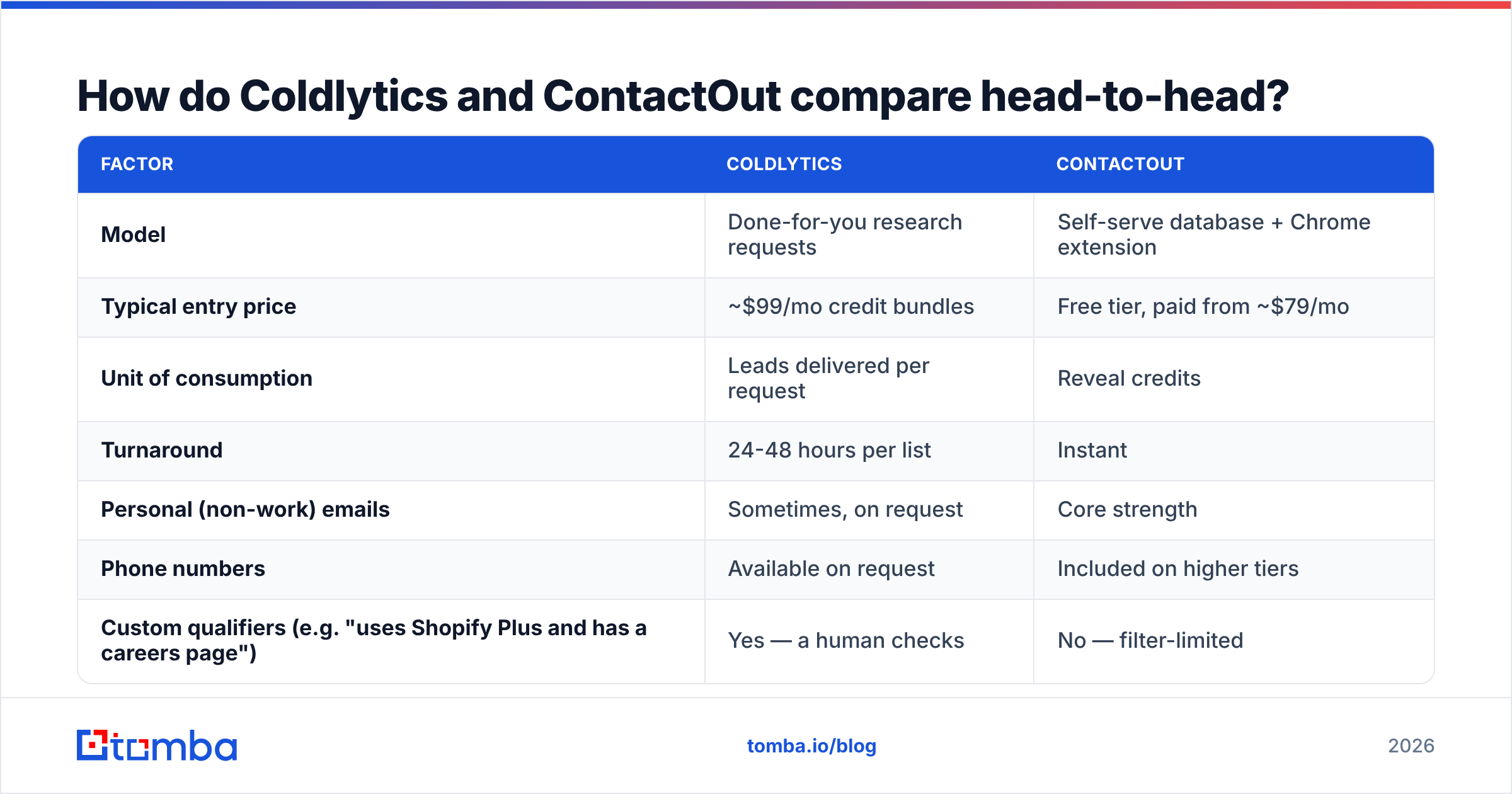
Here is the honest side-by-side. Pricing is what the vendors publicly listed at the time of writing — both change tiers regularly, so check their pages before you commit.
| Factor | Coldlytics | ContactOut |
|---|---|---|
| Model | Done-for-you research requests | Self-serve database + Chrome extension |
| Typical entry price | ~$99/mo credit bundles | Free tier, paid from ~$79/mo |
| Unit of consumption | Leads delivered per request | Reveal credits |
| Turnaround | 24-48 hours per list | Instant |
| Personal (non-work) emails | Sometimes, on request | Core strength |
| Phone numbers | Available on request | Included on higher tiers |
| Custom qualifiers (e.g. "uses Shopify Plus and has a careers page") | Yes — a human checks | No — filter-limited |
| Native API | Limited | Yes |
| Best for | Niche ICPs no filter can express | High-volume LinkedIn prospecting |
| Worst for | Same-day campaigns | Lists that need human judgment |
Read that table twice. The row that actually decides most purchases is "custom qualifiers." If your ICP can be expressed as a set of database filters — SaaS, 50-200 employees, US, VP Marketing — you do not need a human researcher, and Coldlytics is overkill. If your ICP is "agencies that recently posted a job for a paid-media specialist and don't already have an in-house analytics lead," no filter set on earth captures that, and ContactOut can't help you.

Which one has better data accuracy?#
This is where marketing claims collapse under contact with reality. Both vendors quote high accuracy figures. Both are measuring different things.
ContactOut's numbers refer to coverage and match rate on LinkedIn profiles it has indexed — how often it returns something when you click reveal. Coldlytics' numbers refer to verified deliverability of the rows it hands you — because a human ran verification before delivery.
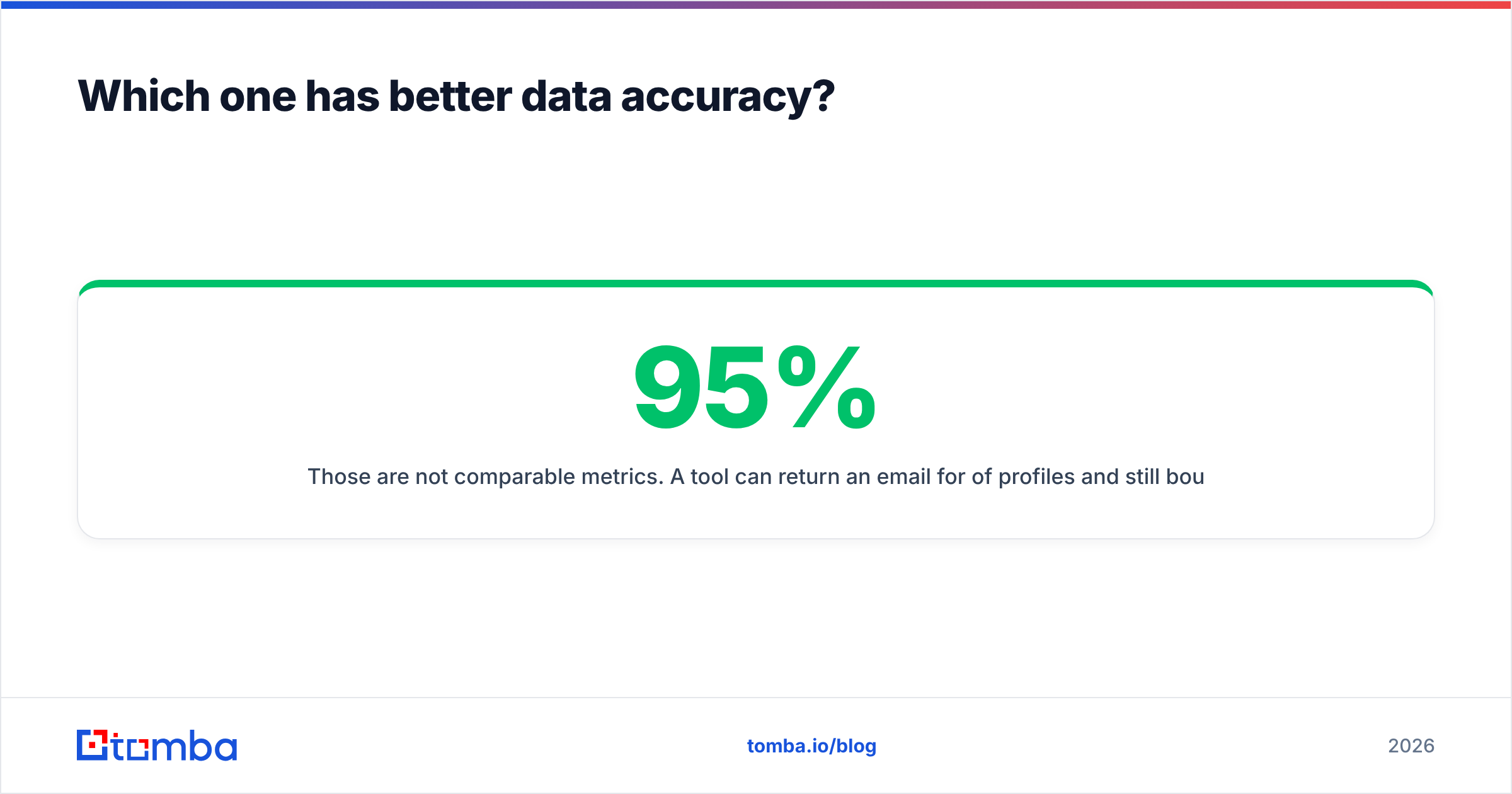
Those are not comparable metrics. A tool can return an email for 95% of profiles and still bounce on 15% of them. A tool can return an email for only 60% of your list and have 98% of those land.

What you should measure instead is cost per usable contact:
- Reveal or delivery cost. What did the row cost you, all-in?
- Match rate. What share of your target list produced any contact?
- Verified rate. What share of those survived independent verification?
- Bounce rate in production. What actually happened when you sent?
- Reply rate. The only number your CFO cares about.
Run 200 contacts through each tool, then divide total spend by the number of contacts that produced a delivered email. Do this before you sign an annual contract. The winner is rarely the one with the prettiest accuracy page, and it is almost never the same winner across two different ICPs.
One warning specific to ContactOut: personal Gmail addresses inflate match rate and destroy deliverability metrics. A personal email is fantastic for recruiting outreach and mediocre for B2B cold email, where the recipient's mailbox provider has no reason to trust a stranger writing to their private inbox. Filter on work emails if cold sales is your use case.
Is Coldlytics worth the turnaround time?#
Depends entirely on whether your bottleneck is finding or sending.
If your team can only work 300 accounts a month and each one requires genuine research — reading the site, checking the tech stack, confirming there is no in-house equivalent of what you sell — then a 48-hour turnaround costs you nothing. The list arrives before you were going to touch it anyway. Coldlytics effectively converts an SDR's research hours into an operating expense, and it usually converts them at a better rate than a junior hire.
If your team runs 5,000 sends a week off a repeatable filter, the 48-hour turnaround is a hard ceiling on iteration speed. You cannot A/B test an ICP hypothesis when each variant takes two days to procure. That workflow needs self-serve — either ContactOut, or a programmatic pipeline built on an email finder API.
There is also a hidden cost in done-for-you research: the brief. A vague brief produces a mediocre list, and you will not know it was vague until the list arrives. Teams that get real value from Coldlytics have written their ICP down properly, with disqualifiers, and can articulate exactly what a wasted row looks like. Teams that haven't will blame the vendor for their own ambiguity.
Is ContactOut worth it if you already have Sales Navigator?#
Mostly yes, with a caveat.
ContactOut's core loop — browse Sales Navigator, reveal, export — is genuinely fast, and the extension is one of the better-built ones in the category. Reviewers on G2 consistently praise the LinkedIn integration and flag the same two complaints: credit consumption feels opaque, and the standalone search inside the web app is weaker than the extension experience.
The caveat is workflow lock-in. Everything good about ContactOut happens inside a browser tab on linkedin.com. The moment your process moves to a spreadsheet, a CRM sync, or an enrichment step at the top of a Clay table, you are working against the tool rather than with it. That is the point where teams migrate to something API-first and look for a ContactOut alternative that does the same reveal programmatically.
Also worth knowing: LinkedIn actively discourages automated extraction, and extension-based scraping carries some account risk. Nobody advertises this. Everyone in outbound knows someone whose account got restricted. Use a secondary LinkedIn account for high-volume reveal work, and never run an extension on the account that holds your network.
What does each tool cost per 1,000 contacts?#
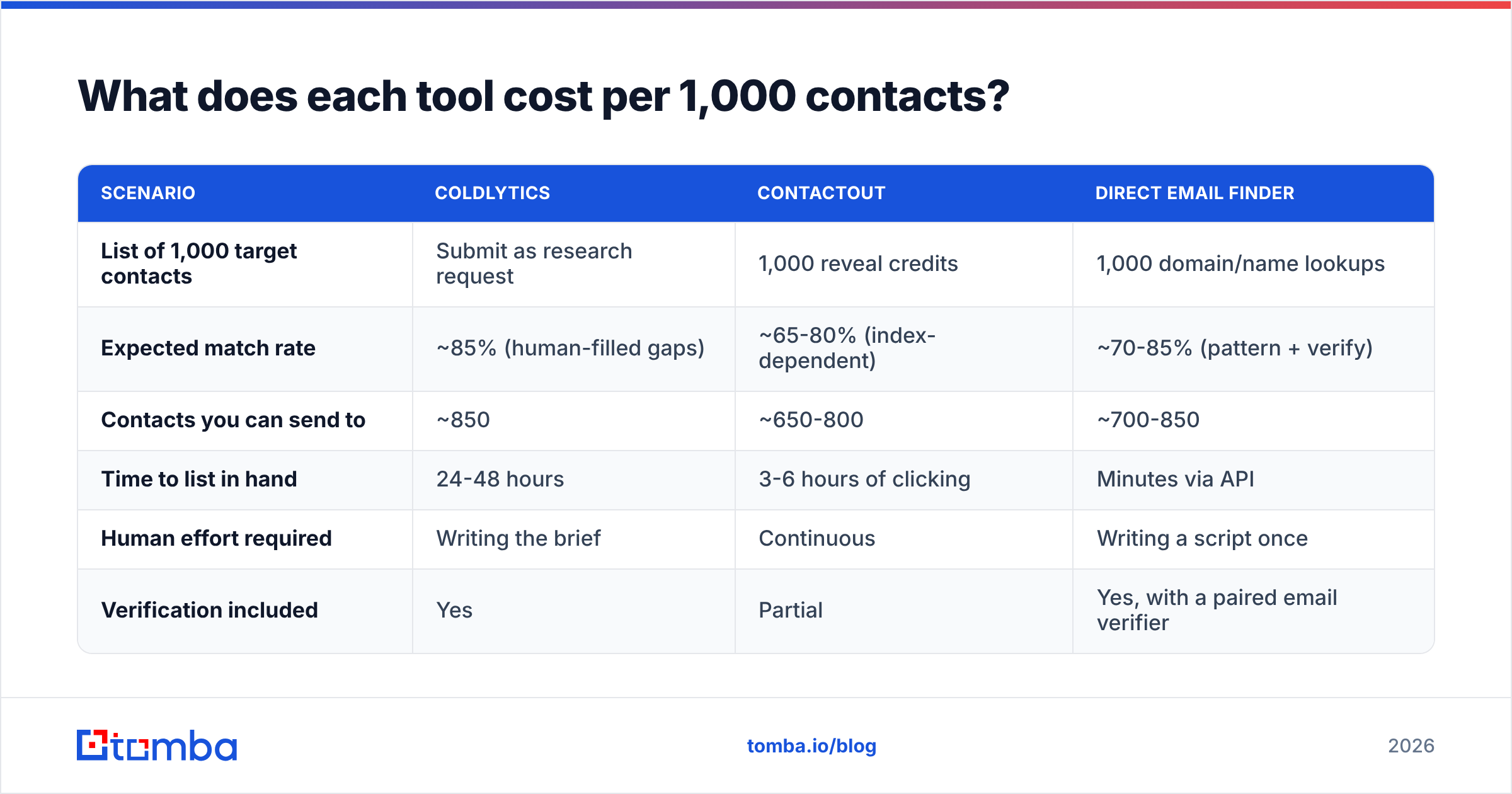
Rough math, using published entry-tier pricing and realistic match rates. Treat these as directional — your ICP will move every number.
| Scenario | Coldlytics | ContactOut | Direct email finder |
|---|---|---|---|
| List of 1,000 target contacts | Submit as research request | 1,000 reveal credits | 1,000 domain/name lookups |
| Expected match rate | ~85% (human-filled gaps) | ~65-80% (index-dependent) | ~70-85% (pattern + verify) |
| Contacts you can send to | ~850 | ~650-800 | ~700-850 |
| Time to list in hand | 24-48 hours | 3-6 hours of clicking | Minutes via API |
| Human effort required | Writing the brief | Continuous | Writing a script once |
| Verification included | Yes | Partial | Yes, with a paired email verifier |
The interesting column is the third one. If your list is already defined — you have the company domains and the target job titles, you just need the addresses — you are paying Coldlytics for research you already did, and paying ContactOut for a UI you don't need. That is the exact case where a straight lookup service is dramatically cheaper. Tomba's Free tier gives you 25 searches a month to test the match rate on your own accounts, and the Starter plan is $49/mo, with Growth at $99/mo and Pro at $249/mo.
Run your own numbers rather than trusting mine. Take fifty accounts you already closed, feed the contacts through each tool, and count how many it would have found.
When should you pick each one?#
Pick Coldlytics if:
- Your ICP resists filters. The qualifier is a judgment call — "they run paid ads but their landing pages are bad," "they just lost a key hire" — and no database column encodes it.
- You have no SDR capacity for research. You'd rather spend money than headcount hours.
- Your ACV is high. At $40k deal sizes, spending $3 to research one perfectly-qualified account is trivially correct.
- Your list is small and precious. 200 accounts a quarter, each one mattering.
Pick ContactOut if:
- You prospect inside LinkedIn. Sales Nav is already your source of truth.
- You need personal emails. Recruiting, executive search, and founder-to-founder outreach all benefit.
- You want instant results. No queue, no brief, no waiting.
- Volume is moderate and manual. A few hundred reveals a week, done by a human who is also writing the emails.
Pick a direct email finder if:
- Your list already exists. Domains and names in a CSV, addresses missing.
- You want it programmatic. Bulk enrichment or an API call inside your data pipeline, not a browser tab.
- You care about deliverability more than coverage. You'd rather send to 700 verified addresses than 900 guesses.
Honest caveat on that third bucket: a pure email finder will not tell you who to contact. It solves the last mile, not the strategy. If you don't know your ICP yet, no lookup tool fixes that, and Coldlytics genuinely might.

What do most teams get wrong here?#
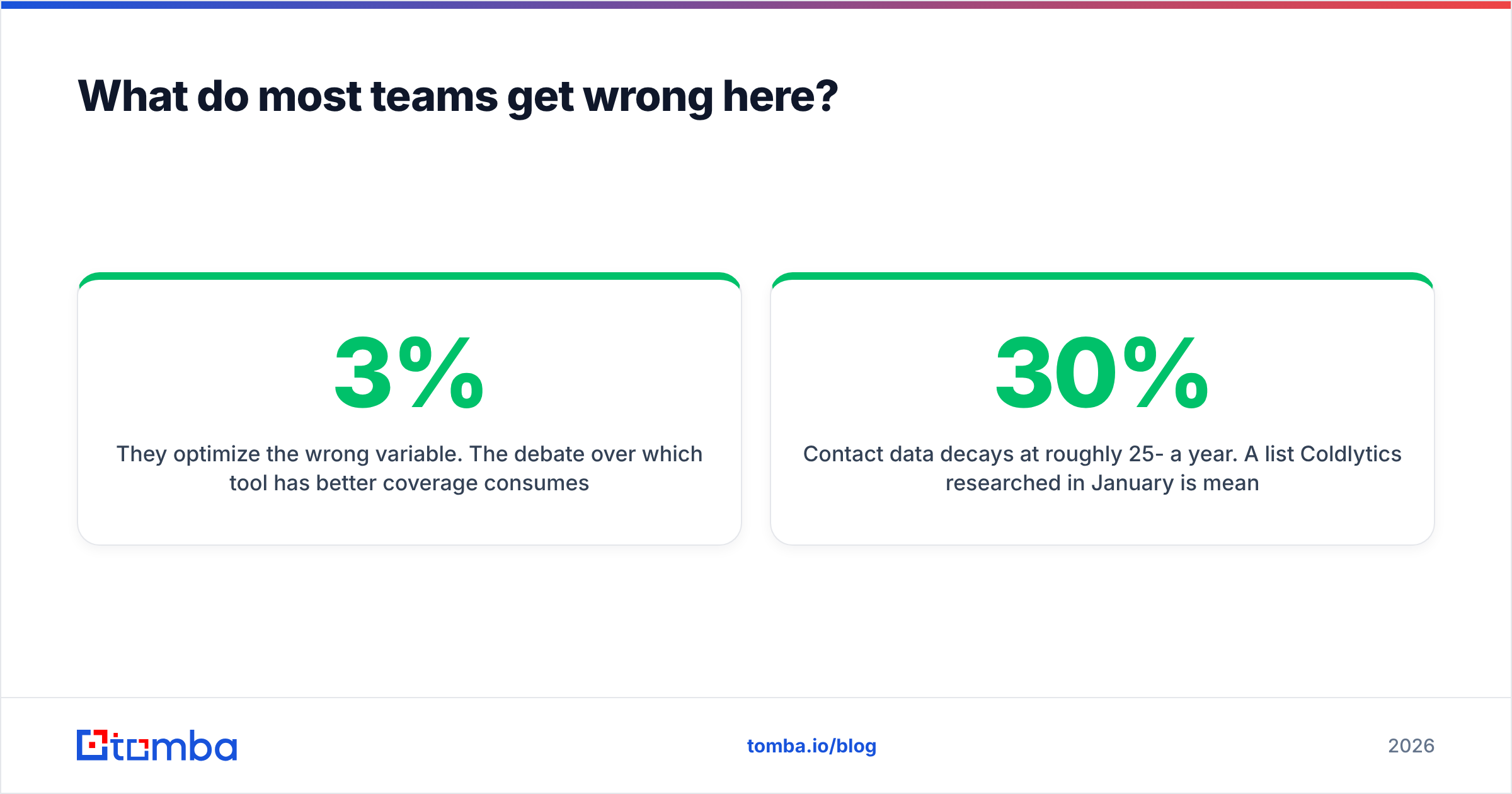
They optimize the wrong variable. The debate over which tool has 3% better coverage consumes weeks, while the campaign bounces at 8% because nobody re-verified a six-month-old export.
Contact data decays at roughly 25-30% a year. A list Coldlytics researched in January is meaningfully wrong by August. A ContactOut reveal from last quarter has a real chance of pointing at someone who left. Whichever tool you buy, re-verify immediately before send, using a service independent of the one that sourced the data. Two independent sources agreeing is worth more than one source claiming 99%.
The second mistake: treating catch-all domains as valid. A catch-all mail server accepts everything at SMTP time and silently discards what it doesn't recognize. Your verification tool reports "accepted," your ESP reports no bounce, and your email lands nowhere. Roughly one in five B2B domains is configured this way. Handle them explicitly with a catch-all verifier rather than pretending the risk isn't there.

The third mistake: buying for the workflow you wish you had. Teams buy done-for-you research because they intend to become disciplined about ICP, then submit vague briefs and blame the output. Teams buy an extension because they intend to prospect daily, then use it four times a month. Buy for the behavior you can actually observe in your own calendar.
So which wins: Coldlytics or ContactOut?#
Neither, universally. That answer is unsatisfying, and it is correct.
Coldlytics wins when the hard part of your prospecting is deciding who qualifies, and you're willing to pay a human to decide. Its output is a finished artifact you can hand to an SDR the same morning it arrives.
ContactOut wins when the hard part is retrieving the address for someone you've already identified on LinkedIn, and you need it now. Its extension is the fastest path from profile to inbox in the category.
Both lose to a plain, well-integrated email finder when your list already exists and you simply need verified addresses at the lowest cost per usable contact. That describes far more outbound teams than either vendor's marketing suggests.
Run the 200-contact bake-off. Measure cost per delivered email, not per row. Ignore the accuracy pages, including ours.
Test it on your own list before you commit to anyone. The Tomba Email Finder gives you 25 free searches a month — no card — so you can benchmark match rate and bounce rate against whatever Coldlytics or ContactOut returns for the same accounts. Feed it a domain and a name, pipe the results through verification, and compare the only number that matters: how many of those emails actually landed.
Related guides#
Ready to find emails that actually work?
Join 150,000+ professionals who stopped guessing and started sending. Free credits on signup — no credit card required.
Get the Tomba newsletter
Practical outbound tactics and product updates — once every two weeks.
About the author