CompanyData.com vs BoldData Pricing: Reviews, Pros & Cons
A neutral breakdown of CompanyData.com and BoldData pricing, real reviews, and the pros and cons of each B2B data provider — plus a cheaper, self-serve way to build lists.
Buying a B2B contact list sounds simple. Then you ask two vendors for a price and get two very different answers. This guide compares CompanyData.com vs BoldData pricing in plain terms. Both sell company and contact data. Both promise global coverage. And both hide most of their pricing behind a quote form. So which one deserves your budget? And is a static list even the right buy in 2026?
This is a neutral, side-by-side look at CompanyData.com vs BoldData pricing, the reviews buyers actually leave, and the honest pros and cons of each. At the end, we cover a self-serve alternative. It suits teams that would rather pull fresh, verified contacts on demand than wait on a sales rep and a CSV.
TL;DR — CompanyData.com vs BoldData pricing at a glance#
- Both are quote-based. Neither publishes transparent per-record pricing; expect to talk to sales and buy in minimum volumes.
- BoldData leans into custom, targeted extracts from ~330 million companies worldwide, with a consultative "tell us your target, we build the file" model.
- CompanyData.com focuses on large company and firmographic datasets and bulk downloads. It often suits analysts and data teams better than a rep who needs 200 emails today.
- Static lists decay fast — B2B data goes stale at roughly 2–3% per month, so a one-time purchase is losing accuracy the day it lands.
- A self-serve tool like a Tomba Email Finder lets you pull verified, current contacts by domain or name for a flat monthly fee instead of a per-list invoice.

What are CompanyData.com and BoldData?#
Both companies sell B2B data, but they come at it from different angles.
BoldData is an Amsterdam-based data provider. It markets a large global database — commonly cited as around 330 million companies across 200+ countries. Its pitch is targeting. You describe your ideal customer: industry codes, geography, company size, job titles. BoldData then compiles a bespoke list. It's a service-led model, closer to a data brokerage than a software product.
CompanyData.com focuses on company-level and firmographic data at scale. Think of the datasets used to enrich records, feed models, or power market analysis. Buyers tend to be data, analytics, and operations teams. They want structured company information in bulk, not a hand-picked prospecting list.
The practical difference is simple. BoldData feels like hiring someone to build your list. CompanyData.com feels like licensing a big database. Neither one is built for a rep who wants to self-serve a handful of verified emails in the next ten minutes. That is where lighter tools and data enrichment platforms come in.
CompanyData.com vs BoldData pricing: how much does each cost?#
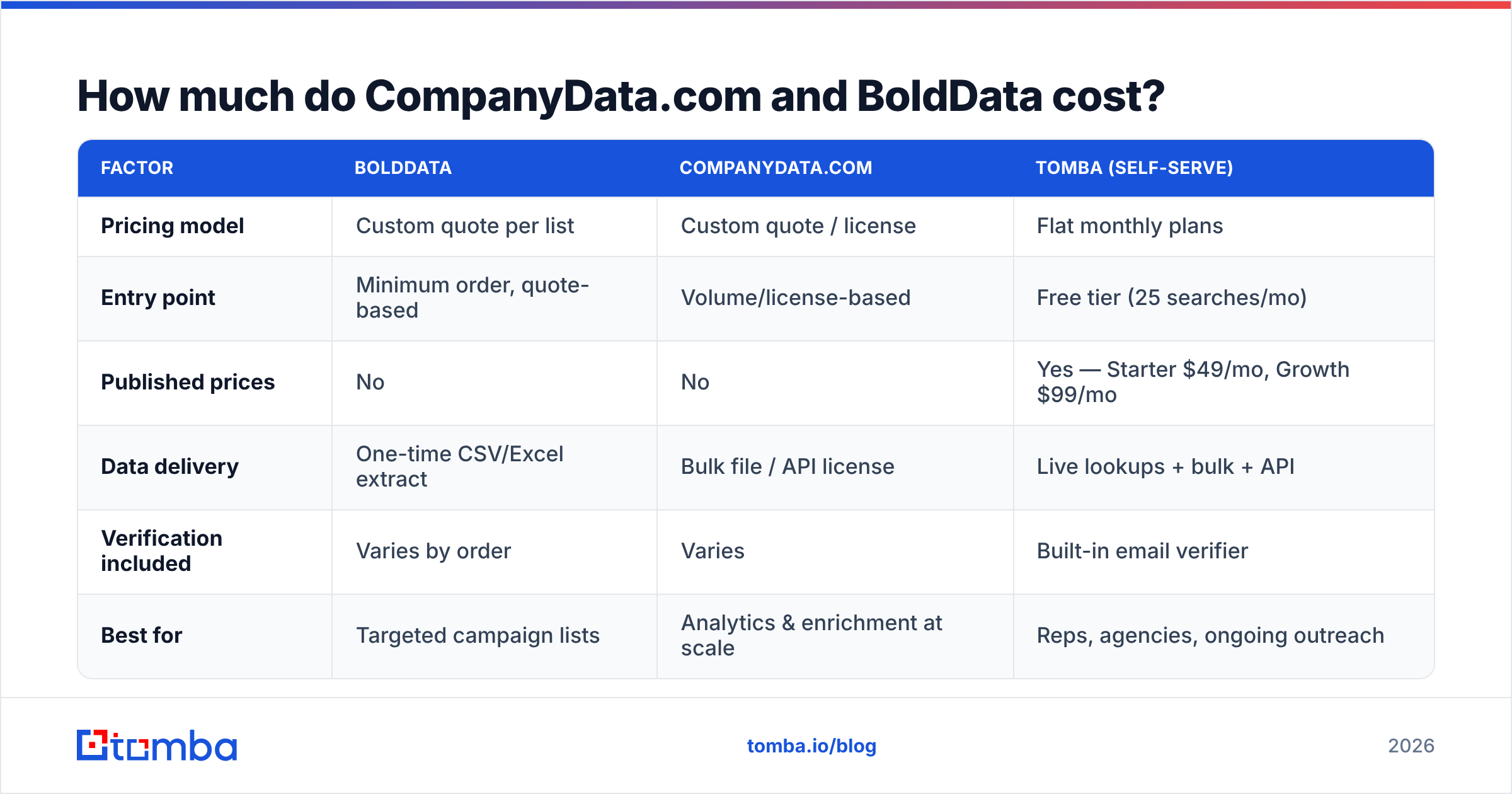
Here's the honest answer. Both hide pricing behind a quote. That's normal for the list-broker category. But it makes budgeting hard and comparison harder. The table below is a directional comparison. It's based on how each provider sells, public signals, and typical market ranges. Treat the figures as estimates, and always confirm with a live quote.
| Factor | BoldData | CompanyData.com | Tomba (self-serve) |
|---|---|---|---|
| Pricing model | Custom quote per list | Custom quote / license | Flat monthly plans |
| Entry point | Minimum order, quote-based | Volume/license-based | Free tier (25 searches/mo) |
| Published prices | No | No | Yes — Starter $49/mo, Growth $99/mo |
| Data delivery | One-time CSV/Excel extract | Bulk file / API license | Live lookups + bulk + API |
| Verification included | Varies by order | Varies | Built-in email verifier |
| Best for | Targeted campaign lists | Analytics & enrichment at scale | Reps, agencies, ongoing outreach |
A few things stand out when you compare CompanyData.com vs BoldData pricing. First, quote-based models mean your real price depends on volume, geography, and how niche your targeting is. A hyper-specific list — say, CFOs at logistics firms in the Nordics — usually costs more per record than a broad national pull. Second, one-time extracts don't refresh. You pay for a snapshot. Third, transparent flat pricing, like published Tomba pricing, lets you forecast cost without a sales call. That matters if you run outreach every month rather than once a quarter.
Is BoldData worth it? Pros and cons#
BoldData earns solid marks for reach and for the "done-for-you" convenience of custom extracts. Say you have an unusual target and don't want to build the list yourself. Then the consultative model is genuinely useful.
Pros
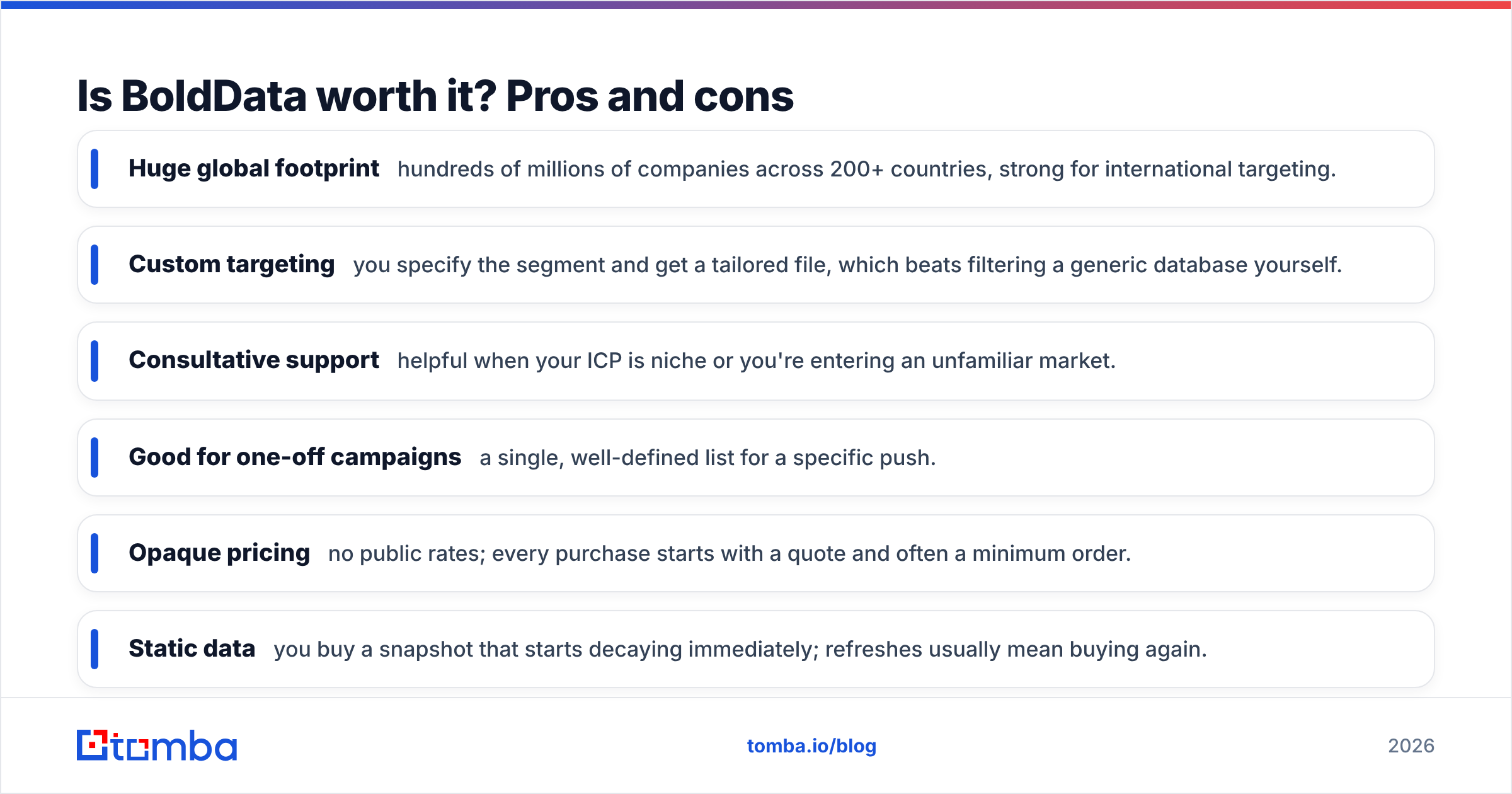
- Huge global footprint — hundreds of millions of companies across 200+ countries, strong for international targeting.
- Custom targeting — you specify the segment and get a tailored file, which beats filtering a generic database yourself.
- Consultative support — helpful when your ICP is niche or you're entering an unfamiliar market.
- Good for one-off campaigns — a single, well-defined list for a specific push.
Cons
- Opaque pricing — no public rates; every purchase starts with a quote and often a minimum order.
- Static data — you buy a snapshot that starts decaying immediately; refreshes usually mean buying again.
- Slower turnaround — a human-built list takes longer than an instant self-serve lookup.
- Verification varies — confirm exactly what deliverability guarantees you're getting before you pay.
BoldData reviews on directories like G2 and Capterra praise coverage and responsiveness. They also flag the classic list-broker frustrations: minimum spends and the need to re-buy as data ages. You can cross-check the vendor's own claims on the official BoldData site.
Is CompanyData.com worth it? Pros and cons#
CompanyData.com is a better fit when your problem is "we need structured company data at scale," not "we need 300 emails for a cold campaign."
Pros
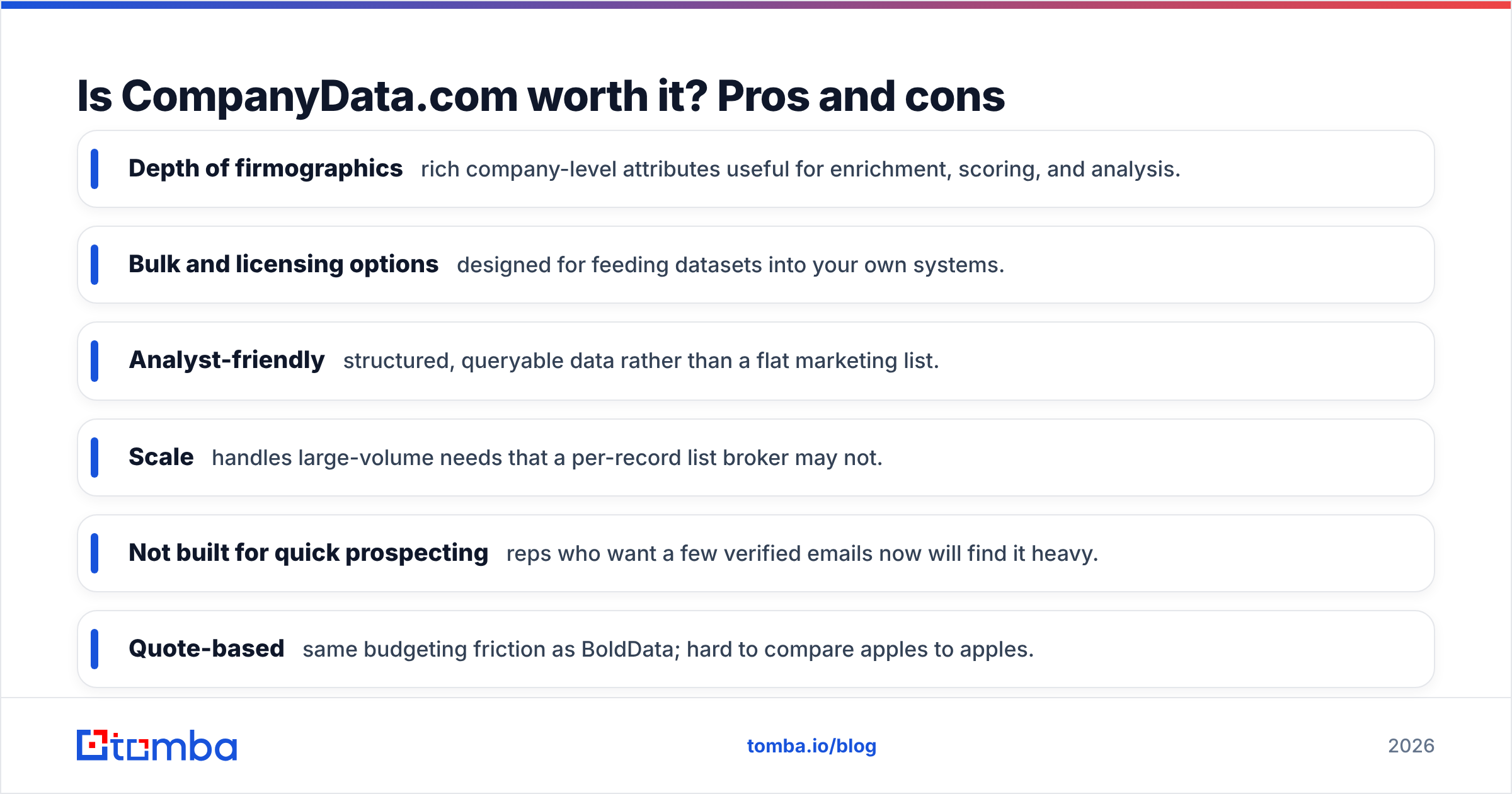
- Depth of firmographics — rich company-level attributes useful for enrichment, scoring, and analysis.
- Bulk and licensing options — designed for feeding datasets into your own systems.
- Analyst-friendly — structured, queryable data rather than a flat marketing list.
- Scale — handles large-volume needs that a per-record list broker may not.
Cons
- Not built for quick prospecting — reps who want a few verified emails now will find it heavy.
- Quote-based — same budgeting friction as BoldData; hard to compare apples to apples.
- Contact-level freshness — company data can be strong while individual contact details still need verification before outreach.
- Onboarding overhead — licensing and integration take time versus an off-the-shelf tool.
The recurring theme across both vendors is the same. They sell you data at a moment in time. That's fine for analysis. But for active outreach, it creates a maintenance problem you'll pay for again and again.
Why does static list data lose value so fast?#
Because people move. Professionals change jobs. Titles shift, companies rebrand, and domains get retired. Industry benchmarks put B2B data decay at roughly 2–3% per month. That's about a quarter to a third of a list going stale within a year. A CSV you bought in January is measurably less accurate by summer.
That decay hits you three ways:
- Bounces climb. Emailing dead addresses hurts your sender reputation and can land future mail in spam.
- Rep time is wasted. Every bounced or wrong-person email is minutes lost and a worse impression.
- You re-buy. To stay current with a static provider, you purchase again — turning a "one-time" cost into a recurring one anyway.
This is the core argument for a live-lookup approach. Instead of licensing a snapshot, you query for a contact when you need it. Then you verify it on the spot. A built-in email verifier and a catch-all verifier check the address before it ever enters your sequence.
When should you buy a list vs. use a self-serve tool?#
The right choice depends on the job, not the brand.
Buy from CompanyData.com or BoldData when:
- You need a large, one-time dataset for analysis, modeling, or market sizing.
- Your targeting is highly unusual and you want a vendor to build it for you.
- You have budget for a quote and don't mind minimum order volumes.
- Contact-level freshness is secondary to breadth (e.g., firmographic enrichment).
Use a self-serve email finder when:
- You run outreach continuously, not once a quarter.
- You want predictable, published pricing instead of a sales call.
- You need contacts verified and current at the moment you reach out.
- Your team lives in tools like a Chrome extension, Google Sheets, or your CRM and wants data to flow in without a file handoff.
Plenty of teams do both: license a broad dataset for analysis, then use a live tool for the day-to-day prospecting that a static file can't keep up with.
How does a self-serve alternative compare on cost?#
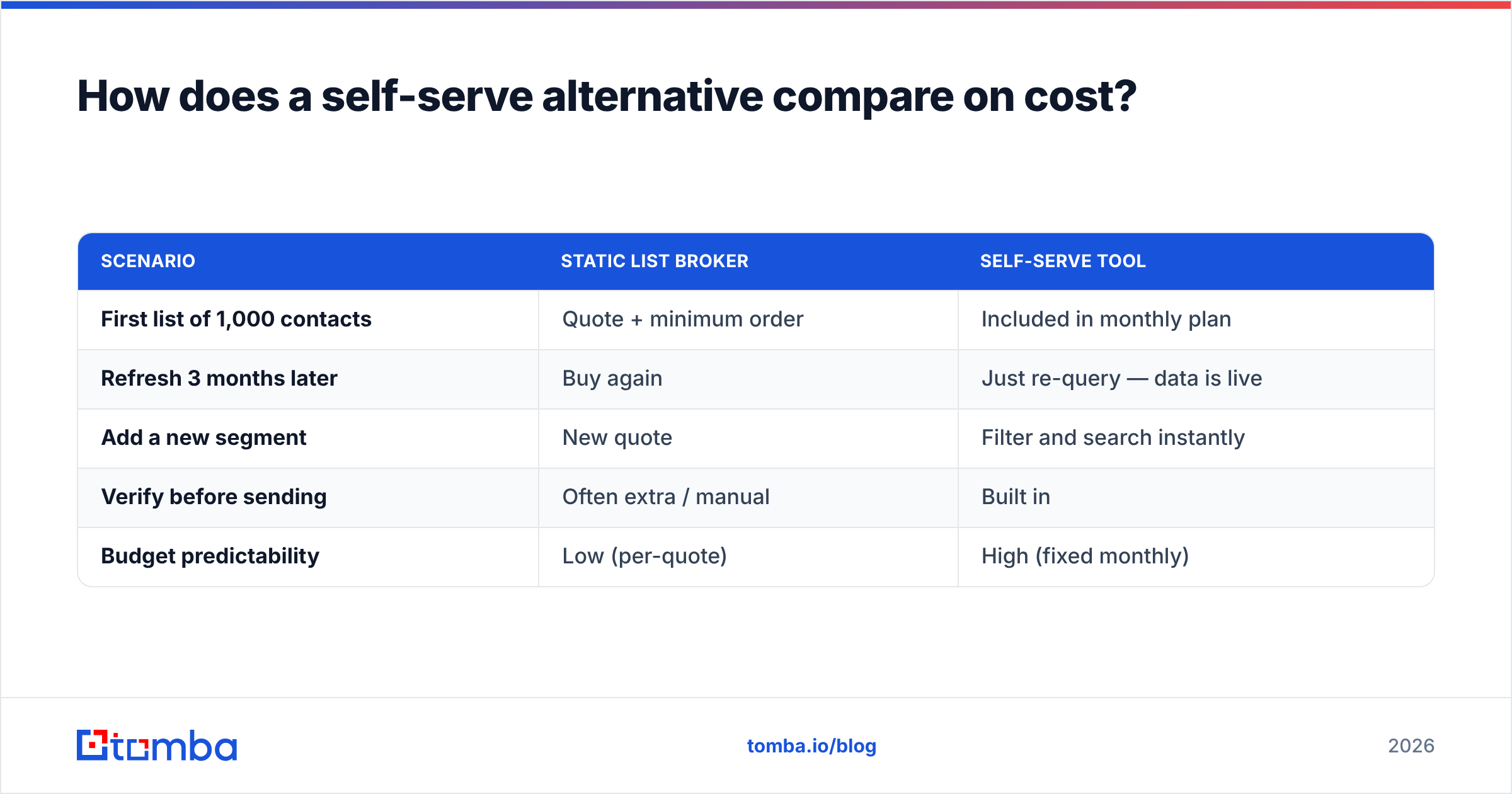
Here's the budgeting difference in plain terms. With a quote-based broker, your cost scales with every list and every refresh. With a flat-rate tool, you pay a known monthly price. Then you pull as many current contacts as your plan allows.
| Scenario | Static list broker | Self-serve tool |
|---|---|---|
| First list of 1,000 contacts | Quote + minimum order | Included in monthly plan |
| Refresh 3 months later | Buy again | Just re-query — data is live |
| Add a new segment | New quote | Filter and search instantly |
| Verify before sending | Often extra / manual | Built in |
| Budget predictability | Low (per-quote) | High (fixed monthly) |
For an outbound team, the recurring-refresh column is where broker costs quietly balloon. Self-serve platforms flip that. With a searchable B2B database and domain search, you rebuild or expand a segment in minutes. No new invoice. If you'd rather validate what you already own, a dedicated email verifier cleans an imported list before you send.
The verdict: which one should you pick?#
The honest truth about CompanyData.com vs BoldData pricing is that both keep it behind a quote. So pick based on the job you need done.
Choose BoldData if you want a custom, done-for-you list with genuinely global reach and you're comfortable with quote-based, one-time pricing. It's a strong fit for a specific international campaign or a niche segment you can't easily build yourself.
Choose CompanyData.com if your need is firmographic depth and bulk company data for enrichment or analysis rather than ready-to-send prospecting lists. It suits data and ops teams more than individual reps.
Choose a self-serve email finder if your work is continuous outreach and you value fresh, verified contacts, transparent pricing, and no waiting on a sales rep. It's the lowest-friction path for reps, agencies, and lean GTM teams that prospect every week.
Neither broker is "bad" — they solve a real problem for the right buyer. But say your honest use case is "I need accurate, current contacts on an ongoing basis." Then a static list is the wrong shape of purchase, no matter how good the coverage looks in the demo.
Start finding verified contacts today#
If the recurring cost and slow turnaround of quote-based lists is your real problem, skip the CSV cycle. The Tomba Email Finder finds professional email addresses by domain, name, or company. It verifies them instantly and exports in bulk. Plans are transparent. They start free (25 searches/mo) and scale to Starter at $49/mo and Growth at $99/mo. No quote form. No minimum order. No stale snapshot. Try it free, run a few searches against your target accounts, and compare the freshness yourself before you pay a broker for another list.
Related guides#
Ready to find emails that actually work?
Join 150,000+ professionals who stopped guessing and started sending. Free credits on signup — no credit card required.
Get the Tomba newsletter
Practical outbound tactics and product updates — once every two weeks.
About the author