CompanyData.com BoldData vs Finder.io: 2026 Comparison
CompanyData.com, BoldData, and Finder.io all promise B2B contact data, but they solve very different problems. Here's an honest breakdown of pricing, accuracy, and which one actually fits your outbound stack.
Choosing a B2B data source comes down to one question: do you want a giant static list, or accurate emails you can send today? This CompanyData.com BoldData vs Finder.io comparison answers that. Each tool solves the problem differently. Pick the wrong one, and you pay for it in bounce rates and burned domains.
This is a neutral, hands-on comparison. No tool here is perfect, and each has a real use case. Below you'll get the pricing, the data model, and the accuracy trade-offs. You'll also get a clear recommendation, based on how you actually run outbound.
TL;DR: Which one should you pick?#
- CompanyData.com — best when you want to buy a firmographic list (company names, sizes, SIC codes, addresses) in bulk. Strong on company records, thin on verified individual emails.
- BoldData — best for custom, country-specific company databases built to spec by a data team. Great targeting, but it's a delivered-file model, not a self-serve real-time tool.
- Finder.io — best if you want a self-serve email finder bundled inside the 500apps suite. Cheap entry point, but accuracy and standalone polish lag dedicated finders.
- The gap all three share — none give you real-time, verified email lookup at the individual level the way a dedicated email finder does. That's where a tool like Tomba Email Finder fits.
- Rule of thumb — buy a list from CompanyData.com or BoldData for account-level targeting; use a real-time email finder + email verifier to get send-safe contacts at those accounts.
What are CompanyData.com, BoldData, and Finder.io?#
They get lumped together in searches, but they're three different product categories.
- CompanyData.com is a self-serve company data marketplace. You filter by industry, revenue, employee count, and geography, then download or license the records. The core strength is breadth of company-level (firmographic) data — you're buying a database, not looking up one person.
- BoldData is a managed B2B data provider. Based in Amsterdam, it markets access to hundreds of millions of companies worldwide and builds custom, targeted lists per request — "all manufacturing companies in Germany with 50+ employees," for example. It's closer to a data agency than an app.
- Finder.io is an email finder tool inside the 500apps ecosystem. It searches for email addresses by name and domain, offers verification, and runs on a credit model. It's the only one of the three built around individual email lookup as the primary job.
The distinction matters because "B2B data" is not one product. A list of 40,000 companies is useless if you can't reach a human at each one. A verified email is useless if you don't know which companies to target. You usually need both layers.

The three data models, side by side#
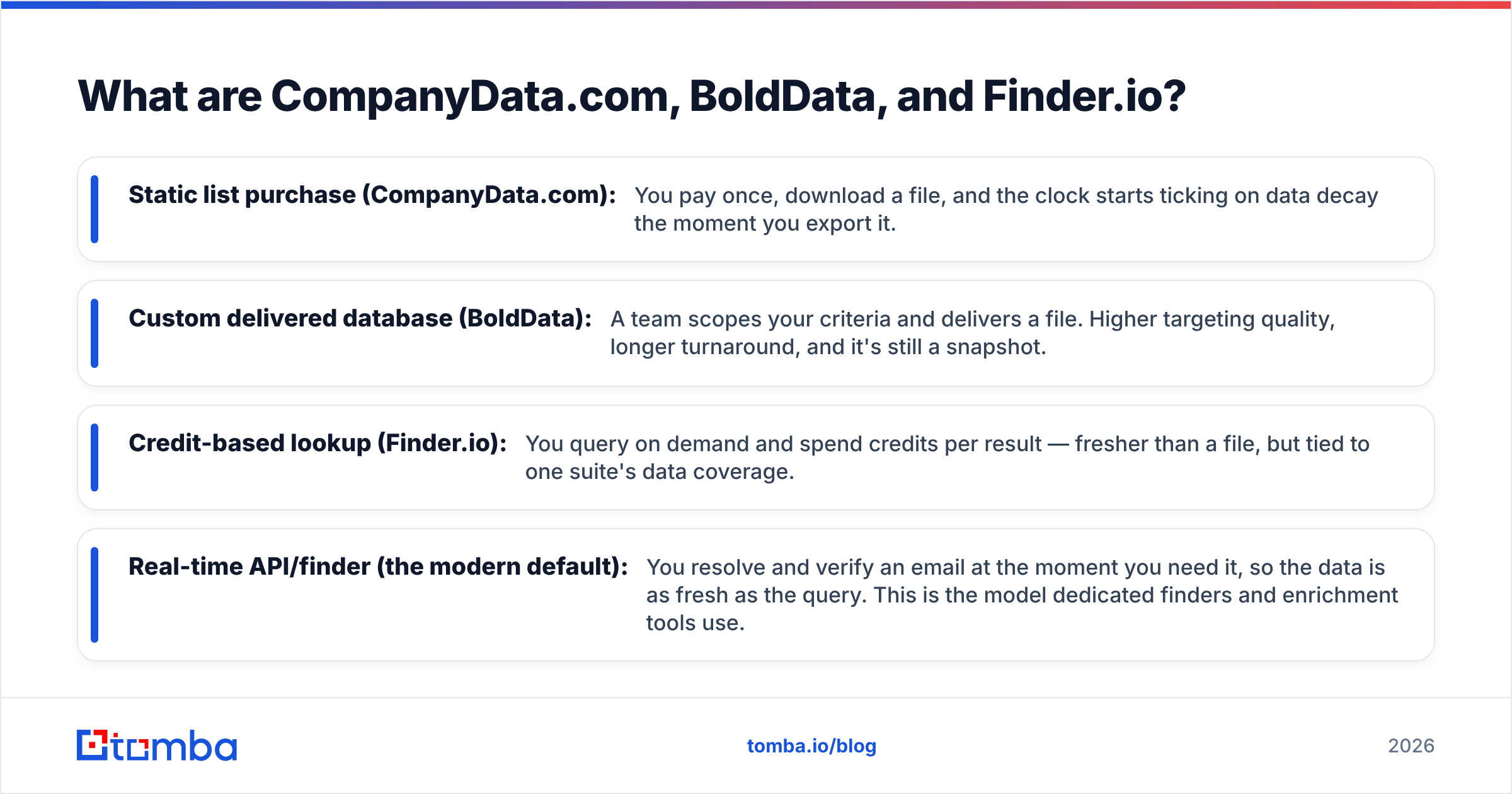
- Static list purchase (CompanyData.com): You pay once, download a file, and the clock starts ticking on data decay the moment you export it.
- Custom delivered database (BoldData): A team scopes your criteria and delivers a file. Higher targeting quality, longer turnaround, and it's still a snapshot.
- Credit-based lookup (Finder.io): You query on demand and spend credits per result — fresher than a file, but tied to one suite's data coverage.
- Real-time API/finder (the modern default): You resolve and verify an email at the moment you need it, so the data is as fresh as the query. This is the model dedicated finders and enrichment tools use.
How do they compare on pricing and features?#
Pricing structures differ enough that a straight price-per-record number is misleading. CompanyData.com and BoldData price around volume and targeting; Finder.io prices around credits. Here's the honest shape of it.
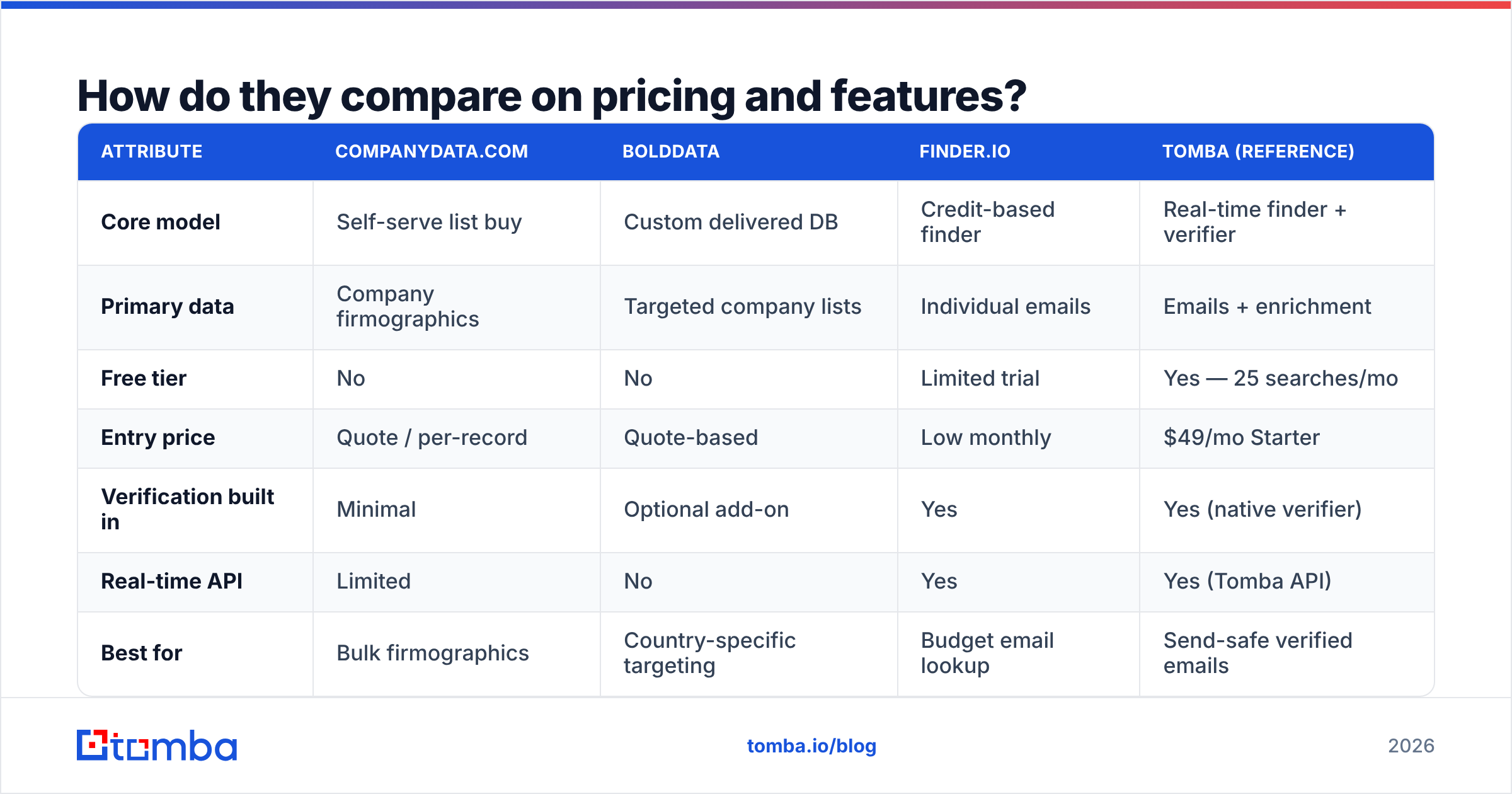
| Attribute | CompanyData.com | BoldData | Finder.io | Tomba (reference) |
|---|---|---|---|---|
| Core model | Self-serve list buy | Custom delivered DB | Credit-based finder | Real-time finder + verifier |
| Primary data | Company firmographics | Targeted company lists | Individual emails | Emails + enrichment |
| Free tier | No | No | Limited trial | Yes — 25 searches/mo |
| Entry price | Quote / per-record | Quote-based | Low monthly | $49/mo Starter |
| Verification built in | Minimal | Optional add-on | Yes | Yes (native verifier) |
| Real-time API | Limited | No | Yes | Yes (Tomba API) |
| Best for | Bulk firmographics | Country-specific targeting | Budget email lookup | Send-safe verified emails |
A few honest notes on that table:
- CompanyData.com and BoldData don't publish flat pricing because quotes depend on record count and criteria. That's normal for the list-data business — just budget for a sales conversation, not a checkout.
- Finder.io's low entry price is real, but it's bundled economics: the value proposition leans on the wider 500apps suite. If you only want an email finder, you're evaluating one module inside a bigger platform.
- Free tiers matter for testing accuracy. You can't judge data quality from a demo deck. Tools that let you run real lookups before paying — including Tomba's free tier — let you measure bounce rates yourself.
How accurate is the data, really?#
Accuracy is the whole ballgame, and it's where list-based and lookup-based models diverge hardest.
A purchased list — whether from CompanyData.com or a BoldData custom build — is accurate on the day it's compiled. B2B data decays fast: people change jobs, companies rebrand, domains get retired. Industry estimates put B2B contact-data decay at 2-3% per month. That compounds fast. A big chunk of a list goes stale within a year. That's not a knock on any vendor; it's physics. A file is a snapshot.
Real-time finders sidestep some of this by resolving the email when you query, then verifying it against the mail server. That's why the pairing of a finder with an email verifier matters more than any single accuracy percentage on a sales page.

When you evaluate accuracy claims, pressure-test three things:
- Is the number for company data or contact emails? CompanyData.com and BoldData shine on firmographics; that's a different metric from deliverable individual emails.
- Is verification included or extra? A 95% "accuracy" figure means little if bounce-checking is a paid add-on you haven't turned on.
- Can you verify a sample yourself? Export 100 records, run them through a catch-all verifier and an SMTP check, and measure the real deliverable rate before you scale spend.
Where does the data come from is the question most buyers skip. Transparent providers publish their sourcing — Tomba documents its data sources, and you should expect the same clarity from any vendor before trusting their emails with your sending domain.
When should you choose each tool?#
Match the tool to the job instead of hunting for a single winner.
- Choose CompanyData.com when your motion is account-based and firmographic-first: you need a broad universe of companies matching size, industry, and region, and you'll layer contact discovery on top yourself. It's a solid starting map, not the final contact list.
- Choose BoldData when you need precise, custom targeting in specific countries — especially European markets — and you'd rather have a data team scope the build than filter a self-serve UI. Expect a delivered file and plan around refresh cadence.
- Choose Finder.io when you want a low-cost, self-serve email finder and you're already in or curious about the 500apps ecosystem. It's a reasonable budget entry point for individual lookups, with verification in the box.
- Choose a dedicated real-time finder when deliverability is the priority — you're sending cold outbound at scale and every bounce hurts your sender reputation. Fresh, verified, on-demand emails beat any static export here.

A practical stacked workflow#
Most high-performing teams don't pick one — they stack:
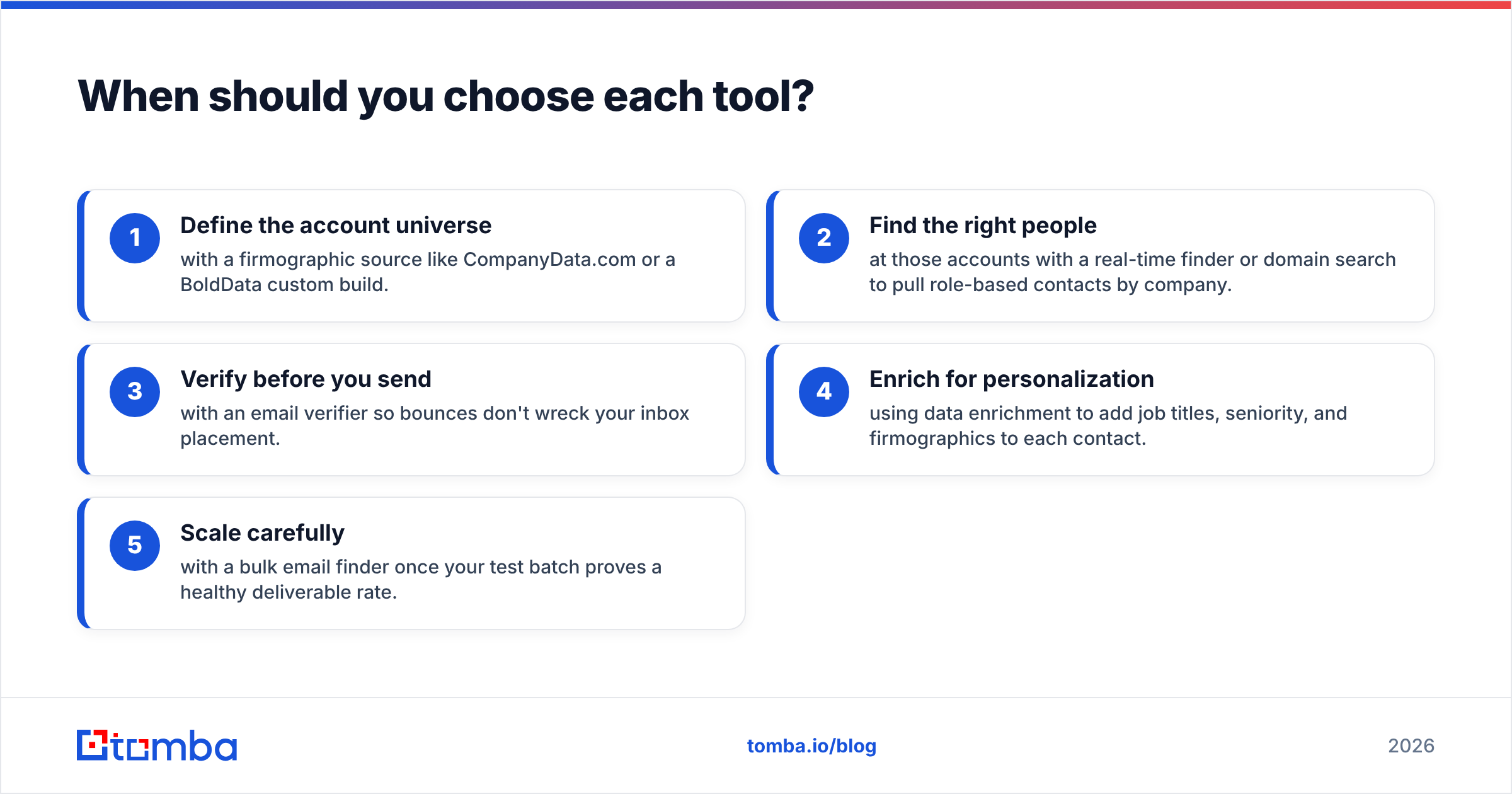
- Define the account universe with a firmographic source like CompanyData.com or a BoldData custom build.
- Find the right people at those accounts with a real-time finder or domain search to pull role-based contacts by company.
- Verify before you send with an email verifier so bounces don't wreck your inbox placement.
- Enrich for personalization using data enrichment to add job titles, seniority, and firmographics to each contact.
- Scale carefully with a bulk email finder once your test batch proves a healthy deliverable rate.
This is where the CompanyData.com BoldData vs Finder.io debate resolves. They're not really competitors with each other. They're different layers of the same funnel.
CompanyData.com BoldData vs Finder.io: best value in 2026?#
Value depends on whether you're buying reach or deliverability.
If you're buying reach — a broad map of the market — CompanyData.com and BoldData earn their keep. BoldData edges ahead on targeting precision, and CompanyData.com on self-serve breadth. If you're buying deliverability — verified emails you can send today without torching your domain — a credit finder like Finder.io is closer to the mark. Even then, it competes in a crowded field of dedicated finders that often out-verify it.

Independent reviews are worth reading before you commit. Check current user ratings on G2 for each tool, and look at the official product pages — BoldData and Finder.io — to confirm coverage for your target geographies. Claims age; recent reviews don't.
The honest summary: none of the three is a full outbound data stack on its own. List providers give you the where; finders give you the who and the how-to-reach. Pairing a targeting source with a verified real-time finder consistently beats leaning on any single tool.
How does Tomba fit into this comparison?#
Tomba isn't a list marketplace like CompanyData.com or a custom-database agency like BoldData — it's built for the layer those tools leave open: finding and verifying individual professional emails in real time.
Where a purchased file starts decaying the day you download it, Tomba resolves emails when you query and verifies them natively, so you're not sending to a snapshot. You get an email finder, a built-in email verifier, domain search for company-wide contact discovery, and data enrichment — plus a free tier with 25 searches a month so you can measure real deliverable rates before spending a cent. Paid plans start at $49/mo (Starter), scale to $99/mo (Growth) and $249/mo (Pro), with a full API for teams that want to bake lookups into their own workflow.
Use CompanyData.com or BoldData to draw the map of accounts. Then use Tomba to reach a real, verified human at each one — without the bounce tax. Start with Tomba's free tier, verify a sample against your own sending domain, and let the numbers pick your stack.
Related guides#
Ready to find emails that actually work?
Join 150,000+ professionals who stopped guessing and started sending. Free credits on signup — no credit card required.
Get the Tomba newsletter
Practical outbound tactics and product updates — once every two weeks.
About the author