7 Best Conga Alternatives in 2026 for Document Automation
Conga is powerful but heavy and expensive. Here are the 7 best Conga alternatives for document generation, CLM, and CPQ in 2026 — with pricing, pros, and cons.
Conga does a lot — document generation, contract lifecycle management (CLM), CPQ, and e-signature, mostly bolted tightly to Salesforce. That breadth is also the problem. Teams routinely tell you the same thing: it's powerful, it's expensive, and standing it up takes an admin (or a consultant) you didn't budget for.
If you're shopping for Conga alternatives because the quotes came back high, the implementation felt like a second job, or you only need one slice of what Conga sells, this guide ranks seven options that cover the same jobs with less overhead.
TL;DR#
- Conga is best for large Salesforce shops that need deep CLM + CPQ and have admin resources to run it.
- PandaDoc is the most popular all-around swap for document generation and e-signature at SMB-friendly pricing.
- DocuSign CLM wins if contracts (not proposals) are your center of gravity.
- Ironclad is the modern CLM pick for legal-led teams; Nintex and Formstack Documents cover workflow-heavy document automation.
- Before you automate a single proposal, fix the data feeding it — bad contact records break every downstream template.
Why look for a Conga alternative in 2026?#
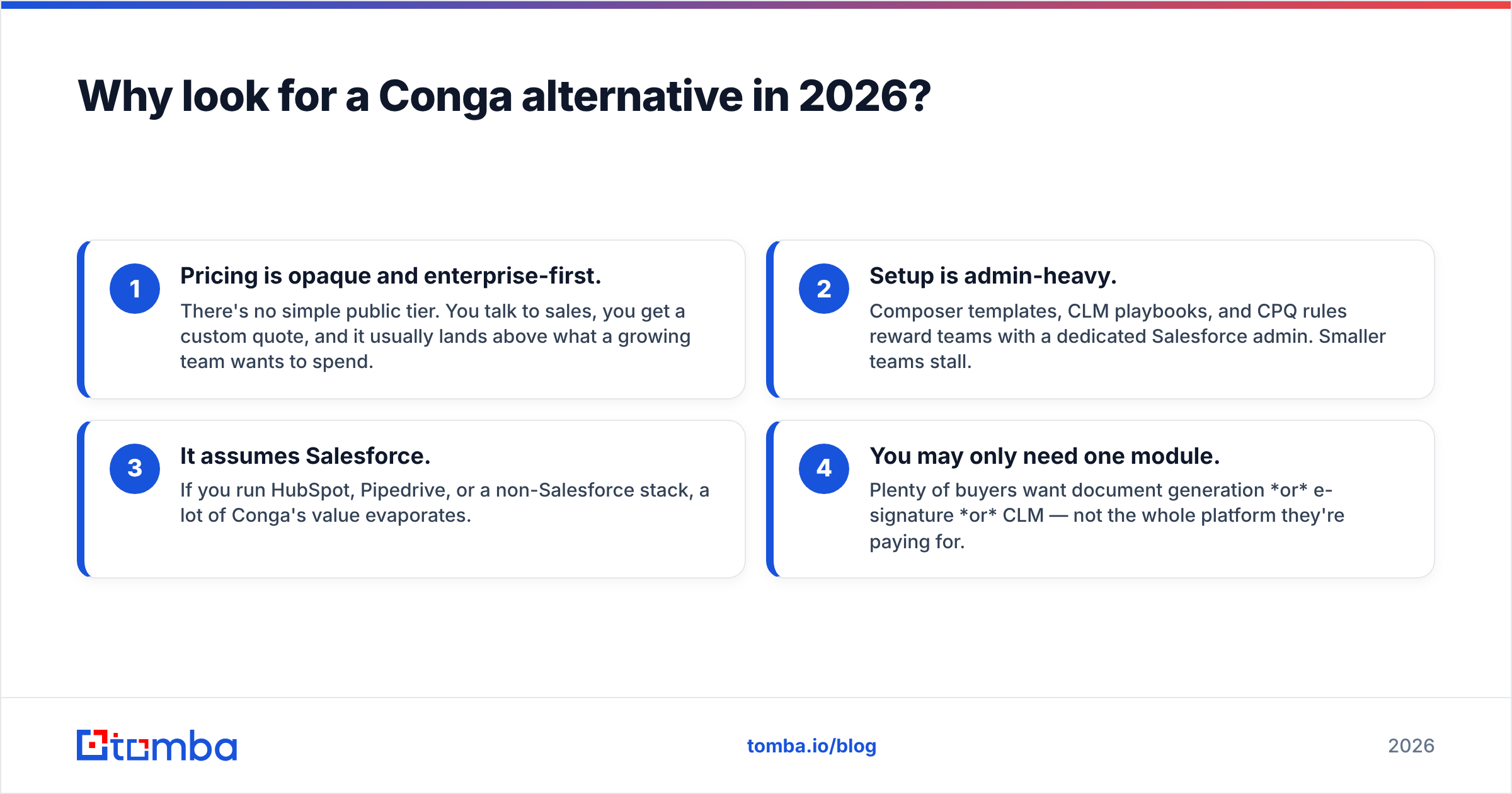
The short version: cost, complexity, and lock-in. Conga's suite is genuinely capable, but that capability comes with three recurring frustrations.
- Pricing is opaque and enterprise-first. There's no simple public tier. You talk to sales, you get a custom quote, and it usually lands above what a growing team wants to spend.
- Setup is admin-heavy. Composer templates, CLM playbooks, and CPQ rules reward teams with a dedicated Salesforce admin. Smaller teams stall.
- It assumes Salesforce. If you run HubSpot, Pipedrive, or a non-Salesforce stack, a lot of Conga's value evaporates.
- You may only need one module. Plenty of buyers want document generation or e-signature or CLM — not the whole platform they're paying for.
None of that makes Conga bad. It makes it a poor fit for a large share of the market — which is exactly why the alternatives below exist.
What should you look for in a Conga alternative?#
Match the tool to the job you actually have, not the demo you were shown. Use these five criteria as a filter:
- Primary job — Are you generating documents (proposals, quotes), managing contracts end-to-end (CLM), or configuring priced quotes (CPQ)? Few tools are best at all three.
- CRM fit — Native Salesforce, native HubSpot, or CRM-agnostic. This single factor eliminates half the market for you.
- Time-to-value — Can a non-admin ship a working template in a week, or do you need a services engagement?
- Pricing transparency — Published tiers you can self-serve beat "book a call" when you're a small team.
- E-signature — Built in, or bolted on through a separate DocuSign/Adobe contract?
Score each candidate against those, and the shortlist gets short fast.
The 7 best Conga alternatives in 2026#
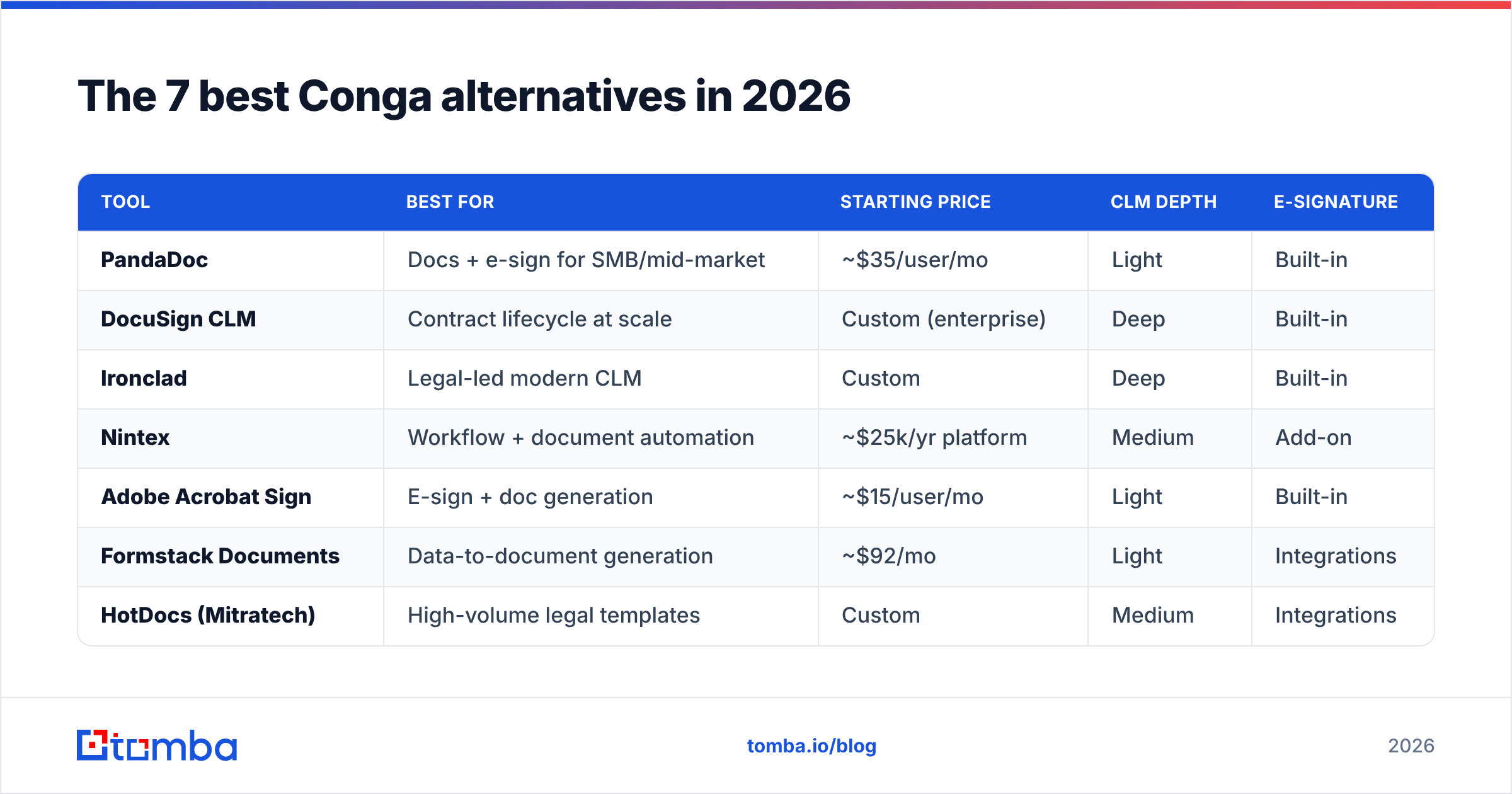
Here's the at-a-glance comparison, followed by notes on each tool.
| Tool | Best for | Starting price | CLM depth | E-signature |
|---|---|---|---|---|
| PandaDoc | Docs + e-sign for SMB/mid-market | ~$35/user/mo | Light | Built-in |
| DocuSign CLM | Contract lifecycle at scale | Custom (enterprise) | Deep | Built-in |
| Ironclad | Legal-led modern CLM | Custom | Deep | Built-in |
| Nintex | Workflow + document automation | ~$25k/yr platform | Medium | Add-on |
| Adobe Acrobat Sign | E-sign + doc generation | ~$15/user/mo | Light | Built-in |
| Formstack Documents | Data-to-document generation | ~$92/mo | Light | Integrations |
| HotDocs (Mitratech) | High-volume legal templates | Custom | Medium | Integrations |
1. PandaDoc — best all-around document + e-sign swap#
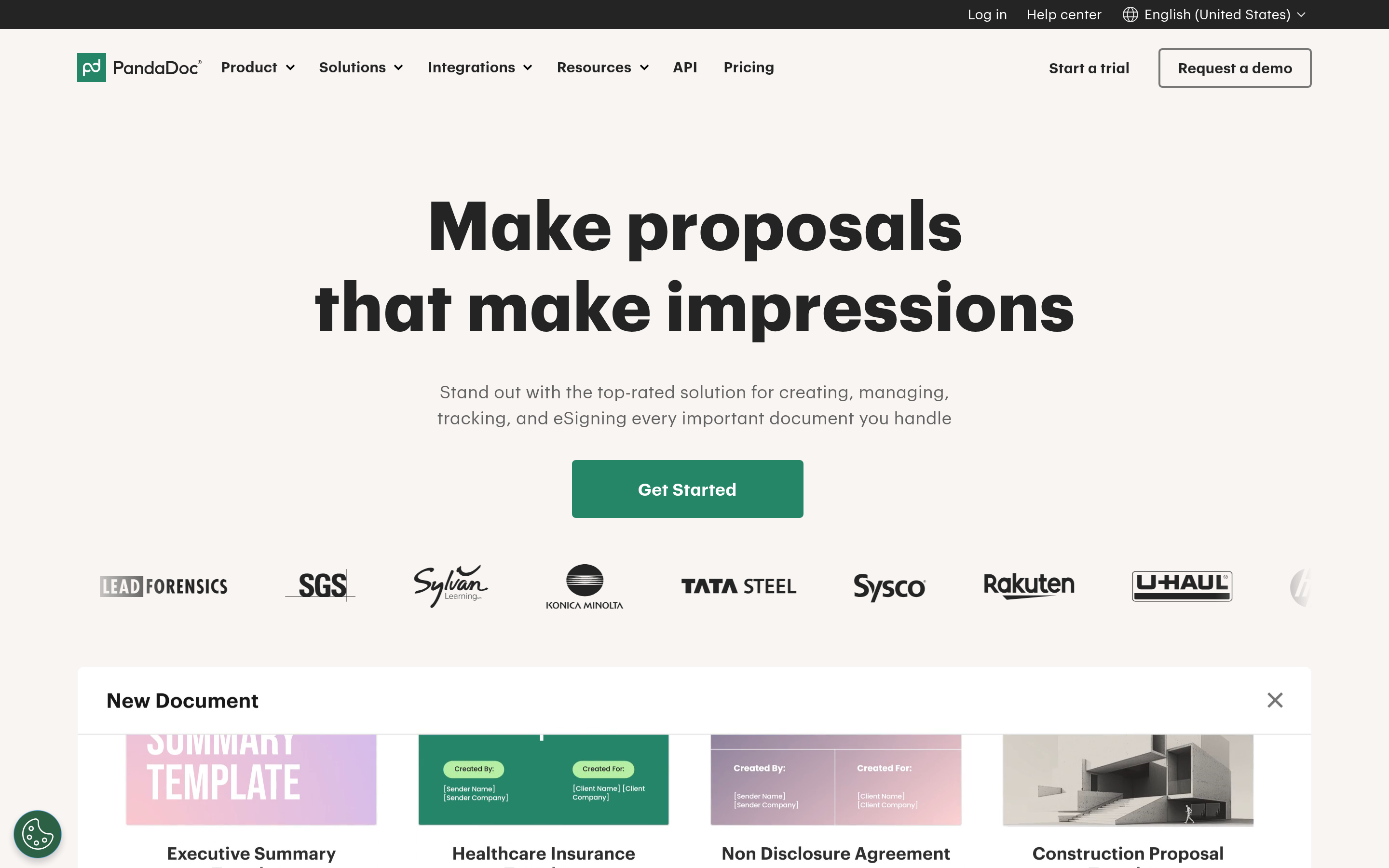
PandaDoc is the tool most teams land on when they leave Conga for document generation. It handles proposals, quotes, and contracts with a drag-and-drop editor, a content library, native e-signature, and payment collection. It integrates with HubSpot, Pipedrive, Salesforce, and more, so you aren't forced into one CRM.
Pros: transparent pricing, fast setup, strong analytics on doc opens and signs. Cons: CLM features (obligation tracking, deep clause libraries) are lighter than a dedicated contract platform. See their official site for current plans.
2. DocuSign CLM — best when contracts are the center of gravity#
If your real problem is contracts — authoring, negotiation, approvals, renewals — DocuSign CLM is the heavyweight alternative. It pairs the ubiquitous DocuSign e-signature with full lifecycle management: clause libraries, workflow routing, and a searchable repository.
Pros: mature, secure, deep CLM. Cons: enterprise pricing and enterprise complexity — you're trading one heavy platform for another, so only pick it if CLM depth justifies it.
3. Ironclad — best modern CLM for legal-led teams#

Ironclad is the CLM that legal teams tend to love. Its "Workflow Designer" lets non-engineers build contract processes, and its AI features extract and summarize terms across your repository. It's CRM-agnostic and API-friendly.
Pros: excellent UX for a legal tool, strong AI contract analytics. Cons: premium pricing; overkill if you just need proposals.
4. Nintex — best for workflow-plus-document automation#
Nintex is a process-automation platform with document generation (formerly Nintex DocGen / Drawloop, which has Conga-adjacent roots). Choose it when documents are one step inside a larger automated workflow — approvals, RPA, forms, and generation together.
Pros: broad automation surface, good Salesforce support. Cons: platform pricing is aimed at bigger orgs; document generation alone is a small slice of what you'd buy.
5. Adobe Acrobat Sign — best budget e-signature with light generation#
If Conga was mostly your e-signature and simple document workflow, Adobe Acrobat Sign covers that at a fraction of the cost, with the Adobe document ecosystem behind it. Per-user pricing is published and low.
Pros: cheap, trusted brand, ubiquitous PDF tooling. Cons: not a real CLM; document generation is basic.
6. Formstack Documents — best pure data-to-document engine#
Formstack Documents (formerly WebMerge) is a focused engine: pipe structured data in, get a finished document out. It's a clean fit when you want to replace Conga Composer's merge job without buying a whole suite.
Pros: simple, affordable, connects to hundreds of apps via Zapier and native integrations. Cons: you assemble e-sign and CRM sync from parts.
7. HotDocs — best for high-volume legal document templates#
HotDocs (now under Mitratech) automates complex, high-volume templates — the kind law firms and insurers churn out. If your bottleneck is thousands of near-identical documents with conditional logic, this is purpose-built.
Pros: powerful conditional templating at scale. Cons: dated feel, legal-centric, custom pricing.
How do these Conga alternatives compare on the core jobs?#
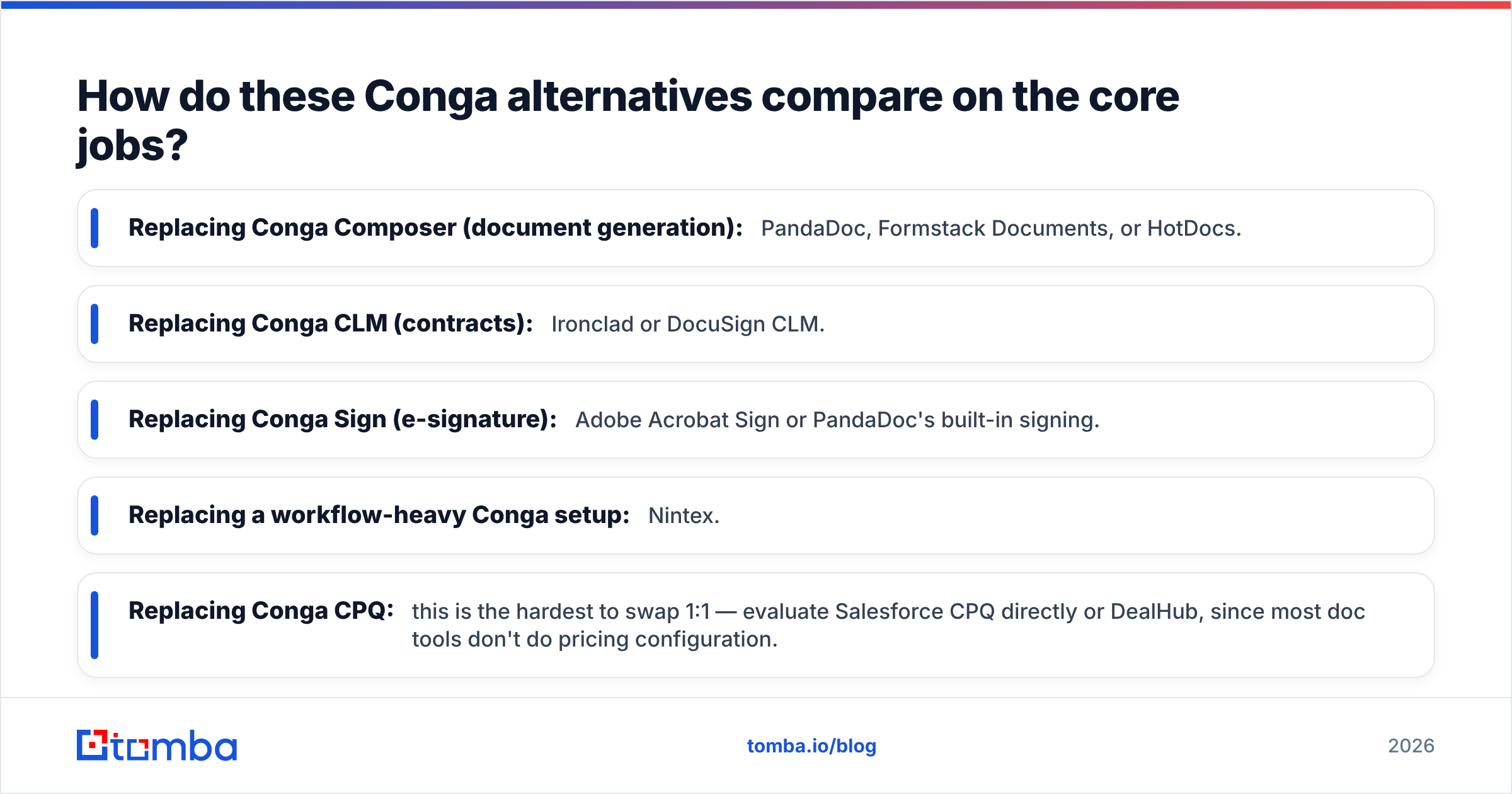
Because "alternative" means different things depending on the module you're replacing, map your need to the pick:
- Replacing Conga Composer (document generation): PandaDoc, Formstack Documents, or HotDocs.
- Replacing Conga CLM (contracts): Ironclad or DocuSign CLM.
- Replacing Conga Sign (e-signature): Adobe Acrobat Sign or PandaDoc's built-in signing.
- Replacing a workflow-heavy Conga setup: Nintex.
- Replacing Conga CPQ: this is the hardest to swap 1:1 — evaluate Salesforce CPQ directly or DealHub, since most doc tools don't do pricing configuration.
Check independent review data too. Filtering Conga on G2 against these competitors by company size and use case surfaces where each one actually wins, not just where marketing says it does.

What most teams miss: the data behind the document#
Here's the trap nobody puts in the demo. A document-automation platform is only as good as the data merged into it. If the contact name is misspelled, the company field is stale, or the signer's email bounces, your beautiful automated proposal fails silently — it goes to the wrong person, or nowhere.
Conga, PandaDoc, and every alternative here pull merge fields straight from your CRM. Garbage in, garbage out, at scale. Before you invest in any of these tools, the higher-leverage fix is often upstream: clean, verified contact records and reliable signer emails.
That's where accurate contact data pays off. Use an email finder to confirm the decision-maker's real address before a contract ever leaves the building, and layer in data enrichment to keep the company and title fields your templates depend on current. If you run a Salesforce-native stack — the same environment Conga assumes — a Salesforce integration keeps those verified fields flowing into the merge without manual copy-paste. Pairing document automation with clean data is one of the quieter sales automation wins that actually moves close rates.
How much do Conga alternatives cost?#
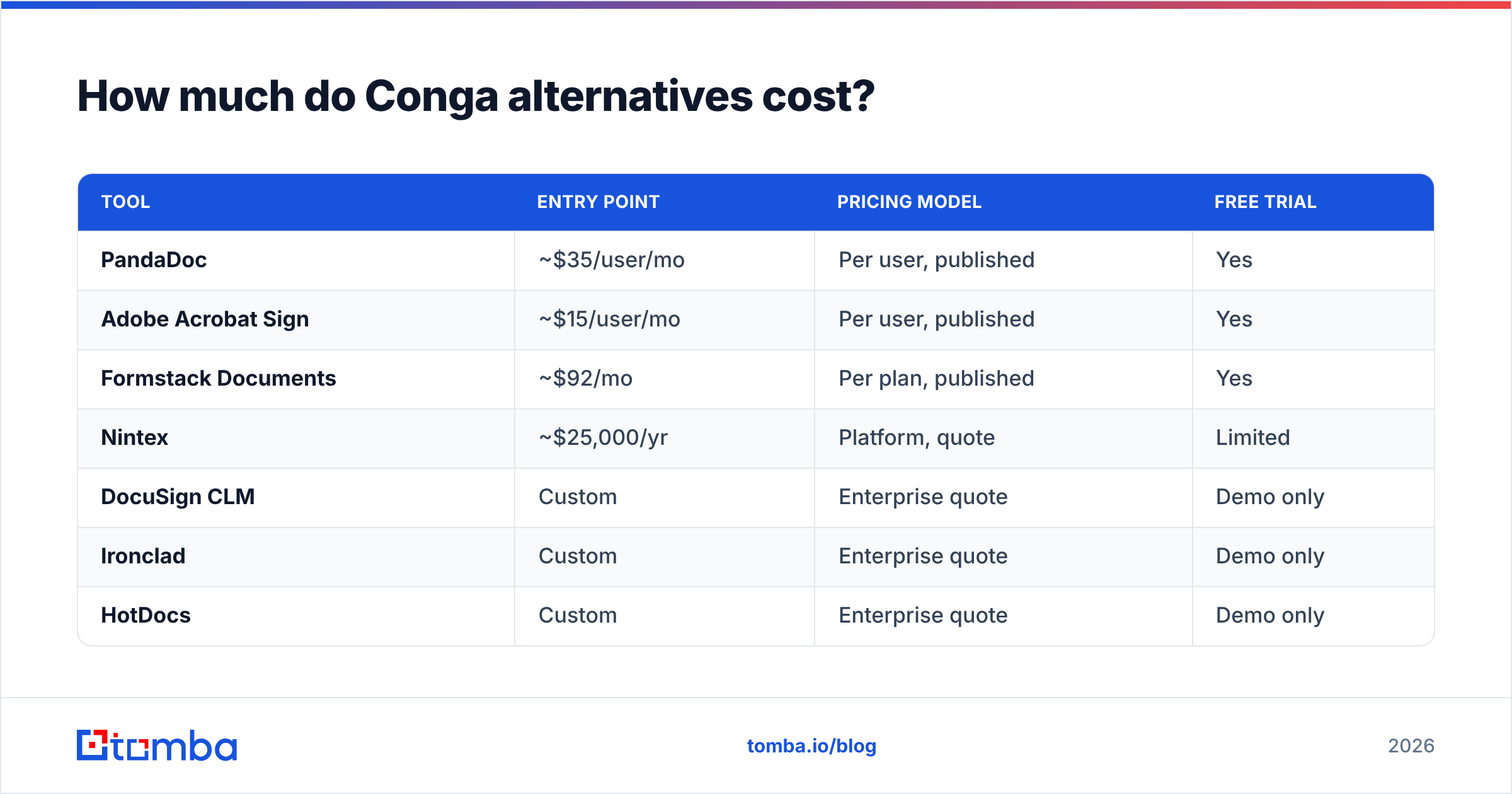
Pricing spans a wide range, and the transparent-vs-quote split matters as much as the number.
| Tool | Entry point | Pricing model | Free trial |
|---|---|---|---|
| PandaDoc | ~$35/user/mo | Per user, published | Yes |
| Adobe Acrobat Sign | ~$15/user/mo | Per user, published | Yes |
| Formstack Documents | ~$92/mo | Per plan, published | Yes |
| Nintex | ~$25,000/yr | Platform, quote | Limited |
| DocuSign CLM | Custom | Enterprise quote | Demo only |
| Ironclad | Custom | Enterprise quote | Demo only |
| HotDocs | Custom | Enterprise quote | Demo only |
If budget predictability is why you're leaving Conga, the top three published-price tools are the natural landing spot. If you genuinely need deep CLM, expect to re-enter quote territory — the value is real, but so is the sticker.
Which Conga alternative should you choose?#
Decide by the job, not the brand:
- You mostly build proposals and quotes and want fast, cheap setup → PandaDoc.
- Contracts are your whole world → Ironclad (legal-led) or DocuSign CLM (scale).
- You only signed documents in Conga → Adobe Acrobat Sign.
- You need documents inside a bigger automated workflow → Nintex.
- You want a pure merge engine to replace Composer → Formstack Documents.
- You pump out thousands of templated legal docs → HotDocs.
For most sales and revenue teams leaving Conga, PandaDoc is the safe default and Ironclad is the CLM upgrade path.
Close the data gap before you automate#
Switching document tools fixes how your paperwork gets built. It doesn't fix who it's built for. The fastest teams pair a lean document platform with verified, enriched contact data so every merge field is right the first time — and every signature request reaches a real, monitored inbox.
Start there. Run your target accounts through the Tomba Email Finder to lock down accurate decision-maker emails before your proposals and contracts go out, and let your new Conga alternative do what it does best: turn clean data into signed documents. Check Tomba pricing — including a free tier of 25 searches a month — and stop losing deals to a bounced signer email.
Related guides#
Ready to find emails that actually work?
Join 150,000+ professionals who stopped guessing and started sending. Free credits on signup — no credit card required.
Get the Tomba newsletter
Practical outbound tactics and product updates — once every two weeks.
About the author