Connectily Pricing, Reviews, Pros and Cons: A 2026 Breakdown
A neutral, no-fluff look at Connectily pricing, real user reviews, and the honest pros and cons before you commit budget to LinkedIn and email outreach automation in 2026.
This guide breaks down Connectily pricing, reviews, pros and cons in plain terms. Connectily markets itself as an all-in-one LinkedIn and email outreach platform. You build a list, run multichannel sequences, and let automation nudge prospects until they reply. The pitch is tidy. The pricing page, the fine print, and the review sentiment are messier. That gap is what you need to understand before you hand over a card number.
Below is a neutral look at Connectily pricing, reviews, pros and cons — the details that matter when you weigh it against the rest of your outbound stack.
Connectily pricing, reviews, pros and cons: TL;DR#
- What it is: a LinkedIn-first outreach automation tool with email sequencing bolted on. It aims at solo founders, recruiters, and small sales teams.
- Pricing shape: tiered per-seat monthly plans that scale by contacts, active campaigns, and channel access. Expect the entry plan to cover one user and a capped number of monthly touches.
- Biggest strength: fast to launch multichannel sequences without stitching five tools together.
- Biggest weakness: it automates sending, not data quality. You still need accurate, verified contact data feeding it, or your deliverability and reply rates suffer.
- Verdict: a reasonable outreach engine, but pair it with a dedicated data source. Automation on top of bad emails just gets you blocked faster.
What is Connectily and who is it for?#
Connectily is an outbound automation platform. You import or build a prospect list. Then you define a sequence of steps — a LinkedIn connection request, a follow-up message, an email or two. The tool runs each prospect through that flow on a schedule and pauses when someone replies.
That positions it against LinkedIn-automation tools like Waalaxy, Dripify, and Expandi. It also competes with email-led sequencers like Instantly, Saleshandy, and Reply.io. The audience skews toward:
- Solo founders and consultants who want pipeline without hiring an SDR.
- Recruiters running candidate outreach at moderate volume.
- Small sales teams that need multichannel cadences but can't justify Outreach or Salesloft pricing.
Here is the important framing: Connectily is a delivery layer. It moves messages. It is not a database, and it is not an email-verification engine. That distinction drives almost every pro and con below. It is also why the smartest buyers treat data sourcing as a separate decision. If you're evaluating the category broadly, our roundups of an Instantly alternative and a Dripify alternative cover adjacent options.
How much does Connectily cost? (Pricing breakdown)#
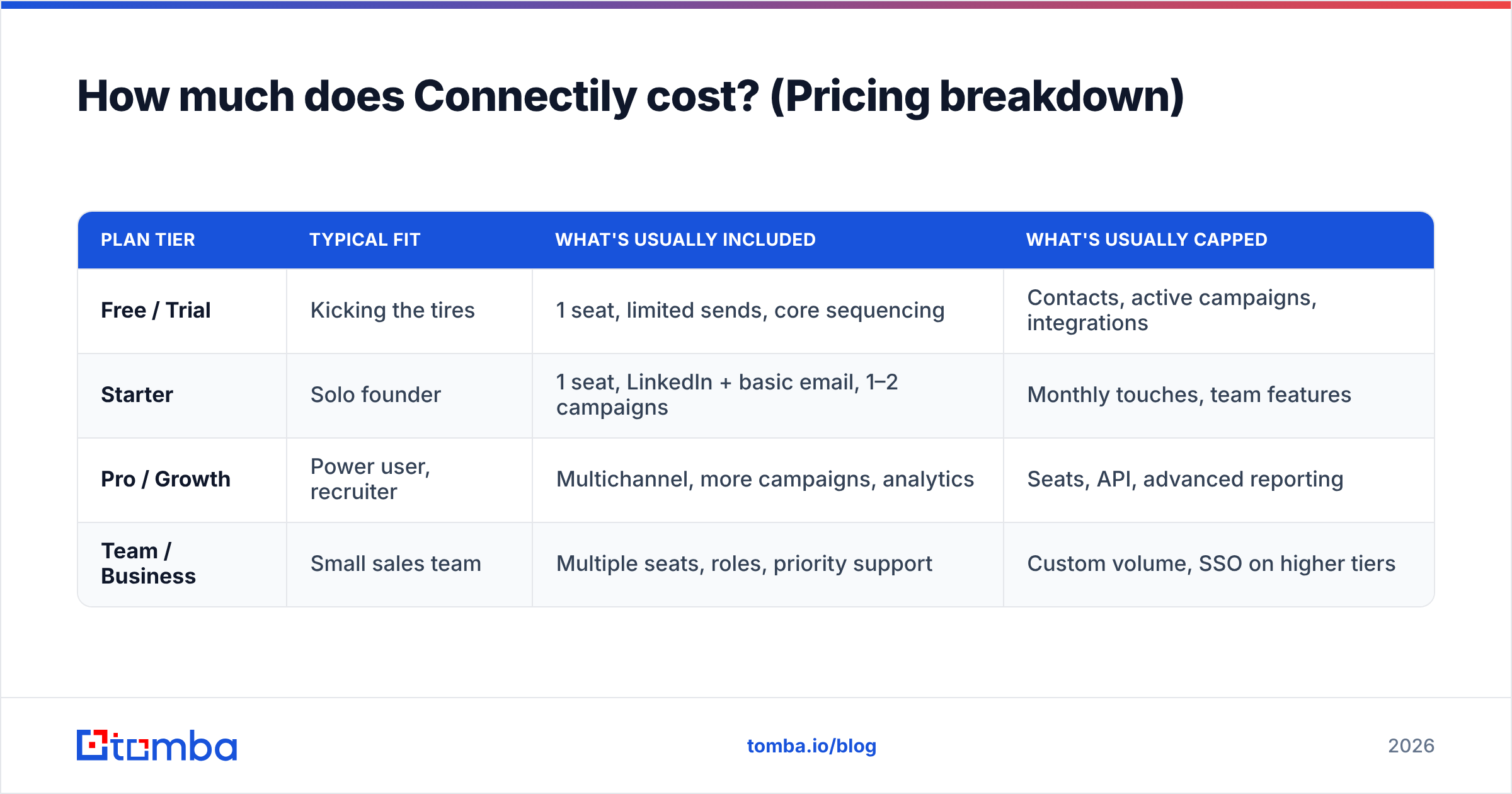
Connectily uses the familiar SaaS ladder. There is a low entry tier for individuals, mid tiers that unlock more active campaigns and higher sending caps, and a top tier (or custom quote) for teams that need seats, roles, and priority support. Pricing is per seat, billed monthly or annually, with the usual discount for paying yearly.
Outreach vendors adjust plans often. So treat the table below as a representative structure rather than a locked quote. Always confirm the current numbers on the official Connectily site before you buy.
| Plan tier | Typical fit | What's usually included | What's usually capped |
|---|---|---|---|
| Free / Trial | Kicking the tires | 1 seat, limited sends, core sequencing | Contacts, active campaigns, integrations |
| Starter | Solo founder | 1 seat, LinkedIn + basic email, 1–2 campaigns | Monthly touches, team features |
| Pro / Growth | Power user, recruiter | Multichannel, more campaigns, analytics | Seats, API, advanced reporting |
| Team / Business | Small sales team | Multiple seats, roles, priority support | Custom volume, SSO on higher tiers |
Three cost questions actually decide value:
- Is it per seat? Multichannel tools almost always are. A three-person team pays roughly three times the sticker price. Model that before you compare it to a flat-rate competitor.
- What's the real sending cap? Entry plans throttle daily touches to protect their infrastructure and your account. If the cap is below your target volume, you're already on the next tier up.
- Does data cost extra? This is the hidden line item. If contacts, enrichment, or email verification aren't included, the "cheap" plan isn't cheap. You're adding a second subscription to make the first one usable.
That last point is where budgets quietly balloon. So price the whole workflow, not the logo on the invoice.
Connectily pricing vs the real cost of outreach#
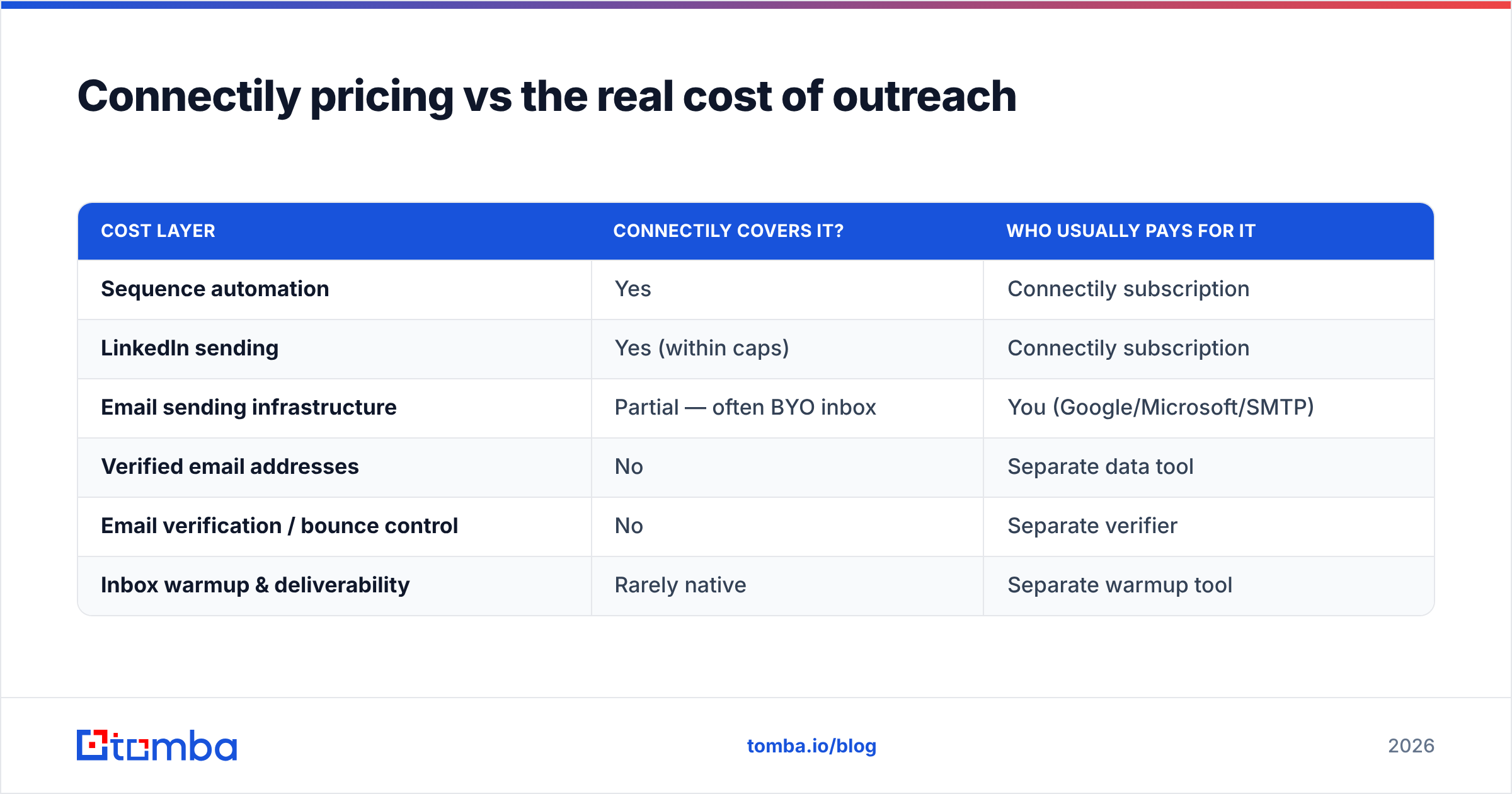
Here's the trap in every LinkedIn-automation pricing page: the subscription is the small number. The expensive part is everything you bolt on to make it work.
| Cost layer | Connectily covers it? | Who usually pays for it |
|---|---|---|
| Sequence automation | Yes | Connectily subscription |
| LinkedIn sending | Yes (within caps) | Connectily subscription |
| Email sending infrastructure | Partial — often BYO inbox | You (Google/Microsoft/SMTP) |
| Verified email addresses | No | Separate data tool |
| Email verification / bounce control | No | Separate verifier |
| Inbox warmup & deliverability | Rarely native | Separate warmup tool |
Add those layers and a "$49-ish" outreach tool becomes a $120–$200 monthly stack. That's not a knock on Connectily specifically. It's true of nearly every sequencer. But it reframes the question. Stop asking "is Connectily cheap?" and start asking "is my whole outbound stack efficient?" A tool that sends flawlessly into a list of guessed, unverified emails will still tank your sender reputation and land you in spam.
What do Connectily reviews say? (Pros and cons)#
Let's pull together the sentiment you'll find on directories like G2 and Capterra, plus community threads. A consistent pattern emerges. Treat individual star ratings with skepticism, and read the reasons instead.
Pros reviewers mention#
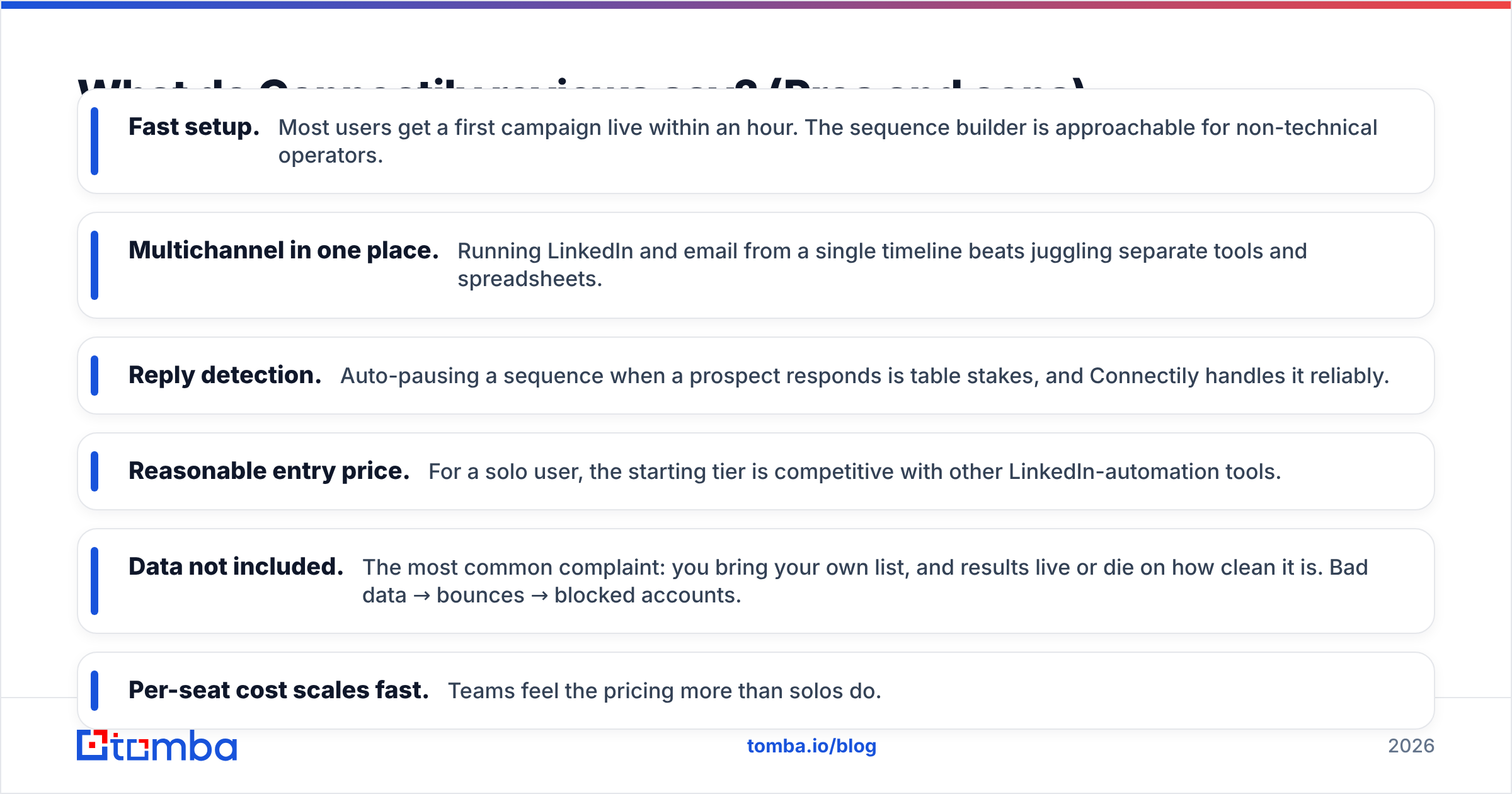
- Fast setup. Most users get a first campaign live within an hour. The sequence builder is approachable for non-technical operators.
- Multichannel in one place. Running LinkedIn and email from a single timeline beats juggling separate tools and spreadsheets.
- Reply detection. Auto-pausing a sequence when a prospect responds is table stakes, and Connectily handles it reliably.
- Reasonable entry price. For a solo user, the starting tier is competitive with other LinkedIn-automation tools.
Cons reviewers mention#
- Data not included. This is the most common complaint. You bring your own list, and results live or die on how clean it is. Bad data leads to bounces, and bounces get accounts blocked.
- Per-seat cost scales fast. Teams feel the pricing more than solos do.
- LinkedIn risk. Any automation on LinkedIn carries account-safety risk if you push limits. Conservative sending settings matter.
- Support tiering. Faster support tends to sit on higher plans. It's a familiar SaaS pattern that frustrates entry-tier users.
- Deliverability is on you. Without native warmup and verification, cold email performance depends entirely on your own hygiene.
The throughline is clear. Reviewers rarely complain about the automation. They complain about what happens when good automation meets bad data. Which is the whole point.
How does Connectily compare to alternatives?#
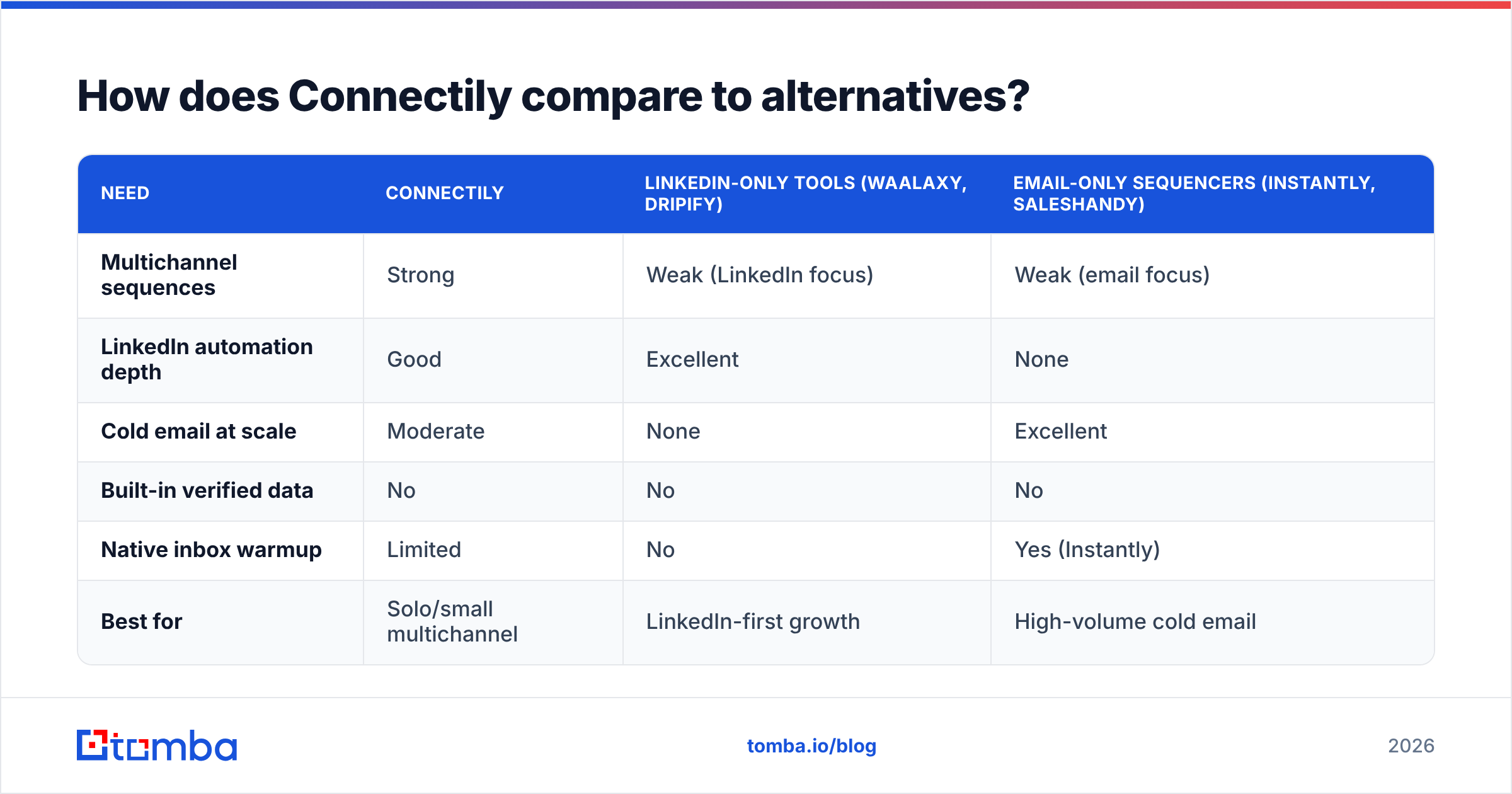
No single tool wins for everyone. The right question is which layer you're actually shopping for.
| Need | Connectily | LinkedIn-only tools (Waalaxy, Dripify) | Email-only sequencers (Instantly, Saleshandy) |
|---|---|---|---|
| Multichannel sequences | Strong | Weak (LinkedIn focus) | Weak (email focus) |
| LinkedIn automation depth | Good | Excellent | None |
| Cold email at scale | Moderate | None | Excellent |
| Built-in verified data | No | No | No |
| Native inbox warmup | Limited | No | Yes (Instantly) |
| Best for | Solo/small multichannel | LinkedIn-first growth | High-volume cold email |
If you live on LinkedIn, a dedicated LinkedIn tool may go deeper. If cold email volume is your game, an email-native sequencer with warmup wins. Connectily's sweet spot is the operator who wants both channels, simply, in one login — and is willing to solve data separately. For a broader shortlist, compare a Waalaxy alternative and a Saleshandy alternative side by side.
Is Connectily worth it? (Honest verdict)#
Yes, conditionally. Connectily is a competent outreach engine. It removes real friction for solo operators and small teams who need LinkedIn and email in one flow. If that's your shape and you value simplicity over depth, it earns its subscription.
But three caveats decide whether it's worth it for you:
- You have a real data source. Connectily assumes you already have accurate, verified contacts. If you don't, budget for that first. It's the input that determines every output.
- You'll respect sending limits. Aggressive settings on LinkedIn risk your account. The tool gives you rope; don't hang the account with it.
- You'll own deliverability. Verify before you send, warm up your inboxes, and monitor bounces. Automation amplifies whatever you feed it, clean or dirty.
Get those three right and Connectily is a solid buy. Get them wrong and no automation tool, at any price, will save the campaign. That's the honest read on Connectily pricing, reviews, pros and cons.
Where the data layer fits — the piece Connectily leaves to you#
Every con above traces back to one gap: Connectily automates delivery, not data. So the highest-leverage thing you can do is fix the input.
That means, before a single sequence runs, you should:
- Find the right email addresses by domain, name, or company — not guess formats.
- Verify every address so bounces stay low and your domain reputation stays intact.
- Enrich contacts with role, company, and channel data so your sequences actually personalize.
This is where a dedicated data platform pays for itself. Tomba's email finder sources professional addresses from public data. Its email verifier catches risky and dead addresses before they burn your reputation. And its LinkedIn finder turns profiles into reachable contacts you can push straight into an outreach tool like Connectily. Plans start free (25 searches/month) and scale to Starter at $49/month — see full Tomba pricing for the tiers. One fair warning on comparison shopping: whatever sequencer you pick, feed it verified data or you're automating your way into the spam folder.
Final recommendation#
Buy Connectily if you're a solo founder, recruiter, or small team that wants multichannel outreach without a Frankenstein stack. Just price the whole workflow, not only the subscription line. Skip it if you need deep single-channel firepower or a database baked in. A specialist tool will serve you better.
Either way, the automation is only as good as the contacts behind it. Start by finding and verifying real, reachable emails with the Tomba Email Finder. Then let Connectily do the sending. Clean data in, real replies out. That order never changes.
Related guides#
Ready to find emails that actually work?
Join 150,000+ professionals who stopped guessing and started sending. Free credits on signup — no credit card required.
Get the Tomba newsletter
Practical outbound tactics and product updates — once every two weeks.
About the author