ContactOut Pricing in 2026: Plans, Real Costs, and a Cheaper Pick
A neutral breakdown of ContactOut pricing in 2026 — real per-credit costs, what each tier actually unlocks, the hidden limits, and when a cheaper email finder wins.
ContactOut is one of the better-known LinkedIn email finders, but its pricing is famously hard to read from the outside. Quotes shift by seat, credits, and sales call. This is a neutral walk-through of what you actually pay in 2026, where the costs hide, and when a flat-rate tool serves you better.
TL;DR#
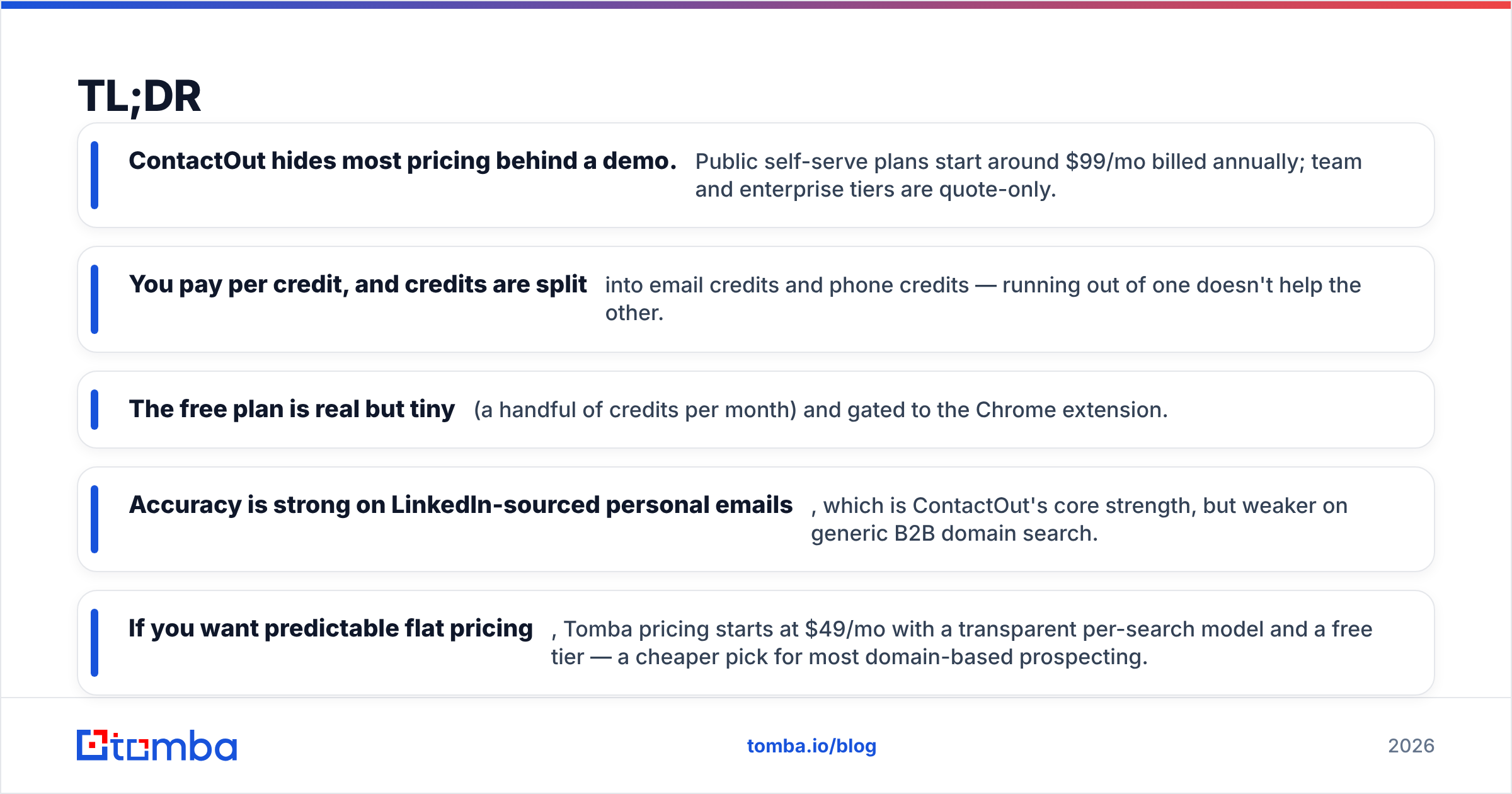
- ContactOut hides most pricing behind a demo. Public self-serve plans start around $99/mo billed annually; team and enterprise tiers are quote-only.
- You pay per credit, and credits are split into email credits and phone credits — running out of one doesn't help the other.
- The free plan is real but tiny (a handful of credits per month) and gated to the Chrome extension.
- Accuracy is strong on LinkedIn-sourced personal emails, which is ContactOut's core strength, but weaker on generic B2B domain search.
- If you want predictable flat pricing, Tomba pricing starts at $49/mo with a transparent per-search model and a free tier — a cheaper pick for most domain-based prospecting.
What does ContactOut pricing actually look like in 2026?#
The short version: expect roughly $99/mo for a solo self-serve plan, more per seat for teams, and a custom quote for anything at scale. ContactOut, like many contact-data vendors, keeps its higher tiers behind a "book a demo" wall, so the exact number you see depends on seat count, credit volume, and whatever the sales rep quotes on the day.
That opacity is the single most common complaint in reviews on G2. It isn't unusual for the category — Apollo, Lusha, and RocketReach all do versions of it — but it makes apples-to-apples budgeting hard. Here's the structure as it's generally published on the ContactOut site and reseller listings.

The thing to understand before you compare dollar figures is the credit model. ContactOut separates email credits from phone credits. A plan that advertises "unlimited" often means unlimited email lookups within fair-use limits, while phone numbers stay metered. If your workflow is phone-heavy, the sticker price understates your real cost.
How much does each ContactOut plan cost?#
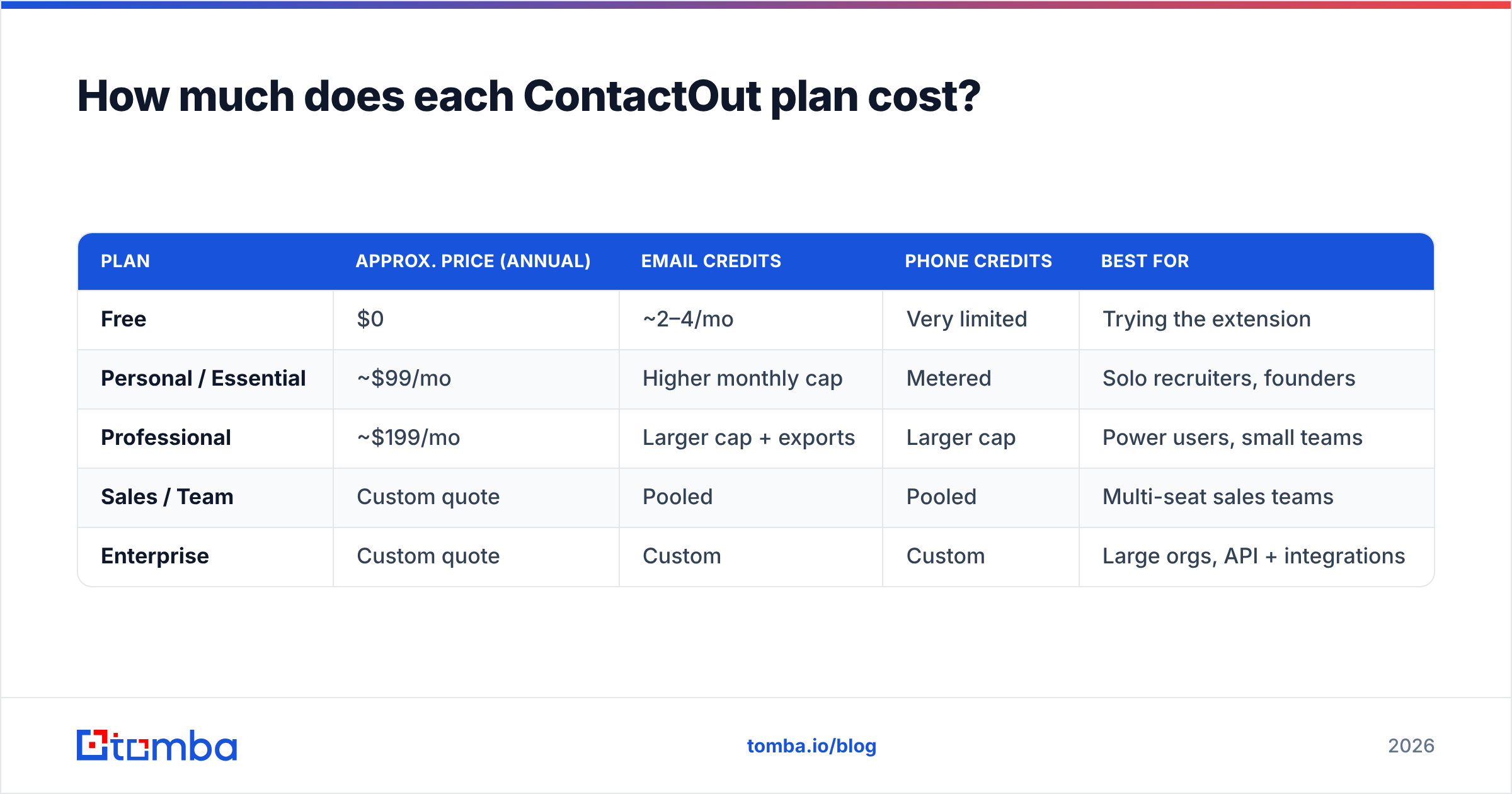
Below is a representative breakdown based on publicly listed self-serve pricing. Team and enterprise numbers are quote-driven, so treat those cells as directional rather than guaranteed.
| Plan | Approx. price (annual) | Email credits | Phone credits | Best for |
|---|---|---|---|---|
| Free | $0 | ~2–4/mo | Very limited | Trying the extension |
| Personal / Essential | ~$99/mo | Higher monthly cap | Metered | Solo recruiters, founders |
| Professional | ~$199/mo | Larger cap + exports | Larger cap | Power users, small teams |
| Sales / Team | Custom quote | Pooled | Pooled | Multi-seat sales teams |
| Enterprise | Custom quote | Custom | Custom | Large orgs, API + integrations |

A few things worth flagging on this table:
- Annual billing is where the advertised prices live. Month-to-month is typically noticeably higher, so the "$99" figure assumes you commit for a year.
- Bulk exports and API access sit on the upper tiers. If you need to push data into a CRM or run enrichment at volume, you're likely on a custom quote, not the entry plan.
- Credit rollover is limited. Unused credits generally don't bank indefinitely, so over-buying to "be safe" wastes spend.
- Seats multiply cost fast. A five-person team on a paid tier is a very different monthly number than the solo sticker price suggests.
What are the hidden costs in ContactOut pricing?#
The real cost of ContactOut isn't the headline plan — it's the credit math and the seat math. Three gotchas catch buyers most often.
Split credits. Because email and phone credits are separate buckets, a plan sized for your email volume can leave you short on phones (or vice versa). You end up upgrading for the resource you're short on, not the one you use most.
Quote-gated scaling. The moment you need team seats, API calls, or bulk workflows, you leave self-serve and enter a negotiation. That's fine if you like to negotiate; it's friction if you just want to swipe a card and start prospecting today.
Data you can't fully use. ContactOut's strength is personal emails pulled from LinkedIn profiles. If your outbound targets are role-based inboxes or you work primarily from a company domain, you'll burn credits on lookups that a cheaper domain search tool would return more directly.
None of this makes ContactOut a bad product — it's genuinely good at what it's built for. But "good at LinkedIn personal emails" and "cheapest way to fill a B2B pipeline" are not the same claim.
Is ContactOut accurate enough to justify the price?#
On LinkedIn-sourced personal emails, yes — that's its home turf. ContactOut cross-references profile data and maintains a large repository of personal and work emails, and its verified-email hit rate on connected profiles is competitive with the top of the category.
Where it's weaker is generic domain search and catch-all handling. If you feed it a company domain and ask for every reachable contact, results are thinner than a dedicated domain-first tool, and catch-all domains (where the mail server accepts everything) need a separate verification step you shouldn't skip. That's true of every finder — always run addresses through an email verifier before you send, regardless of vendor.

So the accuracy question is really a fit question. Recruiter sourcing individual candidates off LinkedIn? ContactOut earns its price. Sales team building account-based lists from domains? You're paying a premium for a strength you won't lean on.
How does ContactOut pricing compare to Tomba?#
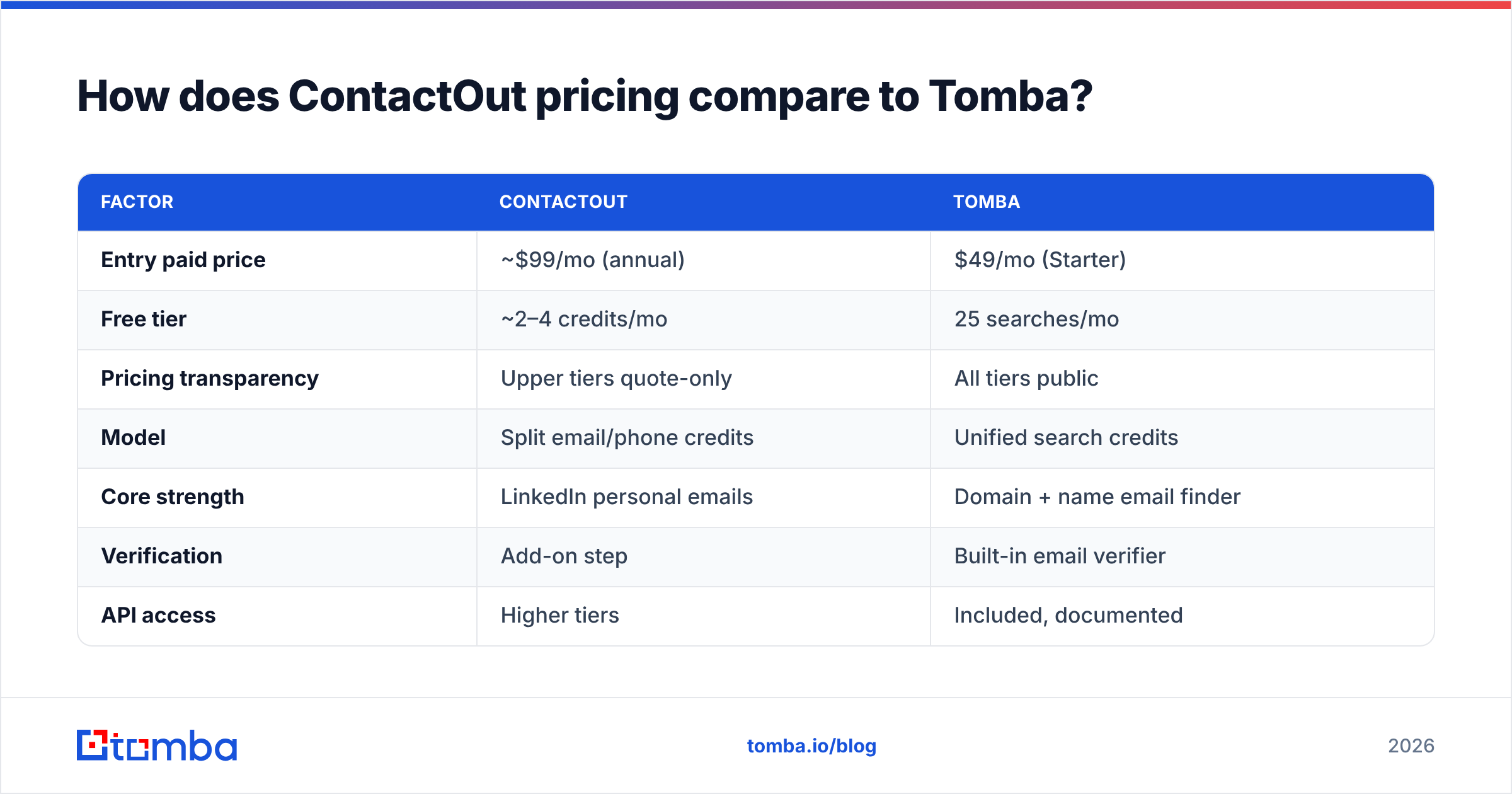
Tomba trades the demo-gated credit model for flat, published pricing — and starts lower. Here's the head-to-head on the things that actually drive your monthly bill.
| Factor | ContactOut | Tomba |
|---|---|---|
| Entry paid price | ~$99/mo (annual) | $49/mo (Starter) |
| Free tier | ~2–4 credits/mo | 25 searches/mo |
| Pricing transparency | Upper tiers quote-only | All tiers public |
| Model | Split email/phone credits | Unified search credits |
| Core strength | LinkedIn personal emails | Domain + name email finder |
| Verification | Add-on step | Built-in email verifier |
| API access | Higher tiers | Included, documented |
| Phone data | Metered credits | Phone finder available |

The practical read: if your prospecting starts from company domains and names — which is how most B2B sales teams actually build lists — a flat tool like the Tomba Email Finder covers the job at roughly half the entry cost, with verification baked in. Full Tomba pricing runs Free (25 searches), Starter $49/mo, Growth $99/mo, Pro $249/mo, and custom Enterprise.
If your prospecting starts from individual LinkedIn profiles — classic recruiter sourcing — ContactOut's personal-email depth may be worth the higher, less predictable spend. And Tomba's own LinkedIn finder covers the LinkedIn angle too, so it's worth trying both against your real target list before committing.
Which plan should you actually buy?#
Match the tool to where your list starts, not to the flashiest feature list.
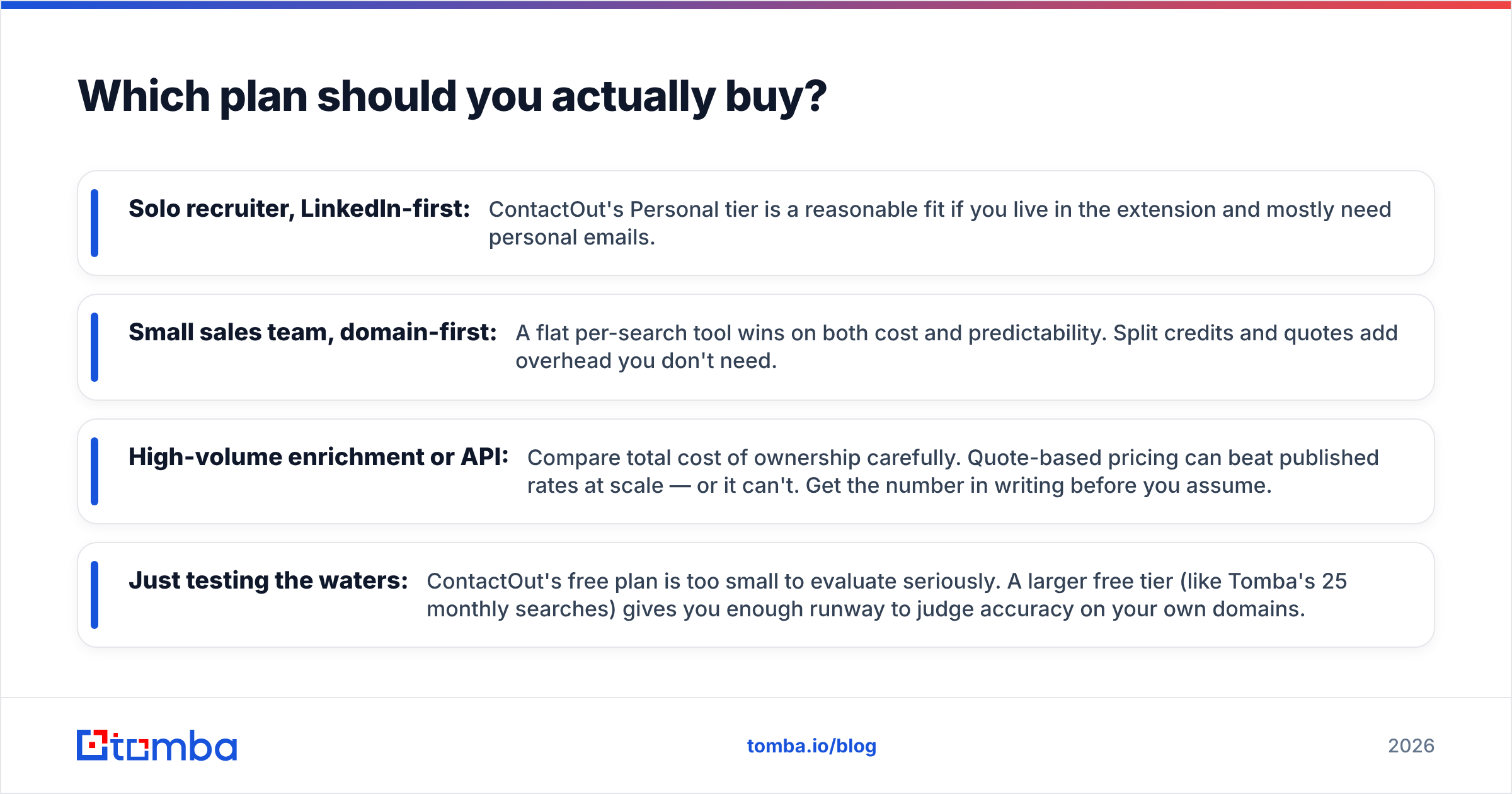
- Solo recruiter, LinkedIn-first: ContactOut's Personal tier is a reasonable fit if you live in the extension and mostly need personal emails.
- Small sales team, domain-first: A flat per-search tool wins on both cost and predictability. Split credits and quotes add overhead you don't need.
- High-volume enrichment or API: Compare total cost of ownership carefully. Quote-based pricing can beat published rates at scale — or it can't. Get the number in writing before you assume.
- Just testing the waters: ContactOut's free plan is too small to evaluate seriously. A larger free tier (like Tomba's 25 monthly searches) gives you enough runway to judge accuracy on your own domains.
A last budgeting tip that applies to any finder: your cost per usable contact matters more than cost per credit. A cheaper lookup that returns a dead address isn't cheaper. Always verify before you send, and measure spend against connected replies, not raw exports.
The bottom line on ContactOut pricing#
ContactOut is a strong LinkedIn email finder with pricing that rewards annual commitment and punishes anyone who needs to scale without a sales call. Expect ~$99/mo to start solo, split email-and-phone credits, and custom quotes above that. It's worth the money if personal emails off LinkedIn profiles are your bread and butter.
For most domain-based B2B prospecting, though, a flat, transparent tool is the more predictable buy. If you'd rather see the price before you talk to anyone — and get verification built in — start free with the Tomba Email Finder, find emails by domain, name, or company, and only upgrade to the $49/mo Starter when your volume justifies it. No demo required.
Related guides#
// get started
Find, verify and enrich your first contacts today
Start on the free plan with 25 searches a month, then scale when your team is ready.
Free plan · No credit card required · GDPR & CCPA
// about the author