ContactOut vs Skrapp: Which Email Finder Wins in 2026?
ContactOut sells personal emails and phone numbers at a premium. Skrapp sells cheap B2B work emails at volume. We compare accuracy, pricing, and coverage to find which one your team should actually pay for.
TL;DR
- ContactOut is a LinkedIn-first recruiter tool. Its edge is personal emails and mobile numbers — the data most B2B tools don't touch. You pay a premium for that edge.
- Skrapp is a budget B2B work-email tool. Domain search, LinkedIn extension, bulk CSV enrichment, cheap credits. Coverage is thinner and verification is lighter.
- Accuracy: neither publishes an independently audited bounce rate. In practice, both land in the 85–95% band on easy domains and drop hard on catch-all and small-company domains.
- Cost per verified lead is the number that matters, not credit price. A $49/mo tool with 92% deliverable data beats a $29/mo tool at 70%.
- If you need personal contact data for recruiting, ContactOut. If you need cheap bulk work emails, Skrapp. If you need verified work emails plus an API, verifier, and catch-all handling in one bill, look at a third option.
What are ContactOut and Skrapp, actually?#
They get lumped together because both live in a Chrome extension next to LinkedIn. That's where the similarity stops.
ContactOut started as a recruiter tool and still behaves like one. Its database is built around people, not companies. When you open a LinkedIn profile, ContactOut tries to surface a personal Gmail/Yahoo address and a mobile number alongside the work email. For a recruiter chasing a passive candidate who never opens their corporate inbox, that personal email is the entire product. See their own positioning at contactout.com.
Skrapp is a sales tool. It's built around domains. Give it acme.com and it returns the email pattern and the people it knows at that company. It scrapes LinkedIn and Sales Navigator lists, exports to CSV, and does light SMTP verification on the way out. Its pitch is volume at a low price. See skrapp.io.
The mental model: ContactOut is a private investigator, Skrapp is a phone book. One digs up the contact nobody published. The other tells you the format everyone at the company already uses.
That distinction decides most of the buying decision before you compare a single price.
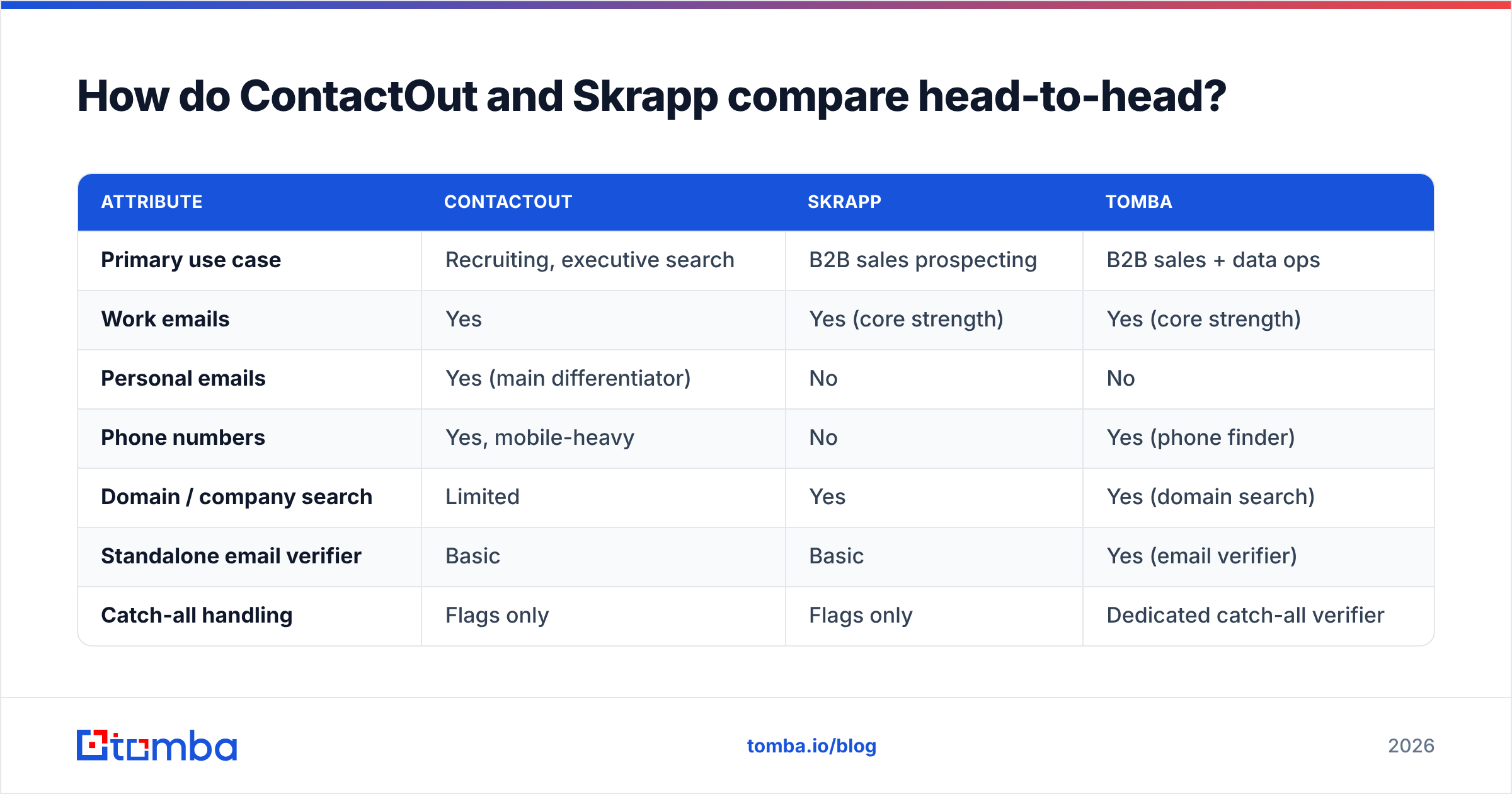
How do ContactOut and Skrapp compare head-to-head?#
Here's the practical breakdown. Prices reflect publicly listed self-serve tiers as of early 2026 and move around — check both vendors before you commit.
| Attribute | ContactOut | Skrapp | Tomba |
|---|---|---|---|
| Primary use case | Recruiting, executive search | B2B sales prospecting | B2B sales + data ops |
| Work emails | Yes | Yes (core strength) | Yes (core strength) |
| Personal emails | Yes (main differentiator) | No | No |
| Phone numbers | Yes, mobile-heavy | No | Yes (phone finder) |
| Domain / company search | Limited | Yes | Yes (domain search) |
| Standalone email verifier | Basic | Basic | Yes (email verifier) |
| Catch-all handling | Flags only | Flags only | Dedicated catch-all verifier |
| Free tier | Limited monthly credits | 100 emails/mo (historically) | 25 searches/mo |
| Entry paid tier | ~$79/mo range | ~$39–49/mo range | $49/mo (Starter) |
| Mid tier | ~$199+/mo | ~$99/mo | $99/mo (Growth) |
| Public API | Enterprise-gated | Limited | Full email finder API on all paid plans |
| Bulk CSV enrichment | Yes | Yes | Yes (bulk email finder) |
| Best for | Recruiters who need mobiles | Small teams on a budget | Teams who need verified work emails at scale |
Three things jump out of that table.
First, ContactOut charges roughly 2x for a data type Skrapp doesn't sell at all. If you don't need personal emails or mobiles, you're paying a recruiting premium for nothing.
Second, Skrapp's cheapness is real but narrow. It's a finder, not a data platform. No serious API, no catch-all resolution, no enrichment layer. Once your workflow outgrows "export CSV, paste into sequencer," you'll be bolting on a second and third tool.
Third, neither tool ships a proper verifier. Both flag an address as valid/risky/invalid and move on. That gap is what quietly kills your sender reputation three weeks into a campaign.

How accurate are ContactOut and Skrapp?#
Short answer: nobody knows precisely, including the vendors — and you should be suspicious of any blog that claims a hard number.
Both companies advertise accuracy figures in the 95–98% range. Those figures are self-reported, measured on their own test sets, and almost never reproduced in the wild. Independent user reviews on G2 tell a more textured story: strong hit rates on large, well-known domains; noticeable degradation on companies under 50 employees, on non-English-speaking markets, and on any domain configured as catch-all.
Here's what actually drives accuracy, in rough order of impact:
- Domain size and public footprint. A 5,000-person US SaaS company has thousands of published addresses and a predictable pattern. A 12-person agency in Lisbon has neither. Every tool's hit rate collapses on the second one — the difference between vendors on that segment is smaller than either would like to admit.
- Catch-all configuration. If a domain accepts every address at the SMTP layer, standard verification can't tell a real mailbox from a typo. Tools that just flag "catch-all — risky" push the problem onto you. Tools that resolve them (via pattern confidence, secondary sources, or engagement signals) actually solve it.
- Data freshness. People change jobs every 2–3 years. A database that isn't continuously re-crawled decays roughly 25–30% annually. Ask both vendors when their records were last re-verified, not how many records they have.
- Verification depth. Syntax check → MX record → SMTP handshake → mailbox existence. Most cheap tools stop at MX. That's the gap between "looks valid" and "will actually deliver."
- Source transparency. Where does the data come from? Tools that publish their data sources are making a falsifiable claim. Tools that say "proprietary AI" are not.

The honest verdict on accuracy: ContactOut wins on personal-email coverage because almost nobody else competes there. Skrapp is competitive on standard corporate work emails but not class-leading. Neither is a good enough verifier to skip a dedicated verification pass before you send.
Which is better for cold email deliverability?#
Neither, on its own. And this is the part most comparison posts skip.
Your bounce rate is a reputation signal. Google and Microsoft both treat elevated hard bounces as evidence you're sending to a scraped list. Cross roughly 2–3% and you don't get a warning — you get quietly filtered into spam for weeks. Google's own bulk sender guidelines spell out the expectation: keep your lists clean, authenticate properly, keep complaints low.
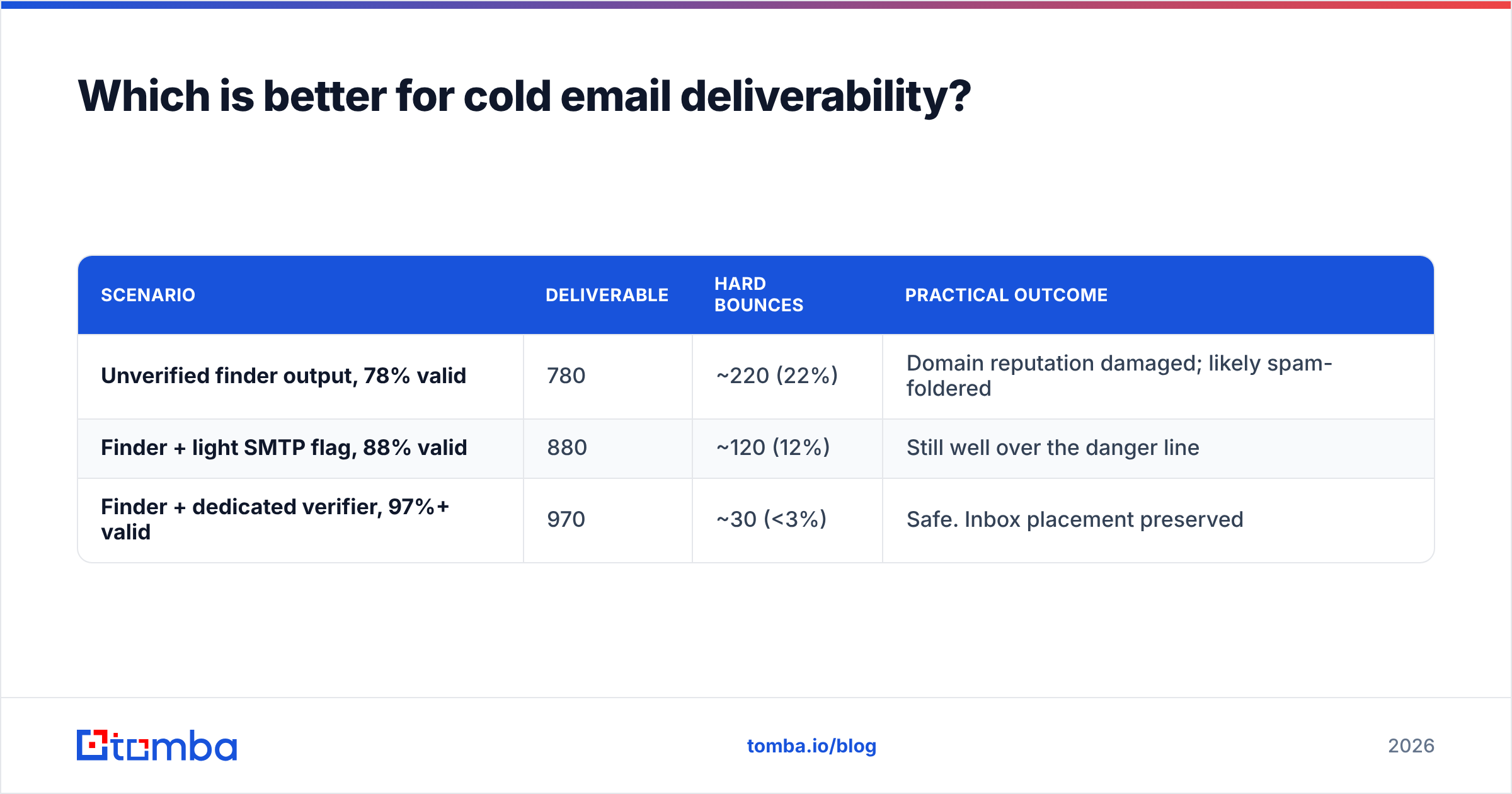
Run the math on a 1,000-lead campaign:
| Scenario | Deliverable | Hard bounces | Practical outcome |
|---|---|---|---|
| Unverified finder output, 78% valid | 780 | ~220 (22%) | Domain reputation damaged; likely spam-foldered |
| Finder + light SMTP flag, 88% valid | 880 | ~120 (12%) | Still well over the danger line |
| Finder + dedicated verifier, 97%+ valid | 970 | ~30 (<3%) | Safe. Inbox placement preserved |
The third row is the only one you can send from. Getting there means either paying for a separate verification tool on top of ContactOut/Skrapp — or picking a platform where finding and verifying live in the same pipeline.
If you're already fighting inbox placement, fix the plumbing first: check your SPF record, confirm DKIM and DMARC alignment, and only then blame the data. Bad email deliverability is usually two problems stacked — bad list and bad auth — and people only fix one.
What does each tool actually cost per usable lead?#
Credit price is a vanity metric. Cost per deliverable, verified contact is the real one.
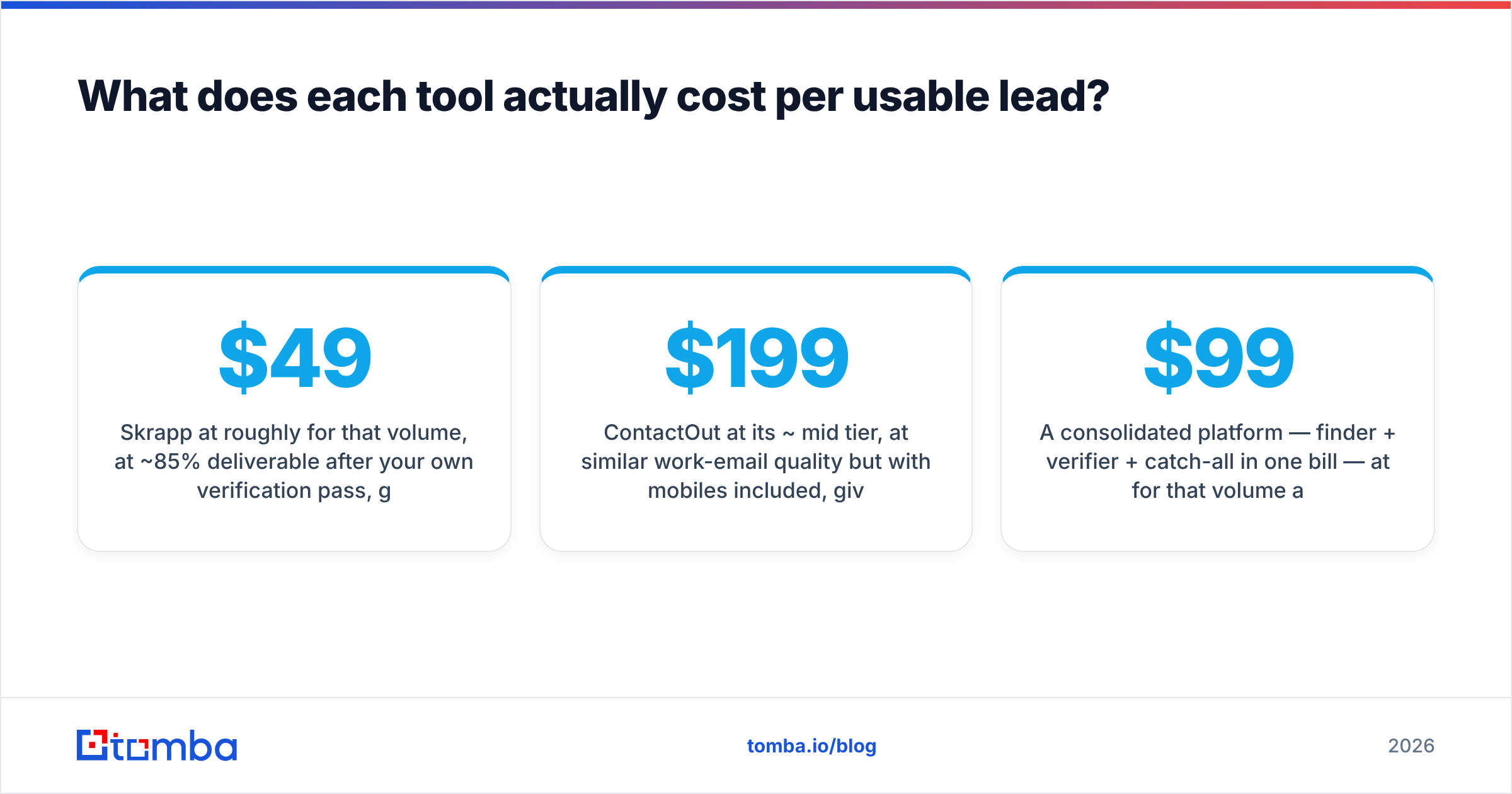
Take a team pulling 2,000 contacts a month:
- Skrapp at roughly $49/mo for that volume, at ~85% deliverable after your own verification pass, gives ~1,700 usable contacts → about $0.029 each — plus whatever you pay a separate verifier (typically $20–40/mo for that volume), pushing real cost to roughly $0.04–0.05.
- ContactOut at its ~$199/mo mid tier, at similar work-email quality but with mobiles included, gives ~1,700 usable → about $0.117 each. Fine if you need the mobiles. Terrible value if you don't.
- A consolidated platform — finder + verifier + catch-all in one bill — at $99/mo for that volume at ~95% deliverable gives ~1,900 usable → about $0.052 each, with no second vendor, no CSV round-trip, no reconciliation.
The lesson isn't "cheapest wins." It's that the sticker price of a finder tells you almost nothing about your true cost, because every finder-only tool has an invisible verification tax attached. Compare full-stack Tomba pricing against finder-plus-verifier bundles and the gap usually closes fast.
Worth naming: if your problem is list purchase rather than list building — you want a pre-built, pre-verified B2B list rather than sourcing contacts one profile at a time — a database vendor like BookYourData is a different and legitimate answer to a different question. It's not really competing with ContactOut or Skrapp; it's competing with the decision to build a list at all.
When should you pick ContactOut over Skrapp?#
Pick ContactOut if:
- You're recruiting. Personal emails and mobile numbers are the product. Nothing on this page replaces that.
- Your targets are executives who have an assistant filtering the corporate inbox and answer only on their phone.
- Volume is low, value per contact is high. At $200/mo for a few hundred well-researched contacts, the math works when one placement is worth five figures.
- You live inside LinkedIn all day. ContactOut's extension is genuinely well-built for that workflow.
Pick Skrapp if:
- You're a small sales team with a tight budget and need work emails, nothing more.
- Your workflow is CSV-shaped: pull a list, enrich, export, sequence, repeat.
- You already own a verifier and just need a cheap source of raw addresses to feed it.
- You target mid-to-large companies with predictable email patterns, where any decent finder performs well.
Skip both if:
- You need an API. Neither tool's API story is strong for self-serve customers. If you're enriching inside a product, a CRM workflow, or a data pipeline, you'll hit a wall.
- You're drowning in catch-all domains. Roughly a quarter of B2B domains are catch-all in some verticals. "Risky — send at your own peril" is not an answer.
- You want one bill. Finder + verifier + enrichment + phone as four line items is a RevOps problem waiting to happen.
Where does Tomba fit in this comparison?#
Honestly: Tomba doesn't compete with ContactOut on personal emails. If you need a candidate's Gmail, ContactOut is the tool. We'd rather say that than pretend otherwise.
Where Tomba does compete — directly with Skrapp, and favorably — is B2B work-email sourcing where deliverability is the deciding factor:
- Finder and verifier in one pipeline. Every address from the email finder can be verified before it leaves the platform. No CSV export to a second vendor.
- Real catch-all resolution, not a "risky" label you have to interpret.
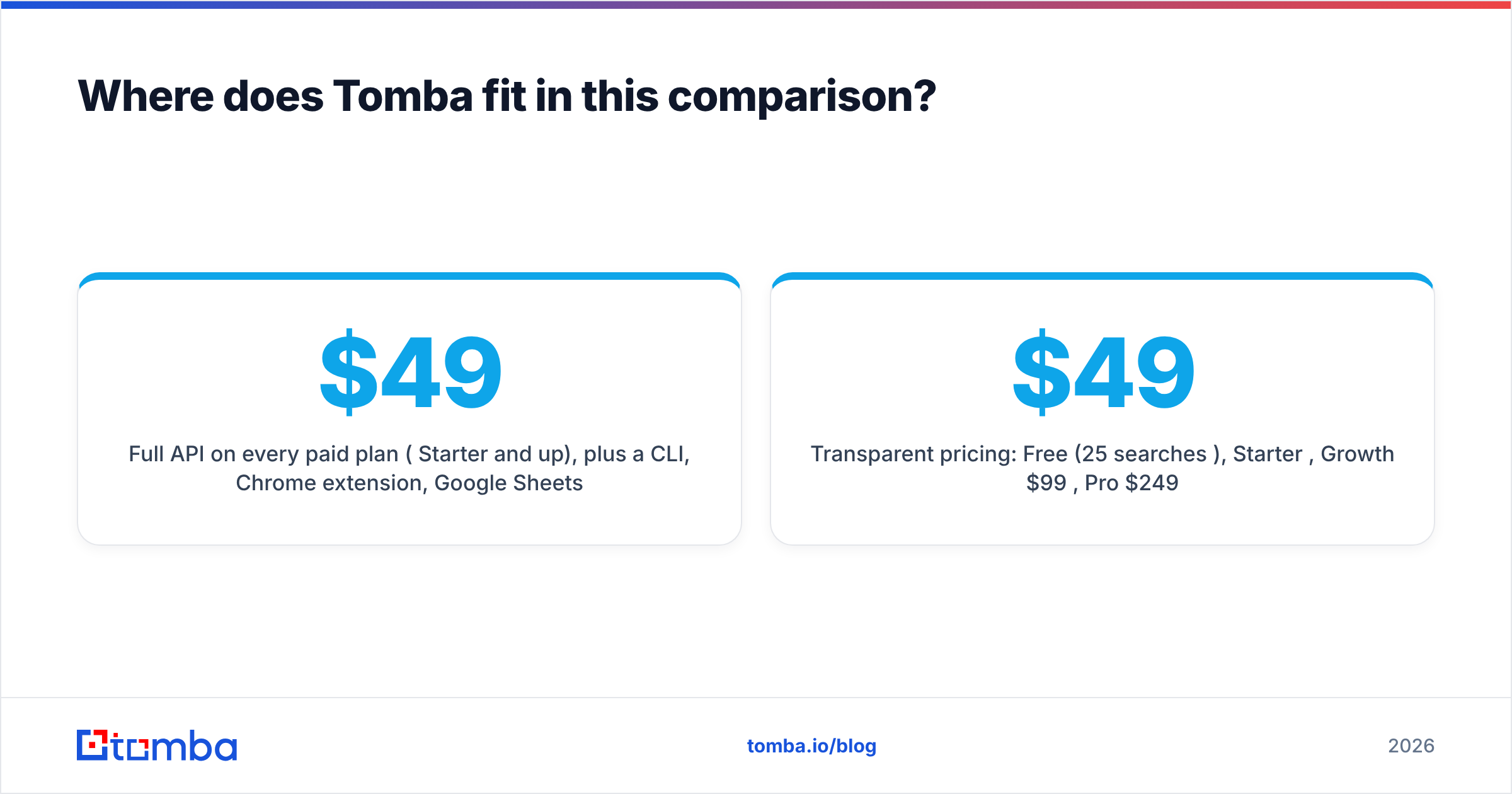
- Full API on every paid plan ($49/mo Starter and up), plus a CLI, Chrome extension, Google Sheets add-on, and native HubSpot integration — so the data lands where it's used.
- Published data sources. You can see where records come from and audit the claim.
- Transparent pricing: Free (25 searches/mo), Starter $49/mo, Growth $99/mo, Pro $249/mo.

Where Tomba is the wrong pick: recruiting workflows that live and die on mobile numbers and personal inboxes, and buyers who want a pre-packaged purchased list rather than a build-your-own pipeline. Use the right tool for the job.
What's the verdict on ContactOut vs Skrapp?#
ContactOut vs Skrapp isn't really a comparison — it's a category error most buyers make. They're solving different problems and only look similar because both sit in a browser extension.
- Recruiting, personal emails, mobiles, high value per contact → ContactOut.
- Budget B2B work emails, CSV workflows, mid-to-large target companies, and you already own a verifier → Skrapp.
- Verified work emails at scale, catch-all domains you need actually resolved, an API you can build on, and one bill instead of three → you're shopping in the wrong aisle entirely, and you should evaluate a consolidated platform.
The single biggest mistake in this decision is optimizing for credit price. A cheap credit that bounces costs you far more than an expensive one that lands — because the bounce doesn't just waste a credit, it taxes every future email you send from that domain.
Whatever you choose, verify before you send. That's the non-negotiable.
Ready to test the alternative? The Tomba Email Finder gives you 25 free searches a month — no card — so you can run your own head-to-head against ContactOut and Skrapp on your actual target accounts, not a vendor's cherry-picked demo list. Pull 25 contacts from your ICP, verify all three outputs, and compare real bounce rates. That test takes an afternoon and will tell you more than any comparison post, including this one.
Related guides#
Ready to find emails that actually work?
Join 150,000+ professionals who stopped guessing and started sending. Free credits on signup — no credit card required.
Get the Tomba newsletter
Practical outbound tactics and product updates — once every two weeks.
About the author