ContactOut vs Zintlr: Which B2B Contact Tool Wins in 2026?
ContactOut and Zintlr both promise verified emails and mobile numbers, but they win on different jobs. Here's the honest breakdown of coverage, pricing, and which one your team should actually buy.
TL;DR
- ContactOut is a LinkedIn-first contact tool. Its strength is personal + work emails and mobile numbers pulled from profiles you're already browsing. It's built for recruiters and AE teams who live in LinkedIn Recruiter or Sales Navigator.
- Zintlr is a database-plus-personality play. It bundles B2B contact data with "personality intelligence" (DISC-style profiling) and an increasingly agentic UI. Cheaper entry point, thinner coverage outside its core geos.
- Neither is a great API-first option. If you need email discovery at scale — inside your app, your CRM, or a script — a dedicated email finder with a real API is the better spine.
- Pick ContactOut if LinkedIn is your prospecting surface and you need mobile numbers. Pick Zintlr if you're price-sensitive, sell into India/APAC, and want personality cues in the same pane.
- Whatever you pick, verify before you send. Both tools return contacts that will bounce, and bounces are what kill your domain.
What is ContactOut, actually?#
ContactOut is a Chrome extension plus a web platform that surfaces email addresses and phone numbers for people you find on LinkedIn, GitHub, and company sites. It launched as a recruiter tool and still shows it: the killer feature is personal (non-work) email — the Gmail address a candidate actually reads — alongside the corporate one.
The workflow is straightforward. You install the extension, browse LinkedIn or Sales Navigator, and a sidebar reveals contact details on each profile. You can save people to lists, push them to your ATS or CRM, and export CSVs. There's also a searchable database and a bulk enrichment tool for uploading lists, but the extension is the center of gravity. Check their own product pages and you'll see the positioning is unambiguous: "find anyone's email."
Coverage skews strongly toward North America and Western Europe, and toward tech, SaaS, and professional services. If your ICP is a VP of Engineering in Austin, ContactOut will usually have both her work email and her personal one. If your ICP is a procurement manager at a mid-market manufacturer in Poland, the hit rate drops noticeably.
The tradeoff is cost. ContactOut's per-contact economics are on the expensive end of the market, and credits are consumed on reveals whether or not the contact turns out to be usable. Teams that run high-volume outbound tend to burn through plans faster than they budgeted.
What is Zintlr, and why does it keep showing up in comparisons?#
Zintlr is a newer B2B data platform that pairs a contact database with what it calls personality intelligence — behavioral profiles inferred from public signals, meant to tell you whether a prospect responds better to data or to story, to brevity or to detail. It also ships a browser extension, a searchable database, and increasingly AI-agent-flavored workflows for building lists.
Two things drive its visibility. First, price: entry tiers undercut most incumbents, which makes it attractive to founders and small SDR teams doing their first serious outbound. Second, geographic coverage — Zintlr has meaningfully better depth in India and parts of APAC than most US-built databases, which is a real differentiator if that's where you sell.
The honest caveat is that the personality layer is inference, not fact. It's directionally useful for shaping a first line; it is not a substitute for research. And like every database tool, Zintlr's records go stale. Job-change churn in B2B runs roughly 20–30% annually, which means a chunk of any database you buy today is wrong within a year.

ContactOut vs Zintlr: how do they compare head-to-head?#
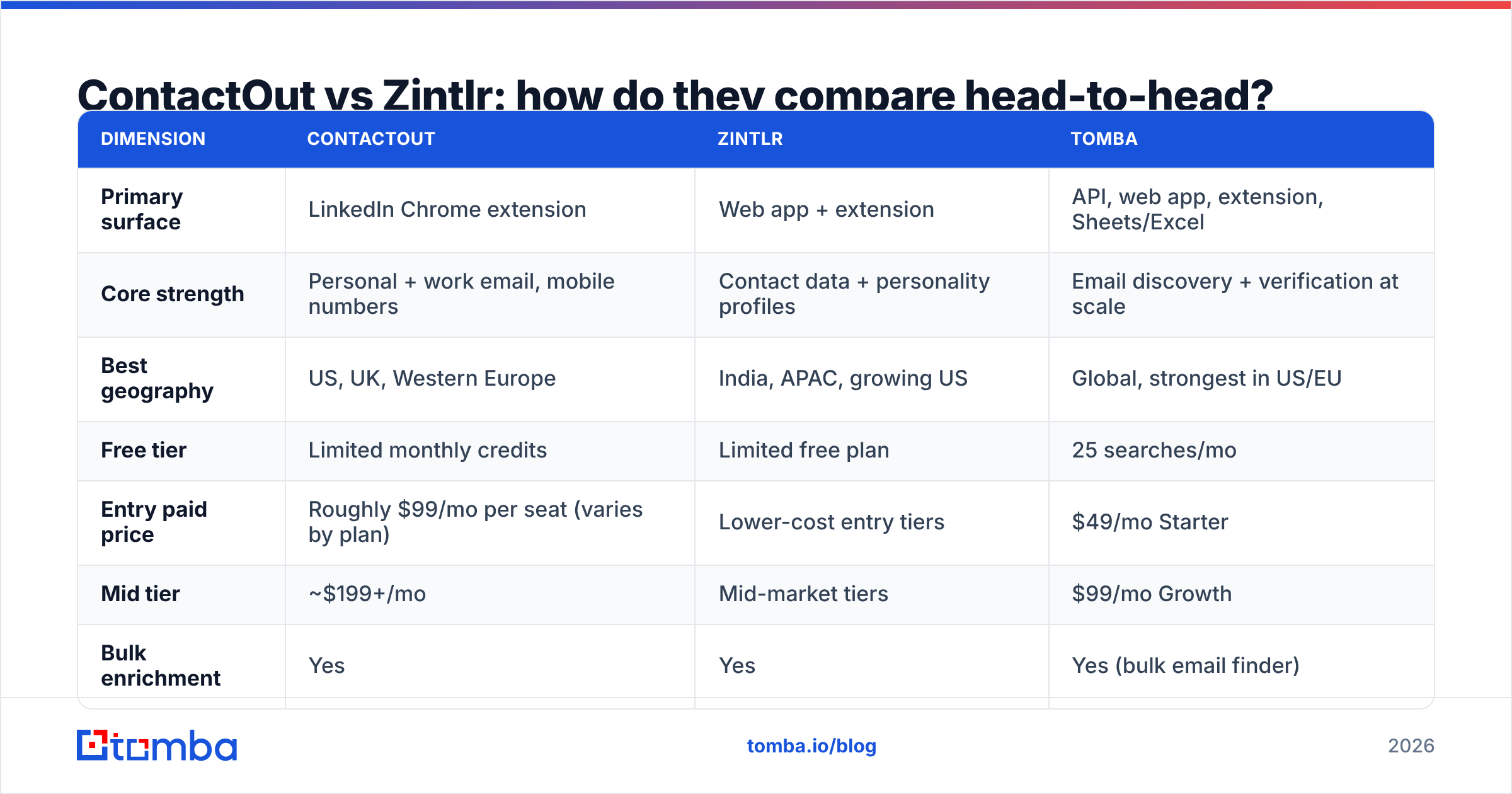
Here's the side-by-side, with Tomba included as the API-first reference point since a lot of teams end up running one of these alongside a dedicated finder.
| Dimension | ContactOut | Zintlr | Tomba |
|---|---|---|---|
| Primary surface | LinkedIn Chrome extension | Web app + extension | API, web app, extension, Sheets/Excel |
| Core strength | Personal + work email, mobile numbers | Contact data + personality profiles | Email discovery + verification at scale |
| Best geography | US, UK, Western Europe | India, APAC, growing US | Global, strongest in US/EU |
| Free tier | Limited monthly credits | Limited free plan | 25 searches/mo |
| Entry paid price | Roughly $99/mo per seat (varies by plan) | Lower-cost entry tiers | $49/mo Starter |
| Mid tier | ~$199+/mo | Mid-market tiers | $99/mo Growth |
| Bulk enrichment | Yes | Yes | Yes (bulk email finder) |
| Public API | Limited / higher tiers | Limited | Full REST API, documented |
| Email verification | Basic | Basic | Dedicated verifier + catch-all handling |
| Personality/behavioral data | No | Yes (DISC-style) | No |
| CRM push | HubSpot, Salesforce, Greenhouse, Lever | HubSpot, Salesforce, others | HubSpot, Salesforce, Pipedrive, Zapier, Make |
Pricing on both vendors moves and is often quoted per seat with credit bands, so treat the numbers above as a shape, not a contract — check each vendor's current pricing page before you buy. Tomba's pricing is public and flat: Free (25 searches/mo), Starter $49/mo, Growth $99/mo, Pro $249/mo, Enterprise custom.
Which one has better data accuracy?#
Neither vendor publishes an independently audited accuracy figure, and you should be skeptical of any that claims one without methodology. What you can do is run your own bake-off, which takes about an hour.
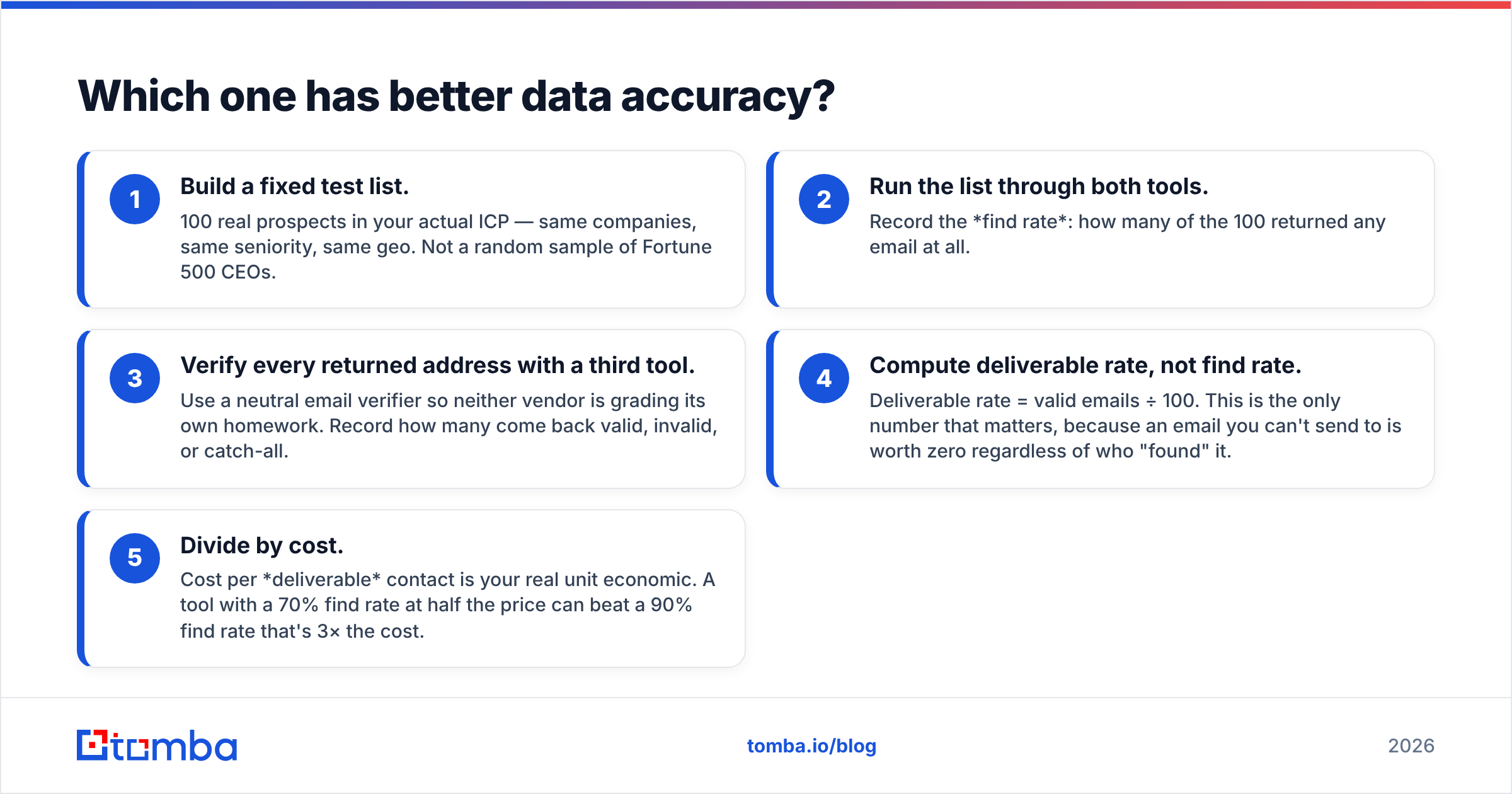
- Build a fixed test list. 100 real prospects in your actual ICP — same companies, same seniority, same geo. Not a random sample of Fortune 500 CEOs.
- Run the list through both tools. Record the find rate: how many of the 100 returned any email at all.
- Verify every returned address with a third tool. Use a neutral email verifier so neither vendor is grading its own homework. Record how many come back valid, invalid, or catch-all.
- Compute deliverable rate, not find rate. Deliverable rate = valid emails ÷ 100. This is the only number that matters, because an email you can't send to is worth zero regardless of who "found" it.
- Divide by cost. Cost per deliverable contact is your real unit economic. A tool with a 70% find rate at half the price can beat a 90% find rate that's 3× the cost.
In practice, most teams running this test find ContactOut wins on US tech profiles and mobile numbers, Zintlr wins on APAC and on price-per-record, and a specialist finder beats both on cost-per-deliverable-email because verification is native rather than an add-on. Whatever you find, the point is you measured it on your ICP instead of trusting a landing page.
One more accuracy trap: catch-all domains. A catch-all server accepts every address at the domain, so a naive verifier marks everything "valid" and you send into a void. If a meaningful slice of your ICP sits on catch-all domains — common in enterprise and in EU mid-market — you need a catch-all verifier that actually resolves them rather than shrugging.
Is ContactOut better than Zintlr for outbound sales?#
It depends on where your prospecting actually happens.
Choose ContactOut if:
- Your reps live inside LinkedIn Sales Navigator or Recruiter and you want reveals in-context.
- You need mobile numbers for a call-heavy motion. This is ContactOut's most defensible feature.
- You're recruiting, where personal email dramatically outperforms work email for reply rates.
- Your ICP is US/UK/Western Europe knowledge work.
- Budget is not the binding constraint.
Choose Zintlr if:
- You're early-stage and price is the binding constraint.
- You sell into India or APAC, where its coverage is genuinely stronger than most US-built databases.
- Your reps would actually use behavioral cues when writing a first line, rather than ignoring them.
- You want a database you can search directly, rather than a browsing-driven workflow.
Choose neither (or add a third tool) if:
- You need contact discovery inside your own product or automation — that's an API problem, and neither of these is API-first.
- You're enriching thousands of rows in a spreadsheet or CRM, where a data enrichment pipeline beats seat-based extension credits.
- Your bounce rate is already above 3% and deliverability is the fire, not lead volume.

What do both tools get wrong?#
Three failure modes show up in almost every review of tools in this category, on G2 and elsewhere.
Credits burn on failures. With most extension-based tools, a reveal attempt that returns a stale or unverifiable address still costs you. Read the credit policy before you commit to an annual plan — "5,000 contacts" and "5,000 deliverable contacts" are very different products.
Extensions are fragile. LinkedIn actively changes its DOM and enforces scraping limits. Any tool whose core value depends on injecting a sidebar into someone else's site inherits that risk. Extension-based workflows also cap out: they're fundamentally one-profile-at-a-time, which does not scale to a 5,000-account territory.
Verification is an afterthought. Both tools return addresses; neither treats verification as the product. That gap is where deliverability goes to die. Bounce hard enough and you're not fighting for reply rates — you're fighting Google and Microsoft for the inbox itself. If you don't already track it, start with the basics of email deliverability: SPF, DKIM, DMARC, a warmed domain, and a bounce rate held under 2%.
For completeness: if you're evaluating this category broadly, other names you'll hit include Apollo (all-in-one, noisy data), RocketReach, Lusha, and BookYourData — the last of which is a solid choice if you specifically want a pay-as-you-go, verified-list purchase model rather than a seat license. Different tools, genuinely different jobs. Compare on the job, not the feature grid.
How do you actually build a stack that works?#
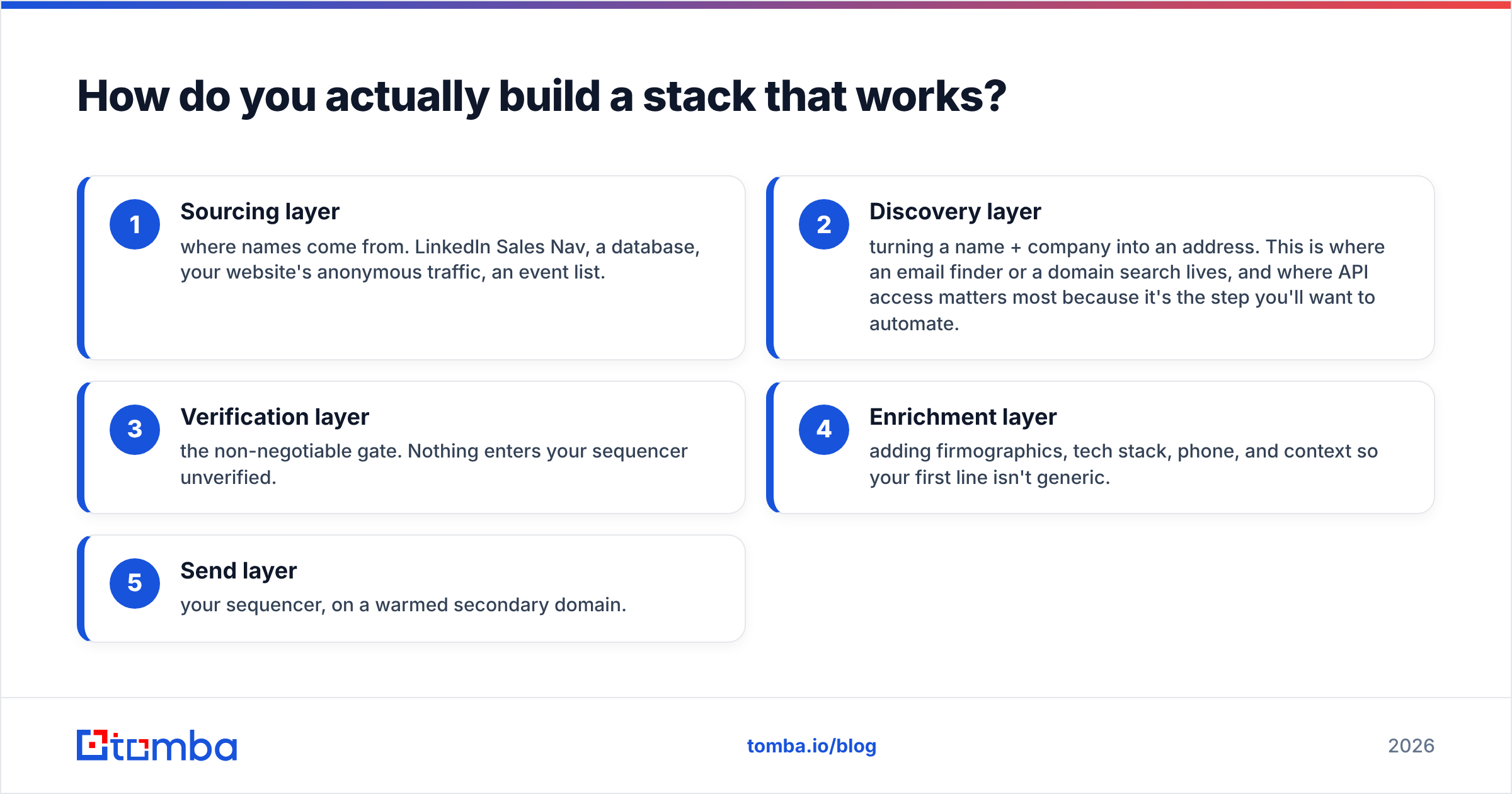
The teams with the best cost-per-meeting usually don't run one tool. They run a layer cake:
- Sourcing layer — where names come from. LinkedIn Sales Nav, a database, your website's anonymous traffic, an event list.
- Discovery layer — turning a name + company into an address. This is where an email finder or a domain search lives, and where API access matters most because it's the step you'll want to automate.
- Verification layer — the non-negotiable gate. Nothing enters your sequencer unverified.
- Enrichment layer — adding firmographics, tech stack, phone, and context so your first line isn't generic.
- Send layer — your sequencer, on a warmed secondary domain.
ContactOut plugs into layers 1–2 and does layer 4 partially. Zintlr covers 1, 2, and 4. Neither is a credible layer 3, and that's the layer that decides whether the other four were worth paying for.
If you're operating at any real volume, the discovery + verification layers should be API-driven, not clicked. That's the structural argument for pairing whichever of these tools your reps love with a proper email finder API behind your CRM.
What's the verdict?#
ContactOut wins on mobile numbers and personal emails for US/EU knowledge workers, and it wins for recruiters outright. If your reps spend their day inside LinkedIn and your motion is call-heavy, it earns its price.
Zintlr wins on price and on APAC coverage, and its personality layer is a real (if soft) differentiator for teams that will actually use it. If you're early, budget-constrained, or selling into India, start there.
But run the bake-off. A hundred contacts, both tools, one neutral verifier, and you'll have a cost-per-deliverable number that beats every review on the internet — including this one.
And whichever you land on, don't let verification be the thing you skip. The cheapest lead in your pipeline is the one you didn't bounce.
Ready to fix the layer both tools leave open? Tomba Email Finder gives you email discovery with verification built in — not bolted on — plus a documented REST API, bulk processing, and integrations with HubSpot, Salesforce, Sheets, and Zapier. Start free with 25 searches a month, or go to Starter at $49/mo when you're ready to scale. Run your next 100-contact bake-off against it and compare the deliverable rate yourself.
Related guides#
Ready to find emails that actually work?
Join 150,000+ professionals who stopped guessing and started sending. Free credits on signup — no credit card required.
Get the Tomba newsletter
Practical outbound tactics and product updates — once every two weeks.
About the author