Copper vs Insightly: Which CRM Fits Your Sales Team in 2026?
Copper is a Google Workspace-native CRM built for relationship selling. Insightly bolts project delivery and marketing onto the pipeline. Here's an honest breakdown of pricing, automation, data quality, and who should pick which.
TL;DR
- Copper is a Google Workspace–native CRM. If your team lives in Gmail, Calendar, and Drive, Copper feels like a sidebar extension of the inbox rather than a separate system you have to remember to update.
- Insightly is a broader platform: CRM plus project delivery, plus optional marketing and service products. It's the better fit when the deal doesn't end at "closed won" and someone has to actually ship the work.
- Pricing diverges fast at the top. Copper's entry tiers are cheap; Insightly's mid-tier buys more automation and reporting. Both charge per user, per month, and both get expensive when you add seats.
- Neither one finds contact data for you. Both CRMs manage records you already have. Filling those records is a separate job — and it's where most pipelines quietly rot.
- Verdict: relationship-led, Gmail-heavy teams → Copper. Project-delivery or services businesses that need post-sale visibility → Insightly.
What are Copper and Insightly, actually?#
Both are mid-market CRMs that positioned themselves against Salesforce by promising less admin overhead. That's where the similarity ends.
Copper was built as a Google-first CRM. It's a recommended Google Workspace partner, and the product design reflects that: contacts, opportunities, and activity logging all surface inside Gmail via a side panel. You don't "go to the CRM." The CRM comes to you while you're reading an email. Its ideal customer is an agency, consultancy, or founder-led sales team where deals close on relationships and long email threads, not on a 14-stage MEDDIC process.
Insightly started as a CRM and grew sideways into a platform. Today it sells CRM, Insightly Marketing (campaigns, journeys), Insightly Service (ticketing), and AppConnect (its automation/integration layer) as modular products. Its distinguishing feature has always been projects: when an opportunity converts, Insightly can spawn a project with tasks, milestones, and a delivery owner. That makes it unusually well-suited to services companies where "won" is the start of the work, not the end.
So the real question isn't "which CRM is better." It's which shape of business are you?
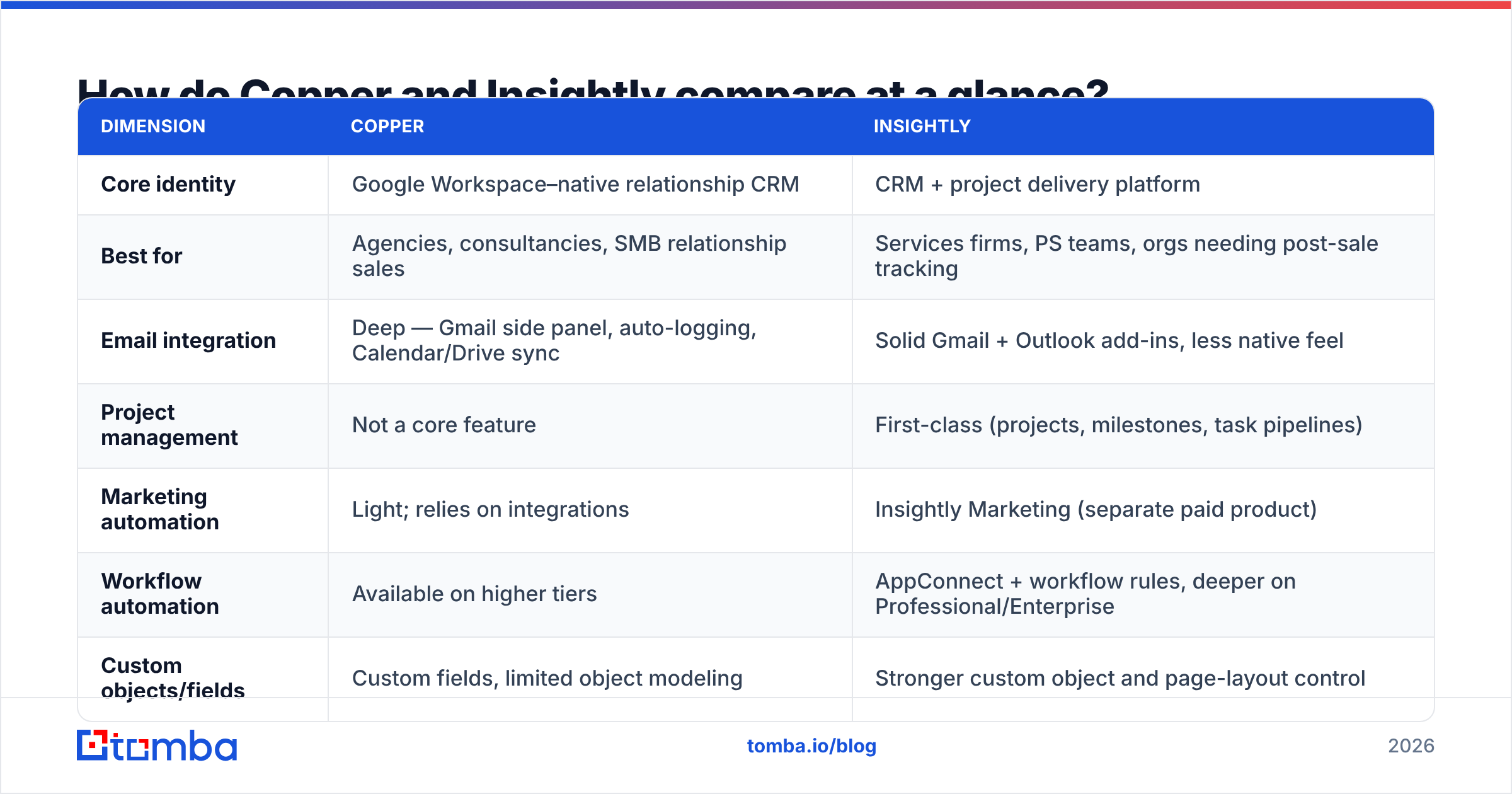
How do Copper and Insightly compare at a glance?#
| Dimension | Copper | Insightly |
|---|---|---|
| Core identity | Google Workspace–native relationship CRM | CRM + project delivery platform |
| Best for | Agencies, consultancies, SMB relationship sales | Services firms, PS teams, orgs needing post-sale tracking |
| Email integration | Deep — Gmail side panel, auto-logging, Calendar/Drive sync | Solid Gmail + Outlook add-ins, less native feel |
| Project management | Not a core feature | First-class (projects, milestones, task pipelines) |
| Marketing automation | Light; relies on integrations | Insightly Marketing (separate paid product) |
| Workflow automation | Available on higher tiers | AppConnect + workflow rules, deeper on Professional/Enterprise |
| Custom objects/fields | Custom fields, limited object modeling | Stronger custom object and page-layout control |
| Reporting | Clean but shallow on lower tiers | Dashboards + configurable reports, stronger at Enterprise |
| Learning curve | Very low (days) | Moderate (weeks, more so with Marketing/Service) |
| Contact data included | No | No |
That last row is the one people skip and regret. Neither product is a data vendor. Both assume you arrive with names, companies, and working email addresses. We'll come back to that.
Which one wins on Google Workspace integration?#
Copper, and it isn't close.
If your reps write 40 emails a day in Gmail and schedule everything in Google Calendar, Copper removes the single biggest source of CRM failure: manual data entry. Emails log themselves against the right contact. Calendar events attach to the right opportunity. Drive files link to the right company record. Adoption problems mostly evaporate, because there's nothing to adopt — the rep already lives there.
Insightly integrates with Gmail and Outlook through add-ins, and it works fine. But it's an integration, not an identity. Reps still context-switch into Insightly to move a deal, update a custom field, or check a project. For a disciplined team, that's a non-issue. For a five-person agency where "the CRM" is whatever the account lead remembers to type at 6pm on Friday, it's the difference between a live pipeline and a graveyard.

If you're on Microsoft 365 instead, this whole advantage inverts — Copper's core selling point becomes irrelevant, and Insightly's platform breadth starts to look like the better trade.
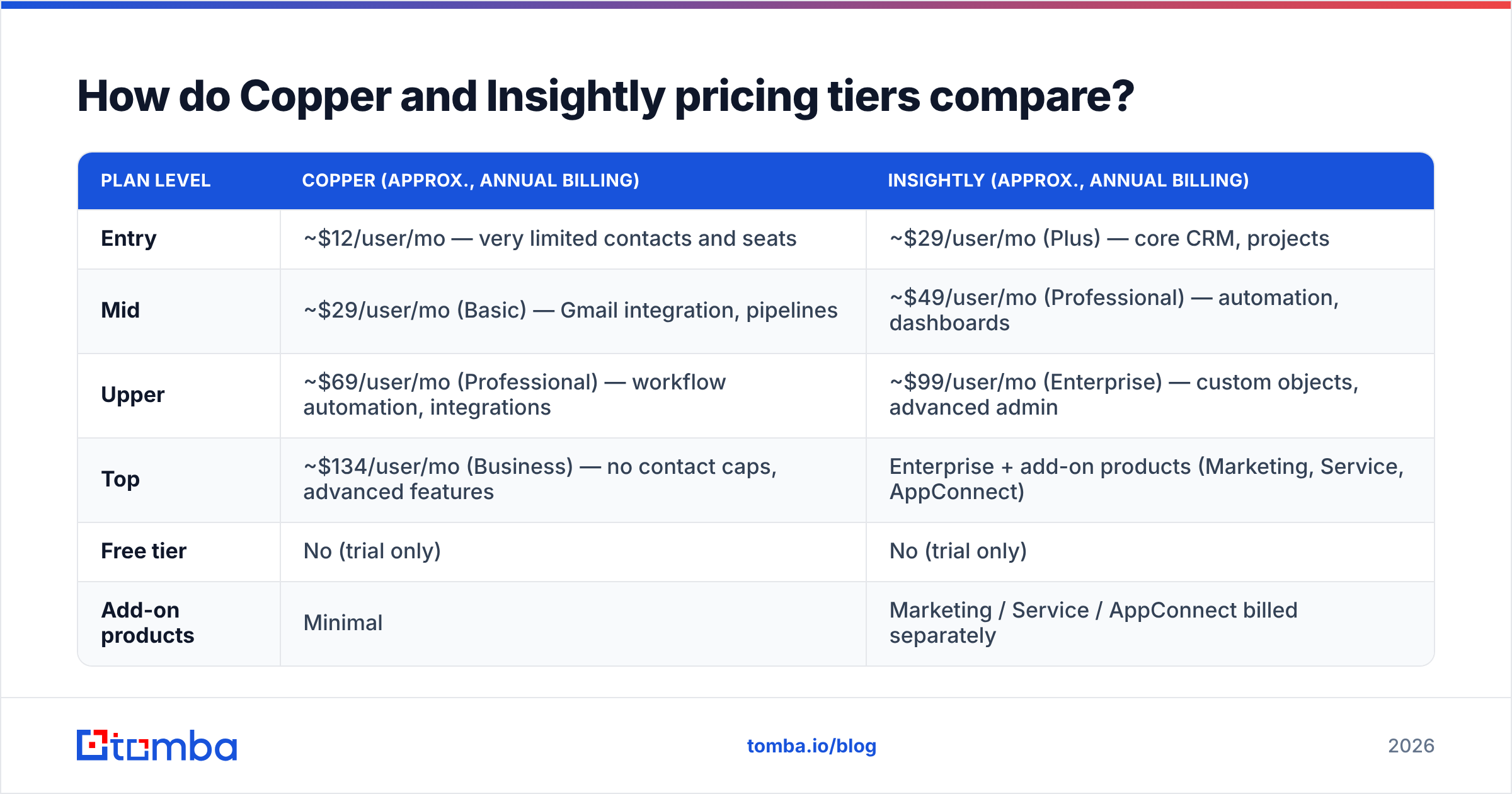
How do Copper and Insightly pricing tiers compare?#
Both vendors publish per-user, per-month pricing with a discount for annual billing. Prices move, so treat the table below as directional and confirm on the vendor pages before you sign anything.
| Plan level | Copper (approx., annual billing) | Insightly (approx., annual billing) |
|---|---|---|
| Entry | ~$12/user/mo — very limited contacts and seats | ~$29/user/mo (Plus) — core CRM, projects |
| Mid | ~$29/user/mo (Basic) — Gmail integration, pipelines | ~$49/user/mo (Professional) — automation, dashboards |
| Upper | ~$69/user/mo (Professional) — workflow automation, integrations | ~$99/user/mo (Enterprise) — custom objects, advanced admin |
| Top | ~$134/user/mo (Business) — no contact caps, advanced features | Enterprise + add-on products (Marketing, Service, AppConnect) |
| Free tier | No (trial only) | No (trial only) |
| Add-on products | Minimal | Marketing / Service / AppConnect billed separately |
Two traps worth naming:
- Copper's cheap tiers are cheap for a reason. Contact record limits and missing automation on the lower plans push growing teams onto Professional faster than the pricing page implies. Model the tier you'll be on in 12 months, not the one you'll sign today.
- Insightly's add-on stack compounds. CRM at $49 sounds reasonable. CRM + Marketing + AppConnect across 12 seats does not. If you only need the CRM, that's fine — but the platform pitch is only good value if you actually use the platform.
Cross-check both against real buyer reviews on G2 before you commit; the pattern in complaints tells you more than the feature matrix does.
Which CRM handles post-sale work better?#
Insightly, decisively.
This is its structural advantage. In Insightly, an opportunity converting to a project isn't a workaround — it's a supported object with its own pipeline, milestones, and task assignments. For an agency that sells a $40k engagement and then has to deliver it over four months, having sales context and delivery status in the same system is genuinely valuable. Your account manager can see the deal notes, the SOW, the current milestone, and the open tasks without opening a second tool.
Copper doesn't try to do this. It expects you to hand off to Asana, Monday, ClickUp, or Notion. That's a legitimate architecture — best-of-breed tools connected by integrations usually beat one mediocre everything-tool — but it means one more subscription, one more sync to maintain, and one more place where context goes to die.
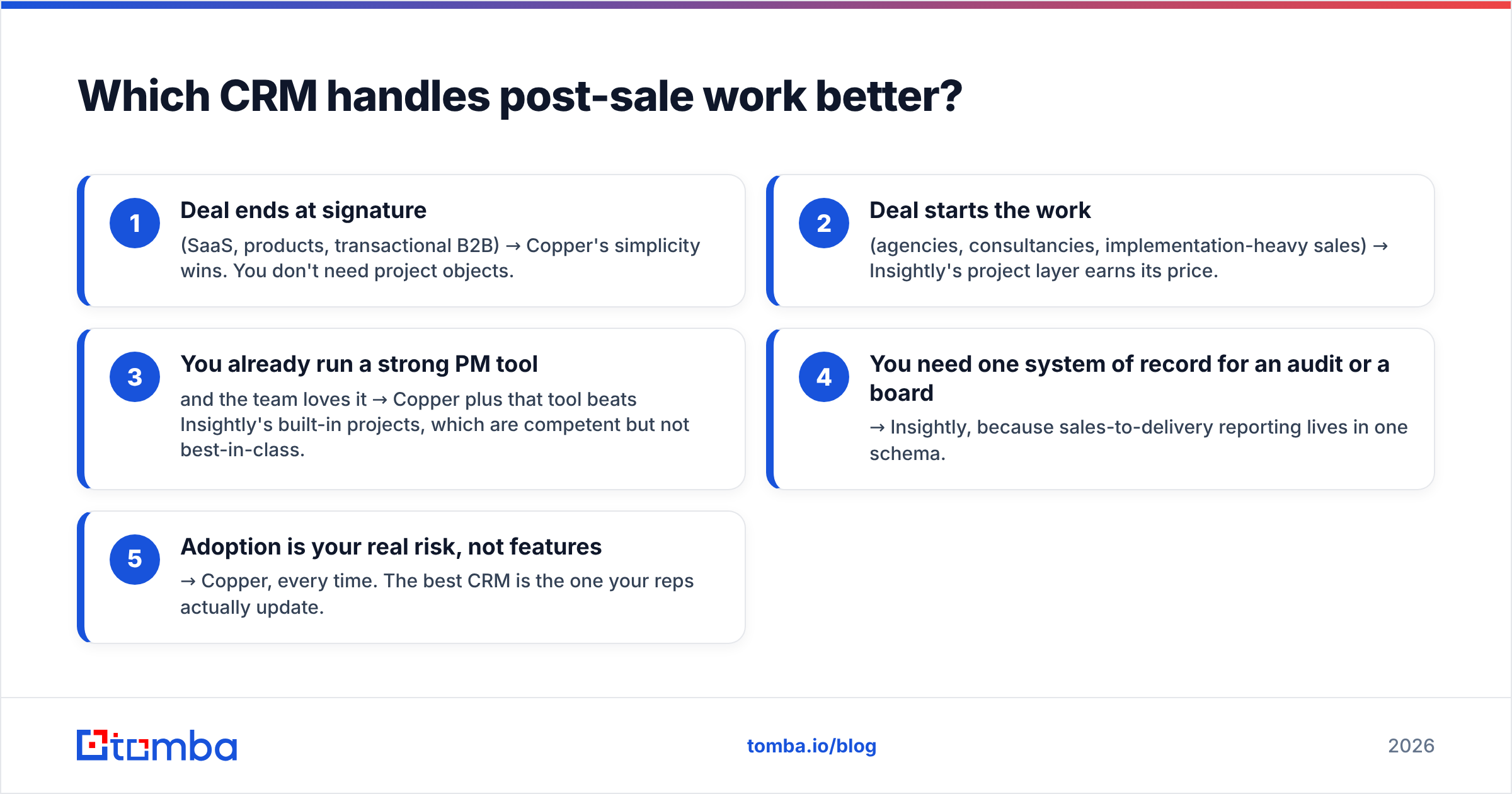
How to choose between them on this axis:
- Deal ends at signature (SaaS, products, transactional B2B) → Copper's simplicity wins. You don't need project objects.
- Deal starts the work (agencies, consultancies, implementation-heavy sales) → Insightly's project layer earns its price.
- You already run a strong PM tool and the team loves it → Copper plus that tool beats Insightly's built-in projects, which are competent but not best-in-class.
- You need one system of record for an audit or a board → Insightly, because sales-to-delivery reporting lives in one schema.
- Adoption is your real risk, not features → Copper, every time. The best CRM is the one your reps actually update.
Which is better for automation and reporting?#
Insightly on paper; Copper in practice for small teams.
Insightly's automation runs through workflow rules and AppConnect, its integration/automation layer, which can chain multi-step processes across apps. Its reporting is more configurable — custom dashboards, report builders, and stronger custom-object support on Enterprise. If you have a RevOps person who wants to model a non-standard sales process, Insightly gives them more clay to work with.
Copper's automation is deliberately narrower: workflow automations, task triggers, pipeline rules, and a clean set of integrations. It's enough for a team of 5–25 running a straightforward pipeline. It is not enough if you're building lead-routing logic across three regions and four product lines.
Here's the honest test: write down the three automations you actually want. Not the ones you might want. If all three are "when a deal moves to stage X, create a task and send a template," Copper handles it and you save money. If any of them involve conditional branching across objects or external systems, Insightly (or something bigger) is where you're heading.
What do both CRMs get wrong about your data?#
They assume you have it.
This is the shared blind spot, and it's the one that actually kills pipeline. Copper and Insightly are both excellent at storing and moving records. Neither one tells you that j.smith@acme.co bounced three months ago, that the VP of Ops left in March, or that the company you're chasing has six other decision-makers you never found.
The symptoms are familiar:
- Bounce rates creep up. Every dead address you email chips away at sender reputation, which drags down deliverability for the addresses that are real.
- Reps guess formats.
first.last@,flast@,first@— the manual permutation game burns hours and poisons the CRM with junk. - Enrichment gets skipped. Records land with a name and a company and nothing else, so segmentation and routing are impossible.
- Nobody cleans up. Both CRMs will happily hold a decayed contact forever. B2B data decays fast — turnover alone rewrites a meaningful chunk of your database every year.

The fix is to treat contact data as its own layer that feeds the CRM, rather than something you hope the CRM produces. That means a bulk email finder for filling records at scale, an email verifier running before anything hits your sequencer, and data enrichment so a record arrives with a title, company size, and LinkedIn profile instead of an empty shell. Whether the record then lands in Copper or Insightly is almost a detail.
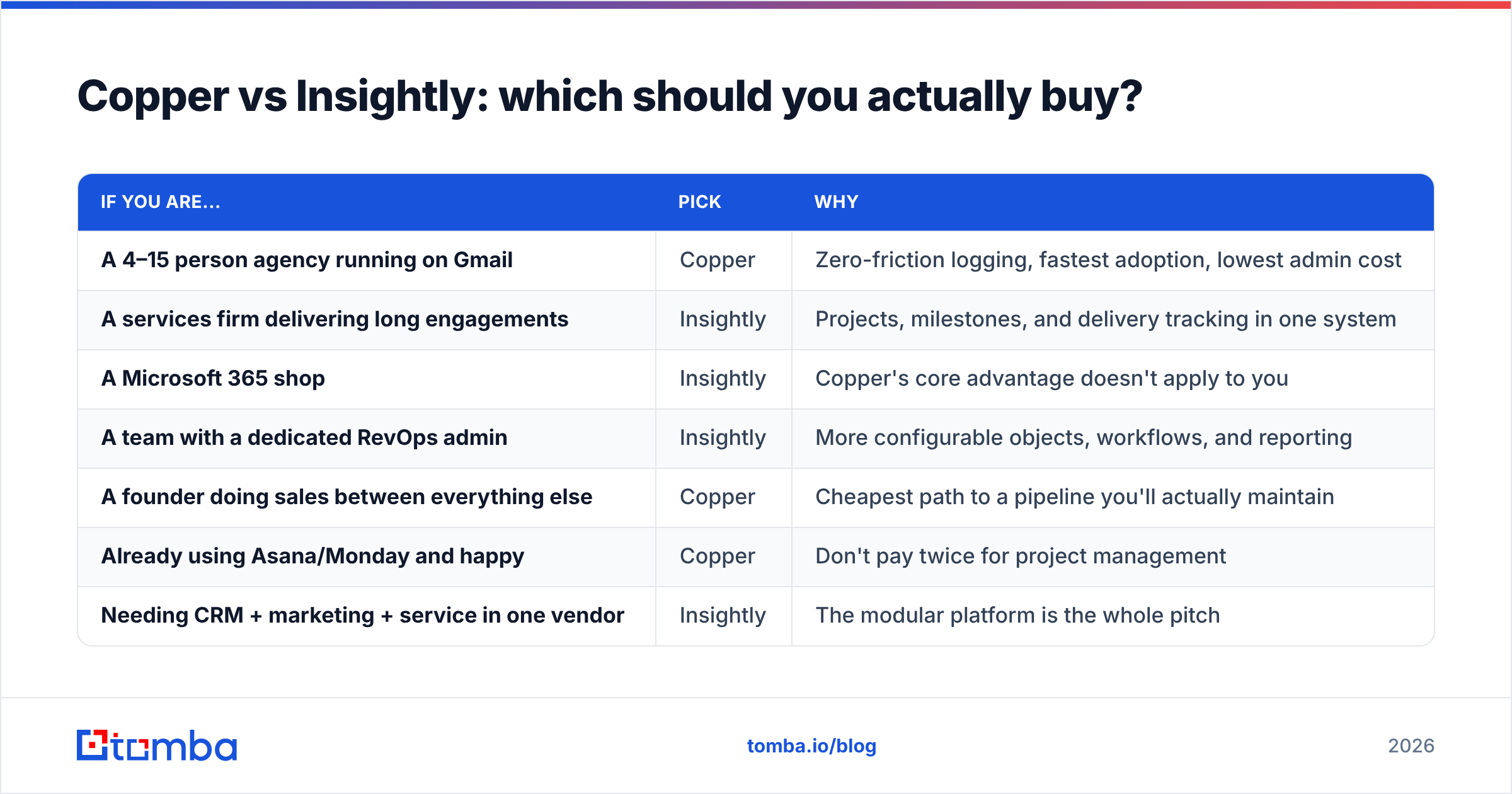
Copper vs Insightly: which should you actually buy?#
| If you are... | Pick | Why |
|---|---|---|
| A 4–15 person agency running on Gmail | Copper | Zero-friction logging, fastest adoption, lowest admin cost |
| A services firm delivering long engagements | Insightly | Projects, milestones, and delivery tracking in one system |
| A Microsoft 365 shop | Insightly | Copper's core advantage doesn't apply to you |
| A team with a dedicated RevOps admin | Insightly | More configurable objects, workflows, and reporting |
| A founder doing sales between everything else | Copper | Cheapest path to a pipeline you'll actually maintain |
| Already using Asana/Monday and happy | Copper | Don't pay twice for project management |
| Needing CRM + marketing + service in one vendor | Insightly | The modular platform is the whole pitch |
A note on migration cost. Both are far easier to leave than Salesforce, but neither is free to switch. Budget for field mapping, a re-import, and roughly two weeks of reps complaining. Pick the one you can live with for three years, not the one that's $10 cheaper this quarter.
And a note on what neither replaces. If your outbound motion depends on reaching people who aren't in your CRM yet — which, for most B2B teams, is the entire motion — the CRM is downstream of the real problem. You still need a reliable way to go from "this company looks like a fit" to "here is the head of engineering and here is her verified work email."
The layer that sits in front of whichever CRM you choose#
Copper and Insightly are both good answers to "where do my contacts live?" Neither answers "where do my contacts come from?"
That's the job Tomba's Email Finder does. Give it a company domain and a name and it returns a verified professional email address with a confidence score; run a whole list through it and it fills your CRM instead of your reps doing permutation math in a spreadsheet. Pair it with domain search to map every reachable contact at a target account, and verification to keep bounce rates low before a single send. It starts free with 25 searches a month, with paid plans from $49/mo — see Tomba pricing for the full breakdown.
Buy Copper if your team lives in Gmail. Buy Insightly if the work starts when the deal closes. Then feed whichever one you picked with data that's actually correct — because a clean CRM full of dead emails is still a dead pipeline.
Related guides#
Ready to find emails that actually work?
Join 150,000+ professionals who stopped guessing and started sending. Free credits on signup — no credit card required.
Get the Tomba newsletter
Practical outbound tactics and product updates — once every two weeks.
About the author