Copper vs Pipedrive 2026: Which CRM Fits Your Sales Team?
Copper is a Google Workspace-native CRM. Pipedrive is a pipeline-first sales machine. We compare pricing, automation, reporting, and data quality to show which one actually fits your team in 2026.
TL;DR — Copper vs Pipedrive in 60 seconds#
- Copper wins if your company lives inside Google Workspace. It installs as a Gmail sidebar, auto-logs threads and calendar events, and requires almost no manual data entry from reps who already work in Gmail all day.
- Pipedrive wins if your revenue depends on a repeatable, multi-stage pipeline. Its deal board, activity-based selling model, sequences, and forecasting are more mature than Copper's, and it has a bigger marketplace.
- On price they're closer than the marketing suggests. Both start cheap (roughly $12–$14 per user/month annually) and both put the features you actually want — automation, custom reports, permissions — two or three tiers up.
- Neither tool finds contacts for you. Copper and Pipedrive store and move records; they do not source or verify email addresses. That gap is where most CRM ROI quietly dies.
- Our pick: Pipedrive for outbound-led SMB and mid-market sales teams. Copper for relationship-led, referral-driven, Google-first businesses (agencies, consultancies, real estate, PR).
What are Copper and Pipedrive, actually?#
Both are SMB-focused CRMs. That's where the similarity stops.
Copper (copper.com) is a CRM built explicitly for Google Workspace. It's a Google Cloud partner, and its core value proposition is that it doesn't feel like a separate app. You open Gmail, a Copper panel sits on the right, and every email, meeting, and file attached to a contact gets pulled in automatically. Copper markets heavily to agencies, consultancies, real estate teams, and professional-services firms — businesses where deals come from relationships and warm intros rather than cold sequences.
Pipedrive (pipedrive.com) was designed by salespeople who wanted one thing: a visual pipeline where every deal has a next action. Its philosophy is "activity-based selling" — you can't control whether a deal closes, but you can control whether you booked the follow-up. Everything in the product bends toward that: kanban deal stages, required next-activity prompts, goal tracking, and forecast views.
The mental model: Copper is a system of record that hides inside your inbox. Pipedrive is a system of action that lives on a deal board.
Neither of them is a data provider. Both assume you already know who to contact — a critical assumption we'll come back to.
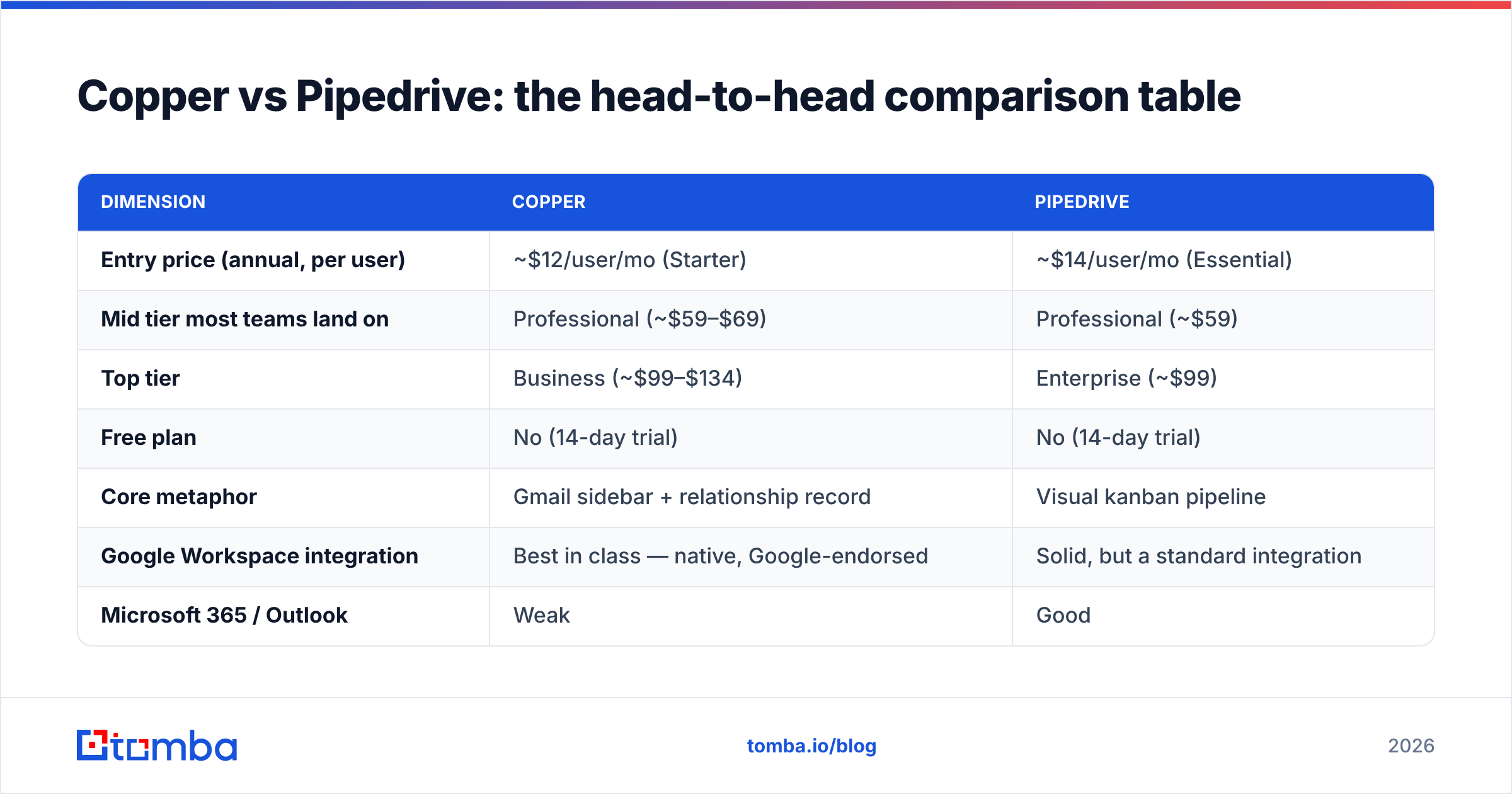
Copper vs Pipedrive: the head-to-head comparison table#
Pricing below reflects annual per-user billing at the time of writing. Both vendors change tiers, so confirm on their pricing pages before you sign.
| Dimension | Copper | Pipedrive |
|---|---|---|
| Entry price (annual, per user) | ~$12/user/mo (Starter) | ~$14/user/mo (Essential) |
| Mid tier most teams land on | Professional (~$59–$69) | Professional (~$59) |
| Top tier | Business (~$99–$134) | Enterprise (~$99) |
| Free plan | No (14-day trial) | No (14-day trial) |
| Core metaphor | Gmail sidebar + relationship record | Visual kanban pipeline |
| Google Workspace integration | Best in class — native, Google-endorsed | Solid, but a standard integration |
| Microsoft 365 / Outlook | Weak | Good |
| Workflow automation | Available, mid tiers up | Strong; Workflow Automation + AI assistant |
| Email sequences / cadences | Basic; usually needs a third-party tool | Built-in (Campaigns/Sequences on higher tiers) |
| Custom reporting & forecasting | Lighter, improving | Deeper: revenue forecast, goals, custom dashboards |
| Marketplace / integrations | ~100s | 400+ apps |
| Lead sourcing / email finding | None | Limited (Prospector add-on, extra cost) |
| Email verification | None | None |
| Best-fit buyer | Google-first, relationship-led SMB | Outbound/inbound SMB & mid-market with defined stages |
| Learning curve | Very low | Low-to-moderate |
The single most useful row in that table is the last-but-one. Neither CRM verifies email addresses. Both will happily store jsmith@acme.com forever, even after John left Acme in 2024 and the address started hard-bouncing.
Is Copper better than Pipedrive for Google Workspace teams?#
Yes — and it isn't close.
If your team's entire working day happens in Gmail, Google Calendar, and Google Drive, Copper removes the single biggest reason CRMs fail: nobody updates them. Copper's Chrome extension surfaces the contact record inside the Gmail thread, suggests new contacts from people you've emailed, and files calendar events against the right record without a rep clicking anything.
That has a real, measurable effect. The classic CRM failure mode is not "the software lacked a feature." It's "reps stopped logging activity by week six, so the pipeline data was fiction, so the forecast was fiction, so leadership stopped trusting it." Copper's design attacks that failure mode directly.
Where Copper struggles:
- Outbound at volume. Copper is not built for running 500-prospect sequences with branching logic. You'll bolt on a separate sending tool.
- Reporting depth. Copper's reports have improved, but if your VP of Sales wants weighted-pipeline-by-stage-by-rep-by-source, you'll feel the ceiling.
- Non-Google shops. If half your company is on Outlook, Copper's biggest advantage evaporates and you're paying for a mid-tier CRM with mid-tier features.
- Price at scale. Copper's top tiers get expensive per seat once you add users beyond the core sales team.
Is Pipedrive better than Copper for outbound sales?#
Yes, on almost every axis that matters to an outbound motion.
Pipedrive's deal board is the clearest visual representation of pipeline in the SMB CRM category. Drag a deal from Discovery to Demo, and the product nags you: what's the next activity? That nudge is the product's whole personality, and it works — it's the reason Pipedrive consistently ranks near the top of SMB CRM lists on G2.
What Pipedrive gives you that Copper doesn't, in practical terms:
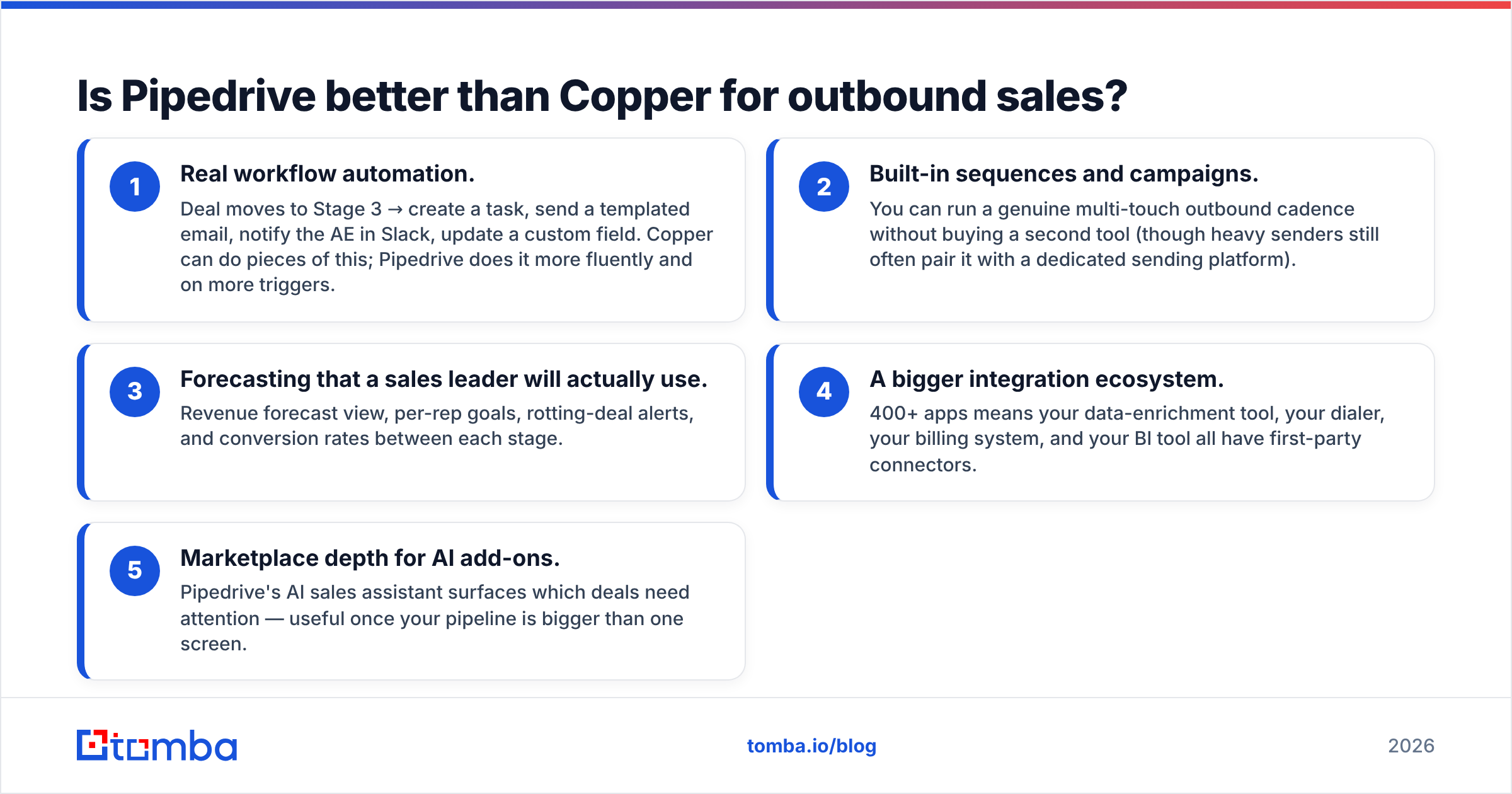
- Real workflow automation. Deal moves to Stage 3 → create a task, send a templated email, notify the AE in Slack, update a custom field. Copper can do pieces of this; Pipedrive does it more fluently and on more triggers.
- Built-in sequences and campaigns. You can run a genuine multi-touch outbound cadence without buying a second tool (though heavy senders still often pair it with a dedicated sending platform).
- Forecasting that a sales leader will actually use. Revenue forecast view, per-rep goals, rotting-deal alerts, and conversion rates between each stage.
- A bigger integration ecosystem. 400+ apps means your data-enrichment tool, your dialer, your billing system, and your BI tool all have first-party connectors.
- Marketplace depth for AI add-ons. Pipedrive's AI sales assistant surfaces which deals need attention — useful once your pipeline is bigger than one screen.
Where Pipedrive struggles:
- Data hygiene is your problem. Pipedrive imports whatever you give it. Feed it a scraped list and you've built an expensive database of bounces.
- The Prospector add-on is not a serious data play. Credits are limited, coverage is patchy, and costs stack on top of your seat price. Most teams end up sourcing contacts elsewhere and pushing them in.
- Feature gating. Sequences, custom permissions, and the better reports live on higher tiers. The $14 plan is a demo of the product, not the product.
What do Copper and Pipedrive both get wrong?#
They both assume the contact record already exists and is correct.
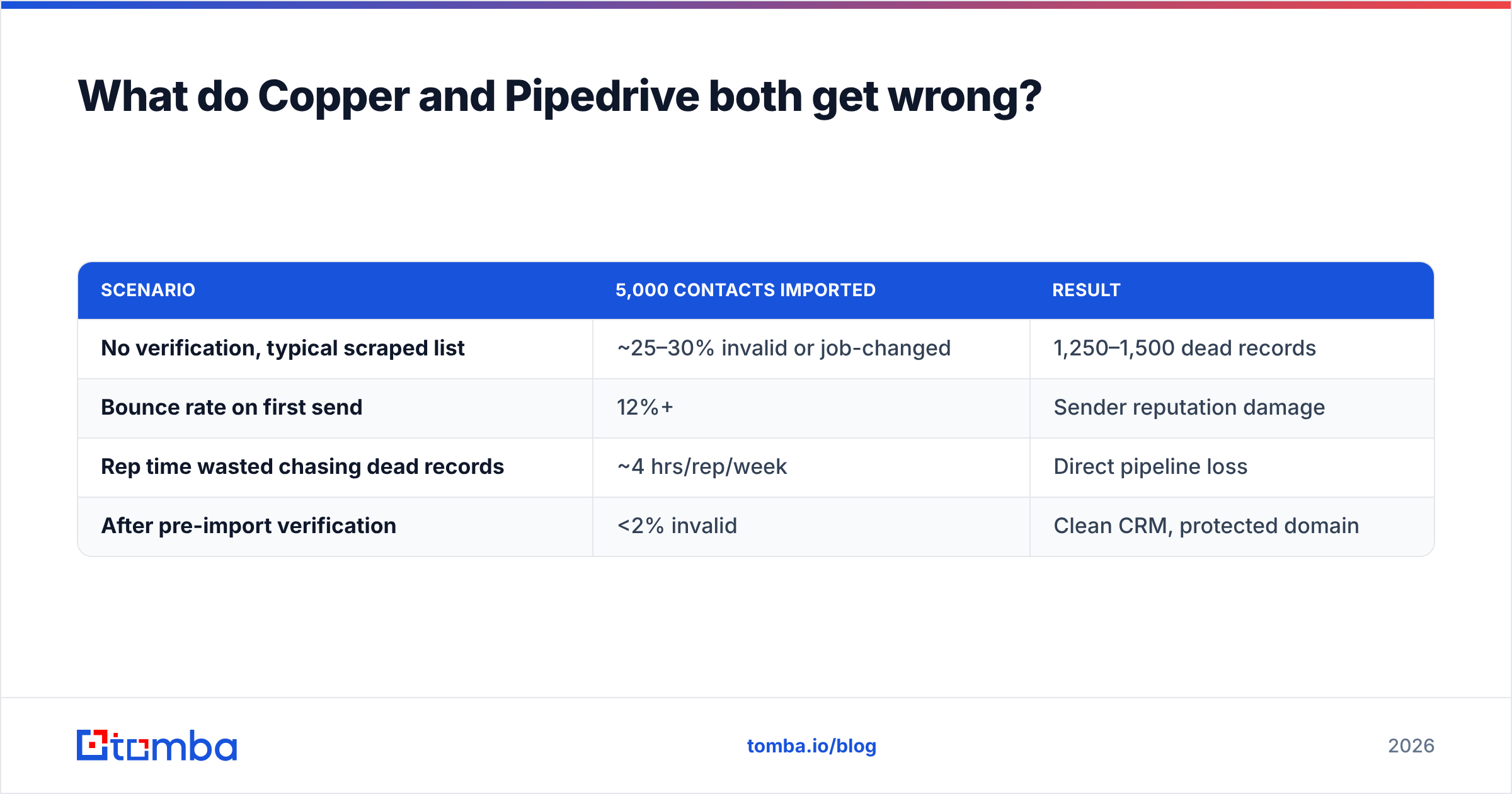
That assumption is where the money leaks. A CRM's value is a direct function of the quality of the records in it. Run the arithmetic on a typical mid-market team:
| Scenario | 5,000 contacts imported | Result |
|---|---|---|
| No verification, typical scraped list | ~25–30% invalid or job-changed | 1,250–1,500 dead records |
| Bounce rate on first send | 12%+ | Sender reputation damage |
| Rep time wasted chasing dead records | ~4 hrs/rep/week | Direct pipeline loss |
| After pre-import verification | <2% invalid | Clean CRM, protected domain |
Twelve percent bounce is not a rounding error — it's the threshold where inbox providers start throttling your domain. And no CRM, Copper or Pipedrive, will warn you. They're both perfectly happy storing garbage.
This is why the correct question is not "Copper or Pipedrive?" It's "which CRM, plus what feeds it?"
The stack that actually works looks like this:
- Source — find the right people at the right companies. Use an email finder or run a domain search to pull every public address on a target company's domain.
- Verify — run every address through an email verifier before it enters the CRM. Catch-all domains get flagged, not guessed.
- Enrich — attach title, company size, LinkedIn, and phone so segmentation actually works. That's what data enrichment is for.
- Load — push clean records into Copper or Pipedrive via native integration, Zapier, or the Tomba API.
- Sell — now the CRM's automation, forecasting, and reporting run on data that's actually true.
Skip step two and everything downstream is theatre.

How much do Copper and Pipedrive really cost?#
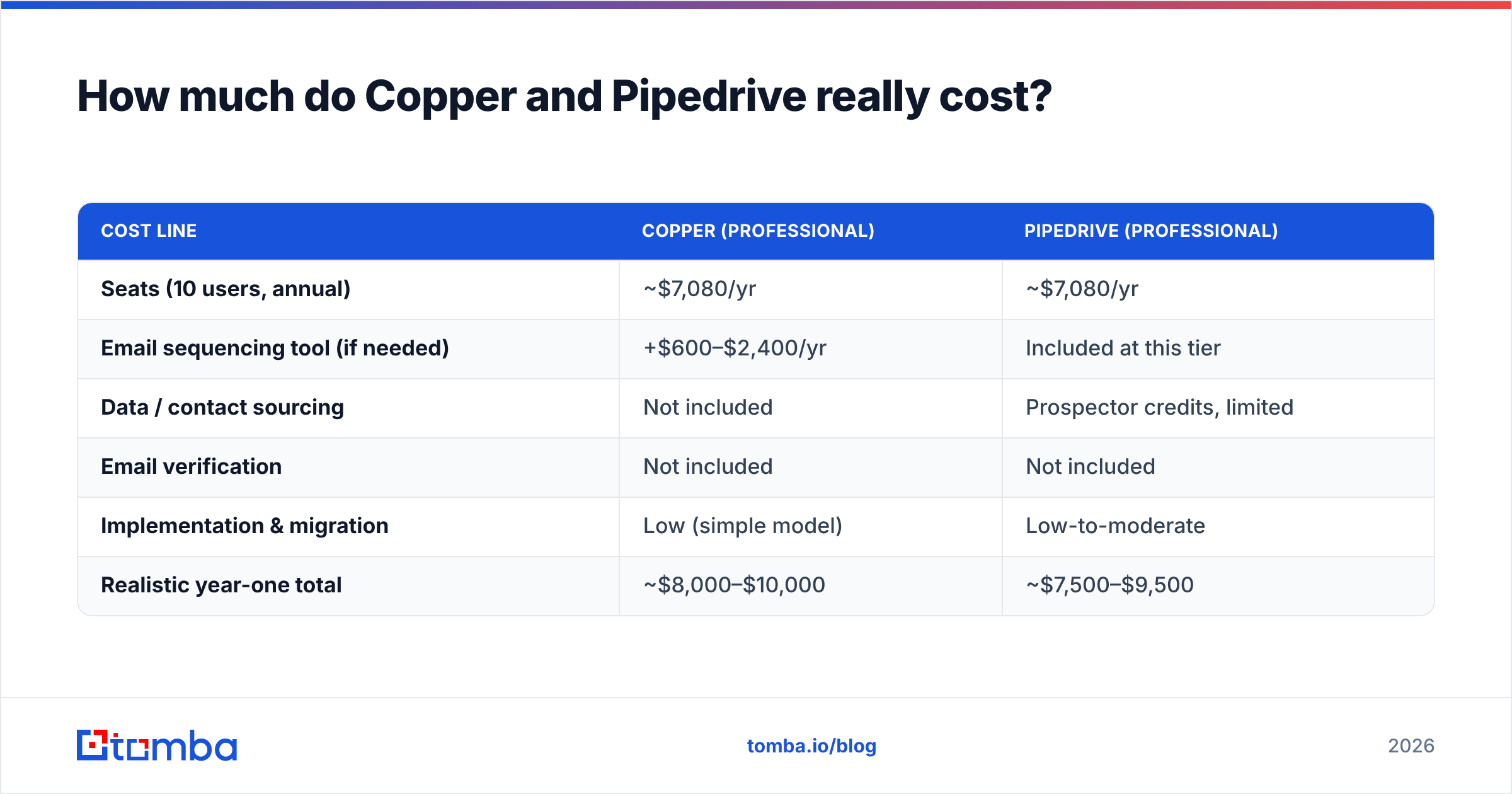
Sticker price is misleading for both. Here's the honest total cost of ownership for a 10-rep team over a year.
| Cost line | Copper (Professional) | Pipedrive (Professional) |
|---|---|---|
| Seats (10 users, annual) | ~$7,080/yr | ~$7,080/yr |
| Email sequencing tool (if needed) | +$600–$2,400/yr | Included at this tier |
| Data / contact sourcing | Not included | Prospector credits, limited |
| Email verification | Not included | Not included |
| Implementation & migration | Low (simple model) | Low-to-moderate |
| Realistic year-one total | ~$8,000–$10,000 | ~$7,500–$9,500 |
The line item both vendors leave blank — data — is the one you have to fill in yourself. A verified contact-data layer starts far cheaper than either CRM seat cost: Tomba pricing runs a free tier at 25 searches/month, Starter at $49/mo, Growth at $99/mo, and Pro at $249/mo, with Enterprise custom. For most 10-rep teams, that's an order of magnitude less than the CRM bill and it's the input that makes the CRM bill worth paying.
Which CRM should you choose in 2026?#
Use this decision list rather than a feature matrix:
- Are you 100% on Google Workspace, and are most deals relationship- or referral-driven? → Copper. The zero-data-entry advantage compounds every single day, and you won't miss the sequencing you weren't going to use.
- Do you run structured outbound with defined stages, and does a sales leader need a forecast they trust? → Pipedrive. The pipeline discipline and automation are worth the slightly steeper ramp.
- Are you split across Outlook and Gmail? → Pipedrive. Copper's core advantage doesn't apply to you.
- Do you need heavy custom objects, complex territories, and CPQ? → Neither. You've outgrown both; look at HubSpot Sales Hub or Salesforce.
- Is your team under five people and price-sensitive? → Start with Pipedrive Essential or Copper Starter, and put the savings into clean data instead of seats.
- Are you currently blaming the CRM for bad pipeline? → Check your data first. A 25% invalid contact rate looks exactly like a broken CRM from the outside.
What about migrating between them?#
Both support CSV import and both have migration partners, so the mechanical part is easy. The part teams get wrong is treating migration as a copy-paste job.
A CRM migration is the only moment you get a free, politically painless excuse to delete bad data. Take it:
- Export everything.
- Run the full contact list through bulk verification before it touches the new system.
- Drop or quarantine anything invalid, unknown, or unverifiable — don't "import it just in case." That's how you rebuild the same mess in a new UI.
- Re-verify catch-all domains with a dedicated catch-all verifier rather than guessing.
- Only then import.
Teams that do this routinely see bounce rates fall from double digits to under 2%, and their reps stop losing hours to phantom contacts.
The verdict#
Pipedrive is the better default choice for most B2B sales teams in 2026. It's more capable where revenue is made — pipeline discipline, automation, forecasting, integrations — and its pricing is competitive with Copper's at every equivalent tier.
Copper is the better choice for a specific, real, and underserved buyer: the Google-native, relationship-led business where the CRM's job is to remember everything without anyone typing anything. If that's you, Copper isn't a compromise — it's the correct tool, and Pipedrive would be overkill you'd never fully adopt.
But the decision that will move your numbers more than either logo is the one nobody sells you on: what goes into the CRM. A perfectly configured Pipedrive fed with a scraped, unverified list will produce a beautiful dashboard describing an imaginary business.
Fix the input. Fill your pipeline with contacts that are real, current, and verified before they ever hit a deal stage — start free with the Tomba Email Finder (25 searches a month, no card), find every reachable contact at your target accounts by domain or name, and push clean records straight into Copper or Pipedrive via native integration or API. Whichever CRM you pick, it'll finally be telling you the truth.
Related guides#
// get started
Find, verify and enrich your first contacts today
Start on the free plan with 25 searches a month, then scale when your team is ready.
Free plan · No credit card required · GDPR & CCPA
// about the author