Corcava Pricing Reviews Pros and Cons: An Honest 2026 Breakdown
Corcava bundles CRM, invoicing, time tracking and outreach into one $9/user seat. We break down the real pricing, the reviews, the pros, the cons, and where it quietly falls short.
Corcava is cheap, broad, and shallow. That is the short version. This guide walks through Corcava pricing reviews pros and cons in plain terms, so you can tell in ten minutes whether the $9 seat fits your team.
TL;DR
- Corcava is an all-in-one business OS — CRM, project management, invoicing, time tracking, payroll, and outbound email. It starts near $9 per user/month, well under most point solutions.
- The price is cheap and simple. The trade-off is depth. Each module is "good enough," not best-in-class, and the built-in prospecting data is thin.
- Reviews praise the value and the fast support. They fault onboarding, documentation, and the reporting layer.
- Best fit: agencies, freelancers, and small consultancies (2–20 seats) who pay for four or five separate tools today and want one bill.
- Worst fit: outbound-heavy sales teams that need verified contact data at volume. You will still need a dedicated email finder in front of it.
What is Corcava, and what problem does it claim to solve?#
Corcava calls itself a "business operating system." One login replaces the stack most small agencies duct-tape together: a CRM, a Kanban board, a time tracker, an invoicing tool, a payroll tool, and a cold-outreach sender.
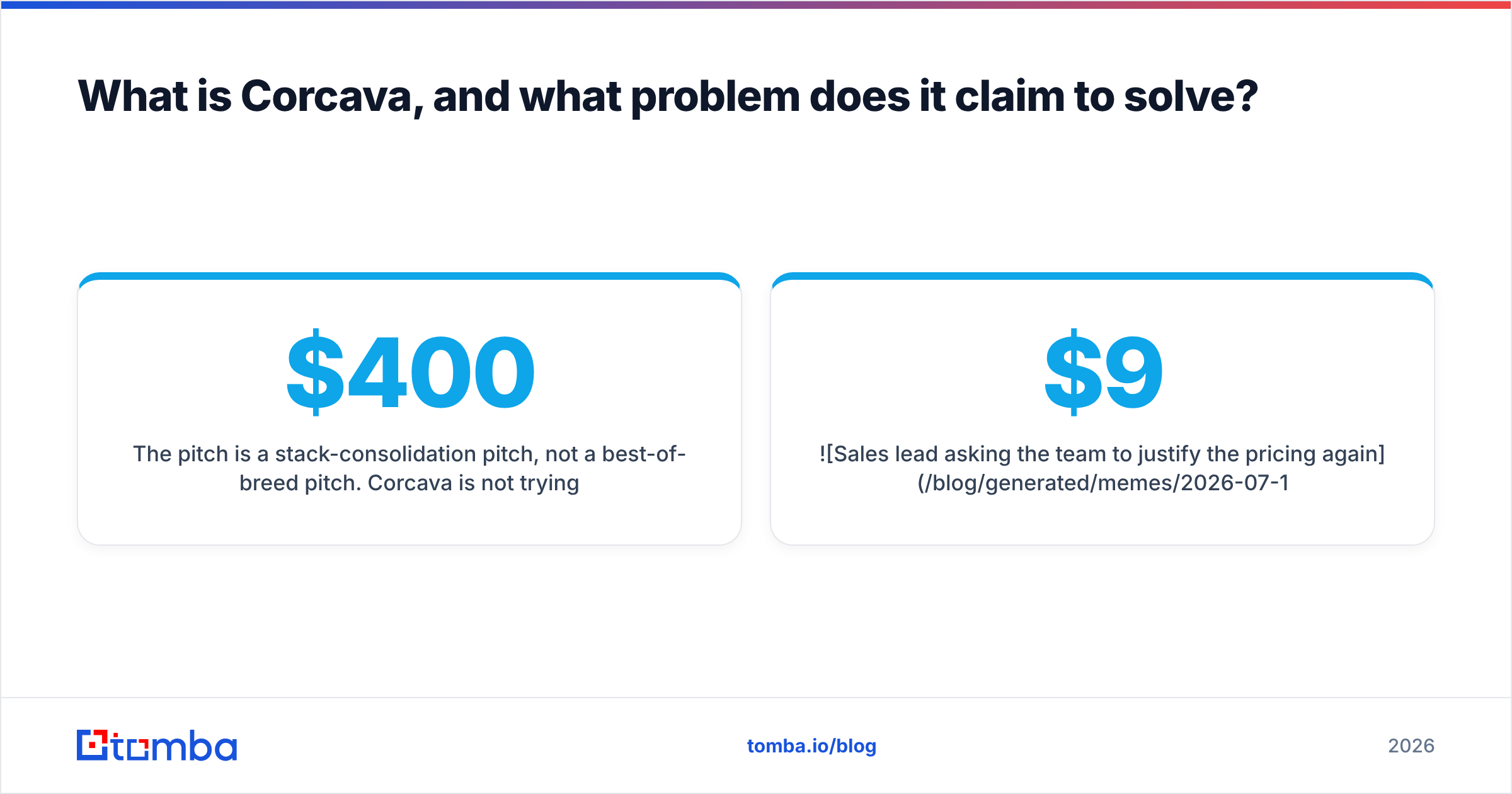
The pitch is stack consolidation, not best-of-breed. Corcava is not trying to beat HubSpot on CRM depth or Instantly on sending. The argument is simpler: most 8-person agencies pay $400/month across six vendors for features they barely use, and one $9 seat covering 80% of each is the smarter bet.
That argument holds up more often than SaaS purists admit. It also breaks in specific, predictable places — which is the point of this review.
The product surface, as of 2026, covers roughly:
- CRM and pipeline — contacts, companies, deals, stages, basic automations.
- Project and task management — Kanban boards, task assignment, deadlines, sub-tasks.
- Time tracking — timers, timesheets, billable/non-billable splits.
- Invoicing and payments — invoice generation, recurring billing, payment links.
- Payroll and HR — contractor payments, leave tracking, basic org management.
- Outreach — email sequences, a lead database, and a light prospecting layer.
That sixth bullet is where most buyers get burned, and we'll come back to it.

How much does Corcava actually cost in 2026?#
The headline is a low per-seat price with everything included. There is no "CRM tier" versus "invoicing tier" upsell ladder. Check corcava.com for the live numbers, since cheap vendors change pricing often. The structure has been stable, though: a free or trial entry point, then a flat per-user monthly rate in the high single digits. Annual billing trims it further.
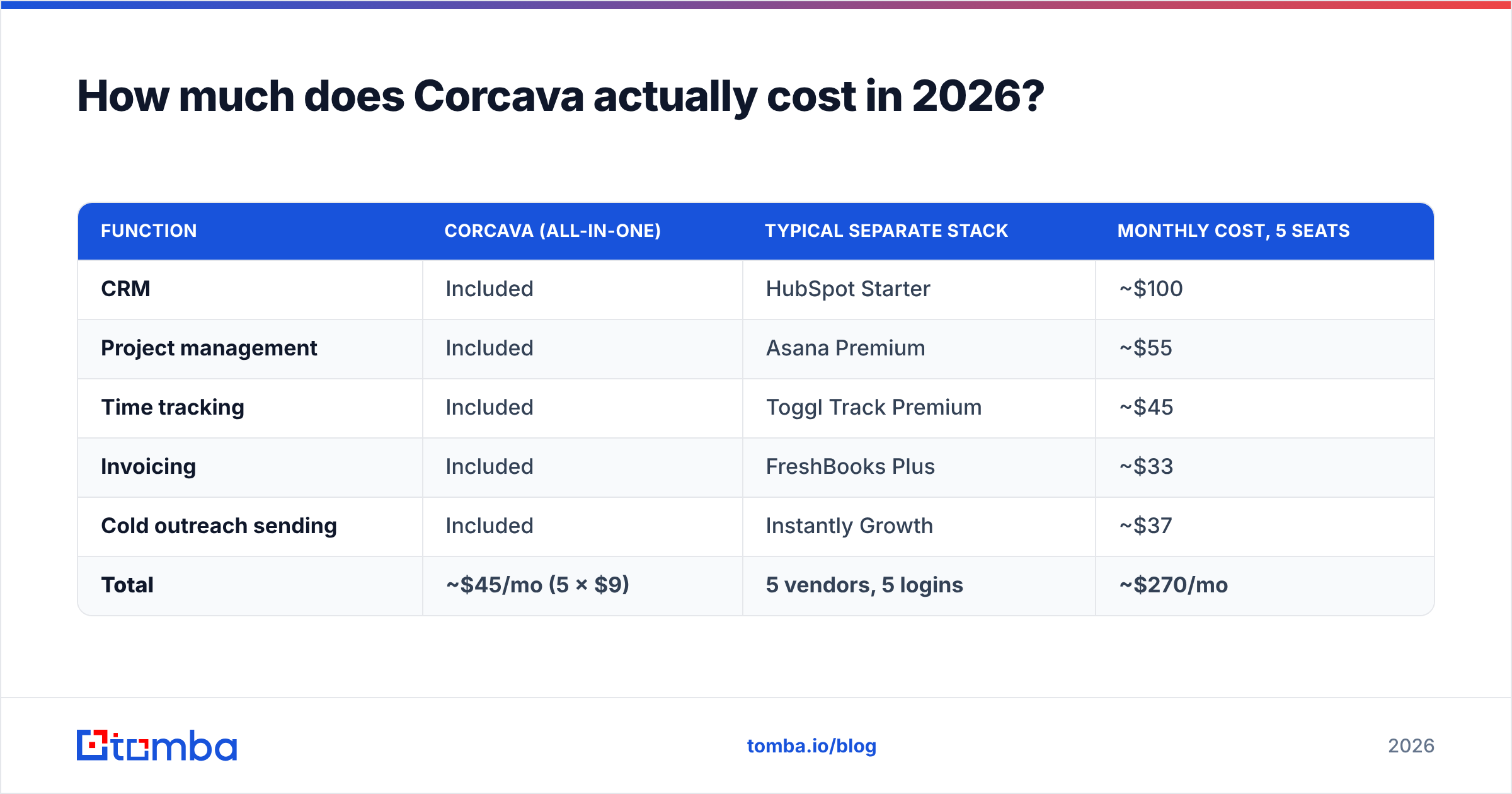
What matters more than the sticker price is what it replaces. Here is the honest comparison against the stack a typical 5-person agency would otherwise buy.
| Function | Corcava (all-in-one) | Typical separate stack | Monthly cost, 5 seats |
|---|---|---|---|
| CRM | Included | HubSpot Starter | ~$100 |
| Project management | Included | Asana Premium | ~$55 |
| Time tracking | Included | Toggl Track Premium | ~$45 |
| Invoicing | Included | FreshBooks Plus | ~$33 |
| Cold outreach sending | Included | Instantly Growth | ~$37 |
| Total | ~$45/mo (5 × $9) | 5 vendors, 5 logins | ~$270/mo |
That is roughly a 6× cost delta. For an agency owner staring at renewal emails, that gap is not a rounding error. It is a hire.
But the table prices the presence of a feature, not parity. Corcava's invoicing does not handle multi-entity tax the way FreshBooks does. Its outreach module does not do inbox rotation or deliverability tuning the way Instantly does. You are not buying five tools for the price of one. You are buying one tool that does five jobs at maybe 60–70% of the depth each.
Whether that is a bargain or a trap depends on which 30% you need.
Where does Corcava's pricing quietly get more expensive?#
Every cheap all-in-one leaks the savings back out somewhere. For Corcava, there are four leaks:
- Seats scale linearly, features don't. At 5 seats, $9/user is a steal. At 40 seats, you pay $360/month for a CRM whose reporting still can't match a mid-tier tool.
- The prospecting data is the weak link. The built-in lead database is a bundled convenience, not a real data asset. If you need contacts at volume, you will pay a data provider on top.
- Migration cost is real and unbudgeted. Moving deals, invoices, and old time entries out of five tools is a project. Many complaints about Corcava are really complaints about the migration.
- Reporting gaps push work into spreadsheets. When native reports can't answer a question, someone exports CSVs. That hour costs more than the whole subscription.
None of these are dealbreakers. All of them belong in your total-cost math.
What do Corcava reviews actually say?#
Review coverage on G2 and Capterra is thinner than for the big players. Corcava is young, so the review base is small. Read that as a signal in itself. Sparse counts mean less social proof, not a worse product, but you should trial it harder rather than trust the average score.
Most Corcava pricing reviews pros and cons threads repeat the same handful of points:
What reviewers praise
- Price-to-feature ratio. The most repeated positive. People genuinely did cancel three subscriptions.
- Support responsiveness. Small vendors often win here, and reviewers mention reaching a real human fast.
- Single source of truth. A deal, its tasks, its hours, and its invoice in one record is a real win. That context usually lives in four systems.
- Speed to first value. For basic CRM, task, and invoice work, teams report being productive within days.
What reviewers criticize
- Documentation and onboarding. The most common complaint. Features exist but are hard to find. You learn by clicking around.
- Reporting depth. Fine for pipeline value and hours billed. Weak for cohort analysis or attribution.
- Integration ecosystem. The connector list is short next to a mature CRM. Expect to lean on Zapier or the API.
- Module unevenness. Time tracking and invoicing are the mature parts. Outreach and prospecting get the most "it's fine, but…" energy.
That last point deserves its own section.
Is Corcava's outreach module good enough for outbound?#
Short answer: it's fine for follow-up, not for prospecting.
Bundled outreach modules share the same shape. The sending works. The data doesn't. Corcava fits that pattern. If your leads already exist — inbound forms, referrals, past clients, event lists — sequencing them out of Corcava works well. If you need to build a list of 2,000 verified decision-makers that match an ICP, the built-in database will disappoint you on coverage and accuracy.
This matters because a bad list poisons everything downstream. Unverified addresses drive bounces. Bounces damage sender reputation. Damaged reputation kills the deliverability of every email you send, including the ones to real prospects. No amount of clever sequencing survives a 12% bounce rate.
The pragmatic setup, and the one most Corcava agencies land on:
- Data layer (separate): a dedicated finder and verifier that sources and checks contacts before they touch your sender. Tomba's email verifier and domain search do that unglamorous work of keeping the list clean.
- Execution layer (Corcava): sequences, tasks, deal creation, and the invoice at the end.
Two tools, clear boundary, no overlap. That beats pretending one $9 seat covers a job that data vendors spend their whole engineering budget on.
How does Corcava compare to the alternatives?#
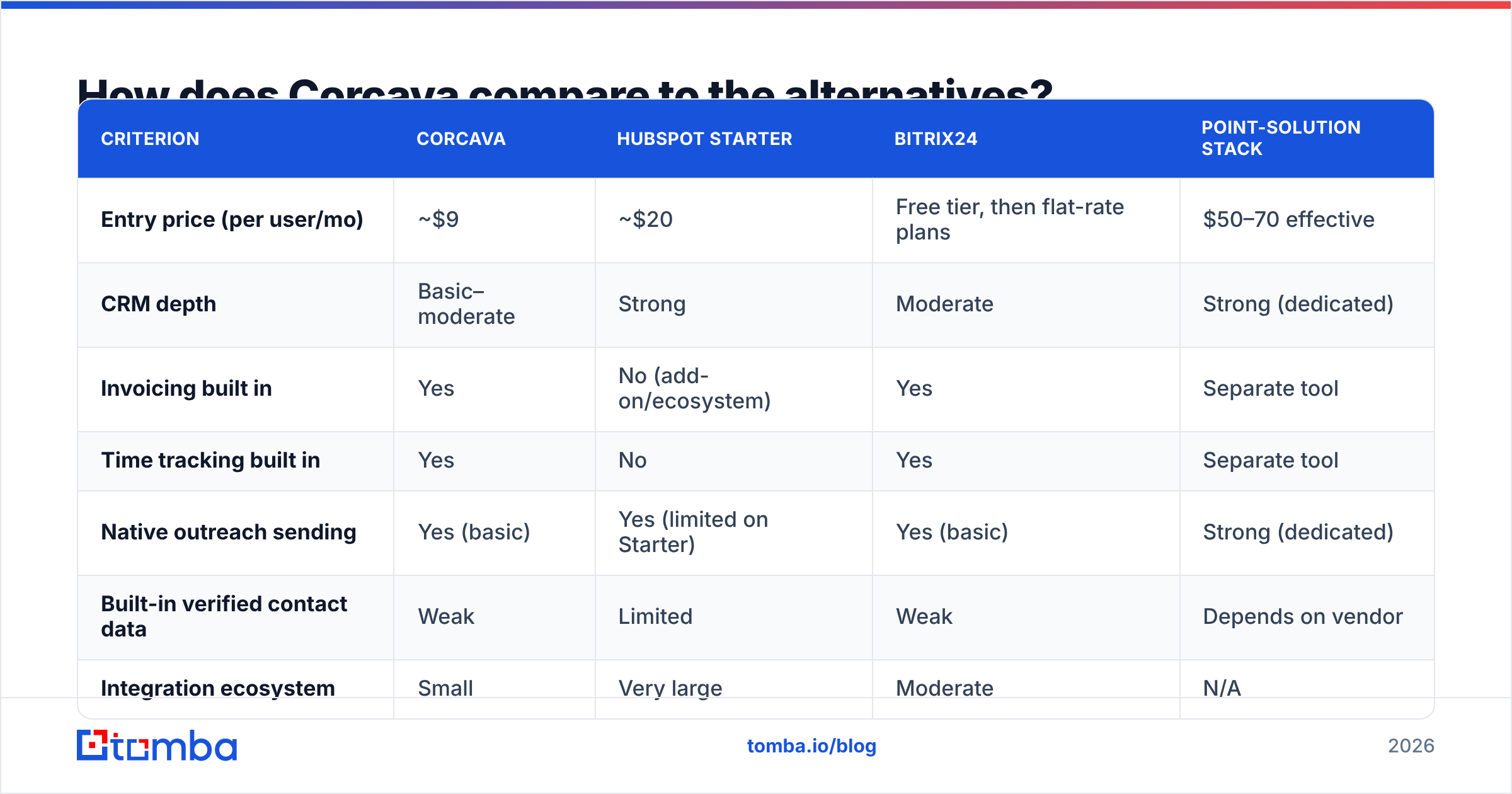
Corcava's real competition isn't "other CRMs." It is the bundle of tools you are trying to escape. Here is how it stacks up against the options buyers weigh beside it.
| Criterion | Corcava | HubSpot Starter | Bitrix24 | Point-solution stack |
|---|---|---|---|---|
| Entry price (per user/mo) | ~$9 | ~$20 | Free tier, then flat-rate plans | $50–70 effective |
| CRM depth | Basic–moderate | Strong | Moderate | Strong (dedicated) |
| Invoicing built in | Yes | No (add-on/ecosystem) | Yes | Separate tool |
| Time tracking built in | Yes | No | Yes | Separate tool |
| Native outreach sending | Yes (basic) | Yes (limited on Starter) | Yes (basic) | Strong (dedicated) |
| Built-in verified contact data | Weak | Limited | Weak | Depends on vendor |
| Integration ecosystem | Small | Very large | Moderate | N/A |
| Reporting/analytics | Basic | Strong | Moderate | Strong |
| Best for | 2–20 seat agencies | Scaling sales teams | Ops-heavy SMBs | Specialist teams |
Read that table honestly and the picture is clear. Corcava wins on price and consolidation. It loses on depth, ecosystem, and analytics. HubSpot wins if your bottleneck is CRM sophistication and you plan to grow into it. Bitrix24 is the closest rival — also all-in-one, also cheap, but heavier and harder to learn.
If your bottleneck is contact data rather than workflow, none of these are the answer. That is a different purchase, and a provider with transparent data sources beats a bundled database every time.
Corcava pricing reviews pros and cons at a glance#
Pros
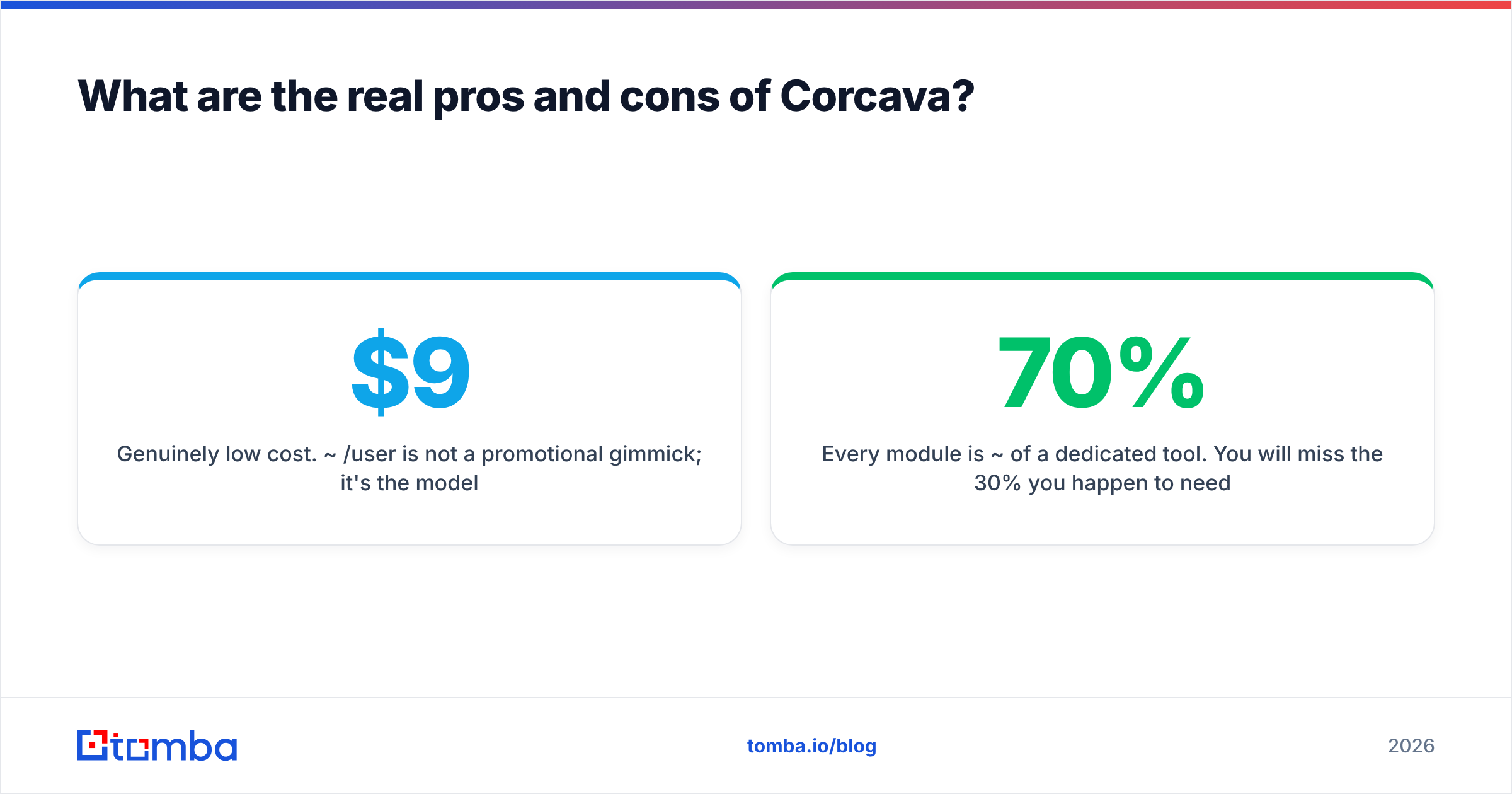
- Genuinely low cost. ~$9/user is the model, not a promo.
- One record, full context. Deal → tasks → hours → invoice in one chain is excellent for services businesses.
- Fast to stand up. No solutions engineer, no six-week rollout.
- Responsive support. Reviewers confirm this often.
- Kills subscription sprawl. Fewer logins, fewer renewals, fewer admin seats.
Cons
- Every module is ~70% of a dedicated tool. You will miss the 30% you need.
- Prospecting data is not a strength. Plan to source and verify contacts elsewhere.
- Thin documentation. Onboarding is self-directed, like it or not.
- Shallow reporting. Expect CSV exports for anything analytical.
- Small integration catalog. The API and Zapier fill gaps, which costs engineering time.
- Limited review corpus. Less outside validation than incumbents. Trial it properly.
Who should buy Corcava — and who shouldn't?#
Buy it if:
- You run a 2–20 person agency, studio, or consultancy where one project creates tasks, hours, and an invoice.
- Your current stack costs $200–400/month and you use a fraction of each tool.
- Your lead flow is mostly inbound, referral, or relationship-driven.
- You value one bill and one login more than best-in-class depth.
Skip it if:
- Outbound is your main growth engine and you need verified contact data at volume.
- You need real revenue analytics, attribution, or forecasting.
- Your team is 40+ seats and growing. You will outgrow the reporting layer before the price hurts.
- You depend on an integration that isn't on Corcava's list.
In the first bucket, Corcava is one of the better-value buys in B2B software right now, and the pricing gap against a five-vendor stack isn't close. In the second, you are not shopping for an all-in-one at all. You want a data provider and a sender, bought on their own merits.
Where does contact data fit into a Corcava stack?#
Wherever you land on the CRM question, the data problem stays the same. A pipeline is only as good as the contacts in it. Saving $200/month is a bad trade if your sequences hit addresses that bounce.
That is the gap Tomba fills. Use the Tomba Email Finder to source verified, deliverable addresses for your ICP — by name, by domain, or in bulk. Then push them into Corcava, or whatever CRM you pick, as clean records.
The free tier gives you 25 searches a month, so you can test accuracy against your own known-good list. Paid plans start at $49/mo when you scale. That is the balance behind Corcava pricing reviews pros and cons: cheap workflow, weak data. Verify first, sequence second, invoice third.
Related guides#
Ready to find emails that actually work?
Join 150,000+ professionals who stopped guessing and started sending. Free credits on signup — no credit card required.
Get the Tomba newsletter
Practical outbound tactics and product updates — once every two weeks.
About the author