Creatio Pricing Reviews Pros and Cons: 2026 Buyer's Guide
Creatio sells a no-code CRM platform with modular pricing that looks cheap on the pricing page and rarely stays that way. Here's what it really costs, what reviewers praise, and where it falls short.
Looking for a straight answer on Creatio pricing reviews pros and cons? Here it is. Creatio is a no-code CRM platform. The list price looks cheap. The quote rarely is. This guide covers the real cost, what buyers praise, and what they warn you about.
TL;DR
- Creatio's list pricing starts around $25/user/month for the Growth platform tier, with Enterprise near $55 and Unlimited near $85 — but the platform license is only the base layer.
- Sales, Marketing, Service and Field Service apps are sold separately (roughly $15/user/month each in Creatio's composable model), so a realistic mid-market quote lands far above the headline number.
- Reviewers on G2 and Gartner Peer Insights consistently praise the no-code builder and workflow engine, and consistently flag implementation time, partner dependency, and documentation gaps.
- Creatio is a strong fit for ops-heavy teams that need custom processes. It is a poor fit for a 5-person startup that just wants a pipeline and some contacts.
- Creatio does not find or verify contact data. That layer — emails, phones, enrichment — is a separate purchase no matter which CRM you land on.
What is Creatio, and who actually buys it?#
Creatio is a no-code platform with CRM applications built on top of it. That order matters. Most vendors sell you a CRM and bolt on customization. Creatio sells you a workflow-and-app-building engine (Studio), then sells CRM apps — Sales, Marketing, Service, Field Service — that run on it.
The buyer profile follows from that. Creatio wins deals at organizations whose processes are too odd for out-of-the-box Salesforce or HubSpot. They also need enough internal ops muscle to model those processes themselves: insurance, banking, pharma distribution, logistics, government contractors, complex B2B manufacturers. Think of a company with a 14-step approval chain and three legacy systems to talk to.
It is not the tool a founder-led sales team of four picks on a Tuesday afternoon. That team wants pipeline in an hour. Creatio is a platform you configure, not a product you switch on.
Creatio has been named in Gartner's Magic Quadrants for both Sales Force Automation and B2B Marketing Automation. That is real enterprise credibility. It is also a hint about the sales motion: you will talk to a rep.
What does Creatio pricing actually look like in 2026?#
Creatio publishes list pricing, which is more than many enterprise vendors do. But the published number is the platform, not the product you'll end up using.
The structure has three layers:
- Platform tier (per user/month). Growth, Enterprise, or Unlimited. This buys the no-code studio, workflow engine, and the base data model. Growth sits around $25/user/month; Enterprise around $55; Unlimited around $85. Higher tiers unlock things like advanced ML, unlimited workflow complexity, and deeper admin controls.
- Composable applications (per user/month). Sales Creatio, Marketing Creatio, Service Creatio, Field Service — each is a separate line item, commonly quoted around $15/user/month per app. Want sales and service? That's two.
- Everything that isn't a seat. Marketing Creatio is typically priced on contact volume, not seats. Then add implementation (often through a partner), sandbox environments, premium support, and — if you go on-premise — infrastructure.
So a 40-seat team on Enterprise with the Sales app is not paying 40 × $25. It's closer to 40 × ($55 + $15) = $2,800/month, before implementation, before marketing contacts, before support upgrades. That's roughly $33,600/year in license alone.
Two more things the pricing page won't shout at you:
- Annual billing is the default. Month-to-month, where available, costs more. Multi-year commitments are where the discounts live, which means your negotiating leverage is highest at first signature and lowest at renewal.
- Minimums exist. Practically, Creatio is not selling 3-seat deals. Expect a floor on user count and a floor on annual contract value that gets set in conversation, not on the website.
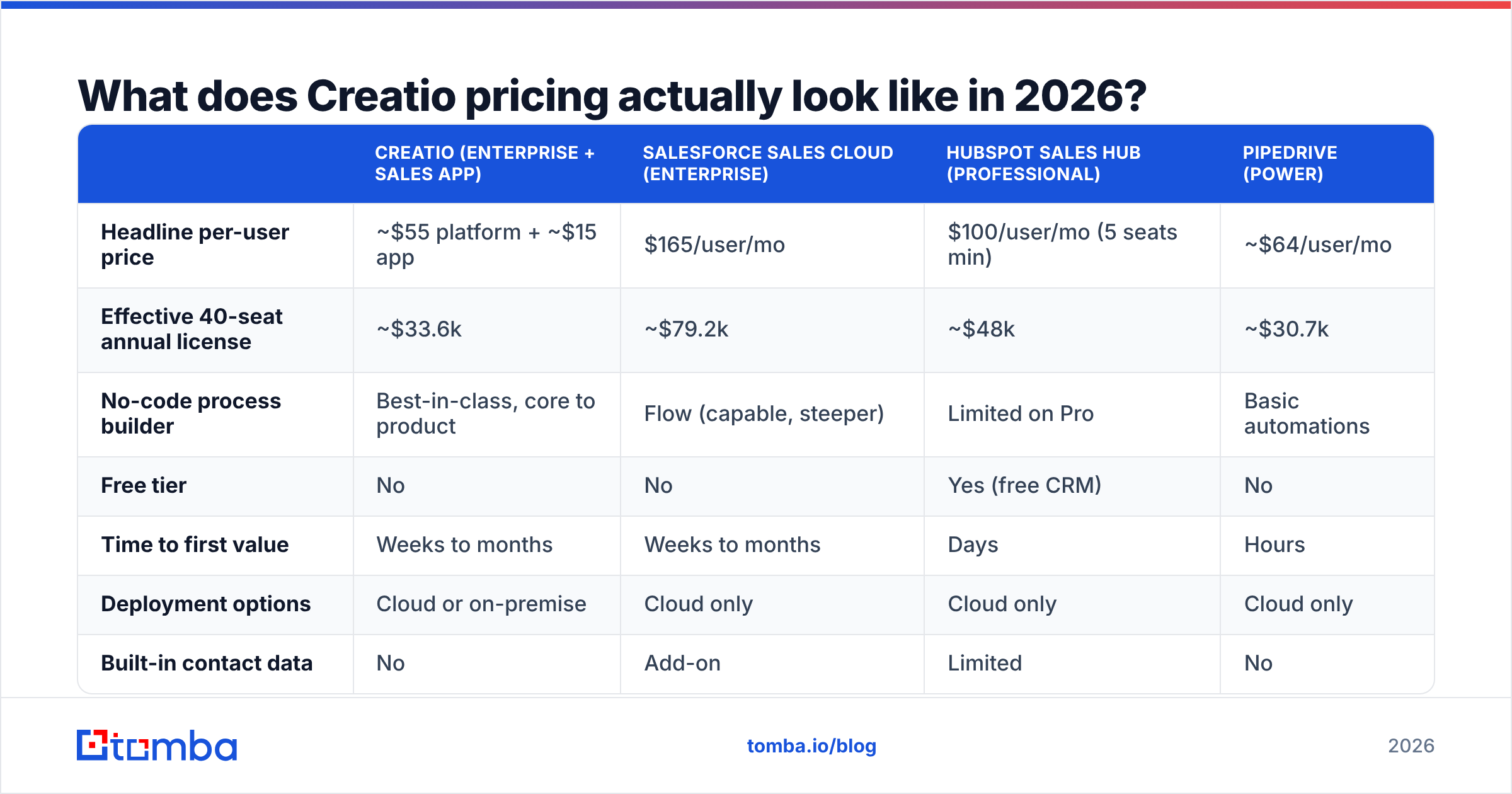
| Creatio (Enterprise + Sales app) | Salesforce Sales Cloud (Enterprise) | HubSpot Sales Hub (Professional) | Pipedrive (Power) | |
|---|---|---|---|---|
| Headline per-user price | ~$55 platform + ~$15 app | $165/user/mo | $100/user/mo (5 seats min) | ~$64/user/mo |
| Effective 40-seat annual license | ~$33.6k | ~$79.2k | ~$48k | ~$30.7k |
| No-code process builder | Best-in-class, core to product | Flow (capable, steeper) | Limited on Pro | Basic automations |
| Free tier | No | No | Yes (free CRM) | No |
| Time to first value | Weeks to months | Weeks to months | Days | Hours |
| Deployment options | Cloud or on-premise | Cloud only | Cloud only | Cloud only |
| Built-in contact data | No | Add-on | Limited | No |
| Typical buyer | Process-heavy mid-market/enterprise | Enterprise | SMB → mid-market | SMB |
The honest read: Creatio is not expensive for what it is. Next to Salesforce at the enterprise tier, it is much cheaper, and the no-code layer is stronger. It is expensive relative to what a small team needs. That is why "Creatio is too much" and "Creatio is great value" are both true, depending on who is saying it.
What do Creatio reviews consistently praise?#
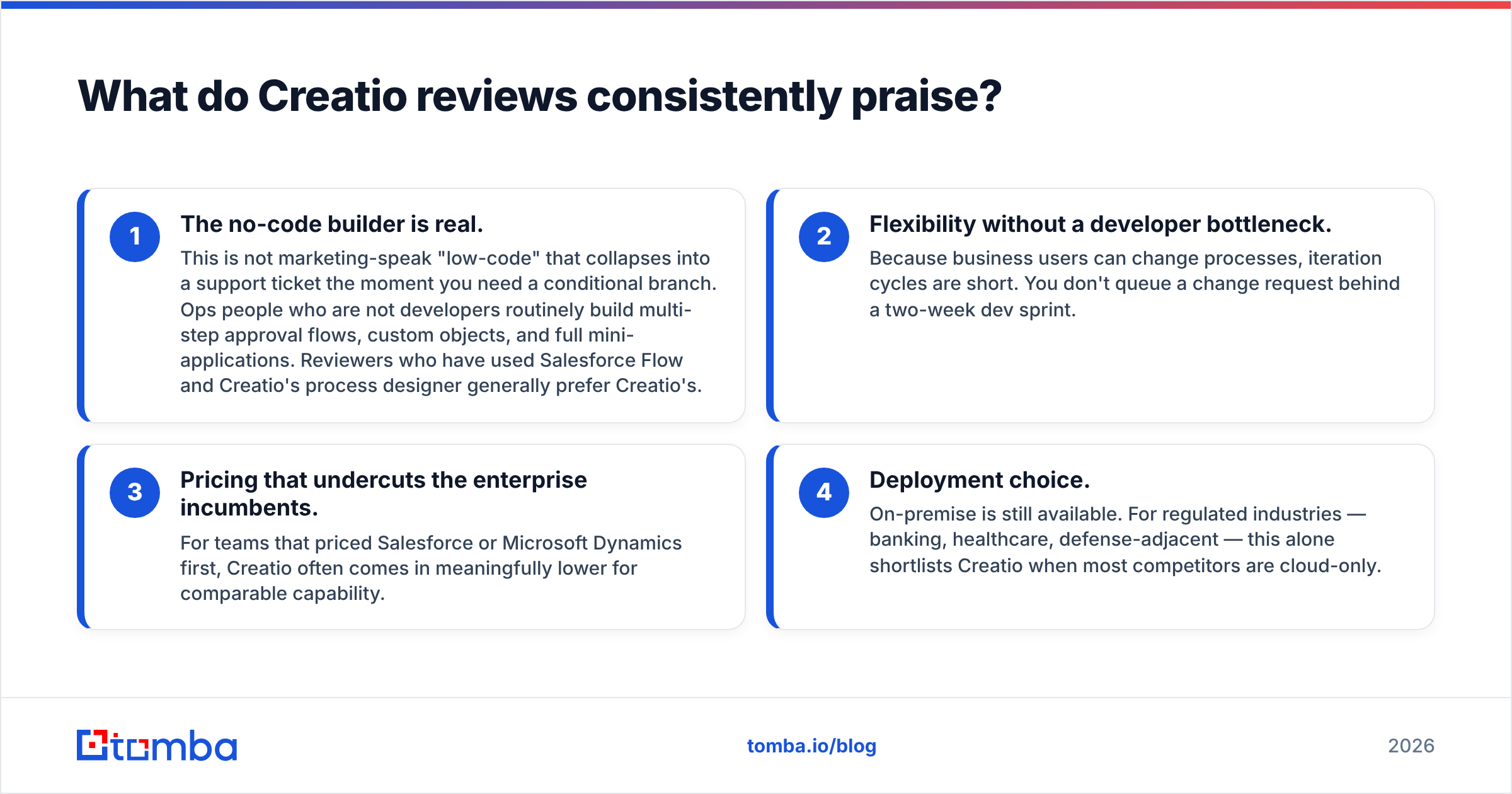
Pull enough reviews from G2 and Gartner Peer Insights and the same four themes surface. These are the ones that repeat across dozens of reviews, not the outliers:
- The no-code builder is real. This is not marketing-speak "low-code" that collapses into a support ticket the moment you need a conditional branch. Ops people who are not developers routinely build multi-step approval flows, custom objects, and full mini-applications. Reviewers who have used both generally prefer Creatio's process designer to Salesforce Flow.
- Flexibility without a developer bottleneck. Business users can change processes, so iteration cycles are short. You don't queue a change request behind a two-week dev sprint.
- Pricing that undercuts the enterprise incumbents. For teams that priced Salesforce or Microsoft Dynamics first, Creatio often comes in meaningfully lower for comparable capability.
- Deployment choice. On-premise is still available. For regulated industries — banking, healthcare, defense-adjacent — this alone shortlists Creatio when most competitors are cloud-only.
What do Creatio reviews consistently criticize?#
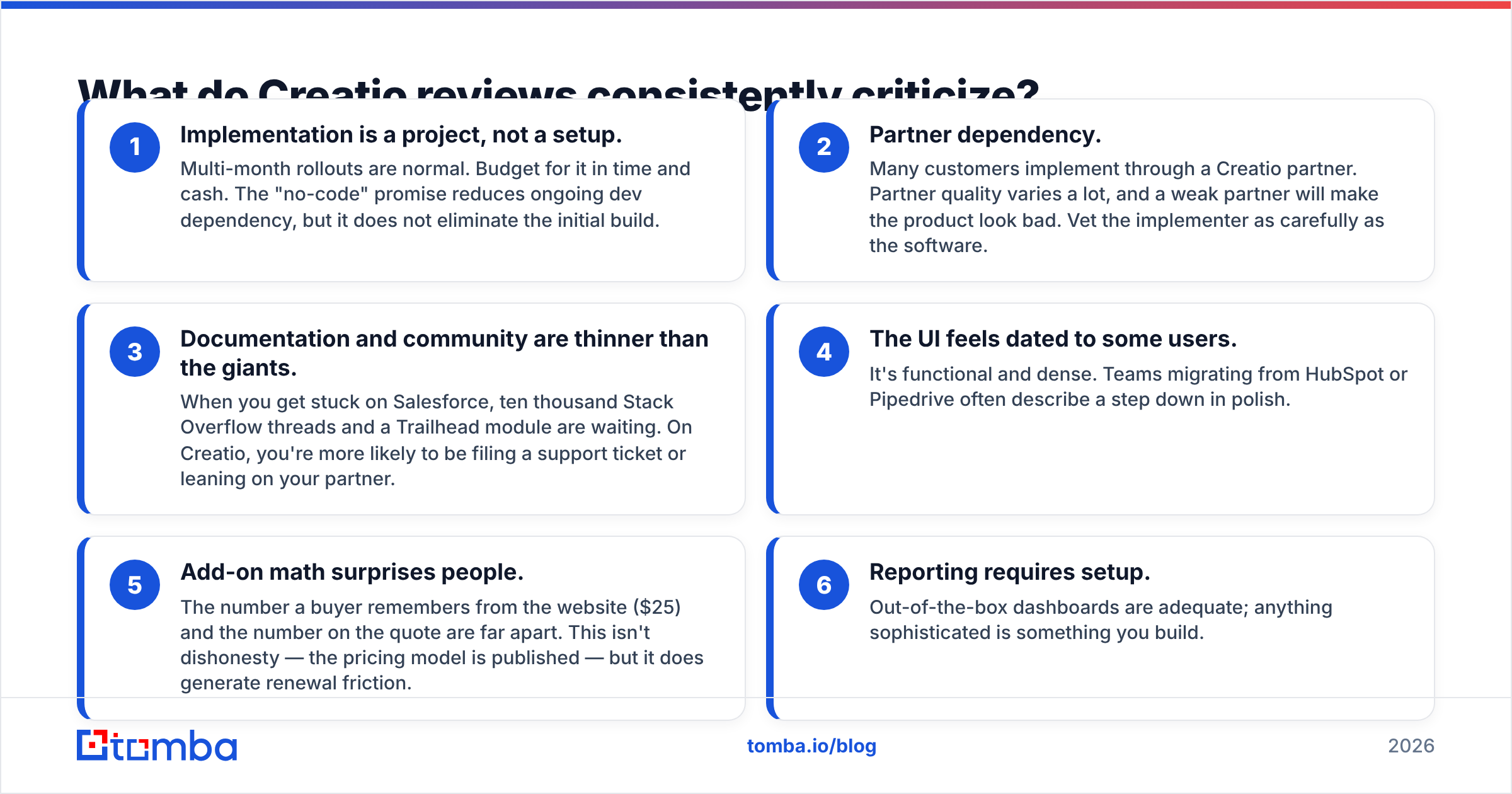
The complaints are just as consistent. Weight them heavily, because they cost real money.
Delivery risks — the ones that hit the budget:
- Implementation is a project, not a setup. Multi-month rollouts are normal. Budget for that in time and cash. The no-code promise cuts ongoing dev work. It does not remove the first build.
- Partner dependency. Many customers roll out through a Creatio partner. Partner quality varies a lot, and a weak partner will make the product look bad. Vet the implementer as carefully as the software.
- Documentation and community are thinner than the giants. Get stuck on Salesforce and ten thousand Stack Overflow threads are waiting. On Creatio, you file a support ticket or lean on your partner.
Daily-use gripes — smaller, but they wear on teams:
- The UI feels dated to some users. It is functional and dense. Teams moving from HubSpot or Pipedrive often describe a step down in polish.
- Add-on math surprises people. The number a buyer remembers from the website ($25) and the number on the quote are far apart. The model is published, so this is not dishonesty. It still creates renewal friction.
- Reporting requires setup. Out-of-the-box dashboards are adequate. Anything more advanced is something you build.
Is Creatio worth it compared to the alternatives?#
Answer first: yes, if your processes are genuinely complex and you have someone to own the build. No, if you're buying a CRM to escape a spreadsheet.
Use this as a decision filter:
- Choose Creatio when you have non-standard workflows, need on-premise or data-residency control, want a single platform for sales + service + marketing, and have an ops owner with 3–6 months of runway to implement properly.
- Choose Salesforce when you need the deepest app ecosystem, a hiring pool that already knows the platform, and budget isn't the constraint.
- Choose HubSpot when speed matters more than depth, and your process is close to standard B2B SaaS motion.
- Choose Pipedrive or a lightweight CRM when you have fewer than ~20 reps and a linear pipeline.
- Choose Microsoft Dynamics when you're already deep in the Microsoft estate and that integration outweighs everything else.
There's a hidden cost every one of these options shares, and it's the one that quietly wrecks pipeline math.
What does Creatio not do — and what does that cost you?#
Creatio stores, routes, scores, and automates your data. It does not source your data, and it does not verify it.
That gap matters more than any pricing tier you pick. Picture a beautiful 14-step approval workflow filled with contacts whose emails bounce. That is an expensive way to generate bounce reports. The email deliverability hit from a decayed list follows you across every campaign you run out of that CRM. It also compounds, because sender reputation is slow to build and fast to burn.
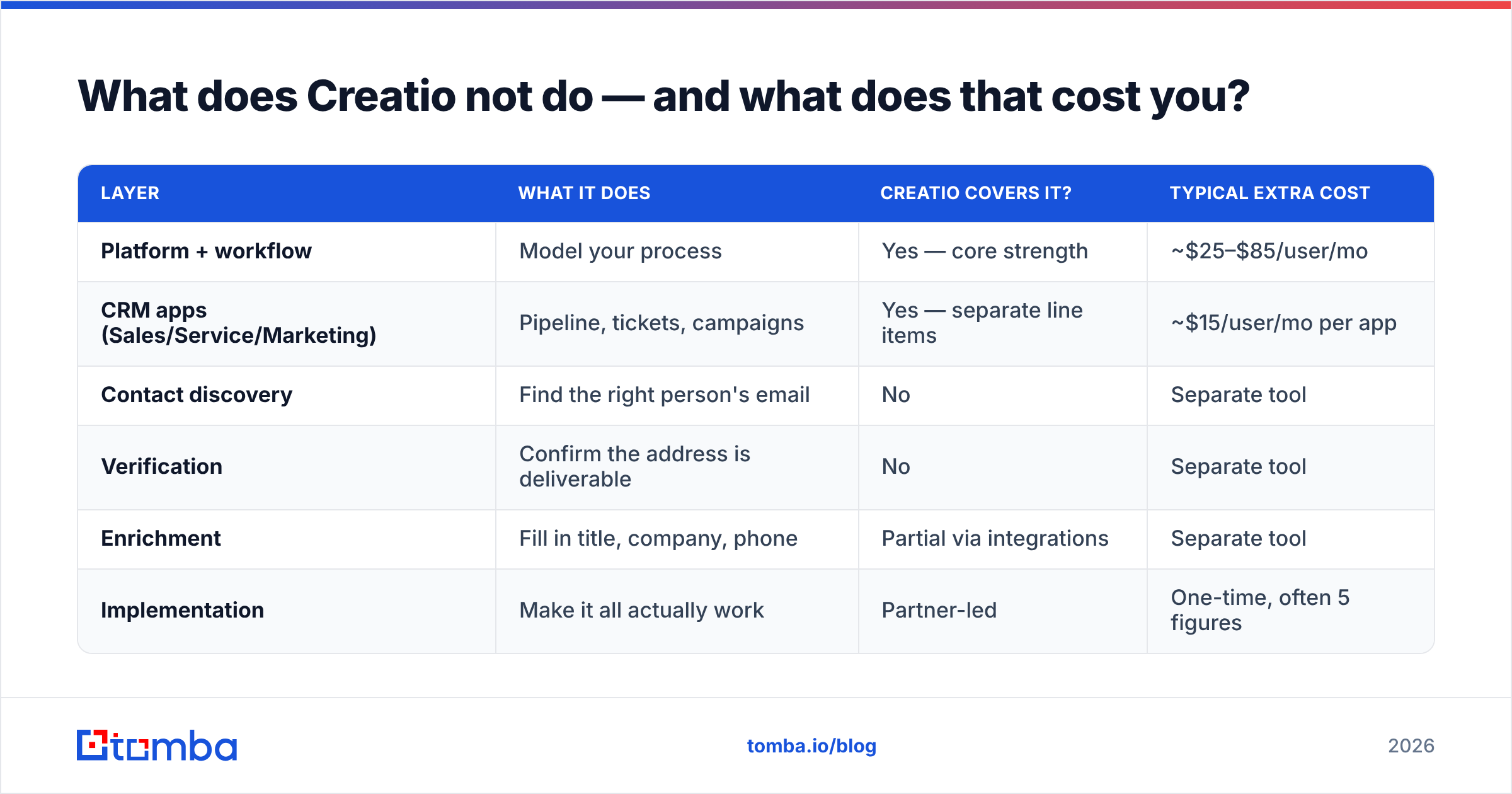
B2B contact data decays at roughly 25–30% per year through job changes, title changes, and company moves. So the real cost stack for any CRM looks like this:
| Layer | What it does | Creatio covers it? | Typical extra cost |
|---|---|---|---|
| Platform + workflow | Model your process | Yes — core strength | ~$25–$85/user/mo |
| CRM apps (Sales/Service/Marketing) | Pipeline, tickets, campaigns | Yes — separate line items | ~$15/user/mo per app |
| Contact discovery | Find the right person's email | No | Separate tool |
| Verification | Confirm the address is deliverable | No | Separate tool |
| Enrichment | Fill in title, company, phone | Partial via integrations | Separate tool |
| Implementation | Make it all actually work | Partner-led | One-time, often 5 figures |
You will buy the bottom half of that table from someone. The question is only whether you notice before or after your first campaign lands in spam.
That's where a dedicated data layer sits alongside the CRM. A tool like Tomba's email finder turns a name and domain into a working address. The email verifier confirms deliverability before the record ever enters Creatio, and data enrichment fills the gaps in records you already have.
Tomba's pricing runs a free tier at 25 searches/month, then Starter at $49/mo, Growth at $99/mo, Pro at $249/mo — see Tomba pricing for the current breakdown. It is usage-based, not per-seat, so it does not multiply against your Creatio headcount.
How should you negotiate a Creatio contract?#
Five things that move the number, in rough order of leverage:
- Ask for the all-in quote, in writing, at signature. Platform tier + every app + contact-based marketing pricing + sandboxes + support + implementation. Not "starting at."
- Model year 2 and year 3 headcount. Per-seat pricing punishes growth. Negotiate the price of future seats now, when you have leverage, not at renewal when you don't.
- Push for a longer term in exchange for a rate lock. Creatio discounts multi-year. If you're confident in the fit, that's real money.
- Interview the implementation partner separately. Ask for two references at your company size, in your industry. A bad partner is the single most common source of a failed Creatio rollout.
- Run a paid pilot on your ugliest process. Not the demo-friendly one. If the no-code builder can handle your worst workflow, the rest is downhill.
Creatio pricing reviews pros and cons: the honest verdict#
Creatio is a good product sold with a pricing model that rewards careful buyers. The platform is not overpriced. At roughly $70/user/month all-in for Enterprise plus Sales, it undercuts Salesforce while offering a better no-code layer. The pros — workflow depth, flexibility, deployment choice — are real and load-bearing. The cons — implementation drag, partner variance, thin community — are just as real. Underestimate them and they cost you a quarter of runway.
Weigh the Creatio pricing reviews pros and cons as one stack, not line by line. Do the full math before you sign: platform + apps + implementation + the data layer no CRM includes. Buyers who get surprised by the cost are almost always the ones who priced line one and skipped lines two through six.
Fill your CRM with contacts that actually exist. Whatever platform you land on — Creatio, Salesforce, HubSpot — it's only as good as the records inside it. Tomba Email Finder turns a name and a domain into a verified, deliverable email address, with a free tier to test it on your own list before you commit. Start there, and let the CRM do what it's actually good at.
Sources: Creatio official pricing, G2 Creatio reviews, Gartner CRM research. Pricing reflects publicly listed rates as of 2026 and varies by region, term, and negotiated discount — always confirm with the vendor.
Related guides#
Ready to find emails that actually work?
Join 150,000+ professionals who stopped guessing and started sending. Free credits on signup — no credit card required.
Get the Tomba newsletter
Practical outbound tactics and product updates — once every two weeks.
About the author