CRM Dialer Pricing Reviews Pros and Cons: 2026 Guide
A neutral breakdown of CRM dialer pricing, real user reviews, and the pros and cons that vendors bury in the footnotes — so you buy the right dialer, not the loudest one.
Buying a CRM dialer looks simple until the first invoice lands. The sticker price on the pricing page is rarely the price you pay. The "unlimited calling" badge often hides per-minute charges, number-rental fees, and seat minimums that reshape your budget. This guide covers CRM dialer pricing reviews pros and cons, so you know the real cost before you sign.
Below you'll find how CRM dialer pricing actually works in 2026, what real reviews consistently praise and complain about, and the honest pros and cons of each dialer category — so you can match a tool to your team instead of to a sales rep's quota.
TL;DR#
- Real CRM dialer pricing runs $25–$150 per seat/month, but per-minute rates, phone-number rentals, and local-presence add-ons often add 20–40% on top.
- Power dialers suit SMB SDR teams; predictive and parallel dialers pay off only above ~5 reps making high call volumes.
- The most common review complaint isn't price — it's connect rate. A cheap dialer calling stale numbers costs more than a pricey one calling verified data.
- "Unlimited" almost always has an asterisk. Read the fair-use cap, overage rate, and number-provisioning fees before you sign.
- Your data quality caps your dialer ROI. Feeding a dialer verified phone numbers beats any auto-dialing feature.
What is a CRM dialer and how does its pricing work?#
A CRM dialer is calling software that lives inside — or plugs into — your CRM, so reps click a contact and dial without touching a phone. Think of it like a barista's espresso machine wired straight to the order screen: the order (contact) appears, one button pulls the shot (the call), and the receipt (call log, disposition, recording) files itself automatically.
Pricing almost always stacks in three layers, and understanding the stack is the whole game:
- The per-seat license — the headline number, usually billed annually. This is what the pricing page shows.
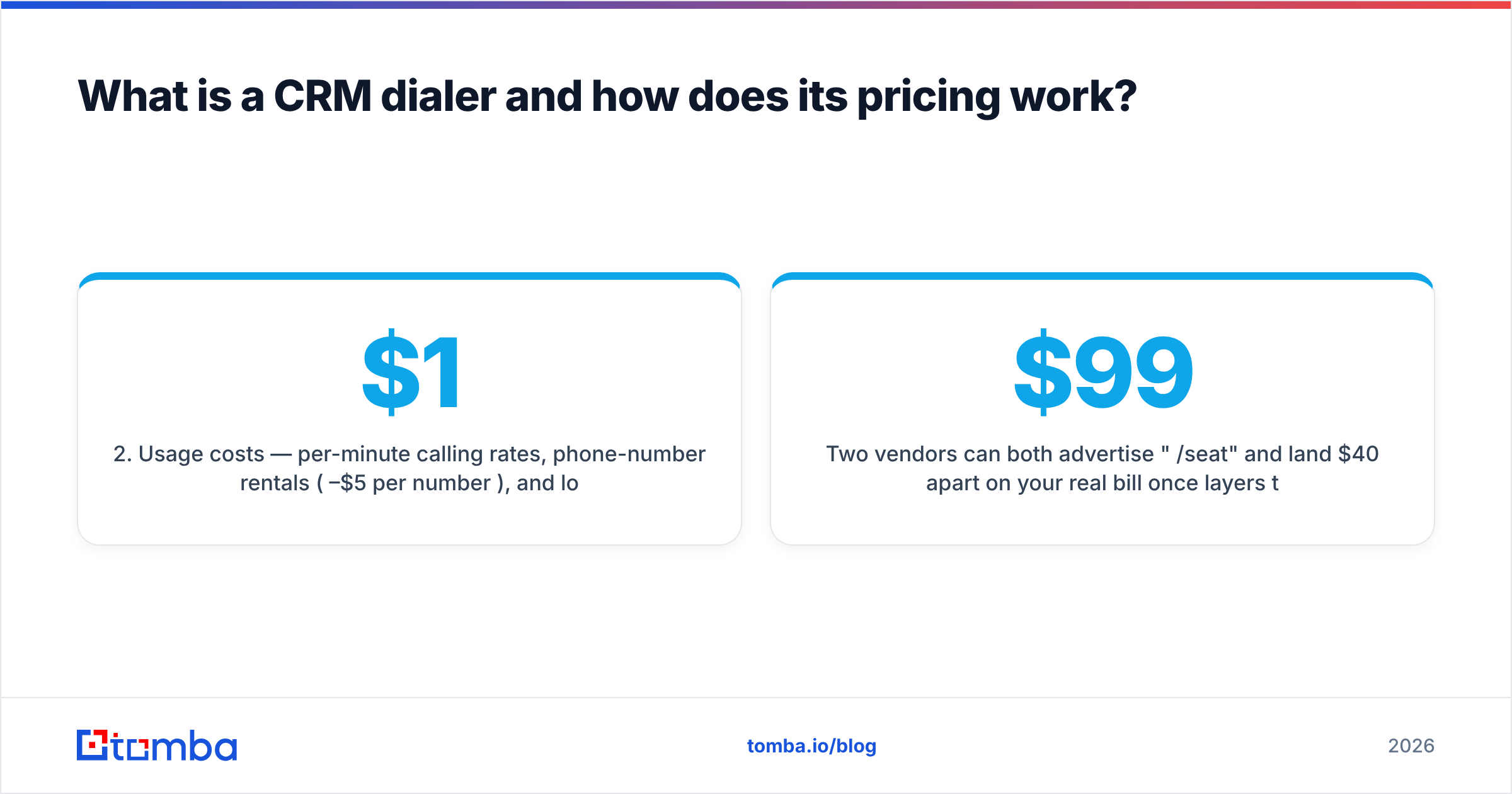
- Usage costs — per-minute calling rates, phone-number rentals ($1–$5 per number/month), and local-presence or caller-ID packages.
- Add-ons — call recording storage, AI transcription, parallel-dial multipliers, and premium support tiers.
Two vendors can both advertise "$99/seat" and land $40 apart on your real bill once layers two and three are counted. That's why review scores on sites like G2 diverge so sharply from the marketing copy: buyers rate the total experience, not the brochure.
How much do CRM dialers actually cost in 2026?#
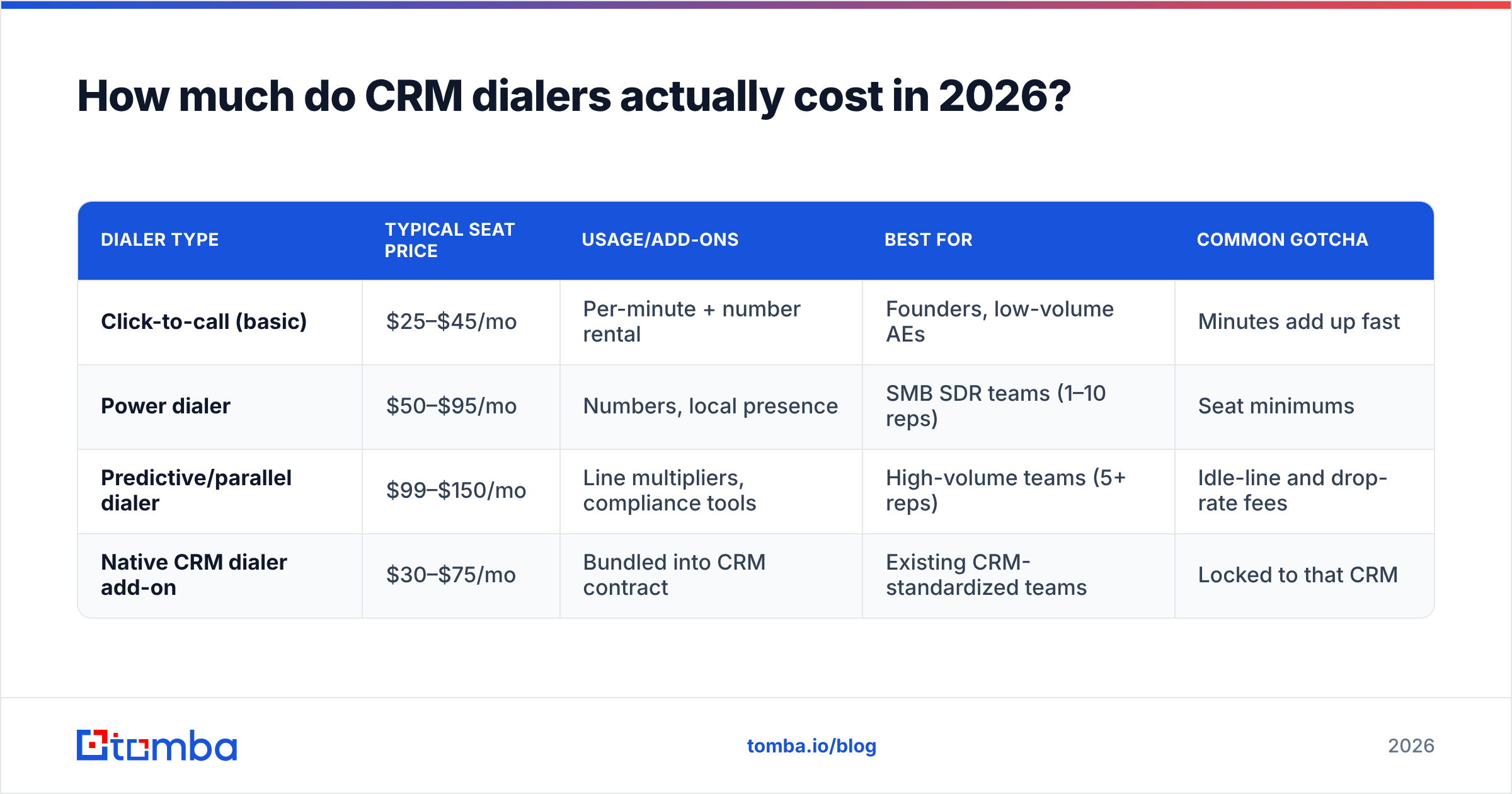
Here's a realistic view of the market, normalized to a single SDR seat making moderate outbound volume. Treat these as representative bands rather than any one vendor's quote — dialer pricing changes constantly and most vendors gate the real number behind a demo.
| Dialer type | Typical seat price | Usage/add-ons | Best for | Common gotcha |
|---|---|---|---|---|
| Click-to-call (basic) | $25–$45/mo | Per-minute + number rental | Founders, low-volume AEs | Minutes add up fast |
| Power dialer | $50–$95/mo | Numbers, local presence | SMB SDR teams (1–10 reps) | Seat minimums |
| Predictive/parallel dialer | $99–$150/mo | Line multipliers, compliance tools | High-volume teams (5+ reps) | Idle-line and drop-rate fees |
| Native CRM dialer add-on | $30–$75/mo | Bundled into CRM contract | Existing CRM-standardized teams | Locked to that CRM |
A few patterns hold across nearly every review corpus:
- Annual contracts undercut monthly by 15–25%. If you're confident in the tool, annual is genuinely cheaper — but it also removes your leverage if connect rates disappoint.
- Seat minimums bite small teams. Predictive dialers frequently require 3–5 seats, so a 2-rep startup pays for phantom seats.
- Local presence is the sneaky upsell. Rotating local caller IDs can lift pickup rates, but packages run $10–$30 per seat on top of the base license.
For a broader tooling budget, cross-check any dialer quote against your overall B2B sales tools spend — a dialer that duplicates features you already pay for in your CRM is pure waste.
Is an expensive dialer worth it, or is a cheaper one fine?#
The honest answer: the dialer rarely determines your ROI — the phone data feeding it does. A predictive dialer screaming through a list of disconnected numbers just burns money faster.
Reviews make this brutally clear. The top complaint across dialer categories isn't the price tag; it's low connect rates, wrong numbers, and voicemail purgatory. That's a data problem wearing a software costume. Before you upgrade tiers, ask whether your contact list is the actual bottleneck.
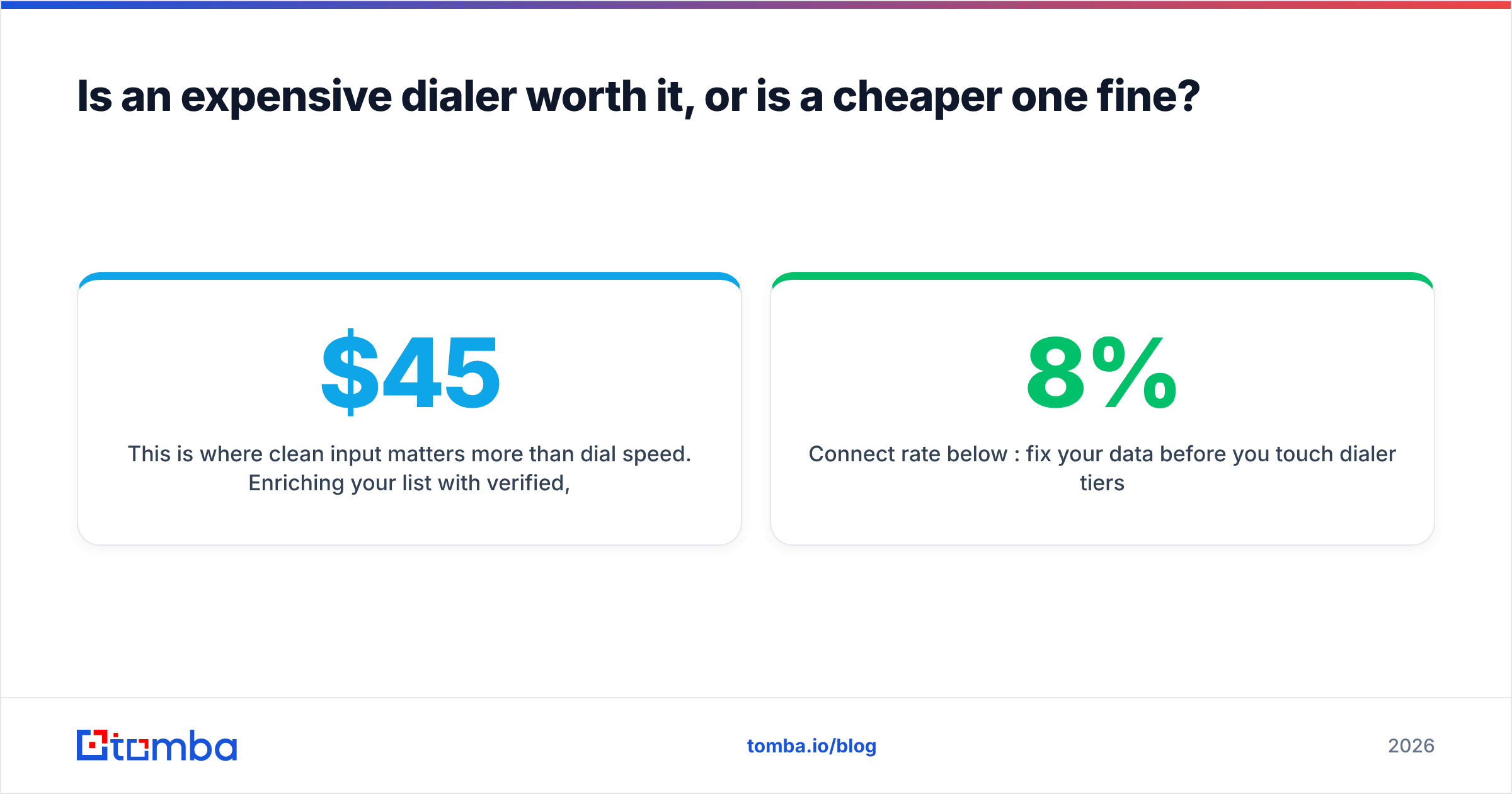
This is where clean input matters more than dial speed. Enriching your list with verified, current mobile and direct-dial numbers — via a dedicated phone finder and then running them through a phone validator before import — routinely does more for pickup rates than any auto-dial upgrade. A $45 dialer on verified numbers beats a $150 dialer on stale ones, every time.
Use this quick decision framework:
- Under 3 reps, sub-100 calls/day: a power dialer or native CRM add-on is plenty. Skip predictive.
- 5+ reps, high-volume outbound: predictive/parallel dialing earns its keep — but only with a compliance layer and clean lists.
- Already standardized on one CRM: price the native add-on first; the integration savings often outweigh a "better" standalone tool.
- Connect rate below 8%: fix your data before you touch dialer tiers.
What do reviews say are the biggest pros and cons?#
Aggregating patterns from public reviews on G2 and Capterra, a consistent picture emerges across dialer types.
Pros reviewers consistently praise#
- Time saved per rep — eliminating manual dialing reclaims 1–2 hours/day for SDRs. This is the single most-cited benefit.
- Automatic logging — every call, disposition, and recording lands in the CRM without data entry.
- Local presence lift — teams report meaningful pickup-rate gains from rotating local caller IDs.
- Coaching tools — call recording, whisper, and barge features get repeat praise from managers.
Cons reviewers consistently flag#
- Opaque total cost — "I couldn't predict my bill" appears constantly. Usage layers surprise buyers.
- Spam-flagging — aggressive dialing gets numbers marked as spam, tanking connect rates over time.
- Onboarding friction — predictive dialers especially require setup, list scrubbing, and compliance config.
- Support gaps on lower tiers — fast, human support is frequently paywalled to premium plans.
Notice how many "cons" trace back to data hygiene and deliverability of the call itself — spam flags, wrong numbers, bad connect rates. The dialer is only as good as the numbers and the sender reputation behind it. Keeping your contact records fresh with ongoing data enrichment directly attacks three of the four cons on that list.
Power dialer vs predictive dialer: which pricing model fits you?#
These two categories cause the most buyer confusion, so here's a direct comparison on the axes that actually change your bill and your results.
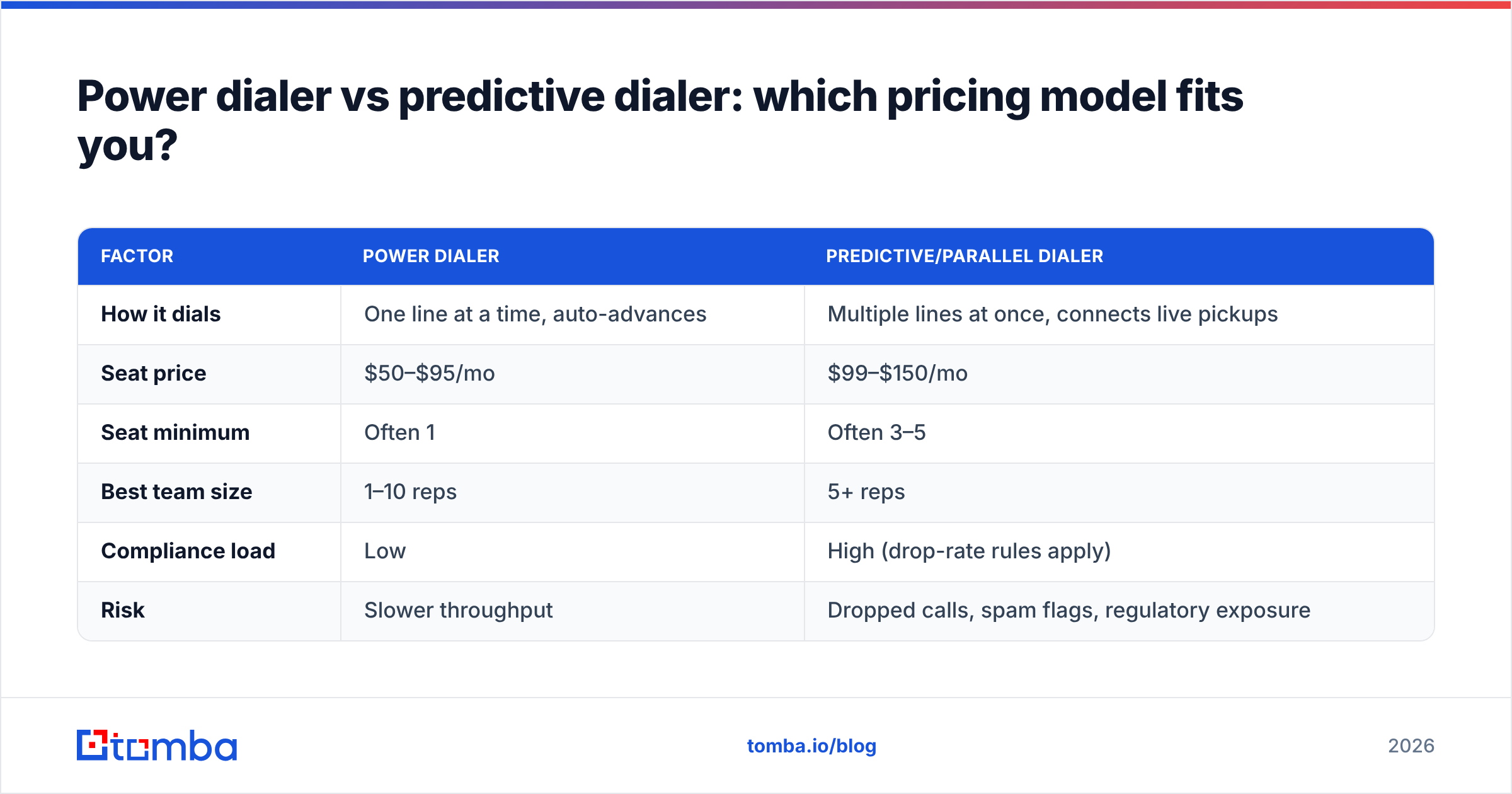
| Factor | Power dialer | Predictive/parallel dialer |
|---|---|---|
| How it dials | One line at a time, auto-advances | Multiple lines at once, connects live pickups |
| Seat price | $50–$95/mo | $99–$150/mo |
| Seat minimum | Often 1 | Often 3–5 |
| Best team size | 1–10 reps | 5+ reps |
| Compliance load | Low | High (drop-rate rules apply) |
| Risk | Slower throughput | Dropped calls, spam flags, regulatory exposure |
Choose a power dialer if you're a small team, sell a considered product, or your reps need to be fully present on each call. The lower price and simpler compliance profile fit most SMBs.
Choose a predictive/parallel dialer if you run high-volume, transactional outbound with 5+ reps and can invest in list hygiene and compliance. Below that threshold, the seat minimums and drop-rate management usually erase the throughput advantage.
Whichever you pick, model the fully loaded cost: seat price × required seats + estimated minutes + number rentals + local presence. Vendors like HubSpot and Salesforce bundle calling into broader CRM contracts, which can be cheaper if you're already on the platform — but locks you in.
How do you avoid overpaying for a CRM dialer?#
Six moves separate teams that get burned from teams that get value:
- Demand a fully-loaded quote. Ask the vendor to price your exact seat count, expected monthly minutes, and number needs in writing. If they can't, that's a red flag.
- Start monthly, convert to annual later. Pay the small monthly premium until you've proven connect rates hold. Then lock the annual discount.
- Audit your call data first. Run your list through a phone validator before you buy any dialer — you may find the "dialer problem" is a data problem, and a cheaper tier will do.
- Negotiate the number-rental and local-presence add-ons. These are high-margin upsells with real discount room, especially at 5+ seats.
- Watch the spam-flag trap. Rotating numbers and warming them up protects connect rates; ask how the vendor handles carrier spam labeling.
- Right-size the dialer type. Don't buy predictive throughput you can't feed with volume and clean lists.
The recurring theme: your dialer's ceiling is set by your data floor. Great software on bad numbers is an expensive way to reach voicemail.
The bottom line on CRM dialer pricing reviews pros and cons#
Here's the short version on CRM dialer pricing reviews pros and cons. Pricing is a three-layer stack: seat, usage, and add-ons. The reviews that matter most are about connect rate, not the sticker price. The pros are real — time saved, auto-logging, and coaching. But nearly every con traces back to data quality and call deliverability. Match the dialer type to your team size and volume. Insist on a fully-loaded quote. Fix your contact data before you upgrade tiers.
That last point is where most teams leave money on the table. A dialer amplifies whatever list you feed it. If the numbers are stale, wrong, or missing, no pricing tier saves you — you just reach dead ends faster.
Start by making sure the numbers you're dialing are real. Use Tomba's Phone Finder to pull verified, current B2B direct-dial and mobile numbers straight into your workflow, then validate them before import — so whatever dialer you choose spends its minutes on people who actually pick up. Check Tomba pricing to see how a free tier and a $49/mo Starter plan can sharpen your list before you commit a cent to calling software.
Related guides#
// get started
Find, verify and enrich your first contacts today
Start on the free plan with 25 searches a month, then scale when your team is ready.
Free plan · No credit card required · GDPR & CCPA
// about the author