Cufinder vs Xverify (2026): Which B2B Data Tool Wins?
Cufinder finds B2B contacts; Xverify cleans email lists. This 2026 breakdown compares pricing, accuracy, and use cases—so you pick the right one (or a tool that does both).
Picking between Cufinder and Xverify feels like a head-to-head, but it usually isn't one. They solve different halves of the same problem: Cufinder helps you find B2B contacts and enrich company data, while Xverify helps you clean the emails you already have so they don't bounce. Choosing correctly means knowing which half of the pipeline is actually leaking.
This comparison breaks down where each tool wins, what they cost in 2026, and when a single platform that does both finding and verification saves you money and a browser tab.
TL;DR: Cufinder vs Xverify at a glance#
- Cufinder is a B2B data and lead-enrichment platform. Use it to find company details, contact emails, and firmographic data at scale.
- Xverify is a real-time email verification and list-hygiene service. Use it to scrub lists and validate signups before you send.
- They are complementary, not interchangeable — Cufinder gets you contacts, Xverify keeps your sender reputation clean.
- If you want both jobs in one workflow, an all-in-one platform like Tomba pairs an email finder with a built-in email verifier so you skip the export-import shuffle.
- Verdict: buy Xverify if you already have volume and just need clean data; buy Cufinder if you need net-new contacts; consider a combined tool if you're doing both weekly.

What is Cufinder and who is it for?#
Cufinder is a B2B data enrichment and lead-generation platform. Its core promise is turning a small input — a company name, domain, or partial record — into a fuller profile: business emails, phone numbers, company size, industry, tech stack, and social handles. It leans on a large contact and company database plus enrichment APIs.
The typical Cufinder user is a sales or growth team that needs volume and breadth: you're building outbound lists from scratch, enriching a CRM full of half-empty records, or feeding an SDR team new accounts every week. Its bulk enrichment and API access are the draw for teams that want to automate list-building rather than hand-search each prospect.
Where Cufinder is weaker is on the quality-control side. Like most data vendors, it returns emails at varying confidence levels, and it doesn't position itself as a deep, deliverability-grade verification engine. You'll still want to validate the riskiest records before a big send — which is exactly the gap tools like Xverify fill.
What is Xverify and who is it for?#
Xverify is an email verification and list-hygiene service. It checks whether an address is real, correctly formatted, and safe to mail — flagging invalids, spam traps, disposable domains, role accounts (like info@), and catch-all servers. It runs both in real time (an API on your signup forms) and in batch (upload a list, get a cleaned file back).
The typical Xverify user is a marketer or deliverability owner protecting sender reputation. If your bounce rate is creeping up, your ESP is throttling you, or your signup forms are collecting junk, Xverify's job is to stop bad addresses before they poison your domain. Good email deliverability starts with a clean list, and that's the entire point of a verifier.
What Xverify does not do is find contacts. It has no database of prospects to draw from. Give it an empty spreadsheet and it has nothing to work on — it only validates addresses you supply. So on its own, Xverify is half a pipeline.
Cufinder vs Xverify: the core difference#
Here's the mental model. Think of building a contact list like cooking dinner: Cufinder is grocery shopping (it brings the ingredients into your kitchen), and Xverify is food safety (it makes sure nothing on the counter is spoiled before you serve it). You need both steps, but they're not the same step, and one can't replace the other.
That distinction drives every buying decision below:
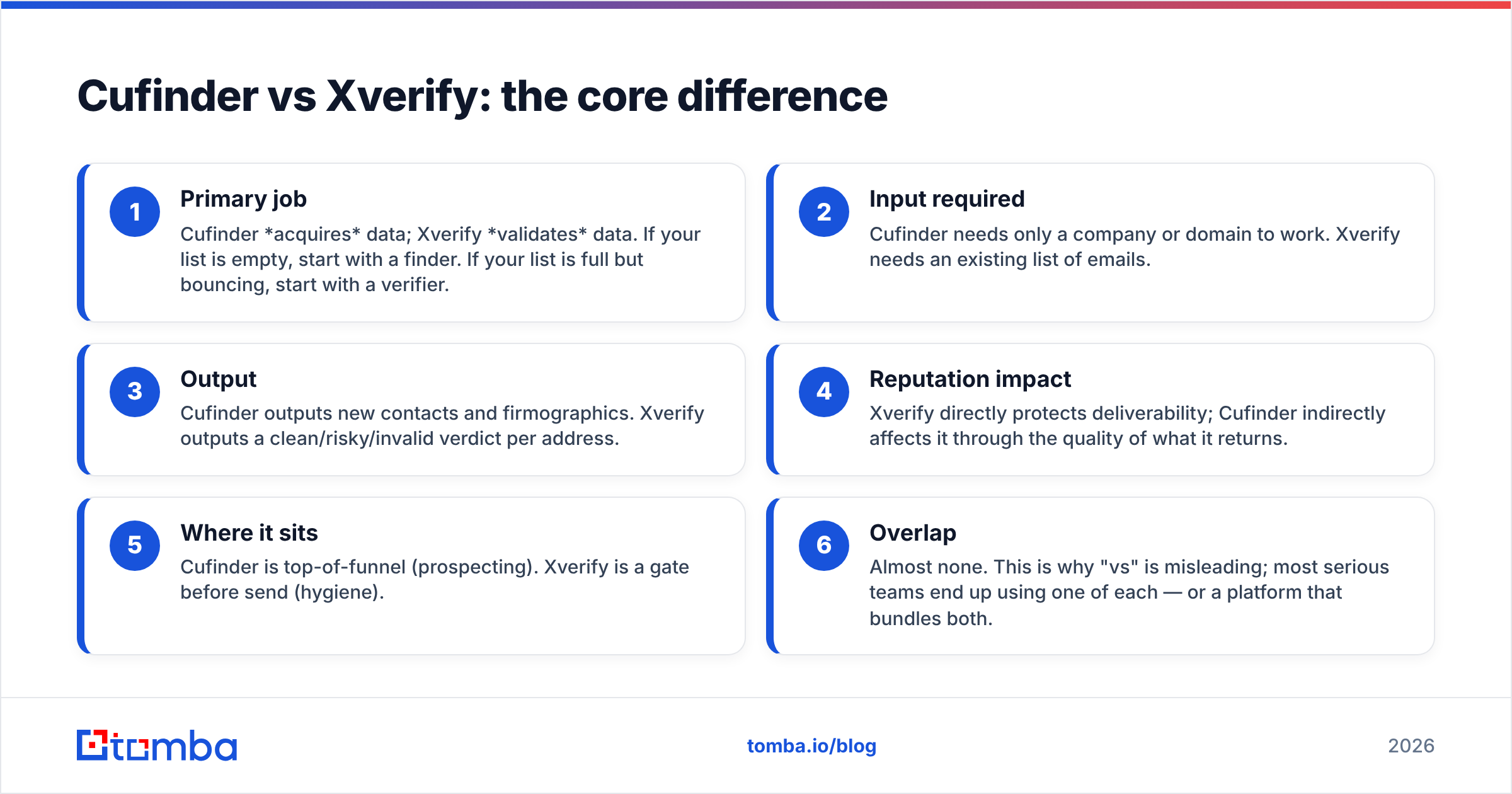
- Primary job — Cufinder acquires data; Xverify validates data. If your list is empty, start with a finder. If your list is full but bouncing, start with a verifier.
- Input required — Cufinder needs only a company or domain to work. Xverify needs an existing list of emails.
- Output — Cufinder outputs new contacts and firmographics. Xverify outputs a clean/risky/invalid verdict per address.
- Reputation impact — Xverify directly protects deliverability; Cufinder indirectly affects it through the quality of what it returns.
- Where it sits — Cufinder is top-of-funnel (prospecting). Xverify is a gate before send (hygiene).
- Overlap — Almost none. This is why "vs" is misleading; most serious teams end up using one of each — or a platform that bundles both.
Cufinder vs Xverify: feature and pricing comparison#
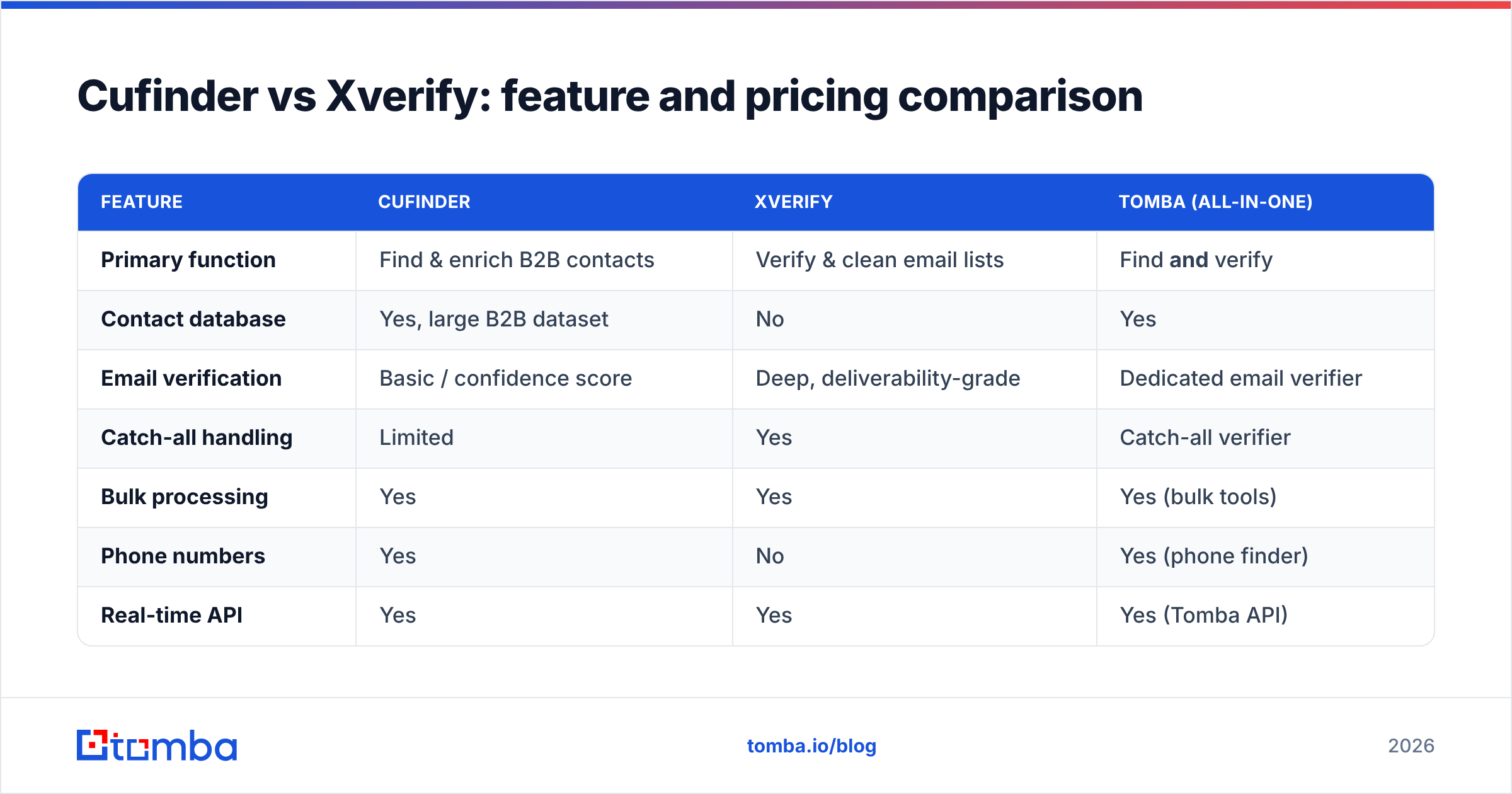
| Feature | Cufinder | Xverify | Tomba (all-in-one) |
|---|---|---|---|
| Primary function | Find & enrich B2B contacts | Verify & clean email lists | Find and verify |
| Contact database | Yes, large B2B dataset | No | Yes |
| Email verification | Basic / confidence score | Deep, deliverability-grade | Dedicated email verifier |
| Catch-all handling | Limited | Yes | Catch-all verifier |
| Bulk processing | Yes | Yes | Yes (bulk tools) |
| Phone numbers | Yes | No | Yes (phone finder) |
| Real-time API | Yes | Yes | Yes (Tomba API) |
| Free tier | Limited credits | Trial credits | 25 searches/mo free |
| Best for | Building lists | List hygiene | Full find→verify loop |
Pricing for both Cufinder and Xverify is credit- or volume-based and shifts by tier, so always confirm current numbers on their official pages (cufinder.io, xverify.com). The pattern to watch: verification tools like Xverify charge per address checked, and finders like Cufinder charge per record found or enriched. Run both separately and you're paying two per-unit meters for one contact.
For reference, an all-in-one like Tomba folds both into one plan — Free (25 searches/mo), Starter $49/mo, Growth $99/mo, and Pro $249/mo — so a found-then-verified email is a single workflow, not two invoices. You can see the full breakdown on the Tomba pricing page.

Is Cufinder better than Xverify?#
Neither is "better" — they're better at different things, and the honest answer depends on which problem is bleeding money right now.
Choose Cufinder if: your lists are empty or stale, you need net-new accounts and contacts, you're enriching a CRM full of gaps, or you want firmographic data (company size, industry, tech stack) alongside emails. Cufinder's strength is breadth of acquisition.
Choose Xverify if: you already have plenty of emails but they bounce, your ESP is flagging your reputation, your signup forms leak junk, or you're about to mail a large purchased or aged list and want to scrub it first. Xverify's strength is depth of validation.
Choose neither (pick a combined tool) if: you're doing both jobs every week and tired of exporting from a finder, importing to a verifier, then re-importing to your CRM. That round-trip wastes time and duplicates spend.
The trap most teams fall into is buying one and discovering they needed the other. A great finder with no verification still sends you into spam folders; a great verifier with no finder gives you nothing to send. That's the real argument for consolidating.
How does an all-in-one tool compare to Cufinder plus Xverify?#
Running Cufinder and Xverify together works — plenty of teams do it — but it stacks up hidden friction: two logins, two billing meters, two data formats, and a manual handoff between "found" and "verified." Every export-import step is a chance for records to get mangled or duplicated.
A single platform collapses that. With Tomba, the flow is: run domain search to find contacts at a company, and each address comes back already scored by the verifier — including catch-all verification for the tricky domains that most tools guess on. Need enrichment too? Data enrichment fills in the firmographics in the same pass.
Here's how the two approaches stack up in practice:
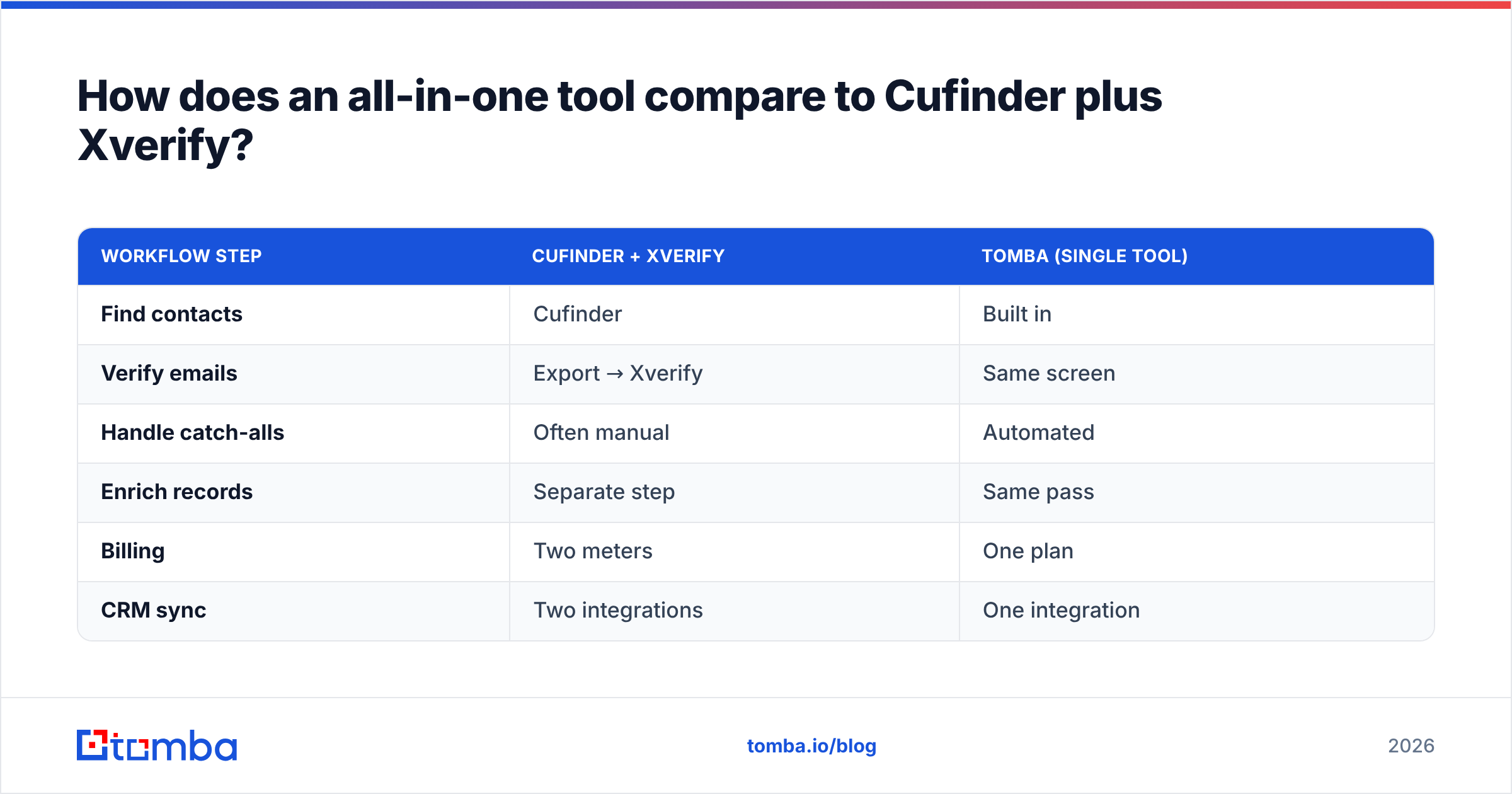
| Workflow step | Cufinder + Xverify | Tomba (single tool) |
|---|---|---|
| Find contacts | Cufinder | Built in |
| Verify emails | Export → Xverify | Same screen |
| Handle catch-alls | Often manual | Automated |
| Enrich records | Separate step | Same pass |
| Billing | Two meters | One plan |
| CRM sync | Two integrations | One integration |
This isn't to say Cufinder and Xverify are bad — they're focused, capable tools in their lanes. It's that for a team doing the full loop, one platform usually means less spend, fewer errors, and faster list-building. Independent reviews on G2 are a good sanity check on any vendor's real-world accuracy before you commit.
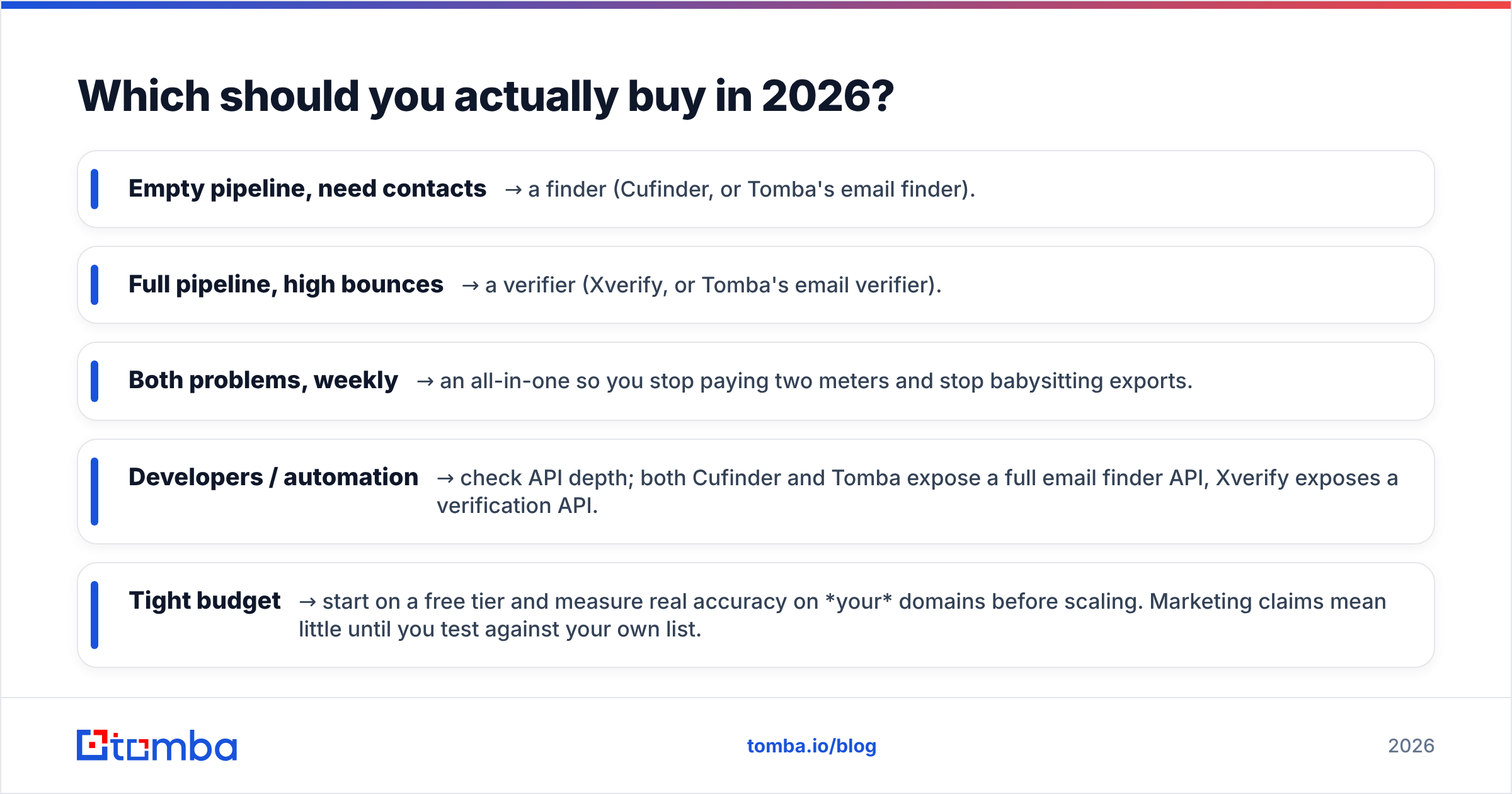
Which should you actually buy in 2026?#
Match the tool to the leak in your funnel:
- Empty pipeline, need contacts → a finder (Cufinder, or Tomba's email finder).
- Full pipeline, high bounces → a verifier (Xverify, or Tomba's email verifier).
- Both problems, weekly → an all-in-one so you stop paying two meters and stop babysitting exports.
- Developers / automation → check API depth; both Cufinder and Tomba expose a full email finder API, Xverify exposes a verification API.
- Tight budget → start on a free tier and measure real accuracy on your domains before scaling. Marketing claims mean little until you test against your own list.
The single biggest mistake is treating "cufinder vs xverify" as an either/or. It's really "acquire vs validate," and mature outbound needs both. The only open question is whether you buy them as two tools or one.
The bottom line#
Cufinder and Xverify aren't rivals so much as neighbors — one fills your list, the other keeps it clean. Buy Cufinder when you need contacts, buy Xverify when you need hygiene, and seriously weigh a combined platform the moment you find yourself doing both every week.
If that's you, Tomba's email finder is worth a look: find verified professional emails by name, domain, or company, with verification and catch-all handling built into the same search — no exports, no second invoice, and a free tier so you can benchmark accuracy on your own prospects before you pay a cent. Start with 25 free searches and see whether one tool can replace two.
Related guides#
Ready to find emails that actually work?
Join 150,000+ professionals who stopped guessing and started sending. Free credits on signup — no credit card required.
Get the Tomba newsletter
Practical outbound tactics and product updates — once every two weeks.
About the author